

ExLibris

Knowledge Assistant

BETA
 
  • Subscribe by RSS
  • Back
    Alma
    Ex Libris Knowledge Center
    1. Search site
      Go back to previous article
      1. Sign in
        • Sign in
        • Forgot password
    1. Home
    2. Alma
    3. Product Documentation
    4. 日本語
    5. Alma-Primo の統合
    6. Almaの配信システムの設定
    7. Leganto図書リストへのリンクの表示

    Leganto図書リストへのリンクの表示

    1. Last updated
    2. Save as PDF
    3. Share
      1. Share
      2. Tweet
      3. Share
    New updates to this page are now published in the new Knowledge Portal. Learn more in the FAQ.


    No headers
    Translatable

    Primo VEを使用している場合、詳細については「Primo VE」を参照してください。

    メニューに戻る

    サインインしているユーザーの場合、Primoは、メインメニューにリンクを表示して、ユーザーがLegantoの主要図書リストにアクセスできるようにします。
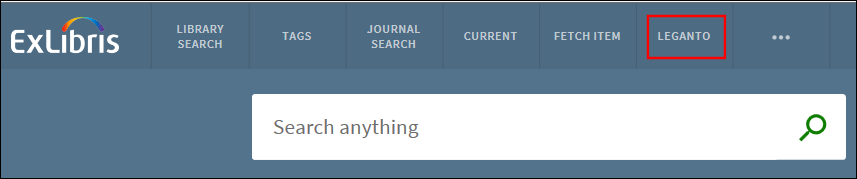
    LegantoLink.png

    PrimoのメインメニューでのLegantoへのリンク
    Legantoへのリンクを有効にするには:
    1. [ビューウィザード]ページ([Primoホーム] > [継続的な設定ウィザード] > [ビューウィザード])で、ビューを編集します。

    2. [タイル設定]ページに進み、ホームページの下の[メインメニュー]タイルを編集します。

    3. [新しいラベルの作成]セクションで、次のフィールドを指定します。

      • ラベル – legantoと入力します。

      • URL – 次のフォーマットを使用してLegantoのURLを入力します。

        <alma_base_url>/leganto/readinglist/lists?auth=<auth_type>&institute=<alma_institution_code>

        • alma_base_url – Almaに使用する基本URLを指定します。たとえば: https://<my_university>.alma.exlibrisgroup.com

        • auth_type – 使用している認証タイプを指定します。CAS、SAML、ローカル(LDAPに使用されます)というタイプがサポートされています。

        • alma_institution_code – Almaの機関コードを指定します。

      • リンクを開く場所 – [現在のウィンドウ]または[新しいウィンドウ/タブ]のいずれかの表示オプションを選択します。

    4. [追加]を選択します。

    5. [保存して続行]を選択します。

    6. フロントエンドに変更を配置します。

    View article in the Exlibris Knowledge Center
    1. Back to top
      • Primoでの最長更新日の表示
      • 場所の地図へのリンクのテンプレートの設定
    • Was this article helpful?

    Recommended articles

    1. Article type
      Topic
      Content Type
      Documentation
      Language
      日本語
      Product
      Alma
    2. Tags
      This page has no tags.
    1. © Copyright 2026 Ex Libris Knowledge Center
    2. Powered by NiCE Knowledge Management ®
    • Term of Use
    • Privacy Policy
    • Contact Us
    2025 Ex Libris. All rights reserved