ExLibris

Knowledge Assistant

BETA
 
  • Subscribe by RSS
  • Back
    Alma
    Ex Libris Knowledge Center
    1. Search site
      Go back to previous article
      1. Sign in
        • Sign in
        • Forgot password
    1. Home
    2. Alma
    3. Product Documentation
    4. Alma Online Help (Alma中文在线手册)
    5. 采访
    6. 采购
    7. 创建和复核订单行 - 概述
    8. 更改订单行中的货币

    更改订单行中的货币

    1. Last updated
    2. Save as PDF
    3. Share
      1. Share
      2. Tweet
      3. Share
    New updates to this page are now published in the new Knowledge Portal. Learn more in the FAQ.


    No headers

    您可以按照以下工作流程步骤更改已打包的订单行的货币:

    • 准备就绪
    • 已发送
    • 等待手动续订
    • 定期续订
    • 等待发票

    更改货币操作仅在查看订单行时可用(而不是在编辑时)。

    要更改供货币:
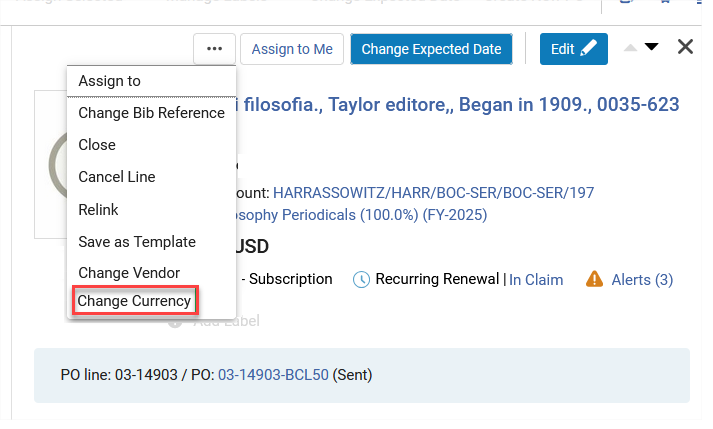
    1. 选择订单行中的更改货币操作。

      订单行的“更改货币”操作。
       
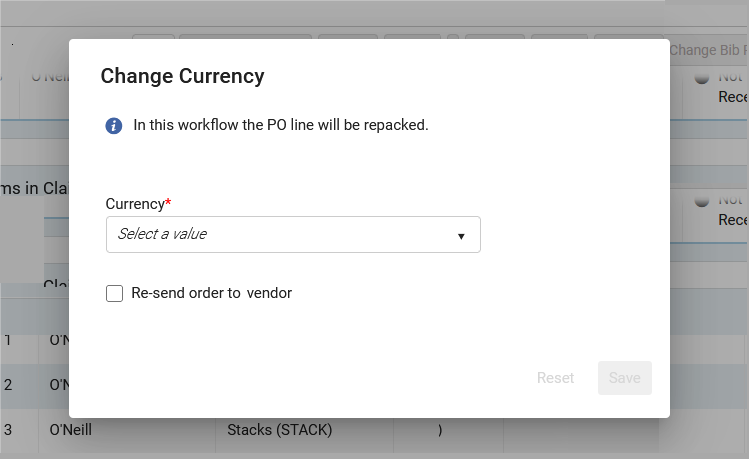
    2. 在货币字段中选择新货币。

      “更改货币”对话框中的“货币”字段。
       
    3. 选择重新发送订单给供应商会将新的订单发送给供应商。对于工作流程步骤为“就绪”的订单行,以及当采访方法不包括将订单发送给供应商作为工作流程的一部分(例如,“在供应商系统中购买”)时,重新发送订单给供应商字段。 
    4. 选择保存。该订单行已从原始订单中移除。如果这是订单中唯一的订单行,该订单将被删除。选择重置将货币恢复为原来的值。订单行的状态更改为“手动打包/自动打包”,并按照采购工作流程进行。
    • 可用货币列表与订单行所选供应商的可用货币相匹配。
    • 当未选择重新发送订单给供应商时,订单行将移至“手动打包”或“自动打包”,但当打包成订单时,它将不会发送给供应商。
    可译的
    View article in the Exlibris Knowledge Center
    1. Back to top
      • 创建法定缴送订单行
      • 关闭/取消、重新打开和重新链接订单行
    • Was this article helpful?

    Recommended articles

    1. Article type
      Topic
      Content Type
      Documentation
      Language
      简体中文
      Product
      Alma
    2. Tags
      This page has no tags.
    1. © Copyright 2026 Ex Libris Knowledge Center
    2. Powered by NiCE Knowledge Management ®
    • Term of Use
    • Privacy Policy
    • Contact Us
    2025 Ex Libris. All rights reserved