

ExLibris

Knowledge Assistant

BETA
 
  • Subscribe by RSS
  • Back
    Primo
    Ex Libris Knowledge Center
    1. Search site
      Go back to previous article
      1. Sign in
        • Sign in
        • Forgot password
    1. Home
    2. Primo
    3. Product Documentation
    4. Primo
    5. Back Office Guide
    6. Primo Tools
    7. The Delete Sitemap Tool

    The Delete Sitemap Tool

    1. Last updated
    2. Save as PDF
    3. Share
      1. Share
      2. Tweet
      3. Share
    No headers
    This functionality is not relevant to to Primo VE.
    Return to menu
    The Delete Sitemap tool allows you to delete site map files per view.
    To delete a sitemap:
    1. On the Tools Monitoring page, select Delete Sitemap in the Create a Tool drop-down list. The Delete Sitemap page opens.
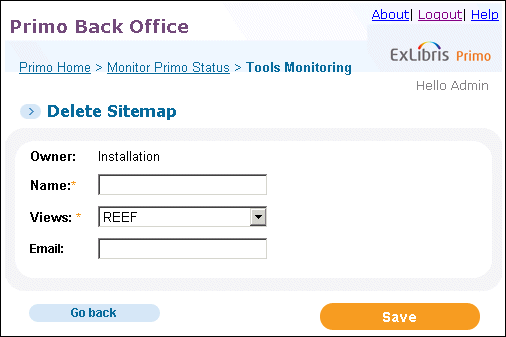
      deleteSitemap2.gif
      Delete Sitemap Page
    2. Enter a name for the tool, which you can execute and monitor in the Tool Monitoring list.
    3. Select a view in the Views drop-down list.
    4. Specify the e-mail address to which the completion status is sent when this tool completes.
    5. Click Save.
    6. Execute the tool when needed. For information on monitoring tools, see Tools Monitoring.
    View article in the Exlibris Knowledge Center
    1. Back to top
      • The Generate Sitemap Tool
      • The Export Primo Configuration Tool
    • Was this article helpful?

    Recommended articles

    1. Article type
      Topic
      Content Type
      Documentation
      Language
      English
      Product
      Primo
    2. Tags
      1. Back Office Guide
      2. contype:docum
      3. Primo Tools
      4. Prod:Primo
    1. © Copyright 2025 Ex Libris Knowledge Center
    2. Powered by CXone Expert ®
    • Term of Use
    • Privacy Policy
    • Contact Us
    2025 Ex Libris. All rights reserved