ExLibris

Knowledge Assistant

BETA
 
  • Subscribe by RSS
  • Back
    RapidILL
    Ex Libris Knowledge Center
    1. Search site
      Go back to previous article
      1. Sign in
        • Sign in
        • Forgot password
    1. Home
    2. RapidILL
    3. Product Documentation
    4. RapidILL Tools
    5. Configuring the Additional Information Field on Request Forms

    Configuring the Additional Information Field on Request Forms

    1. Last updated
    2. Save as PDF
    3. Share
      1. Share
      2. Tweet
      3. Share
    New updates to this page are now published in the new Knowledge Portal. Learn more in the FAQ.


    1. Blank Forms
    2. Resource-Sharing Request Forms
    3. Rapido Digital Request Forms

    An optional Additional Information dropdown is available in the digital request forms for Primo VE and NDE. Borrowers can select predefined notes, which are then included in the request metadata and passed to the lender.

    To configure the Additional Information dropdown:

    1. Go to Configuration > Resource Sharing > Patron Additional Information.
    2. Select the Add Row option, then configure the new code table to your preferences.
    The Patron Additional Information window.
    Patron Additional Information

    Blank Forms

    The Additional Information dropdown field for Blank Forms in Primo VE is visible only when the request format is Digital or Photocopy, and the code table is configured.

    PrimoVE Blank Forms Additional Information field.

    Primo VE Blank Form Additional Information

    The Additional Information field for Blank Forms in Primo NDE is visible only when the request format is Digital or Photocopy and the new code table is configured.

    The Additional Information field is added to both Book and Article forms when the format is digital.

    Primo NDE Blank Forms Additional Information Field.

    Primo NDE Blank Form Additional Information

    Resource-Sharing Request Forms

    The Additional Information field for Resource-Sharing Request Forms in PrimoVE is visible only when the request format is Digital and the new code table is configured.

    The Additional Information field is added to both Book and Article forms when the format is digital.

    RS Forms Primo VE Additional Information.

    Resource Sharing Request PrimoVE Additional Information

    The Additional Information field for the Resource-Sharing Request Forms in Primo NDE is visible only when the request format is Digital and the code table is configured.

    Resoruce Sharing PrimoNDE Additional Information.

    RS Request Primo NDE Additional Information field

    Rapido Digital Request Forms

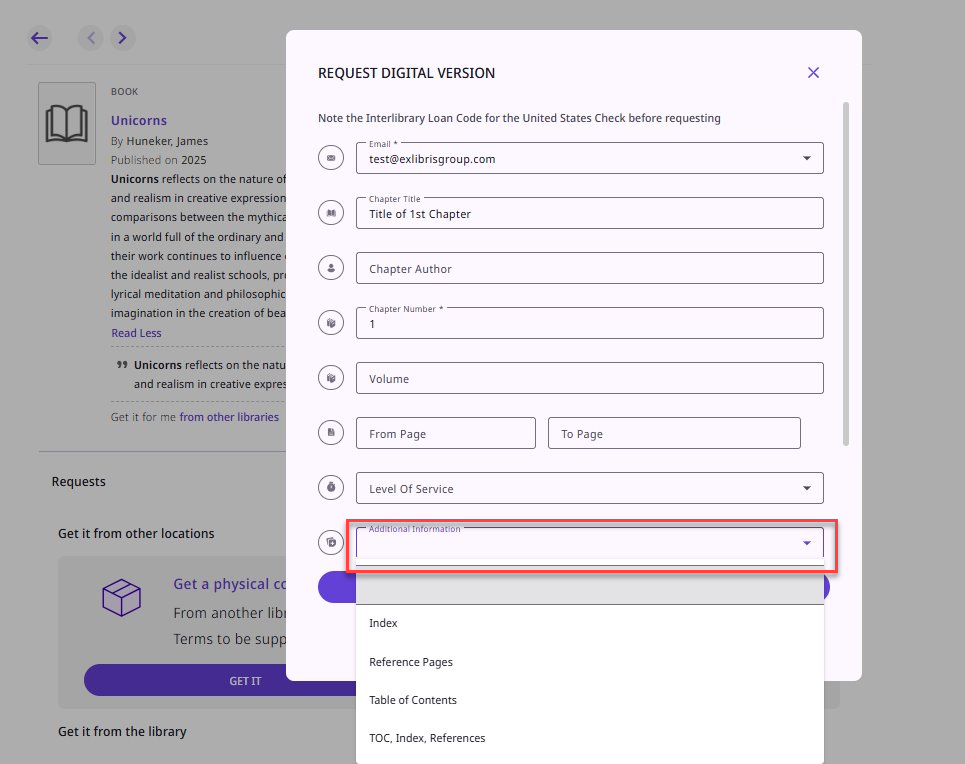
    The Digital Request VE.

    Rapido Digital Request Form PrimoVE Additional Information

    Rapido Digital Request Form PrimoNDE.

    Rapido Digital Request Form Primo NDE Additional Information
    View article in the Exlibris Knowledge Center
    1. Back to top
      • Collection Management
      • Contact RapidILL Library
    • Was this article helpful?

    Recommended articles

    1. Article type
      Topic
      Content Type
      Documentation
      Product
      RapidILL
    2. Tags
      This page has no tags.
    1. © Copyright 2026 Ex Libris Knowledge Center
    2. Powered by NiCE Knowledge Management ®
    • Term of Use
    • Privacy Policy
    • Contact Us
    2025 Ex Libris. All rights reserved