ExLibris

Knowledge Assistant

BETA
 
  • Subscribe by RSS
  • Back
    360 Services
    Ex Libris Knowledge Center
    1. Search site
      Go back to previous article
      1. Sign in
        • Sign in
        • Forgot password
    1. Home
    2. 360 Services
    3. 360 Consortium Edition
    4. Product Documentation
    5. 360 Consortium Edition: Consortium Member Library Functions
    6. 363 Consortium Edition: Inheriting Information from a Consortium
    7. 360 Resource Manager: Duplicating a Note to Make a Template

    360 Resource Manager: Duplicating a Note to Make a Template

    1. Last updated
    2. Save as PDF
    3. Share
      1. Share
      2. Tweet
      3. Share
    1. Can I create a copy of a note to make a template?
    • Product: 360 Resource Manager

    Can I create a copy of a note to make a template?

    To make a resource note template, you can copy an existing note and use the copy as a template. This feature is especially useful for member libraries that have inherited a note from a consortium, because inherited notes cannot be edited. Instead, you can copy the inherited note (below) and then customize the new local note.
    To copy a note:
    1. Go to the Client Center Home page.
    2. Click the Notes link in the Management Tools section.
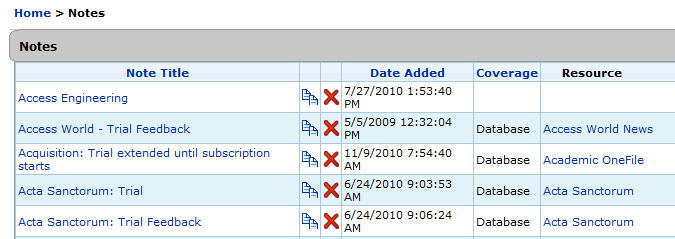
    3. Click the duplicate icon
      Duplication (copy) icon
      in the second column of the Notes page:

      Image


    4. You will be asked to confirm duplicating the note. To continue, click the Add button.
    5. The Notes page will refresh and display the duplicate note:

      Image

    • Date Created: 9-Feb-2014
    • Last Edited Date: 21-Feb-2014
    • Old Article Number: 7367
    View article in the Exlibris Knowledge Center
    1. Back to top
      • 363 Consortium Edition: Inheriting Information from a Consortium
      • 360 Consortium Edition: Consortium Member Library Still Sees Detached Attachment
    • Was this article helpful?

    Recommended articles

    1. Article type
      Topic
      Content Type
      Documentation
      Language
      English
      Product
      360 Consortium Edition
    2. Tags
      This page has no tags.
    1. © Copyright 2025 Ex Libris Knowledge Center
    2. Powered by CXone Expert ®
    • Term of Use
    • Privacy Policy
    • Contact Us
    2025 Ex Libris. All rights reserved