

"New Order" Import profile improvements
Details
The following issue was reported:
“We are using an Import Profile, type New Order, to load a MARC file to create bibs (and/or match to existing bibs), holdings, items and PO lines. We want a newly created holdings record for each item, such that the new item is the only item on that holdings record. But in testing I am finding that if there is already a holdings record with the same library and location then the item is added to that. How can I prevent that from happening? We need to be able to have different holdings call numbers, so different holdings records.
…We have two options that we're looking at. The first is that the New Order import would create records with an empty holdings call number, and then later the Update Inventory profile would populate the holdings call number using a value from the bibliographic record. The second is that the New Order import would set the holdings call number based on data in the incoming record. For testing with the file I gave you, try the 980$$f. (That isn't actually what we would use, but it should be ok for testing.)”
Response
Suggested Solution
A development was done to add the option to use call number for matching. Users can set the match for holdings to be based on call number when creating items as part of the New Order import profile. This can be done by setting the new eod_match_holdings_by_call_number customer parameter to true (the default is false).
When True
- Import file has call number
The call number is considered when matching holdings for items creation as part of New Order import profile. When the call number is different than the one of an existing holdings for the matched bib, a new holdings will be created.
- Import file does not have call number (empty call number field)
The behavior depends on “Call Number Mapping” configuration (see 1 in Appendices below):
(2.1) When there is no call number mapping / the mapping does not match the import file:
(2.1.1) When there is one holdings in the matched bib - items are added to existing holdings.
(2.1.2) When there is more than one holding in the matched bib – a new holding with an empty call number is created (Alma cannot determine which holdings should have the items).
(2.2) When there is a configuration and it does match the import file:
(2.2.1) Call number is generated by the mapping, and the holdings creation behavior is the same as #1 - when there is one or more holdings in the matched bib, a new holdings is created.
Suggested Workaround - For Holdings with Empty Call Number Creation
When the expected outcome in scenario #2.1.1 is to create create records with an empty holdings call number a workaround is needed:
(1) Create a Normalization Rule that will set the call number with a value, for example “EMPTY”. (This can be added to existing Normalization Rule, for example “Exl add 980 b and c”).
(1.1) The rule is created in the Metadata (MD) editor:
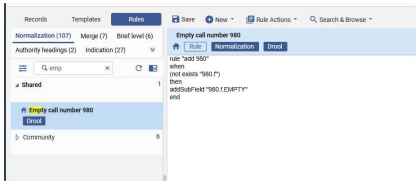
For example, when there is no 980/f, add the word “EMPTY”. (Testing of this drool confirmed that this generally works)

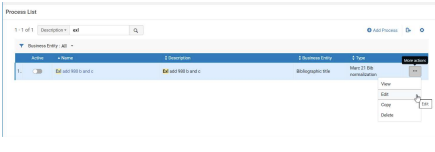
(1.2) The rule can then be added to “Exl add 980 b and c” from the Configuration Menu:

Edit:
Add Task:
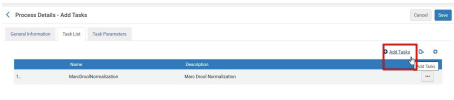
MarcDroolNormalization:

Add the drool to the second Marc Drool Normalization:

Select the rules in the import profile:

(2) After the import is done, you can find all of the holdings with the call number “EMPTY” to set them with the proper call number, or use the “Update Inventory” profile as mentioned:

Appendices
- Call Number Mapping configuration can be found in the Configuration Menu:
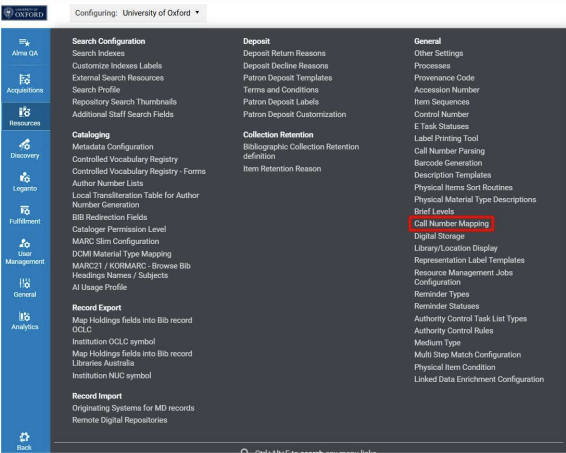
It allows defining fields in order to generate a call number when it doesn’t exist in the expected fields (as per the import profile). For example
