

Alma AI Assistant – Acquisitions Funds and Ledgers
- You must have a General System Administrator or an Acquisitions Administrator role to enable the Alma AI Assistant.
- You must have the Fund/Ledger Manager role at the institution scope to use the Alma AI Assistant.
What is the Alma AI Assistant?
The Alma AI Assistant is an initiative that leverages advanced technologies to support Alma staff users in their day-to-day work. The Alma AI Assistant is designed to enable intuitive, natural-language interactions, helping staff ask questions and receive responses more easily within Alma.
The first focus area for the Alma AI Assistant is Acquisitions - Funds and Ledgers. Staff users with the Fund/Ledger Manager role (from the institution level) can ask questions about their institution’s funds and ledgers and receive immediate, natural-language responses. The AI Alma AI Assistant uses a Large Language Model generative AI to process the question, in the context of the conversation, and generate the relevant data to answer the question.
In general, using the Alma AI Assistant is similar to common AI chat experiences:

Watch the Alma AI Assistant – Funds and Ledgers video (3:20 minutes).
Preview Mode (Beta)
Given the exploratory and evolving nature of this type of feature, we want to broaden the feedback loop. Therefore, as part of the February 2026 release, we are introducing the Alma AI Assistant in Preview Mode (beta) across all Alma environments. Administrators can choose to activate the feature at their discretion.
At this stage, the Alma AI Assistant supports conversations in English. It can answer questions regarding funds, ledger and their related data: reporting code, fund types, etc. The assistant can also answer questions on the fund transactions – for example, "which funds do not have any expenditures". However it cannot give information on PO lines and invoices – only return their ID with a link.
When referring to a specific fund, the assistant provides a link that can be used for reviewing the fund data in Alma:

We recommend pinning the Alma AI Assistant before selecting the link so the navigation does not lose the conversation.
The Alma AI Assistant can answer a single question at a time.
Best Practice
- Ask a single question at a time.
- The Assistant is not familiar with your data – try to make the question clear. If you specify fund name or code, put them in quotes ("").
For example, ask:
What is the available balance for fund with "Main library fund" name.
Instead of:
What is the available balance for Main library fund
In the second example, the assistant might understand the name as "Main library" or "Main library fund". It might also understand that you are asking for fund that has the "Main" library defined as owner.
Example Questions
- What is the total available balance in the institution?
- How much money do we have available in fund x?
- Which funds have a negative balance?
- Which funds do not have expenditure transactions?
- How much do we still have encumbered for 2025?
- Can you show the largest expenditure transaction for fund x?
- Do I have enough available money to add a subscription package that is $8,387.00 per year?
- Build me a graph that shows the spent in the various funds.
- How much have we spent from fund x? At the current rate, when will the fund run out?
Future Plans
Future phase plans include support the following:
- Conversation in non-English languages
- Taking actions
- Return PO line number and Invoice number instead of IDs for specific transactions
Capabilities and Limitations
Large Language Model generative AI tools are agile, and their responses differ between uses and evolve over time. We are continually working with the community to maximize the usefulness and accuracy of the returned data, and to maintain the efficiency of our prompts and data processing.
However, while we phrase our prompts carefully, there are cases where the AI returns inaccurate or generic data.
What We’re Doing to Mitigate These Limitations
- Working with the Alma community to understand the type of questions being asked
- Validating the accuracy of various types of questions
- Adding gradual support for different languages
- Monitoring feedback and updating our prompts periodically using a new scheduled job, Synchronize AI settings
Enabling the AIma Assistant for Funds and Ledgers in Your Environment
To enable AIma Assistant, you must have the following roles:
- General Administrator
- Acquisitions Administrator
The Alma Assistant for funds and ledgers is disabled by default in all institutions.
Once administrators review this generative AI tool’s advantages and limitations, understand the risks and decide if and how their library works with it. They can accept the disclaimer in Configuration Menu > Acquisitions > AI Features > AI Usage Profile.
Select Yes.
Select Save.

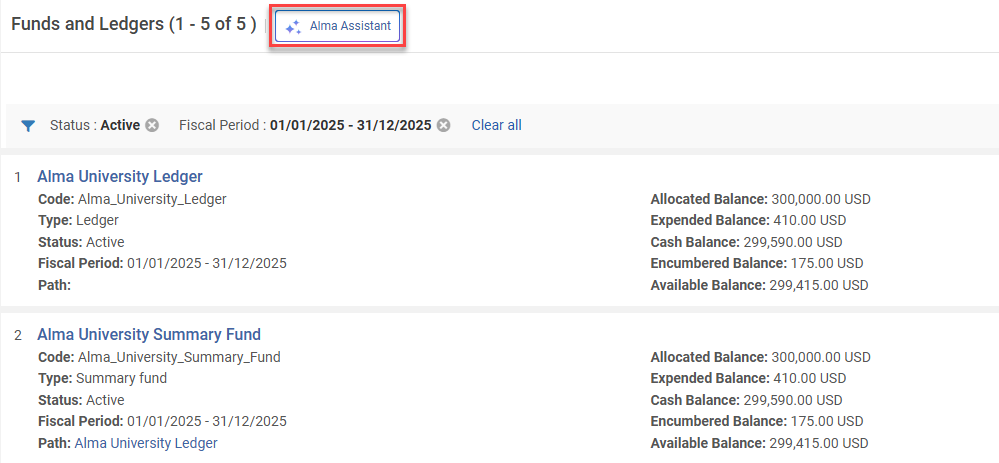
The new assistant is then visible on the Funds and Ledgers page.
Testing In a Sandbox Environment
The AI Alma Assistant settings are periodically updated using the Synchronize AI settings job. This ensures that the AI prompt remains effective and up-to-date as AI models evolve and change.
As scheduled jobs are disabled in Sandbox environments, before testing the AI Metadata Assistant, run the Synchronize AI settings to test with current settings.
- Select Monitor Jobs > Scheduled tab.
- Filter by Job Category = Data services.
- Select Run Now (available in Sandbox environments) from the Synchronize AI settings row actions.
After the job is completed, users with the required roles can test the Alma Assistant in the Funds and Ledger page.
Enabling the AI Alma Assistant in the AI Usage Profile configuration page may need to be reset after the sandbox is refreshed.
Giving Feedback
The Preview Mode (beta) is an early iteration designed to give libraries the opportunity to explore the feature, understand its potential, and actively contribute feedback that will guide future development. Additional enhancements, including the ability to perform actions as part of the Alma AI Assistant flow to workflows and responses, are planned for upcoming releases.
Feedback is a critical part of this phase. You can share your input directly within the Assistant using the thumbs up/thumbs down options on each response, or by contacting us directly at tamar.fuches@clarivate.com.
Frequently Asked Questions for the Alma AI Assistant
- Is our data used to train the AI?
A: No – The AI is not trained on your data, and in fact does not even see it. It only produces the query to retrieve the data, which is then being processed by Alma. - What LLM are you working with?
A: Models are subject to change as models and capabilities evolve. As of the February 2026 release, the Alma AI Insights were working with the GPT 4O LLM model. - What is your policy regarding AI?
A: Clarivate’s Academia & Government policy for use of generative AI is available in the link: https://clarivate.com/ai/academia/policy/ - Why am I getting slightly different answers for the same question?
A: Large Language Model generative AI tools are agile, and their responses differ between uses and evolve over time. The returned answer by the AI will vary each time according to the information provided to it, and the AI’s internal processing itself. - Can I trust the AI to always give the “correct” answer?
A: AI provides data-driven suggestions, not absolute truths. It’s designed to assist decision-making, not replace human judgment. Always consider AI answers as one input among others, especially in complex or high-impact scenarios.