

Administration and Infrastructure - August 2016 Enhancements
Sandbox Management
You can view the status and history of your sandboxes, and the sandboxes of the institutions for which your institution is the contract lead, on the new Sandbox Management page. You can also add a widget with links to your sandboxes to the Alma home page. The privilege MANAGE_SUPPORT_AND_MAINTENANCE was added to the General System Administrator role for this feature.
For more information, see Sandbox Management.
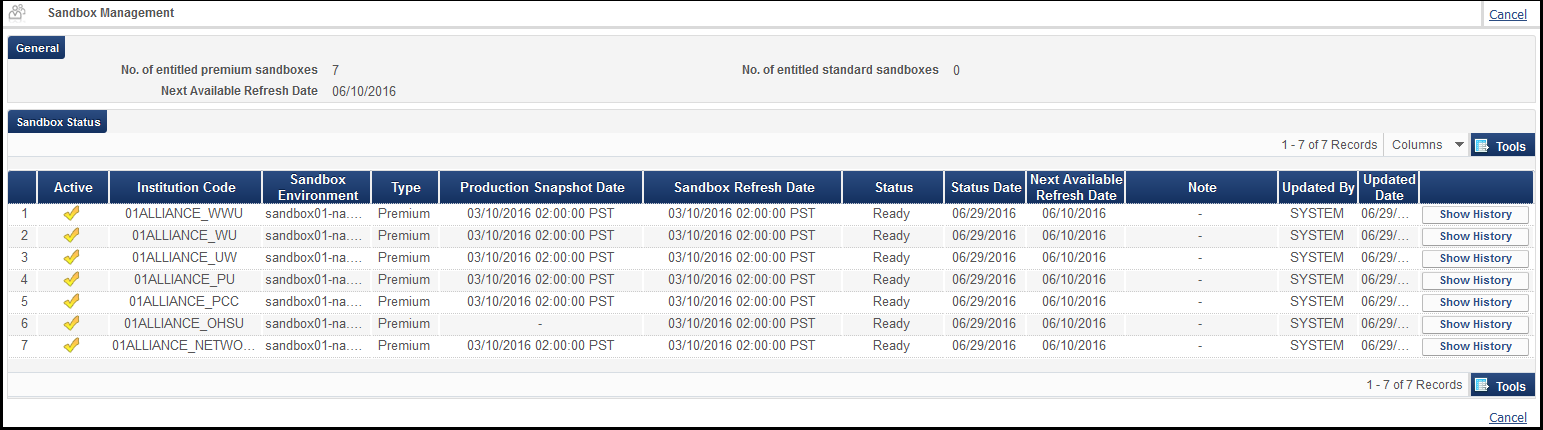
Sandbox Management Page
Alma Social Login
Staff may now use Facebook or Google to log in to their Alma accounts. The social login information is defined in an integration profile. On the User Details page, user types were removed and the password is now an optional field, to allow for the social network sign-in. For more information, see Adding Users.
An invitation to log in using a social network can be emailed to staff users from the Manage Users interface (see Send Social Login Invitation Letter) for an individual user, or can be sent in bulk using the Update/Notify Users job.
Additional Administration and Infrastructure Enhancements
- The option to sign logout requests has been added to SAML single logout. In order to sign single logout requests, click the Sign Single Logout Requests check box.
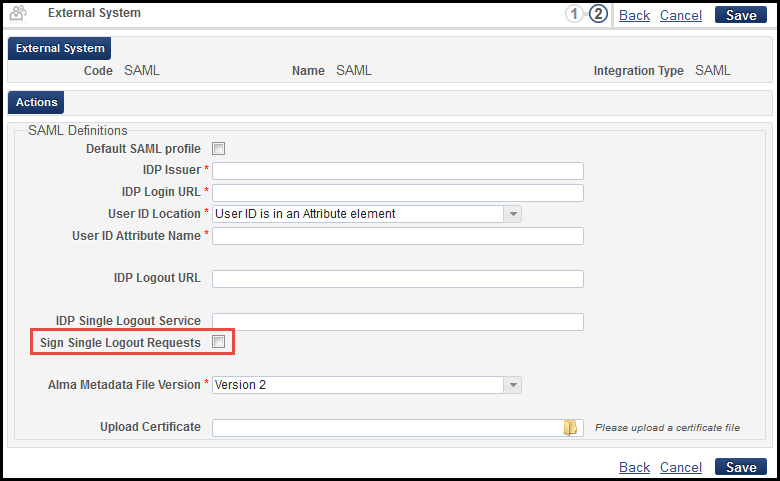 SAML Integration Profile
 - The All option was removed from the Find in drop-down list on the List of S/FTP Connections page (Administration > General Configuration > Configuration Menu > External Systems > S/FTP Definitions).
- The user type of Internal with External Authentication has been replaced by the Internal type. Future internal users that require their passwords to be managed externally should be created with type Internal and no password.