

Working Copy Leganto April 2026 Release Notes
|
May 2026 Sneak Preview
-
Highlight open access and OER on lists
Main Features
When E-Resource Removed Reading Lists Should Be Updated
 CERV Enhancement (ID #LENH-I-6031) URM-319227
Leganto now alerts the library when list items are linked to e-resources that have been deleted from the collection. When a list item is linked to an Alma portfolio that has been deleted, Leganto notifies the library that the resource is no longer available to students.
Previously, if an electronic resource was removed from its portfolio in Alma (or if the portfolio itself was deleted), the corresponding item remained visible in Leganto. However, because the underlying portfolio no longer existed, students could not access the resource. The item appeared normal in the list, with no indication that access had been lost.
To address this issue, a new internal nightly job, Leganto Identify Deleted Eresources (Admin > Manage Jobs and Sets > Monitor Jobs), now runs automatically for Leganto institutions (enabled by default). The job scans all items that contain portfolio IDs, including repository items and items added from CDI. If it detects that a portfolio no longer exists, the job generates an alert on the item with the Portfolio removed from repository label.

The missing portfolios notification is also displayed in Alma's Task List under Citations, where you can see the number of affected items next to the Portfolio removed from repository task. Selecting the task opens a list of all impacted items.
This enhancement improves list reliability by proactively identifying unavailable electronic resources, helping libraries address access issues before they affect students.
Leganto does not store portfolio IDs for items added from the Alma UI, so it cannot detect when those portfolios are deleted. However, items added using the Alma search scope within Leganto do include portfolio IDs.
Improve the Display of Recent List Changes
CERV Enhancement (ID #LENH-I-6099) URM-318321Leganto now provides an improved display of information in the Recent Changes tab in Fulfillment > Course Reserves > Reading Lists. This tab provides an overview of all manual and job-based updates made to a list.
Previously, each change appeared as a single long row containing a descriptive sentence explaining what occurred, where, and by whom. This information is now presented in a structured table with the following dedicated columns:
- Created on – Date the change was made
- Type – Type of change performed
- User – The user or job that performed the action
- Citation title – The affected item
- Section title – The affected section
- Additional information – Contextual details that clarify the action. For example:
- When a collaborator is added, the collaborator’s name is displayed.
- When an item is added, the method used (such as by ISBN, DOI, or Cite it!) is indicated.
- When a tag is added, the exact tag is displayed.

You can navigate directly to the item or section affected by a change from the Recent Changes tab. From the row actions menu for the relevant change, select View Citation or View Section to open it in Leganto.

In addition, the following new events are now tracked in the Recent Changes tab when changes are made manually in Leganto:
- Updated item source URL
- File added to or removed from item
- Section copied from another list
- Hidden or unhidden item link
- Changed item material type
The new format of the Recent Changes tab makes it easier to review and interpret list activity.
Workflow to Request Accessible Files
Leganto now enables users to request a more accessible version of a list item. This functionality is activated by configuring the new request_accessible_file_email_notification parameter (Configuration > Leganto > Features > Leganto Features).
To enable the feature, enter one or more email addresses in the request_accessible_file_email_notification parameter. These addresses represent the staff responsible for receiving and handling accessibility requests. The email addresses may be affiliated with staff outside the library. Multiple email addresses can be entered, separated by commas. The Leganto Request Accessible File Email Letter (Configuration > General > Letter > Letter Configuration) must also be enabled for the feature to work (enabled by default).
Once configured, all items with inventory in Leganto get a Request accessible file button. Users can access this option from the item’s More options menu in the brief view or from the Links & availability tab in the item’s details.


Selecting Request accessible file opens a request form where students can add a comment describing their accessibility needs. Students can also choose to include additional email recipients in case the requester is asking on behalf of another user.

After the request is submitted, an email notification is sent to all addresses configured in the request_accessible_file_email_notification parameter. The remainder of the workflow occurs outside of Leganto or Alma. The staff responsible for the request can fulfill the request by sending the accessible file directly via email.
When enabling this feature, it is recommended that you customize the description that displays to users using the citation.availability.request.accessible.file.description label (Configuration > Leganto > General > Labels). Consider adding information to let your users know:
- Who will the request be sent to (library, office of accessibility, etc.)
- Estimated turnaround time
- Email address for any follow-up
This enhancement provides users with a direct way to request course materials when those available in Leganto do not meet their accessibility requirements. For details, see Enabling Users to Request Accessible Versions of Items.
Track Accessibility Status of Files
Leganto now enables users to assign an accessibility status to files. Accessibility information can be set during file upload or updated later when editing an item.
To activate this functionality, configure the new file_accessibility_status parameter (Configuration > Leganto > List Management > Settings) with one of the following values:
- all – Both instructors and library staff can view and set file accessibility statuses.
- library – Only library staff can view and set file accessibility statuses.
If the parameter is left blank (default), the feature is disabled.
Libraries also control whether entering an accessibility status is mandatory when uploading a file using the new file_accessibility_statuses_mandatory parameter (Configuration > Leganto > List Management > Settings). When the parameter is set to Yes, users must enter an accessibility status when uploading a file. Required fields are marked with a red asterisk. When set to No (default value), users can upload a file without selecting a status.
Use the mapping table in Configuration > Leganto > List Management > File upload accessibility statuses to manage which statuses are available for selection during file upload. Available out-of-the-box statuses include:
- ACCESSIBLE
- NOT_ACCESSIBLE
- UNKNOWN
- PARTIALLY_ACCESSIBLE
The table also includes an option to ADD_COMMENT, which you can toggle on to enable users to include an accessibility-related comment when adding a file to a list. By default, only ADD_COMMENT and UNKNOWN are enabled.
From the File upload accessibility statuses table, users can:
- Enable or disable specific statuses by using the toggle next to every status
- Change the display order of statuses
- Delete statuses using row actions
- Edit the text in the Description column (this updates the text of statuses users see during file upload)

When uploading a file to a list, users can select an accessibility status from the options defined in the mapping table and, if enabled, add an accessibility-related comment.

This information is intended for internal library use only and is not displayed to students. You can review a file’s accessibility status by going to the item’s Links & availability tab, opening the relevant file's row actions menu, and selecting Accessibility information.

A file’s accessibility status and the associated comment (separated by a semicolon) are also displayed in the File Upload section when editing an item in Alma.

This enhancement helps institutions better track and manage the accessibility of files in their lists. For details, see Configuring File Accessibility Statuses.
New Leganto Library Processing Measurement Dashboard
A new Leganto Library Processing Measurement dashboard is available in Catalog > Shared Folders > Leganto > Data Visualization. It consists of four tabs and can be used to view the workflow status of recently submitted items and lists, with a default filter showing submissions from the last three months.
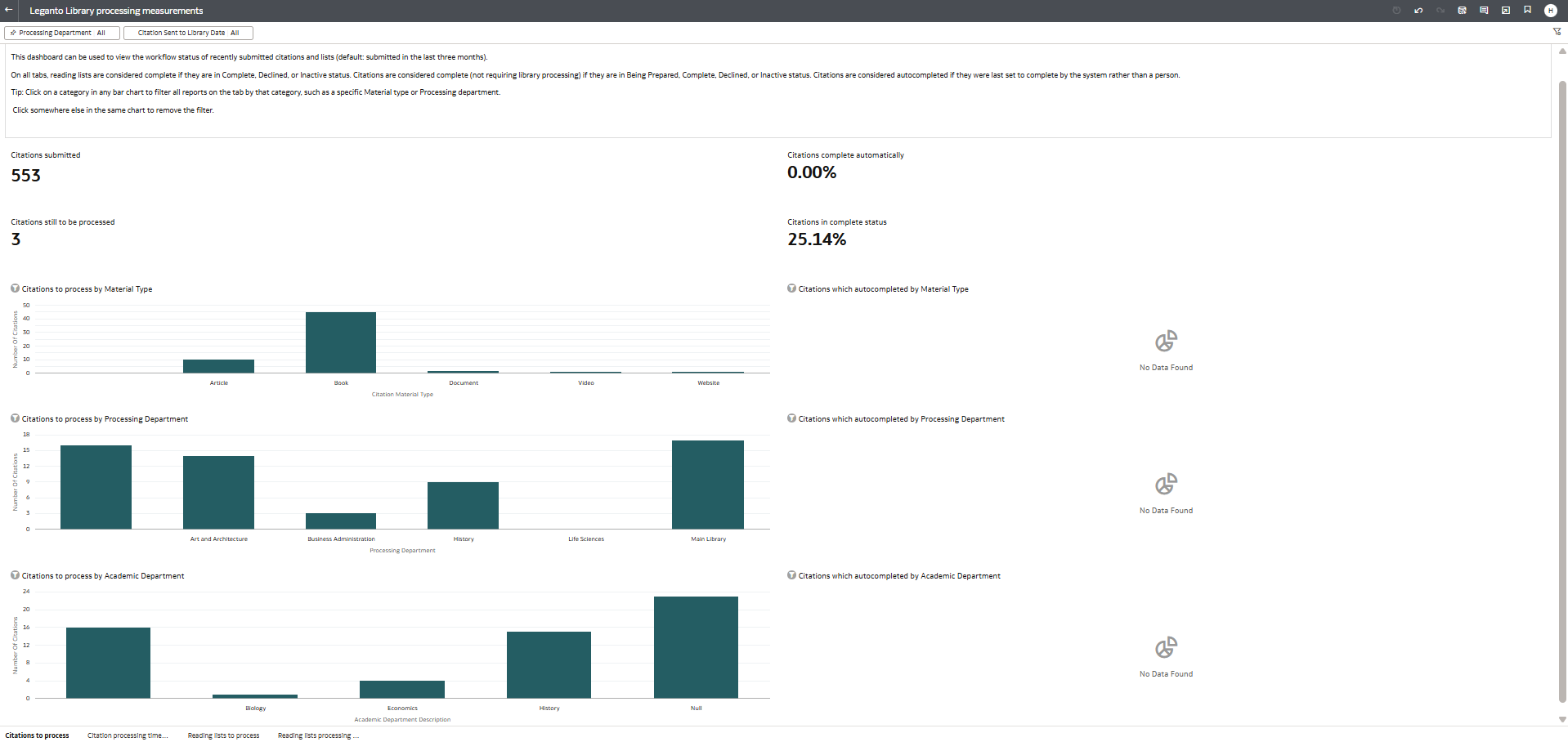
For more information, see Leganto Library Processing Measurement Dashboard.
Additional Enhancements
- April 2026 Leganto
 Idea Exchange URM-316917
Leganto now supports uploading multiple file formats for a single item. The number of formats per item is not limited.Copyright is still managed at the item level, not per file format. Only upload alternative formats of the same work (for example, PDF and Word versions of the same essay). Do not upload different works under a single item.
To enable this feature, set the new citation_multiple_file_formats parameter (Configuration > Leganto > List Management > Settings) to one of the following values:
- all – Both instructors and library staff can upload multiple formats
- library – Only library staff can upload multiple formats
Leaving the parameter blank, which is the default configuration, disables the feature.
The citation_multiple_file_formats parameter applies only in Leganto. Library staff working in Alma can upload multiple formats regardless of this parameter's setting.
When the citation_multiple_file_formats parameter is enabled, and a new file is uploaded to a list (or you make changes to an existing item with Edit item), users see the new Add additional format button. Selecting this option enables you to upload another format of the same content and add it to the same list item.
 Add additional format button
After selecting Add additional format, a pop-up window appears where the user can modify the file name and, if configured by the institution, enter accessibility information before adding the additional file.
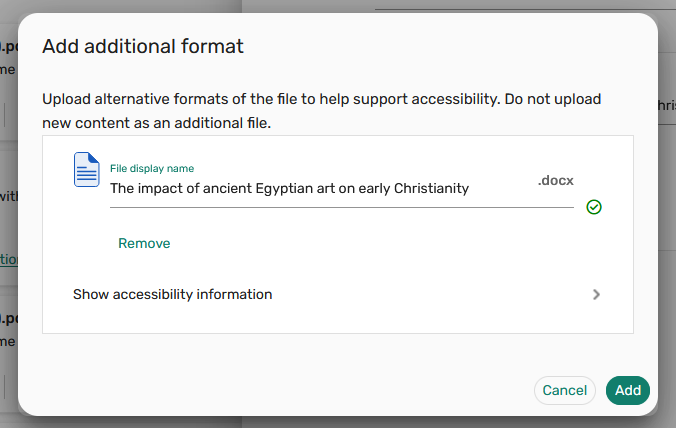 Adding a different file format
All uploaded formats are displayed together under the same item on the upload screen. Users may rename any format by changing its File display name. After uploading the desired formats, the rest of the file upload process remains unchanged.
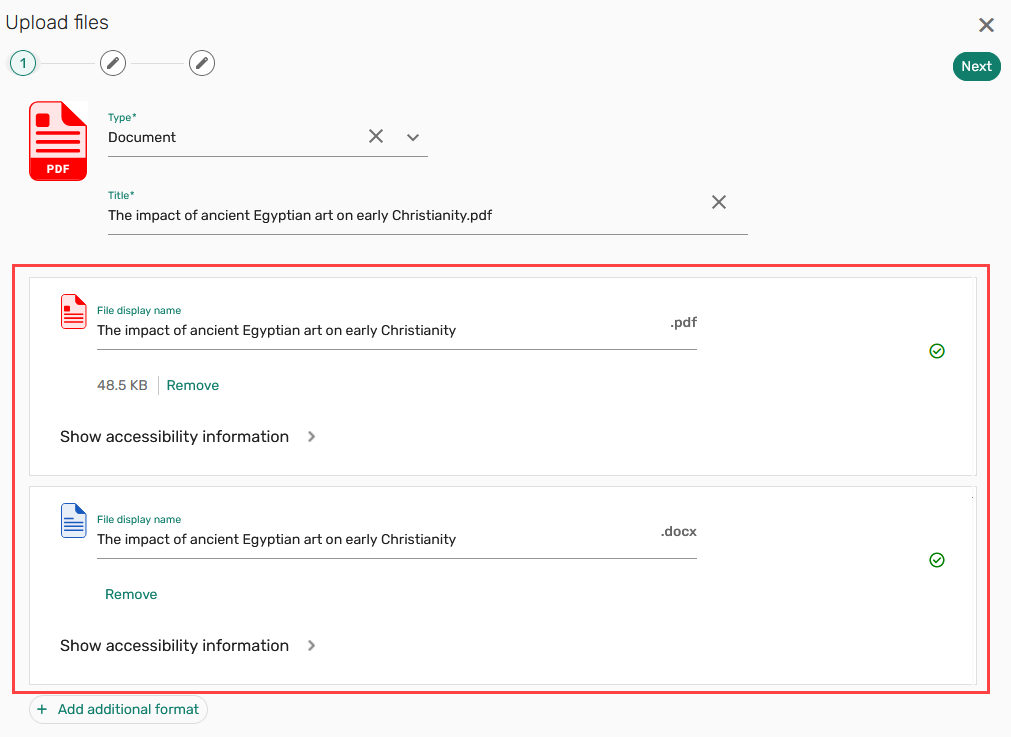 Two format options of the same file
After the item is added to a list, all available formats are visible in the Links & availability tab. Users control which format appears first—both in Links & availability and as the primary option in the brief view (including when selecting View or Download)—by opening the row actions menu next to the desired file and choosing Set default. By default, the first format you added during file upload is set as the primary format.
 An uploaded item with multiple format options
This update enables institutions to support different user preferences and accessibility needs without creating duplicate items in their lists. For details, see Enabling the Upload of Multiple File Formats to One List Item.
- April 2026 Leganto URM-316920
Leganto users can now add alternative text to images. This enhancement improves accessibility by enabling image descriptions (alternative text) for users who are blind or have low vision.When uploading an image or editing an existing item that contains an image, users can enter alternative text that explains the image's content or purpose in the Alt text field. Adding alternative text is optional and does not require configuration.
 Alternative text field for images
TIFF/TIF files are not supported as images in Leganto. For these file types, the View option and the Alt text field are not available.
- April 2026 Leganto URM-323559
Leganto now supports filtering items by their availability. For now, the availability filter is visible only to list administrators (instructors and library staff) and is not available to students.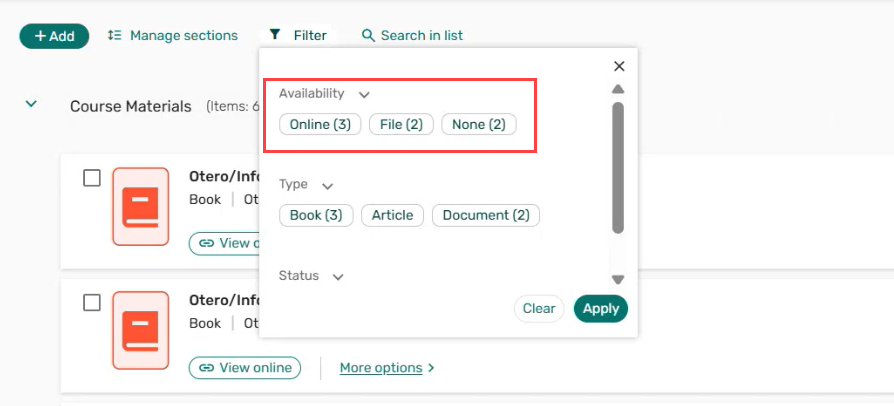 Availability-based filter
The new filter includes the following availability types:
- Physical
- Online (includes repository electronic resources, uResolver links, digital resources, and web links)
- File
- No inventory
From now on, availability is automatically assigned to all newly added items. In the April production environment, the ComputeCitationsFieldsJob job will run to update the availability value for all items in lists created from 2025 onward.
For certain third-party integrations (BrowZine, HathiTrust, Unpaywall, Bolk, and DCS), items in lists created between 2025 and April 2026 will be updated dynamically when a user opens the list and interacts with it (for example, by accessing an item or scrolling through the list).
- April 2026 Leganto URM-321001
Leganto now displays Open Access and Peer Reviewed labels for items returned from Summon searches in Search the library.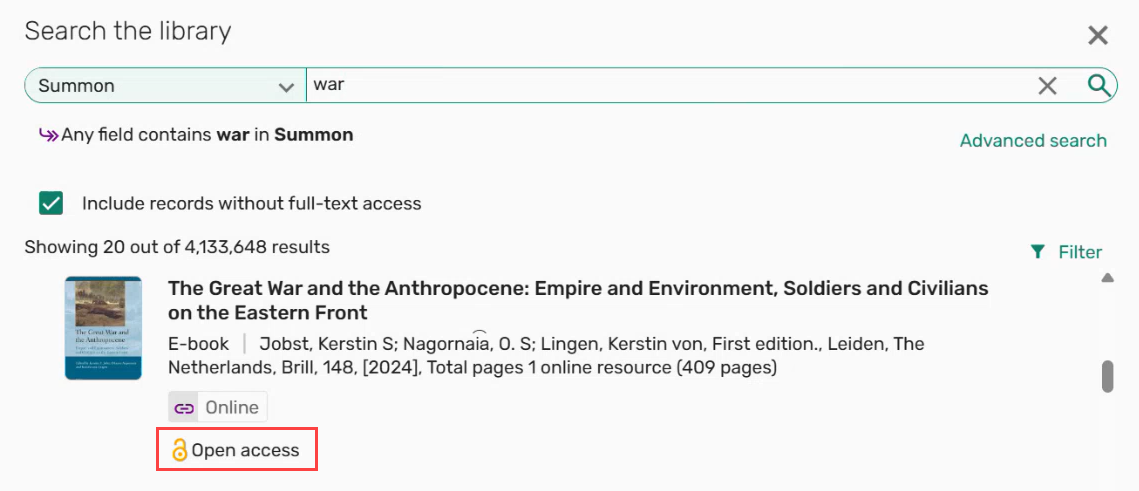 Open access label
 Peer Reviewed label
This enhancement helps users more easily identify openly available resources and scholarly, peer-reviewed content when selecting materials for their lists.
- April 2026 Leganto URM-224662
Cite it! now supports adding content from the United Nations' official website. This site provides a comprehensive repository of authoritative source documents, global reports, speeches, resolutions, and information on international issues, making it a valuable resource for research in various areas. - April 2026 Leganto URM-225481
Cite it! now also supports adding content from Legislation.gov.uk, the official online database of UK statute law. This site provides free, authoritative access to materials essential for legal studies, policy research, and courses addressing governance, rights, and regulation. -
April 2026 Analytics and Insights URM-321923
A new field, Access Type, has been added to the following Alma Analytics Subject Areas. The access type field displays whether a citation is Open Access (OA) or an Open Educational Resource (OER).-
Course Reserves (Analytics > Access Analytics > Create > Analysis > Course Reserves > Reading List Citation)
-
Leganto Instructor Usage (Analytics > Access Analytics > Create > Analysis > Leganto Instructor Usage > Citations)
-
Leganto Student Usage (Analytics > Access Analytics > Create > Analysis > Leganto Student Usage > Citations)
-
Purchase Requests (Analytics) (Analytics > Access Analytics > Create > Analysis > Purchase Requests (Analytics) > Reading List Citation)
For more information, see Course Reserves, Leganto Instructor Usage, Leganto Student Usage, Purchase Requests (Analytics).
-
Resolved Issues
- April 2026 Leganto URM-320675
In Mozilla Firefox, selecting View PDF occasionally redirected users to the Leganto login page or displayed an error screen. This was fixed so that the View PDF action now consistently opens the PDF in Firefox. - April 2026 Leganto URM-238216
Some Google search results were directing users to an institutional login page instead of the intended public Leganto page because Google had crawled and indexed Leganto public URLs without preserving the required permalink parameters. This was resolved by disabling search engine crawling of Leganto public pages, preventing incorrect links from appearing in Google results. - April 2026 Leganto SF: 08335999 URM-323657
Although Book Extract and Book Chapter items have Start Page and End Page defined as mandatory fields, it was still possible to create these items in Leganto without entering page ranges. This was fixed so that these item types must always have a Start Page and End Page when being added to Leganto. - April 2026 Leganto SF: 08336137 URM-323643
When adding a URL to an item’s public note, the rich-text editor did not always apply the hyperlink correctly. In some cases, the formatting appeared correct at first, but after a refresh, the link broke or displayed incorrect HTML content. This was fixed so that URLs added to public notes are now properly formatted and consistently saved as valid hyperlinks. - April 2026 Leganto SF: 08323295 URM-323314
Even when reading_list_auto_locate_citation_upon_creation was set to false, items were still being automatically resource located upon creation. This was fixed so that resource locate is no longer triggered when the parameter is disabled. - April 2026 Leganto SF: 08116275 URM-316785
When instructors rolled over a list and its status was set to RolledOver, the banner above the rolled-over list incorrectly displayed The library is reviewing your list, even though the list had not been sent to the library and all items had the Being Prepared status. This was fixed so that the banner message now accurately reflects the list’s actual status. - April 2026 Leganto SF: 08321135 URM-323237
If none of the relevant Alma Fulfillment roles (Course Reserves Manager, Course Reserves Operator, Leganto Course Operator, or Fulfillment Services Operator) were scoped at the institutional level, lists could not be assigned to the user. This was incorrect, as users should be able to have lists assigned even when these roles are scoped below the institutional level. This was fixed so that list assignment no longer depends on having at least one of these roles defined at the institutional level. - April 2026 Leganto SF: 08351249 URM-324458
When navigating with the Tab key from My Lists, it was not possible to move focus to the Lists catalog. Instead, the focus skipped directly to the User menu. This was fixed to ensure proper keyboard navigation. - April 2026 Leganto SF: 08361306 URM-324664
When adding an item from the library search, the source link was not included in the created item due to a mapping issue. This was fixed so that the source link is now correctly included when the item is added to the list. - April 2026 Leganto SF: 08358971 URM-324909
When Leganto was integrated with an NDE view and primove_getit was enabled, accessing Primo Get It from an item via LTI triggered an unnecessary SSO login. This redirected users to the Find Lists page instead of loading the holdings. This was fixed so that Primo Get It holdings now load directly without triggering an SSO login or redirecting to another page.