

Leganto 2026 Release Notes
|
Click here to view the monthly release and maintenance schedules.
Click here to watch the Leganto What's New videos, another great resource for learning about the Leganto release.
The Leganto What's New videos highlight some of the main features of the Leganto releases.
These videos enable you to view more details about the features that are most relevant to you.
August 2026 Sneak Preview
-
Indicate potential license issues on lists
-
Customize the "Add item" menu
July 2026 Sneak Preview
-
Set priority for course reserves automatic statuses table
June 2026 Sneak Preview
-
New Course Loader integration profile which includes the Faculty/School field
-
Display different general messages to different user groups
May 2026 Sneak Preview
-
Highlight open access and OER on lists
April 2026 Sneak Preview
-
CERV 6099: Improve the display of recent list changes
March 2026 Sneak Preview
-
Request accessible file workflow
-
Filter lists by inventory type
February 2026 Sneak Preview
-
Behind-the-scenes work to address reading list items linked to removed e-resources (LENH-I-6031)
Main Features
Users will no longer be able to upload .svg and .xml files to Leganto starting with the November release. This change follows a security audit recommendation to prevent the upload of file types that may contain embedded JavaScript, which could pose a security risk when opened by users.
Set Priority for Course Reserves Automatic Statuses
Leganto now enables libraries to control the priority of Course Reserves Automatic Status rules when multiple rules apply to the same item.
Previously, when multiple rules configured in Configuration > Leganto > List Management > Course Reserves Automatic Statuses matched the same item, Leganto applied the first matching rule based on an internal processing order. Because this order could not be configured, libraries had no control over which rule determined the final status.
To address this limitation, a new configuration table is now available under Configuration > Leganto > List Management > Course Reserves Automatic Statuses – Prioritization. The table displays the different automatic status parameters and enables libraries to reorder them.

The order in which you set the parameters in the prioritization table determines which rule is applied to an item that matches multiple rules. For example, if both citation_open_access and citation_physical apply to an item, the rule that appears higher in the prioritization table determines the resulting status.
By default, the new prioritization table follows the same order as the Course Reserves Automatic Statuses table, with the following exceptions:
- The citation_uploaded_file rule is ranked above citation_copyright_approved.
- The unlimited_access_citation rule is ranked above citation_electronic.
Libraries can adjust the prioritization to suit their workflows. However, we recommend keeping citation_uploaded_file above citation_copyright_approved and unlimited_access_citation above citation_electronic, as this order reflects the recommended best-practice configuration.
This enhancement gives libraries greater control over automatic status assignment and helps ensure that auto-statuses effectively support institutional workflows.
Date of Work Now Supported in Leganto
 Idea Exchange URM-228160
Leganto now supports the display of a work's original publication date through the Date of Work field, enabling institutions to distinguish between the original publication date of a title and the publication date of a later edition or format.
The Date of Work field is not enabled by default. Institutions that want to display this information must configure the relevant bibliographic mapping and display settings.
To map the field in Alma, go to Configuration > Fulfillment > Courses > Bibliographic Mapping Rules and update the production Drools rules to map the desired MARC field to the date_of_work field. For example:
rule "Display - Date of work"
when
MARC is "240"."f"
then
set citation."date_of_work" to MARC."240" subfields "f"
end
You can verify the mapping using Configuration > Fulfillment > Courses > Test BIB to Citation Normalization by entering an item's MMS ID and confirming that the Date of Work field is populated as expected.
- Go to Configuration > Leganto > UI > Citation Field Mapping.
- Map Date of Work to a Book type (and/or other material type).
- Configure the display order.
- Choose whether the field appears immediately when a user opens Item details or under More details.
- Specify whether the field is mandatory.
Once configured, the Date of work field appears in Leganto under the item's Item details tab.

Institutions using Primo or Summon can also display this information in discovery records. Configure the field in Configuration > Leganto > Discovery > Primo Mapping or Configuration > Leganto > Discovery > Summon Mapping using the date_of_work code (for details, see Primo Mapping and Summon Mapping).
This enhancement improves metadata clarity and helps users identify the original publication date of a work, regardless of the format or edition being used.
Upgraded Course Loader Integration Profile
Idea Exchange URM-321492The Course Loader integration profile (Configuration > General > External Systems > Integration Profiles) has been enhanced to enable easier file import and to support the import of additional data.
The course loader integration profile now enables users to upload a file containing course information directly from their computer. Previously, course loading required uploading a tab-delimited file to an FTP server before running the integration. Users can now select and upload a local file, eliminating the need for FTP. The course loader integration profile still supports loading data from an FTP server.
A new Upload file field is now available in the Actions tab of the Course Loader integration profile. Users can use this field to upload a file containing course information, save the uploaded file, and run the job to ingest the course data.

When a file is uploaded via Upload file, scheduling is disabled for that run.
Additionally, the Course Loader integration profile has been enhanced with a second version that supports importing School/Faculty information for courses and provides a more flexible structure for future data expansion. A new Version field has been added to the Actions tab, enabling users to choose between two input file formats for course data. The available options are:
- Version 1 – Existing file structure and behavior (default for all existing Course Loader profiles).
- Version 2 – Updated file structure with the following changes:
- Adds a School/Faculty field (SCHOOL_FACULTY), which replaces TERM1.
- Replaces TERM2 with a single MULTIPLE_TERMS field.
- Introduces a new ALL_INSTRUCTORS OPERATION field for one or multiple comma-separated instructors. This field replaces the previous INSTRUCTOR1 -INSTRUCTOR10 fields.
Both versions support FTP-based course loading and direct file upload.

Here is an example of a Version 2 file illustrating the new file format.
Within the course loader integration profile, the layout of the Actions tab has also been updated with visual separators between different operations (such as creating, updating, or rolling over courses) to improve clarity when configuring Course Loader profiles.
This enhancement simplifies the course loading process, reduces reliance on FTP-based workflows, and introduces a future-ready file structure. For details, see Configuring Course Loading.
Initiate Purchase Request Workflows from Leganto
Idea Exchange URM-319496Leganto now enables users to submit purchase requests for items directly from lists. Institutions control who can submit purchase requests with the new purchase_request parameter (Configuration > Leganto > Features > Leganto Features), which can have the following values:
- all – Both instructors and library staff can initiate a purchase request
- library – Only library staff can create purchase requests
- blank (default) – Purchase requests are disabled for everyone
When enabled, the Request purchase button becomes available in several locations across Leganto:
- In the brief view when the item is selected
 Request purchase button in the brief view
 - In the Item actions tab within full details (in the Library services section)
 Request purchase button in Library services
 - In the Links & availability tab (visible only when an item is not available)
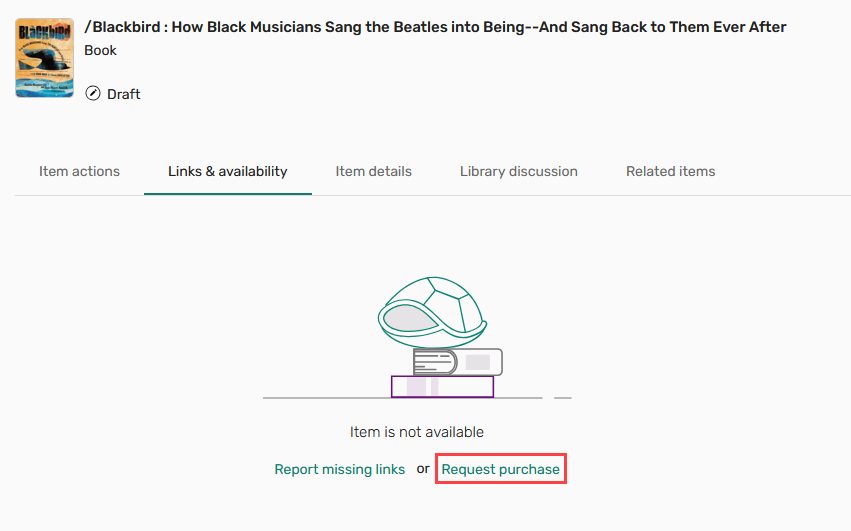 Request purchase button in Links & availability
Selecting Request purchase prompts the user to choose a format (physical or online) and submit the request. Once submitted, the item is marked with a Purchase requested tag.

Users can track the status of their purchase request under Library services in the Item actions tab. The following statuses are supported:
- Library processing – The request is being handled by the library.
- Approved – The request has been fulfilled. The item is marked with the Purchase request approved tag.
- Rejected – The request has been declined by the library. The item is marked with the Purchase request rejected tag.
When the PO line is closed, the purchase request tag is automatically removed from the item.
If a purchase request for an item already exists in Alma, Leganto displays the request's existing status and does not prompt the user to select a format. Additionally, if requester notes are mandatory (activated on request by Ex Libris support), purchase requests can only be submitted for items linked to a course.
This enhancement streamlines the material acquisition process by enabling instructors to create purchase requests directly in Leganto. For details, see Creating Purchase Requests for List Items.
Display Different General Messages to Different User Groups
Idea Exchange URM-156620Leganto now supports role-based general messages, enabling institutions to display different messages to different user groups. These messages appear in a header above all lists and items in Leganto.
A new General Message mapping table is now available under Configuration > Leganto > Features > General Message. The table is empty by default.
Administrators can add messages by selecting Add Row, defining the target role, message text, and an optional date range, and then saving the configuration. Each role can be used only once in the table.

Each row in the mapping table defines a message to a specific user group and includes the following columns:
- Enabled – A toggle that controls whether the message is active
- Role – The target audience (All, Guest, Instructor, Librarian, Student)
- Text – The message text, defined using a code from Configuration > Leganto > General > Customer Labels
- Date range – Optional start and end dates that control when the message is displayed
- Updated By – The name of the user who last modified the row
- Last Updated – The date of the last update
If a general message for the All role is configured, it overrides any role-specific messages and is displayed to all users.
As part of this enhancement, the existing general_message, general_message_dates, and general_message_role parameters (Configuration > Leganto > Features > Leganto Features) will be removed in the July release. Existing configurations will be automatically migrated to the new mapping table.
This enhancement provides greater flexibility in communicating with users by enabling more targeted messaging. For details, see Configuring the General Message for Lists and Items.
Highlight Open Access and OER on Lists
Leganto now displays visual indicators for open access and open educational resources (OER) items in lists. When enabled, these indicators are visible to all users, including students and guests.
To enable this feature, set the access_type parameter (Configuration > Leganto > Features > Leganto Features) to true (default: false). Once enabled, Leganto displays OER and open access indicators in the brief view (next to the item type) and in the full view (in the Access Type section on the Item details tab).


Even if access_type is set to false, Primo and Summon searches in Leganto still display these indicators.
List administrators can manually edit the access type indication. When editing an item, the Open Access and Open Educational Resources checkboxes under Access Type control whether indicators are displayed.

Additionally, a new Access Type field has been added to the Citation Parameters section when editing an item in Alma.

This enhancement provides immediate visual cues for open access and OER items, making it easy for students, instructors, and library staff to identify open and freely available resources.
When E-Resource Removed Reading Lists Should Be Updated
 CERV Enhancement (ID #LENH-I-6031) URM-319227
Leganto now alerts the library when list items are linked to e-resources that have been deleted from the collection. When a list item is linked to an Alma portfolio that has been deleted, Leganto notifies the library that the resource is no longer available to students.
Previously, if an electronic resource was removed from its portfolio in Alma (or if the portfolio itself was deleted), the corresponding item remained visible in Leganto. However, because the underlying portfolio no longer existed, students could not access the resource. The item appeared normal in the list, with no indication that access had been lost.
To address this issue, a new internal nightly job, Leganto Identify Deleted Eresources (Admin > Manage Jobs and Sets > Monitor Jobs), now runs automatically for Leganto institutions (enabled by default). The job scans all items that contain portfolio IDs, including repository items and items added from CDI. If it detects that a portfolio no longer exists, the job generates an alert on the item with the Portfolio removed from repository label.

The missing portfolios notification is also displayed in Alma's Task List under Citations, where you can see the number of affected items next to the Portfolio removed from repository task. Selecting the task opens a list of all impacted items.
This enhancement improves list reliability by proactively identifying unavailable electronic resources, helping libraries address access issues before they affect students.
Leganto does not store portfolio IDs for items added from the Alma UI, so it cannot detect when those portfolios are deleted. However, items added using the Alma search scope within Leganto do include portfolio IDs.
Improve the Display of Recent List Changes
CERV Enhancement (ID #LENH-I-6099) URM-318321Leganto now provides an improved display of information in the Recent Changes tab in Fulfillment > Course Reserves > Reading Lists. This tab provides an overview of all manual and job-based updates made to a list.
Previously, each change appeared as a single long row containing a descriptive sentence explaining what occurred, where, and by whom. This information is now presented in a structured table with the following dedicated columns:
- Created on – Date the change was made
- Type – Type of change performed
- User – The user or job that performed the action
- Citation title – The affected item
- Section title – The affected section
- Additional information – Contextual details that clarify the action. For example:
- When a collaborator is added, the collaborator’s name is displayed.
- When an item is added, the method used (such as by ISBN, DOI, or Cite it!) is indicated.
- When a tag is added, the exact tag is displayed.

You can navigate directly to the item or section affected by a change from the Recent Changes tab. From the row actions menu for the relevant change, select View Citation or View Section to open it in Leganto.

In addition, the following new events are now tracked in the Recent Changes tab when changes are made manually in Leganto:
- Updated item source URL
- File added to or removed from item
- Section copied from another list
- Hidden or unhidden item link
- Changed item material type
The new format of the Recent Changes tab makes it easier to review and interpret list activity.
Workflow to Request Accessible Files
Leganto now enables users to request a more accessible version of a list item. This functionality is activated by configuring the new request_accessible_file_email_notification parameter (Configuration > Leganto > Features > Leganto Features).
To enable the feature, enter one or more email addresses in the request_accessible_file_email_notification parameter. These addresses represent the staff responsible for receiving and handling accessibility requests. The email addresses may be affiliated with staff outside the library. Multiple email addresses can be entered, separated by commas. The Leganto Request Accessible File Email Letter (Configuration > General > Letter > Letter Configuration) must also be enabled for the feature to work (enabled by default).
Once configured, all items with inventory in Leganto get a Request accessible file button. Users can access this option from the item’s More options menu in the brief view or from the Links & availability tab in the item’s details.


Selecting Request accessible file opens a request form where students can add a comment describing their accessibility needs. Students can also choose to include additional email recipients in case the requester is asking on behalf of another user.

After the request is submitted, an email notification is sent to all addresses configured in the request_accessible_file_email_notification parameter. The remainder of the workflow occurs outside of Leganto or Alma. The staff responsible for the request can fulfill the request by sending the accessible file directly via email.
When enabling this feature, it is recommended that you customize the description that displays to users using the citation.availability.request.accessible.file.description label (Configuration > Leganto > General > Labels). Consider adding information to let your users know:
- Who will the request be sent to (library, office of accessibility, etc.)
- Estimated turnaround time
- Email address for any follow-up
This enhancement provides users with a direct way to request course materials when those available in Leganto do not meet their accessibility requirements. For details, see Enabling Users to Request Accessible Versions of Items.
Track Accessibility Status of Files
Leganto now enables users to assign an accessibility status to files. Accessibility information can be set during file upload or updated later when editing an item.
To activate this functionality, configure the new file_accessibility_status parameter (Configuration > Leganto > List Management > Settings) with one of the following values:
- all – Both instructors and library staff can view and set file accessibility statuses.
- library – Only library staff can view and set file accessibility statuses.
If the parameter is left blank (default), the feature is disabled.
Libraries also control whether entering an accessibility status is mandatory when uploading a file using the new file_accessibility_statuses_mandatory parameter (Configuration > Leganto > List Management > Settings). When the parameter is set to Yes, users must enter an accessibility status when uploading a file. Required fields are marked with a red asterisk. When set to No (default value), users can upload a file without selecting a status.
Use the mapping table in Configuration > Leganto > List Management > File upload accessibility statuses to manage which statuses are available for selection during file upload. Available out-of-the-box statuses include:
- ACCESSIBLE
- NOT_ACCESSIBLE
- UNKNOWN
- PARTIALLY_ACCESSIBLE
The table also includes an option to ADD_COMMENT, which you can toggle on to enable users to include an accessibility-related comment when adding a file to a list. By default, only ADD_COMMENT and UNKNOWN are enabled.
From the File upload accessibility statuses table, users can:
- Enable or disable specific statuses by using the toggle next to every status
- Change the display order of statuses
- Delete statuses using row actions
- Edit the text in the Description column (this updates the text of statuses users see during file upload)

When uploading a file to a list, users can select an accessibility status from the options defined in the mapping table and, if enabled, add an accessibility-related comment.

This information is intended for internal library use only and is not displayed to students. You can review a file’s accessibility status by going to the item’s Links & availability tab, opening the relevant file's row actions menu, and selecting Accessibility information.

A file’s accessibility status and the associated comment (separated by a semicolon) are also displayed in the File Upload section when editing an item in Alma.

This enhancement helps institutions better track and manage the accessibility of files in their lists. For details, see Configuring File Accessibility Statuses.
New Leganto Library Processing Measurement Dashboard
A new Leganto Library Processing Measurement dashboard is available in Catalog > Shared Folders > Leganto > Data Visualization. It consists of four tabs and can be used to view the workflow status of recently submitted items and lists, with a default filter showing submissions from the last three months.
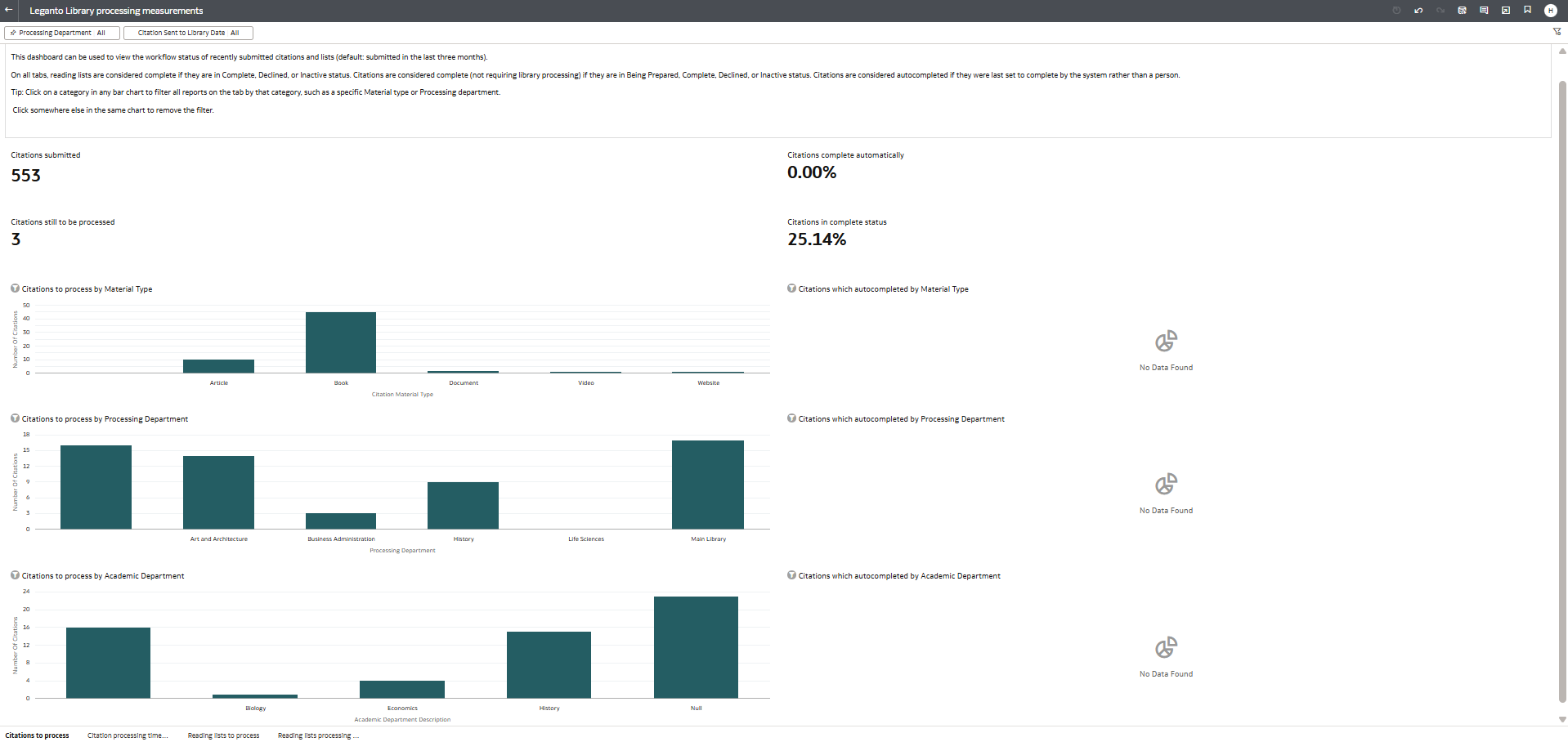
For more information, see Leganto Library Processing Measurement Dashboard.
Indicate Items Which Are Open Educational Resources (OER)
Leganto now provides an automated way to identify Open Educational Resources in lists. A new configurable mapping table, available under Configuration > Leganto > List Management > Open Educational Resources, enables libraries to define which source URL domains and license types qualify as OER at their institution.

The new mapping table enables libraries to:
- Enable or disable predefined OER URL domains and license types
- Add new, edit existing, or remove URL domains and license types
Some commonly used OER source domains and the Creative Commons license types that are most widely considered to be OER are enabled by default. Two license types (CC BY-ND 4.0 and CC BY-NC-ND 4.0) are included in the table but disabled by default.
Changes to the OER table do not retroactively update existing items. After modifying the table, you can apply the updated OER rules to existing items by running the Reading List Citation Update Task job (Admin > Manage Jobs and Sets > Run a Job) and selecting the Calculate OER option.
Leganto automatically identifies items as OER and updates their metadata when new or updated items match the defined domains or license types. For items added from Primo or Summon, Leganto checks the item metadata for an OER indicator. If the item includes the OER attribute, it's automatically marked as OER in Leganto.
This update introduces a centralized approach to identifying OER materials in Leganto, helping libraries apply consistent rules while reducing manual effort. For details, see Open Educational Resource (OER) Item Identification and Configuration.
This release introduces the OER configuration table and metadata support only. A visual indicator for OER items in the Leganto user interface and Analytics support for OER will be introduced in future releases.
New Editions Available for Purchase
Leganto now supports an end-to-end workflow for identifying and requesting newer editions of books in lists. This functionality is available for institutions that use Rialto and have the rialto_new_edition parameter (Configuration > Leganto > Features > Leganto Features) set to true.
When this parameter is enabled, users can check whether the book has a newer edition by opening an item’s details and navigating to the Related items tab.
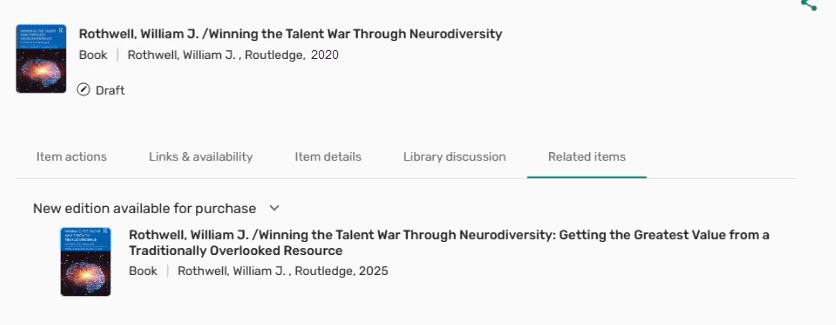
Institutions can also enable the new check_new_edition parameter (Configuration > Leganto > UI > Citation Menu) to add the Check for new edition option to the item’s row action menu, which opens the item’s Related items tab if a new edition of the book is available.

When a newer edition is available for purchase, it appears in the New edition available for purchase section of the Related items tab. From there, instructors can submit a purchase request using the Request purchase button. Instructors can monitor the progress of their request by seeing the status (Library processing, Purchase completed, Purchase request declined) in the Library services section under the Activity tab of the item's details.
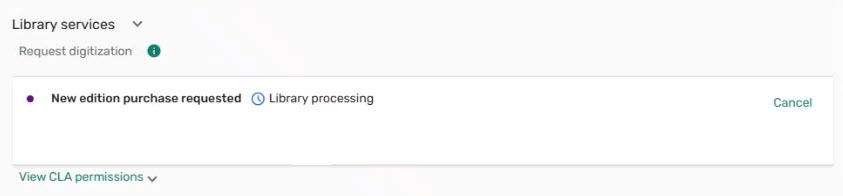
The system tag next to the original item in the brief view also enables instructors to track the progress of their request.

Requests for newer editions appear in Rialto under Collection Development > Orders > Faculty-Recommended Titles, where librarians can review and approve them. Once approved, the purchase is processed automatically. When a new edition becomes available, instructors see a New Edition Available tag next to the original item and a notification bar at the top of the list with a Show editions button.

Selecting Show editions leads instructors to a screen where they can review the editions and choose whether to replace the original item, add the new edition alongside it, or decline the new edition.
This enhancement simplifies the process of identifying and requesting newer editions of books, helping keep lists current and aligned with available materials. For details, see Enabling Instructors to Request New Editions of Books.
Infrastructure Enhancements for Upcoming Features
The February release includes significant behind-the-scenes infrastructure work to support several upcoming enhancements planned for later releases. This work includes preparation for the following initiatives:
- Handling reading list items linked to removed e-resources (LENH-I-6031)
- Enriching citations with additional metadata, such as open access status, OER indicators, and inventory type
- Supporting multiple file uploads per citation
These infrastructure updates ensure that Leganto can deliver these enhancements reliably as they are introduced. For more information about planned developments, see the 2026 roadmap.
Set "No List Expected" in Bulk Using Course Bulk Update Task
Idea Exchange URM-240421The Course Bulk Update job (Admin > Run a Job > Courses > Course Bulk Update) now supports the No list expected attribute. Staff can select the No list expected checkbox in the job and choose either Add No list expected or Remove No list expected for all courses in the selected set, which enables efficient large-scale updates.

A new No list expected facet is also available on the Fulfillment > Courses page. It enables staff to filter courses based on whether the No list expected attribute is selected (Yes) or not selected (No). This enhancement improves course management by enabling institutions to quickly identify and organize courses that are intentionally not expected to have lists.

Course Material Visibility in Rialto
There is now a deeper integration between Rialto and Leganto that provides greater visibility into course-related materials during marketplace searching and selection. Rialto now includes course information for book citations with ISBNs that are associated with current and future courses. This data is updated on a weekly basis.
Two new filters are available in Rialto's advanced search for institutions that use Leganto:
- Reading List Course Dates (Current and Future) — This filter limits results to titles that appear on either active or upcoming Leganto courses.
- Reading List Tags — This filter enables libraries to refine results based on tags applied in Leganto. Institutions define these tags themselves.

Titles that appear on Leganto reading lists display a Course Material badge in Rialto at both the work and offer levels. The badge indicates that the title is required or recommended for one or more current or future courses. Hovering over the badge displays the associated course codes.


When an item associated with a Leganto reading list is added to a Rialto cart, citations with a matching ISBN are linked to the newly acquired inventory. Citation alerts and statuses are updated as the order progresses, based on the rialto_purchase_complete parameter (Configuration > Leganto > List Management > Course Reserves Automatic Statuses). Institutions can also configure whether citations with equivalent ISBNs (such as different formats or editions of the same book) are eligible for linking with the allow_citation_link_for_alternate_isbn parameter (Configuration > Collection Development > General > Other Settings).
This enhancement strengthens coordination between Leganto course activity and Rialto acquisitions, supporting timely identification and fulfillment of course-driven materials. For a full overview of these functionalities, see Leganto Integration in the Rialto documentation.
Additional Enhancements
- July 2026 Leganto URM-331403
Leganto now enables institutions to control whether changes made by library staff update the list's Initial Request for Review and Current Request for Review fields in Alma.Previously, these fields were updated only when changes were made by instructors, course operators, or collaborators. Changes made by library staff did not affect the review request information.
To provide greater flexibility, a new update_review_list parameter has been added under Configuration > Leganto > List Management > Settings. The parameter supports the following values:
- instructor (default value) – The Initial Request for Review and Current Request for Review fields are updated only when changes are made by instructors, course operators, or collaborators.
- all – The Initial Request for Review and Current Request for Review fields are updated when changes are made by instructors, course operators, collaborators, or library staff.
This enhancement provides greater flexibility in how review requests are tracked and helps institutions align the process with local review workflows.
- July 2026 Leganto URM-321487
Leganto now supports AI-generated alternative text (alt text) for images. Institutions can enable or disable this functionality with the alt_text_using_AI parameter (Configuration > Leganto > Features > Leganto Features). By default, the parameter is set to true.When the feature is enabled, users can select the new Fill with AI option next to the Alt text field when adding a new image or editing an existing one. Leganto then analyzes the image and generates a suggested description, which is automatically populated in the field.
 Fill with AI button
The generated text is fully editable, so users can review and modify the image description before saving. Users can also regenerate the description if needed and provide feedback on the generated content with the Rate this result button.
 Rate this result button
This enhancement simplifies the creation of high-quality alt text and helps institutions improve the accessibility of image-based content.
- July 2026 Leganto URM-327854
The visual focus indicator for buttons in Leganto has been enhanced to improve visibility and contrast during interaction.Previously, focused buttons were highlighted with a single colored outline. With this update, a white ring has been added between the button and the focus outline, creating greater visual separation and making the focused element easier to identify.
 New visual focus indicator
This UI enhancement improves accessibility across Leganto, with particular benefit for users who navigate the interface using a keyboard.
- July 2026 Leganto Idea Exchange URM-252973, URM-327588
Libraries can now perform syllabus bulk imports directly in Leganto. To enable this capability, institutions must submit a support ticket.Once enabled, the Syllabus option becomes available in the Type dropdown under the Actions tab of the Reading List Loader integration profile (Configuration > General > External Systems > Integration Profiles). After selecting Syllabus, users then need to enter the Input File Path, which specifies the path to the input files on the FTP server, and then select Run to perform a bulk upload of syllabus files.
 Syllabus option in the Reading List Loader profile
It is also possible to map the syllabus files to course codes. To enable course association, add an Excel or tab-delimited file named coursemapping to the Input File Path field. The file must contain the following columns:
- File_name
- Course_code
- Section_id
- Searchable_id1
- Searchable_id2
- Searchable_id3
This example file shows the required format for the coursemapping file.
During the import process, Leganto uses this file to link imported lists to the corresponding courses. If no course mapping file is provided, or if a specified course cannot be found, the list is still created but is not associated with a course. Any association issues are recorded in the error report.
This feature streamlines the import of syllabus content and reduces the need for manual loading of individual files.
- July 2026 Analytics and Insights URM-325763
A new field, Reading List Subjects, has been added to the following Alma Analytics Subject Areas:- Course Reserves (Analytics > Access Analytics > Create > Analysis > Course Reserves > Reading Lists)
- Leganto Instructor Usage Events (Analytics > Access Analytics > Create > Analysis > Leganto Instructor Usage Events > Reading Lists)
- Leganto Student Usage (Analytics > Access Analytics > Create > Analysis > Leganto Student Usage > Reading Lists)
For more information, see Course Reserves, Leganto Instructor Usage Events, and Leganto Student Usage.
- July 2026 Analytics and Insights URM-328618
The following fields have been removed from the Course Reserves, Leganto Instructor Usage Events, and Leganto Student Usage Alma Analytics Subject Areas:- Citation Digital File Date Added (Calendar) (to be deprecated)
- Article End Page (to be deprecated)
- End Page (to be deprecated)
- End Page 2 (Calendar) (to be deprecated)
- Start Page (Calendar) (to be deprecated)
- Start Page 2 (Calendar) (to be deprecated)
- July 2026 Leganto URM-326625
Several improvements have been introduced to the file upload experience in Leganto:- During file upload, the Cancel option is now replaced with Cancel upload. Selecting Cancel upload returns the user to the upload component screen.
 Cancel upload button
 - If a file upload fails or is manually canceled, the failure state is now shown with a red X icon for clearer visual indication.
- When uploading a folder containing multiple files, canceling a single file upload no longer stops the entire process. Instead, the canceled file is marked with a red Upload canceled label and an X icon, while the remaining files continue to upload.
These improvements enhance the user experience by providing clearer feedback and more consistent behavior during file uploads.
- During file upload, the Cancel option is now replaced with Cancel upload. Selecting Cancel upload returns the user to the upload component screen.
- July 2026 Leganto URM-322286
The advanced_publish_options setting has been removed from the table under Configuration > Leganto > List Management > Publishing, as it is no longer relevant following the deprecation of the classic user interface in 2025. - June 2026 Leganto URM-324647
The syllabus configuration pages in Leganto are now available to all users with access to Leganto configuration. Previously, these settings were managed only by Ex Libris Support.The following configuration pages are now fully accessible:
- Configuration > Leganto > Syllabus > Settings
- Configuration > Leganto > Syllabus > Match by Fields for Syllabus
These pages enable libraries to directly configure syllabus-related settings and tailor item matching behavior to local workflows and requirements.
- June 2026 Leganto URM-322768
The daily Leganto Detailed Notifications Email Letter has been updated to reduce redundant information. Previously, this email notification listed all changes made throughout the day, even when earlier updates were no longer relevant.With this update, the email now includes only the latest change of the day for the following events:
- A submit lists by date was added to your course
- The due date is updated for an item
- New edition available
This enhancement reduces noise in notification emails and ensures that course owners see only the most up-to-date information.
- June 2026 Leganto URM-231491
Leganto now supports HTML formatting and hyperlinks in the copyright_clearance_header and digitization_request_header labels (Configuration > Leganto > General > Labels). Previously, these labels supported plain text only.With this update, libraries can enhance these labels by:
- Adding hyperlinks (for example, to copyright policies or external resources)
- Applying basic formatting, such as bold or italic text
- Including email links (mailto tags) for direct contact
This enhancement enables institutions to deliver clearer and more accessible copyright and digitization information to instructors and students.
- June 2026 Analytics and Insights URM-322477
New field, Citation Uploaded File Default, has been added to the following Alma Analytics Subject Areas. It indicates which uploaded file is selected as the default for an item, based on explicit selection or creation date. If a file is not explicitly marked as the default on a citation, the file uploaded first is the default.- Course Reserves (Analytics > Access Analytics > Create > Analysis > Course Reserves > Reading List Citations)
- Leganto Instructor Usage Events (Analytics > Access Analytics > Create > Analysis > Leganto Instructor Usage > Citations)
- Leganto Student Usage (Analytics > Access Analytics > Create > Analysis > Leganto Student Usage > Citations)
For more information, see Course Reserves, Leganto Instructor Usage Events, and Leganto Student Usage.
- June 2026 Analytics and Insights URM-315288
A new field, Number of Sections, has been added to the Course Reserves (Analytics > Access Analytics > Create > Analysis > Course Reserves > Reading List Citations) Subject Area. It counts the number of sections in a list.For more information, see Course Reserves.
- June 2026 Analytics and Insights URM-252200
New fields, Additional Author, Additional Title, Other Standard ID, PMID, Remote Record ID and Series Title Number, have been added to the following Alma Analytics Subject Areas.- Course Reserves (Analytics > Access Analytics > Create > Analysis > Course Reserves > Reading List Citations)
- Leganto Instructor Usage Events(Analytics > Access Analytics > Create > Analysis > Leganto Instructor Usage > Citations)
- Leganto Student Usage (Analytics > Access Analytics > Create > Analysis > Leganto Student Usage > Citations)
For more information, see Course Reserves, Leganto Instructor Usage Events, and Leganto Student Usage.
- June 2026 Analytics and Insights URM-326926
A new field, Students that Accessed Resources, has been added to the Leganto Student Usage (Analytics > Access Analytics > Create > Analysis > Leganto Student Usage > Student Usage) Subject Area. It displays the number of unique students who clicked a View online link, viewed a file, or downloaded a file.For more information, see Leganto Student Usage.
-
May 2026 Fulfillment and Resource Sharing URM-175629
Institutions can now customize copyright status labels in Alma, which enables libraries to align terminology with local regulations and practices.You can configure these labels in Configuration > Fulfillment > Copyright Management > Citation Copyright by updating the text in the Description column.
 Citation Copyright table - Updated fair use label
Institutions cannot add/delete entries or modify the underlying code in the Citation Copyright table; only the display text (Description) can be edited.
After updating the Description column, the custom label appears in Fulfillment > Course Reserves > Citations for all items with the corresponding copyright status. Updated labels are also reflected in facets and are available when applying bulk changes using Change Copyright Status.
 Custom label for the fair use status
 -
May 2026 Leganto Idea Exchange URM-322608
When exporting a resource list from Leganto, the export now displays up to ten individual page ranges per item. Page ranges are supported in PDF, Excel, and Word exports.In Word and PDF exports, page ranges are displayed on a single line, separated by commas. In Excel exports, the previous Item start page and Item end page columns have been replaced with a single Item Page Range column, which displays all page ranges separated by commas.
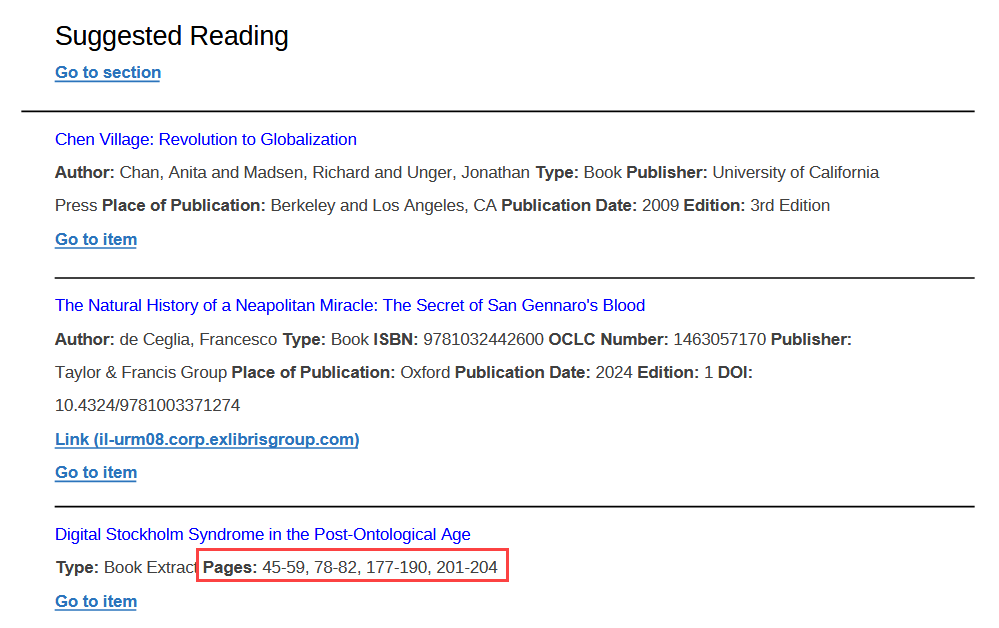 Multiple page ranges in an exported PDF
For Word exports, page ranges are included only when the Bibliography style is set to Expanded Reading List Style during exporting.
- May 2026 Leganto URM-225391
Leganto now includes the CC0 (Public Domain) license in the Creative Commons license options when editing an item or a list._license_option_in_Leganto.png?revision=1) New CC0 license in Leganto
New CC0 license in LegantoThe CC0 (Public Domain) license has also been added to the Creative Commons License dropdown under Citation Parameters when editing an item in Alma.
Items with an assigned CC0 (Public Domain) license display an icon and description in the Item details tab in Leganto.
_license_icon_%2526_description_in_Leganto.png?revision=1) CC0 license icon and description in Leganto
CC0 license icon and description in LegantoThe Creative Commons license dropdown in Leganto only appears for items without an existing license type.
-
May 2026 Analytics and Insights URM-324646
A new field, Portfolio IDs, is now available in the following Analytics Subject Areas:-
Course Reserves (Analytics > Access Analytics > Create > Analysis > Course Reserves > Reading List Citations)
-
Leganto Instructor Usage Events (Analytics > Access Analytics > Create > Analysis > Leganto Instructor Usage > Citations)
-
Leganto Student Usage (Analytics > Access Analytics > Create > Analysis > Leganto Student Usage > Citations)
-
Purchase Requests (Analytics > Access Analytics > Create > Analysis > Purchase Requests > Reading List Citations)
For more information, see Course Reserves, Leganto Instructor Usage Events, Leganto Student Usage and Purchase Requests. -
-
May 2026 Analytics and Insights
Two new fields, Availability and Availability Type, are now available in the following Analytics Subject Areas:-
Course Reserves (Analytics > Access Analytics > Create > Analysis > Course Reserves > Reading List Citations)
-
Leganto Instructor Usage Events (Analytics > Access Analytics > Create > Analysis > Leganto Instructor Usage Events > Citations)
-
Leganto Student Usage (Analytics > Access Analytics > Create > Analysis > Leganto Student Usage > Citations)
These fields identify the specific source or format through which a list item is accessible and group these values into broader categories to support higher‑level reporting and analysis.For items in lists created between January 2025 and April 2026, availability is displayed as None by default. To obtain the correct availability, open the list and scroll to the bottom. Analytics will be updated accordingly after 24 hours.For more information, see Course Reserves, Leganto Instructor Usage Events, and Leganto Student Usage.
-
-
May 2026 Analytics and Insights URM-322606
New fields, Citation Uploaded File Accessibility Comment, Citation Uploaded File Accessibility Information and Citation Uploaded File Alt Text are now available in the following Analytics Subject Areas:-
Course Reserves (Analytics > Access Analytics > Create > Analysis > Course Reserves > Reading List Citations)
-
Leganto Instructor Usage Events (Analytics > Access Analytics > Create > Analysis > Leganto Instructor Usage > Citations)
-
Leganto Student Usage (Analytics > Access Analytics > Create > Analysis > Leganto Student Usage > Citations)
These fields let libraries record the file's accessibility status, add any related comments and include alt text for image-based items.For more information, see Course Reserves, Leganto Instructor Usage Events and Leganto Student Usage. -
- April 2026 Leganto Idea Exchange URM-316917
Leganto now supports uploading multiple file formats for a single item. The number of formats per item is not limited.Copyright is still managed at the item level, not per file format. Only upload alternative formats of the same work (for example, PDF and Word versions of the same essay). Do not upload different works under a single item.
To enable this feature, set the new citation_multiple_file_formats parameter (Configuration > Leganto > List Management > Settings) to one of the following values:
- all – Both instructors and library staff can upload multiple formats
- library – Only library staff can upload multiple formats
Leaving the parameter blank, which is the default configuration, disables the feature.
The citation_multiple_file_formats parameter applies only in Leganto. Library staff working in Alma can upload multiple formats regardless of this parameter's setting.
When the citation_multiple_file_formats parameter is enabled, and a new file is uploaded to a list (or you make changes to an existing item with Edit item), users see the new Add additional format button. Selecting this option enables you to upload another format of the same content and add it to the same list item.
 Add additional format button
After selecting Add additional format, a pop-up window appears where the user can modify the file name and, if configured by the institution, enter accessibility information before adding the additional file.
Adding a different file formatAll uploaded formats are displayed together under the same item on the upload screen. Users may rename any format by changing its File display name. After uploading the desired formats, the rest of the file upload process remains unchanged.
 Two format options of the same file
After the item is added to a list, all available formats are visible in the Links & availability tab. Users control which format appears first—both in Links & availability and as the primary option in the brief view (including when selecting View or Download)—by opening the row actions menu next to the desired file and choosing Set default. By default, the first format you added during file upload is set as the primary format.
 An uploaded item with multiple format options
This update enables institutions to support different user preferences and accessibility needs without creating duplicate items in their lists. For details, see Enabling the Upload of Multiple File Formats to One List Item.
- April 2026 Leganto URM-316920
Leganto users can now add alternative text to images. This enhancement improves accessibility by enabling image descriptions (alternative text) for users who are blind or have low vision.When uploading an image or editing an existing item that contains an image, users can enter alternative text that explains the image's content or purpose in the Alt text field. Adding alternative text is optional and does not require configuration.
 Alternative text field for images
TIFF/TIF files are not supported as images in Leganto. For these file types, the View option and the Alt text field are not available.
- April 2026 Leganto URM-323559
Leganto now supports filtering items by their availability. For now, the availability filter is visible only to list administrators (instructors and library staff) and is not available to students. Availability-based filter
The new filter includes the following availability types:
- Physical
- Online (includes repository electronic resources, uResolver links, digital resources, and web links)
- File
- No inventory
From now on, availability is automatically assigned to all newly added items. In the April production environment, the ComputeCitationsFieldsJob job will run to update the availability value for all items in lists created from 2025 onward. This job will update each item's last modification date.
For certain third-party integrations (BrowZine, HathiTrust, Unpaywall, Bolk, and DCS), items in lists created between 2025 and April 2026 will be updated dynamically when a user opens the list and interacts with it (for example, by accessing an item or scrolling through the list).
- April 2026 Leganto URM-321001
Leganto now displays Open Access and Peer Reviewed labels for items returned from Summon searches in Search the library. Open access label
 Peer Reviewed label
This enhancement helps users more easily identify openly available resources and scholarly, peer-reviewed content when selecting materials for their lists.
- April 2026 Leganto URM-224662
Cite it! now supports adding content from the United Nations' official website. This site provides a comprehensive repository of authoritative source documents, global reports, speeches, resolutions, and information on international issues, making it a valuable resource for research in various areas. - April 2026 Leganto URM-225481
Cite it! now also supports adding content from Legislation.gov.uk, the official online database of UK statute law. This site provides free, authoritative access to materials essential for legal studies, policy research, and courses addressing governance, rights, and regulation. -
April 2026 Analytics and Insights URM-321923
A new field, Access Type, has been added to the following Alma Analytics Subject Areas. The access type field displays whether a citation is Open Access (OA) or an Open Educational Resource (OER).-
Course Reserves (Analytics > Access Analytics > Create > Analysis > Course Reserves > Reading List Citation)
-
Leganto Instructor Usage (Analytics > Access Analytics > Create > Analysis > Leganto Instructor Usage > Citations)
-
Leganto Student Usage (Analytics > Access Analytics > Create > Analysis > Leganto Student Usage > Citations)
-
Purchase Requests (Analytics) (Analytics > Access Analytics > Create > Analysis > Purchase Requests (Analytics) > Reading List Citation)
For more information, see Course Reserves, Leganto Instructor Usage, Leganto Student Usage, Purchase Requests (Analytics).
-
- March 2026 Leganto URM-319963
Leganto now supports displaying the request pane for physical items for Primo NDE customers, which enables users to place physical item requests directly from Leganto. When set up, the request pane appears in the Links & availability tab when viewing an item’s details. Primo requests section in the Links & availability tab
This functionality is controlled by the new primoNDE_requests parameter (Configuration > Leganto > Discovery > Primo Settings), which can be set to true or false (default: false). Set the parameter to true to enable requesting physical items within Leganto.
This enhancement provides Primo NDE institutions with greater flexibility by extending physical item request capabilities into the Leganto experience.
- March 2026 Fulfillment and Resource Sharing Idea Exchange URM-253833
Leganto now enables libraries to customize the labels of workflow tags, including those used for integrations with external systems such as Bolk and DCS.To customize a tag, navigate to Configuration > Fulfillment > Courses > Reading List Citation System Tags, select More actions, and then choose Customize. Libraries can then update the text shown in the Description column to better reflect local terminology or workflows.
 Reading List Citation System Tags
 - March 2026 Leganto Idea Exchange URM-142772
Leganto now enables libraries to automatically set the status of open-access items when they are added to a list from the Search the library pane. Libraries control which status should be applied with the new citation_open_access (Configuration > Leganto > List Management > Course Reserves Automatic Statuses) parameter. By default, the parameter is left blank.When configured, open-access items are assigned the selected status upon addition to a list, eliminating the need for manual updates. This helps keep list statuses accurate while reducing routine administrative work.
- March 2026 Leganto URM-319879
The item availability design has been updated to make resource access options more prominent. Files and online links in the brief view now use redesigned buttons that are more prominent. New-style View online and Download article buttons
This update helps users more easily recognize resource availability.
- March 2026 Leganto Idea Exchange URM-319983
Leganto now has clearer, more context-specific messages when users attempt to access an unavailable list.If a list exists but has not yet been published (code label list.noAccess.draft), users see a message explaining that the list is unavailable because it is still in draft status, with guidance to contact the instructor or the library for further information.
 Error when a list is not yet published
If a course does not have a list (code label list.noAccess.no.list), the error message indicates that no list currently exists for the course and similarly advises users to contact the instructor or the library if they have questions.
 Error when the course does not have a list
By clearly distinguishing between unpublished lists and courses without lists, this update helps students better understand why content is unavailable and helps the library troubleshoot.
- March 2026 Leganto URM-247749
The description of the display_sticker_price parameter (Configuration > Leganto > Features > Leganto Features) has been updated to more accurately reflect its behavior. The description now reads: Whether to display sticker price in library view. true/false. For details on configuring this parameter, see Configuring Sticker Prices. - March 2026 Analytics and Insights URM-XXXXXX
The following fields have been removed from the Leganto Student Usage and Course Reserves Subject Areas:- List Last Set to Complete Date — To Be Deprecated (Leganto Student Usage > Reading Lists)
- List Last Set to Complete Date (Calendar) — To Be Deprecated (Leganto Student Usage > Reading Lists)
- Leganto List Last Set to Complete Date — To Be Deprecated (Course Reserves > Reading Lists)
- Leganto List Last Set to Complete Date (Calendar) — To Be Deprecated (Course Reserves > Reading Lists)
These fields have been replaced by Leganto Reading List Last Set Complete By, Leganto Reading List Last Set Complete Date, and Leganto Reading List Last Set Complete Date (Calendar), which were added in the December release. The new fields contain more complete data and store the date when the list was last set to complete, either manually or automatically by the system.
- February 2026 Leganto URM-234530
Leganto now supports working at higher zoom levels to improve accessibility. Students can use Leganto at up to 400% zoom, and instructors can work at up to 200% zoom, without loss of functionality or layout issues. - February 2026 Leganto URM-316893The default empty-state messages in Leganto have been updated to reflect current interface terminology. Unless you customized system labels, the following out-of-the-box labels now reference List catalog instead of the deprecated All lists tab:
- my_lists.student.empty_state – New label: You don’t have any lists yet. Change your search to List catalog to find lists.
- my_lists.empty_state – New label: You don’t have any lists yet. Create a list or change your search to List catalog.
This update removes references to outdated terminology and aligns system messages with the current tab names in the interface.
- February 2026 Leganto URM-244198
Job reports for Leganto notifications now include detailed counts of successful and failed email deliveries for Detailed Notifications, Full Detailed Notifications, and Upcoming Due Dates Notifications.When notifications are sent through a job, Leganto now generates events that identify successful and failed email deliveries. Total counts for each outcome are displayed in parentheses. Selecting an event opens an Event Report that shows the primary identifiers of users whose emails were delivered successfully or failed.
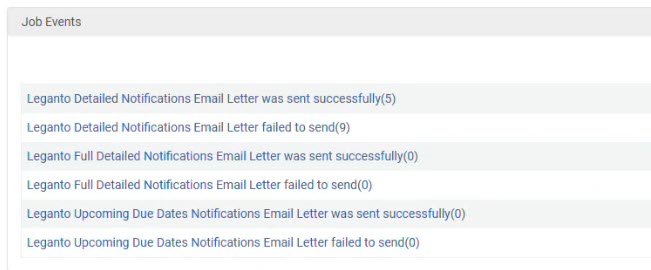 Reports on sent emails
This enhancement provides institutions with clear visibility into email delivery status, supporting more effective tracking and troubleshooting of notification jobs.
- February 2026 Leganto URM-319177
The Bolk integration now provides two separate actions under Fulfillment > Course Reserves > Citations: Create Bolk Request and Update Bolk Request. Previously, these actions were combined into a single dynamic button that could not be customized or reordered. Create Bolk Request and Update Bolk Request in the Action order
With this update, each action can be configured independently, like other row actions in Leganto. Institutions can choose to display one or both actions and control their order in the row action list to better align with local workflows.
- February 2026 Leganto URM-252613
Two Leganto email letters—Link Marked As Broken and Mark As Broken Resolved—were previously unavailable in Norwegian. They are now fully translatable to ensure consistent, localized notifications and more accurate communication for Norwegian-speaking users. - February 2026 Leganto URM-
The Citation Style Language (CSL) styles were refreshed from the central repository as of the January release, which includes a snapshot from October 2025. - January 2026 Fulfillment and Resource Sharing URM-315436
Alma now records which user uploaded a file to a citation. When a file is uploaded, the system stores either the uploader username or, if the file was added by a job, the job ID.In Alma, this information is visible in the File Upload component under the label Uploaded by. This information will be added to analytics in a future release
 Information on who uploaded a file
 - January 2026 Leganto URM-315184
Leganto now supports copying LTI links to use in Moodle when using Moodle 4.5. Moodle 4.5 no longer accepts the full launch URL. When instructors select Copy link to Moodle in the Share Link dialog in Leganto, Leganto now automatically copies only the required URL segment whenever the LMS is detected as Moodle 4.5 or later.Additionally, the Moodle linking help page in the Share Link popup now redirects to updated documentation specifically for Moodle 4.5, ensuring institutions receive setup guidance appropriate for their LMS version.
This enhancement eliminates the need for instructors to manually edit URLs when creating shareable links in Moodle, thereby reducing setup errors and enabling a smoother workflow.
- January 2026 Leganto URM-306092
Leganto now displays the original list name and the associated course code(s) on the Duplicate List screen. The course code has a Copy to Clipboard icon next to it, which makes it easy for instructors to reuse elements of the old code when searching for the new one. Original list name and the associated course code
This improvement streamlines rollover workflows and reduces errors when linking lists to new course codes based on previous ones.
- January 2026 Leganto URM-314959
The exit icon on the right pane, which opens when viewing or editing the full details of an item or when adding items, now displays the updated label Close pane (Esc) instead of Close pane. Updated Close pane tooltip
This enhancement provides clearer guidance for the available keyboard shortcut and supports quicker navigation back to the list.
- January 2026 Analytics and Insights URM-317449
Previously, when users added an item through Cite it! and a matching record was located in the library repository, the citation origin in the analytics reports was set to repository. This prevented customers from seeing the true source of the added item.Items added through Cite it! are now labeled with the origin CiteIt regardless of whether a matching repository record is found. This update enables more accurate analytics, helping institutions better track how items are added to reading lists.
- January 2026 Analytics and Insights URM-316023
The default year for Leganto Usage Dashboard has been changed to 2025. This refers to the academic year. - January 2026 Leganto URM-XXXXXX
Several accessibility issues were resolved in January. The majority of these updates improved screen reader support by adding missing labels and correcting improper status announcements. Further accessibility enhancements were implemented in zoom functionality, color contrast, tab navigation, and focus order. - January 2026 Leganto URM-316495
Shareable links for courses now open on the My Lists tab instead of the List Catalog. As a result, instructors see the Create List button immediately after opening a link, enabling them to start a new list with the linked course preselected.This update ensures that users land directly in the most relevant workspace, where they can view existing lists for the course and begin creating new ones without extra navigation.
- January 2026 Leganto URM-316496
List headers now have a cleaner and more accessible visual layout. List titles now appear on the first row, while list information and links are grouped on a separate second row for improved clarity. New list header layout
Additionally, list titles are now clickable and open the List Information panel. On hover, titles display a tooltip with the full list name. These refinements make it easier for users to navigate a list, access its details, and understand its content.
Resolved Issues
- July 2026 Leganto SF: 10577462 URM-329757
Customizing descriptions in the Citation Copyright code table (Configuration > Fulfillment > Copyright Management > Citation Copyright) previously caused the Copyright Status field to disappear from the fulfillment page in Alma (Alma > Fulfillment > Citations). This was fixed so that copyright status information now continues to display correctly after customizing the Citation Copyright code table. - July 2026 Leganto SF: 10562762 URM-329084
When a list was published with the Anyone Restricted, All Students Full publication status, digital files were incorrectly visible to guest users. This was fixed so that digital files are now properly restricted and visible only to authenticated users, as expected for this publication setting. - July 2026 Leganto SF: 08437800, 08322141, 105919, 10600815 URM-328296
Some bibliographic styles could not be saved due to validation errors. The issue occurred because several existing styles were no longer supported, had been renamed or replaced. This was fixed by updating the affected style mappings so that unsupported styles are now replaced with valid alternatives. - July 2026 Leganto SF: 08426013 URM-327960
When display_cms_entry_by_cms_role was set to true, users who were instructors in one LMS course but students in another could still create lists in courses where they only had a student role. This was fixed so that the Create new list option is now correctly displayed based on the user’s role in the specific course. - July 2026 Leganto SF: 08376986 URM-325734
When using the australian-guide-to-legal-citation bibliographic style in Quick Cite, external links from the Source field were incorrectly displayed in the item output. This was fixed so that URLs from the Source field display correctly when using this bibliographic style. - July 2026 Leganto SF: 08357437 URM-324691
When importing a list of items via the AI Syllabus Assistant from Word or PDF files, only a subset of items was sometimes extracted when working with longer documents. This was fixed so that all items in the uploaded document are now more likely to be correctly identified and imported as expected. - July 2026 Leganto SF: 08341101 URM-323782
When using the Manual Entry form, the Start Page and End Page fields would disappear when you selected More Item Details. This was fixed so that the page range fields are now correctly shown in the expanded item details view. - July 2026 Leganto SF: 08323273 URM-323066
Thumbnail images were not displayed for some journal items, and placeholder images were shown instead. This was fixed so that journal items now correctly display their thumbnail images when available. - July 2026 Leganto SF: 08226079 URM-317412
When using the Rialto search in Leganto, selecting the More Details button caused the availability section to hang and not load. This was fixed so that availability now loads correctly and displays the expected information for items available via Rialto. - June 2026 Leganto SF: 08421393 URM-328224
Adding Additional Format files did not always complete successfully. In some cases, the file appeared to upload but could not be saved, and although it could be added in Alma, the file was not actually attached to the item. This was fixed so that additional files are now consistently saved and properly associated with the target list item. - June 2026 Leganto SF: 08400571 URM-327793
It was not possible to manually add more than one Website item in Leganto, as the process would freeze at step 2 when entering the second item. This was fixed so that multiple Website items can now be added manually without any issues. - June 2026 Leganto URM-327787
In the Alma Course Instructors tab, some instructors appeared with only an icon and no name or additional details, typically when the user had been removed from the system but was still associated with the course. This was fixed so that the current instructor information is now displayed correctly. - June 2026 Leganto SF: 08270022 URM-320842
In library search, physical inventory was sometimes displayed for the wrong campus, even when users were logged into a specific campus view. In addition, the More Details panel did not always show inventory correctly. In both cases, the information appeared correctly only after the item was added to the list. This was fixed so that campus-specific inventory and More Details information are now displayed accurately in the search results. - May 2026 Leganto SF: 08380865 URM-325952
Items could be added to a locked list from the clipboard, even though locked lists should not allow new items to be added. This was fixed so that items can no longer be added from the clipboard to locked lists. - May 2026 Leganto SF: 08359381, 08396002 URM-324529
When adding items using Cite It! (both the bookmarklet and browser extension), tags could not be added to the item, even though tagging worked as expected in Leganto. This was fixed so that tags are now available and can be added when using the Cite It! bookmarklet and extension. - May 2026 Leganto SF: 08345560 URM-324083
When linking an item to a library resource using Manage Links to Library, the material type was incorrectly changed, even when the link_to_library_locate parameter (Configuration > Leganto > Features > Leganto Features) was set to overlay_no_type. This was fixed so that the material type is no longer overridden during the linking process when this setting is configured. - May 2026 Leganto SF: 08336619 URM-323770
When using the in-section search, Leganto highlighted the search term, but the list did not actually filter. Instead, it showed all items in the section, not just the relevant ones. This was fixed so that searches within a section now correctly filter the list to show only matching items. - May 2026 Leganto SF: 08334764 URM-323754
When editing an item and entering ISBN, ISSN, or DOI, each character entered triggered the enrichment process, causing interruptions while typing and loss of focus from the edited field. This was fixed so that enrichment no longer interrupts typing, and focus remains in the correct field during editing. - May 2026 Leganto SF: 08329844 URM-323133
When an instructor used Student View, exporting a list to PDF generated a blank file. In addition, items with a Ready for Processing status were incorrectly included in exports, and lists containing hidden items could result in no data being displayed for students. All of these export-related issues were fixed. - May 2026 Leganto SF: 08363118 URM-325279
Items added using the syllabus assistant did not apply the default copyright statuses defined in the Citation Default Copyright Status table, and were instead set to Not Determined. This was fixed so that items created via the syllabus assistant now use the configured default copyright statuses as expected. - May 2026 Leganto SF: 08341151 URM-323883
When uploading a file that exceeds the maximum allowed size, the error message was only displayed when using Add > Upload file, but not when uploading via manual entry or when adding a file while editing an item. In those cases, the upload failed without any warning. This was fixed so that the file size error message is now consistently displayed across all upload methods. - May 2026 Leganto SF: 08336581 URM-323611
It was not possible to add a new item from the library search to an empty section using drag-and-drop. This was fixed so that items can now be successfully dragged and added to empty sections. - May 2026 Leganto SF: 08281273 URM-322993
When editing a list in Alma, selecting the icon next to an instructor’s name in the Courses tab did not display the instructor’s contact information as expected. This was fixed so that the contact details now open correctly when selecting the instructor icon. - April 2026 Leganto URM-320675
In Mozilla Firefox, selecting View PDF occasionally redirected users to the Leganto login page or displayed an error screen. This was fixed so that the View PDF action now consistently opens the PDF in Firefox. - April 2026 Leganto URM-238216
Some Google search results were directing users to an institutional login page instead of the intended public Leganto page because Google had crawled and indexed Leganto public URLs without preserving the required permalink parameters. This was resolved by disabling search engine crawling of Leganto public pages, preventing incorrect links from appearing in Google results. - April 2026 Leganto SF: 08335999 URM-323657
Although Book Extract and Book Chapter items have Start Page and End Page defined as mandatory fields, it was still possible to create these items in Leganto without entering page ranges. This was fixed so that these item types must always have a Start Page and End Page when being added to Leganto. - April 2026 Leganto SF: 08336137 URM-323643
When adding a URL to an item’s public note, the rich-text editor did not always apply the hyperlink correctly. In some cases, the formatting appeared correct at first, but after a refresh, the link broke or displayed incorrect HTML content. This was fixed so that URLs added to public notes are now properly formatted and consistently saved as valid hyperlinks. - April 2026 Leganto SF: 08323295 URM-323314
Even when reading_list_auto_locate_citation_upon_creation was set to false, items were still being automatically resource located upon creation. This was fixed so that resource locate is no longer triggered when the parameter is disabled. - April 2026 Leganto SF: 08116275 URM-316785
When instructors rolled over a list and its status was set to RolledOver, the banner above the rolled-over list incorrectly displayed The library is reviewing your list, even though the list had not been sent to the library and all items had the Being Prepared status. This was fixed so that the banner message now accurately reflects the list’s actual status. - April 2026 Leganto SF: 08321135 URM-323237
If none of the relevant Alma Fulfillment roles (Course Reserves Manager, Course Reserves Operator, Leganto Course Operator, or Fulfillment Services Operator) were scoped at the institutional level, lists could not be assigned to the user. This was incorrect, as users should be able to have lists assigned even when these roles are scoped below the institutional level. This was fixed so that list assignment no longer depends on having at least one of these roles defined at the institutional level. - April 2026 Leganto SF: 08351249 URM-324458
When navigating with the Tab key from My Lists, it was not possible to move focus to the Lists catalog. Instead, the focus skipped directly to the User menu. This was fixed to ensure proper keyboard navigation. - April 2026 Leganto SF: 08361306 URM-324664
When adding an item from the library search, the source link was not included in the created item due to a mapping issue. This was fixed so that the source link is now correctly included when the item is added to the list. - April 2026 Leganto SF: 08358971 URM-324909
When Leganto was integrated with an NDE view and primove_getit was enabled, accessing Primo Get It from an item via LTI triggered an unnecessary SSO login. This redirected users to the Find Lists page instead of loading the holdings. This was fixed so that Primo Get It holdings now load directly without triggering an SSO login or redirecting to another page. - March 2026 Leganto SF: 08324875 URM-323099
When creating a new list and selecting Single Section from the Create Sections drop-down, the choice did not take effect immediately. Switching to another option and then back to Single Section updated the list correctly. This was fixed so that the selected template now applies on the first attempt. - March 2026 Leganto SF: 08318694 URM-322696
When adding items to a list by DOI, the system was incorrectly running a locate request. This caused articles added by DOI to go through the locate process unnecessarily. This was fixed so that articles added by DOI no longer run a locate request and behave the same as items added from Primo search. - March 2026 Leganto SF: 08280310 URM-321587
Some supported Cite it! websites were only pulling partial metadata via the browser extension, linking to the journal rather than the specific article and omitting details such as book title, pages, or year. This was fixed so that Cite it! now correctly retrieves complete metadata and links directly to the individual article when available. - March 2026 Leganto SF: 08206066 URM-319854
Some article items were not consistently auto-completing when added to a list, even though the institution configured them for automatic completion. This was fixed so that article items now reliably auto-complete when added via library search (if set so by the library). - March 2026 Leganto SF: 08226184 URM-318814
Sections in some lists did not always remain in the correct order after being moved, particularly in longer lists with multiple sections. This was fixed so that sections now retain their order after being moved to a different part of the list. - March 2026 Leganto SF: 08151320 URM-316208
Instructors were able to link courses to locked lists when accessing them from Canvas via My Lists, even though this option was blocked in All Lists. This was fixed so that courses can no longer be linked to locked lists from Canvas, ensuring consistent behavior across both list views. - March 2026 Leganto SF: 08153470 URM-315007
When an item was copied or linked to an existing list, its copyright information was sometimes lost or became editable. This was fixed so that the copyright information is retained during duplication and disabled for editing. - March 2026 Leganto SF: 07987493 URM-314373
Adding a collaborator to a list did not work when using a touchpad tap, while using the touchpad’s physical button or a mouse worked as expected. This was fixed so that collaborators can now be added successfully using a touchpad tap as well. - February 2026 Leganto SF: 08292104 URM-321026
When medium or large font sizes were chosen in Accessibility settings, selecting multiple citations caused the list header to be cut off. This issue was fixed so that the header now displays correctly during bulk selection regardless of the chosen font size. - February 2026 Leganto SF: 08286222 URM-321022
In full view, the text in the Item details and Related items tabs always displayed at the default font size, even when medium or large font sizes were selected. This issue was fixed so that both tabs now display the selected font size correctly. - February 2026 Leganto SF: 08270022 URM-320842
Physical inventory in library search sometimes displayed holdings for the wrong campus, and the More Details view did not always show accurate holdings. These issues were resolved so that search results now consistently display inventory for the user’s campus and the More Details view always shows correct holdings. - February 2026 Leganto SF: 08283089, 08279068, 08282853, 08282882, 08284629, 08285899, 08285666, 08286119, 08286582, 08285691, 08285865, 08285478, 08285818 URM-320697
Previously, the Course Loader could not update courses if the update involved removing campuses from an existing course. This was fixed so that the Course Loader can now successfully remove campuses during course updates without generating errors. - February 2026 Leganto SF: 08264017 URM-319594
Expanding a section with a long description and then scrolling sometimes caused the description to disappear. In these cases, the text only reappeared when the user refreshed the page. This issue was fixed so that section descriptions now always display correctly. - February 2026 Leganto SF: 08191804 URM-319591
Selecting the Sync Bolk button for a citation in the Reading List refreshed all citations in the list, rather than just the one selected. This was fixed so that only the selected citation’s tag is updated when syncing. - February 2026 Leganto SF: 08117027, 08223583, 08219940, 08094179 URM-253772
If Alma and Leganto were open in separate browser tabs and platforms had different UI languages, making changes in Leganto caused the Alma interface to switch to the Leganto UI language. This was fixed so that Alma now retains its originally selected UI language regardless of actions taken in Leganto. - February 2026 Leganto SF: 08116021 URM-313892
When using the library search in Leganto, CDI records for titles in the Films on Demand collection were appearing as not available, even though they have an access link in Primo. This was fixed so that these records now display as available in Leganto. - January 2026 Leganto SF: 08247449 URM-319387
Approved digitization requests in Alma and Leganto were not displaying DCS links even after syncing. This was fixed so that once a digitization request is approved, the corresponding DCS link now appears correctly in both Alma and Leganto. - January 2026 Leganto SF: 08211752 URM-318705
When searching under Lists Catalog, the item count for a list did not include notes, while the List Info field included them. This was fixed so that both item counts are now consistent, with notes included in the count in both the catalog search and the List Info. - January 2026 Leganto SF: 08191432 URM-318564
When sorting a list by author in alphabetical order, items with only Additional Persons were incorrectly grouped separately from items that included an author. This caused all items with just Additional Persons to appear ahead of items with an author. This was fixed so that sorting now correctly considers both the Author and Additional Persons fields, producing the proper overall alphabetical order. - January 2026 Leganto SF: 08210155 URM-318390
When running the Reading List Citation Update Task job on itemized sets, the number of errors shown in the summary sometimes did not match the errors listed in the detailed report. This has been fixed so that the summary now accurately reflects the actual issues reported in the job details. - January 2026 Leganto SF: 08200902 URM-317780
The Cite it! extension was not retrieving metadata correctly from The Open Textbook Library in Chrome and Firefox. This has been fixed so that metadata from this supported site is now correctly retrieved. - January 2026 Leganto SF: 08193452 URM-317724
The DRLS bibliographic mapping rules did not support the Original Thumbnail field. As a result, it was not possible to populate this field using a mapping rule. This has been fixed so that the Original Thumbnail field is now correctly populated according to the mapping rule. - January 2026 Leganto SF: 08226079 URM-317412
When using the Rialto search in Leganto, selecting More Details caused the availability to hang indefinitely. This was fixed so that the availability now loads correctly and displays the expected information for items retrieved via Rialto. - January 2026 Leganto SF: 07136235, 07159801, 07254940 URM-222561
Dragging and dropping items between sections did not always work as expected. Items could only be moved to the next section, and attempts to drag over multiple sections would fail unless the intermediate section contained other items. This was fixed so that citations can now be dragged and dropped freely between any sections.