
Paging through Search Results in Primo VE
To provide accessibility and enable researchers to track results on a per page basis, paging enables you to load more results and access specific pages within the results. In addition to selecting a specific page of results, you can set the number of results to display per page.
Navigation Controls
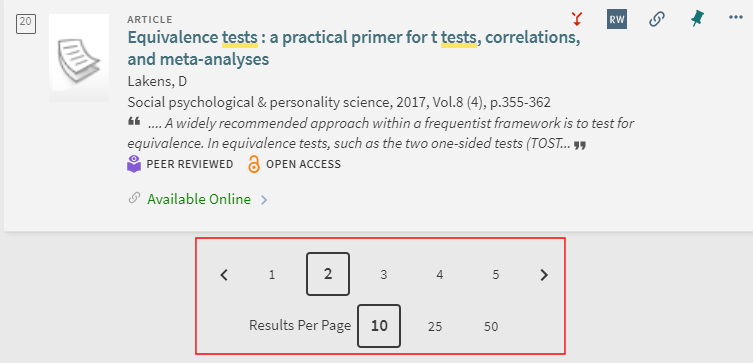
The number of results per page is determined by the Results Per Page setting, which is retained for all searches during the session and, for signed-in users, between sessions. Users can select either a specific page, the < icon to display the previous page, or the > icon to display the next page.
The Results Per Page selector can be found at the top and bottom of the list of results on each page; the page selector is located below the list of results:


Offset Parameter
You can also modify the offset parameter in the search URL to display results for a specific page, which is based on increments of the Results Per Page setting. For example, if you want to display the second page when Results Per Page is set to 50, you would need to add the &offset=50 parameter to the URL. For example:
Limitations on the Number of Results
Unfortunately, it is necessary to protect the system from automated attacks that manipulate the search-result navigation by changing the offset parameter to a very large number. Such attacks create excessive and unnecessary system load, causing stability issues. In order to protect the system from attacks of this sort while still allowing legitimate users to continue browsing search results, the following limitations have been established:
- Guest users can only access the first 250 results in the results list.
- Validated users can only access the first 2000 results in the results list.
When a guest user attempts to navigate to a page in which results beyond 250 would be displayed, they are prompted to sign into Primo VE.
If they sign in, the page is displayed. If they do not, a message indicating there are no records that match their query is displayed. Similarly, if a signed-in user attempts to access more than 2000 results, this message is shown.
Label Customization
The following labels in the Sign-In prompt can be customized (Discovery > Display Configuration > Labels):
- nde.login.continueSearchPolicy – Sign in to view full results
- nde.login.continueSearchPolicySubtitle – Guest users can view a limited set of results