

General
General
What is Rapido?
Rapido is a discovery-to-delivery library resource sharing platform focused on staff efficiency and patron services offering streamlined workflows by automating processing, and reducing the need for staff mediation.
How do RapidILL and Rapido interrelate?
RapidILL is embedded into Rapido and is the main source for borrowing and lending of digital material – book chapter and article scans. It is part of the Rapido subscription and provides customers with full access to all the RapidILL pods that you are entitled to join (some pods are for specific consortia and are restricted).
Where can I get information about RapidILL pods?
A list of all the pod members can be viewed on our web site: https://rapid.exlibrisgroup.com/Public/PublicInfo
Are there “Notes” field in Rapido records?
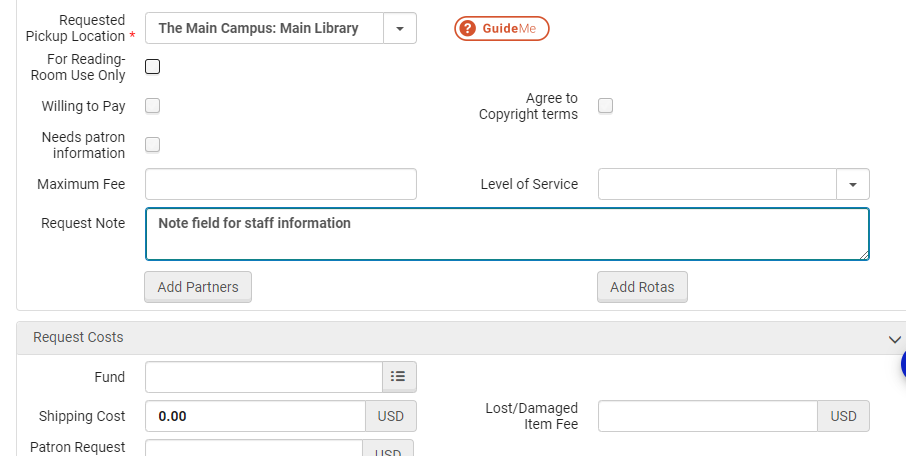
Yes. The Rapido Lending and Borrowing records include note fields.
Are there turnaround time expectations for Rapido as there is with RapidILL?
Each POD has defined turnaround time expectations. See the pods to understand the turnaround time requirements for each pod. More pods can be created to meet library needs and goals. Contact judith.fraenkel@clarivate.com to discuss the creation of another pod.
What are typical borrowing agreements in pods?
For digital material all pods support 24 hour delivery at no cost (part of RapidILL).
For physical, terms of pods are defined as part of onboarding as we identify the relevant pod you can join. Currently, all pods we have agreed to no charges, with delivery time and loan duration based on the specific group configurations.
How long are Rapido requests retained before they’re deleted/anonymized?
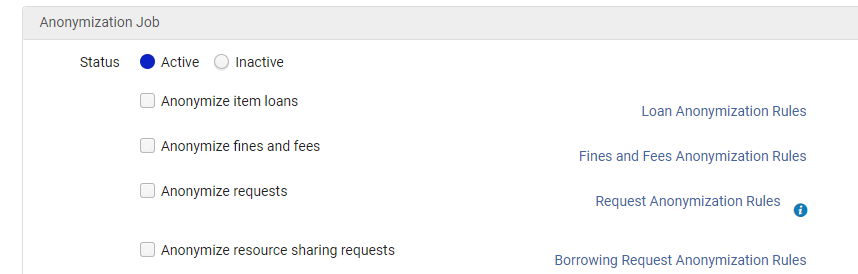
This is entirely up to the library. There is a job in Rapido that can be configured by the library to anonymize requests. Requests are anonymized when the job is run.
Are borrowing physical requests checked out to our patrons through the Manage Patron Services screen? And returned on the Return Items screen?
Checkouts and returns can be from the Patron Services and Return screens, or from the individual item on the request view in Rapido Borrowing and Lending.
Is Rapido considered to be in development, or robust and ready to handle large scale and complex resource sharing operations?
Rapido continues to evolve but it can handle the diverse needs of libraries. The initial phase of working with development partners and early adopters phase has concluded.
Will Rapido requests be distinguishable from other Alma Resource Sharing requests in Alma?
The experience of processing Rapido requests at an Alma resource sharing library will be seamless and rely on the same workflows as Alma resource sharing. Rapido users have further functionality that supports workflow, through functionality like sets, Rapido libraries can distinguish differences across requests.
Does Rapido work with OpenURL to import data from external resources into requests?
Yes.
Will ebooks be an integrated function of Rapido?
Ebooks will be integrated in Rapido. We are currently finalizing a pilot with ProQuest.
Is there a separate set of email notifications in Alma for Rapido?
Rapido uses letters that exist in Alma as well as additional letters.
What is the process for requesting enhancements, and the enhancement release schedule?
Initially the Rapido working group handles this. We will soon be launching Rapido Idea Exchange.
What are the differences between rotas, locally managed pods, pods, and hybrid pods, and when should I use each?
Rotas
Rotas are a classic Alma resource sharing functionality. Using rotas relies on various configurations, such as adding partners, creating rotas, applying assignment rules, and Terms of Use (TOU). The locate is based on the library's locate configuration. These configurations may already be in place at some libraries implementing Rapido, and they may suit the new Rapido library if their preference is to maintain them.
Locally Managed Pods
A locally managed pod is a configuration option that is enabled by Rapido. When a library implements Rapido, it can select the rota option to manage it as a locally managed pod. If selected, some aspects of the previous rota use remain the same, while others introduce new considerations. The Locally Managed Pod still uses the Alma resource-sharing configurations for the added partner, the rota, and the library's configured locate settings. Instead of rota assignment rules managing this locally managed pod, the configuration of pod priority under borrowing policies determines the prioritized use of partners. This selection simplifies configuration by bringing the rotas and pods into a single list, allowing ordering by dragging and dropping into the preferred order of use. Libraries can also define offers for end users to see when holdings are discovered by locally managed pods. This can present users with terms to expect, such as delivery times and loan periods. The presentation of the offers provides an experience consistent with items available through pod partners. Using locally managed pods works well for libraries that want to enhance existing rotas with pod prioritization and presenting terms. Locally managed pods are for physical resource sharing.
When configuring terms for locally managed pods, it is best for all partners in the rota to use the same terms to present accurate terms to users. When partners have varying terms, libraries often display the most restrictive loan term and the longest expected delivery term, and the variance is either a faster delivery or a longer loan.
Pods
Pods connect Rapido libraries. Libraries opt into a pod if they are in the relevant geographical region and agree to work with the pod partners through the shared pod terms. Pods and pod members are managed by Clarivate. When libraries use Rapido, no configuration is required to establish connections with pod partners. Unlike classic resource sharing, the pod connections do not require adding partners, rotas, locate settings, etc. The libraries define lendable items by attaching participating items to the pod and only receive requests from the pod for their participating items. If relevant, the library can have different participating items for different pods that they are a part of. The locate is based on the participating items. Libraries configure pod priority of use by ordering the pod list under borrowing policies. Existing pod members do not need to take action when new members join.
Pods can be public. This means they are open to any Rapido library in the region and listed in the pods documentation. Pods can be private with membership approved by a library representative and not listed on the pods documentation page. An example of private pods is for consortia connections. Pods are unique to Rapido and enable connections with other Rapido libraries for physical sharing. The community is also sharing eBooks through the International DRM-free eBook pod.
Hybrid Pods
Hybrid pods can be used to connect Rapido and Alma resource sharing libraries via shared terms. Rapido members use the same pod configuration of defining participating items and pod prioritization under borrowing policies. The partners that are using Alma resource sharing are connecting via classic peer-to-peer resource sharing configurations and workflows. They are required to match their partners' configurations in their rota to the pod terms. To be added to the hybrid pod, the Alma resource sharing library must add itself to the resource sharing directory. All Rapido libraries are in the directory by default. Next, they need to define and attach participating items to the pod once they are in the pod. Hybrid pods are managed as private pods, with pod membership managed by a library representative. Alma resource-sharing libraries need to reconfigure when pod membership changes. Hybrid pods enable physical sharing.
If libraries have overlapping partners in both rotas and hybrid pods, there is a configuration for hybrid pod exceptions to consider. This configuration is relevant for the library to continue lending with the partner via the rota terms rather than the hybrid pod terms. Hybrid pods are best used to connect Rapido and Alma resource-sharing libraries, while allowing each partner type to continue using familiar workflows and configurations.
Customization
How customizable is the patron interface?
Messages, Rapido tile text, notes, and display of offers are customizable.
Are Rapido sets customizable?
Rapido sets are fully customizable. Sets are user-specific. They can be private to the creator and created by any resource sharing staff, shared and available across resource sharing staff, or required for all resource sharing staff. Rapido comes with predefined sets that can be used to help onboard new customers as well as an option to create new private or public sets.
Sets support workflow management to distinguish requests with various aspects of interest. In creating sets, selections made within a facet provide results of an OR statement while selections across facets provide results of an AND statement. Sets can be created on any of the facet variables.
Can we create custom facets for Rapido Lending and Borrowing?
Yes - these are very easy to create.
Are labels customizable?
Yes. You can change the text of the labels to reflect local terminology.
After creating a new set based on certain criteria, do all new requests that meet those criteria automatically route into the set?
Yes, you might need to refresh the page if you are already on the set but each time the set is selected it will display all relevant requests that meet the criteria of the set.
Do you have to create new sets every time you receive new requests?
Requests will automatically be available in existing sets based on defined criteria. The receipt of a request does not require the creation of a set.
Can certain types of request be defined as going for review?
You can create and define sets to use for review, based on available criteria. You can also use mediation rules. There is the option to implement the default mediation rules or create further mediation rules, which means that requests meeting the parameters of the rule will be awaiting staff review in the accompanying set.
Document delivery
Does Rapido support requests for digitization/scanning/document delivery of locally owned material?
Rapido offers this service as per configurable options. Self-held items can be configured to be requested through Rapido tiles or through digitization requests. Making a seamless request experience is better for patrons. Configuration then allows for these requests for self-held items to either be handled by digitization workflows or by Rapido workflows.
Would the Rapido Document Delivery/Alma Digitization request button display if there is an electronic version of the item?
This is configurable.
Is there a backup location for easy access to resend scanned articles when requested?
The library configures the expiration period for the articles for their patrons. Prior to expiration, articles will be available to the patrons via their library card and additionally as a download within their notification method. From the borrowing task list, staff can resend the article if deemed necessary.
Are scanned articles saved for a certain time?
Scanned files are stored in dedicated Amazon servers designated for this purpose – specific for the borrowing institution. The time is configurable for up to 90 days.
Does Rapido allow for automated delivery of scanned content from BSCAN?
Rapido integrates with BSCAN. We have a dedicated API that enables automated delivery for scanned content that can be used by BSCAN and other providers such as SCANX. The API was developed in collaboration with BSCAN.