

ExLibris

Knowledge Assistant

BETA
 
  • Subscribe by RSS
  • Back
    SFX
    Ex Libris Knowledge Center
    1. Search site
      Go back to previous article
      1. Sign in
        • Sign in
        • Forgot password
    1. Home
    2. SFX
    3. Product Documentation
    4. Version 4.0
    5. SFX General User's Guide
    6. KB Tools
    7. DataLoader
    8. Update Objects

    Update Objects

    1. Last updated
    2. Save as PDF
    3. Share
      1. Share
      2. Tweet
      3. Share
    1. Loading Values to the LOCAL Field
    2. Loading Local Titles
    3. Update Objects - Examples
    You can update objects using DataLoader. The input file must be prepared as described in Preparing the Data File.
    To update objects:
    1. On the DataLoader menu bar, click Update Objects.
    2. Select an input file.
    3. Select a primary key.
    4. Specify the field names of data in the input file. Allowed fields are:
      • OBJECT_TYPE
      • LOCAL
      • TITLE_LANGUAGE
      • TITLE_TYPE
      • TITLE_VALUE
      • TITLE_NON_FILING_CHAR
      • TITLE_LANGUAGE
      • AUTHOR
      • PUBLICATION_DATE
      • PUBLICATION_PLACE
      • PUBLISHER
    5. Select a load type.
    6. Click Submit.
    If the value for the TITLE_TYPE field is TRANSLATION, you need to provide a value for the TITLE_LANGUAGE field as well.
    Only one value can exist for each field. From Load Type, select one of the following options if you are attempting to load a value to a field that already has one:
    • Keep Existing Attributes – The field values already in the KnowledgeBase are retained and the values in the input file are ignored.
    • Overwrite Existing Attributes – The values already in the KnowledgeBase are replaced by the values in the input file.
    • Remove Attributes – The values in the KnowledgeBase are removed.

    Loading Values to the LOCAL Field

    Using DataLoader, it is possible to add customer-specific, local data to the OBJECT table by storing information in the LOCAL field. Examples of local information which may be useful are EZB numbers, local catalog ID numbers, and ERM database IDs. These local identifiers can be assigned to all the SFX objects (journals and books) in the SFX KnowledgeBase.
    Local information can be useful:
    • When exporting information from the SFX KnowledgeBase (for example, for matching SFX journals with other databases, such as OPAC)
    • During linking (target parsers can be written to use local information when creating target URLs)
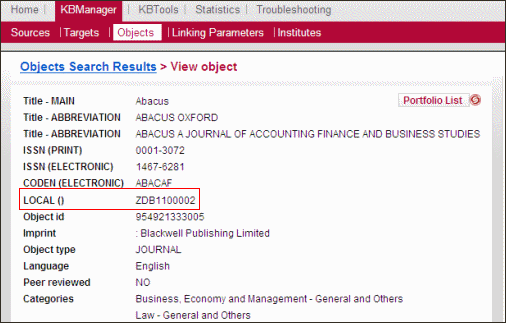
    In the following example, a local identifier has been added to the LOCAL field of the following object in the SFX KnowledgeBase:
    local_field_with_identifier.gif
    Local Field with Identifier
    When an OpenURL is sent to SFX, SFX includes the local identifier as part of the context object (CTXO). (For more information about the CTXO, refer to the Context Object section of the SFX Advanced User’s Guide.)
    During a look-p in the SFX database, the LOCAL field is found and stored as part of the CTXO. For example:

    rft.local_attribute' => 'ZDB1100002

    Loading Local Titles

    It is possible to override the Ex Libris title in the SFX database by loading a local title. These local titles can be assigned to all the SFX objects (journals and books) in the SFX KnowledgeBase.
    To load a local title:
    1. Select the input file.
    2. Select a primary key.
    3. Specify the TITLE_TYPE data field name. The following are possible title types:
      • MAIN
        • MAIN-TRAD-CHI
        • MAIN-SIMP-CHI
        • MAIN-PINYIN
        • MAIN-KOREAN
        • MAIN-HANGUL
        • MAIN-JAPAN
        • MAIN-KANA
      • ABBREVIATION
      • ALTERNATIVE
      • TRANSLATION
      • UNIFORM
    4. Specify the TITLE_VALUE data field name.
    5. Specify the TITLE_NON_FILING_CHAR data field name.
    6. Select a load type.
    7. Click Submit.
    More information on the LANGUAGE and TITLE fields can be found in Add/Remove Objects.

    Update Objects - Examples

    • Loading EZB numbers to existing global objects with the LOCAL field:

    0001-8708 1472893x

    0001-8791 1470972-7

    The first column of the input file contains the ISSN and the second column contains a value for the LOCAL field.

    • Loading local titles to existing global objects with the LOCAL_TITLE field:

    0001-8708   The journal of Medicine 4

    0001-8791   Blood 0

    The first column of the input file contains the ISSN, the second column contains a value for the LOCAL_TITLE field, and the third column contains a value for the TITLE_NON_FILING_CHAR field.

    The TITLE_NON_FILING_CHAR column should contain a number to indicate how many of the initial characters should be ignored during sorting. If the TITLE_NON_FILING_CHAR column is empty, it is set to 0. DataLoader checks to make sure that the number in the TITLE_NON_FILING_CHAR column is not greater than the number of characters in the LOCAL_TITLE field.

    If the non-filing character number is greater than the number of characters in the LOCAL_TITLE field, SFX ignores the number in the TITLE_NON_FILING_CHAR column and uses the default non-filing character number 0 instead.

    • Removing local attributes

    For example, the input file contains OBJECT ID<tab>LOCAL:

    9967854456611   8888456671

    9967854456614   8888456670

    View article in the Exlibris Knowledge Center
    1. Back to top
      • Updating Portfolios
      • Add/Remove Objects
    • Was this article helpful?

    Recommended articles

    1. Article type
      Topic
      Content Type
      Documentation
      Language
      English
      Product
      SFX
    2. Tags
      This page has no tags.
    1. © Copyright 2026 Ex Libris Knowledge Center
    2. Powered by CXone Expert ®
    • Term of Use
    • Privacy Policy
    • Contact Us
    2025 Ex Libris. All rights reserved