

360 Consortium Edition: Consortium Manager Functions
- Product: 360 Consortium Edition
How does a consortium use 360 Consortium Edition to manage a consortium?
To manage a consortium, the Consortium must first subscribe to 360 Consortium Edition.
Once that service is set up, there are several functions that a Consortium uses to set up and maintain the consortium within the Client Center:
Note that member libraries are not limited to managing their profile in the Client Center. Intota's Interlibrary Shared Resources feature set is fully compatible with 360 Consortium Edition, so ProQuest can configure a manager library with sharing of resources to member libraries using Intota as well as member libraries using the Client Center.
Viewing Member Libraries
There is link in the on the Client Center Home page in the Manage Your Library section labeled View Member Libraries. Click on this link to see all of the libraries associated with your consortium and the date the consortium relationship was established:
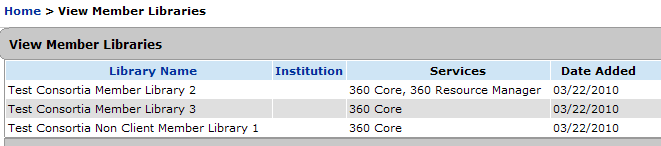
In addition, the ProQuest management and discovery services each member library subscribes to are listed, as well as the Institution (as entered in that library's Library Settings). Contact your ProQuest Sales Representative to have libraries added to or removed from this list.
Sharing Resources with Member Libraries
The procedure for sharing resources with your consortium's member libraries is more extensive than would fit on this page, so it is documented elsewhere:
Managing Hybrid Consortium Pass-Through
A Consortium library can set up a pass-through system for any of its Member libraries that are themselves Consortiums ("Hybrid" Consortium libraries):
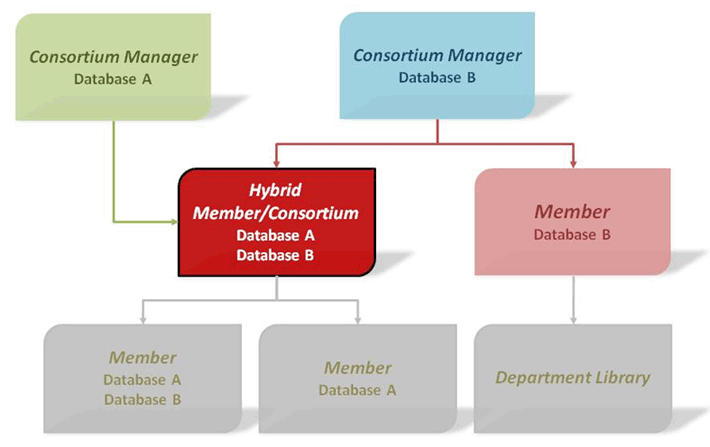
From that point on, objects shared with the Hybrid library from its higher-level Consortium are automatically shared and inherited by both the Hybrid library and all its Member libraries. (In other words, all these involved libraries acquire the Auto-Accept attribute.)
Note that any resources that were shared by the Hybrid library from the higher-level Consortium before enabling pass-through are not passed through to the Hybrid's Member libraries; these resources must be manually shared after the fact by normal sharing means.
Contact ProQuest (using the Contact Us menu near the top of this page) to enable Pass-Through.
Locking Member Libraries
A Consortium manager can "lock" a member library so that accounts at that member library cannot edit the Database Details page for databases inherited from the Consortium. To do this, the Consortium manager needs to contact ProQuest using the Contact Us menu near the top of this page.
Locked member libraries will not be able to control which ProQuest services the resources Display In for patrons, and in some cases there may be unexpected behavior. We suggest you read Providing Inherited Resources to Library Patrons before you lock a member library.
- Date Created: 9-Feb-2014
- Last Edited Date: 7-Oct-2015
- Old Article Number: 7019