

Single Activation with the EasyActive Setting
See also a webinar recording CDI Activation: EasyActive and FullyFlexible which was delivered on Sept. 6, 2023
The User's Perspective on CDI Record Types
From the user's perspective, two types of records can appear in search results:
-
Available – Records that are flagged as Full text available.
-
Searchable – Records flagged as Full text not available and are searchable only.
Most Primo customers filter their users' initial searches by availability. This means that search results contain only items flagged as Full text available. After performing a search, users can select the Expand beyond the library collection link to see the records flagged as Full text not available. We refer to these options as filtered and expanded searches. Some Primo customers default to the expanded search and filter by availability using top-level facets.
Single Activation with Alma
Alma collections that you have active because you subscribe to their full text will become automatically searchable in CDI. For those collections no separate search activations are necessary.
Search activations are necessary only for collections or for portfolios that are not activated for full text, but you still want your users to discover them. They will appear in the expanded searches with the flag No full text available. You do not need to activate alternative coverage collections for those providers that do not provide us with their metadata for indexing in CDI. Based on your full text activations, CDI automatically checks across the entire index for metadata matching your holdings and make them available for discovery.
This works as follows:
Alma publishes to CDI several sets of data (Institutional holding files) that include the following information:
-
Full text availability (All your active full text in Alma) This will affect records returned in CDI for filtered searches (flag them as available and make them discoverable in filtered searches)
-
Search availability (All collections that you activated for search): This will affect records returned in CDI for the expand search (for those items that are not also available in full text and do not fall under the item above.
For information about linking parameters, see Customer Linking Parameters in CDI Links.
Using Alma to Control What Is Searchable and Available in CDI
All collections with CDI activation required set to No are automatically searchable by users and do not require activation to appear in expanded searches. This applies to most CDI collections in Alma.
Some collections are defined with CDI activation required set to Yes for the following reasons and require activation in Alma using the standard Alma activation process before they can appear in expanded searches:
-
The providers did not want their content to be searchable without a subscription.
-
Some collections were likely to be used only by some institutions.
Full-text activations in Alma fully control what your users see in filtered searches. Additional activations for collections defined with CDI activation required set to Yes affect only what appears in expanded searches.
CDI content management's scale and ongoing activity may result in records orphaned from Alma collections and 360 databases, usually based on provider subscription offerings. We retain these records to be applied to alternate coverage options. They will appear in Expanded search results when they are not associated with an “Activatable” collection.
From the library administrator’s perspective, there is no option to activate or deactivate collections for search in Alma with the EasyActive setting. On your Alma interface, you will see the following:
-
Your Alma activations for full text.
-
Your Alma activations for the collections defined with CDI activation required set to Yes.
All other CDI-related configuration options in Alma are still available. This includes using CDI fields as filters in the Advanced Search, as well as using the CDI tab in the Electronic Collection Editor:
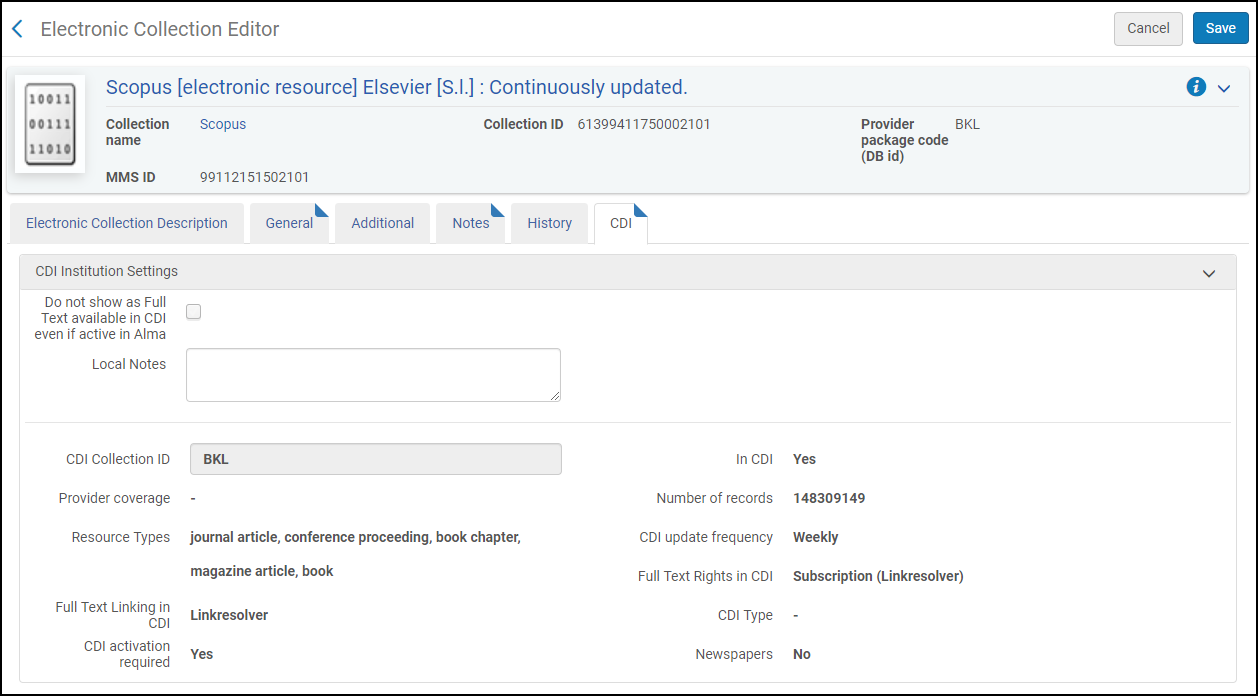
If you want to include any of the collections defined with CDI activation required set to Yes in your search results, you will need to activate them in Alma using the standard Alma activation process.
In the search results on the Electronic Collections page, these collections will display the indication CDI activation required: Yes, as shown in the following example for the Scopus collection:

Please ensure that you activate only collections defined with CDI activation required set to Yes, for which you have a subscription, or that are free for search.
The CDI tab in the Electronic Collection Editor contains the following associated settings in Alma:
-
Do not show as full text in CDI even if active in Alma ('Suppress') –
It is possible to suppress active full text collections in Alma from being published to CDI so that they appear as Full text not available in CDI.
From a library patron perspective activation of full text collections or items in Alma serve mostly two purposes:
-
to mark them as Full text available in discovery, and
-
to make the full text link available via the link resolver.
This option appears in the CDI tab on the Alma Electronic Collection Editor for all collections indexed in CDI and for all collections (such as local collections) not indexed in CDI with portfolios in Alma.
Results:-
All portfolios for the collection are removed from the CDI holdings file. This ensures that the content is not flagged as Full text available unless it is also available from another collection where it is active and not suppressed.
-
The collection will still appear on your link resolver, and users can link to the full text when coming from other search engines or platforms.
-
Content from collections where the full text is suppressed is also not searchable in the expand search unless set to active for search or unless the same content is available from other active collections.
-
The local bibliographic records are not affected and are published to the local Primo Index for discovery.
Why use this option:-
Prevent content from certain collections from appearing in Primo results for example for Open Access collections – where you would like to have only the full text active for the link resolver, but you do not want the same full text visible in filtered searches because it could clutter the result lists for your users.
-
Prevent duplicate ebook results where bib records are published to Primo local and in addition the CDI records appear in the result list. This option will make sure that the CDI records do not appear in the result list. Note that this will also eliminate the chapter level records in CDI.
-
-
CDI-only full text activation –
The CDI-only full text activation option is found in the following areas of the Alma UI:
-
The CDI tab in the electronic collection editor.
-
The Action menu on the IZ collection list.
And appears for collections if at least one of the following conditions is met:
-
The CDI full text linking field is set to Link in Record (not Linkresolver).
-
The CDI type is set to Hybrid, and the Alma collection type is Database.
-
The CDI type is set to A&I Database (regardless of whether the collection has portfolios).
Effect:
If set to yes, the collection is added to the CDI Zero title holdings file with the following results:
-
If the collection is defined as a Full text database in CDI, all records in the collection will be flagged as Full text available in the Primo UI and appear in filtered searches. The Full text available flag is inherited at the collection level. If any individual portfolio settings exist, they will be ignored.
-
If the collection is defined as an A&I database in CDI, its content will be searchable in CDI (Full text available flags will depend on full-text activations across all full-text collections in Alma).
Why use this option:
This option can be used when your library does not want the collection and its contents to appear in the Primo local index or in the link resolver, but you want it to be discoverable in CDI.
How to use this option:
-
Verify that the collection exists in the Institution Zone.
-
Edit the electronic collection. In the CDI tab, select the CDI-only full text activation checkbox.
If you want to activate a collection that contains portfolios and linking parameters for full-text in CDI only, you must fill in the linking parameters in the Electronic Service Editor to ensure that CDI linking works as expected. For information about linking parameters, see Customer Linking Parameters in CDI Links.
-
-
We subscribe to only some titles in the collection –
If set to Yes, CDI will match its content to the active portfolios in this collection. If set to No, CDI will set all contents of this collection to full text available without matching to individual portfolios. This setting is generally used as follows (check also for recommended settings by collection link type below):
-
Select Yes to indicate a selective subscription (where you subscribe to only part of the content).
-
Select No to indicate a non-selective subscription for this collection (where you subscribe to all of the content in the collection)
This is unrelated to the way you purchase such collections, and some libraries use selective settings for aggregator packages. This setting in CDI; therefore, does not mean that subscriptions to those resources are necessarily selective.
This option is available only for Aggregator/Selective collections (not for Database types of collections that have no portfolios). The default value is Yes (selective subscription). This field is read-only in case the option CDI-only full text activation is used.
Recommended settings by collection link type:
For 'Link in Record' type of collections that do have portfolios in Alma, where the institution subscribes to the whole collection, it is recommended to change the "We subscribe to only some titles in the collection" setting to 'No'. This will ensure that the whole collection is flagged as 'Full text available'. In the Alma January 2021 Release, the Activation Wizard will be changed to set this as a default for 'Link in Record' type of collections.
If this is set to 'Yes', only the active portfolios in Alma will be included in the CDI holdings file only when a match is found in CDI, and the record will display 'Full text available'. Because CDI matches only on standard identifiers such as ISSN or ISBN, this will result in less records displaying Full text available for collections with non-ID content.
For Linkresolver type of collections, we recommend that you retain the Yes setting for the We subscribe to only some titles in the collection option (which is the default setting), especially when there are partial activations in Alma and not all portfolios are active. Setting this option to No will increase the chance of having linking problems in CDI because of mismatches between CDI records and the Alma CKB.
-
Switching from FullyFlexible to EasyActive
Switching from the FullyFlexible to the EasyActive setting in your Alma institution is possible. Ex Libris support will run the switch for you. Before the actual switch, a report will be provided of the changes in your Alma environment once you switch from FullyFlexible to EasyActive.
The following will happen during the switch:
-
All CDI search activations will be removed.
-
All collections (defined with CDI activation required set to Yes) previously activated for search in CDI will be activated in Alma.
-
All collections previously set to Active for Full text in CDI only will be activated in Alma.
Activated in Alma means:
-
The service and all its portfolios will be activated for electronic collections with services and portfolios.
-
The bib record will not be suppressed for electronic collections of type database.
Once the institution uses the EasyActive setting, the following changes will occur in Alma:
-
Search activation options and the Search activation facet will no longer be displayed in Alma.
-
The CDI Publishing profile to CDI will no longer include the search activation in the CDI holdings file, and the ‘searchable’ file containing this information will no longer be published to CDI.
Frequently Asked Questions
-
When will the switch from FullyFlexible to EasyActive be available? How is this handled?
The switch to EasyActive is scheduled to be available from August 2020 onwards. Institutions can open a support ticket and the switch can be scheduled from the beginning of August.
-
In a multi-campus environment where each campus has its own PC key and publishing profile, is it possible for some campuses to use the FullyFlexible setting and others to have the EasyActive setting?
No, the setting is per Alma institution.
-
Is it possible to go back to the FullyFlexible setting if we have implemented the EasyActive setting?
Currently there is no way to switch back to FullyFlexible from the EasyActive setting. When moving to EasyActive, the majority of your current activation settings for CDI will not be available anymore so there is nothing to move back to. We have discussed ways to preserve the last setting in case someone wants to move back but given that there was so far not much interest we have not scheduled any work for this right now.
-
When do we have to decide on switching to the EasyActive setting? Does it have to be right after moving to the CDI, or can we wait and decide later? Is there a deadline for switching to the EasyActive setting?
You can decide at any time to move to EasyActive, there is no deadline. You can start with FullyFlexible and see how this works for you and only make the change when convenient for you. This is entirely up to you.