
Eldad Scratch 2026 June
Mark as private!
General
- May:
- Liza to reply to "Smallest update to the OUP autoholdings OLH" (she said she will check this)
Moshe
- For Rapido stories:
- Use Fix Version instead of Sprint
- Nikola to send 1 week before release. If he doesnt, ping to remind him.
- Review Documentation Notes to see if differences between Alma and Rapido
(URM-103876) Automatic Cleanup of Temporary Location After Restore Request
- The following 2 updates in the OLH were reviewed by Rivka (Yedidia is away)
- Update the following sections in Scanning Items:
- Where it says: " It does not remove the value in the item's Temporary Location field."
Update to "It removes the value in the item's Temporary Location field. Note that this is dependent on the force_empty_temp_location_when_disabled parameter (Configuration > Fulfillment > General > Other Settings)."
- Where it says: " It does not remove the value in the item's Temporary Location field."
- Update Configuring Fulfillment Jobs:
- Add the parameter "force_empty_temp_location_when_disabled".
Description:
If set to true, when the Item is in temporary location radio button is set to no, no data will appear in the Temp Location field. - Rivka to reply to "To check in the code for (URM-103876) Automatic Cleanup of Temporary Location After Restore Request" to be sure the description is correct i.e., it was implemented like that in the code by Yedidia.
- Add the parameter "force_empty_temp_location_when_disabled".
Idea Exchange URM-103876 URM-103876When an item is assigned a temporary location, one option for returning it to its permanent location is to process a Restore Request. Previously, after fulfilling a Restore Request, the temporary location flag on the item was correctly set to No, but the temporary location field still displayed the old temporary location value. With this enhancement, once a Restore Request is fulfilled, the temporary location field is automatically cleared, fully restoring the item’s location status and preventing confusion about its real location.

This behavior is controlled by the force_empty_temp_location_when_disabled parameter (Configuration > Fulfillment > General > Other Settings). It is true by default, and customers will need to set it to false to return to the previous behavior. Note, however, that for existing customers, this parameter is set to false.
For more information, see Scanning Items.
(URM-180322) Enhancements for Hold Requests
Idea Exchange URM-103876 URM-180322- Tzofiya said this will move to July unless there is a last minute change but unlikely
- Schedule a meeting with Tzofiya
- Managing the Hold Shelf - Ex Libris Knowledge Center
- Where it says "If the patron fails to pick up the item by the expiration date:"
- Add "A fine/fee may be charged for not picking up the item, based on fulfillment policies"
- Where it says "If the patron fails to pick up the item by the expiration date:"
- Configuring Physical Fulfillment - Ex Libris Knowledge Center (Update per URM-180322 - Fine for On Hold Shelf Items not picked up - EXL - URM - Confluence)
- https://knowledge.exlibrisgroup.com/...rs_fulfillment
The following enhancements were implemented for hold requests:
Configurable Purged Request Fee for Hold Requests
A new Purged Request Fee can now be configured in the Hold Request Terms of Use (TOU), similar to the existing option for booking requests. When staff process expired holds from the hold shelf using Reshelve, Transit, or Activate Next, the system consults the Hold Request TOU and automatically applies the appropriate fee. This gives libraries more precise control over cost recovery and ensures consistent handling of expired hold requests.

Control Over Canceling Hold Requests in Transit
A new circulation policy now allows libraries to determine whether a hold request can be canceled once it has been put in transit. This added control helps prevent unintended cancellations during fulfillment, strengthens workflow reliability, and ensures that items already en route continue through the process as intended.

For more information, see Managing the Hold Shelf, How to Set Up Requesting Policies and Configuring Fulfillment Jobs.
(URM-145473)Digitization Request Queue Indicator
Idea Exchange URM-103876 URM-145473- Review with Asaf Peter
- Digitization Processing - Ex Libris Knowledge Center
- Post-Receiving Processing - Ex Libris Knowledge Center?
- Working with Items - Ex Libris Knowledge Center?
Manage In‑Process Items now highlights when an item has additional digitization requests waiting in the queue. Staff can use a new row action to complete the current active digitization request and automatically activate the next one, improving workflow efficiency and ensuring queued digitization work progresses smoothly.

For more information, see Digitization Processing.
(URM-253329) Additional Information in Resource Sharing Directory Members API
The Resource Sharing Directory Members API has been enhanced to include the directory member's email and phone number.
For more information, see Developer Network.
(URM-320851 URM-323964 URM-326240) Improved Use of Network Resources in Course Reading Lists
Idea Exchange URM-320851 URM-323964 URM-326240- Reviewed with Baruch
- OLH
- Managing Citations - Ex Libris Knowledge Center
- Where it says "The citation tabs in each row are:" add a new row to show that Hold By appears for Network Zone resources that are used in a citation.
- In the "Adding a Citation Already in the Repository" section where it says "Search for a title; see Searching in Alma.", add also something like "Note that the search can also be done in the scope of the network zone."
- Searching in Alma
- Tzofiya to reply to "Question about (URM-320851 URM-323964 URM-326240) Improved Use of Network Resources in Course Reading Lists" (originally was to Shoshana but she said its for Tzofiya and added her to the thread)
- Managing Citations - Ex Libris Knowledge Center
Institutions can now add resources from the Network Zone directly to locally managed reading lists. When a Network Zone resource is used in a citation, the reading list will display its availability across the consortium, including Held By information for all participating libraries.
This enhancement streamlines course support and improves visibility into shared network holdings.
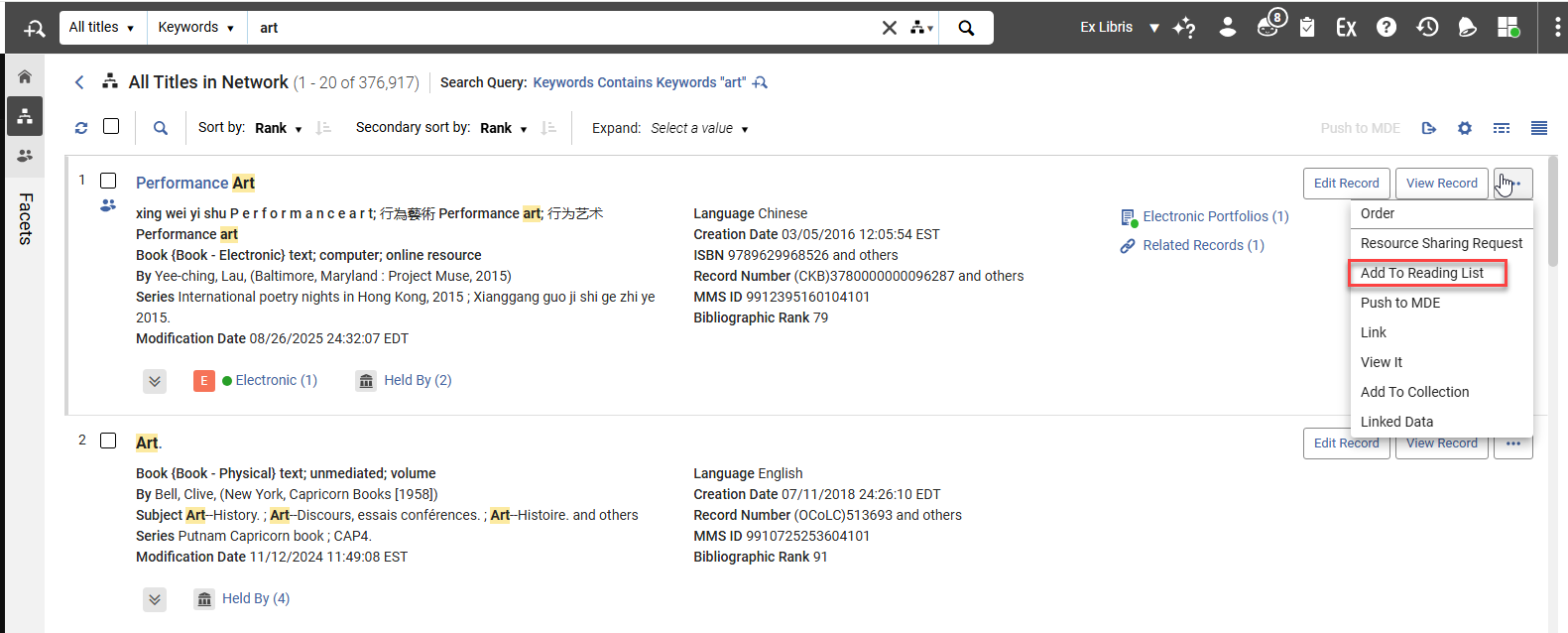

For more information, see Searching in Alma and Managing Citations.
Baruch
Baruch is now also responsible for Ori Miller's group
(URM-XXXXXX) TBD - Headline
TBD
For more information, see TBD.
Zohar
- Nothing for June but start with PO Line templates for August. (For July will be another small story)
- Will need to update the following section: Reviewing and Managing PO Lines - Ex Libris Knowledge Center
- Add a new page under Purchasing called PO Line Templates
- Add to new TMS system
- Translation?
- Add link from the current PO Line Templates section to this new page
- Delete the current content from the PO Line Templates section and just leave the link to the new page
- Scheduled meeting with Zohar to demo/context
Uri
(URM-322503) Improved Performance for Large New UX Combo Box Dropdown Lists in New UX Query Builder
- Reviewed with Avigail
Large new UX combo box dropdown lists (with more than 200 items), for example in the advanced search, now load dynamically using lazy loading, reducing delays when opening and navigating long lists.

(URM-316060) Add NOT Group Operator to New UX Advanced Search
CERV Enhancement (ID#36492) URM-316060- 15 April: Avishai is working on it and should be ready soon
- Update OLH at Searching in Alma - Ex Libris Knowledge Center
In the new UX advanced search, a NOT Boolean operator was added at the group level for the supported entities. In addition, the group boolean operators dropdown is now always visible with 'And' as the default option, and it includes the new 'Not' option. It ensures that saved query sets and recent searches are properly displayed and use the new operator, and that the generated queries follow the same structure as existing 'And' and 'Or' logic.
This enables users to define a group of conditions and exclude the entire group with a single action, significantly reducing the effort required when excluding multiple terms or values across different fields.
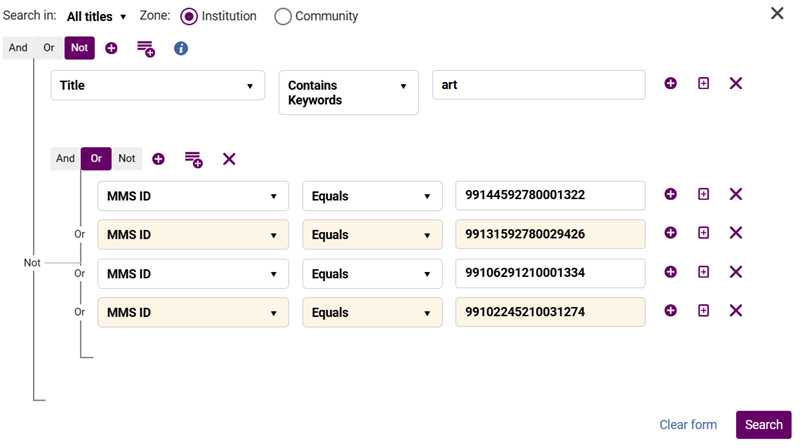
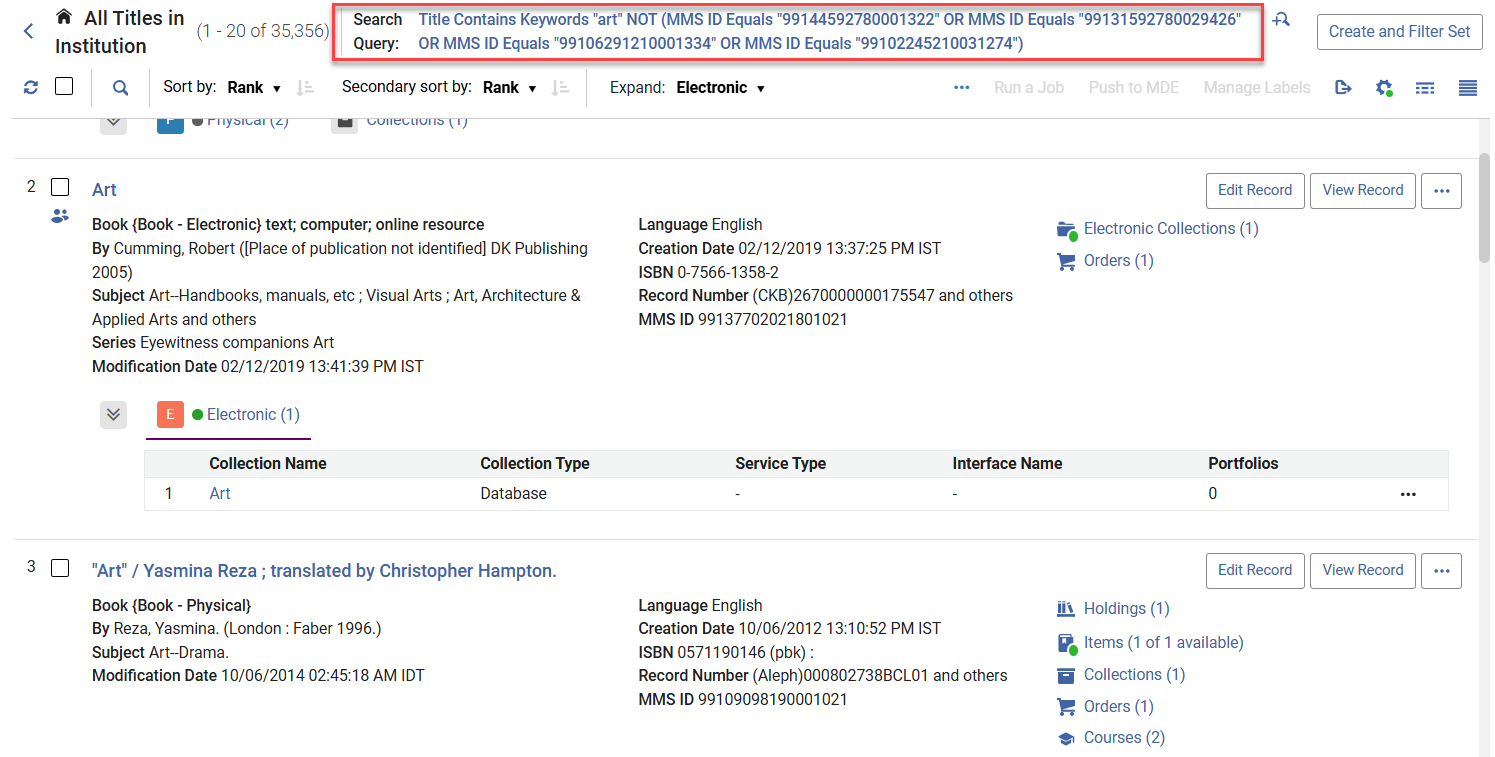
For more information, see Searching in Alma.
(URM-326565) Did You Mean Search Suggestions for Simple Search
CERV Enhancement (ID#36332) URM-326565- Might get moved to a later release on URM-328523 - currently between Moti and Dana
- Reviewed RN with Shira
- Add OLH:
- Send OLH to Shira to review
- Add note that this was reviewed by Shira
- Link from RN to OLH
This development introduces the UI functionality for displaying "Did you mean" suggestions in supported simple searches. When enabled at the institution and user levels, the interface displays an alternative suggested term when a search returns 0-15 results. Users can click the suggested term to trigger a new search or dismiss the suggestion.
Users thus receive helpful alternative term suggestions when searches may contain typos or minor variations, improving discoverability and reducing the need for repeated searches.

A new user-level toggle was added to the User menu, controlled by the institution-level configuration parameter at Configuration > General > General Configuration > Other Settings > did_you_mean_search_suggestion.

-
This feature applies to all the pages in the new UX.
-
It is activated when searching by Keywords or All.
For more information, see Searching in Alma, Alma User Interface and Configuring Other Settings.
Liza
(URM-321917) Open Predicted Items in Bulk for an Entire Set of Holdings records
- After May Sandbox
- Create a draft for https://knowledge.exlibrisgroup.com/...redicted_Items
- Add a new section after "Creating Additional Predicted Items Using Open Predicted Items", called "Open Predicted Items in Bulk Job" and add the info from the RN.
- Link to it from RN
- Create a draft page for Manual Jobs: Manual Jobs - Ex Libris Knowledge Center
- Add the Open predicted items in bulk job
- Link to it from RN
- Create a draft for https://knowledge.exlibrisgroup.com/...redicted_Items
Alma now supports opening predicted items for a set of holdings records using the new Open predicted items in bulk job. This saves significant time for managing serial records with ongoing subscriptions. The job can be run from the manual jobs page or directly from the Holdings and Physical Titles search results pages, using the Run a job bulk action.
For more information, see Prediction Patterns, Manual Jobs and Searching in Alma.
Maud
-
For after May Sandbox:
For URM-327669 on the following page:
Support Services - Ex Libris Knowledge Center
update the 2 sentences that currently say "If a member was selected in the Institution Level dropdown list, the Network Zone administrator can only update and save the parameters at the member level, but cannot run the job that applies these changes to the analytics data."
CHANGE TO THIS:
If a member was selected in the Institution Level dropdown list, the Network Zone administrator can update and save the parameters at the member level, and run the job that applies these changes to the analytics data by selecting the Apply changes button.
Per mail: "Updates for URM-327669: Support Services Customers feedback on the new tool - Reindexing Job not available at IZ level"
NOTE: The new text is in Flare since the assumption was that Alma Flare will be published to customers for August or later.
(URM-217427) License Terms Management and Distribution from the Consortia Central Configuration Dashboard
URM-217427 - Update OLH after May release
Sections and Configuration Options - Ex Libris Knowledge Center
It is now possible for Network Zone operators to manage the License Terms via the Consortia Central Configuration Dashboard. This improves efficiency and supports central offices in their efforts to manage information across the Network Zone.
This feature is relevant only for consortia operating with a Network Zone setup.
For more information, see Sections and Configuration Options.
(URM-321273) Consortial Communication Tool in Alma
URM-321273- Continue with Word doc on desktop
- Inbar Levy is doing the QA for this
- AT: AT - Consortia communication tool part 7-20260312_140741-Enregistrement de la réunion.mp4 (Maud asked Elad in "Expiry date for communication tool acceptance test recording" to make sure expiry date is removed completely as currently its for July and this might be for August)
- Figma: https://www.figma.com/proto/ESS9M3At...id=2091%3A7293
- Maud confirmed that the general TOC and flow in the OLH is ok but some headings might need to be renamed e.g., Send a Message instead of Create Chat
- Add the "Chat with Consortia" role to Privileges for Roles in Alma - Ex Libris Knowledge Center
- Check with Maud if the following page needs to be updated: Managing User Roles - Ex Libris Knowledge Center ((Maud said we can get this info from the FSD and/or also we can see it in the dashboard in the role/privileges Service.)
- Inbar said there is a new configuration to hide the chat icon completely from members - not just disable via the
- Check if we need to update TMS so the Help for this Page will link to the relevant online help page.
- Check that the For more information below goes to the correct place
- Move OLH to Flare
It is now possible for a member staff user in their Institution Zone to create and send a chat communication to a Network Zone (NZ) operator, and for an NZ operator to manage and answer those chat communications centrally in the Network Zone. At the NZ level, the new Communication tool enables group chats where all NZ operators with the relevant roles can participate.
This provides a better communication tool between members and NZ operators in a collaborative network for better cooperation.
The tool is available through a dedicated icon on the top right corner of the Alma Homepage screen at both levels (Institution Zone for Members and Network Zone for NZ operators).

This feature is only relevant to Consortia with a Network Zone setup, for NZ/IZ members with the Chat with Consortia role.
For more information, see Consortia Communication Tool.
Tags
If you have a </span> followed directly by an <span> there must be a space between them.
- Acquisitions
ACQ - Fulfillment and Resource Sharing
FUL - NERS (In CommitmentNote field - the number is in the Jira title)
<img alt="CERV" class="internal default" src=/@api/deki/files/177227/CERV.png /> <span class="ScreenElement">CERV Enhancement (ID#XXXX)</span>It comes after Idea Exchange and/or before <span class="AlmaRNURMTag">URM.
To find the ID #, click the label. - Idea Exchange (In UserVoice Links field)
<img alt="idea exchange" class="internal default" src="/@api/deki/files/66486/idea_exchange.png" /><span class="ScreenElement">Idea Exchange</span>
It comes after <div class="BodyText"><span class="AlmaRNTag">November 2023 Fulfillment</span> - Collaborative Networks
- Collaborative Networks
TBD - Need to add the correct ID for the image once Greg adds it to the Media Repository- When "Collaborative Networks" is not the feature name in the title
<img alt="Consortia" class="internal default" src="/@api/deki/files/177378/Consortia_RN.png" style="vertical-align: -35%;" /><span class="ScreenElement">Collaborative </span> <span class="ScreenElement">Networks</span> - When "Collaborative Networks" is the feature name in the title
<img alt="Consortia" class="internal default" src="/@api/deki/files/177378/Consortia_RN.png" style="vertical-align: -35%;" />
- When "Collaborative Networks" is not the feature name in the title
- LATEST Example of NERS and Idea Exchange Combined
<div class="BodyText"><span class="AlmaRNTag">August 2025 </span> <span class="AlmaRNTag">Fulfillment and Resource Sharing </span> <img alt="idea exchange" class="internal default" src="/@api/deki/files/66486/idea_exchange.png" /><span class="ScreenElement">Idea Exchange</span><img alt="CERV" class="internal default" src="/@api/deki/files/177227/CERV.png" /><span class="ScreenElement">CERV Enhancement (ID#8734)</span> <span class="AlmaRNURMTag">URM-88726</span></div> - Example Acquisitions Feature for November
<div class="rnsub ACQ 202311BASE">
<h3>(URM-XXXXXX) Additional Personal Delivery Locations</h3><div class="BodyText"><span class="AlmaRNTag">November 2023 Acquisitions</span> <span class="AlmaRNURMTag">URM-XXXXXX</span>
<p>TBD</p>
<p>For more information, see TBD</p>
</div>
</div> -
Salesforce Tag (for resolved issues only - not added to features or enhancements)
<span class="AlmaRNSFTag">SF: YYYYYYYY</span>
Component Order
The new order of components is:
- Fulfillment and Resource Sharing (FUL)
- Metadata & Linked Open Data (MDM)
- Metadata Management
- Linked Open Data
- AI (AI)
- Resource Management (RM)
- Physical Resource Management
- Electronic Resource Management
- Digital Resource Management
- Acquisition (ACQ)
- Collaborative Networks (COL)
- UX, Accessibility, Infrastructure (ADM)
- Analytics (ANA)
- APIs (API)

