

Eldad Scratch 2026 September
|
Mark as private!
General
- TBD
- TBD
Moshe
- For Rapido stories:
- Use Fix Version instead of Sprint
- Nikola to send 1 week before release. If he doesnt, ping to remind him.
- Review Documentation Notes to see if differences between Alma and Rapido
(URM-172353) Renew Loan from Network Activities Tab (Source Institution)
 Idea Exchange URM-172353
- AT
- Explanation:
-
This feature makes it easier for staff working in a Network Zone environment (a group of institutions that share resources and work together) to renew loans that belong to other institutions in the network. Previously, if a patron had borrowed an item from another institution in the network, staff could see the loan in the patron's Network Loans tab, but they could not renew it directly from there. Now, users can open a patron record, go to the Network Loans tab and click the
- new Renew action on the relevant loan. available directly on each loan in the Network Loans tab. Staff can renew eligible loans without leaving the patron view.
NOTE:
This feature only supports renewing one loan at a time.
The Renew action does not appear when the loan is Lost or Recalled.
If a block occurs, there is no override option. The user can see the reason, but cannot force the renewal from the Network Loans tab.
- OLH:
- Fulfillment Networks - Ex Libris Knowledge Center (In the Viewing Patron Loans in the Network Activity Tab section, add a point that you can also renew a loan from here.
- TBD (In the Renewing Loans section, add a link to the point added to Fulfillment Networks - Ex Libris Knowled for the new Renew feature in - in the Viewing Patron Loans in the Network Activity Tab section)
RELEASE NOTES
Previously, renewing a loan in the Patron Services workbench was only possible when working at a desk of the item owning institution. This enhancement enables staff at the source institution to renew loans directly from the Network Activities tab of the Manage Patron Services page. Improves cross-institution circulation workflows by enabling efficient loan renewals from the source institution, reducing operational friction for staff and enhancing patron service.

For more information, see TBD.
(URM-316060) Add NOT Boolean to New UX Advanced Search
 CERV Enhancement (ID#36492) URM-316060
Note that Baruch said this should be under User Experience and not Fulfillment
In the new UX advanced search, a NOT Boolean operator was added for supported searches that use the new search infrastructure, such as All Titles, Physical Titles, etc.
The new feature enables users to define a group of conditions and exclude the entire group with a single action, significantly reducing the effort required when excluding multiple terms or values across different fields.
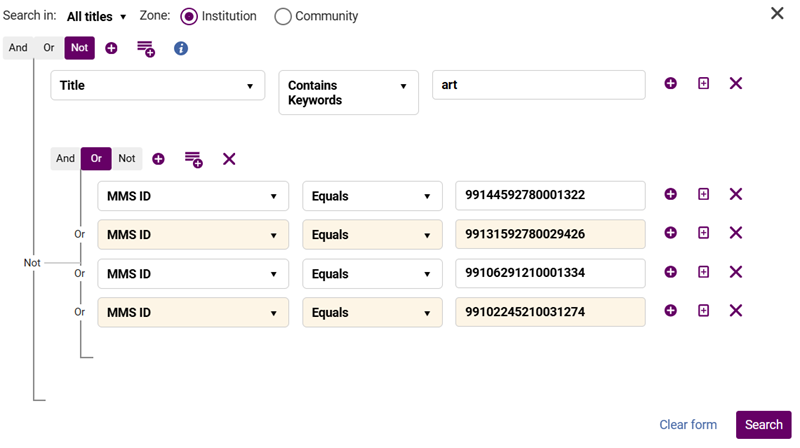

Note that the boolean operator defined for a subgroup of conditions applies between the keyword conditions (the first condition is always true). Therefore, when using NOT, only the members in the group that come after the first member will be false.


The advanced search uses hierarchical entity levels. For example, a Physical Title can have multiple Holdings, and a Holding can have multiple Items.
Because of this structure, using the Boolean ‘NOT’ may return results that seem counterintuitive when your search entity level and index level differ.
The Rule of Exclusion: A record is included in the results if at least one of its related lower-level records does not match the excluded value.
Example:
A Title has:
a Holding in Library A
a Holding in Library B
A search for Library (Holdings) not equals A will return this Title, because it has at least one Holding (Library B) that does not match A.
For more information on using the advanced search, see Searching in Alma.
(URM-320898) Prevent Requesting When Items Are Available in the Same Library
- Moshe updated the FSD after Rivka sent the mail "URM-320898: On Shelf policy - No requesting from available library option - QA Handover"
-
UI Path
-
The new policy “Prevent requesting from available library (even if different holding)” is at: Fulfillment → Fulfillment Units → Fulfillment Unit Rules → On Shelf Request Policy.
-
- AT: URM-320898 On Shelf policy - No requesting from available library option - Acceptance Test-20260707_120109-Meeting Recording.mp4
- OLH
- Configuring Physical Fulfillment - Ex Libris Knowledge Center
- After the sentence "From the On shelf request policy drop-down list, select one of the following options" is a list of policies. Add the new policy to the list and add the following text:
Prevent requesting from available library (even if different holding) – If any item of the title is available anywhere in the same library, the item cannot be requested. This applies even when the available item belongs to a different holding within the library. When this option is applied, Alma blocks the request if any item in the same library is available. Requests are allowed only when no items in the library are available.
- After the sentence "From the On shelf request policy drop-down list, select one of the following options" is a list of policies. Add the new policy to the list and add the following text:
- Creating a Request from the Institution - Ex Libris Knowledge Center
- After the paragraph "When a patron places a request, Alma checks the requested items to determine whether they are requestable. If a title level request is placed, then all of the title’s items are checked. If an item level request is placed, then the specific item is checked."
-
In some cases, items may be considered not requestable even when the specific item being viewed is not available. This occurs when another item of the same title is available in the same library. When the fulfillment unit is configured to prevent requesting from available library items, Alma blocks the request if any item in the same library is available. In these cases, no pickup locations are offered and the request cannot be submitted unless the policy is overridden.
-
- After the paragraph "When a patron places a request, Alma checks the requested items to determine whether they are requestable. If a title level request is placed, then all of the title’s items are checked. If an item level request is placed, then the specific item is checked."
-
How to Set Up Requesting Policies - Ex Libris Knowledge Center
-
Check with Moshe if it could be useful to add the following note after the sentence "When trying to place a request, either from Get It or from Alma, the request Terms of Use (TOU) will be checked and the request will be allowed or blocked accordingly.":
NOTE: When the Prevent requesting from available library (even if different holding) policy is selected, Alma blocks the request if any item in the same library is available. Requests are allowed only when no items in the library are available.
-
- Configuring Physical Fulfillment - Ex Libris Knowledge Center
Release Notes Text
A new On Shelf Policy option was added to provide libraries with more granular control over requesting behavior. Until now, Fulfillment Units could block requests only when an item was available in the specific holding or block request entirely.
With this enhancement, libraries can now configure an On Shelf Policy that blocks requesting whenever any available item exists within the same library, regardless of the holdings structure. This supports more efficient local fulfillment, reduces unnecessary internal transfers, and ensures patrons are directed to the nearest available item within their library.
For more information, see TBD.
(URM-94453) Opt-In “Keep My Loan History” Setting
Idea Exchange URM-94453- Explanation:
-
Many libraries automatically anonymize (remove personal borrower information from) completed loans after a period of time for privacy reasons. This happens when the Alma customer parameter should_anonymize_item_loan is enabled.
Now, if a patron wants to keep a record of their borrowing history, staff can select a new option on the patron's user record called "Do not anonymize loans". When this option is selected, Alma will keep that patron's completed loan history instead of anonymizing it. Library staff can enable or disable the setting from the patron's user record:
User Details > General > Do not anonymize loans

-
The field appears only when the institution has enabled loan anonymization using the should_anonymize_item_loan customer parameter.
Libraries can also update this value through the Users API, the SIS (Student Information System integration), and the Update Users job.
NOTE:
The setting applies to an individual patron, not the entire institution.
The default value is off (loan history will be anonymized according to the institution's normal policy).
It affects both completed loan records and loan notes that would normally be anonymized.
-
OLH
-
Managing Users - Ex Libris Knowledge Center - Manage User Details > General Information (New Do not anonymize loans checkbox. Staff can opt a patron out of loan anonymization. The field is available in both the quick form and full user edit form.)
-
In Configuring Fulfillment Jobs - Ex Libris Knowledge Center (Under the Configuring Anonymization section add a new subsection called "Opt-In “Keep My Loan History” Setting")
-
RELEASE NOTES
A new “Keep My Loan History” option is now available in the Circulation Desk user update form, allowing staff to set whether a patron wishes to retain their loan history. When this option is enabled, the patron’s loans will not be anonymized during the loan anonymization process. This indication is also available via the User API and can be exposed to Primo, enabling consistent handling of patron preferences across systems.
For more information, see TBD.
Baruch
Baruch is now also responsible for Ori Miller's group
(URM-XXXXXX) TBD - Headline
TBD
For more information, see TBD.
Zohar
- Moved this PO Line Templates story to September (Zohar said its for November)
- PO Line templates
- Update the Word doc (currently in C:\Users\U6068261\OneDrive - Clarivate Analytics\Desktop\Files\Release Notes) per "TBD – Continue from here:" at the top of the page.
- Share with Zohar for review
- Update the following section currently in the OLH: Reviewing and Managing PO Lines - Ex Libris Knowledge Center
- MindTouch
- Flare
- Add a new page under Purchasing called PO Line Templates
- MindTouch
- Flare
- Add link from the current PO Line Templates section to this new page
- Delete the current content from the PO Line Templates section and just leave the link to the new page
- Translation for new page
- MindTouch?
- Flare?
- PO Line templates
(URM-XXXXXX) TBD
TBD
For more information, see TBD.
Hadas
(URM-331583) TBD - Headline
- Check if will be for September
- Explanation of new feature from Shira:
- For the right hand panel which currently has expand/minimize per section:

There will now be a new button on the top left to the right of the lightning icon to expand/collapse all

- For the right hand panel which currently has expand/minimize per section:


- OLH:
- New Layout - Ex Libris Knowledge Center
- In the Expanding and Collapsing Sections Menu section add the new collapse all functionality.
- Shira said: Mixed State behaviour (some sections open, some closed): The first click will collapse all.
- New Layout - Ex Libris Knowledge Center (In the Quick Access Module section update screenshots because the Quick Access button (lightning icon) was moved directly next to the Expand/Collapse All button in the top header to group all actions together. No change in functionality as far as I understood - just new screenshot/s in this section.
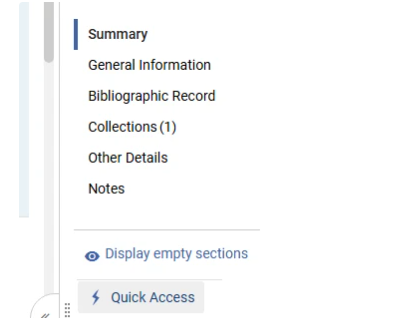
- New Layout - Ex Libris Knowledge Center
RELEASE NOTES
TBD
For more information, see TBD.
Liza
- For November:
- Liza is working on the shared doc: CZ Updates Task List word doc in C:\Users\U6068261\OneDrive - Clarivate Analytics\Desktop\Files\Release Notes For November sprint and November release. I edited most of it but do another quick review.
- It should update the existing content on: Working with the Community Zone Updates Task List - Ex Libris Knowledge Center
- Add to TMS - it has a new ID: ng_alma_rep_res_cz-update-task-list
- Add to Flare (for November)
- Add a new Sub page (see in the Word Doc for the details) CZUTL Configuration
- For the new sub page do the TMS
- Add to Flare
- Liza is working on the shared doc: CZ Updates Task List word doc in C:\Users\U6068261\OneDrive - Clarivate Analytics\Desktop\Files\Release Notes For November sprint and November release. I edited most of it but do another quick review.
(URM-321917 URM-328497) FOR SEPTEMBER:Open Predicted Items in Bulk for an Entire Set of Holdings Records
Idea Exchange URM-321917 URM-328497- Was originally added to 07 Main but Liza said to move it to September. (Updated the html in this story to November)
- Need to add the OLH section below to Flare for September in the "Prediction Patterns" page after the "Creating Additional Predicted Items Using Open Predicted Items" section and change New for August to New for November.
- (New for August 2026) You can open predicted items for a set of holdings records with the Open predicted items in bulk job. The job can be run from the manual jobs page (see Manual Jobs) or directly from the Holdings and Physical Titles search results pages, using the Run a job bulk action (see Searching in Alma). The input for the job should be a set of holdings records with prediction patterns defined on each record.
Alma now supports opening predicted items for a set of holdings records using the new Open predicted items in bulk job. This saves significant time for managing serial records with ongoing subscriptions. The job can be run from the manual jobs page or directly from the Holdings and Physical Titles search results pages, using the Run a job bulk action. The input for the job should be a set of holdings records with prediction patterns defined on each record. For the list of supported roles, see Manual Jobs.
For more information, see Prediction Patterns.
Maud
(URM-XXXXXX) TBD
 URM-XXXXXX
TBD
TBD
For more information, see TBD.
Tags
If you have a </span> followed directly by an <span> there must be a space between them.
- Acquisitions
ACQ - Fulfillment and Resource Sharing
FUL - NERS (In CommitmentNote field - the number is in the Jira title)
<img alt="CERV" class="internal default" src=/@api/deki/files/177227/CERV.png /> <span class="ScreenElement">CERV Enhancement (ID#XXXX)</span>It comes after Idea Exchange and/or before <span class="AlmaRNURMTag">URM.
To find the ID #, click the label. - Idea Exchange (In UserVoice Links field)
<img alt="idea exchange" class="internal default" src="/@api/deki/files/66486/idea_exchange.png" /><span class="ScreenElement">Idea Exchange</span>
It comes after <div class="BodyText"><span class="AlmaRNTag">November 2023 Fulfillment</span> - Collaborative Networks
- Collaborative Networks
TBD - Need to add the correct ID for the image once Greg adds it to the Media Repository- When "Collaborative Networks" is not the feature name in the title
<img alt="Consortia" class="internal default" src="/@api/deki/files/177378/Consortia_RN.png" style="vertical-align: -35%;" /><span class="ScreenElement">Collaborative </span> <span class="ScreenElement">Networks</span> - When "Collaborative Networks" is the feature name in the title
<img alt="Consortia" class="internal default" src="/@api/deki/files/177378/Consortia_RN.png" style="vertical-align: -35%;" />
- When "Collaborative Networks" is not the feature name in the title
- LATEST Example of NERS and Idea Exchange Combined
<div class="BodyText"><span class="AlmaRNTag">August 2025 </span> <span class="AlmaRNTag">Fulfillment and Resource Sharing </span> <img alt="idea exchange" class="internal default" src="/@api/deki/files/66486/idea_exchange.png" /><span class="ScreenElement">Idea Exchange</span><img alt="CERV" class="internal default" src="/@api/deki/files/177227/CERV.png" /><span class="ScreenElement">CERV Enhancement (ID#8734)</span> <span class="AlmaRNURMTag">URM-88726</span></div> - Example Acquisitions Feature for November
<div class="rnsub ACQ 202311BASE">
<h3>(URM-XXXXXX) Additional Personal Delivery Locations</h3><div class="BodyText"><span class="AlmaRNTag">November 2023 Acquisitions</span> <span class="AlmaRNURMTag">URM-XXXXXX</span>
<p>TBD</p>
<p>For more information, see TBD</p>
</div>
</div> -
Salesforce Tag (for resolved issues only - not added to features or enhancements)
<span class="AlmaRNSFTag">SF: YYYYYYYY</span>
Component Order
The new order of components is:
- Fulfillment and Resource Sharing (FUL)
- Metadata & Linked Open Data (MDM)
- Metadata Management
- Linked Open Data
- AI (AI)
- Resource Management (RM)
- Physical Resource Management
- Electronic Resource Management
- Digital Resource Management
- Acquisition (ACQ)
- Collaborative Networks (COL)
- UX, Accessibility, Infrastructure (ADM)
- Analytics (ANA)
- APIs (API)