

Display All Links in Full Display for CDI
|
This feature is available only for regular Primo VE searches. It is not applicable in the Newspapers Search. For more information, see Configuring Newspaper Search for Primo VE.
By default, the full display of CDI records displays either one link in record or OpenURL links based on the prioritization settings for the best possible link to view full text. For more details, see Link Prioritization in the Merged Record.
If you prefer, you can display all eligible full text links to enable users to select their preferred source of the CDI record's full text. Eligible links are links to which the library has access through subscription or open access and that meet a minimum quality threshold as defined by Ex Libris. In cases where there are two Link in Record links to the same full text on the same provider platform, Primo VE shows only one of those links. If you have Link in Record links and OpenURL links to the same provider platform, duplicates are not removed, since we can only remove duplicates within the Link in Record sections.
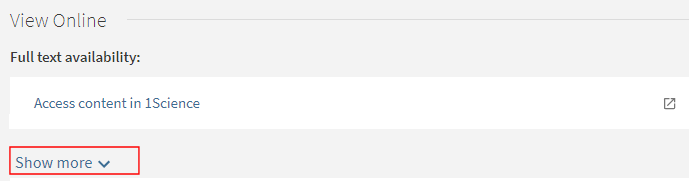
The option to display all eligible full text links is configurable per view and affects all records from CDI displayed in that specific view. When this functionality is enabled, the CDI record initially displays only the preferred link (which is the same behavior as the default setting). However, if there are other eligible links, users can select the Show more link, which appears below the preferred link to display.
By default, the optional headings do not appear unless configured in the GetIT! Tab1 Labels code table. For more information, see Configuration Options.
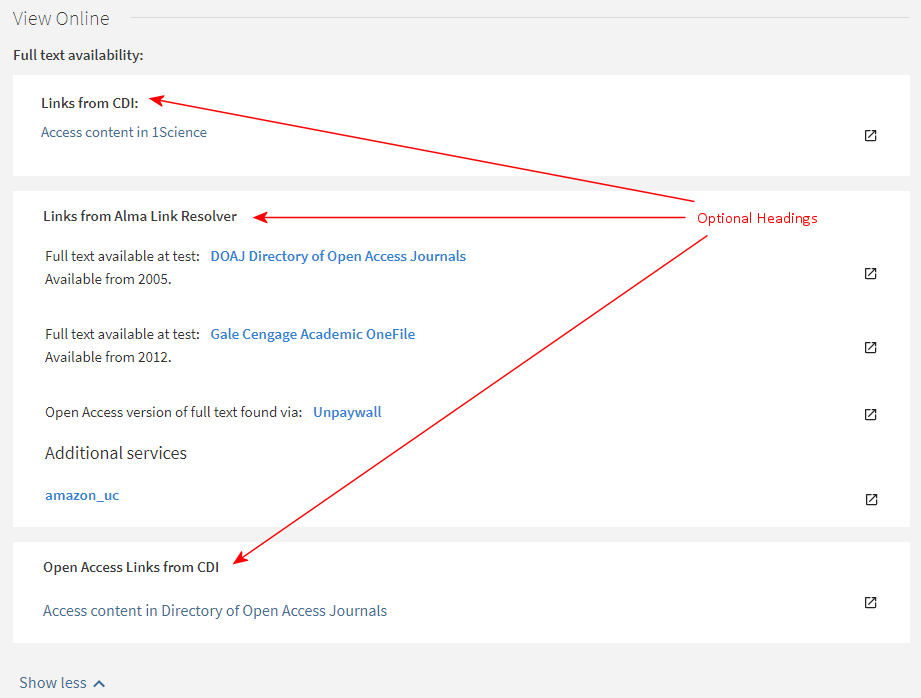
Selecting the Show more option displays additional link options that are grouped in the following order, if they exist:
-
Link in Record links for subscribed content (excluding open access links).
-
Link resolver:
-
OpenURL links from Alma/SFX.
-
OpenURL related services from Alma.
-
-
Link in Record links for Open Access content only.
The following example shows all linking options with the group headings defined:
Configuration Options
This functionality is disabled by default. For information on how to enable this functionality and configure related settings, see the following table.
| Configuration Page | Description |
|---|---|
|
View Configuration (Configuration Menu > Discovery > Display Configuration > Configure Views) |
When selected, the Display all links in View Online section option instructs CDI to return all available full text links so that they are selectable in a record's full display. If disabled, CDI returns only the preferred link. |
|
GetIT! Tab1 Labels code table (Configuration Menu > Discovery > Display Configuration > Labels) |
The following codes define the labels for showing more or less links at a time:
The following codes allow you to add a section heading for each type of link:
|
|
Aria labels code table (Configuration Menu > Discovery > Display Configuration > Labels) |
The following codes are used for accessibility:
|
|
Calculated Availability Text Labels code table (Configuration Menu > Discovery > Display Configuration > Labels) |
The following code defines the text label for calculated availability:
|