

Working File May 2024
June 2024 Sneak Preview
The upcoming June release will include features such as:
-
POST Grant API
-
Add researcher’s projects to their CV
Main Features
(URM-152577) Assets Can Now Be Linked to Activities
Researcher Activity records now include a Related Assets section, in which assets can be linked to the activities.

For additional information, see Working with Activities.
(URM-215385) Bulk Rejection for Smart Harvesting
The Author Matching Report for Smart Harvesting has been expanded to include more information and an option to mark matches for automated rejection (in addition to the already available option to mark them for automated approval). For this purpose, three additional columns have been added to the report:
- Additional AM Tasks – "Yes" when the asset has two or more authors that were matched to affiliated researchers, resulting in an author matching (AM) task for each. "No" when the asset has only one author that was matched to an affiliated researcher.
- Provisional Asset – "Yes" if the asset has not had at least one author-researcher match approved. "No" if at least one author-researcher match has already been approved for the asset.
An asset harvested by Smart Harvesting is considered “provisional” until the first author-researcher match is approved, because only then is it clear that the record is relevant to the repository. A provisional asset is not included in the repository of assets, and can only be found in the Author Matching Task list. - Rejected – The column in which you can reject a match (initially blank). When a match is marked for rejection, if the asset to which it is linked has no pending or approved matches to other researchers, or all of its matches are pending and are marked for rejection in the report, all its matches are rejected and the asset is deleted from the database. If these conditions are not met, all rejections for the asset are ignored.

- These enhancements are only available for Smart Harvesting input. When the report is generated for other types of input (i.e., Smart Expansion, Input profile, or SWORD), these columns are not included in the report.
- The name of the menu option for creating the Author Matching Report and uploading updates has been changed from Author Matching Report / Update Approved Matches (Researchers > Author Matching Report / Update Approved Matches) to Author Matching Report / Update Author Matches (Researches > Author Matching Report / Update Author Matches).
For additional information, see Reports and Notifications for the Smart Harvesting Framework.
(URM-217874) Enhanced Author-Matching Algorithm
The Author Matching algorithm has been enhanced. The main change is that an updated embedding feature, which uses improved dictionaries, has been implemented. The embedding feature helps the algorithm detect the research domain of the researcher and of the incoming asset. For additional information about the Author Matching algorithm, see Author Matching Algorithm.
(URM-201603) Links to Researchers' Esploro Portal Profiles in Their ORCID Profiles
Links to researchers' Esploro profiles can now be published to ORCID as part of the metadata sent from Esploro to ORCID by the Update Researcher ORCID scheduled job (see Scheduled Jobs). This functionality is implemented for researchers who have approved ORCID updating by Esploro, and for whom profile data from Esploro is sent to ORCID. When it is activated, the option adds a link to the researcher's ORCID profile that opens their Esploro profile. This option can be activated for the organization in a new configuration table called Orcid Record Sections Settings (Configuration menu > Repository > Integrations > ORCID Record Sections Settings). For additional information, see ORCID in Esploro.
(URM-186711) New Digital Adoption Tool
Starting with the November 2023 release, Ex Libris has been gradually deploying Pendo, a new digital-adoption tool, across Alma and other components of our higher-education back-office suite. Pendo was previously deployed in the Esploro hub, and has now been deployed in the Esploro portal.
- Pendo is a Digital Adoption tool used by SAAS (Software as a Service) software companies to identify usage trends and to provide users with an optimized user experience. It provides information on user trends and behavioral analytics to help improve the user experience.
- The implementation of Digital Adoption on the HEP (Higher Education Platform) is designed with our business partners to ensure that no personal data is passed through to Pendo.
- As part of our ongoing effort to improve the user experience, Digital Adoption helps us identify complex workflows where users might be struggling. This gives us the input needed to improve or simplify these workflows. During 2024, we will add a new walkthrough, which provides in-app guidance. In the future, there may be additional capabilities, such as in-app help, messaging, user feedback, and more.
- For more information about Pendo, see the FAQ.
Deployment
The digital adoption is functional only for users where:
- Pendo is operating based on their country and institution’s policy.
- The Digital Adoption configuration is turned ON (see screen capture below).
- The user accepted functional and targeting cookies.
For more information about data collection, data privacy, and the anonymization process, see Pendo for Ex Libris: Higher Education Platform (HEP).
Configuration
Administrator users can activate or deactivate data collection for Pendo on the Digital Adoption page (Configuration Menu > General > General Settings > Digital Adoption).
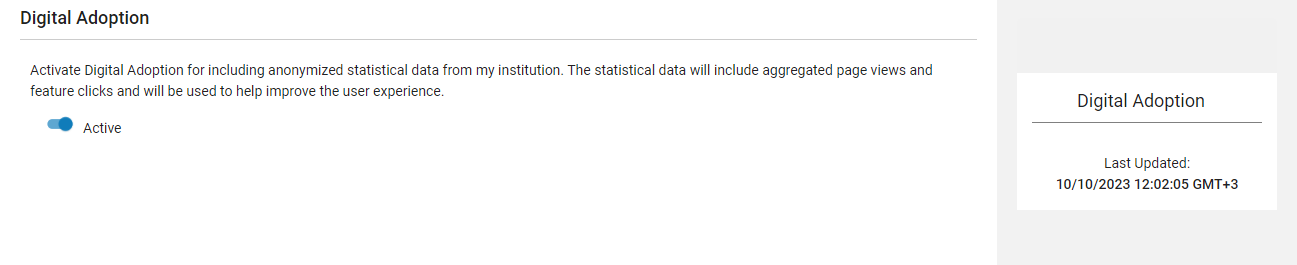
For more information about configuration, see Configuring Digital Adoption.
Additional Enhancements
-
May 2024 Research Portal URM-213103
(URM-213103) When the system is configured such that the default page for organizational units is their homepage, if a particular organizational unit does not have a homepage, the Outputs page is automatically opened instead. The process of opening the Outputs in this case has been improved, so that it now opens seamlessly and more quickly. For additional information about configuring organizational-unit display, see Configuring the Research Portal. -
May 2024 Data URM-213112
(URM-213112) When assets or grants are moved from one researcher to another, if the original researcher's account had an ORCID token associated with it, the token is now automatically moved as well. ORCID tokens are used for authenticating and gaining access to the researcher’s ORCID profile. For additional information, see Working with Researchers -
May 2024 Data URM-215494
(URM-215494) Documentation of the Post API for creating organizational units, and the organizational unit schema, have been added to the Developer Network. For additional information, see Esploro API Docs: Create organization in the Developer Network.
Resolved Issues
- May 2024 Data SF: 06553431URM-181782
(URM-181782) When conference metadata was exported to RiS or BibTeX, the event fields were not included. This was fixed. - May 2024 Smart Harvesting SF: 07026089URM-214249
(URM-214249) An author match that is approved by a researcher creates a task that informs the admins of the approval. These tasks did not appear in the Tasks widget as they should have. This was fixed. - May 2024 Smart Harvesting SF: 07015939URM-214296
(URM-214296) When authors were edited using the Manage Creators option to update or approve author affiliations, asset affiliations were incorrectly added from previously edited provisional assets. This was fixed. - May 2024 Management SF: 06737082URM-192202
(URM-192202) The Research ORCID Letter was sent to researchers after every run of the Update Researchers' ORCID job, even when the job did not attempt to update their ORCID profiles. This was fixed; only researchers for whom the job attempted to update their ORCID profiles now receive the letter. - May 2024 Management SF: 07118271 07010404 06937662 06925182URM-211700
(URM-211700) When operators sent messages to researchers from the Asset Details page, the messages appeared in the Communications tab and in the researcher's profile in the portal, but they were not sent as emails to the researchers. This was fixed; these communications are now sent to the researchers by email as well as appearing in the researchers' profiles in the portal. - May 2024 Research Portal SF: 06986281URM-212548
(URM-212548) Files with local access-rights only – such as files that could only be accessed from on campus – appeared with an Open Access label in the portal when the portal was accessed from within the specified local area. Now, when a file only has local access-rights, the Open Access label is never displayed – only the name of the license is displayed when the portal is accessed from within the specified area. - May 2024 Research Portal URM-211804
(URM-211804) Translation of the page and section names of General pages was not working. This was fixed. - May 2024 Research Portal SF: 06961952URM-211694
(URM-211694) Activities on researcher profiles displayed the researcher member names with the prefix "by." This prefix was removed. - May 2024 Management SF: 06989331URM-215824
(URM-215824) Republishing of a subset of a set of assets republished the entire set. This was fixed; republishing a subset now only republishes the subset. - May 2024 Analytics and Insights SF: 06870934URM-207515
(URM-207515) Scheduled analytics reports were sent out with the Alma layout and logo. This was fixed; these reports are now formatted correctly for Esploro. - May 2024 Analytics and Insights SF: 07020946URM-214162
(URM-214162) In the Research Assets Dashboard, the Assets per Journal title tab displayed no data. This was fixed.