

Esploro 2026 Release Notes
Click here to view the monthly release and maintenance schedules.
October 2026 Sneak Preview
The upcoming September release will include:
- Publication Version field added to Research Output
September Main Features
Enhanced Control over Researcher Profiles
September 2026 Portal & Profiles
Create more engaging researcher profiles by highlighting the content that best represents your institution. New configuration options allow administrators to customize the order of sections within the central column of the Overview tab and the order of the other tabs, ensuring researchers and visitors see the most important information first. A new configuration table Configuration > Portal & Profiles > Researcher Profile Display Configuration lists the sections and tabs that can be reordered using drag and drop.

Control over which tabs display continues to be managed in the configuration table - Configuration > Portal & Profiles > Researcher Privacy Display.
Improvements to EROD (External Research Organization Database) Search
September 2026 Management
Search functionality in EROD was improved to make it easier to find organizations:
- Punctuation and leading/trailing spaces are now ignored. For example, searching for Ludwig Maximilians Universität München will find Ludwig-Maximilians-Universität München.
- Word order is no longer considered when matching results. For example, searching for Memorial Hospital Abington will find Abington Memorial Hospital.
These improvements help ensure that relevant organizations can be found even when names are entered in different formats.
Analytics Enhancements
September 2026 Analytics
1. The Grant DOI was added to the Grant Details dimension in the Grants Subject Area.
2. A new Researcher Metrics dimension was added to the Researchers Subject Area, enabling more flexible reporting on researcher impact metrics.
The new dimension includes the following elements:
- Metric Type
- H-Index (Web of Science)
- H-Index (Scopus)
- Total Citations (Web of Science)
- Total Citations (Scopus)
- Metric Value: The value associated with the selected metric type.
This enhancement allows users to report on and analyse researcher metrics using a single, extensible dimension structure.

Additional items section
Smart Expansion via Alma Enhancements
- Records that are suppressed from Discovery in Alma are now created in Esploro with Portal Visibility and Profile Visibility disabled.
- The Smart Expansion job can now be scheduled to run on an hourly basis. The new option was added to the Schedule drop-down in the Smart Expansion via Alma profile.
Update DOI Registration Agency Job Enhancement
The Update DOI Registration Agency job can now be scheduled to run on an hourly basis. The new option was added to the Schedule drop-down in the Research Jobs Configuration page.
UKETD_DC Format Supported in Esploro Publishing
The UKETD_DC (UK Electronic Theses and Dissertations Metadata Schema) is now supported in Esploro Publishing. The format, based on Dublin Core, is used to publish to the British Library's EThOS service that harvests thesis information.
Revoke Temporary URL
A new Revoke Temporary URL line action was added to the File Requests tab of a Research Asset. This action is available for temporary links and allows administrators to immediately disable access to a shared file. When invoked, the temporary URL's expiration date is updated to the current date, making the link inaccessible.

Files and Links Help Text Enhancements
Several improvements were made to the display of help text in the Files and Links section of the Configurable Researcher Deposit forms.
A new label was added as a fallback help text. This text is displayed when the asset type is not yet known, such as on the first page of the deposit process before an asset type was selected. It also serves as the default help text for asset profiles that do not have profile-specific help text configured.
The code of the new label is researcherDeposit.filesAndLinks.helpText. It can be configured at:
Configuration > Portal & Profiles > Labels > Researcher Deposit Files and Links.

Resolved Issues
September 2026 Analytics - SF:10695831 & 10654994 - Grants Missing from Analytics Reports/Downloads
Fixed an issue where grants were missing from some analytics reports and report exports. Grant data is now included correctly in both reports and downloads.
September 2026 Management - Changes to the Researcher Titles Code Table
The Researcher Titles Code Table can now be edited by the administrators with the Configuration Manager. Note that this code table is also used for the platform user titles.
September 2026 Management - Usage Statistics Not Counted for Direct File Access
Fixed an issue where usage statistics were not recorded when files were accessed via direct links. Usage generated through direct file access is now included correctly in usage statistics.
September 2026 Portal & Profiles - SF:08386510 – Export of Assets in RIS Format from Research Portal Sometimes Incorrect
Fixed an issue where RIS exports containing more than 30 assets were generated in an incorrect format. RIS exports now work correctly also for larger result sets.
September 2026 Management SF:10613941- Asset Citation includes Empty 'Illustrated By'
Fixed an issue where citations could include an empty ’Illustrated by‘ field. The field is now displayed only when illustrator information is available.
September 2026 Portal & Profies - SF:0602503 - Researcher Engagement Types Display
Fixed an issue where some enabled Researcher Engagement Types were not displayed on researcher profiles. All configured engagement types now appear as expected.
September 2026 Integrations - SF:10574578 – Projects & Activities API Returns Error for Researchers Without Data
Fixed an issue in the Projects & Activities GET API where queries by researcher ID could return an unexpected error if the researcher had no associated projects or activities.
The API now returns an empty response stanza, allowing integrations to handle these cases correctly.
September 2026 Analytics - SF:08129306 - Asset Creation and Modification Dates Incorrect in Analytics
Fixed an issue where asset creation and modification dates were not always transferred correctly to Analytics. The Asset creation and modification dates should now be accurate in analytics reports and dashboards.
August Main Features
Organizational Unit Proxy
August 2026 Management
this feature was introduced in the June release, temporarily withdrawn due to an issue, and has now been reinstated following a successful fix
Previously, proxies could only be assigned to individual researchers. In some scenarios, however, it is useful to assign a proxy to a larger group — for example, allowing a departmental administrator to act on behalf of all researchers within a department.
You can now assign a proxy at the organizational unit level. This enables a selected user to act as a proxy for all researchers within a specific organizational unit or units, including sub-units.
A new “Proxies” section was added to the Manage Organization Unit page. Use the “Add Proxy” option to define a unit-level proxy. Any platform user can be selected from the list.

When a user signs in, the available options depend on their assigned roles: they may be able to act as a unit proxy, act as a researcher proxy, access their own researcher profile, or choose from any combination of these options
After selecting to act as a unit proxy, the system displays all researchers associated with that unit and its sub-units. The unit proxy can then search for and select a specific researcher and access their profile. Once selected, the unit proxy can update the researcher’s profile in the same way as a direct researcher proxy.

Researcher Profile Enhancements
August 2026 Portal & Profiles
The August release includes several enhancements to the Researcher Profile that make it easier for users to understand and navigate profile content:
Tab counts: Each tab now displays the number of records it contains, helping users quickly understand the volume of content available.
Output search: A search option was added to the Outputs tab, making it easier to find specific records
Output sorting: Outputs can now be sorted alphabetically and not just by publication date, giving users more control over how results are displayed.

Researcher Engagements
August 2026 Portal & Profiles
Researchers can now add and manage Engagements on their Researcher Profile.
Engagements are publicly displayed and searchable, making them a valuable way to showcase professional roles and activities. Researchers can also hide Engagements from public view when they are no longer active or should not be displayed.
In addition, the number of Engagement types that can be defined by administrators was increased from ten to twenty. For more information about configuring Researcher Engagements see Configuring Researcher Details.
UN Sustainability Development Goals Added to Researcher Activities
August 2026 Portal & Profiles
Researchers can now associate UN Sustainable Development Goals (SDGs) with their Researcher Activities. SDGs help demonstrate the broader impact of an activity by connecting it to recognized global goals. SDGs were added to Researcher Activities in the Research Information Hub in July and in August it is available for Researchers in the Researcher View. For more information about configuring Researcher Activities
Support for ROR
August 2026 Management
Esploro expanded its support for Research Organization Registry (ROR) IDs. Previously, APIs and data loaders required Esploro's proprietary Organization Code to identify and match organizations. With this enhancement, institutions can now use ROR IDs as an alternative identifier, simplifying data integration and alignment with a widely adopted community standard.
ORCID Authentication
August 2026 Management
When researchers authenticate their ORCID iD, they verify ownership of the identifier, providing institutions with greater confidence in the accuracy and reliability of researcher identity data. Esploro now supports ORCID iD authentication through the ORCID Public API, extending this capability beyond institutions with ORCID Member API access. Because Public API credentials can be obtained by any institution at no cost and without ORCID membership, all Esploro customers can now offer researchers a simple way to authenticate and verify their ORCID iDs directly from Esploro. This helps improve data quality, strengthen researcher identity management, and increase trust in ORCID information across the institution.
Esploro also now displays separate indicators for authorized and unauthorized ORCID iDs, providing clear visibility into each ORCID iD's verification status.
Authenticated icon 
Unauthenticated icon 
File Accessibility Fields Added to Analytics
August 2026 Analytics
The File Accessibility status and File Accessibility comments fields were added to the File Details dimension in the Research Assets Subject Area.
Additional Enhancements
Update Researcher Employment in ORCID
The Update Researcher Profile in ORCID job was enhanced to synchronize researchers' departmental affiliations with ORCID. Esploro now also automatically updates ORCID when affiliation information changes in Esploro, reducing manual maintenance and helping keep researcher profiles consistent across systems.
UKETD_DC Format Supported in Esploro Publishing
The UKETD_DC (UK Electronic Theses and Dissertations Metadata Schema) is now supported in Esploro Publishing. The format, based on Dublin Core, is used to publish to the British Library's EThOS service that harvests thesis information.
The Delete Action is Supported by the Esploro SWORD Server
The DELETE action is now supported by the Esploro SWORD server which means that Esploro assets can be deleted via SWORD.
Patch API Supports Update of Asset Visibility Flags and Local Fields
It is now possible to update assets’ Portal Visibility, Profile Visibility, and Local Fields using the PATCH API.
Asset visibility flags can be updated only for approved assets. The following fields are supported:
- portal_visibility – true / false
- profile_visibility – true / false
For local fields (for example, local.note1), the PATCH API supports the Add and Replace actions. Only local fields configured in Configuration > Repository > Asset Additional Fields can be updated.
- Add – Creates a new value for the local field. If the field already contains a value, the request is rejected.
- Replace – Replaces all existing values of the local field with the values provided in the request.
July Main Features
Smart Expansion via CSV Without Researcher Information
July 2026 Smart Harvesting Framework
-
Run without researcher
Select the “Run without active researcher” option in the Run section (displayed below the file upload). -
Researcher ID not required
The column for the Researcher ID (USERID or ALMAID) is now optional. -
Supported search methods
The job searches CDI using identifiers only: DOI, PMID, Web of Science ID, or Scopus ID.
Title-based search is not supported in this mode, since no researcher context is available. -
Author matching behavior
Because there is no researcher, author matching may not identify affiliated researchers. In such cases:-
No Author Matching Tasks are created.
-
The job report includes a new event:
“Assets with no matching affiliated author/author matching tasks (N)” -
You can click this event to view the list of affected assets and access them via search
-

Full Display of Media Mention
July 2026 Portal & Profiles

Add UN SDG Field to Project and Activity Records
July 2026 Management

Enhanced Control over Activity and Project Page in the Researcher Profile
July 2026 Portal & Profiles
Configuration was added to control if individual sections of the Activity and Project entity default to open or closed when the entity is opened from the Researcher Profile in edit mode. By defaulting to open, the section is more visible and the operator is more likely to add data to the section. Configuration was added to the existing Entity configuration page – Configuration > Portal & Profiles > Project Display Configuration, and Configuration > Portal & Profiles > Activity Display Configuration.

Researchers Control Email and Phone visibility on Profile
July 2026 Portal & Profiles
Researchers can now hide email addresses and phone numbers from public display, improving privacy and control over personal information—previously, this information could be added or edited but not hidden.

Allow customers to control if creator affiliation is required in Researcher Deposit
July 2026 Management

Improvements to File Request Management in the Research Information Hub
July 2026 Management
When an admin approves a file request in the Research Information Hub, the URL is now emailed to the requestor automatically, streamlining the approval process. Previously, admins had to open an email application and send the URL manually. If the approval email cannot be sent, the File Request status is updated to Failed and displayed in the Research Information Hub.
New Dashboard – Private Researcher Profile Events


Organization Subject Area
The new analytics subject area for the Esploro internal organization entity - Esploro Organization is no longer “under construction.”
The subject area provides a comprehensive view of organizational data, including key attributes and related entities such as researchers, assets, projects, grants, activities, and media mentions.
The subject area also models the organizational hierarchy, enabling analysis across different levels. Measures can be reported for a specific organizational unit or aggregated across the unit and its sub-units. To include sub-unit data in your analysis, use the Organization Unit Levels dimension.
For more details, refer to the documentation
Additional Enhancements
July 2026 Management Improve Project to Activity Relationships
Links between Projects and Activities now display in both the Project and the Activity record, whereas in the past they only displayed on the Activity record. Creating and updating the link can be done from the Project record only.
July 2026 Portal & Profiles Entity Name Added to Full Display of Entity
The entity name now appears in the Full Page view, helping users confirm which entity they are viewing. This is especially useful because common fields such as Researcher, Academic Unit, and Dates appear across multiple entity types.
July 2026 Portal & Profiles Add TikTok icon to Researcher Profile Social Media Links
The TikTok icon will now display next to social media links to a Researcher’s TikTok account.
July 2026 Integrations Suppress from Public Portal flag Added to Researcher Schema
The Researcher schema now includes the “Suppress from Public Portal” flag for fields researchers can hide from their public profile through the Private Profile. This flag is included in the GET Researcher response, but can only be set by the researcher in the Private Profile; any value provided in PUT or POST Researcher requests is ignored.
Resolved Issues
July 2026 Management SF:10613941 Group Authors Missing from Asset Citations
Group authors were not included in asset citations. This was fixed.
July 2026 Portal & Profiles SF:08013416 – Researchers Incorrectly Prompted to Sign In to Profile
In some cases, researchers who were already signed in to their profile were incorrectly redirected to the sign-in page when navigating to other pages in the Research Portal. This issue was fixed.
July 2026 Integrations SF:08409998 Author Order Sometimes Incorrect in Esploro Assets Pushed to ORCID
When Esploro sent assets to ORCID the system didn’t take the order of the authors into account. This was fixed.
July 2026 Management SF: 08402294 Researcher Letters Missing from Attachments Tab
Some letters to researchers did not appear in the Attachments tab in Manage Researchers. This was fixed.
July 2026 Management SF: 08400521 – Student Primary ID Missing from History Tab
The student primary ID wasn’t displayed in the History Tab of a submitted ETD. This was fixed.
July 2026 Management SF: 08382087 Obsolete Entry in EROD
The external organization 41___BAYLOR_COLLEGE_OF_DENTISTRY_(DALLAS) does not exist in ROR and has been removed from Esploro’s External Research Organizations database (EROD).
July 2026 Integrations SF: 07104899 ETD Authors were not Included in the Metadata Sent to ORCID
ETD authors were not sent to ORCID with the rest of the ETD metadata. This was fixed.
July 2026 Management SF: 08428696 Date Published Added to Asset Deposit by System
In some cases, the system added a date published (year only) to the assets even if it was left blank in the Researcher Deposit form. This issue was fixed.
July 2026 Integrations Some Records Fail to be Published via OAI-PMH
In some cases, if a record was missing a field the record failed to be published even if the field was not mandatory. This was fixed.
July 2026 Portal & Profiles SF: 08410507 – Re-directs in Chrome Occasionally Return a 400 Error
Re-direct URLS are now encoded, and this resolves the issue.
July 2026 Management SF: 07953236 Esploro External Organization XSD and Import
The targetOrganizationIdType always displayed as the GRID Id regardless of which Id type was used. This was fixed.
In addition, the link to the Organization Units schema was fixed in the Developer’s Network.
June Main Features
Update Researcher ORCID Profiles with Grants
June 2026 Management
Esploro customers with ORCID membership can now push researcher grants directly from Esploro to their ORCID profiles. This enhancement improves data completeness while reducing the need for manual data entry.
New configuration tables provide full control over which grants are shared and how they are mapped to ORCID funding types, ensuring accurate data transfer and alignment with your institution’s requirements.
- Esploro ORCID Funding Configuration: defines which grants are eligible to be sent
- Esploro Grant Type to ORCID Funding Type: maps Esploro grant types to ORCID funding types
For more information, see Configuring ORCID Integrations.


New Keyword Facet added to Researcher Results Page
June 2026 Portal & Profiles
A new keyword facet was added to the Researcher Results page in the Portal, enabling users to quickly refine results and identify researchers by their research areas.
In multi-lingual environments, facets are displayed per language, supporting more precise, language-specific discovery.
The facet is disabled by default. To enable it, navigate to Configuration > Portal & Profiles > Researcher Profile Search Results Configuration, and activate the keyword facet.
Note that there is a single facet configuration entry. When enabled, in multi-lingual environments it will be active across all UI languages. The facet will only display if there is keyword data in that language.

Organizational Unit Proxy
June 2026 Management
Previously, proxies could only be assigned to individual researchers. In some scenarios, however, it is useful to assign a proxy to a larger group — for example, allowing a departmental administrator to act on behalf of all researchers within a department.
You can now assign a proxy at the organizational unit level. This enables a selected user to act as a proxy for all researchers within a specific organizational unit or units, including sub-units.
A new “Proxies” section was added to the Manage Organization Unit page. Use the “Add Proxy” option to define a unit-level proxy. Any platform user can be selected from the list.

When a user assigned as a unit proxy signs in, they are prompted to select the organizational unit they wish to act on behalf of, or to sign in to their own profile.
After selecting a unit, the system displays a list of all researchers associated with that unit and its sub-units. The proxy can then search for and select a specific researcher to manage their records.

Events added for Actions in the Private Researcher Profiles
June 2026 Analytics
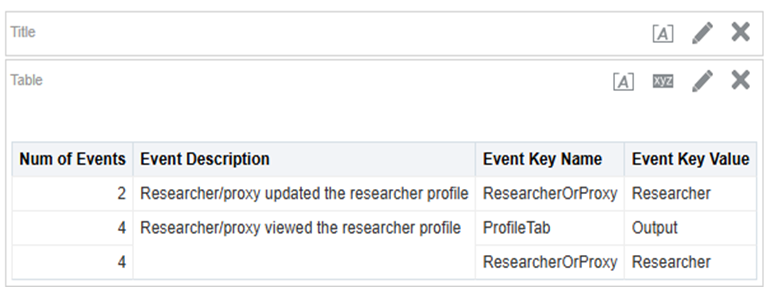
New events were introduced to capture selected actions performed by researchers and their proxies within private researcher profiles.
These events are available in the System Events subject area, which consolidates activity from across Higher Education Platform systems, including Alma.
The table below lists the newly added events.
An out-of-the-box dashboard based on these events will be available in the July release.
|
Event Type |
Description |
Parameters |
|
39120 |
Researcher/proxy accessed the private researcher profile |
· Researcher or Proxy |
|
39121 |
Researcher/proxy updated the researcher profile |
· Researcher or Proxy |
|
39122 |
Researcher/proxy viewed the researcher profile |
· Researcher or Proxy · Tab viewed |
|
39123 |
Researcher/proxy added content to the researcher profile |
· Researcher or Proxy · Content type |
|
39124 |
Researcher/proxy invoked the CV feature |
· Researcher or Proxy · CV Action |
|
39125 |
Researcher/proxy invoked the Claim/Reject Output feature |
· Researcher or Proxy · Claim/Reject |
|
39126 |
Researcher/proxy invoked the Access request feature |
· Researcher or Proxy · Approve/Deny |
Paste a string of Keywords (CERV)
June 2026 Management
Admins in the Research Information Hub can now paste a string of keywords and have them automatically parsed into individual keywords using the @@@ delimiter, streamlining data entry and improving efficiency. This capability is available across all entities in both the Research information Hub and Researcher View: Assets, Researchers, Activities, Projects, and Media Mentions.
Organization Subject Area - Under Construction
June 2026 Analytics
A new analytics subject area for the Esploro internal organization entity, Esploro Organization, was introduced in the June release. As development is still in progress, the subject area is currently labeled “Under Construction.” Full availability is expected in the July release.
The subject area provides a comprehensive view of organizational data, including key attributes as well as related entities such as researchers, assets, projects, grants, activities, and media mentions. Currently most measures and dimensions are already available.
The subject area also models the organizational hierarchy, enabling analysis across different levels. Measures can be reported for a specific organizational unit or aggregated across the unit and its sub-units. To include sub-unit data in your analysis, use the Organization Unit Levels dimension.
Additional details and documentation will be provided with the July release.

Enable Researcher to Select Name to Display on Profile
June 2026 Portal & Profile
Researchers can now select a display name on their profile without updating their name in the database. Previously, this capability was limited to researchers with permissions to edit their name.
This enhancement provides greater flexibility while preserving authoritative data. It is controlled by a new flag in Configuration > Portal & Profiles > Researcher Display Settings (disabled by default).

Additional Enhancements
June 2026 Management Update Asset type to External ETD
The “Update Set of Assets” job now supports conversion to and from External ETD, enabling more efficient bulk updates. Previously, only Internal ETD was supported.
For more information, see the CKC.
June 2026 Analytics Researcher SDGs added to Analytics
Researcher SDGs were added to a new dimension in the Researchers Subject Area – Researcher SDGs. The dimension has two elements – SDG source and SDG value.
June 2026 Management Define External Relationship for Asset without a URL
It is now possible to define an external relationship for an asset without a URL, as long as there is a title. This is possible in mediated and researcher deposits (in the configurable researcher deposit forms) as well as via the Asset API.
June 2026 Portal & Profiles Include additional Fields in BiBTex export
BibTeX exports were enhanced to include additional commonly used (non-standard) fields, including URL, Peer Reviewed, Open Access, and License. These additions improve the completeness of exported records.
Resolved Issues
June 2026 Management SF: 08326072 - Agricultural Chemistry [0749] is missing from Researcher ETD Topics Labels
June 2026 Portal & Profiles SF:10556725 - Research Topics and Keywords are not displaying for Some Researchers in the Researcher Portal
If a researcher profile had no research keywords, the research topics also would not display. This was fixed.
June 2026 Management SF:08428696 - Availability Date shown in Configurable Researcher Deposit form
In some scenarios in a Researcher Deposit using the configurable forms an “Availability Date” was added automatically by the system to the asset. This was fixed.
June 2026 Management SF:08424115 - Incorrect Web of Science Citations metrics
The Research asset Web of Science metrics retriever did not work for all assets. This was fixed.
June 2026 Management SF:08397417 - Esploro – Creating Itemized Sets using Analytics Report
In Esploro, when creating an itemized set from Analytics, some of the Shared Folders did not display. This was fixed. Note that the “My Reports" folder will only include reports that were shared with the operator as an Analytics Object.
June 2026 Portal & Profiles SF:08398081- Accessibility issue: Elements with low contrast
Two elements in the Research Portal, 'Most downloaded' and 'Most viewed', had low contrast and were fixed.
June 2026 Portal & Profiles SF:08389791 - Esploro public UI – “Empty form label” accessibility errors on Researchers and search-results pages
Empty form labels were removed from the Research Portal DOM (Document Object Model).
June 2026 Management SF:08395228 - PDF cover page DOI hyperlink includes prefix and does not resolve
When a DOI was added to an asset as a link, the system still added the DOI domain prefix to the DOI in the PDF Cover page resulting in an invalid URL. This was fixed.
June 2026 Management SF:08369754 - Correction in Locally Defined Embargo Access Rights
The date parameters that can be used to define a local embargo access right – Publication Year and Additional Publication Year - were incorrect. They were corrected:
- Publication Year is “date.published”
- Additional Publication Year is “date.epublished”
June 2026 Management SF:08389342- Org Unit with No Associated Entities Cannot Be Deleted Despite Delete Button Appearing in Details Pane
In some cases, the system returned the error “This Unit cannot be deleted - it has associated entities” even when it did not have any entities linked to it. This was fixed.
June 2026 Portal & Profiles SF:08386510 - Inconsistency in RIS file export from Research Portal
Due to a data problem the system did not include all selected assets in an RIS file format export in the Research Portal. This was fixed.
June 2026 Management SF:08363975 - Grant amounts over 10 million display in scientific notation instead of standard number format in Research Information Hub
A grant amount exceeding 10,000,000 displayed in scientific notation format. This was fixed.
June 2026 Integrations SF:08354471 - Expose local access-rights policy name/code and reason field per file in asset API
When a local access right is in use the Asset API only returned “Local” with no information about the specific access right in use. It now returns the policy name and reason.
June 2026 Integrations SF:08337349 - Configuration of opt-out consent for Pendo
The loading behavior of the Pendo Web SDK has been updated to align with cookie consent requirements. Previously, the SDK was loaded before consent for functional cookies was granted. This was changed so that the Pendo Web SDK is loaded only after user consent is provided and as a result all Pendo-related communication is delayed until consent is accepted. Tracking itself has always occurred only after consent was granted.
June 2026 Management SF:08329500 - Missing author emails for ETD in Analytics
When an ETD author is linked to a researcher the author’s email was not included in analytics. This was fixed.
June 2026 Management SF:08243979 - Mediated ETD not harvesting metadata from PDF
The option to extract metadata from the PDF to populate the asset did not work in a mediated ETD deposit. This was fixed.
June 2026 CloudApps SF: 07269944 - Esploro Activities CloudApp / Loader fails if an Abstract has more than 4,000 characters
The CloudApp Activities Loader failed if the abstract had more than 4,000 characters. This was fixed.
June 2026 Management SF:07176750 - Media Mention can't be saved as the title is too long
The Media Mention title and translated title were limited to 255 characters each, resulting in an error if longer titles were added. The limit was extended to 1,000 characters.
June 2026 Management SF:06953440 - Organization names are sent to DataCite in different format for affiliated and non-affiliated researchers
The internal organization name is now sent to DataCite in the same way for affiliated and non-affiliated researchers. The ROR format is now used in both cases.
June 2026 Management SF:06929827 - Apostrophe in ROR entry in Central EROD list not matching
Some of the apostrophes in external organization names were non-ASCII apostrophes. This was fixed.
May Main Features
Add Sustainable Development Goals (SDGs) to the Researcher Profile
May 2026 Portal & Profile
The United Nations Sustainable Development Goals (SDGs) provide a powerful way to demonstrate the real‑world impact of research. Esploro now supports associating SDGs directly with a Researcher, enabling institutions to highlight the global challenges their research addresses.
SDGs can be added manually either by an administrator (via the Research Information Hub) or by the researcher within their Researcher Profile. They can also be ingested through the SIS loader and the Researcher API.
For institutions that maintain SDG information in external systems, Esploro supports activating and configuring up to three SDG sources for display in the Researcher Profile. Each source can be configured independently, giving administrators full control over:
- which sources are enabled
- whether researchers can edit them
- which sources are displayed publicly
By default a single SDG source is active. To activate and customize additional SDG sources, go to Configuration > Researchers > Researcher SDG Sources, select how many sources to enable, and define their descriptions.
To control whether researchers can add or update SDGs, navigate to Configuration > Portal & Profiles > Researcher Profile Settings.
To configure how SDGs are displayed publicly, go to Configuration > Portal & Profiles > Researcher Profile Privacy Display Settings.

Enhance display of SDGs on Research Output
May 2026 Portal & Profiles
Research Outputs (assets) in Esploro may include two SDG lists:
- A locally defined SDG list
- An SDG list derived from InCites via the Esploro–InCites integration (for mutual subscribers)
Esploro now supports displaying both SDG lists, each list displays on a separate tab and end users can toggle between the tabs. with the ability to toggle between them. If both SDG types are enabled in the existing configuration, they will both display.
SDG display settings are managed under Configuration > Portal and Profiles > Assets Display Configuration

Add Review Flow for Projects and Activities
May 2026 Management
Researchers can add and update Projects, Activities, and Media Mentions in their Private Profile to showcase their research work.
In the May release, a new configuration was introduced to control whether newly submitted Projects, Activities, and Media Mentions require administrator approval.
When admin approval is enabled:
- Researchers submit new records for review
- An admin task is created for approval
- Once approved, the Researcher receives an email notification confirming the approval
This configuration is available under Configuration > Portal & Profiles > Researcher Profile Settings:
- Projects and Media Mentions: admin approval can be turned on or off
- Activities: approval can be configured by Activity category, allowing some categories to require approval while others do not
Delete All Keywords in the Research Information Hub (CERV)
May 2026 Management
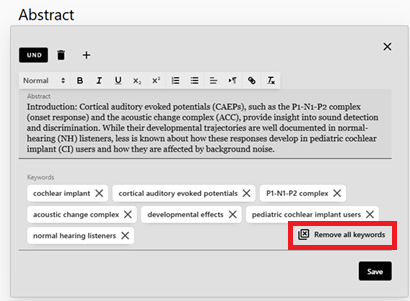
In the Research Information Hub it is now possible to remove all the keywords from a record with a single click. The “Remove all Keywords” function was added to all entities that contain a Keywords or Additional Subjects field.
Additional Enhancements
May 2026 Integrations New Patch API Action Add Group Author
The Patch API to update existing Asset records can now be used to add or replace a Group Author field in the Asset record. For more information about how to use the Asset API see the Developer Network.
May 2026 Integrations Portal & Profile Allow Researchers to enter File Accessibility data when depositing a file
File accessibility fields have been added to the Researcher Profile file deposit screens, allowing Researchers to record an Accessibility Status and Comments at the time of submission. This ensures accessibility information is captured consistently and early in the workflow.
These fields enable administrators to track the accessibility status of new files. The fields are indexed so admins can easily identify, filter, and retrieve files that require remediation or replacement, supporting ongoing accessibility management and institutional compliance efforts.
Resolved Issues
May 2026 Management SF: 08326072 - Agricultural Chemistry [0749] is missing from Researcher ETD Topics Labels
The label for the topic “Agricultural Chemistry” was missing in assets imported from ETD Admin. This was fixed.
May 2026 Portal & Profiles SF: 08384788 - Unable to edit Activity description via Researcher Profile
When a researcher updated and saved the description of an activity the text did not display. This was fixed.
May 2026 Management - File view usage still includes bots
The usage for file views included some usage by bots. This was fixed.
April Main Features
Generate SDGs for Assets Using AI
April 2026 Management
This release introduces Esploro’s first AI-powered capability built on the Clarivate Academic AI Platform. You can now automatically generate UN Sustainable Development Goals (SDGs) for sets of up to 500 assets at a time. SDGs are an effective way of demonstrating the impact of your research output. The workflow includes two stages , the first stage allowing operators to review, approve, reject, or modify the suggested SDGs, and the second for updating assets in bulk.
A new menu option is available under: Repository > Manage Assets > AI Generated SDGs for Assets.
The process supports two operations for the two stages:
- Generate SDGs and Report
In this mode, Esploro sends selected asset metadata—title, publication title, keywords, research topics, and descriptions (such as abstract or table of contents)—to the Academic AI Platform, which returns SDG suggestions.
The generated SDGs are added to a CSV report for operator review. The CSV file can be downloaded from the job report as explained below.
Parameters
- Select set of assets - Choose a predefined set (maximum 500 assets).
- Is an asset description mandatory? (Yes/No) - When descriptions are included, the AI model receives richer context and produces higher precision suggestions. If set to Yes (default), only assets with a description will be processed.
- Add SDGs - Choose whether SDGs should be added only when the asset currently has none (default) or also when SDGs already exist. Duplicate SDGs are never added.

After the job completes, you can access the job report via Monitor Jobs, where you will find counters, events, and a link to download the SDG report.
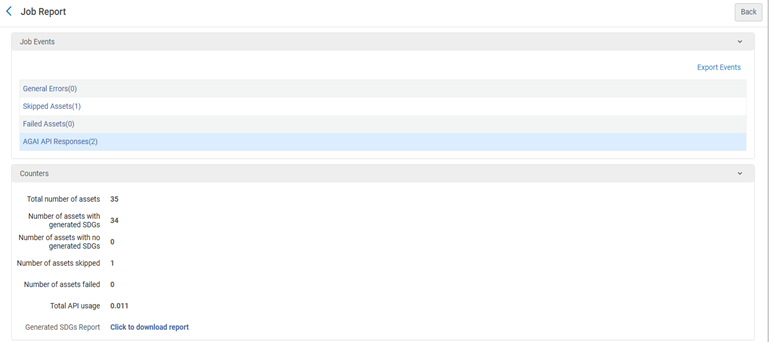
Report Columns
The SDG report includes only assets for which SDGs were generated, and contains:
- Asset ID (mandatory for updates)
- Asset type
- Title
- Publication title
- Keywords
- Research topics
- Description
- Generated SDGs (mandatory for updates)
- Update Asset with SDGs – enter x or X to confirm updates (mandatory for updates)
Operators may adjust the SDGs in the file — remove or add values as needed.
- Update Assets with SDGs
In this mode, the reviewed CSV report is uploaded and processed.
The only parameter is the input report file.

The job validates the file and records events for all updated assets. Validation includes:
- Missing mandatory columns (Asset ID, Generated SDGs, Update Assets with SDGs)
- Assets with no Asset ID
- Assets with no SDGs
- Assets with no confirmation (x or X)
- Invalid Asset IDs (non‑numeric values)
- Invalid SDGs
- Duplicate Asset IDs
- Asset IDs not found in Esploro
Researchers can now deposit Media Mentions through their Profile (CERV)
April 2026 Portal & Profiles
Researchers can now deposit Media Mentions (MMs) through their profile using the “Add Content” feature. MMs are typically press releases, interviews or other media activities about the researcher. MMs can be configured to display in the Media tab of a researcher’s profile.
To enable researchers to deposit MMs, the “include add media mentions” flag in Configuration > Portal & profiles > Header/footer must be checked.

You can configure if deposited Media Mentions require admin approval or not. This is controlled by a flag in Configuration > Portal & profiles > Researcher profile settings.

If set to require approval, then when a researcher submits a MM it triggers an admin task in the Research Information Hub. If not set to require approval, then the researcher can choose if the MM should display publicly using the “make public” icon in the MM deposit form.
Before a MM is made public, it will be displayed as a draft. There are two new sub-tabs in the Researcher Profile Media Tab – one for displaying draft records and the other for displaying records that are in process. The in-process tab is only visible when the configuration is defined to require admin approval of the MM.
Once the MM is approved, researchers with active notifications get an email informing them that the MM was approved. A MM will only display publicly after it is approved.
The researcher notification letter is called Researcher Entity Deposit Approved Letter and it can be turned on or off and configured in Esploro Letters Configuration manager.
Field added to the Asset File to store accessibility information
April 2026 Management
To help institutions comply with new institutional and national accessibility policies concerning file accessibility, two new fields were added to the Asset file metadata, one to store the file accessibility status, and the other to store accessibility comments. The file accessibility field is a management field and is available for input, display and retrieval in the Research Information Hub. The field is not public.

The file accessibility status comes from a closed list of statuses; this list can be configured in the table Configuration > Repository > File accessibility.
The file accessibility status is indexed and can be used to search for records that need their files updated. 
You can decide if the file accessibility field should be required or not. If it is required, you will be prompted to fill it in whenever a file record is edited.
In May, file accessibility fields will be available for input by researchers as part of both Researcher deposit and Add file to an existing record.
robots.txt can now be Updated
April 2026 Management
Institutions can now update robots.txt and block bots and crawlers (that respect robots.txt) from access to the Research Portal and public Researcher Profiles. The robots.txt file is updated via a new code table – Esploro Disallowed Bots. The mapping table is a list of the bots to block. There is a suggested list of common bots an institution may want to block; the list is disabled by default.
To activate the functionality:
1. Enable the customer parameter esploro_partial_disallow_crawlers (Configuration > General > Institution Settings). Set the value to “true.”
2. Activate and/or add bots to the Esploro Disallowed Bots code table (Configuration > General > General Settings > Robots.txt Configuration).
Secondary Sort for Organizational Units
April 2026 Portal & Profiles
Customers can choose to have their Organizational Units sort alphabetically or by the sort order field. For customers that use the sort order field, Organizational Units are now sorted using a primary and secondary sort. Units with a defined sort order appear at the top of the list, ordered by that value. All remaining Organizational Units without a sort order are displayed alphabetically at the bottom of the list.
Previously, Organizational Units without a sort order were displayed in a random order at the bottom of the list.
Include Bibliographic Citation in the Asset API
April 2026 Integrations
The Get Asset API was improved and now in addition to individual metadata fields in the asset schema, the response includes a full bibliographic citation in the style of your choice. Two new parameters were added to the API to support this feature, one for choosing the citation format and the other for choosing if the citation is sent with HTML formatting or as a simple string. A sample URL looks like this: user_primary_id=exl_impl&limit=10&citation_style=apa-cv&citation_format=html
More information is available on the developers network.
Retrieve Assets from ORCID can be run with the ORCID Public API
April 2026 Integrations
The existing job to retrieve assets from a Researcher’s ORCID profile can now be run by customers who have the ORCID public API set up. For more information about setting up your ORCID public API credentials see: ORCID in Esploro.
Additional Enhancements
April 2026 Portal & Profiles
Improvements to the Researcher Engagement Facet
The researcher engagement facet in the Researcher Profile search page was improved so that it only includes engagements that are visible on the Researcher’s profile. Engagements that are hidden by the researcher are no longer included in the facet.
April 2026 Analytics
Researcher Credentials were Added to Analytics
The Credentials element that was added to the Researcher Name and Additional Researcher Name was now added to the Researcher Details dimension in the Esploro Researcher Subject Area.
Resolved Issues
April 2026 Portal & Profiles SF: 08418580 — Files without access rights were not inheriting access rights from the Asset. This has been fixed and now files without access rights will inherit the access rights from the Asset.
April 2026 Management SF: 06798370 — A handle ID that was failing to register was fixed so that it could be registered.
April 2026 Integrations SF 08005514 Delimiter added between funding organization and acknowledgment when mapping Funding field from Web of Science to Esploro.
April 2026 Portal & Profiles SF: 08419996 In a single language institution, data entered by Researchers through their profile was assigned the language of the UI. This has been fixed.
April 2026 Portal & Profiles SF: 08387294 Image layout issue resulting from Angular 21 migration
April 2026 Integrations SF 08375994 Corrections to the way Esploro sends asset metadata to HAL: The electronic publication date is not sent if there is a publication date. The author’s affiliation is taken from the asset and not always inherited from the researcher in case of affiliated researchers.
April 2026 Integrations SF: 08352040 – When Organizational Units are sorted according to the Sort Order field, Units without a sort order are arranged randomly. This has been fixed and they now sort alphabetically.
April 2026 Analytics SF: 08355229 – Researchers’ Google Scholar IDs were not being populated in analytics. This was fixed.
April 2026 Analytics SF: 08341848 - The dashboard that reports on missing data in assets imported via Smart Harvesting - Smart Harvesting Assets - Missing Data Dashboard – was not working due to an incorrect link. This was fixed.
April 2026 Management SF: 08325112 – Organizational positions that were disabled in Organizational Positions code table still displayed in the positions dropdown when affiliations were updated in the private researcher profile. This was fixed.
April 2026 Portal & Profiles SF: 08322883 – If a researcher’s website did not include a title, it was not displayed in the researcher’s profile. This issue was fixed, and when no title is provided, the mandatory URL now displays as expected.
April 2026 Analytics SF: 08268214 In some cases, the Hierarchical Year was not generated and therefore did not appear in Analytics. This issue was fixed.
April 2026 Management SF: 08257662 When creating a new researcher record from an existing user record, the “Managed externally” checkboxes in the Previous Affiliation – Internal/External section were automatically selected after saving, even when they were initially left unchecked. This issue was fixed.
April 2026 Portal & Profiles SF: 08236229 The License Statement defined for a license did not display next to the license name in the full display of an asset in the Research Portal. This was fixed.
Ongoing Update from OpenAlex CERV
March 2026 Management
OpenAlex provides information on Open Access status as well as Open Access links sourced from Unpaywall. When assets are imported into the system, Esploro can use the OpenAlex API to optionally retrieve Open Access–related details. To ensure greater accuracy over time, Esploro now supports ongoing updates from OpenAlex. These updates are important in cases such as:
- The asset was created manually or imported through a workflow that did not use OpenAlex.
- The record was imported before OpenAlex had information about it.
- The Open Access status has changed. This may occur, for example, when a Green Open Access link is added or updated, though other scenarios or errors can also lead to changes.
The following configuration options are available:
| Scenario | Actions |
| Update the Open Access (published version flag) | Yes/No |
| Update the Open Access Status | Yes/No |
| Update the license | Yes/No |
| If the Open Access Status is Diamond, Gold, Bronze or Hybrid (meaning the publisher’s version is open access) do you want to add a link using the publisher DOI | Yes/No |
| If the Open Access status is Green do you want to add the Green Open Access link? |
Never add a link Always add a link Add a link if the record has no other links |
| If the Open Access Status changed from Diamond/Gold/Bronze/Hybrid to Closed or Green what should be done with a link based on the publisher DOI? |
Delete the link Update the status of the link to "restricted" Do not do anything |
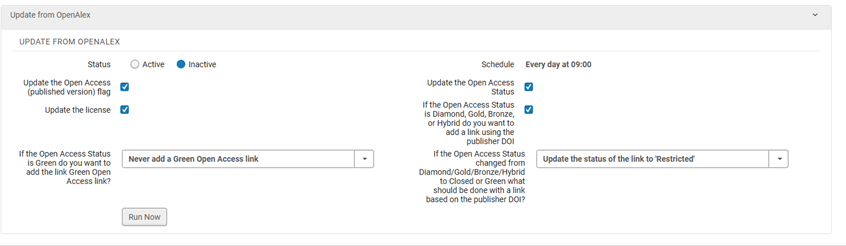
Once activated in the Research Jobs Configuration, the new job will run daily. The first execution is retrospective and will include all assets that have a DOI, excluding institutional DOIs and internal ETDs. Because of the volume, the initial processing may require several runs to complete. Subsequent updates occur on the following schedule:
- Records without an Open Access status (blank or Unknown): checked weekly
- Records with Closed or Green Open Access: checked every 3 months
- Records with Diamond, Gold, Hybrid, or Bronze Open Access: checked every 6 months
- Records with a publication date older than five years: not checked
The job report lists all assets that were updated during the run.
Both the last update date from OpenAlex and the next expected update date appear in the asset form. If the asset is no longer scheduled for updates, the message “No planned updates” is displayed.
To give operators more control, two row actions are available when the job is active:
- Add asset to “Update from OpenAlex” job – Includes the asset in the next job run.
- Remove asset from “Update from OpenAlex” job – Excludes the asset from the next job run.
Mapping to ORCID Work Type can now be based on Asset type and subtype (CERV)
March 2026 Management
The mapping from Esploro assets to ORCID Work Types can now include the asset subtype, enabling a more precise and accurate alignment with ORCID Work Types.
This mapping is configured in the Esploro Asset Type to ORCID Work Type mapping table (Configuration > Repository > Integrations > ORCID Work Type).
The mapping table now contains three columns:
- Esploro Asset Type
- ORCID Work Type
- Esploro Asset Subtype – sourced from the controlled list of asset subtypes
(Configuration > Repository > Asset Details > Esploro Subtypes).
The out‑of‑the‑box mappings can be adjusted as needed by customizing this table.
Update Set of Researchers with Data from ORCID
March 2026 Management
The new ad-hoc job that pulls unique identifiers from researchers’ ORCID profiles and updates their Esploro profiles can now be used with the ORCID Public API. Add your public API client ID and client secret to the configuration table Configuration > repository > ORCID Public API. When using the ORCID Public API the system will only have access to data that is flagged as public. With the member API it is possible for Researchers to grant read and write access to non-public data. For more information about entering your credentials for the ORCID Public API please see: ORCID in Esploro.
Query by Researcher Primary ID
March 2026 Integrations
A new Query by Researcher Primary ID was added to the GET Activities, GET Projects, GET Media Mentions and GET Grants APIs, enabling efficient retrieval of all entities associated with a specific researcher. A single API call per-endpoint reduces the need for multiple queries, improves performance, and simplifies data synchronization across systems. For more information see API documentation in the Developers Network.
Map Multi-lingual Researcher Profile Data to Analytics
March 2026 Analytics
All multi‑lingual researcher profile data elements are now fully mapped to the Esploro Researchers subject area. A new dimension has been introduced for several of these elements , enabling institutions to use structured fields rather than relying on concatenated lists of values. This enhancement provides cleaner, more flexible reporting—also for institutions that do not actively maintain multi‑lingual researcher profiles.
The table below outlines how each multi‑lingual data element has been incorporated into the Researcher subject area.
|
Element |
Description |
|
Affiliation – title |
The language was added to the Researcher Affiliations dimension. |
|
Education |
The language was added to the Researcher Affiliations dimension. |
|
Display title |
A new dimension was added – Researcher Display Title. There are two fields: title and language. |
|
Keywords |
A new dimension was added – Researcher Keywords. There are two fields – keyword and language. |
|
Area of Interest |
A new dimension was added – Researcher Area of Interest. There are two fields – area of interest and language. |
|
Websites |
A new dimension was added – Researcher Webpages. There are several fields – language, title, type, description, and URL |
|
Honors |
A new dimension was added – Researcher Honors. There are several fields – code, name, time period, title, and language. |
Additional Enhancements
-
March 2026 Portal & Profiles
Increase the size and resolution of Researcher Profile images – Esploro can now support Profile images with dimensions of up to 500 x 500
March 2026 Portal & Profiles
Update to Angular version 21
March 2026 Portal & Profiles
Identify the Link to Web of Science in the Global ID section of the Profile Overview - A label was added to the Researcher ID display in the Global ID section to identify the link to the Web of Science Profile.
March 2026 Portal & Profiles
The text “view” has been added to the view icon on Activity and Project links in the portal to make Activities and Projects consistent with Research Output.
March 2026 Integrations
The Grant loader and API were improved so that if a primary_id in the incoming record doesn’t have a match in the primary_id index, the system will automatically search for a matching non-affiliated primary_id. This is important to ensure that the system can match both Affiliated and Previously Affiliated Researchers.
March 2026 Analytics
The Requester Type element from the Usage details dimension in the Esploro Assets Usage subject area was removed because it was unreliable and thus misleading.
Resolved Issues
March 2026 Management SF: 08211928 — When a researcher who was part of an itemized researcher set was deleted, they were not removed from the set. This has been fixed.
March 2026 Portal & Profiles SF: 08296496 — Long labels of field that were defined to be mandatory caused the red asterisk to not display in the researcher’s deposit form. This has been fixed.
March 2026 Analytics SF: 08223415 — When an organizational unit name changed, the updated name did not appear in the Awarding Academic Unit element in the Esploro Research Assets subject area. This has been fixed.
March 2026 Smart Harvesting SF: 08250046 — Error when saving Smart Harvesting Profile. An error was displayed when one of the Smart Harvesting Profiles was saved. This has been fixed.
March 2026 Portal & Profiles SF: 08297699 — <ul> and <li> HTML tags do not display correctly when used in an asset and resulted in an incorrect display. This has been fixed.
February Main Features
Add DOI as Grant Identifier
February 2026 Management
A new DOI (Digital Object Identifier) field has been added to the Grant record. This enhancement allows administrators to store and manage official grant DOIs directly within the system, supporting improved data standardization, traceability, and integration with external research systems.
The DOI can be added via the Grants Loader and Grants API and used as the match-point in grant updates.
Asset Subtype Added to All Asset Forms
February 2026 Management
The asset subtype can be used to add granularity to the asset type.
Until now, the asset sub‑type could be added to the generic asset form and the Dataset and Teaching & Learning asset type forms. This update expands its availability to all asset forms, ensuring a consistent data‑capture experience across all asset types.
The asset sub-type has also been added to asset search results:

Credentials Field added to Researcher Record
February 2026 Portal & Profiles
We’ve added a new Credentials field to the Researcher record. This field allows you to capture and manage professional credentials (for example, degrees, certifications, or licenses) directly within the researcher profile and display them prominently alongside the Researcher name. Customers control if the credential field displays on the Researcher Profile. For more information about how to configure see: Configuring Researcher Profiles.
Support Use of ORCID Public API
February 2026 Integrations
Esploro now supports ORCID Public API credentials, allowing institutions to read public data from their researchers’ ORCID records. Previously, Esploro relied only on Member API credentials, which continue to offer broader read/write functionality. Support of the Public API, which provides read‑only access to limited, publicly available information, enables institutions without Member credentials to collect data from their Researchers’ ORCID Profiles.
The job “Update ORCID Record for Researcher” can now run using Public API credentials. To use the Public API, enter your credentials in Configuration > Repository > Integrations > ORCID Public Integration. Note that this table only displays for institutions that do not have ORCID membership credentials.
Learn more about integrating with ORCID and see find more information about integrating Esploro and ORCID here: ORCID in Esploro.
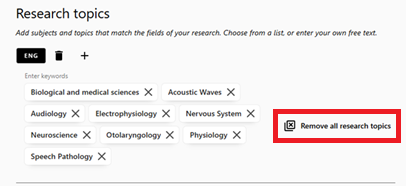
Remove All Keywords (CERV)
February 2026 Portal & Profiles
Researchers can now delete all profile and asset keywords in a single action making it simpler to update keywords.
Edit asset:
Edit profile:
Default Collection Sort Changed to Date 
February 2026 Portal & Profiles
The default Collection sort order is now Date (descending) instead of Relevance, ensuring newer items surface first.
Campus Configuration for OpenURL
February 2026 Portal & Profiles
It is now possible to include a campus in the OpenURL sent from Esploro to the Alma link resolver. This can be useful if the institution wants to make use of the campus level link resolver functionality. Since all campuses share the same Esploro Research Portal, a virtual campus representing the entire institution should be created. The campus code should be added to the “esploro_campus_for_openurl” parameter which can be accessed via Configuration > General > Institution Settings.
Additional Enhancements
-
February 2026 Integrations
Altimetric is now available as a citation source, enabling customers with an Altimetric subscription to include metrics beyond traditional citation indexes.
February 2026 Management
Esploro has been updated to support version 2 of the ROR schema. This update introduces several changes to the organization data imported into Esploro. The new schema includes two additional organization types—funder and nonprofit—and replaces the address field with location field. In addition, more names are being brought in with associated languages and these are being mapped to multi-lingual organization names.
February 2026 APIs
The following relationships have been added to the Projects API:
- Project-Activities relationships
- Project-Media Mentions relationships
- Project-Project relationships
February 2026 Management
Customers can now add additional currencies for grants. The list of available currencies can be edited from Configuration > Research Administration > Grants > Grant Currencies.
February 2026 Management
Following the development of the multi-lingual researcher profile which includes an updated schema for researchers, customers can no longer update the default language in Multi-lingual Data Elements as any change also requires a database change. If you require any change, please contact Esploro support.
February 2026 Management
Open the Activity Category table for editing so that the Category Names can be customized.
February 2026 Management
Customers can now configure which character should be used as the delimiter in the CSV update loader. This has been added to Configuration > General > Institutional Settings and the flag is called “ esploro_csv_excel_delimiter_char”.
February 2026 Analytics
Multi-lingual researcher data is now partially available in analytics. The data and language of the data have been added to the Researcher Affiliations and Researcher Education dimensions. Additional multi-lingual data will be included in future releases.
February 2026 Analytics
Esploro needs to process asset metadata before it can be included in the nightly ETL so it will be available in analytics. In some cases, changes to the asset were not processed in time and the change appeared in analytics only after two days. The job that handles this will now run on an hourly basis, so more data is in place before the nightly ETL.
February 2026 Smart Harvesting
Admin tasks have been added for pending Author Matching tasks with the status “Matched on ID”.
Resolved Issues
February 2026 APIs SF: 08254306 — Researcher Draft Deposits were included in Assets GET API. This has been fixed.
February 2026 Management SF: 07934090 — Education year field decreases by 1 for users in Americas time zones. When the researcher education years were edited in the private Researcher Profile, the year would automatically decrease by a year in some time zones. This has been fixed.
February 2026 Analytics SF: 08106320 — Current External Organization Affiliations not always included in Analytics. In some cases, a researcher’s Current External Organization Affiliations were not saved to analytics. This has been fixed.
February 2026 Smart Harvesting SF: 08250046 — Error when saving Smart Harvesting Profile. An error was displayed when one of the Smart Harvesting Profiles was saved. This has been fixed.
February 2026 Management SF: 08238433 — The Update DOI Agency Job sometimes had an error due to incorrect mapping of the Esploro to Crossref relationship types. This has been fixed.
February 2026 Management SF: 08227209 — The article number was not included in the RIS and Citation format exports from the Research Portal. This has been fixed.
January Main Features
Improved Handling of Assets with Many Authors
January 2026 Smart Harvesting
Research outputs – especially articles - can have many authors, in some cases even thousands of authors. Handling this number of authors can pose a challenge for the system and for administrators.
You can now choose from one of two policies for the handling of assets with many authors:
-
Keep all authors – this is the default policy, and this is how the system behaves today. In this policy all the authors – affiliated or not – are kept in the asset.
-
Keep affiliated authors – this is a new policy added now. In this policy only affiliated authors are kept in the asset. If chosen, you can define the following:
-
Number of Authors Threshold – any asset with this or a higher number of authors will be considered an asset with many authors and the “Keep affiliated authors” policy will become active. The threshold must be below 500 authors.
-
Optionally always include the first 10 authors even if they are not affiliated. This allows you to support the common requirement for citations to include the first 10 authors.
-
Optionally add a group author to represent deleted authors and define the text for the group author. The default text is “et. al”.
-
System limits for handling assets with many authors were not changed and assets with more authors than the limit will be rejected. These are the limits:
-
Smart Harvesting Framework jobs – 3000 authors
-
Import profiles and SWORD – 800 authors
-
Create Asset API – 100 authors
In addition, there is now an author limit for auto-population in mediated and researcher deposits, to avoid import failures. There is now a limit of 500 authors, and if the record has more authors the system will delete authors 501 and beyond. These authors will be deleted before author matching and may include affiliated authors. the group author option can be used to represent deleted authors.
The configuration for the handling of assets with many authors was added to Configuration > Repository > Asset Details > Handling of Assets with Many Authors.
The following table illustrates what will happen with either policy being active for assets added via Smart Harvesting.
|
Number of authors in asset |
Active policy = Keep all authors |
Active policy = Keep only affiliated Threshold = 100 authors
|
|
50
|
All authors are kept in the record |
All authors are kept |
| 1500 | All authors are kept in the record | All 1500 authors will be matched to researchers but only affiliated authors will be kept in the record. If enabled by the configuration, the first 10 authors will also be kept even if they are not affiliated. A group author to represent the deleted authors can be added. |
For more information about configuring handling of assets with many authors see: Configuring the Many Authors Handling Policy
Update Set of Researchers with data from ORCID
January 2026 Management
A new ad-hoc job “Update Set of Researchers with data from ORCID” enriches a Researcher’s Esploro record with unique identifiers from their ORCID profile. The job runs on a set of Researchers and can retrieve up to three identifiers - the Researcher ID, the Scopus ID and ISNI - if these identifiers are on the ORCID profile and not in Esploro. If an ID is in Esploro it will not be replaced. The job is available for Esploro customers who have ORCID membership. In February it will also be available for customers with an ORCID public API key. For more information about running the job see: Running Manual Jobs on Defined Sets
Move to DataCite version 4.6
January 2026 Management
We moved to DataCite Metadata Schema 4.6, bringing improved accuracy and richer metadata to research outputs. This update introduces a new contributor type - Translator - and two new relationship types — IsTranslationOf and HasTranslation — to better link original and translated works, replacing the previous mapping IsVersionOf / HasVersion. Finally, specific resource type mappings are now available for common scholarly outputs, including JournalArticle, Book, BookChapter, ConferencePaper, ConferenceProceeding, Dissertation, Preprint, and Report, which were previously mapped to the generic “Text” type. These changes ensure more precise metadata and improved interoperability across research systems. You can review your mappings in Configuration > Repository > Creator/Contributor Mapping and Configuration > Repository > Asset to Asset Relationship List to see if you want to update them considering the changes to DataCite.
New Metrics Endpoint for Esploro APIs
January 2026 APIs
We added a new Metrics API that allows you to add citation counts to research outputs. With this feature it is possible to use one of four different identifiers to identify the output record in Esploro – DOI, Web of Science ID, Scopus ID or MMS_ID. and includes the source of the metrics and the total number of citations. Up to 100 entries can be loaded per call. Citation metrics help you track and showcase the impact of your research more accurately. For more information about the API and details about the input schema see the Developers Network.
Display Researcher Associations on their Profile
January 2026 Portal and Profiles
We added the ability to display a researcher’s associations — such as memberships — directly on their profile page. Researchers have full control over visibility of each association, and can show or hide individual entries. This ensures that profiles remain accurate and personalized, allowing researchers to highlight the connections most relevant to their professional identity while keeping others private. Associations have been added to the configuration table Configuration > Portal & Profiles > Researcher Profile Management –Profile Privacy Display Settings. If you want to include Associations on your Researcher Profiles, update the field to display Publicly. For more information see: Configuring Researcher Profiles.
Additional Enhancements
-
January 2026 Management
The System Job Letter was added to the Esploro letters configuration.
-
January 2026 Analytics
The Collaboration by Country report took a long time to load and therefore was moved from the Researcher Collaboration Overview tab to the Researcher Collaboration Network tab, which is pre-filtered to focus on a single researcher and loads faster.
Resolved Issues
- January 2026 Management SF: 08260922 — An error displayed in the Research Jobs Configuration page – the system expected a set to be defined in the Push Assets To Sword Servers job. This has been fixed.
- January 2026 Management SF: 08206265 — Redirect Behavior When Accessing Student Deposit Form. Users attempting to access the student deposit form were not redirected to the form after signing in. This has been fixed.
- January 2026 Portal and Profiles SF: 08198707 — Auto-population using a DOI in the new configurable Researcher deposit form did not bring in authors and keywords and the form could not be saved. This has been fixed.
- January 2026 Management SF: 08186082 — The DOI URL prefix (https://doi.org/) displayed in the PDF Cover page even if the asset had no DOI. This has been fixed.
- January 2026 Management: 08176541 — In environments that have been set up for entry of multi-lingual data elements, keywords could not be updated via CSV update because the new values were added under the language code “undefined”. They are now added using the default language.
- January 2026 Smart Harvesting: 08170219— The Esploro search results page in a mobile browser or a minimized browser window was obscured by an overlaid search page. This has been fixed.
- January 2026 Management SF: 08121858— Users were redirected to the portal login page or encountered SAML authentication errors instead of being taken directly to the researcher deposit form when they invoked the “Go to form” option from the list of Deposit Profiles. This has been fixed.
- January 2026 Management: 08176541 — In some cases, the metadata exported in the Research Assets CSV export job did not align with the column headers. This has been fixed.
- January 2026 Smart Harvesting: 07962286— The Research Asset WOS Identifier Retriever job completes successfully but reported errors in the Clarivate API failures. This has been fixed.
- January 2026 SWORD: 08029645— Limit the file size in the SWORD Integration between Esploro and ETD_Admin to 2GB per-deposit not 2GB per-file.
-