

Working with Curated Lists
The following user roles are required to work with curated lists:
- View curated lists, add offers from curated lists or user lists, and add offers to the DDA pool: Purchasing Operator, Super Selector, Selector, Selector Limited
- Add offers from a curated list to the shopping cart: Rialto Manager, Purchasing Operator, Super Selector, Selector
Rialto curated lists are ready-made collections of themed, high-quality titles across a range of subjects and publishers. They help you quickly identify relevant books for your library’s collection.
What Is in a Curated List
The available lists under Curated Topics come from two different sources: ProQuest for Curated Topics, and Syndetics Unbound for Distinctions & Honors and Notable Lists.
As of February 2025, ProQuest is no longer generating new lists, however, historical lists dating back to September 2019 remain available. Curated Topics were created monthly and published in Rialto within the first week of the month. Each list contains approximately 100 unique titles from various publishers.
Curated lists were prepared according to the following guidelines:
- Format: Print and e-books. Content with multiple format alternatives and platforms is prioritized whenever possible.
- Audience: Global.
- Readership: Primarily academic, with variable academic levels. Trade and popular content may be included where relevant to the topic.
- Price: Variable price points, with e-books capped at $500.
- Language: English.
- Publishers: Balanced representation. No single publisher accounts for more than 15% of a list, and only publishers respected by the librarian community are included.
- Quality: Titles with reviews, awards, or faculty affiliations are preferred.
- Availability: For print titles, In Stock is preferred.
Distinctions & Honors and Notable Lists are sent to Rialto on a weekly basis from Syndetics Unbound. Lists are stored going back 10 years from the current year. Syndetics Unbound determines the lists as follows:
Notable Lists
- Criteria: These are one-off or lists of books (or other media), appearing in a book, a magazine, or even a blog.
- Examples: Pitchfork’s Top 100 Albums of the 1980s, Guardian 1,000 (“1000 novels everyone must read”), 1001 Children’s Books You Must Read Before You Grow Up
Distinctions
- Criteria: Everything else, including celebrity and book-club “picks,” bestseller lists, and “starred” reviews.
- Examples: Oprah’s Book Club, NPR: Books We Love.
Working with Curated Lists
You can review curated lists from the Curated Topics page (Collection Development > Market > Curated Topics).

The List Type column has three values:
- Curated Topics - Themed lists of titles selected for relevance and quality.
- Distinctions & Honors - Titles that have received awards or formal recognition from respected organizations or publications.
- Notable List - Titles recognized for importance or popularity within their field.
You can use the List Type filter at the top of the Curated Topics page to filter results by list type.

Searching for a List
If you know the name of a list or have a specific keyword in mind, you can search the curated lists to quickly locate the titles you want to review.
- Enter the term(s) in the search box and select the spyglass icon to retrieve relevant results.
- Select a list from the results to review its titles.

Adding Offers to Cart, My List or DDA Pool
- Navigate to the Curated Topics page (Collection Development > Market > Curated Topics) and select the list name. You then see all the resources within that curated list.
- Select a title to display its details in the right-hand panel.
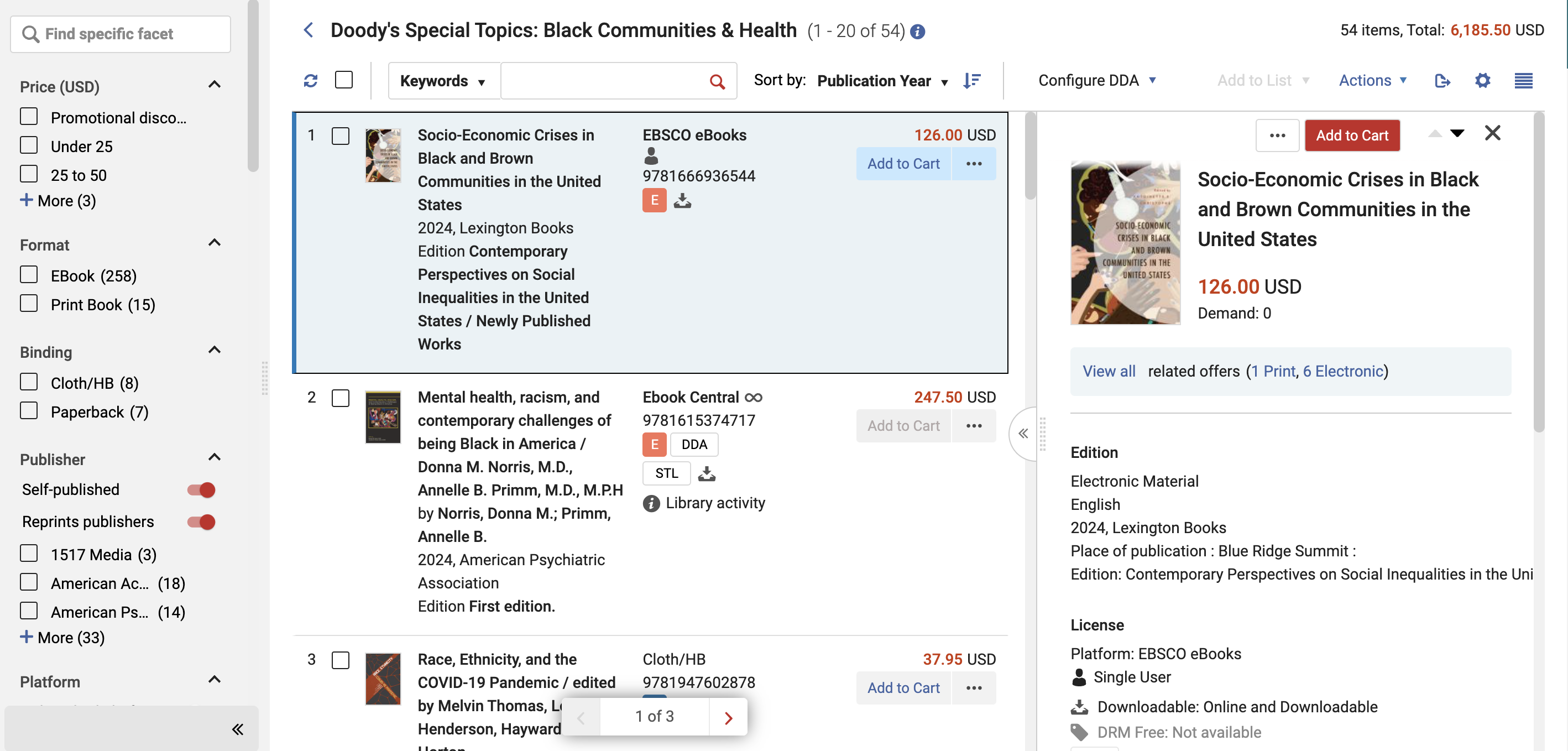
- Select View All within the offer details to see all additional offers in the work.
- Do one of the below:
| To: | Do: |
|---|---|
| Add offers to Cart |
Select Add to Cart for the preferred offer. The title receives the In your cart badge. A confirmation appears in the upper-right corner, and the cart icon displays the total number of items. To view the item in your cart, select the Cart icon ( For details, see Adding to Shopping Cart and Submitting to Approval.
|
| Add offers to My List |
Select Add to List in the row actions of the offer and choose the desired list. The In your lists badge appears on the offer and the work. Hover over the badge to see the lists containing the offer. For details, see Working with Lists. |
| Add offers to DDA Pool |
For electronic offers, select Add to DDA in the row actions. You must indicate the ordering library and fund. For details, see Adding Offers to DDA Pool. |
 ) on the main toolbar.
Searching, Filtering, and Sorting a Curated List
While looking at a curated list, you can search for a title, filter the list by facets, and apply rankings to quickly locate the offers you need.
| To: | Do: |
|---|---|
| Search for a title |
Search by Title, ISBN, Author, or Keywords. Select the desired option from the dropdown, enter your search text, and click the search icon ( |
| Filter the list by facets | Use facets to hide irrelevant offers. In the facets panel, select the values you want to filter by. Selected facets appear at the top of the panel. Click X to remove any facet. For a full list of facets and a detailed explanation on how to use them, see Working with Facets. |
| Sort the list by rankings |
By default, curated lists are sorted by the first ranking profile in the list of ranking profiles. You can select a different ranking profile - see Managing Ranking Profiles. |
 ). To clear the search, select