

campusM 2026 Release Notes
|
Developments
Enhanced Banner Tiles
July 2026
Banner tiles have been updated to support more effective implementation and better user experience. Administrators can now show banner items in random order, associate each banner item with specific roles, and pre-configure scheduled banner tile campaigns. Additionally, users can now browse through banners by swiping left and right.
Previously, the only way to show banner items by role was through App Settings > Home Page Banners. Since this capability is now available directly in App Builder, the old Home Page Banners configuration page will be deprecated at the end of 2026.


For more information, see Configuring Services.
New Outlook Product Integration
July 2026A new Outlook Product Integration has been implemented to provide a sleeker user interface and a more stable user experience. The new Outlook Product Integration also allows users to create and update drafts. While this release introduces a new Outlook integration, the configuration remains largely consistent with the previous setup, with changes primarily limited to updated user interface elements.
This Outlook Product Integration replaces Legacy Outlook Product Integration. Legacy Outlook Product Integration will be deprecated at the end of 2026.


For more information, please see Outlook in Managing Product Integrations.
Landscape Mode Popup
June 2026

Sending Notification to All Active Users
June 2026
Sending Multi-Language Advanced Role Notifications
June 2026
Multiple Calendars from Outlook Calendar Supported in Timetable Product Integration
May 2026
Task Board Redesign
May 2026
In a continuous effort to improve productivity and organization, the Task Board Product Integration user interface has been redesigned. The improved Task Board Product Integration now allows institutions to customize colors and aims to increase student organization and productivity.
campusM will start collecting anonymized analytics data on Task Board usage with these UI changes. The data will be displayed in the Analytics section of App Manager starting late summer 2026. Engagement analytics are collected for each university-created task, while user-created tasks are aggregated.
For more information, see Task Board.
.jpg?revision=1)
.jpg?revision=1)
.jpg?revision=1)
.jpg?revision=1)
.png?revision=1)
Home Page and Web App upgraded to React 19
May 2026
The campusM Home Page and campusM Web App has been upgraded from React 18.3 to React 19.2, which is currently the latest version of React. This change fixes some outstanding accessibility issues, and generally brings infrastructure up-to-date, making the campusM platform more stable, easier to maintain, and quicker to develop.
For more information on React versions, see the Versions page on the official React website.
Customers using custom CSS and Javascript on the Home Page are strongly advised to test for regressions in the May 2026 Preview environment, with a special emphasis on sidebar behavior, as the sidebar has been significantly restructured. No action is required for customers who do not use customer CSS and Javascript on the Home page, and no UI change is expected for end-users, aside from accessibility improvements.
Customers using AEK are strongly advised to test their code in the May 2026 Preview environment, with a special emphasis on TileSDK integrations. No action is required for customers who do not use AEK.
Various TileSDK projects have been tested internally, and it has been determined that customers using the TileSDK as designed should not experience any issues. However, TileSDK behavior might experience regressions if it has dependencies on third-party code that is no longer supported in React 19.
For more information about migrating your code to React 19, see React's migration guide.
For further support on this topic, please join the campusM Slack Channel.
Permissions for Attendance Configuration in App Manager
May 2026
A new permission has been added to campusM for Attendance – Attendance: Can Access Attendance Configuration.
Previously, only campusM users with All Permissions checked could access Attendance configuration in App Manager (provided Attendance was enabled for their organisation). Now, to access Attendance configuration, administrators must have either: All Permissions checked, or both Attendance: Can Access Attendance Configuration and Service : Can change product integration permissions selected.
For more information, see Configuring Attendance.
Navbar Analytics
April 2026
A new Navbar dimension is now available in the Home Page and Home Page by Roles subject areas in campusM Analytics. This enables campusM administrators to monitor the app engagement through the taps on the Navbar menu items for their specific institution. For more information, see Home Page and Home Page by Roles on the Subject Areas page.
New Task Board Configuration Vendor
April 2026
In a continuous effort to improve productivity and organization, a new vendor has been added to the Task Board Product Integration that is entirely managed within App Manager. Institutions can now assign tasks to students based on their App Role with no API required.

For more information, see Task Board.
Notifications Analytics
March 2026
A new Notifications subject area is now available in campusM Analytics. This enables campusM administrators to monitor the app engagement through notifications for their specific institution. Additionally, administrators can compare their data to the average data of the institutions in their region. As notifications may contain sensitive information, the Notifications Analytics data does not include notification content. The Notifications subject area contains the following new fields for both local and regional analysis:
-
Number Sent — The number of notifications sent by the administrators
-
Personalised — Displays whether the notification was personalised or not. Personalised notifications are notifications with fewer than 10 recipients.
-
Number Received — The number of expected recipients of a notification at the time the notification was created
-
Number Read — The number of notifications read by the recipients
-
Engagement — The engagement rate (Number Read divided by Number Received)
For example, after sending a notification, you can cross-reference the data with other Analytics subject areas to determine whether a certain notification drove engagement in the app.
While the Notification Center in App Manager only displays 12 months of data, the Notification Analytics contains all data from 2019 onward. For more information, see the relevant section in campusM Analytics Subject Areas.
Task Board Tasks Synced to Calendar
March 2026
In a continuous effort to improve productivity and organization, tasks from the Task Board Product Integration that include a date and/or time are now automatically synced to the campusM calendar. This is the first among several upcoming Task Board features designed to support student success around academic organization.
For more information, see Task Board.
Favorites Container
February 2026
A new type of tile container has been introduced to campusM: a Favorites Container. Unlike the regular type containers that are controlled by the administrator, when personalization is enabled for an App Profile, campusM end-users are fully in control of their Favorites Container.
Favorites Containers enable campusM users to keep their favorite tiles in a single tile container. Once users select a tile as one of their favorites, the tile automatically disappears from its original place and moves to the Favorites Container for easy access.
- At time of release, any existing App Profiles will have a Favorites Container added, and it will be hidden by default - but still accessible to the end-user via the Arrange function if Personalization is enabled.
- New App Profiles added after the release will have the Favorites Container added and displayed to end-users by default.
- For more details on how to configure the Favorites Container, see Configuring Tile Containers.


For more information and configuration options, see Configuring Tile Containers.
Due Dates from Blackboard Assignments are Available in campusM Calendar
February 2026
Due Dates for assignments from the Blackboard Product Integration are now imported straight into the campusM calendar. The Blackboard Due Dates are shown as all-day events with the exact time of the Due Date event specified in the event description. These events also include a link to the assignment in the Blackboard application.
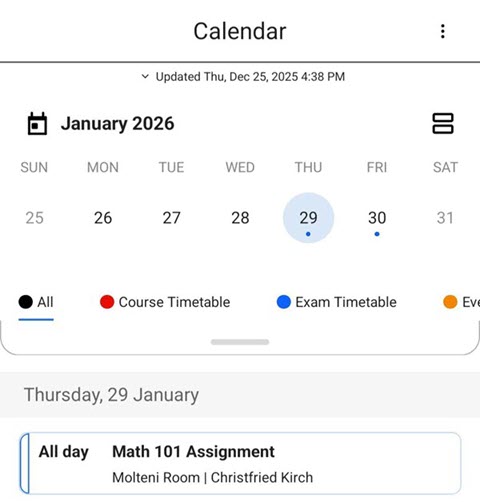
campusM users must log in to the Blackboard Product Integration in campusM to see the assignments' Due Dates in the campusM Calendar.
For more information and configuration options, see Blackboard - Due Dates Calendar.
Due Dates from Canvas Assignments are Available in campusM Calendar
February 2026
Due Dates for assignments from the Canvas Product Integration are now imported straight into the campusM calendar. The Canvas Due Dates are shown as all day events with the exact time of the Due Date event specified in the event description. These events also include a link to the assignment in the Canvas application.
CampusM users must log in to the Canvas Product Integration in campusM to see the assignments' Due Dates in the campusM Calendar.
For more information and configuration options, see Canvas - Due Dates Calendar.
Terms of Use Removed from the App Manager
February 2026
AEK Framework Updated to Support Node.js 20
February 2026
Tile Containers Analytics
January 2026
Tile Containers are now supported in campusM Analytics. A new Container field was added to the Home Page dimension in Analytics for both the Home Page and Home Page by Roles subject areas. Clicks on tiles within a Tile Container also record the name of that container. The value of the Container field in Analytics is null for clicks on tiles that do not belong to a tile container.
This enables campusM administrators to view the total number of clicks on tile containers by excluding the Menu field from the analysis, as well as see the total number of clicks on tiles by excluding the Container field.
Data collected from the launch of the Tile Containers feature will become available in Analytics beginning January 2026.
Institutional Privacy Policy Added to campusM
January 2026CAM-28370
The "Institutional Privacy Policy", which was previously only available in the App and Google Play Stores, is now available in campusM. Users can find it in the mobile app Settings page, or in the web-app top-right menu.
Force Upgrade Implemented
January 2026CAM-28279
React Native now supports Force Upgrade, enabling campusM administrators to implement it to ensure the users have the latest version of the application. When users log in to their application and a new version is available, campusM displays a pop-up that forces them to update before they can continue using the app.

To define the minimal supported campusM version required for Android and iOS platforms, please open a case to our Support team.
For more information, see the relevant section in Configuring App Basics.
Resolved Issues
- July 2026 Platform: All SF: 08273083
In some cases, Page Descriptions in Page Hit Analytics were showing as "No page description", because the title of the page failed to be captured. This was fixed, and Page Hit Analytics collected from July 2026 onward should always have Page Descriptions. - July 2026 Platform: All SF: 08325263
In some cases, Events in the campusM calendar which originated from the Events PI appeared incorrectly as All-Day events. This was fixed. - July 2026 Platform: All
In the Attendance screens, the navigation tabs at the bottom of the screen did not meet accessibility standards, as it was not clear enough which of the tabs was selected. This was fixed by altering the design to invert the colors for the selected tab, which meets accessibility standards. - July 2026 Platform: All
When using a screen reader, focus was not handled correctly in part of the Alma Self-Checkout Product Integration workflow. This was fixed. - July 2026 Platform: All
The Time Picker component, currently only used in the app in the Task Board Product Integration, had accessibility defects. It was replaced, and the Time Picker component is now accessible and easier to use. - July 2026 Platform: All SF: 08297112
In some cases, institutions could not edit their "About" page in Creative Studio. This was fixed. - July 2026 Platform: All SF: 08209902
Tile-click analytics were not being sent for List PI Live Tiles. This was fixed, and tile-click analytics are now collected as expected for this type of tile. - July 2026 Platform: All SF: 08242352,
In some cases, deeplinks did not redirect to the App Store/Google Play Store as expected when the app isn't installed. This was fixed. - July 2026 Platform: Web
Previously the "Test API" functionality in App Manager did not work as expected when configuring a Microsoft Graph API vendor in Timetable PI. This was fixed. - July 2026 Platform: Mobile
Accessibility improvements were made to the Arrange Functionality in List View. - July 2026 Platform: Mobile
Attendance screens did not support pinch-to-zoom behavior. This was fixed. - July 2026 Platform: Web
All modals on the web app now trap focus, in accordance with WCAG 2.2 A and AA standards. - July 2026 Platform: All SF: 08430570, 08435944
Improvements were made to App Builder code, which should provide a more stable experience for campusM Administrators. - July 2026 Platform: Mobile
Accessibility improvements were made to the Task Board Product Integration. - June 2026 Platform: All
The Weather Product Integration did not behave as expected when using the National Weather Service (Weather.gov) vendor. This was fixed. - June 2026 Platform: Mobile SF: 08386879
When using non-CMAuth authentication (such as LDAP), users who failed to log in due to an incorrect password did see an error message indicating the reason for the login failure. This was fixed. - June 2026 Platform: Mobile SF: 08273751
Previously, when using Floor Plan images in Maps, it was only possible to zoom in to the center of the floor plan by double-tapping, obfuscating the image corners. Now, double-tapping to zoom will zoom on the area that was tapped instead of the center of the image, and Floor Plans will support pinch and drag gestures, making the whole floor plan easier to navigate. - June 2026 Platform: Web
A label was added to the Map Selection dropdown on the Web App to improve accessibility. - June 2026 Platform: All
When using a screen reader, Tasks in the Task Board Product Integration did not indicate if they were favorited or not when announced. This was fixed. - June 2026 Platform: Web SF: 0838733
The Newsfeed Product Integration did not behave as expected when using the JSON API vendor. This was fixed. - June 2026 Platform: Mobile
When arranging the home page on a mobile device, some tiles displayed with a favorite button when they were not expected to. This was fixed. - June 2026 Platform: Android SF: 08261084
In some cases, the Maps feature was slow to load on Android devices. This was fixed. - June 2026 Platform: All
Previously, when using a screen reader, Leganto Live Tiles were not announced correctly when put in a container. This was fixed. - June 2026 Platform: Android SF: 07713181, 07729902
In some cases, it was not possible to download linked files when using iOS devices. This was fixed. - May 2026 Platform: Mobile
When users navigated to the Moodle PI and then navigated back before completing the Moodle login, a spinner screen showed instead of the campusM Home Page. This was fixed. - May 2026 Platform: All
In certain scenarios, favoriting a subtile from inside an admin container sometimes did not behave as expected. This was fixed. - May 2026 Platform: All SF: 08126560, 08320086
RSS Feed tiles will now display items in reverse chronological order – from newest to oldest. - May 2026 Platform: All
In the Task Board, when using the Configuration vendor, in some cases it was possible to save a Task without a Title, or a Task with a Start Time and no End Time. This was fixed. - May 2026 Platform: Mobile SF: 08212623
In some cases, when authenticating via an external browser on a mobile device, App Roles were not applied to users as expected. This was fixed. - May 2026 Platform: Android
The heading in the Biometric Lock screen was not formatted as such, making it difficult for users with screen readers to read. This was fixed. - May 2026 Platform: Android
Upon login, after a user chose to enable a biometric lock for the app, but then canceled before completion of the flow, the Try Again button appeared overlaying an image, making it unreadable. This was fixed. - May 2026 Platform: Mobile
Accessibility for campusM Maps was improved on mobile for screen-reader users. - May 2026 Platform: iOS SF: 08269387
In some cases, users on the iOS app had to reauthenticate when viewing content through the campusM browser. This was fixed. - May 2026 Platform: Mobile
The accessibility of Tile Containers on mobile was improved for screen-reader users. - May 2026 Platform: Mobile
The accessibility of the search bar component in the Events PI was impoved for screen-reader users. - May 2026 Platform: Web
The click area for the radio buttons in the Advanced Role Notification screen in App Manager was too wide, causing mis-clicks. This was fixed. - May 2026 Platform: Mobile
In some cases, subtile text inside of tile containers was truncated after one line when the tile container was 2 tiles high, which is unexpected. Now, this will only happen in certain cases when a container is 1 tile high, as designed. - May 2026 Platform: Mobile
In List View of the Arrange functionality, disabled buttons were focusable, and some buttons were not announced correctly when using a screen-reader. This was fixed. - April 2026 Platform: All SF: 08325321
In some cases, when exporting events registrations from the Events PI, the dates of the events were incorrect. This was fixed. - April 2026 Platform: Web SF: 08131417
When using the Attendance Export function from inside App Manager, time zone information was not accounted for in the resulting file. This was fixed. - April 2026 Platform: iOS SF: 08294146
In some cases, custom fields in the ID card product integration appeared twice after adding the ID card to Apple Wallet. This was fixed. - April 2026 Platform: iOS, Android SF: 08185932
In the Manage Channels Subscription page, long channel names pushed the toggle component off of the edge of the screen. This was fixed. - April 2026 Platform: Android SF: 08294146
Certain components in the Self-Checkout PI were not being announced correctly when using a screen reader. This was fixed. - April 2026 Platform: Android, iOS SF: 08314294
In some cases, the badge count on Primo/PrimoVE live tiles was not displayed correctly when the tile was placed in a tile container. This was fixed. - April 2026 Platform: iOS
In certain situations, the favorites in the Newsfeed PI were not cached correctly. This was fixed. - April 2026 Platform: All
Missing Translation Keys were added for Favorites tiles. - March 2026 Platform: All SF: 08115000
In some cases, the HTML editor in Creative Studio did not correctly save the code as inserted. This was fixed. - March 2026 Platform: Web SF: 08237899
When choosing alert groups for an App Role, non-alert groups items appeared as options on the list. This was fixed. - March 2026 Platform: Android, iOS SF: 08152834
In some situations, on mobile, Grid Mode was not available when using the Arrange functionality. This was fixed. - March 2026 Platform: All SF: 08075208
Previously when a user changed their Tags in My Profile section, the relevant tiles on the homepage only updated after a logout and login. This was fixed, and now the relevant tiles on the homepage update upon refresh, in a way similar to roles. - March 2026 Platform: All SF: 08076310
Previously, when a user opened a URL from inside a specific Alert, the back button directed the user to the Homepage of the app. This was fixed, and now the back button takes the user back to the Alerts screen. - March 2026 Platform: Android, iOS SF: 08294699
In some cases, the barcode in the ID Card product integration did not appear on mobile devices. This was fixed. - March 2026 Platform: Web SF: 08288978
The Attendance Transaction Viewer did not display the Absence Reason field correctly. This was fixed. - March 2026 Platform: Web SF: 08128821
Using a campusm:// URL scheme when creating a linkout in Creative Studio did not work as expected. This was fixed. - March 2026 Platform: Web SF: 08140970
In the Notification Center in App Manager, the popup showing a summary of the last notification in the list caused the screen to flicker. This was fixed. - February 2026 Platform: App Manager
In some cases, previously sent notifications did not appear as expected in the Notification Center in App manager when filtering by date. This was fixed. - February 2026 Platform: All
When choosing dates in various parts of the app, the color of the current date, and the selected date were identical. This was fixed. - February 2026 Platform: Web SF: 08009294
Previously, Analytics for Generic Live Tiles were not collected as expected. This was fixed, and they should now generate the same analytics as all other tiles. - February 2026 Platform: iOS
In some cases, when using the Maps feature on iOS devices, Google Maps did not appear as expected. This was fixed. - February 2026 Platform: Mobile
In some cases, the red badge on the Alerts icon in the bottom Navigation bar remained visible, despite all alerts being marked as read. This was fixed. - February 2026 Platform: Web SF: 08264466
In the app settings, navigation to the Manage Notification Channels page was unavailable in from the Setting page. This was fixed. - February 2026 Platform: iOS
In some cases, using the Search function on the Events PI caused the screen to zoom in unexpectedly on iOS. This was fixed. - February 2026 Platform: iOS
In some cases, using the Search function on the Newsfeed PI caused the screen to zoom in unexpectedly on iOS. This was fixed. - February 2026 Platform: All SF: 08262544, 08275215
In some cases, students using the Attendance feature were able to check into class outside the defined check-in window by changing the date and time settings on their device. Additional validations to the check-in time were added, and check-ins outside the defined check-in window will not be validated. - February 2026 Platform: Web SF: 08130870
In some cases, in App manager, the "Test API" button that appears in several Product Integration configuration pages did not function as expected. This was fixed. - February 2026 Platform: Android SF: 08196885
Additional improvements were added to insure proper user authentication in AEK screens, which will reduce errors for users. - January 2026 Platform: Web SF: 07948983
In some cases, the getPersonAttribute API call returned multiple duplicate attributes for a single user. This was resolved.
Link to the relevant API documentation: https://developers.exlibrisgroup.com/campusm/apis/get-person-attribute/ - January 2026 Platform: iOS SF: 08152815
In the Library Self-Checkout Product Integration, iOS users could not see the input field when manually typing in a barcode. This was fixed. - January 2026 Platform: Android SF: 08188616
In AEK, when using the image picker, Android users were sometimes unable to use the native Android navigation at the bottom of the screen. This was fixed. - January 2026 Platform: All SF: 08231777
In the ID Card Product Integration, the user's image did not always appear as expected when it was taken from Alma. This was fixed. - January 2026 Platform: Android, iOS SF: 08231272
In languages other than English, Calendar reminders were sometimes not translated fully. This was fixed. - January 2026 Platform: Android, iOS SF: 08232237
In some cases, end-users saw an error message when clicking a link on a content page leading to another content page. This was fixed. - January 2026 Platform: Web SF: 07702409
Previously, when a Tile/Tile Container/Page has been deleted from campusM, any analytics associated with those objects disappeared from campusM Analytics. This was fixed, and now when a Tile/Tile Container/Page has been deleted, the Menu/Page ID appears instead of its name. This allows campusM Admins to still differentiate between clicks coming from different tiles. However, the tile names are still deleted along with the tiles. - January 2026 Platform: Android SF: 08269836
Previously, the reminder push notification for Attendance on Android did not lead into the app as expected. This was fixed. - January 2026 Platform: Android, iOS SF: 08242352
In some cases, deep linking did not open the Native app as expected. This was fixed.