

Rialto 2026 Release Notes
 Release:
 Click here to view the monthly release and maintenance schedules.
Information provided in the Release Notes is subject to change. Occasionally, features or fixes described here may be postponed or adjusted based on production schedules or quality considerations as part of our commitment to maintaining product quality and stability.
Features
Improved Display of Badges in Collection Development Workflows
September 2026 Rialto URM-321468
Collection development workflows now display recommendation badges in a more compact and organized format. Badges are now displayed in a single row and continue onto additional rows as needed, rather than appearing in a vertical one-by-one list. Badges are now grouped under the new Recommendation Insights section, and the Badges facet has been replaced with the Recommendation Insights facet.

Additionally, each badge now has a distinct icon, making it easier to distinguish between different recommendation insights.
This enhancement makes badges easier to identify while taking up less space in the recommendation's summary section.
Display Match Keys for Title Matches
September 2026 Rialto URM-319386
Rialto now displays the match key used to identify matching titles within external institutions, giving users greater visibility into how matches are determined. This information is available in both exported project reports and in the View Full List and Additional Information sliding panel, accessible from the Compare To section when viewing individual recommendations.
In the sliding panel, the Match Key column is hidden by default. Select the cog icon ( ) to add it to the table.
If multiple match keys are used to identify a match, they are displayed in the same field, separated by semicolons.
This enhancement helps libraries better assess the strength of title matches and make more informed collection development decisions. For details about all the match keys Rialto uses, see our FAQ page.
Match keys are currently displayed only for matches found at external institutions. Match keys for internal matches will be available in the October release.
Collection Development Recommendation Labels Added to Analytics
September 2026 Rialto URM-330070
Item labels are now available in Alma Analytics and within the Rialto Collection Development Subject Area. Institutions can now include recommended items' labels in Analytics reports, enabling enhanced reporting and filtering based on the labels assigned to recommendations.
This enhancement gives libraries greater flexibility when analyzing and reporting on collection development recommendations in Analytics.
View Resource Availability Directly from Search Results
September 2026 Rialto NGS-14574
Rialto now displays smart links at the offer level, providing immediate visibility into an offer's Rapido pod and open access availability.
When an offer is available through a Rapido pod or has open access versions, the following smart links appear in the third column of the record display:
-
Available in my pods – Indicates that the offer is available through the institution's Rapido pods and displays the number of available matches in parentheses. Selecting the link opens the Physical Pods section of the offer details.
 Rapido pod smart link
 -
Open access – Indicates that open access versions of the offer are available and displays the number of available versions in parentheses. Selecting the link opens the Open Access section of the offer details.
 Open access smart link
Institutions and users can choose whether to display these links by configuring the new Smart Links option in the record display settings. For details, see Customizing the Brief Record View.

This enhancement helps users quickly assess resource availability during search and eliminates the need to open individual offer details to check this information.
Simplified Query Builder for License Upgrades
September 2026 Rialto NGS-14873
The query builder on the License Upgrades (EBC) page (Collection Development > Market) has been streamlined by removing search fields that are not relevant to license upgrade workflows. The following fields have been removed from the query builder on this page:
- Platform
- Print Supplier
- Format
This enhancement streamlines the query builder on the License Upgrades (EBC) page and helps users focus on search criteria that are relevant to license upgrades.
Updated Springer Provider Name
September 2026 Rialto NGS-14880
The provider name Springer has been updated to SpringerNatureLink throughout Rialto to reflect the provider's recent rebranding.
The updated name is now displayed in the query builder, facets, and ranking profiles (Collection Development > Profiles and Rankings > Ranking Profiles).
Improved Matching to CZ Records for Brill, IGI Global, and Manchester University Press
September 2026 Rialto NGS-14273, NGS-14114, NGS-14113
Rialto has improved Community Zone (CZ) record matching for activated e-titles from the Brill, IGI Global, and Manchester University Press platforms.
Matching for these platforms now leverages unique vendor identifiers, improving the accuracy and reliability of record-to-collection alignment during activation. Going forward, Rialto recommends the following CZ collections for optimal results:
- Brill: All E-Book Titles (CZ Collection ID = 613170000000000148)
- IGI Global: IGI Global InfoSci-Books (CZ Collection ID = 611000000000002255)
- Manchester University Press: Manchester Hive (CZ Collection ID = 615490000000000250)
Libraries are not required to use these collections, but adopting the recommended collections streamlines activation and ensures the most reliable matching. To switch to a recommended collection, contact Ex Libris Support.
Collection Development Data-Sharing Consent Updated
August 2026 Rialto URM-328073
As announced in previous releases, the collection development data-sharing consent has been updated to include discoverable item-level data. This change follows feedback from the Rialto Collection Development Workflows Early Adopters group, which identified discoverable item-level data as valuable in specific collection development scenarios.
The consent text on the Data Sharing Profile page (Configuration > General > General Configuration > Data Sharing Profile) has been updated to reflect this change. Existing opt-in selections are preserved, so institutions do not need to update their current settings.
More Comprehensive Information in Extended Project Reports
August 2026 Rialto  Idea ExchangeURM-244257
Extended project reports now include additional usage, bibliographic, location, and weeding data, providing a more complete view of collection information. The following values are now included in reports:
- Total Usage and Usage in Project Scope – Now available in both internal and external collection development project reports. These values are included only for the user's institution.
- Comparison Library & Location – Now also available in external collection development project reports and in the View Full List and Additional Information panel accessible from the Compare To section when viewing individual recommendations.
- Comparison Barcode and Comparison Bibliographic Rank – Now also available in external collection development project reports and in the View Full List and Additional Information panel of the Compare To sections. Both values are hidden by default when the panel opens; select the cog icon () to add them to the table.
- Bibliographic Rank – Now also available in external collection development project reports. This value indicates ranks of bibliographic records within the user's institution.
- Weeding Number and Comparison Weeding Number – Weeding Number (for the recommended item) is now available in both internal and external project reports, while the Comparison Weeding Number for the matched internal item is now available in internal reports. Both values have also been added to the Item Information and Additional Items sections when viewing individual recommendations.
These enhancements provide richer insights across reports and recommendation details, helping libraries make more informed collection development decisions.
New Rialto Search Role for Acquisitions Accounts
August 2026 Rialto NGS-14794
A new Rialto Search role is available for Rialto Acquisitions accounts. This role is intended for users assigned to explore and evaluate resources in the Rialto marketplace. The Rialto Search role can be assigned on its own or paired with any Alma role.
Users with the Rialto Search role can:
- Perform basic and advanced searches of the Rialto marketplace.
- Add offers to lists, view them, and leave comments.
- Explore curated collections of recommended titles.
- Export search results.
- Share marketplace offers with other users by email.
- Access title alert lists shared with them (if no alerts are available, the Title Alerts page displays an empty grid).
- Create purchase requests for selected items, provided they have the required Alma permissions.
Users with the Rialto Search role see all available badges in Rialto and can customize both facets and record display settings. On its own, the new role does not grant access to additional Alma functionality beyond the permissions associated with the user's existing roles.
The Rialto Search role is intended for discovery workflows. Because all other Rialto roles already include these permissions (and additional capabilities), it is generally intended to be assigned on its own. For details about all Rialto roles, see Managing Rialto User Roles.
Price Change Notifications in the Cart
August 2026 Rialto  CERV Enhancement (ID #RENH-I-61) NGS-14753
Rialto now tracks price changes for offers in the cart and, when configured by the institution, notifies staff members when an offer's price changes by the defined percentage threshold. The price used to track changes is the offer price at the time the item is added to the cart (when the purchase request is created).
To enable this functionality, Rialto Administrators can set the cart_price_percent_change_notification parameter (Configuration > Collection Development > General > Other Settings) to a value between 1 and 100. This value represents the percentage change threshold that triggers a notification. When a price increase or decrease meets or exceeds the configured threshold, users are notified. Selecting the notification opens the cart with the offer that has the price change.
If the cart_price_percent_change_notification parameter is left blank, users do not receive price change notifications. However, users can still view price changes when viewing offers in the cart. The offer details display both the old and the updated price.
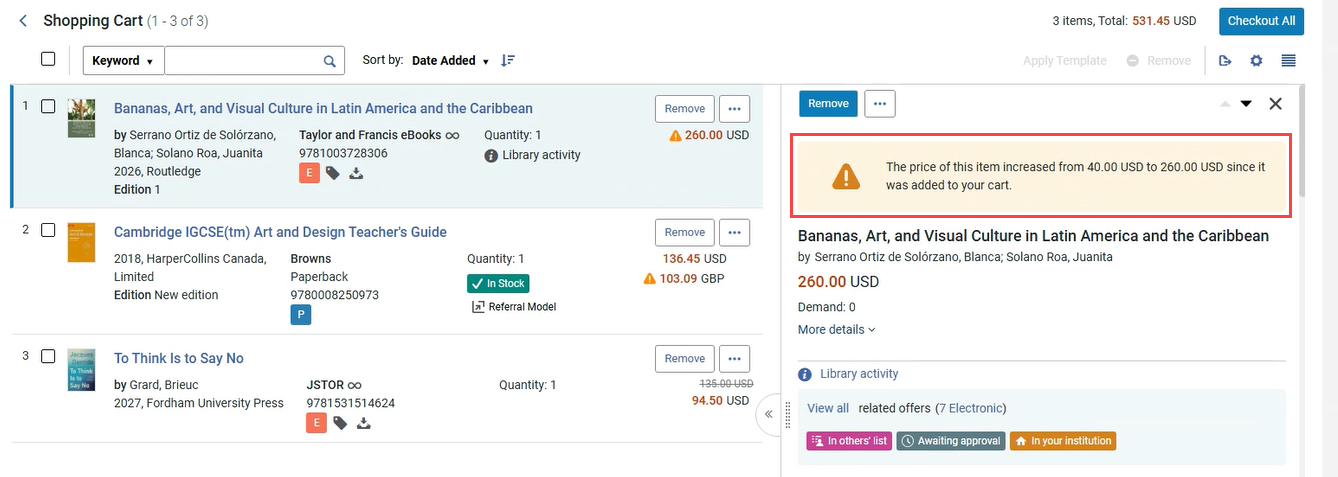
This enhancement improves transparency during the purchasing process by helping users identify recent price changes and make more informed purchasing decisions.
Display Original GBP Pricing for Browns Print Offers
August 2026 Rialto NGS-14933
Print offers from Browns Books now display the price in GBP (the invoicing currency) alongside the equivalent price in the institution's configured currency.

The same pricing information is also displayed in the offer details, together with a non-dismissible informational message indicating that the offer will be invoiced in GBP.

This enhancement improves pricing transparency for referral-based print purchases from Browns Books by helping users understand the invoiced price while still allowing them to evaluate offers in their local currency.
Improved Matching to CZ Records for Rittenhouse and John Benjamins
August 2026 Rialto NGS-14110, NGS-14111
Rialto has improved Community Zone (CZ) record matching for activated e-titles from the Rittenhouse and John Benjamins platforms.
Matching for these platforms now leverages unique vendor identifiers, improving the accuracy and reliability of record-to-collection alignment during activation. Going forward, Rialto recommends the following CZ collections for optimal results:
- Rittenhouse: R2 Digital Library (CZ Collection ID = 613450000000000030)
- John Benjamins: John Benjamins Books (CZ Collection ID = 613820000000000062)
Libraries are not required to use these collections, but adopting the recommended collections streamlines activation and ensures the most reliable matching. To switch to a recommended collection, contact Ex Libris Support.
Casalini and Taylor & Francis Orders Now Deliver Community Zone Records
August 2026 Rialto NGS-
All Casalini and Taylor & Francis ebook records are now delivered through an API instead of an import profile. As a result, customers no longer receive the full MARC record from the provider through the import profile. Instead, during checkout, Rialto searches the Community Zone (CZ) for a matching record and uses the available metadata to create the record.
For institutions that are not configured to use the CZ, Rialto still retrieves metadata from the matching CZ record, but the record is not linked to the CZ. The metadata is copied to the local record only and the local record has no tie to the CZ.
This enhancement helps ensure that newly purchased titles are created using high-quality CZ metadata whenever available.
Please see Rialto End-To-End Order Lifecycle for Community Zone Based Records for more information.
In the August 2026 release, the Collection Development data‑sharing consent will be updated to include discoverable item‑level data.
This update follows a request from our Early Adopters group, who found that discoverable item‑level data can be valuable in specific scenarios when making more informed collection development decisions.
This change will not affect existing opt‑in status.
Improved Internal Matching and Enhanced Additional Items Section
July 2026 Rialto URM-319044, URM-316547, URM-316548, URM-326794
Previously, recommendation generation relied solely on the MMS ID to identify internal matches. As a result, duplicate titles stored under different MMS records within the same institution were not recognized as related, leading to inaccurate item counts and skewed usage data.
The recommendations generation job now uses enhanced matching logic that evaluates multiple bibliographic attributes when identifying internal matches. This update ensures that records representing the same title—even when associated with different MMS IDs—are identified when generating recommendations.
The Additional Items section in the recommendation details panel has been redesigned to reflect this enhanced logic. It now displays item-level information based on data availability for each matching item, in addition to collection development context such as Included in Recommendations (project name and type; may include multiple names/types) and Included in (My library/location scope, Comparison libraries/locations, or Other libraries/locations).
If a matching title has a different MMS ID, it gets the Different Title label, enabling easier at-a-glance identification. Users can also add custom labels to items by selecting Add Labels, which helps group, track, or mark items.
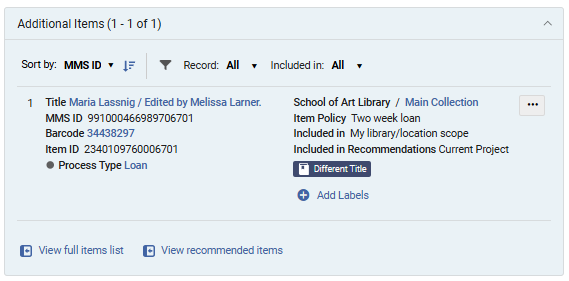
To support efficient review of larger item sets in the Additional Items section, users can:
- Sort items by MMS ID, Library/Location, Temporary Location, or Status.
- Filter results by:
- Record (All, Same Record (matches based on the same MMS ID), or Matching Records (matches based on other factors, not MMS ID))
- Included in (All, Comparison Libraries/Locations, Current Project Recommendations, My Library/Location Scope, Other Libraries/Locations)
By expanding internal matching beyond a single bibliographic record, this update ensures a more complete view of institutional holdings. Furthermore, the redesigned Additional Items section consolidates related items into a single structured view, enabling more accurate evaluation of recommendations across all relevant items.
As part of this enhancement, key calculated values (number of items, number of loans, and whether a title is included in a reading list) are now calculated across all matching title records rather than being limited to a single MMS record. Existing collection development projects are not automatically recalculated.
Internal Project Reports Can Now Be Generated Without Comparison Libraries
July 2026 Rialto URM-329733
Project reports for internal collection development projects can now be generated and exported even when no libraries or locations are selected in the Compare to section during project creation.
Previously, report generation required at least one comparison library/location and the presence of matching items. This requirement has been removed for internal projects, so reports can now be generated regardless of whether comparison libraries have been configured.
When no comparison data is available, the exported Excel file includes recommendation-related information only and excludes comparison-specific columns.
This enhancement enables users to review recommendations and associated data, such as usage metrics and item-level details, without requiring a comparison setup.
Support for generating and exporting external project reports without comparison institutions/libraries will be introduced in the August release.
Indication for Recommendations with Low Bibliographic Rank
July 2026 Rialto URM-327414
Rialto now provides a visual indicator for recommendations with a low Bibliographic Rank, helping users identify cases where incomplete bibliographic metadata may affect recommendation quality.
Recommendations with a Bibliographic Rank below 60 are marked with an Insufficient Metadata badge. The badge helps users quickly recognize recommendations that may be based on limited or low-quality bibliographic information. Selecting the badge opens the recommendation's Title Information section, where users can view the Bibliographic Rank field and review the item's score. Recommendations marked with the badge can also be located using the new Insufficient Metadata facet.
This enhancement makes recommendation quality more transparent and helps users make more informed collection development decisions.
To learn more about how Alma determines bibliographic ranks and assigns ranking values to bibliographic records, see Bibliographic Ranking in Metadata Editor.
Exclude Item Process Types from Recommendation Calculations
July 2026 Rialto URM-324602
Rialto now enables institutions to control whether items at their own institution with specific Alma process types are included in recommendation calculations for the institution's collection development projects.
Previously, local items with process types such as Lost, Missing, Claimed Returned, or Transit were always included in recommendation logic. In some cases, this inflated local item counts and affected title comparisons, resulting in less accurate retention and deselection recommendations.
To address this issue, a new configuration page is now available under Configuration > Collection Development > Workflows > Process Type Exclusion. Access to this page is available to users with the Rialto Administrator or Repository Administrator role.

The page lists all Alma item process types. For each process type, administrators can use the Exclude setting to determine whether items at their institution with that status are included in recommendation calculations. By default, all process types are included in calculations (Exclude = False).
This enhancement gives institutions greater control over how their local collections are evaluated during recommendation generation.
Changes made on this page affect local items within the institution's collection development projects. The configuration applies only to items owned by the institution and does not impact other institutions. Title usage calculations are not affected by these settings.
Browns Books Print Content Now Available in the Marketplace
July 2026 Rialto NGS-14597
Rialto now supports print book ordering through a referral-based model that enables libraries to discover and order print books directly through the marketplace using selected third-party print vendors. In this release, the functionality is available for the Browns Books catalog, for in stock books only. Books available under other stock statuses will be added in future releases. Additional print vendors will be onboarded as soon as their integrations with Rialto are completed.
Browns Books (referral print books) are now searchable in the marketplace, and libraries can place orders directly through Rialto, which are transmitted to Browns Books via EDI. Fulfillment and invoicing are handled by the vendor.
To support this workflow, a new Print Supplier facet has been added to marketplace search results, enabling users to filter offers to Browns Books print content. In addition, the new Referral Model badge ( ) helps users easily identify offers available through the referral ordering model.
This enhancement extends print acquisition capabilities in Rialto, enabling libraries to continue discovering and ordering print content directly from the marketplace through a supported third-party vendor. For details on configuring Browns Books print offers in the marketplace, see Configuring a Third-Party Provider for Print Ordering. For information about referral-based ordering workflows, see How Referral-Based Print Ordering Works.
If Browns Books is not configured as a subscribed supplier, its print offers still appear in marketplace search results, but ordering is disabled.
License Upgrade Options for Ebook Central Titles
July 2026 Rialto NGS-13600
A new Licenses Upgrades (EBC) page is now available under Collection Development > Market, enabling users to purchase license upgrades for Ebook Central titles held by their institution.
The page is pre-filtered to display owned Ebook Central titles that are eligible for an upgrade. Titles with owned unlimited licenses are excluded. A query builder is available on the page to further refine the displayed titles.
_page.png?revision=1)
Users can select Upgrade directly from the results list to add the desired item to the cart. Selecting a title opens a detailed view, which displays the institution’s local holdings for that title. The Upgrade option is also available from this view.

This enhancement provides continued support for managing Ebook Central license upgrades following the removal of Ebook Central purchasing from the Rialto marketplace. For details, see Ebook Central Electronic License Upgrades.
EBSCO Removed from the Provider Configuration Page
July 2026 Rialto NGS-14429
Rialto no longer displays EBSCO as an option alongside other providers on the Provider Configuration page (Configuration > Collection Development > General > Provider Configuration). As EBSCO is no longer a configurable provider in Rialto, it has been removed from provider configuration settings and is no longer available for selection.
Improved Matching to CZ Records for the Ovid Platform
July 2026 Rialto NGS-14274
Rialto has improved Community Zone (CZ) record matching for activated e-titles from the Ovid platform.
Matching for this platform now leverages a unique vendor identifier, improving the accuracy and reliability of record-to-collection alignment during activation. Going forward, Rialto recommends using the following CZ collection ID for Ovid: 613860000000000549.
Libraries are not required to use that collection, but adopting the recommended collection streamlines activation and ensures the most reliable matching. To switch to the recommended collection, contact Ex Libris Support.
Alphabetical Sorting for Ordering and Shelving Library Selection
July 2026 Rialto Idea ExchangeNGS7102
Libraries listed in the Ordering Library and Shelving Library/Location dropdown menus in the shopping cart are now displayed in alphabetical order.
Previously, libraries were listed in the order they were created in Alma, making it difficult for selectors to quickly locate the required library.
Alphabetical sorting improves usability by making library selection faster and more intuitive when placing orders.
The Shelving Library/Location dropdown menu is only displayed for print offers.
In the August 2026 release, the Collection Development data‑sharing consent will be updated to include discoverable item‑level data.
This update follows a request from our Early Adopters group, who found that discoverable item‑level data can be valuable in specific scenarios when making more informed collection development decisions.
This change will not affect existing opt‑in status.
Electronic Matches in Retention and Deselection Projects
June 2026 Rialto URM-252440, URM-315033, URM-306275, URM-314553, URM-325045, URM-326679
Rialto now identifies whether recommended print titles in retention and deselection projects have electronic matches within the institution or its Network Zone.
A new Electronic Matches step has been added to project creation, enabling users to control how electronic matches affect recommendations:
- For retention projects, users can exclude items with electronic matches or limit recommendations to items without perpetual electronic access.
- For deselection projects, users can focus on items that have electronic matches or limit recommendations only to those with perpetual electronic access.
By default, electronic matches are not considered when creating retention and deselection recommendations.
Identified electronic matches are displayed in a new Electronic Matches section within each recommendation. This section presents key bibliographic details and indicators, including whether the match is from the Network Zone and whether it has perpetual access. Users can also view associated electronic portfolios from this section.
Two new badges have been introduced to support quick identification of electronic availability:
- The Perpetual Electronic Match badge appears when a recommendation has at least one electronic match with perpetual access.
- The Electronic Match Found badge appears when at least one electronic match exists, but none provide perpetual access.
Additionally, two new facets, Electronic Match Found and Perpetual Electronic Match, enable quick filtering of recommendations based on electronic availability, which is helpful when working with large result sets.
This update helps libraries make more informed retention and deselection decisions by showing when recommended print titles have electronic equivalents. For details, see Electronic Matches in Retention Projects and Electronic Matches in Deselection Projects.
New Courses Recommendation Rules Configuration Page
June 2026 Rialto URM-324695
Previously, recommendation calculations for retention and deselection projects considered all courses, regardless of their status or year. With this update, institutions can now define whether inactive courses are considered in projects and limit the time range of courses considered when generating recommendations.
A new Courses Recommendation Rules configuration page (Configuration > Collection Development > Workflows > Courses Recommendation Rules) enables institutions to define which courses are considered during recommendation calculations. The following settings are available:
- Include Inactive Courses – Determines whether inactive courses are included in recommendation logic.
- Course Years – Defines which course years are considered.
Once set, these settings are applied during the recommendations generation process, and only items included in courses that match the selected criteria receive the Courses badge. Access to this new configuration page is limited to users with the Rialto Administrator or Repository Administrator roles.
This enhancement provides greater control over recommendation logic, helping institutions tailor results based on course relevance and lifecycle. For details, see Courses Recommendation Rules.
Collection Development Now Respects Excluded Process Types for External Matches
June 2026 Rialto URM-325632
Collection development workflows now take into account the Exclude Process Types from Publishing mapping table in Alma when identifying matches at external institutions during retention and deselection recommendation generation.
Previously, items at participating institutions could be considered during cross-institution analysis even if those institutions had configured the items' process types (for example, lost or missing) to be excluded from discovery. As a result, items intentionally hidden from discovery could still be counted as available matches.
With this update, items at external institutions that are excluded from discovery through the Exclude Process Types from Publishing configuration are also excluded from retention and deselection matching.
This enhancement improves the accuracy of recommendation results by ensuring that external matches reflect the holdings that participating institutions make discoverable to users.
This update applies only to matches found at external institutions. It does not affect how an institution's own items are analyzed within retention and deselection projects. Support for applying process-type exclusions to internal collection development analysis is planned for the July 2026 release.
Extended Reports for Internal Comparison Projects
June 2026 Rialto URM-324693
Until now, the extended report creation was available only for external retention and deselection projects. With this update, libraries can now generate and download a detailed report for internal projects (currently available only if specific libraries are selected in Compare To during project creation; planned for all internal projects in July).
Creating a report produces a single-sheet XLSX file that includes active recommendations from the institution and item-level details from selected internal comparison libraries, such as status, locations, call numbers, policies, labels, and badges. The Export Extended Report and Download Extended Report options are available in the project actions list.
This enhancement improves the comparison workflow by enabling libraries to generate detailed reports for internal retention and deselection projects. For details on how report generation works, see Creating and Downloading an Extended Project Report.
Compare to Specific Locations in Internal Projects
June 2026 Rialto URM-324611
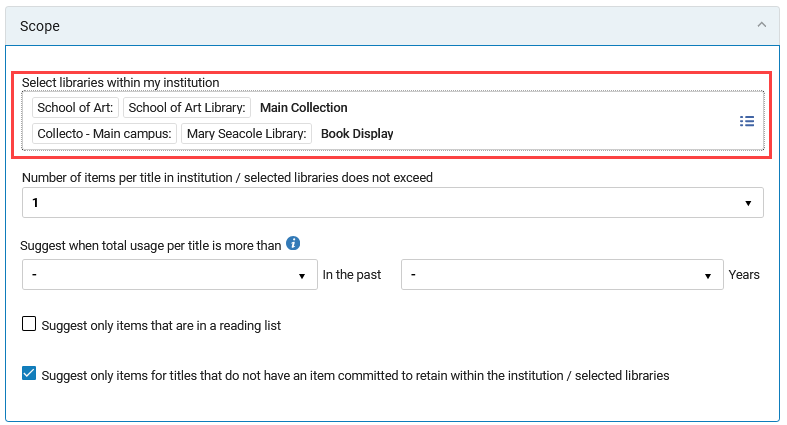
Internal collection development projects now support comparison at the location level, in addition to the institution and library level. Previously, users could filter by library, but could not directly compare holdings to specific internal locations within a library.
Users can now select a specific institution, library, or location within a library in the Compare To and Scope sections when creating or editing a collection development project. This enhancement enables more targeted comparison workflows and more precise project planning.
The UI of the Compare To and Scope sections has been enhanced to surface a structured overview of selected comparison targets, including institutions, libraries, and now specific internal locations.
Continued Support for Print Book Ordering Through Third-Party Vendors
June 2026 Rialto NGS-14597
Rialto is preparing support for a new referral ordering model that will enable libraries to continue discovering and ordering print books directly through the Rialto marketplace using selected third-party print vendors. This functionality is currently in development and will become available once participating print providers complete their integration with Rialto.
With this upcoming enhancement, print books will remain searchable in the marketplace, and libraries will be able to place print book orders directly from Rialto. Orders will be transmitted to vendors through EDI, while fulfillment and invoicing will be handled by the print vendor. Rialto will continue to support invoice-related workflows and notifications.
To support this workflow, Rialto will introduce a new Print Supplier filter and facet in marketplace search results. Libraries will be able to refine print content by supplier and optionally limit results to subscribed suppliers only. When a supplier is not configured as subscribed, print offers from that supplier will still appear in search results, but ordering will be disabled.
New marketplace icons and indicators will help users identify referral-based offers. Libraries will continue to see the same bibliographic and marketplace information when evaluating formats, helping preserve existing selection and ordering workflows for print materials within Rialto.
This enhancement will help ensure continuity for print acquisition workflows while expanding support for third-party print vendors and broader supplier coverage.
Print referral content will not be offered simultaneously with Rialto processed print orders. Referral will be made available after June 30th, when the new provider content is fully loaded.
Open Access Availability in Market Search
June 2026 Rialto NGS-13772
Open access fulfillment options are now visible in market search results in both the general marketplace and the Rialto Search experience. When presenting offers, Rialto now performs real-time checks for open access availability and displays provider-specific links to resources when available.
Open access links appear in the Open Access section under Additional Resources in the right-side panel when inspecting an offer. Each link opens the provider’s website in a new browser tab and directs users to the open access version of the resource. Multiple providers may be displayed for a single title.

This enhancement improves visibility of open access content and enables users to easily access freely available materials directly from market search results.
Removal of EBSCO and Ebook Central Content
June 2026 Rialto NGS-14578
As of July 1, 2026, EBSCO and Ebook Central single titles will no longer be available for purchase in the Rialto marketplace. As part of this change, all fields and values related to EBSCO and Ebook Central will be removed from the query builder.
Since existing profiles (selection plans, title alerts, and recommendation feeds) may still contain these values, a system job will run on July 1 to identify profiles that include the following values:
- ATO available (eBooks)
- DCR available (eBooks)
- Short-term loan (eBooks)
- Collections associated with Ebook Central and EBSCO
- Platform (Ebook Central and EBSCO eBooks)
The job will automatically deactivate (but not delete) selection plans that include one or more of these unsupported values. Title alerts and recommendation feeds with these values will remain active; however, unsupported field values will be cleared, which may affect results.
When a profile is affected, all relevant Rialto administrators will receive a notification (email and in-app) indicating that the profile contains unsupported values and requires adjustment. Administrators should review the affected profiles and update the relevant fields to restore expected behavior.
License Upgrade Options for Ebook Central Titles
June 2026 Rialto NGS-13600
A new Licenses Upgrades (EBC) page is now available under Collection Development > Market, enabling users to purchase license upgrades for Ebook Central titles held by their institution.
The page includes a query builder preset to show titles held by the institution on the Ebook Central platform. Users can refine the query to locate specific titles.
_page.png?revision=2)
Users can select Upgrade directly from the results list to add the desired item to the cart. Selecting a title opens a detailed view, which displays the institution’s local holdings for that title. The Upgrade option is also available from this view.

This enhancement provides continued support for managing Ebook Central license upgrades following the removal of Ebook Central purchasing from the Rialto marketplace. For details, see Ebook Central Electronic License Upgrades.
The Licenses Upgrades (EBC) page is postponed to the July release.
Support for Line-Exclusive EDI Invoicing
June 2026 Rialto NGS-14102
Rialto now supports line-exclusive EDI invoicing for institutions that prefer EDI-based invoicing workflows over API invoicing. As suitability varies by institution, customers interested in this option should contact Ex Libris support for evaluation and potential enablement.
This enhancement provides additional flexibility in invoicing workflows, enabling institutions to align Rialto with their preferred processing requirements.
Notification Routing by Ordering Library
June 2026 Rialto NGS-14434
Rialto now enables notifications to be routed based on ordering library, so users receive only the notifications relevant to the libraries they manage instead of receiving all notifications across the institution.
This enhancement reduces unnecessary notifications and helps ensure that communications reach the appropriate users. Institutions interested in enabling this functionality should contact Ex Libris support.
New Subject Area and Data Visualization Dashboard for Collection Development Workflows Added to Analytics
April 2026 Analytics and Insights URM-321100 URM-318468
A new subject area, Rialto Collection Development, has been added to Alma Analytics. This enhancement introduces support for collection development workflows based on projects and recommendation lists. The subject area includes folders for project details, project measures, recommendation details, bibliographic details, and physical item details. It also incorporates user and date dimensions for comprehensive reporting. This enhancement empowers institutions to monitor and optimize their collection development efforts with greater precision. Users can track project progress, measure outcomes, and analyze key metrics, including the number of active projects, recommendations acted upon, and overall workflow efficiency. These insights help ensure alignment with institutional priorities and broader strategies, including shared print initiatives. For more information, see Rialto Collection Development.
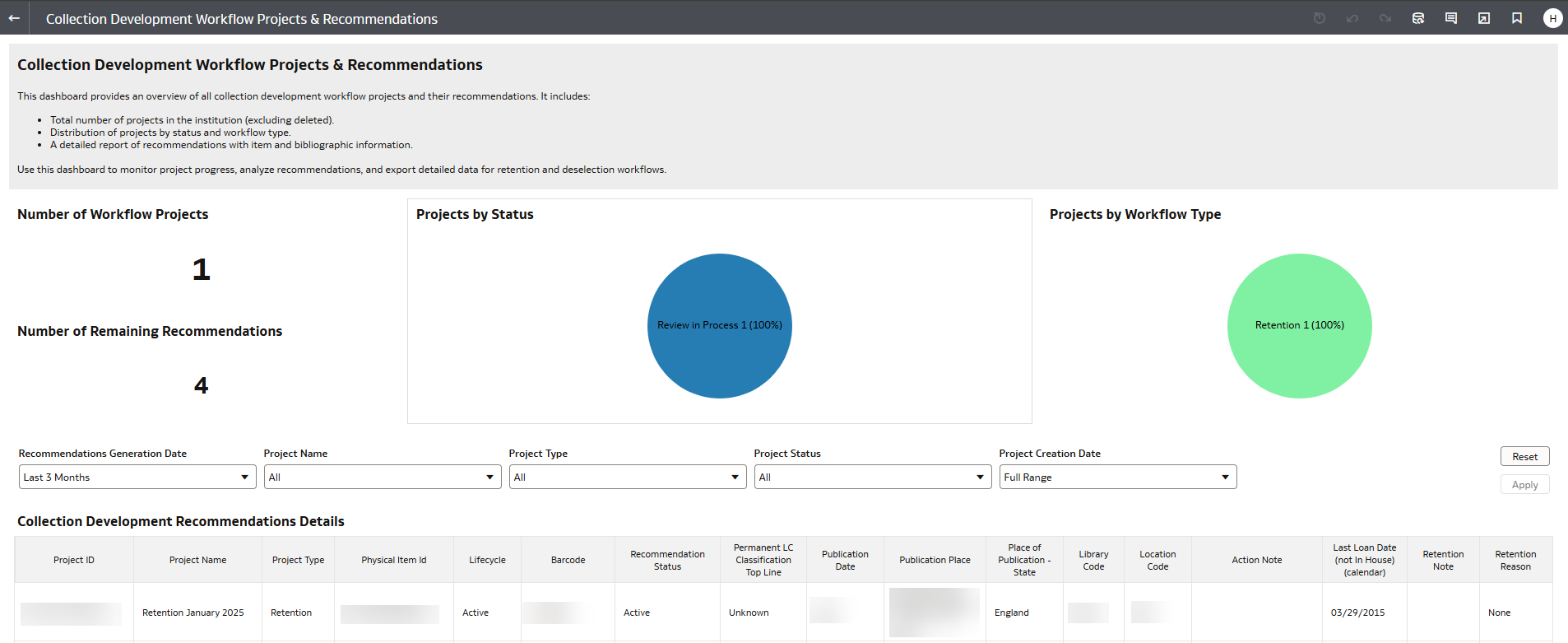
Additionally, the new out-of-the-box Collection Development Workflow Projects & Recommendations Data Visualization dashboard is now available in Analytics > Access Analytics > Catalog > Shared Folders > Alma > Rialto Collection Development > Data Visualization.
It provides an overview of all collection development workflow projects and their associated recommendations. It includes metrics such as the total number of projects, project distribution by status and workflow type, and a detailed recommendations report with item and bibliographic information. This dashboard helps staff monitor project progress, analyze recommendations, and export data for retention and deselection workflows.
Country-Based Selection in the Compare To Section
April 2026 Rialto URM-320716The Compare To section for retention and deselection projects that include comparisons with external institutions has been enhanced to provide a more structured, country-based selection experience.
When creating a new project or editing an existing one, users can now browse comparison institutions using a country tree view. First, select a country to display all available institutions within it. You can then choose specific institutions individually, or select the checkbox next to the country name to automatically include all institutions within that nation.

This enhancement simplifies the process of selecting comparison institutions and makes it easier to locate relevant libraries without having to navigate a long alphabetical list.
Deeper Insight into External Holdings
April 2026 Rialto URM-322033
To support deeper cross-institution analysis, Rialto now offers expanded bibliographic details in the Compare To section when inspecting individual recommendations in projects with external comparisons.
While the Compare To section itself remains unchanged in the main view, the sliding panel under View full list and additional information now displays expanded metadata for matching holdings. Newly added fields include:
- Library
- Publication Place
- Edition
- Material Type
- Language
- OCLC
These additional data points provide deeper insight into external holdings, enabling more informed retention and deselection decisions when comparing your collection to other institutions.
Customize the Brief Record View Across Rialto
April 2026 CERV Enhancement (ID RENH-I-73)
Brief record views previously displayed a limited, fixed set of data points, often requiring users to open the full record to view additional details. Brief views across Rialto are now customizable, enabling users to tailor the display to their needs.
This new capability is available throughout Rialto, although customization options vary by page. Each area of the product contains its own data set and actions, so the fields available for display differ depending on which part of Rialto you are customizing.
To customize the brief record view of the page you are currently viewing:
- Select Customize (
 ).
).
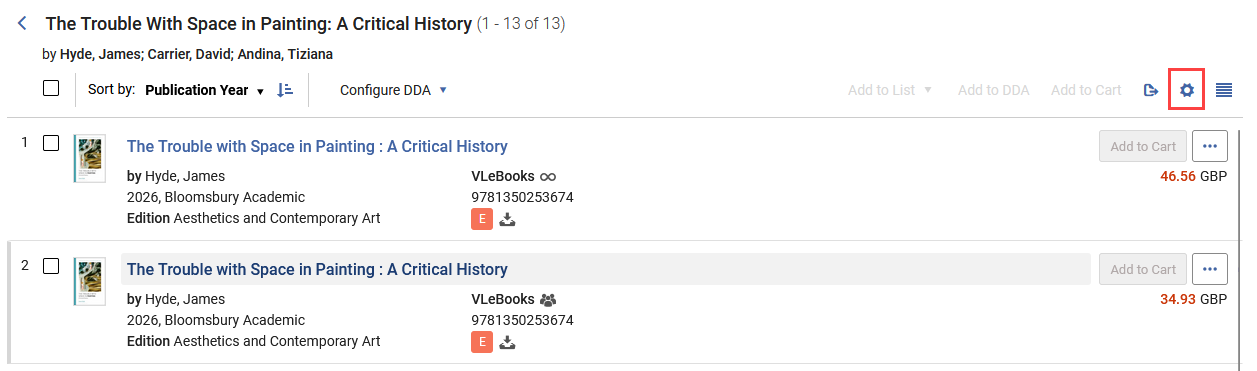 Customize button
 - Choose Records Customization either under User Customization (changes made here apply only to the current user) or Institution Customization (changes made here apply to all users in the institution; available to administrators only).
- The customization interface displays three columns that correspond to the layout of the brief record view: two main columns for bibliographic information and the third Badges and Icons column. Within this interface, users can:
- Show or hide data points by selecting or clearing the checkboxes next to available fields (such as Author, Publication Year, or Edition).
- Control where data appears in the brief view by dragging fields between the first and second columns.
- Change the display order by reordering fields within a column.
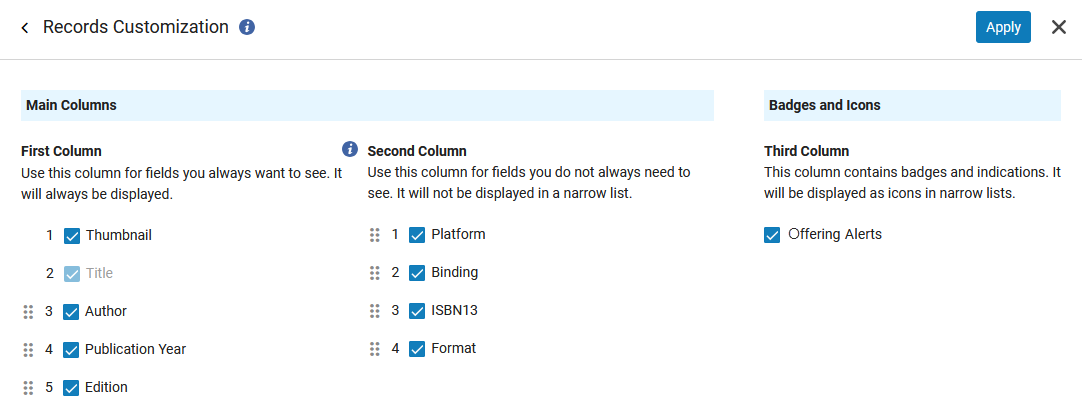 Records Customization - Offer-level options
 - After making changes, select Apply. The brief record view updates immediately without requiring a page refresh.
There are some restrictions on what data points you can customize. Title and Thumbnail always appear in the first column and cannot be moved to the second column, and Title cannot be removed from any brief view. While you can hide them from view, Badges and icons always appear in the third column.
When the brief view has been customized, the Customize icon displays a green indicator ( ).
).
Each page now also enables you to export the current view of selected data points or all fields. Excel (current view) exports only the data points chosen in Records Customization, while Excel (all fields) exports all data available for the listed records.

This enhancement provides greater flexibility in how records are displayed across Rialto. By surfacing the most relevant information directly in the brief view, users can review titles without having to open additional menus.
Enhanced Sorting for Collection Development Recommendations
March 2026 Rialto URM-306163
Rialto now provides more flexible sorting options when viewing recommendations in retention and deselection projects. In addition to sorting by Title and Publication Date, you can now also arrange recommendations by:
- Library / Location
- Call Number
You can also apply a secondary sort to further refine the results' order. The secondary sort uses the same set of fields—Title, Publication Date, Library / Location, and Call Number—and enables additional ordering when multiple recommendations share the same primary sort value.

These enhancements make it easier to review, compare, and organize recommendations, especially when working with large result sets that include many items from the same library or publication period.
New Edition Requests from Leganto in Faculty-Recommended Titles
March 2026 Rialto NGS-14289
Rialto now supports an integrated workflow for reviewing and acting on requests for newer editions of books submitted from Leganto lists. When an institution uses Leganto with Rialto and has the rialto_new_edition parameter (Configuration > Leganto > Features > Leganto Features) set to true, requests for newer editions flow directly into Rialto for review and approval.
Requests submitted by instructors appear in Collection Development > Orders > Faculty-Recommended Titles. Each request has standard Rialto badges to support informed decision-making, and you can use facets to organize requests.

From the Faculty-Recommended Titles page, users can either approve or reject purchase requests for new book editions. Approved requests proceed automatically through the purchasing workflow, ensuring the timely acquisition of newer editions.
This enhancement further strengthens the integration between Leganto and Rialto, giving libraries a centralized way to evaluate and manage requests for newer editions of course-related books. For a detailed look at how this process looks from a Leganto instructor's side, see Requesting New Editions for List Items.
Perpetual Access Type Added for All Rialto Purchases
March 2026 Rialto NGS-6886
Rialto now automatically sets the portfolio access type to Perpetual for all titles purchased through Rialto. This ensures that purchased titles are clearly identified as owned outright, without relying on the collection used for activation.
Additionally, the Access Type is now displayed in the holdings panel, between the collection description and the active status, making ownership information easier to see at a glance.

This update improves transparency around ownership, helps distinguish perpetual purchases from subscription or DDA content, and protects purchased items from Community Zone (CZ) deletions.
Rialto Collaboration with Browns Books (Live)
January 2026 Rialto Idea ExchangeNGS13916
As of February 19, more than two million Browns Books electronic titles—delivered through their VLeBooks digital eBook platform—are now fully integrated into Rialto. Staff can search, select, order, invoice, and fulfill VLeBooks content directly within the marketplace.

Browns Books provides an extensive catalog that spans fiction, non-fiction, academic titles, revision guides, biographies, and classic texts, ensuring broad coverage for diverse institutional needs.
This integration gives libraries a larger, more flexible selection of eBook content while preserving a single, unified workflow across ordering and acquisition.
To request activation for order placement, Rialto administrators can submit the New Platform Activation form accessed from Collection Development > Market > Requests and Services > New Platform Activation.
New Collection Development Manager Role
February 2026 Rialto URM-318430
Rialto now has a dedicated Collection Development Manager role. This role centralizes collection development workflows, replacing the previous model in which multiple roles could use these workflows.
Users assigned the Collection Development Manager role are now the only ones who can:
- Access the Workflows menu under Collection Development
- Create, edit, and delete collection development projects
- Generate and manage recommendations for retention and deselection projects
Repository Administrator and Rialto Administrator roles continue to have access to collection development configuration settings, but they no longer have direct access to the workflows themselves. Collection Development Managers do not have access to configuration settings.
This change clarifies responsibilities and reduces confusion about which users can view, configure, and run collection development workflows.
On Production (not Sandbox), users who created collection development workflow projects prior to the February release will be automatically assigned the Collection Development Manager role to maintain access to existing workflows.
Export Comparison Reports for Collection Development Projects
February 2026 Rialto URM-319704
Rialto now enables Collection Development Managers to export comprehensive comparison reports for retention and deselection projects. Reports can be generated using the Export Extended Report option in the three-dot menu next to a project name.

The export produces an Excel file containing detailed information on all active recommendations from the project, along with comparable data for all matching titles from the selected comparison institutions.

Once a report is generated, a notification appears in the top-right corner of the interface to let the user know it is ready. The report can then be downloaded using the Download Extended Report option in the same three-dot menu. This action is only visible after an extended report has been created. All generated reports can also be viewed or downloaded from the History tab in Admin > Manage Jobs and Sets > Monitor Jobs.

This feature delivers a rich, consolidated view of project recommendations, bringing all relevant data together to support confident retention and deselection decisions. For details, see Creating and Downloading an Extended Report.
Alphabetical Ordering of Comparison Institutions in Compare To Sections
February 2026 Rialto URM-320149
When creating or editing a retention or deselection project, comparison institutions available in the Compare To section of the Criteria form are now displayed in alphabetical order. This change makes it easier to locate and select institutions when defining project criteria.
Improved Matching to CZ Records for Four eBook Platforms
February 2026 Rialto NGS-12824, 14112, 14235, 14236
Rialto has improved how activated eBook titles are matched to records in the community zone (CZ) for the following platforms:
- Wiley
- Karger
- Casalini/Torrossa
- VLeBooks
Matching now leverages platform-specific unique vendor identifiers, improving the accuracy and reliability of record-to-collection alignment during activation. This reduces mismatches and ensures that activated titles are correctly linked to the appropriate CZ records.
To support optimal matching, Rialto recommends using the following CZ collections, which provide the most complete and consistent coverage for each platform:
- Wiley: Wiley Online Library - AutoHoldings Books (CZ Collection ID = 615410000000002415)
- Karger: Karger eBooks Collection (CZ Collection ID = 613810000000000333)
- Casalini/Torrossa: Casalini Torrossa eBooks Institutional Catalogue (CZ Collection ID = 611000000000001478)
- VLeBooks: VLeBooks (CZ Collection ID = 613230000000000191)
New Titles Query Builder Values
February 2026 Rialto NGS-14088
Rialto now highlights Query Builder values exclusively created and maintained by the New Titles team. These fields remain available and can still be used in queries, but within the coming months they will return fewer titles as content ingestion in Rialto is changing. As of the June 2026 release, they will not return new titles added to Rialto. By the end of 2026, they will not return any titles.
An asterisk (*) now appears next to the following fields in the Query Builder to indicate that they will eventually be removed from Rialto search:
- Author Affiliation
- Book Type
- Edition Type
- Genre
- Regional Focus
- Interdisciplinary Studies
- Readership Level
- Series Title
- Series Type
- Treated Titles
- Treated X Weeks Ago
These indicators make it clear which fields return only New Titles-treated content and ensure users build queries with clear expectations about what content will be returned.
This update reflects ongoing changes to how new title data is sourced and maintained in Rialto as part of the platform’s broader evolution.
Creation of Purchase Requests Directly from the Offer Level
February 2026 Rialto NGS-14018
Rialto now enables users to create purchase requests directly from the offer level with the Create Purchase Request action. Selecting this option opens a sliding panel with Alma's Purchase Request form.

After they select Create Purchase Request, users fill out the standard General Information and Request Attributes forms. Some fields are prefilled automatically, and any institutional settings for purchase requests are applied. For details on how these requests work, see Working with Purchase Requests.
The offer-level Create Purchase Request action is available to all users, provided they have the required Alma permissions to create purchase requests.
This enhancement streamlines the purchase request workflow by enabling users to initiate requests directly from offers, reducing steps and improving efficiency.
Display of Rialto Status in the New PO Line UI
February 2026 Rialto Idea ExchangeURM-199550
When a PO line is created as part of the Rialto workflow, the Rialto Status is now displayed in the PO line General Information section.

This enhancement makes it easier for staff to identify the lifecycle state of Rialto orders directly from the PO line. This update was performed by the Alma Acquisition team -- for details, see Rialto Status in PO Line General Information in Alma's February 2026 release notes.
Optional Deletion of Linked Portfolios When Cancelling PO Lines
February 2026 Rialto URM-319332
Previously, cancelling a PO line deleted the portfolio only if it was a standalone, inactive local portfolio. A new customer parameter, delete_linked_portfolio_upon_pol_cancellation (Configuration > Acquisitions > Other Settings), extends this behavior. When set to true (default: false), inactive portfolios linked to the CZ or included in an electronic collection are also deleted.
For details, see PO Line Cancellation: Enable Deletion of Related Inventory Even if Linked to CZ in Alma's February 2026 release notes.
Rialto Collaboration with Browns Books (Live)
January 2026 Rialto Idea ExchangeNGS13916
As of February 19, more than two million Browns Books electronic titles—delivered through their VLeBooks digital eBook platform—are now fully integrated into Rialto. Staff can search, select, order, invoice, and fulfill VLeBooks content directly within the marketplace.
Browns Books provides an extensive catalog that spans fiction, non-fiction, academic titles, revision guides, biographies, and classic texts, ensuring broad coverage for diverse institutional needs.
This integration gives libraries a larger, more flexible selection of eBook content while preserving a single, unified workflow across ordering and acquisition.
To request activation for order placement, Rialto administrators can submit the New Platform Activation form accessed from Collection Development > Market > Requests and Services > New Platform Activation.
Related Records from Recommendation Summaries
January 2026 Rialto URM-316541
Rialto now displays a Related Records link in the Summary section when viewing a retention or deselection recommendation that has associated bibliographic records. The link indicates the number of related records in parentheses.

Selecting Related Records opens a sliding panel with a list of all bibliographic records associated with the recommendation’s MMS ID.
This enhancement makes it easy to find connected records when examining recommendations and helps users understand the broader bibliographic landscape of a title.
Expanded Details in Item-Level Compare To Sections
January 2026 Rialto URM-253024
Item-level Compare To sections for both retention and deselection recommendations now include detailed data for other institutions' resources. Users can view this data by selecting the View full list and additional information link in the Compare To sections.

Selecting View full list and additional information opens a detailed sliding panel that displays various data related to all matching holdings in comparison institutions, such as:
- MMS IDs
- Titles
- Authors
- Publication date
- Publisher name
- ISBNs
- Other system numbers

The panel presents one row per matching MMS ID per institution. For example, if a single institution holds two matching MMS IDs, the panel lists two rows—one for each match. Additionally, if multiple identifiers exist, the sliding panel displays all of them in the same field.
Some data points are hidden by default; use the panel’s configuration button to add additional columns to the sliding panel.

This update increases transparency across comparison institutions and supports more confident decision-making when assessing items for retention and deselection.
Rialto Collaboration with Browns Books (In Testing)
January 2026 Rialto Idea ExchangeNGS13916
More than two million Browns Books electronic titles—delivered through their VLeBooks digital eBook platform—are now fully integrated into Rialto. Staff can search, select, order, invoice, and fulfill VLeBooks content directly within the marketplace.
When VLeBooks offers appear in search results, they can be easily isolated using the Platform facet. VLeBooks has also been added to the view-only Provider Configuration page (Configuration > Collection Development > General > Provider Configuration).
Browns Books provides an extensive catalog that spans fiction, non-fiction, academic titles, revision guides, biographies, and classic texts, ensuring broad coverage for diverse institutional needs.
This integration gives libraries a larger, more flexible selection of eBook content while preserving a single, unified workflow across ordering and acquisition.
Please note, this feature is not available in the sandbox.
Rapido Resource Sharing Information in the Rialto Marketplace
January 2026 Rialto NGS-13771
Rialto now displays Rapido resource sharing information directly within the marketplace to better support informed fulfillment decisions.
When users search in Rialto and open an offer’s details, Rialto performs a real-time check with Rapido to determine whether the version of the title is available for resource sharing. If a match is found, the offer pane lists the names of libraries offering the loan and their lending terms (expected delivery time and the length of the loan).

Selecting the link opens a detailed form that enables selectors to initiate a borrowing request without leaving Rialto.

This enhancement helps staff select the most efficient fulfillment path by presenting borrowing options alongside purchase offers. For full details, see Rapido Integration.
Leganto Integration Enhancements Out of Early Adoption
January 2026 Rialto NGS-13877
The Leganto integration enhancements presented in the December 2025 release notes are now available for all users. Rialto now displays course-related badges, supports citation linking through the Link and Add to Cart action, and provides additional filters and facets that help libraries identify items connected to active and future courses.
These capabilities strengthen course-driven selection workflows and increase visibility into Leganto course materials within the Rialto marketplace. For full details, see Leganto Integration.
Improved Availability Display for Drop Shipping Print Stock
January 2026 Rialto NGS-14238
As outlined in the December 2025 release notes, the updated availability messaging for drop-shipped print stock for North American institutions is now active. Offers that cannot be ordered now display a brown Not Available badge and have a disabled Add to Cart button. This update provides clearer guidance during selection and prevents order attempts for unavailable stock.

Correct Author Names for Purchase Requests Originating in Primo
January 2026 Rialto CERV Enhancement NGS-14122
When a purchase request was created in Primo, the creator field sometimes included the word “author” in addition to the writer’s name. This extra text was passed into the marketplace search, which prevented Rialto from finding the correct title.
Rialto now automatically removes the extra word. Author names display correctly, and marketplace searches return accurate results, ensuring staff can locate the correct titles without any interference from the incorrect metadata.
New Rialto Pricing Settings Page
January 2026 Rialto NGS-13993
A new Rialto Pricing Settings page is now available under Configuration > Collection Development > General. This page displays the institution’s assigned currency, country, and region. It is visible only to administrators, and all fields are view-only.

This page will undergo significant expansion and play a key role in the upcoming rollout that will make marketplace search and limited Rialto functionality available to all Alma institutions.
Informative Error Message for Invalid Bibliographic Template
January 2026 Rialto NGS-13984
Rialto now displays a clear, informative error message on the Order History page when an order cannot be completed because the bibliographic record cannot be created with the selected template. This improvement helps staff quickly identify the issue and take corrective action.

A default book template must be defined in Rialto; if no default book template is set, orders will fail. For more information on templates, see Working with Record Templates.