

Digital Usage
- How many times was the digital representation viewed?
- How many times was the digital representation shared?
- How many times was the digital representation access denied?
- How many and which of the digital files were downloaded?
- How many and which of the digital files were viewed?
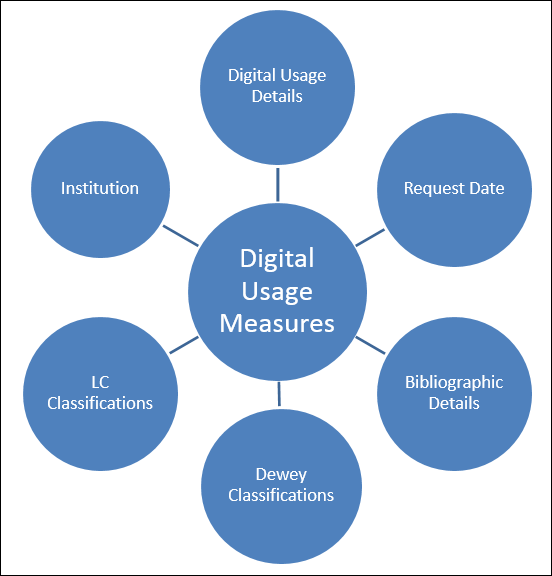
Field Descriptions
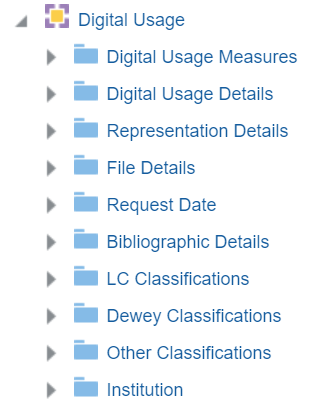
Digital Usage Measures
- If the representation has an access rights policy that requires the patron to acknowledge a copyright statement. If the patron does not accept the copyright statement, it counts as a representation view but not as a file view.
- If the representation has a digital lending access rights policy and the maximum number of concurrent users is exceeded, so that the patron needs to join a waitlist, it counts as a representation view but not as a file view.
| Field | Description | Additional Information |
|---|---|---|
| Num of digital representation views | The number of digital representation views | |
| Num of digital representation shares | The number of digital representation shares | |
| Num of digital representation access denied | The number of digital representation access denied | The number of times access to the digital representation has been denied due to the access rights policy blocking the user. |
| Num of digital file views | The number of digital file views | In the Universal viewer and the Internet Archive Book Reader Viewer, there is no support for counting the number of files viewed (no event is triggered when moving between files), as there is for the Digital Viewer. |
| Num of digital file downloads | The number of digital file downloads |
Digital Usage Details
| Field | Description | Additional Information |
|---|---|---|
| Request ID | The request ID | |
| Delivery Type | The delivery type of the representation | Possible Values:
|
| Representation ID | The representation ID | |
| File ID | The file ID | |
| Usage level | The usage level | |
| Creator | The creator of the usage, for example, the user who viewed or downloaded the file. |
Representation Details
| Field | Description | Additional Information |
|---|---|---|
| Rep Creation Date | The date that the representation was created | |
| Rep Creator | The creator of the representation | |
| Rep Delivery URL | The delivery URL of the representation | |
| Rep Deposit ID | The deposit ID of the representation | |
| Rep Digitization ID | The digitization ID of the representation | |
| Rep Entity Author | The Author value of the representation entity type | |
| Rep Entity Creator | The Creator value of the representation entity type | |
| Rep Entity Date | The Date value of the representation entity type | |
| Rep Entity Day in Month | The Day in Month value of the representation entity type | |
| Rep Entity End Page | The End Page value of the representation entity type | |
| Rep Entity End Time | The End Time value of the representation entity type | |
| Rep Entity Issue | The Issue value of the representation entity type | |
| Rep Entity Number | The Number value of the representation entity type | |
| Rep Entity Season Month | The Season/Month value of the representation entity type | |
| Rep Entity Start Page | The Start Page value of the representation entity type | |
| Rep Entity Start Time | The Start Time value of the representation entity type | |
| Rep Entity Title | The Title value of the representation entity type | |
| Rep Entity Track | The Track value of the representation entity type | |
| Rep Entity Type | The entity type of the representation | |
| Rep Entity Volume | The Volume value of the representation entity type | |
| Rep Entity Year | The Year value of the representation entity type | |
| Rep Label | The label of the representation | |
| Rep Last View Date | The last date that the representation was viewed | |
| Rep Lifecycle | The lifecycle of the representation | |
| Rep Link Param 1-5 | The representation link parameters 1-5 | |
| Rep Modification Date | The modification date of the representation | |
| Rep Modified By | The user who modified the representation | |
| Rep Originating System ID | The origination system ID of the representation | |
| Rep Public Note | The public note of the representation | |
| Rep Remote Code | The remote code of the representation | |
| Rep Type Code | The code of the type of the representation | |
| Rep Usage Type | The usage type of the representation | |
| Is Deposit | Indicates if the representation entered the repository as a deposit | |
| Is Digitization | Indicates if the representation entered the repository from a digitization request |
File Details
| Field | Description | Location in Alma | Additional Information | Data Type | Data Size |
|---|---|---|---|---|---|
| File Creation Date | The creation date of the file | ||||
| File Creator | The creator of the file | ||||
| File Deleted Type | The type of the deleted file | ||||
| File Extension | The extension of the file | ||||
| File Format Description | The file's Format Library format description | New for March! File Format field in the Technical Information section of the file in Specto Preservation | This is relevant only for institutions using Specto Preservation | VARCHAR | 255 |
| File Format ID | The file’s Format Library format ID in Specto Preservation | New for March! File Format field in the Technical Information section of the file in Specto Preservation | This is relevant only for institutions using Specto Preservation | VARCHAR | 255 |
| File Format Version | The file’s Format Library format version | New for March! File Format field in the Technical Information section of the file in Specto Preservation | This is relevant only for institutions using Specto Preservation | VARCHAR | 255 |
| File ID | The ID of the file | ||||
| File Internal Path | The internal path of the file | ||||
| File Label | The label of the file | ||||
| File Last View Date | The last date the file was viewed | ||||
| File Lifecycle | The lifecycle of the file | ||||
| File Mime Type | The Mime type of the file | ||||
| File Modification Date | The modification date of the file | ||||
| File Modified By | The user who modified the file | ||||
| File Name | The name of the file | ||||
| File Original ID | The original ID of the file | ||||
| File Original Name | The original name of the file | ||||
| File Original Path | The original path of the file | ||||
|
File Technical Issue Details
|
The file’s preservation technical error description
|
New for March! Displayed on the file as a badge in the Content List section of the Title in the Technical Analysis Workbench in Specto Preservation
|
This is relevant only for institutions using Specto Preservation.
Multiple values are separated by a semicolon (;)
|
VARCHAR
|
255
|
|
File Technical Issue Type
|
The file’s preservation technical error types in Specto Preservation, for example Format Identification, Technical MD Extraction, etc.
|
New for March! Displayed on the file as a badge in the Content List section of the Title in the Technical Analysis Workbench in Specto Preservation
|
This is relevant only for institutions using Specto Preservation.
Multiple values are separated by a semicolon (;)
|
VARCHAR
|
255
|
Request Date
| Field | Description | Additional Information | Data Type | Data Size |
|---|---|---|---|---|
| Request Date | The current course end date of the purchase request | The date in the format DD/MM/YYYY | DATE | |
| Request Start of Week | The date of the first business day of the week | The date in the format DD/MM/YYYY | DATE | |
| Request Week Number | The number of the week of the year | There are 52 weeks in a year. | VARCHAR | 2 |
| Request Month Key | The month of the date in number format | For example - February will show the number 2 in this column. This field is useful when you want to sort by month. | INT | |
| Request Month | The month of the date in text format | The month, for example, "February" | VARCHAR | 20 |
| Request Full Month | The year and month that the purchase request was modified | The month in text format and the year. For example - Feb 25 (for February 2025) | VARCHAR | 20 |
| Request Quarter | The quarter in the year in which the purchase request was modified | The quarter of the date in a display format such as Q1 | VARCHAR | 20 |
| Request Year | The year in which the purchase request was modified | The year of the date in the format YYYY . For example - 2025 | VARCHAR | 20 |
| Request Year-Month | The year and the month in which the purchase request was modified | The year and the month in the format YYYY-MM | VARCHAR | 250 |
| Request Fiscal Month Key | The fiscal month of the date in number format | For example - If the fiscal year starts in June, this column will show the number 1 for June, the number 2 for July, and so on. | INT | |
| Request Fiscal Year | The fiscal year of the date in string format | The year is presented according to the description in the mapping table "Fund and Ledger Fiscal Period". For more information, see Configuring Fund and Ledger Fiscal Periods | VARCHAR | 50 |
| Request Date Filter | Used to filter report results by date | Possible values:
|
VARCHAR | 100 |
Bibliographic Details
Dewey Classifications
The Dewey Classification is displayed in Analytics in the Dewey Classifications shared dimension, available in several subject areas. Dewey classification information is derived from the bibliographic record in most subject areas, except for the Physical Items subject area, where it can be derived from either the holdings record or the bibliographic record.
- For MARC21
Taken from field 082$$a
https://www.loc.gov/marc/bibliographic/bd082.html - For UNIMARC
Taken from field 676$$
There are three levels of the Dewey Classification stored in Alma Analytics. Each level is referred to by a numbered group (Group1, Group2, and Group3).
The group fields display the names as follows:
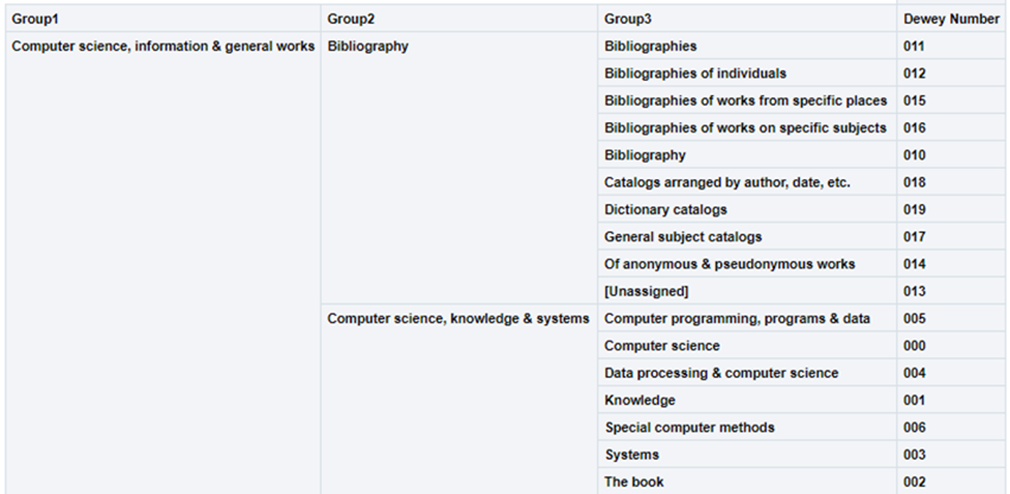
Using the hierarchy option in this dimension, the user can drill down from Group1 to Group3. In each level, the user can see measures accumulated to the relevant group.
For example:
-
000 Computer science, information & general works
o 010 Bibliography
o 000 Computer science, information & systems
-
005 Computer programming, programs & data
-
000 Computer science
-
004 Data processing & computer sciences
-
This is presented in Alma Analytics as follows:
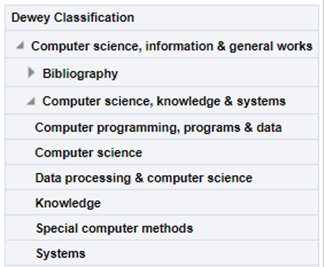
If there is more than one classification code, the last one appears.
| Field | Description | Data Type | Size |
|---|---|---|---|
| Group1 | The name (label) of the first Dewey classification level. | VARCHAR | 500 |
| Group2 | The name (label) of the second Dewey classification level. | VARCHAR | 500 |
| Group3 | The name (label) of the third Dewey classification level. | VARCHAR | 500 |
| Dewey Number |
The Dewey Number is a unique classification code assigned to a specific subject or topic category. The first 3 digits of the Dewey Classification. |
VARCHAR | 15 |
| Dewey Classifications | The hierarchy column that allows the user to drill down from the first level of the Dewey Classification to the third level. |
LC Classification
The Library of Congress Classification (LCC) is displayed in Analytics in the LC Classification shared dimension, available in several subject areas. LC classification information is derived from the bibliographic record in most subject areas, except for the Physical Items subject area, where it can be derived from either the holdings record or the bibliographic record.
- For MARC21
Taken from field 050$$a. If 050$a has no content, 090$a is used.
https://www.loc.gov/marc/bibliographic/bd050.html - For UNIMARC
Taken from field 680$$a
There are five levels of the LC Classification stored in Alma Analytics. Each level is referred to by a numbered group (Group1, Group2, Group3, Group4 and Group5).
Using the hierarchy option in this dimension, the user can drill down from Group1 to Group4. In each level, the user can see measures accumulated to the relevant group.
For example:
- SF1-1100 Animal culture
- SF87 Acclimatization
- ….
- SF191-275 Cattle
- SF250.5-275 Dairy processing. Dairy products
- SF221-250 Dairying
This is presented in Alma Analytics as follows:
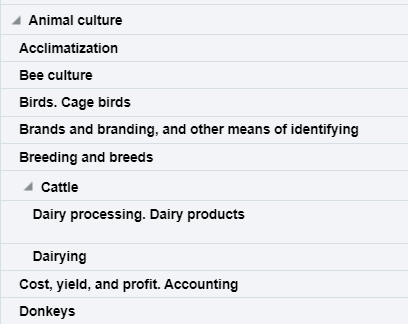
If there is more than one classification code, the last one appears.
Ex Libris works with content providers worldwide to enrich the metadata available in the Alma Community Zone. To enrich the journal/serial content in the CZ, we work directly with the Library of Congress CONSER feed for electronic serials, which we match against our knowledge base to enrich with all of the relevant metadata fields that they supply (for more details, see Community Zone Serial Records Enrichment). We receive weekly updates from CONSER and enrich the CZ records with all relevant metadata, including the 050 fields (when available).
In the case of book content, we work with multiple providers who are willing to share their metadata with the Alma community globally (for more details, see Community Zone Monograph Records Enrichment). If you have local access to these classifications, you may want to consider working with the local extension for these records whenever an update is not available. (For more details, see Working with Local Extension Fields for Community Zone-linked Records)
| Field | Description | Data Type | Data Size |
|---|---|---|---|
| Group1 | Group1 is the name given for the first level of the LC Classification and is the primary division used to organize and group related topics, subjects, or materials. | VARCHAR | 500 |
| Group2 | Group2 is the name given for the second level of classification. | VARCHAR | 500 |
| Group3 | Group3 is the name given for the third level of classification. | VARCHAR | 500 |
| Group4 | Group4 is the name given for the fourth level of classification. | VARCHAR | 500 |
| Group5 | Group5 is the name given for the fifth level of classification. | VARCHAR | 500 |
| Start Range | Start Range refers to the beginning point of a designated range within a classification system. The Start Range indicates the initial classification number or identifier within a specified range that encompasses a set of related subjects, topics, or materials.
For example, in PS501-689 (Collections of American literature), the start range is PS501. Possible start range values are hard coded to the beginning of LC Classification groups. |
VARCHAR | 50 |
| End Range | End Range refers to the concluding point of a designated range within a classification system. The End Range specifies the final classification number or identifier within a defined range that encompasses a set of related subjects, topics, or materials.
For example, in PS501-689 (Collections of American literature), the end range is PS689. Possible end range values are hard coded to the end of LC Classification groups. |
VARCHAR | 50 |
| Classification Code | Classification Code refers to a unique alphanumeric identifier assigned to a specific subject or topic category within the library's classification system. The Classification Code is composed of letters and numbers that represent various facets of a work, such as its subject, genre, or format.
For example, in the LC classification "PN1997.2.D56," the "PN" portion represents the general subject area (Performing Arts), and the "1997.2.D56" further refines the classification to a specific work or aspect within that category. |
VARCHAR | 50 |
| Start Range Number | The numbers that come after the letter(s) in the start range. | DOUBLE | |
| End Range Number | The numbers that come after the letter(s) in the end range. | DOUBLE | |
| Classifications | The Hierarchy column that enables the user to drill down from the first level of the classification to the fourth level. Using this column provides the user with the option to view the accumulative measures. Note that the fifth level is not included in this field. | Hierarchy |