

Alma 2026 Release Notes
|
 Release:
Main Features
AI‑Powered Recommendations in Resource Sharing Letters
Institutions can now enhance several resource‑sharing notifications with AI‑generated recommendations for similar resources. When enabled, Alma uses an AI component to analyze the requested item and automatically generate an optimized search query based on its bibliographic details.
The query is run against a library‑selected search scope, and the resulting recommendations are included in supported letters, such as the request confirmation, document delivery, and cancellation letters, helping patrons discover additional relevant materials.
Activation of this feature is fully optional and controlled within each letter’s setup.

For more information, see Configuring Alma Letters.
Configurable Closed Fee Statuses
 Idea Exchange
Alma now supports up to 10 configurable closed fee statuses, allowing institutions to define their own labels for how fines and fees are resolved. This enables staff to close a fee using a selected close type. Any fee assigned one of these statuses is treated as Closed throughout Alma. These statuses can also be applied through the Bursar Import, enabling external systems to set the appropriate close type. This enhancement improves clarity, reporting, and control over fee resolution workflows.

The action appears only if at least one additional type is activated (see Patron Charges Configuration).
For more information, see Managing Patron Services and Developer Network.
Improved Ability to Block Requesting by Loan Blocks
The ability to block requesting by loan blocks (using the block_request_if_not_loanable parameter) has been improved to ignore the following blocks, which will not block requesting:
- Item is on hold shelf for another patron
- Item is on expired hold shelf for another patron
- Item is currently on loan by another patron
- Item is requested by another patron
- Item is requested by the library
- Item has not been received by Acquisitions Department
For more information, see Configuring Fulfillment Jobs.
Purged Request Fee
Idea Exchange URM-180322 URM-328255Configurable Purged Request Fee for Hold Requests
A new Purged Request Fee can now be configured in the Hold Request Terms of Use (Configuration > Fulfillment > Terms of Use and Policies), similar to the existing option for booking requests. When staff process expired holds from the hold shelf using Reshelve, Transit, or Activate Next, the system consults the Hold Request Terms of Use (TOU) and automatically applies the appropriate fee. This gives libraries more precise control over cost recovery and ensures consistent handling of expired hold requests.

For more information, see Configuring Physical Fulfillment and Managing the Hold Shelf.
Control Over Canceling Hold Requests in Transit
A new circulation policy now allows libraries to determine whether a hold request can be canceled once it has been put in transit. This added control helps prevent unintended cancellations during fulfillment, strengthens workflow reliability, and ensures that items already en route continue through the process as intended.
The policy is controlled by the allow_cancel_in_transit_requests parameter (Configuration > Fulfillment > General > Other Settings).


For more information, see Configuring Fulfillment Jobs and Managing the Hold Shelf.
Date of Work Now Supported in Leganto
Idea Exchange URM-228160Leganto now supports the display of a work's original publication date through the Date of Work field, enabling institutions to distinguish between the original publication date of a title and the publication date of a later edition or format.
The Date of Work field is not enabled by default. Institutions that want to display this information must configure the relevant bibliographic mapping and display settings.
To map the field in Alma, go to Configuration > Fulfillment > Courses > Bibliographic Mapping Rules and update the production Drools rules to map the desired MARC field to the date_of_work field. For example:
rule "Display - Date of work"
when
MARC is "240"."f"
then
set citation."date_of_work" to MARC."240" subfields "f"
end
You can verify the mapping using Configuration > Fulfillment > Courses > Test BIB to Citation Normalization by entering an item's MMS ID and confirming that the Date of Work field is populated as expected.
- Go to Configuration > Leganto > UI > Citation Field Mapping.
- Map Date of Work to a Book type (and/or other material type).
- Configure the display order.
- Choose whether the field appears immediately when a user opens Item details or under More details.
- Specify whether the field is mandatory.
Once configured, the Date of work field appears in Leganto under the item's Item details tab.

Institutions using Primo or Summon can also display this information in discovery records. Configure the field in Configuration > Leganto > Discovery > Primo Mapping or Configuration > Leganto > Discovery > Summon Mapping using the date_of_work code (for details, see Primo Mapping and Summon Mapping).
This enhancement improves metadata clarity and helps users identify the original publication date of a work, regardless of the format or edition being used.
Upgraded Course Loader Integration Profile
Idea Exchange URM-321492The Course Loader integration profile (Configuration > General > External Systems > Integration Profiles) has been enhanced to enable easier file import and to support the import of additional data.
The course loader integration profile now enables users to upload a file containing course information directly from their computer. Previously, course loading required uploading a tab-delimited file to an FTP server before running the integration. Users can now select and upload a local file, eliminating the need for FTP. The course loader integration profile still supports loading data from an FTP server.
A new Upload file field is now available in the Actions tab of the Course Loader integration profile. Users can use this field to upload a file containing course information, save the uploaded file, and run the job to ingest the course data.

When a file is uploaded via Upload file, scheduling is disabled for that run.
Additionally, the Course Loader integration profile has been enhanced with a second version that supports importing School/Faculty information for courses and provides a more flexible structure for future data expansion. A new Version field has been added to the Actions tab, enabling users to choose between two input file formats for course data. The available options are:
- Version 1 – Existing file structure and behavior (default for all existing Course Loader profiles).
- Version 2 – Updated file structure with the following changes:
- Adds a School/Faculty field (SCHOOL_FACULTY), which replaces TERM1.
- Replaces TERM2 with a single MULTIPLE_TERMS field.
- Introduces a new ALL_INSTRUCTORS OPERATION field for one or multiple comma-separated instructors. This field replaces the previous INSTRUCTOR1 -INSTRUCTOR10 fields.
Both versions support FTP-based course loading and direct file upload.

Here is an example of a Version 2 file illustrating the new file format.
Within the course loader integration profile, the layout of the Actions tab has also been updated with visual separators between different operations (such as creating, updating, or rolling over courses) to improve clarity when configuring Course Loader profiles.
This enhancement simplifies the course loading process, reduces reliance on FTP-based workflows, and introduces a future-ready file structure. For details, see Configuring Course Loading.
Digitization Request Queue Indicator
Idea Exchange URM-145473 URM-328254Manage In‑Process Items now highlights when an item has additional digitization requests waiting in the queue. Staff can use the new View Queue row action to manually activate the next one, improving workflow efficiency and ensuring queued digitization work progresses smoothly. Completing the active request automatically activates the next in the queue.

The new Additional Requests column is hidden by default. Select the customization (gear) icon to display it.

For more information, see Digitization Processing.
Set 'Date Needed By' to Mandatory on Patron Physical Request
Idea Exchange URM-322733When creating a request, if the new mandatory_last_needed_date_request parameter (Configuration > Fulfillment > General > Other Settings) is set to true, the Date Needed By field (the latest date by which a requested item is actually needed) becomes a mandatory field on the Alma Request forms.

The automatically populated Date Needed By field is evaluated independently of the Hold Shelf Period and may cause a request to be cancelled before or shortly after arrival, even if hold shelf time remains.
For more information, see Configuring Fulfillment Jobs and Creating a Request from the Institution.
New 'Date Needed By Period' Policy Type for Request Terms of Use Policies
Idea Exchange URM-322733A new Date Needed By Period policy type was added to the request Terms of Use Policies (Configuration > Fulfillment > Terms of Use and Policies). When turned on, the Date Needed By field on the request form is auto-populated by the default value configured in the policy (independently of whatever value exists in the mandatory_last_needed_date_request parameter). All values are calculated on a calendar-day basis, including closed periods. The date can be overridden when editing the request form. Existing Terms of Use will default to a policy with a value of "None".
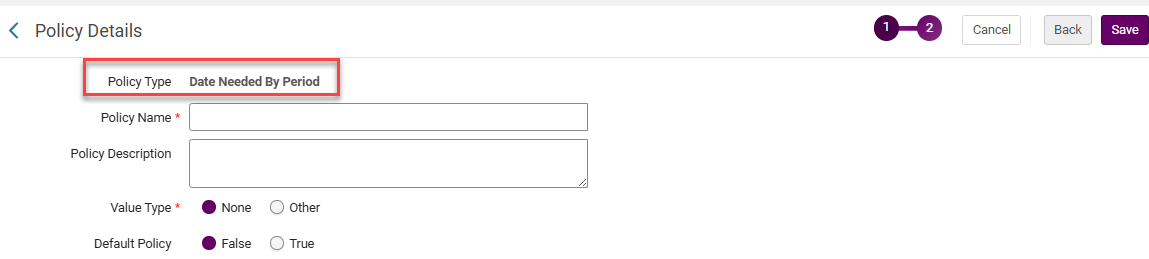
When multiple items have the same title but different Date Needed By Periods, Alma uses the latest date.
For more information, see Configuring Physical Fulfillment and How to Setup Requesting Policies.
Automatic Cleanup of Temporary Location After Restore Request
Idea Exchange URM-103876 URM-103876When an item is assigned a temporary location, one option for returning it to its permanent location is to process a Restore Request. Previously, after fulfilling a Restore Request, the temporary location flag on the item was correctly set to No, but the temporary location field still displayed the old temporary location value. With this enhancement, once a Restore Request is fulfilled, the temporary location field is automatically cleared, fully restoring the item’s location status and preventing confusion about its real location.

This behavior is controlled by the force_empty_temp_location_when_disabled parameter (Configuration > Fulfillment > General > Other Settings).
For more information, see Scanning Items and Configuring Fulfillment Jobs.
Additional Information in Resource Sharing Directory Members API
The Resource Sharing Directory Members API has been enhanced to include the directory member's email and phone number.
For more information, see Developer Network.
Consortial Fulfillment Limits
 URM-206692
Networks can now define fulfillment limits at the network level, enabling consistent policies across all member institutions. For example, a user group can be restricted to a maximum of 10 concurrent loans across the entire network.
Supported limit types include:
- Max Cash
- Max Overdue Loans
- Max Bookings
- Max Overdue Recalls
- Max Digitization Requests
- Max Physical Item Requests
- Max Loans
This enhancement allows libraries to enforce tighter, centralized consortial policies and ensure a more controlled resource sharing experience.
Below is a sample loan cash limit:


Below is a sample request limit:


For more information, see Configuring Fulfillment Jobs and Network Related Limits.
Improved Use of Network Resources in Course Reading Lists
Idea Exchange URM-320851 URM-323964 URM-326240Institutions can now add resources from the Network Zone directly to locally managed reading lists. When a Network Zone resource is used in a citation, the reading list will display its availability across the consortium, including Held By information for all participating libraries.
This enhancement streamlines course support and improves visibility into shared network holdings.

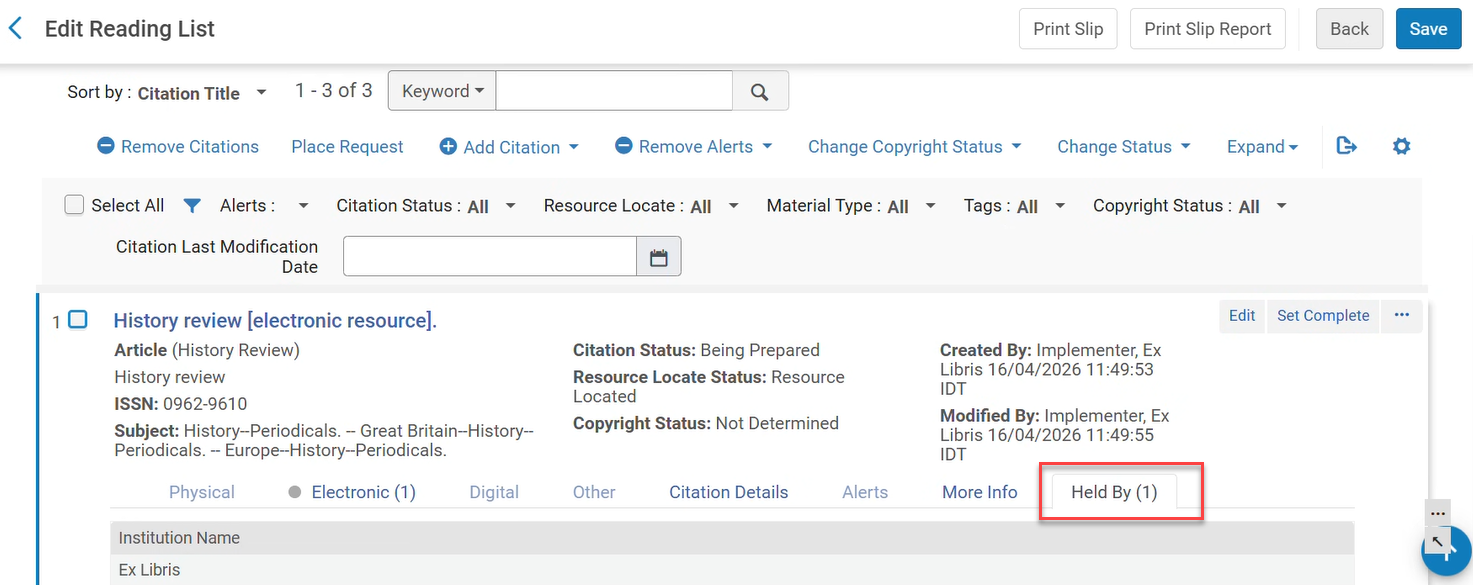
For more information, see Managing Citations.
Introducing the New Physical Items Experience
Alma's physical items workflows are upgraded with new UI concepts, resulting in faster, simpler searches and streamlined workflows, saving time and boosting productivity.
The new item editor offers more customization options and new capabilities, such as updating work order statuses.
The new physical items search and lists offer a side-by-side editor, more actions available directly from the search, and enhanced navigation options. The new search offers the new UI capabilities, including improved advanced search, facets, and search performance - with gradual loading, showing information as soon as it is available and adding more details as they become ready and enabling users to start working faster.
To turn on the new physical items experience, select your user icon  in Alma's persistent bar, select Feature Rollout Preferences, and activate the New Physical Items Search toggle.
For information about the upcoming experience, see the Introduction to the New Physical Items Experience and Working with Items.
Improved Visibility for Temporary Location
In the new repository searches, a clock  icon indicates when items are in a temporary location. This icon was updated to show more prominently, making it easier to identify temporary locations at a glance.

Profile Update Changes
UNIMARC Bibliographic and Authority Profiles Updates
We updated the UNIMARC Bibliographic and Authority profiles to reflect the latest IFLA standards
For more information, see UNIMARC Search Indexes.
Update DC Records with Identical Metadata in Bulk
The Add Metadata Fields job (previously named Add MARC21 Fields job) now enables catalogers to add DC metadata fields in bulk to DC records. Additionally, sets can now include both MARC 21 and DC records, and the relevant records will be updated with the appropriate metadata.
For more information, see Add Metadata Fields.
SBN Indice 3 Handling of Legami for 606 and 676 Fields
Updates to the 606 and 676 fields are now applied to SBN records while complying with data ownership rules.
SBN Authority Alignment Handling of 899 Fields
The 899 fields are now maintained when the SBN integration profile for Authority Alignment runs.
Updated German MARC Field Help Links
To ensure uninterrupted cataloging workflows, Alma now links to the new official German MARC documentation base URL.
Improved Network Zone Import Stability
URM-320679To improve import stability and reduce conflicts that can occur when multiple Consortia or Network members update the same Network Zone record simultaneously, Alma now provides enhanced management of centralized Network Zone records. This new approach introduces more advanced handling of shared records within the Network Zone, ensuring that updates are processed more reliably, reducing the risk of record contention, and improving consistency across member institutions. As a result, collaborative cataloging workflows become more stable, efficient, and predictable, particularly in environments where centralized records are frequently updated by multiple participants.
New Bibliographic Reminders Task List
Idea Exchange URM-175385Alma now displays existing bibliographic record reminders as actionable tasks within the Tasks widget and Tasks menu. A new task list titled Bibliographic Records includes an entry called Due Reminders - Last 7 Days, which displays a counter for reminders whose due date has arrived within the last 7 days. Selecting this task opens the existing Reminders list page, filtered to show the relevant due reminders for follow-up.
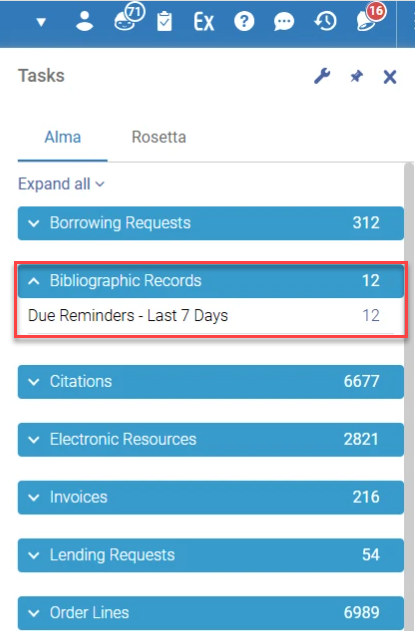

For more information, see Tasks and Task Lists and Viewing Due Reminders.
Estonian Language Support – Search, Sort, and Browse
Alma now provides full support for Estonian language characters and sorting rules across the system, ensuring accurate searching, browsing, and sorting.
For consortia environments, both the Network Zone (NZ) and all Institution Zones (IZs) must be re-indexed after Ex Libris enables the new language.
For more information, see Estonian Characters.
Lithuanian Character Support for PO Lines and Courses
All search, browse, and sorting operations for PO Lines and Courses now follow the correct Lithuanian alphabetical collation.
This alphabetical sorting will only be effective after the semi-annual indexing.
For more information, see Lithuanian Characters.
Improved Related Records Handling
Idea ExchangeCatalogers can now better control how Contains/Part of related records are interpreted, reducing unintended request propagation for multi-volume and series records.
When the New Logic mode is enabled, it refines how relationships between records are classified in Alma, ensuring more accurate handling of connections. It introduces a new Relation type as an alternative to Contains/Part of, providing a clearer distinction between item level relationships and series or other related records. This ensures more consistent and predictable assignment of relationships.
In Primo VE, holdings of related records are only displayed for records defined with a Contains/Part of relation. This ensures that Get It only reflects true containment relationships, improving the accuracy of availability, discovery, and fulfillment.

For more information on relation types in Alma, see New Contains Relation Type Logic.
Rename Normalization, Indication, and Merge Rules
Idea Exchange URM-38800To streamline rule management, when the parameter rename_rules (Configuration > Resources > General > Other Settings) is set to true, users can now rename Alma Normalization, Indication, or Merge rules directly in the UI. As part of this enhancement, when a rule is renamed, Alma automatically reflects the updated name across all processes that use the rule, helping maintain accuracy and consistency and reducing the need for workarounds when updating rule names.

Improved Visibility of Unsaved Changes in the Metadata Editor
Idea Exchange URM-217748The Metadata Editor now applies the Draft badge, which appears in both the Metadata Editor sidebar and header, for any Bibliographic, Authority, or Holding record that is edited but not saved, whether the record was created as a draft or the record was modified. This applies to all records—whether they were originally created as drafts or as regular, saved records. This enhancement provides a clearer, more consistent visual signal that a record contains unsaved changes, helping users stay aware of their editing state and reducing the risk of leaving a record without saving the changes.

For more information, see Navigating the Metadata Editor Page.
New Crosswalks Management Platform
Alma now enables institutions to tailor metadata conversions by editing the out-of-the-box metadata crosswalks used to convert records between formats. This helps better meet local standards and workflows, improving the accuracy and consistency of imported, published, and shared records.
A new Crosswalks Management interface provides direct access to the XSL files that control conversions between formats such as MARC21, UNIMARC, CNMARC, KORMARC, and SBNMARC. From this page, authorized users can view the default crosswalks, create local customizations, test changes, and restore the original behavior if needed.
Customizations apply across relevant Alma processes, including import, publishing, and search-related workflows. Authorized roles can access these settings, and safe restore options ensure institutions can easily revert to the standard Alma crosswalks at any time.
The Crosswalks Management configuration replaces the Digital Publishing Crosswalk XSLs.

Linked Open Data — BIBFRAME Record BIG Validation
Alma now validates BIBFRAME Work and Instance records against PCC BIBFRAME Interoperability Group (BIG) rules, ensuring your linked data meets community standards at the point of creation.
- BIG-aligned validation — Records are checked for mandatory fields, repeatability, and structural requirements based on DC TAP rules for monographs and serials.
- Configurable by institution — Admins can activate, adjust, or deactivate rules and set severity levels (warning or block).
- Clear cataloger feedback — Actionable messages on save guide catalogers to fix issues quickly.
BIG validation reduces manual review, improves data quality, and ensures interoperable BIBFRAME records as the library community transitions to linked data.
The BIG validation configuration table is available to Admin users under Configuration > Resources > Metadata Configuration > LC BIBFRAME Instance/Work Profiles > Validation. Admin users can activate or deactivate validation rules.

For more information, see BIG BIBFRAME Validation Rules.
Linked Open Data — View Versions Action


For more information, see LOD Editor – Actions.
Collection Development Data-Sharing Consent Updated
August 2026 Resource Management URM-328073
As announced in previous releases, the collection development data-sharing consent has been updated to include discoverable item-level data. This change follows feedback from the Rialto Collection Development Workflows Early Adopters group, which identified discoverable item-level data as valuable in specific collection development scenarios.
The consent text on the Data Sharing Profile page (Configuration > General > General Configuration > Data Sharing Profile) has been updated to reflect this change. Existing opt-in selections are preserved, so institutions do not need to update their current settings.
More Comprehensive Information in Extended Project Reports
August 2026 Resource Management Idea ExchangeURM-244257
Extended project reports now include additional usage, bibliographic, location, and weeding data, providing a more complete view of collection information. The following values are now included in reports:
- Total Usage and Usage in Project Scope – Now available in both internal and external collection development project reports. These values are included only for the user's institution.
- Comparison Library & Location – Now also available in external collection development project reports and in the View Full List and Additional Information panel accessible from the Compare To section when viewing individual recommendations.
- Comparison Barcode and Comparison Bibliographic Rank – Now also available in external collection development project reports and in the View Full List and Additional Information panel of the Compare To sections. Both values are hidden by default when the panel opens; select the cog icon (
 ) to add them to the table.
 - Bibliographic Rank – Now also available in external collection development project reports. This value indicates ranks of bibliographic records within the user's institution.
- Weeding Number and Comparison Weeding Number – Weeding Number (for the recommended item) is now available in both internal and external project reports, while the Comparison Weeding Number for the matched internal item is now available in internal reports. Both values have also been added to the Item Information and Additional Items sections when viewing individual recommendations.
These enhancements provide richer insights across reports and recommendation details, helping libraries make more informed collection development decisions.
Internal Project Reports Can Now Be Generated Without Comparison Libraries
August 2026 Resource Management URM-329733
Project reports for internal collection development projects can now be generated and exported even when no libraries or locations are selected in the Compare to section during project creation.
Previously, report generation required at least one comparison library/location and the presence of matching items. This requirement has been removed for internal projects, so reports can now be generated regardless of whether comparison libraries have been configured.
When no comparison data is available, the exported Excel file includes recommendation-related information only and excludes comparison-specific columns.
This enhancement enables users to review recommendations and associated data, such as usage metrics and item-level details, without requiring a comparison setup.
Support for generating and exporting external project reports without comparison institutions/libraries will be introduced in the August release.
Indication for Recommendations with Low Bibliographic Rank
August 2026 Resource Management URM-327414
Rialto now provides a visual indicator for recommendations with a low Bibliographic Rank, helping users identify cases where incomplete bibliographic metadata may affect recommendation quality.
Recommendations with a Bibliographic Rank below 60 are marked with an Insufficient Metadata badge. The badge helps users quickly recognize recommendations that may be based on limited or low-quality bibliographic information. Selecting the badge opens the recommendation's Title Information section, where users can view the Bibliographic Rank field and review the item's score. Recommendations marked with the badge can also be located using the new Insufficient Metadata facet.
This enhancement makes recommendation quality more transparent and helps users make more informed collection development decisions.
To learn more about how Alma determines bibliographic ranks and assigns ranking values to bibliographic records, see Bibliographic Ranking in Metadata Editor.
Exclude Item Process Types from Recommendation Calculations
August 2026 Resource Management URM-324602
Rialto now enables institutions to control whether items at their own institution with specific Alma process types are included in recommendation calculations for the institution's collection development projects.
Previously, local items with process types such as Lost, Missing, Claimed Returned, or Transit were always included in recommendation logic. In some cases, this inflated local item counts and affected title comparisons, resulting in less accurate retention and deselection recommendations.
To address this issue, a new configuration page is now available under Configuration > Collection Development > Workflows > Process Type Exclusion. Access to this page is available to users with the Rialto Administrator or Repository Administrator role.

The page lists all Alma item process types. For each process type, administrators can use the Exclude setting to determine whether items at their institution with that status are included in recommendation calculations. By default, all process types are included in calculations (Exclude = False).
This enhancement gives institutions greater control over how their local collections are evaluated during recommendation generation.
Changes made on this page affect local items within the institution's collection development projects. The configuration applies only to items owned by the institution and does not impact other institutions. Title usage calculations are not affected by these settings.
Electronic Matches in Retention and Deselection Projects
August 2026 Resource Management URM-252440, URM-315033, URM-306275, URM-314553, URM-325045, URM-326679
Rialto now identifies whether recommended print titles in retention and deselection projects have electronic matches within the institution or its Network Zone.
A new Electronic Matches step has been added to project creation, enabling users to control how electronic matches affect recommendations:
- For retention projects, users can exclude items with electronic matches or limit recommendations to items without perpetual electronic access.
- For deselection projects, users can focus on items that have electronic matches or limit recommendations only to those with perpetual electronic access.
By default, electronic matches are not considered when creating retention and deselection recommendations.
Identified electronic matches are displayed in a new Electronic Matches section within each recommendation. This section presents key bibliographic details and indicators, including whether the match is from the Network Zone and whether it has perpetual access. Users can also view associated electronic portfolios from this section.
Two new badges have been introduced to support quick identification of electronic availability:
- The Perpetual Electronic Match badge appears when a recommendation has at least one electronic match with perpetual access.
- The Electronic Match Found badge appears when at least one electronic match exists, but none provide perpetual access.
Additionally, two new facets, Electronic Match Found and Perpetual Electronic Match, enable quick filtering of recommendations based on electronic availability, which is helpful when working with large result sets.
This update helps libraries make more informed retention and deselection decisions by showing when recommended print titles have electronic equivalents. For details, see Electronic Matches in Retention Projects and Electronic Matches in Deselection Projects.
New Courses Recommendation Rules Configuration Page
August 2026 Resource Management URM-324695
Previously, recommendation calculations for retention and deselection projects considered all courses, regardless of their status or year. With this update, institutions can now define whether inactive courses are considered in projects and limit the time range of courses considered when generating recommendations.
A new Courses Recommendation Rules configuration page (Configuration > Collection Development > Workflows > Courses Recommendation Rules) enables institutions to define which courses are considered during recommendation calculations. The following settings are available:
- Include Inactive Courses – Determines whether inactive courses are included in recommendation logic.
- Course Years – Defines which course years are considered.
Once set, these settings are applied during the recommendations generation process, and only items included in courses that match the selected criteria receive the Courses badge. Access to this new configuration page is limited to users with the Rialto Administrator or Repository Administrator roles.
This enhancement provides greater control over recommendation logic, helping institutions tailor results based on course relevance and lifecycle. For details, see Courses Recommendation Rules.
Collection Development Now Respects Excluded Process Types for External Matches
August 2026 Resource Management URM-325632
Collection development workflows now take into account the Exclude Process Types from Publishing mapping table in Alma when identifying matches at external institutions during retention and deselection recommendation generation.
Previously, items at participating institutions could be considered during cross-institution analysis even if those institutions had configured the items' process types (for example, lost or missing) to be excluded from discovery. As a result, items intentionally hidden from discovery could still be counted as available matches.
With this update, items at external institutions that are excluded from discovery through the Exclude Process Types from Publishing configuration are also excluded from retention and deselection matching.
This enhancement improves the accuracy of recommendation results by ensuring that external matches reflect the holdings that participating institutions make discoverable to users.
This update applies only to matches found at external institutions. It does not affect how an institution's own items are analyzed within retention and deselection projects. Support for applying process-type exclusions to internal collection development analysis is planned for the July 2026 release.
Extended Reports for Internal Comparison Projects
August 2026 Resource Management URM-324693
Until now, the extended report creation was available only for external retention and deselection projects. With this update, libraries can now generate and download a detailed report for internal projects (currently available only if specific libraries are selected in Compare To during project creation; planned for all internal projects in July).
Creating a report produces a single-sheet XLSX file that includes active recommendations from the institution and item-level details from selected internal comparison libraries, such as status, locations, call numbers, policies, labels, and badges. The Export Extended Report and Download Extended Report options are available in the project actions list.
This enhancement improves the comparison workflow by enabling libraries to generate detailed reports for internal retention and deselection projects. For details on how report generation works, see Creating and Downloading an Extended Project Report.
Compare to Specific Locations in Internal Projects
August 2026 Resource Management URM-324611
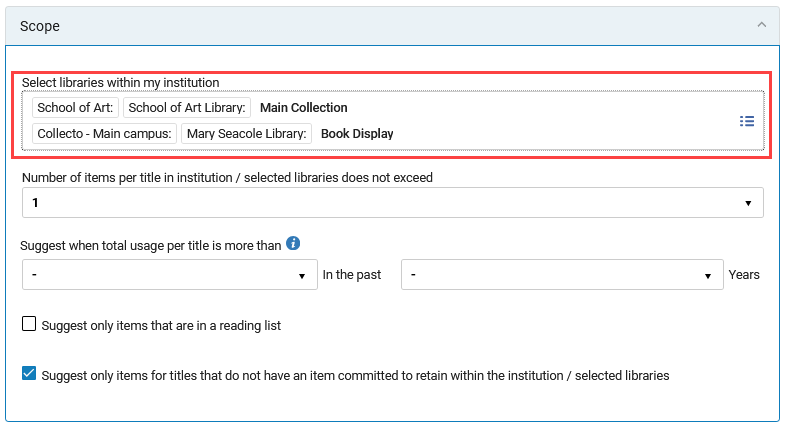
Internal collection development projects now support comparison at the location level, in addition to the institution and library level. Previously, users could filter by library, but could not directly compare holdings to specific internal locations within a library.
Users can now select a specific institution, library, or location within a library in the Compare To and Scope sections when creating or editing a collection development project. This enhancement enables more targeted comparison workflows and more precise project planning.
The UI of the Compare To and Scope sections has been enhanced to surface a structured overview of selected comparison targets, including institutions, libraries, and now specific internal locations.
Improvements for Sending EDI
We are currently working to improve EDI sending performance by implementing technical improvements. Due to the complexity of this, it will be gradually implemented across institutions to ensure a safe roll-out. Once implemented, the The PO Line packaging job will include information on the success and failure of sending EDI messages.

For more information, see Electronic Data Interchange (EDI).
Option to Sort Purchase Request List via API
Today, when retrieving purchase requests list via API, the list is automatically ordered by the request ID in ascending order. Providing a sort option by creation date, with 'Ascending' and 'Descending' options, ensures the most recent records are retrieved first, making it easier to manage the list.
The following query string parameters were added to GET purchase requests API:
- order_by (available option: created_date)
- direction (available options: asc, desc)
For more information, see the Developer Network.
User Registration Form Management and Distribution From the Consortia Central Configuration Dashboard
URM-326183It is now possible for Network Zone operators to manage the User Registration Form via the Consortia Central Configuration Dashboard. This improves efficiency and supports central offices in their centralized approach to managing information across the Network Zone.
This feature is relevant only for consortia operating with a Network Zone setup.
For more information, see Sections and Configuration Options.
License Terms Management and Distribution from the Consortia Central Configuration Dashboard
URM-217427 It is now possible for Network Zone operators to manage the License Terms via the Consortia Central Configuration Dashboard. This improves efficiency and supports central offices in their efforts to manage information across the Network Zone.
This feature is relevant only for consortia operating with a Network Zone setup.
For more information, see Sections and Configuration Options.
Profiles Management and Distribution From the Consortia Central Configuration Dashboard
URM-210043It is now possible for Network Zone operators to manage the Profiles via the Consortia Central Configuration Dashboard. This improves efficiency and supports central offices in their centralized approach to managing information across the Network Zone.
This feature is relevant only for consortia operating with a Network Zone setup.
For more information, see Consortia Central Configuration Dashboard.
Distribution of General Electronic Services Order and General Electronic Services Bib Fields Enrichment Configurations From the Consortia Central Configuration Dashboard
URM-327376It is now possible for Network Zone operators to distribute both GES Order and GES Bib Fields Enrichment tables via the Consortia Central Configuration Dashboard. This improves efficiency and supports central offices in their centralized approach to managing information across the Network Zone.
This feature is relevant only for consortia operating with a Network Zone setup.
For more information, see Consortia Central Configuration Dashboard.
Consortial Communication Tool in Alma
URM-321273It is now possible for a member staff user in their Institution Zone to create and send a chat communication to a Network Zone (NZ) operator, and for an NZ operator to manage and answer those chat communications centrally in the Network Zone. At the NZ level, the new Communication tool enables group chats where all NZ operators with the relevant roles can participate.
This provides a better communication tool between members and NZ operators in a collaborative network for better cooperation.
The tool is available through a dedicated icon on the top right corner of the Alma Homepage screen at both levels (Institution Zone for Members and Network Zone for NZ operators).

This feature is only relevant to Consortia with a Network Zone setup, for NZ/IZ members with the Chat with Consortia role.
For more information, see Consortia Communication Tool, Privileges for Roles in Alma and Managing User Roles.
Unified Sound Configuration for System Notifications and Alerts
Idea Exchange URM-328178 URM-254811 URM-328934Alma now provides a centralized configuration page for managing sounds for system notifications and circulation desk pop-up notifications. Administrators can configure sounds for the institution from a single location and optionally allow users to customize their own notification sounds. This centralized approach promotes a more consistent user experience and simplifies sound management. It also improves accessibility by providing auditory cues for Alma messages.

Institutions can enable users to configure their own sounds. If enabled, users can also reset all their sounds to default and configure the notification message sounds (User Menu > UI Preferences > Advanced Sound Settings).
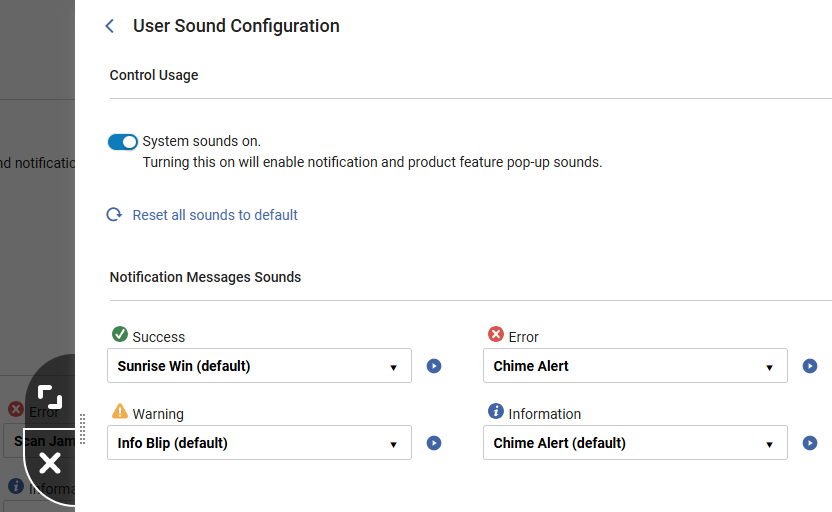
Existing sounds for circulation desk pop-up notifications that were previously configured for the circulation desk on the Configuring Sound Alerts page will remain fully functional and unchanged. They can now be updated by administrators in the Feature Pop-Up Sounds area of the Institution Sound Configuration page. Fulfillment administrators can access this from Configuration > Fulfillment > Sound Configuration.

For consortia operating with a Network Zone setup, Network Zone operators can manage the Sound Configuration page via the Consortia Central Configuration Dashboard (see Sections and Configuration Options).
For more information, see Institution Sound Configuration and The Alma User Interface.
Progress Details for Bulk Jobs
Alma jobs run batch processes on a large number of entities. Some jobs split the job population into discrete units of work called bulks, which are not dependent on one another, and can be processed in parallel.
For these jobs, progress details are available, providing information about the job's progress throughout its runtime, increasing transparency into its state and helping determine its health.

For more information, see Job Progress Details.
New Knowledge Center
Starting with the August release, the Alma documentation will be published and maintained in the new knowledge portal. The current Knowledge Center will continue to be available but will not be updated. The Alma AI Knowledge Assistant will be discontinued in November.
.png?revision=1)
Did You Mean Search Suggestions for Simple Search
 CERV Enhancement (ID#36332) URM-326565 URM-253535 URM-328523
This development introduces the UI functionality for displaying "Did you mean" suggestions in supported simple searches. When enabled at the institution and user levels, the interface displays an alternative suggested term when a search returns 0 -15 results. Users can click the suggested term to trigger a new search or dismiss the suggestion.
Users thus receive helpful alternative term suggestions when searches may contain typos or minor variations, improving discoverability and reducing the need for repeated searches.

A new user-level toggle was added to the User menu, controlled by the institution-level configuration parameter at Configuration > General > General Configuration > Other Settings > did_you_mean_search_suggestion. This enables users to opt out as needed. It is enabled by default.

- This feature applies to all searches in the new UX.
- It is activated when searching by "Keywords" or "All".
- This feature works only for Institutional searches (IZ only, not NZ or CZ).
For more information, see Searching in Alma, Alma User Interface and Configuring Other Settings.
Digital Adoption Popup Translations
Starting with the August release, Digital Adoption Feature Promotions (popup messages) will be translated automatically based on users' interface language settings.
Translations are provided by Pendo and will be displayed according to each user's selected interface language.
While translations are generally accurate, some terminology may not always be translated perfectly. As this functionality is managed by Pendo, translation quality and improvements are controlled by the vendor.
Additional Information Field Added to Borrowing and Lending Requests Subject Areas
A new Additional Information field is now available for Alma Analytics in the Borrowing Requests (Resource Sharing) and Lending Requests (Resource Sharing) Subject Areas. The field displays the additional information provided by the borrower or the lender.
For more information, see Borrowing Requests (Resource Sharing) and Lending Requests (Resource Sharing)
Shipping Address Information for Lending Requests
Shipping address information is now available for Alma Analytics in the Lending Requests (Resource Sharing) Subject Area. The newly added fields are Shipping City, Shipping State, and Shipping Country. These fields provide greater visibility into the actual shipping details used when the request was shipped, enabling accurate tax compliance and geographic reporting.
New Alma AI Insights
 URM-322774
A new Alma AI insight is now available – Request processing trends in the last three months. The analyzed trends include the time for processing requests and for collecting requested resources at different libraries.

Alma AI Assistant for Acquisitions Funds and Ledgers: Additional Action: Activate/Deactivate
URM-322774The Alma AI Assistant enhances the user experience by enabling users to interact with Alma through a chat-based interface. Instead of navigating multiple screens and workflows, staff users can ask questions naturally and receive clear, relevant responses directly within Alma.
It is now possible to perform an additional action directly from the Assistant chat interface: Activate/Deactivate fund.
This is in addition to the existing supported actions.
As done for the other supported actions, before taking action, the assistant checks that all necessary information has been supplied and requests confirmation.
Actions are performed using the Alma APIs (which the assistant uses as tools). Similarly to cloud apps, which utilize APIs, the user who is kept as the modifier is the connected user.
For more information on enabling the feature, how it works, and our planned enhancements, refer to the Alma AI Assistant – Acquisitions Funds and Ledgers documentation. Also see Artificial Intelligence in Alma.
Requested Item ID in Lending Requests (Resource Sharing) Subject Area
A new Requested Item ID field has been added to the Lending Requests (Resource Sharing) Subject Area. This field indicates the exact item associated with the request, and is especially relevant for InnReach and Rapido Consortial Borrowing workflows, where lending requests are managed at the item level.
For more information, see Lending Requests (Resource Sharing).
Improved Internal Matching and Enhanced Additional Items Section
July 2026 Resource Management URM-319044, URM-316547, URM-316548, URM-326794
Previously, recommendation generation relied solely on the MMS ID to identify internal matches. As a result, duplicate titles stored under different MMS records within the same institution were not recognized as related, leading to inaccurate item counts and skewed usage data.
The recommendations generation job now uses enhanced matching logic that evaluates multiple bibliographic attributes when identifying internal matches. This update ensures that records representing the same title—even when associated with different MMS IDs—are identified when generating recommendations.
The Additional Items section in the recommendation details panel has been redesigned to reflect this enhanced logic. It now displays item-level information based on data availability for each matching item, in addition to collection development context such as Included in Recommendations (project name and type; may include multiple names/types) and Included in (My library/location scope, Comparison libraries/locations, or Other libraries/locations).
If a matching title has a different MMS ID, it gets the Different Title label, enabling easier at-a-glance identification. Users can also add custom labels to items by selecting Add Labels, which helps group, track, or mark items.
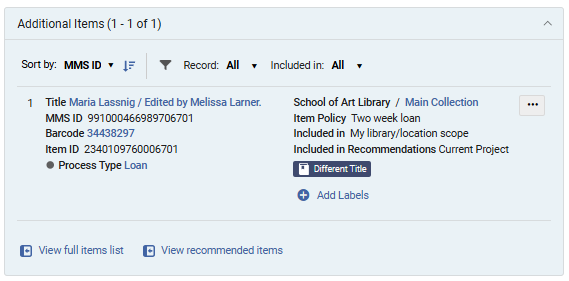
To support efficient review of larger item sets in the Additional Items section, users can:
- Sort items by MMS ID, Library/Location, Temporary Location, or Status.
- Filter results by:
- Record (All, Same Record (matches based on the same MMS ID), or Matching Records (matches based on other factors, not MMS ID))
- Included in (All, Comparison Libraries/Locations, Current Project Recommendations, My Library/Location Scope, Other Libraries/Locations)
By expanding internal matching beyond a single bibliographic record, this update ensures a more complete view of institutional holdings. Furthermore, the redesigned Additional Items section consolidates related items into a single structured view, enabling more accurate evaluation of recommendations across all relevant items.
As part of this enhancement, key calculated values (number of items, number of loans, and whether a title is included in a reading list) are now calculated across all matching title records rather than being limited to a single MMS record. Existing collection development projects are not automatically recalculated.
Internal Project Reports Can Now Be Generated Without Comparison Libraries
July 2026 Resource Management URM-329733
Project reports for internal collection development projects can now be generated and exported even when no libraries or locations are selected in the Compare to section during project creation.
Previously, report generation required at least one comparison library/location and the presence of matching items. This requirement has been removed for internal projects, so reports can now be generated regardless of whether comparison libraries have been configured.
When no comparison data is available, the exported Excel file includes recommendation-related information only and excludes comparison-specific columns.
This enhancement enables users to review recommendations and associated data, such as usage metrics and item-level details, without requiring a comparison setup.
Support for generating and exporting external project reports without comparison institutions/libraries will be introduced in the August release.
Indication for Recommendations with Low Bibliographic Rank
July 2026 Resource Management URM-327414
Rialto now provides a visual indicator for recommendations with a low Bibliographic Rank, helping users identify cases where incomplete bibliographic metadata may affect recommendation quality.
Recommendations with a Bibliographic Rank below 60 are marked with an Insufficient Metadata badge. The badge helps users quickly recognize recommendations that may be based on limited or low-quality bibliographic information. Selecting the badge opens the recommendation's Title Information section, where users can view the Bibliographic Rank field and review the item's score. Recommendations marked with the badge can also be located using the new Insufficient Metadata facet.
This enhancement makes recommendation quality more transparent and helps users make more informed collection development decisions.
To learn more about how Alma determines bibliographic ranks and assigns ranking values to bibliographic records, see Bibliographic Ranking in Metadata Editor.
Exclude Item Process Types from Recommendation Calculations
July 2026 Resource Management URM-324602
Rialto now enables institutions to control whether items at their own institution with specific Alma process types are included in recommendation calculations for the institution's collection development projects.
Previously, local items with process types such as Lost, Missing, Claimed Returned, or Transit were always included in recommendation logic. In some cases, this inflated local item counts and affected title comparisons, resulting in less accurate retention and deselection recommendations.
To address this issue, a new configuration page is now available under Configuration > Collection Development > Workflows > Process Type Exclusion. Access to this page is available to users with the Rialto Administrator or Repository Administrator role.
The page lists all Alma item process types. For each process type, administrators can use the Exclude setting to determine whether items at their institution with that status are included in recommendation calculations. By default, all process types are included in calculations (Exclude = False).
This enhancement gives institutions greater control over how their local collections are evaluated during recommendation generation.
Changes made on this page affect local items within the institution's collection development projects. The configuration applies only to items owned by the institution and does not impact other institutions. Title usage calculations are not affected by these settings.
Open Access Availability in Market Search
June 2026 Resource Management NGS-13772
Open access fulfillment options are now visible in market search results for all users with access to Rialto Search. When presenting offers, Rialto now performs real-time checks for open access availability and displays provider-specific links to resources when available.
Open access links appear in the Open Access section under Additional Resources in the right-side panel when inspecting an offer. Each link opens the provider’s website in a new browser tab and directs users to the open access version of the resource. Multiple providers may be displayed for a single title.

This enhancement improves visibility of open access content and enables Rialto Search users to easily access freely available materials directly from market search results.
Electronic Matches in Retention and Deselection Projects
June 2026 Resource Management URM-252440, URM-315033, URM-306275, URM-314553, URM-325045, URM-326679
Rialto now identifies whether recommended print titles in retention and deselection projects have electronic matches within the institution or its Network Zone.
A new Electronic Matches step has been added to project creation, enabling users to control how electronic matches affect recommendations:
- For retention projects, users can exclude items with electronic matches or limit recommendations to items without perpetual electronic access.
- For deselection projects, users can focus on items that have electronic matches or limit recommendations only to those with perpetual electronic access.
By default, electronic matches are not considered when creating retention and deselection recommendations.
Identified electronic matches are displayed in a new Electronic Matches section within each recommendation. This section presents key bibliographic details and indicators, including whether the match is from the Network Zone and whether it has perpetual access. Users can also view associated electronic portfolios from this section.
Two new badges have been introduced to support quick identification of electronic availability:
- The Perpetual Electronic Match badge appears when a recommendation has at least one electronic match with perpetual access.
- The Electronic Match Found badge appears when at least one electronic match exists, but none provide perpetual access.
Additionally, two new facets, Electronic Match Found and Perpetual Electronic Match, enable quick filtering of recommendations based on electronic availability, which is helpful when working with large result sets.
This update helps libraries make more informed retention and deselection decisions by showing when recommended print titles have electronic equivalents. For details, see Electronic Matches in Retention Projects and Electronic Matches in Deselection Projects.
New Courses Recommendation Rules Configuration Page
June 2026 Resource Management URM-324695
Previously, recommendation calculations for retention and deselection projects considered all courses, regardless of their status or year. With this update, institutions can now define whether inactive courses are considered in projects and limit the time range of courses considered when generating recommendations.
A new Courses Recommendation Rules configuration page (Configuration > Collection Development > Workflows > Courses Recommendation Rules) enables institutions to define which courses are considered during recommendation calculations. The following settings are available:
- Include Inactive Courses – Determines whether inactive courses are included in recommendation logic.
- Course Years – Defines which course years are considered.
Once set, these settings are applied during the recommendations generation process, and only items included in courses that match the selected criteria receive the Courses badge. Access to this new configuration page is limited to users with the Rialto Administrator or Repository Administrator roles.
This enhancement provides greater control over recommendation logic, helping institutions tailor results based on course relevance and lifecycle. For details, see Courses Recommendation Rules.
Collection Development Now Respects Excluded Process Types
June 2026 Resource Management URM-325632
Collection development workflows now take into account the Exclude Process Types from Publishing mapping table in Alma when generating retention and deselection recommendations. This configuration prevents items with specific process types (for example, lost or missing) from appearing in discovery, ensuring they are not shown as available in the catalog.
With this update, items assigned one of the excluded process types in the Exclude Process Types from Publishing table are also excluded from collection development analysis. This enhancement improves the accuracy of recommendation results by applying the same item-level exclusions used in discovery.
For institutions that do not use the Exclude Process Types from Publishing configuration, behavior remains unchanged, and only global suppression rules are applied.
Extended Reports for Internal Comparison Projects
June 2026 Resource Management URM-324693
Until now, the extended report creation was available only for external retention and deselection projects. With this update, libraries can now generate and download a detailed report for internal projects (currently available only if specific libraries are selected in Compare To during project creation; planned for all internal projects in July).
Creating a report produces a single-sheet XLSX file that includes active recommendations from the institution and item-level details from selected internal comparison libraries, such as status, locations, call numbers, policies, labels, and badges. The Export Extended Report and Download Extended Report options are available in the project actions list.
This enhancement improves the comparison workflow by enabling libraries to generate detailed reports for internal retention and deselection projects. For details on how report generation works, see Creating and Downloading an Extended Project Report.
Compare to Specific Locations in Internal Projects
June 2026 Resource Management URM-324611
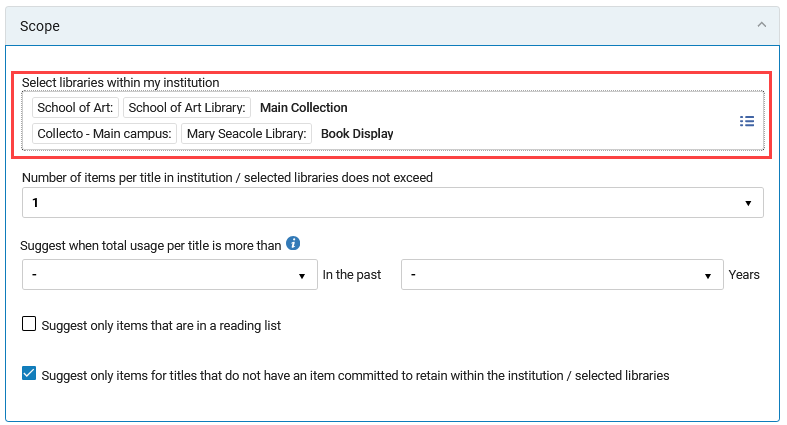
Internal collection development projects now support comparison at the location level, in addition to the institution and library level. Previously, users could filter by library, but could not directly compare holdings to specific internal locations within a library.
Users can now select a specific institution, library, or location within a library in the Compare To and Scope sections when creating or editing a collection development project. This enhancement enables more targeted comparison workflows and more precise project planning.
The UI of the Compare To and Scope sections has been enhanced to surface a structured overview of selected comparison targets, including institutions, libraries, and now specific internal locations.
Progress Details for Bulk Jobs
(Updated on June 10 2026)
Alma jobs run batch processes on a large number of entities. Some jobs split the job population into discrete units of work called bulks, which are not dependent on one another, and can be processed in parallel.
For these jobs, progress details are available, providing information about the job's progress throughout its runtime, increasing transparency into its state and helping determine its health.

For more information, see Job Progress Details.
Improved Visibility of Centrally Managed Bibliographic Records
Until now, a small subset of bibliographic fields has been available for members to report on bibliographic records in the Network for e-resources available for them. With the new enhancement, members can report on the full set of bibliographic information for e-resources. This enables access to complete Network bibliographic information without relying on the central office, enabling members to efficiently create reports covering the full scope of their data.
For more information, see Portfolio Details for Consortia Members and Analytics Configuration in a Network Zone.
Prevent Requests for Blocked Loans
Idea Exchange CERV Enhancement (ID#36426) URM-195332Alma can now be configured to block item requests when a patron is not eligible to loan the item based on its loan terms of use and any existing blocks on the patron. This ensures that patrons cannot place requests for materials that cannot be loaned to them under the library’s defined policies.
The configuration is controlled by the block_request_if_not_loanable parameter (Configuration > Fulfillment > General > Other Settings).

For more information, see Configuring Fulfillment Jobs, Creating a Request from the Institution and How to Set Up Blocks to Prevent Loaning, Renewing and Hold Requests for Patrons.
Update of User Data for Fulfillment Network in Real Time
Idea Exchange URM-322736
May 25, 2026 – Original deployment of this feature was delayed to the June release. It was released on June 24, 2026.
When the source institution of a user changes user details, all of its linked accounts now receive this update in real time. This update will help ensure that linked account information is consistent and accurate across all institutions.
For more information, see Linking Users in Collaborative Networks.
RFID Support in Shipping Items Page
It is now possible to read the RFID tag when shipping an item for resource sharing.

When selecting Ship item physically, the sliding panel remains open, and the user should manually close it after receiving a success message.
For more information, see RFID Support.
Updated Customization Options for Document‑Delivery Login
The login page (when authentication is done with an LDAP server or by the Ex Libris Identity Service) and the document download page for digitally supplied documents now support configurable labels and color settings, enabling a more tailored patron experience. You can access the configuration page at Configuration > Fulfillment > Document Delivery Login Screen.

For more information, see Configuration of Digital Shipping.
Additional Information Field for Borrowing and Lending Requests
A new Additional Information dropdown field was added to the Request Attributes section. The information is added to borrowing requests and can be viewed and edited in lending requests.

This field only appears if values were added to the new Patron Additional Information table (Configuration > Fulfillment > Patron Additional Information).
For more information, see Managing Borrowing Requests, Managing Lending Requests and Basic Resource Sharing Configurations.
Specific Edition Information Available on Lending Requests
If a specific edition is selected on the borrowing request, whether added by staff manually creating the request or by the patron/library user, this information will now be visible in the Request Attributes section on borrowing requests and in the Request Attributes and Request Form sections in borrowing and lending requests. This provides users with more information to inform their workflow.


For more information, see Managing Borrowing Requests and Managing Lending Requests.
OCR for Received Documents
New functionality will determine if a digitally supplied PDF file already has Optical Character Recognition (OCR) applied. If not, OCR will automatically be applied when the lender ships requests from the lending workflow actions, before they are delivered to the borrowing partner.
For Alma as the lender for ISO partners, PDFs supplied by Alma lenders will also have the OCR automatically applied via the lending shipping actions.
For more information, see Managing Lending Requests and Digitization Processing.
Sharing Limits Across the Network
Libraries participating in a fulfillment network can now apply their local patron limits, such as maximum loans, requests, cash balance, or overdue thresholds, across the entire consortium. When a patron reaches a defined limit at any institution in the network, a library may choose to block the patron’s activity locally. This supports consistent policy enforcement and improved fairness by helping maintain equitable access to shared resources across the consortium, and it supports stronger network governance.

This feature affects all blocks in the Patron Limits list (Configuration > Fulfillment > Patron Configurations > Patron Limits) and the patron's Loan Limits that are defined per User Group (Configuration > Fulfillment > Loan Limits). The library can decide to block its own patrons and/or guest patrons, using the ful_network_limits_block_source and ful_network_limits_block_target customer parameters (Configuration > Fulfillment > General > Other Settings).
These limit‑based blocks do not appear in the user’s Blocks tab. Instead, librarians see them as pop-ups or messages during the workflow. The messages describe the problem and the originating institution.
-
This feature impacts networks that use linked accounts or that share users in the Network Zone.
-
It will be available on the Production and Sandbox environments in the release update, planned for 10 May.
For more information, see Configuring User Blocks and Configuring Fulfillment Jobs.
Partner‑Level Configuration for ignore_lender_due_date
Idea Exchange URM-72484It is now possible to override the ignore_lender_due_date parameter at the individual partner level. This enhancement allows institutions to specify which lenders’ due dates should be disregarded when calculating a patron’s loan due date, while still honoring due dates from other partners as needed. This enables more precise policy alignment. Libraries can tailor due‑date handling to align agreements or expectations with specific lending partners.
For more information, see Configuring Fulfillment Jobs and Resource Sharing Partners.
Streamlined Document Delivery Upload and Notification
This new workflow enhancement enables staff on the borrower side to upload a digital file for fulfilling a patron’s document delivery request, update receive parameters such as costs, and simultaneously notify the lending library — all in a single action. This enables staff to complete fulfillment and lender notification in a single streamlined step, reducing processing time and manual effort.

For more information, see Managing Borrowing Requests and Peer to Peer Resource Sharing.
Improved Navigation for Hold Blocks Information
The display of block information during hold, booking, and digitization request creation has been redesigned to streamline the workflow and reduce interruptions. Previously, block details appeared in a pop‑up after entering the Requester in the request form. Now, this information will only pop up after selecting the Calculate Blocks button in the request form, allowing staff to review block status only when needed.
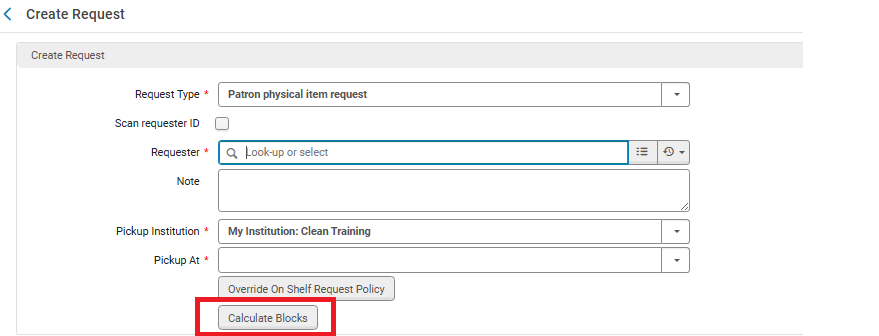
If the pop_override_hold parameter (Configuration > Fulfillment > General > Other Settings) is set to false (true by default), the Calculate Blocks button will not appear.
For more information, see Other Settings.
Automatic Due‑Date Adjustment for Early Patron Expiry
Idea Exchange CERV Enhancement (ID#6737) URM-97328Alma can now automatically update a patron's loan due dates when a patron's expiry date is moved to be earlier. If a loan’s due date extends beyond the new patron expiry date, the system can now adjust it to ensure the loan does not exceed the patron’s active account period. This is controlled by the Update Loans for Shortened User Expiry job (Configuration > Fulfillment > General > Fulfillment Jobs Configuration).
Due dates that were intentionally set beyond the patron’s expiry date using the extend_due_date_beyond_user_expiry parameter will not be changed. For institutions that enabled this customer parameter, loans whose loan date is before the new feature release will be excluded from this job.
Claim returned and lost loans are also excluded from the Update Loans for Shortened User Expiry job. Note that this job triggers the Loan Status Notice letter.
This enhancement prevents loans from remaining active past a patron’s eligibility and helps maintain accurate, policy‑aligned loan records.

For more information, see Configuring Fulfillment Jobs and Scheduled Jobs.
Configure Resource Sharing Library as Temporarily Inactive
Idea Exchange URM-222487Fulfillment Services Managers and Fulfillment Administrators can now temporarily close a library for lending by adding an Inactive date range (Fulfillment > Resource Sharing > Temporary Inactive Date Ranges). This gives libraries greater flexibility and reduces the administrative workload associated with managing temporary closures. Note that Fulfillment Operators can also enable this feature by opening a ticket with the Support team.
.png?revision=2)
Pickup Location Field Removed for Digital Resource Sharing Requests and Blank Request Forms
CERV Enhancement (ID#8562) URM-316507The Pickup Location field on Resource Sharing Digital Request Forms and Blank Request Forms is now hidden when Institutions create a digital request. This helps reduce confusion since the Pickup Location field is relevant to the Physical Request forms.

Pickup Location field removed
This is controlled by the rs_default_pickup_location_when_hide and rs_hide_pickup_location_for_digital parameters. For more information, see Other Settings.
Linking from Borrowing Request to Locate Process Log
It is now possible to link from the borrowing request to the job information for the last locate job that ran for the request. This makes it easier to understand how the locate process determined which partners to leave on the rota and which to remove.


For more information, see Managing Borrowing Requests and Locating Items for Resource Sharing.
Update Records with Identical Metadata in Bulk
Catalogers can now add MARC21 fields to multiple titles at once via a simplified user interface, efficiently managing large batches of records and saving time.
- Catalogers can select one or more titles from a list or search results, or select a set to which the job will be applied.
- Catalogers can define up to five different MARC21 fields (tag, indicators, and subfield values) to add.
- Only users with the relevant role can run the job.
- If a field can't be added to a title, the job continues to the next title. Any skipped or failed additions are logged and noted in the Job and Events Report.
- Electronic portfolios only support MARC family records, excluding MODS, BIB Frame; therefore, DC records cannot be used to create a local portfolio (even in the MD editor).
- Physical items only support MARC when creating a physical item.

Storage Location ID Can Now Be Managed as a Closed List
A new option is now available to manage the Storage Location ID field as a controlled list on the physical item. Enabling this feature also provides a configuration option for maintaining the entries. This enhancement is particularly beneficial for libraries that work with remote storage facilities and maintain a large number of Storage Location ID entries on their physical items in Alma.

- Contact Support to enable this feature.
- This capability is available for up to 100,000 storage IDs.
- The <More...> indicator is for informational purposes only and will be updated in a later release when the Item page moves to the NG layout.
For more information, see Storage Location ID.
Update MARC21 Bibliographic Resource Types
Idea Exchange URM-319073 URM-319489This update enhances the Alma MARC21-Based Resource Type classification to improve the accuracy, coverage, and usability of bibliographic resources. Alma determines the resource type automatically based on metadata fields, enabling more precise filtering and reporting. The enhancement introduces additional resource types that were previously unavailable, enriching the classification system.
To apply the new and improved resource types to existing records, the bibliographic data must be re-indexed. The next scheduled re-indexing will take place at the end of June 2026.
Enhanced Sorting by Full Publication Date
Previously, sorting by Publication Date was limited to the year component only. With this update, when full date metadata is available, sorting is now performed using the complete date, including year, month, and day. This aligns with existing indexing and sorting logic and enables accurate chronological ordering. As a result, institutions managing daily or frequently published content benefit from improved discoverability and a more consistent and precise sorting experience.
Enhanced sorting will only be effective after the semi-annual indexing.
Expose Linked Headings in Simple Record View
Idea Exchange URM-238773
Configurable Pop-up Assistance
Idea Exchange URM-122158Catalogers can now customize their workflow by toggling the pop-up assistance on or off for selected subfields, giving catalogers more flexibility and control, reducing frustration and improving efficiency.

For more information, see Configuring Other Settings.
Linked Open Data (LOD) BIBFRAME Editor Enhancements
Form Editor Actions
The following actions are now available in the LOD BIBFRAME editor:
- View Work (for class instance only)
- Duplicate
- Create Instance (for class work only)
- View Instance (for class work only)
Enhancements to the Linked Open Data Editor Form and Templates
When editing a BIBFRAME record, section-level and field-level actions for adding, duplicating, and deleting sections are now available.

When hovering over the Add Section/Field or Duplicate Section/Field icons, a horizontal line appears, indicating where the section/field will be added.
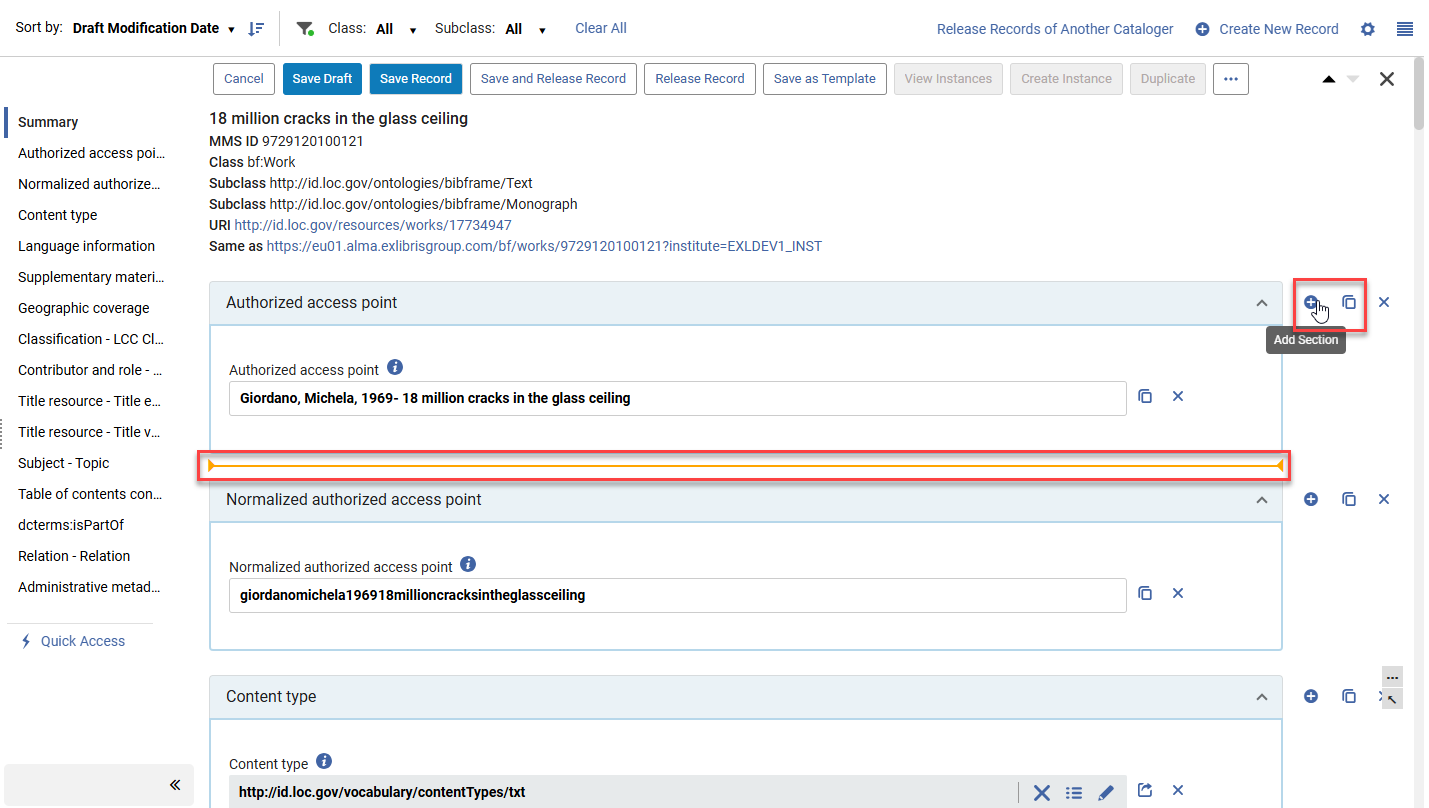

It is still possible to scroll to the end of the sections and use the Add Section/Add Field buttons to the end of the sections.
Additionally, BIBFRAME records and template sections can now be reordered using the Reorder button. The new order is then applied when creating and editing records and templates.

User Interface Languages Now Supported for Wikidata in Info Cards and Contributor Page
When available, the Wikidata in the Info Card and Contributor Page is now displayed in the user's interface language.


Linked Open Data Editor Form — Manual Input Now Available for Lookup
When using the lookup service, a Manual input of data, label and/or URI icon is now available for catalogers to manually add labels and/or URIs.

For more information, see How the Lookup Service Appears in the Editor.
Relations for BIBFRAME from the Linked Open Data Editor
The out-of-the-box templates now include a relations section that is valid with the ontology and supported within Alma's relations job.

For more information, see BIBFRAME Support and Creating a BIBFRAME Records and Templates.
BIBFRAME and BFLC Ontology Update
Alma has updated the metadata standard for BIBFRAME and the BFLC extension to support version 3.0, maintaining the standard to support valid BIBFRAME creation within Alma.

Additionally, a Restore action is now available on the Linked Data Active Profile views to restore the out-of-the-box default value for any changes applied to an ontology.

For more information, see Customizing Field Labels and Descriptions.
Supporting Sets for BIBFRAME Works
Librarians can now create sets for BIBFRAME works, for both logical and itemized sets. Using work sets in different workflows will expand over time, based on need and use cases. Currently, sets can be created within a work search and edited and managed from the Manage Sets menu.

The bulk actions in the work search were replaced to align with the general Alma bulk action standard.

For more information, see Set Content Types and Work Search.
Enhanced Handling of Library and Location in the Physical Holdings Search
The holdings search was updated so that it is now possible to:
- Facet by location without first faceting by library — the library name is displayed in brackets to distinguish between similar locations in different libraries.

- See the library and location information according to the Repository search results configuration — in the record view, facets and export to Excel.

This update may impact the content of the exported holdings file.
- Configure a separate display for the table view of the search results to enable libraries to select a more condensed view for the table, maximizing the value of the table format.
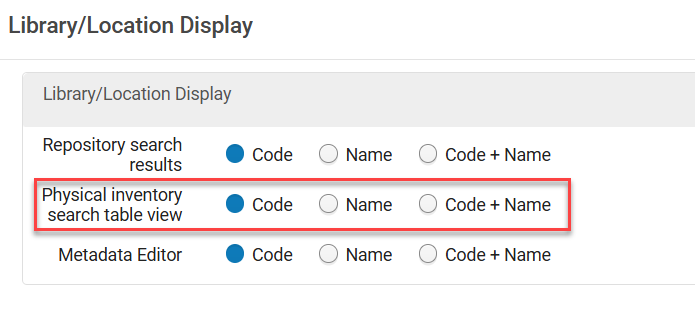 Library/Location Display Configurations
 Table View - Library/Location Columns
For more information, see Customizing How Library and Location Appear.
New View Options for BIBFRAME Records
Alma now supports easy navigation between different BIBFRAME record views, so each user can find the view that best suits them.
To enhance interoperability of BIBFRAME, the BIBFRAME work record now includes the Turtle (.ttl) view mode option.

Additionally, we have introduced a new condensed display for BIBFRAME records in a table view, enabling as much metadata as possible within a section and using the familiar display known to catalogers from MARC formats.

For more information, see Work Search.
Improved Language Support in AI Metadata Assistant, Using Optical Character Recognition
URM-322839The AI Metadata Assistant enables catalogers to easily extract metadata from images and files to streamline the cataloging process. The text is extracted from images by the AI LLM model used in the assistant, as part of the metadata generation process. However, for some languages, scripts, and resource types, lower LLM optical character recognition accuracy may result in lower metadata quality. It is now possible to apply a dedicated OCR tool to improve results for those resources — the LLM then generates metadata based on the text extracted by the OCR tool, rather than directly from the image, leading to improved support for more languages and resource types. Catalogers can select their preferred text extraction method for the specific resource being cataloged:
- AI Metadata Assistant — text processed by the LLM as part of the metadata generation (as today).
- Azure Document Intelligence — an advanced, AI-based OCR service with extensive language support.
- Tesseract — a seasoned, robust OCR tool for extracting text from images and files.

This is especially beneficial for libraries cataloging resources in languages and scripts with lower LLM OCR capabilities (e.g., non-Latin scripts).
For more information, see Enriching a Brief Record.Enrich Bibliographic Records in Bulk Using a Streamlined Copy — Cataloging Process and AI Title Matching
URM-325022A new job, Enrich Bibliographic Records, enables the library to enrich a set of up to 1000 records, streamlining the search for matching records in its existing search profiles and copy-cataloging partners, filtering and assessing the results, and providing copy-cataloging recommendations to the cataloger.
As a first step, the Enrich Bibliographic Records job supports searching in Alma copy-cataloging partners to avoid overwhelming external resources with a large volume of search queries they’re not prepared to handle. Support for external copy-cataloging partners will be added in the future, based on the community's needs and subject to their ability and agreement to handle a large volume of search queries.
This is especially useful for libraries enriching their bibliographic records from copy-cataloging partners, making the process easier, faster, and more efficient.
For more information, see Working with the Enrich Bibliographic Records Job.
Alma AI Assistant for Acquisitions Funds and Ledgers: Now Supports Actions! (and additional improvements)
URM-322774The Alma AI Assistant for Acquisitions Funds and Ledgers was introduced in the February 2026 release in preview mode (beta). After an additional phase of feedback and improvements, it is now available for general availability and can be enabled in Configuration Menu > Acquisitions > AI Features > AI Features Management.
The Alma AI Assistant enhances the user experience by enabling users to interact with Alma through a chat-based interface. Instead of navigating multiple screens and workflows, staff users can ask questions naturally and receive clear, relevant responses directly within Alma.
Supported Actions
It is now possible to perform actions directly from the Assistant chat interface.
Supported actions include:
- Allocate money to a specific fund
- Transfer money from fund to fund
The activate/deactivate a specific fund action will be available in a future release.
Similar to the assistant's follow-up questions, it might also suggest actions to take, depending on the conversation's context. For example:

You can use the assistant suggestions for actions, or alternatively start a conversation with your desired action, for example, "I want to..."
Before taking action, the assistant checks that all necessary information has been supplied and requests confirmation.
The action is performed using the Alma APIs (which the assistant uses as a tool). Similarly to cloud apps, which utilize APIs, the user who is kept as the modifier is the connected user.
Additional Improvements
- The Alma Assistant now identifies funds regardless of the case. For example, questions on fund "data" are answered even when the fund name in Alma database is DATA.
- Questions on fund transactions are answered with information on the transaction's related PO line or invoice. Until now, the ID was returned, which is not useful. Now, the response includes the PO line number or invoice number with the line number. Staff users can use the information and continue their work in Alma.
- The assistant now supports special characters in fund names, e.g. "Art & History fund".
For more information on enabling the feature, how it works, and our planned enhancements, refer to the Alma AI Assistant – Acquisitions Funds and Ledgers documentation. Also see Artificial Intelligence in Alma.
New Setting for Community-Linked Electronic Services to Keep Portfolios Active When Removed from the Community
Idea Exchange URM-320621Services of collections activated from the Community Zone now include a new configuration option that controls whether portfolios deleted from the Community Zone and localized in the institution are deactivated or kept active. The new setting (Automatically deactivate portfolios removed from service?) is relevant when the service is configured as non–auto-delete (meaning portfolios are localized rather than deleted when removed from the Community Zone). The setting determines how localized portfolios behave after they are removed from the Community, giving customers more granular control over Community Zone linked resources.
-
Deactivate — This is the default. It preserves the current behavior. Portfolios are unlinked from the Community Zone and set to Not Available in the institution.
-
Keep all active — Portfolios are unlinked from the Community Zone but remain Available in the institution.
-
Keep perpetual access portfolios active — Portfolios are unlinked from the Community Zone and handled based on their access type:
-
Portfolios with perpetual or current and perpetual access remain available.
-
Portfolios with current access are deactivated.
If the portfolio does not have an access type defined, the collection’s access type will be used.
-
For existing electronic services defined as non–auto-delete, the existing behavior will remain, and they will, by default, be defined to automatically deactivate.
The new setting can be updated manually in the service editor or in bulk using the Change Electronic Collection Information job, E-Collection Quick Update cloud app or via the API.
As before, linked portfolios that were deleted from the Community Zone will be reported on the Community Zone Updates Task List, but with a new dedicated report type for portfolios that were kept active in the institution.
The new setting will be available for reporting in Analytics, allowing users to create reports based on resource configurations. For more information, view the data dictionary for the e-inventory subject area (see E-Inventory).
For more information on this feature, see Activating Electronic Resources from the Community Zone and Managing Electronic Resources.
Electronic Resources Incident Reporting: Updated Company Name and More
The company name for reporting incidents related to collections/portfolios was updated to Clarivate, in order to align with the Clarivate brand.

The following fields were also added to the Additional info section to include all information that might be needed to fix the issue.
- Indication if the collection is an autoholding and if the autoholding profile is defined
- Provider collection ID and name
- DBID
- Portfolio ID (local Portfolio ID i.e., IZ id and global Portfolio ID i.e., CZ id)

The Additional info now consistently displays the relevant information, even when updating the CRM category.
For more information, see Configuring CRM Contacts.
A Streamlined Rialto Experience for Non-Rialto Institutions
May 2026 Resource Management NGS-14456
To strengthen integration between Rialto and Alma and better support collection development activities, a streamlined marketplace experience called Rialto Search is now available for institutions without Rialto. Activation of Rialto Search happens automatically; no opt-in is required.
Rialto Search provides a lightweight marketplace discovery experience within Alma. Users at institutions without Rialto can now access the Collection Development > Market section to:
- Perform basic and advanced searches in the Rialto marketplace for title availability and pricing
- View real-time calls for holdings, course materials (if Leganto is enabled), and books available through resource sharing (if Rapido is enabled)
- Explore curated lists featuring high-quality titles across a range of subjects
- Export marketplace results for further review and analysis
Market searches perform real-time calls to Alma for local and network holdings to provide accurate visibility into owned access. From the search results, Rialto Search users can email marketplace offers to other Alma users within their institution. They can also create purchase requests for selected items, if they have the appropriate Alma role.
This update expands access to Rialto capabilities across a broader user base, enabling more staff to participate in resource discovery and selection workflows. For more information, see Rialto Search.
This feature is not available in Sandboxes prior to the May release.
Advanced Tools Added to the Collection Development Menu
To ensure all tools relevant to collection development are available in one central location, selected advanced tools are now also accessible from the Collection Development menu. These tools remain available in their original location (Resources > Advanced Tools) and function identically from both menus.
The following tools have been added to Collection Development > Advanced Tools:
- Overlap and Collection Analysis — Comparison of collections and title lists to identify overlapping and unique content, which enables data-driven decisions for purchases, renewals, and cancellations.
- Duplicate Title Analysis — Identification and grouping of potential duplicate bibliographic records, which supports metadata cleanup and reduces overall redundancy.
- Merge Records and Combine Inventory — Consolidation of duplicate records into a single preferred record, which leads to cleaner and more accurate catalogs.
To access and use these tools, a user must have the Collection Development Manager role plus the specific operational role required for each tool:
- Overlap and Collection Analysis — Purchasing Operator, Purchasing Manager, Repository Manager, or Electronic Inventory Operator
- Duplicate Title Analysis — Repository Manager
- Merge Records and Combine Inventory — Catalog Administrator, Catalog Manager, or General System Administrator
This update improves visibility of key collection development tools, helping users discover and use functionalities that may have previously been overlooked. For details, see Advanced Tools.
Support for Barcodes When Creating Projects from a File
Previously, creating collection development projects from a file required the uploaded file to include a column with item IDs. With this update, you can now also create projects from a file that contains a column of barcodes.
Once a file with barcodes is uploaded, the rest of the project creation process works exactly as it does when using a file that contains item IDs.
This enhancement makes project creation more intuitive by enabling staff to use barcodes—the identifiers they most likely work with daily—rather than system-generated item IDs, reducing extra steps and making file creation more intuitive.
Deeper Insight into External Holdings
May 2026 Resource Management URM-322033
To support deeper cross-institution analysis, Rialto now offers expanded bibliographic details in the Compare To section when inspecting individual recommendations in projects with external comparisons.
While the Compare To section itself remains unchanged in the main view, the sliding panel under View full list and additional information now displays expanded metadata for matching holdings. Newly added fields include:
- Library
- Publication Place
- Edition
- Material Type
- Language
- OCLC
These additional data points provide deeper insight into external holdings, enabling more informed retention and deselection decisions when comparing your collection to other institutions.
Country-Based Selection in the Compare To Section
May 2026 Resource Management URM-320716
The Compare To section for retention and deselection projects that include comparisons with external institutions has been enhanced to provide a more structured, country-based selection experience.
When creating a new project or editing an existing one, users can now browse comparison institutions using a country tree view. First, select a country to display all available institutions within it. You can then choose specific institutions individually, or select the checkbox next to the country name to automatically include all institutions within that nation.

This enhancement simplifies the process of selecting comparison institutions and makes it easier to locate relevant libraries without having to navigate a long alphabetical list.
Enhanced Sorting for Collection Development Recommendations
May 2026 Resource Management URM-306163
Rialto now provides more flexible sorting options when viewing recommendations in retention and deselection projects. In addition to sorting by Title and Publication Date, you can now also arrange recommendations by:
- Library / Location
- Call Number
You can also apply a secondary sort to further refine the results' order. The secondary sort uses the same set of fields—Title, Publication Date, Library / Location, and Call Number—and enables additional ordering when multiple recommendations share the same primary sort value.

These enhancements make it easier to review, compare, and organize recommendations, especially when working with large result sets that include many items from the same library or publication period.
New Fields in Change Electronic Portfolio Information Job for Expanded Batch Updates
Idea Exchange URM-39199New fields were added to the Change Electronic Portfolio Information job to support expanded batch updates:
-
Set coverage statement to be applied — A new dropdown (Only local, Global and local, Global or local, Only global) that updates the Which coverage statement will be applied? value in the Portfolio Editor. Note that this does not update standalone portfolios.
-
Set access type – A new dropdown (Current, Perpetual, Current and perpetual, Empty) with condition options (If field empty, If field not empty, Unconditionally – default). It updates the portfolio Access Type field.
-
Remove URL/parser override — A new option that clears all URL/parser override fields in the portfolio Linking tab (Parser parameters override, Dynamic URL override, Static URL override).
-
Electronic Material Type — A new empty option – The existing dropdown now includes an empty value that clears the field, aligning with the Portfolio Editor UI. Note that if the portfolio is linked to the Community Zone (CZ), and the linked portfolio in the CZ has an Electronic Material Type, then when selecting an empty value, the job will overwrite this field with the value in the CZ. For example, if the value in the CZ is Journal, and you select the empty value, then after saving, the field in the local portfolio is updated to Journal.

For more information, see Manual Jobs.
Easier Organization for Description Templates
Idea Exchange URM-198843The description templates configuration page (Configuration > Resources > Description Templates) has been enhanced to allow easier rule reordering via drag-and-drop.

For more information, see Configuring Item Description Templates.
Upcoming Electronic Collections
Providers can now send Ex Libris information about collections that do not yet have title lists, provided the collection name is already available.
In these cases, a new “placeholder” collection containing the collection name, provider collection ID, provider name, and expected due date will be created in the CZ, with no option to activate it. The expected due date indicates when the title list is expected to be delivered to Ex Libris, with an additional one-month buffer.
The upcoming collection feature will support better advanced planning for e-resource management by making it possible to see which collections are awaiting title lists and by increasing the overall transparency of the Community Zone.
Once a collection is populated with a title list, activation will be available, as well as other functionality such as acquisition and CDI descriptive fields. Once the collection is populated, we will notify the community in the standard Content Knowledge Base Release Notes, where we announce new collections.
In the Community Zone tab, an upcoming collection will appear with a pre-release indication and a pre-release note, with information from the provider on the planned release of the title list.

We will gradually roll out this development with Adam Matthew. As additional providers include an indication of upcoming collections with a release date, we will be able to extend this solution to other providers as well, as long as they support fully automated metadata delivery.
For more information, see Activating Electronic Resources from the Community Zone.
Prioritizing Online Services in Discovery Based on Current Year Access
CERV Enhancement (ID#36385) URM-248251The Additional Settings section on the Online Services Order configuration page (Configuration Menu > Fulfillment > Discovery Interface Display Logic > Online Services Order) now includes a new configuration option: Prefer services with current year access. This enables institutions to prioritize services with coverage dates within the current calendar year. By default this setting is turned off. When enabled, Alma pushes the current year access resources (according to the portfolio's coverage and embargo definitions in the current year) to the top of the list. This takes priority over all the other criteria.

For Consortia, Network Zone services with current access are prioritized together with Institution Zone services with current access.
For more information, see ViewIt.
Suppress Bibliographic Records Localized When Ordering Electronic Collections from Community Zone
The suppress_bib_upon_cz_ordering parameter was added to Configuration > Resources > Other Settings. When set to true, any newly localized bibliographic record created as part of Community Zone collection ordering is automatically suppressed in the Institution Zone. Bibliographic records that already exist in the Institution Zone, such as when re‑ordering a collection that was previously activated, are not suppressed. The default for this parameter is false.
- Suppression is applied only when a new bibliographic record is localized during the ordering workflow.
- This functionality applies only to ordering electronic collections from the Community Zone. The behavior for ordering portfolios from the Community Zone remains unchanged.
For more information, see Configuring Other Settings (Resource Management) and Activating Electronic Resources.
4th and 5th Reporting Codes Supported in Invoice Lines API and Export Payment
The 4th and 5th reporting codes can now be retrieved and updated by the invoice lines API. Additionally, these codes will now be part of the Export Invoices For Payment job (which can be configured in Configuration Menu > General > Integration Profiles > Editing a Finance profile > Actions).
For more information, see Invoices and Invoice Payment in the Developer Network.
Invoice Creation from PDF/Image by AI (Early Access)
URM-324280A new early access capability is now available: creating an Alma invoice directly from a PDF or image file upload.
Watch a quick demo here: Create invoice from PDF - DEMO
This feature is offered as part of an early access program to gather feedback from a broad range of real-world use cases.
Powered by AI, the process combines OCR (Optical Character Recognition) to extract data from the file with Gen-AI, which transforms this information into a structured invoice, helping streamline and accelerate invoice creation.
Like other AI-based capabilities, this feature is opt-in and must be enabled by an administrator via the AI Features Management configuration page.
Once enabled, a new option will appear under Acquisitions > Create Invoice > From File.

The feature supports PDF uploads of up to 20 pages. Generated invoices are placed in review and clearly marked as AI-created.
Legal Deposit Acquisition Methods in PO Lines
The Legal Deposit workflow in Alma includes two letters that are sent:
- Legal Deposit Order Letter
- Legal Deposit Receipt Letter
Until now, when selecting the Legal Deposit Acquisition Method in the PO line, both letters were sent. When selecting Legal Deposit - Without Letter, neither of these two letters were sent. Now, two Acquisition methods were added for cases in which only one of the letters should be sent for the PO line:
- Legal Deposit - Order Letter — Only the order letter is sent
- Legal Deposit - Receipt Letter — Only the receipt letter is sent
For example, when the item has already arrived at the library, upon creating the PO line, the Legal Deposit - Receipt Letter acquisition method can be selected, as there is no need to ask the provider to supply the item.

The Legal Deposit claim is not affected by the Acquisition method selected and will be sent per the Claiming workflow.
For more information, see Manually Creating a PO Line, Configuring Acquisition Methods and Creating Legal Deposit PO Lines.
Hide Configuration links from 'Old' Menu (Partner Account Allowances, Partner Sectors, Partner Organization Type)
URM-325188After adding the Partner Account Allowances, Partner Sectors and Partner Organization Type configurations to the Consortia Central Configuration dashboard in the February release, they have now been removed from the 'old' Alma and Primo VE configuration menus of the Network Zone. Network Zone administrators, while operating at the Network Zone institution, now access those configurations directly through the Central Configuration Dashboard.
The removed configurations from the Alma and Primo VE configuration menus at Network Zone Level are:
-
Partner Account Allowances
-
Partner Sectors
-
Partner Organization Type
For more information on related configurations, see Consortia Central Configuration Dashboard.
Feature Rollout Preferences Page is Available in Consortia Central Configuration Dashboard for Management Purposes
URM-324985It is now possible for Network Zone operators to manage the Feature Rollout Preferences page via the Consortia Central Configuration Dashboard. This improves efficiency and supports central offices in their efforts to manage information across the Network Zone.
This feature is relevant only for consortia operating with a Network Zone setup.
For more information, see Sections and Configuration Options.
AI Features Management Page Now Available in Consortia Central Configuration Dashboard for Management Purposes
URM-322798It is now possible for Network Zone operators to manage the AI Features Management page via the Consortia Central Configuration Dashboard. This new page centralizes all AI features, and replaces, in their respective locations, the AI Usage Profile configurations available in the Consortia Central Configuration under the Acquisitions, Resources and General sections today. This improves efficiency and supports central offices in their efforts to manage information across the Network Zone.
This feature is relevant only for consortia operating with a Network Zone setup.
For more information, see Sections and Configuration Options.
Protection of Shared Rules in a Consortia
URM-317060 URM-319404It is now possible for Network Zone operators and Institution Zone operators to protect their shared rules (Normalization, Merge, Authority Headings, Brief Level and Indication) from being edited or deleted by other Institution Zone users, when the Protection of Shared Rules feature is enabled (Configuration > Resources > General > Other Settings > enable_shared_rules_protection set to True).
Shared rules can now be marked as Protected and will remain fully visible and executable by Institution Zone users, but cannot be modified or removed. Only Network Zone users with appropriate permissions or the Member institution Zone users who created these shared rules can edit or unprotect them. This ensures that only the Network Zone and the creator at the Institution Zone can make changes, thus preventing accidental changes or deletions of shared rules that impact multiple member institutions.
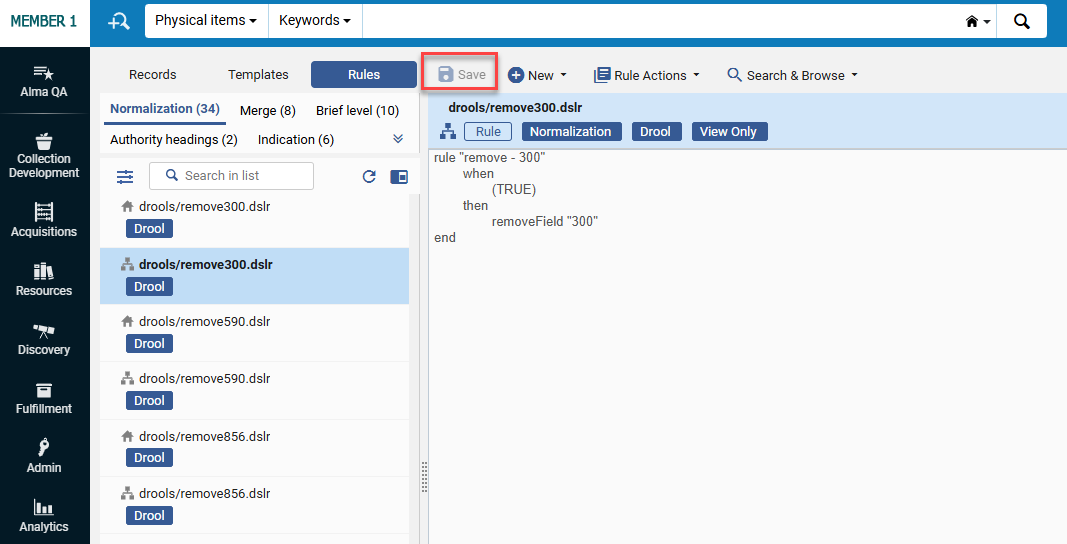
This feature is relevant only for consortia operating with a Network Zone setup.
For more information, see Working with Rules.
Enhancements in New UX for Table-View Navigation in Lists
The table view was redesigned for improved accessibility and usability. Opening the details pane is now done only through the Title field or the view icon in the Actions column - the entire row is no longer clickable. This enables the user to easily copy text from the table cells without opening the right panel.

This behavior applies to all pages that use a table view.
Now, when the right panel is open in split view, the table displays two columns and the Actions column with the view icon/s. Showing two columns instead of one when the right-panel is open, makes more information easily visible, and switching to the desired row much easier.

In addition, navigation using the Up/Down arrow keys was added.
When the focus is on the title in split view, and the user navigates using the Up/Down arrow keys, the focus on the title is kept, and the right panel is auto-refreshed to display the details of the current record in focus. When focused on any field other than the title and navigating with the Up/Down arrow keys, the focus moves to the next/previous item in the table, but the right panel does not refresh.
This provides users with more precise control when opening records in table view, avoiding unintended row clicks and using clear entry points via the Title or the view icon, which reduces unintended right-panel openings when navigating the table.
For more information, see New Layout.
Rebranding of Ex Libris/Clarivate Logos
The Ex Libris/Clarivate logos were rebranded, and the new logos now appear throughout, for example, in the Alma UX, Customer Support Portal, Developer Network, Current Status page, etc.
Your institution's logo will not be replaced.
.png?revision=1)
French Support for "Fuzzy Search" in Alma Menu Search Bar
We have expanded the functionality of the Alma search menu to include "smart" search capabilities in French (FR). Historically, this feature has supported English, Hebrew and German. However, beginning in May 2026, it has also been extended to the French interface. The search functionality offers suggestions for synonyms, interchangeable terms, and even assists with simple spelling errors. This enhances user navigation, simplifying the process of locating items within the Alma search menu.

For more information, see Alma User Interface.
Support for Create Itemized Set and Add to Itemized Set Actions When Using Select All
For the lists that support the Select All option and for users with roles that support creating sets, the Select All functionality was enhanced to support two additional bulk actions: Create Itemized Set and Add to Itemized Set. In addition, when users select all results, only supported actions are displayed. The actions run in the background, and users receive completion notifications through the Real-Time Notifications panel (see Real-Time Notifications).

For more information, see Managing Search Queries and Sets.
Search by Set ID in Manage Sets
A new 'Set ID' search option was added to the Manage Sets screen. The search by ID is an exact match search and requires the full ID number. This gives users an additional search option to support their search workflows, allowing them to find sets directly by ID. Accessibility operations remain unchanged, so users relying on keyboards and screen readers can continue using the Search option as before.

For more information, see Managing Search Queries and Sets.
Centralized AI Features Management Page
URM-321395A new institution-level configuration page, AI Features Management, was introduced in Alma. This page consolidates the enablement and configuration of all AI-based features (that will be added to this page gradually, starting with the AI Metadata Assistant, AI Insights, AI Knowledge Assistant, Alma AI Assistant and AI Title Matching). This page includes feature descriptions, enable/disable toggles, and role-based visibility of the relevant AI features. This centralized page streamlines the management and configuration (when available) of AI features, enhances clarity and control, and enables institutions to turn AI capabilities on or off according to their institutional preferences.
Users with the General System Administrator role can access the page at Configuration > General > AI Features > AI Features Management. Users with admin roles for their area can access the page via their specific area in the menu. For example, a Repository Administrator can access the Metadata Assistant from the Resources menu, which leads to the AI Features Management page. Each feature on the page is visible only to its specific role/s. For example, an Acquisitions Administrator will see Alma AI Assistant on this page.
_Centralized_AI_Features_Management_Page.png?revision=1)
Relevant users can use the toggle to enable/disable a specific feature. The user can select one, many, or all features in the list by selecting the relevant checkbox(es) and then selecting the Turn off/Turn on buttons that appear.
-
If you turn a feature on or off, the change applies to the entire institution.
-
Users that already activated a feature will still have it enabled, and no action is needed as a result of the page move.
For more information, see AI Features Management.
Number of Lending Requests Added to Consortial Analytics Filters
New Subject Area and Data Visualization Dashboard for Collection Development Workflows Added to Analytics
Additionally, the new out-of-the-box Collection Development Workflow Projects & Recommendations Data Visualization dashboard is now available in Analytics > Access Analytics > Catalog > Shared Folders > Alma > Rialto Collection Development > Data Visualization.
It provides an overview of all collection development workflow projects and their associated recommendations. It includes metrics such as the total number of projects, project distribution by status and workflow type, and a detailed recommendations report with item and bibliographic information. This dashboard helps staff monitor project progress, analyze recommendations, and export data for retention and deselection workflows.

New Resource Sharing Request Fields Available in Borrowing and Lending Requests Subject Areas
For more information, see Borrowing Requests (Resource Sharing) and Lending Requests (Resource Sharing).
Country-Based Selection in the Compare To Section
The Compare To section for retention and deselection projects that include comparisons with external institutions has been enhanced to provide a more structured, country-based selection experience.
When creating a new project or editing an existing one, users can now browse comparison institutions using a country tree view. First, select a country to display all available institutions within it. You can then choose specific institutions individually, or select the checkbox next to the country name to automatically include all institutions within that nation.
This enhancement simplifies the process of selecting comparison institutions and makes it easier to locate relevant libraries without having to navigate a long alphabetical list.
Deeper Insight into External Holdings
To support deeper cross-institution analysis, Rialto now offers expanded bibliographic details in the Compare To section when inspecting individual recommendations in projects with external comparisons.
While the Compare To section itself remains unchanged in the main view, the sliding panel under View full list and additional information now displays expanded metadata for matching holdings. Newly added fields include:
- Library
- Publication Place
- Edition
- Material Type
- Language
- OCLC
These additional data points provide deeper insight into external holdings, enabling more informed retention and deselection decisions when comparing your collection to other institutions.
Enhanced Sorting for Collection Development Recommendations
Rialto now provides more flexible sorting options when viewing recommendations in retention and deselection projects. In addition to sorting by Title and Publication Date, you can now also arrange recommendations by:
- Library/Location
- Call Number
You can also apply a secondary sort to further refine the results' order. The secondary sort uses the same set of fields—Title, Publication Date, Library / Location, and Call Number—and enables additional ordering when multiple recommendations share the same primary sort value.

These enhancements make it easier to review, compare, and organize recommendations, especially when working with large result sets that include many items from the same library or publication period.
Predictable Title Updates in Analytics
Title updates are now assigned specific run dates, ensuring libraries know when their data is refreshed. In addition, member institutions in a consortium are updated as a group, providing synchronized data across the network. A new out-of-the-box report is also available in Analytics > Access Analytics > Catalog > Shared Folders > Alma > Titles > Reports > Analytics Titles Subject Area Update. You can use this report to display a widget in your Alma home page:
- Copy the report to your institution folder.
- Create an Analytics Object in Alma pointing to this Report.
- Define it as a Widget.
With this update, libraries can rely on consistent update timing, allowing better planning for internal reporting schedules.
For more information, see Out-of-the-Box Reports and Title Details.
New Partner Fields Available in Borrowing and Lending Requests Subject Areas
New fields are available in Borrowing Requests (Analytics > Create Analysis > Access Analytics > Create > Analysis > Borrowing Requests (Resource Sharing) > Partner) and Lending Requests (Analytics > Create Analysis > Access Analytics > Create > Analysis > Lending Requests (Resource Sharing) > Partner) Subject Areas. They can be used for recording additional information on resource-sharing partner records. Libraries can report on partner information to evaluate their resource-sharing service, including fill rates, volume, charges, and request types, in relation to partner parameters. The new fields are:
- Account Allowances
- Alternate Account Number
- Organization Type
- Sector
- Send Communication Allowed
For more information, see Borrowing Requests (Resource Sharing) and Lending Requests (Resource Sharing)
New Partners Fields in Resource Sharing Partner Record
Additional fields were added to the Resource Sharing Partner record (Fulfillment > Resource Sharing > Partners) to enable further customization. The following fields were added:
- Alternate Account Number — Free text field that, in addition to an alternate symbol, enables additional information to be stored on the partner record.
- Account Allowances — Populated by customizable drop down options. Multiple selections can be made to designate additional partner information.
- Sector — Populated by customizable drop down options to enable additional information to be stored on the partner record.
- Send Communications Allowed — The value is checked/unchecked. Some libraries may want to note if marketing materials can be delivered to partners or not.
- Organization Type — Populated by customizable drop down options to enable additional information to be stored on the partner record.

For more information, see Resource Sharing Partners.
Temporarily Deactivate Lending for Different Formats
Lenders now have the ability to selectively deactivate specific lending services rather than deactivate all services. Previously, lenders could only deactivate all lending operations at once. Now they can decide whether to deactivate Everything, temporarily deactivate Physical lending while keeping digital services active, or temporarily deactivate Digital from Physical lending while continuing physical shipping or electronic lending.
This provides lenders with more flexibility to handle temporary disruptions without having to fully stop their lending services.

For more information, see Configuring Parameters of a Resource Sharing Library.
Details in Alma Metadata History
Idea Exchange URM-317895Alma now tracks the metadata changes made in the Resource Information section. They are recorded and viewable in the History tab of the request.

For more information, see Managing Borrowing Requests.
Location Level Best Copy for Fulfilling a Request
For more information, see Pickup at Shelf and Configuring Libraries.
Add Notes in Deliver Digital Documents Page
Idea Exchange URM-167540It is now possible to add notes to partner and internal notes when using Deliver Digital Documents to fulfill a document delivery request.
This enhances communication with borrowers and facilitates the recording of internal information when providing a document delivery service.

The two note fields were also added to the Download Electronic Resource page.

For more information, see Managing Lending Requests.
Ship Lending Requests Without Barcode
It is now possible to ship items when fulfilling resource sharing lending requests, even when they do not have a barcode. In this case, the ship and check-in actions are used by selecting the items from pickup lists. This impacts the Ship Items page and the Scan-In Items page.
The Item ID of shipped items can be added to the displayed information about a lending request's items. When shipping an item without a barcode, this will be the only unique identifier that can be displayed.

For more information, see Peer to Peer Resource Sharing and Scanning Items.
Override Hold Policies
Idea Exchange URM-317447When placing a hold, booking, or digitization request in Alma, the operator is shown any blocks that may affect the request. Operators with the new Override Patron Hold Blocks privilege can override these blocks. If you would like this functionality enabled, please contact the Alma Support team and request that the relevant privilege be activated for your institution.
This provides transparency around blocked requests and enables authorized overrides.


The privilege will appear for all roles that have the Override Block Request privilege. For existing customers, the privilege will be disabled. For new customers, the privilege will be enabled by default for the Circulation Desk Manager and Fulfillment Services Manager roles.
For more information, see Managing Patron Services at a Circulation Desk and Privileges for Roles in Alma.
View Mode for Courses in Course Reserves
A new privilege was added to the Course Reserves Viewer role, enabling users to view the list of courses in view mode (and not only reading lists and citations).
This impacts Alma users who should not be able to edit courses, reading lists and citations, but should be able to view all of them.
If you would like this functionality enabled, please contact the Alma Support team and request that the relevant privilege be activated for your institution.
For more information, see Managing User Roles, Privileges for Roles in Alma and Roles and Registration Configuration.
Automatic Waiver of Overdue Fines for Re-loaned Items
Idea Exchange URM-90892When an item currently on loan is checked out to a new patron, Alma may automatically check in the previous loan, depending on the configuration (Configuration > Fulfillment > Physical Fulfillment > Block Preferences) for the Item is currently on loan by another patron action. This automatic check-in can result in overdue fines for the prior borrower. Institutions can now configure Alma to automatically waive these fines or allow circulation staff performing the check-out to decide whether the fines should be waived.

For more information, see Configuring Loans and Patron Charges Configuration.
Automatic Selection of Library Digitization Department
Alma now intelligently selects the most suitable library-level digitization department for newly created Patron Digitization Requests and Ship Digitally requests. This enhancement applies in scenarios where the system automatically assigns a digitization department, including:
- Requests submitted via Primo
- Requests automatically generated from incoming resource sharing transactions
In both cases, Alma prioritizes digitization departments that are also configured as circulation desks and are responsible for reshelving the requested items.
For more information, see Configuring Fulfillment Jobs and Creating a Request from the Institution.
Differentiated User Groups in Fulfillment Networks Based on Source Institution
Idea Exchange URM-93337
The external user groups are configured in Alma from Configuration > User Management > External User Group.
For more information, see Linking Users in Collaborative Networks and Configuring External User Groups.
Pop-Up Notification for Hold Shelf Items
CERV Enhancement (ID#247150) URM-247150Libraries can now enable a pop-up alert at the circulation desk, upon logging into the Manage Patron Services page, to notify operators when a patron has an associated system note, such as a note about items waiting on a hold shelf. The notification contains the same information as that in the System notes.
This feature helps ensure that staff are promptly informed and reduces the risk of missing important hold messages during interactions with patrons. The pop-up can be enabled using the popup_message_system_notes parameter in Configuration > Fulfillment > Other Settings.
.png?revision=1)
Selecting OK in the pop-up dismisses the message and leaves the user in the Manage Patron Services page.
For more information, see Configuring Fulfillment Jobs and Managing Patron Services.
Prioritizing Locations for Fulfilling Digitization Requests

For more information, see Configuring Physical Locations, Creating a Request from the Institution and Managing Lending Requests.
New Linked Open Data (LOD) Editor for BIBFRAME Records, Now Available in Alma
This is a new world of Linked Open Data cataloging, streamlined and embedded into Alma and Alma workflows, enabling institutions to embrace BIBFRAME within their familiar workflows while maintaining MARC records alongside them within the same environment.
The new LOD editor is now available to all institutions that want to catalog and edit BIBFRAME records directly within Alma. With the new editor, catalogers can create and edit BIBFRAME works and instances in a seamless, navigation-friendly experience, including quick editing from within the search results and a draft management page for those who wish to work in a separate workflow.
The new editor is guided by the BIBFRAME and BFLC ontologies, enabling users to create entities based on the structure and relationships between properties and classes as defined by the Library of Congress. With the new lookup service, catalogers can query directly external authoritative sources such as the Library of Congress's linked data service (id.loc.gov) and Wikidata. The new editor also provides out-of-the-box templates for works and instances, based on the structures defined by the BIBFRAME interoperability group (BIG) and enables users to create and manage their own templates, with additional functionalities of private and public templates.

Configuration for Enabling BIBFRAME
For users with Cataloging Configuration or Catalog Admin roles, it is now possible to enable (default disabled) support for BIBFRAME works and instances with Alma by using a configuration page rather than needing to open a ticket with the support team.
This setup enables the Works search, the BIBFRAME editor link, and templates links within the Resources menu and the metadata configuration for these formats.

For more information, see Enabling BIBFRAME in Your Institution.
New Merge Option for SBN Authority Contribution and Alignment
Previously, merge rules were not available for SBN authority alignment or as part of SBN contributions. It is now possible to apply merge logic during both SBN authority alignment and Bibliographic/Authority contributions. Customers can select and apply merge rules in these processes to improve data consistency, reduce duplication, and enhance automation within SBN workflows.
For more information, see Integrating the SBN Italian Union Catalogue.
New Search Indexes for Physical Items
New search indexes were added to physical items:
- Physical item: Has Order = yes/no: allows searching for items with/without orders. The index accounts for both orders at the item and the holdings level, similar to the Order link in the items search results.
- Physical item: Received = yes/no: allows searching for items that were received or not received, similar to the receiving filter in the items list. Items are considered received if they have a receiving date of today or earlier.
These new search options make it easier to find items; for example, items with orders that have not yet been received.
For more information, see Physical Items Search Indexes.
Enhanced MARC Bibliographic Index Infrastructure
Idea Exchange URM-253352 URM-322291 URM-243681To enable a seamless setup for institution-specific bibliographic search indexes, customers now have the ability to define custom indexes for their institution based on Bibliographic data. This new infrastructure provides the flexibility for each customer to create their own search indexes tailored to their Bibliographic data.
This feature can only be tested in your sandbox environment after the data is cloned on February 8th.
For more information, see Configuring Search.
Sorting Option for Alma SRU External Search Resources
We have introduced a new sorting capability for Alma SRU-based external search resources only. Users can sort results in the Metadata Editor by Rank, Title (default), Creator, and Publication Date.

For more information, see Configuring External Search Resources.
New Controlled Vocabulary List for Language Codes
A new, merged controlled vocabulary list has been created by combining language codes from the MARC21 standard and the ISO 639-3 list. This enhanced list includes an expanded range of languages, addressing gaps that previously existed when cataloging the MARC 041 $a field.
The list is available only in English. When searching by the language list in subfield 041 $a, using the Language facet, or using the pop‑up assistant in the Metadata Editor for subfield 041 $a, all values are displayed in English.
For more information, see Search Index to MARC 21 Bibliographic Tag Mapping and Cataloging and Searching Language Codes.
Introducing the Alma AI Assistant for Acquisitions Funds and Ledgers – Preview Mode (Beta)
 Artificial Intelligence
 To improve day-to-day efficiency, the Alma AI Assistant enhances the user experience when interacting with Alma through a chat-based interface. Instead of navigating multiple screens and workflows, staff users can ask questions naturally and receive clear, relevant responses directly within Alma.
The first focus area for the Alma AI Assistant is Acquisitions - Funds and Ledgers. Staff users with the Fund/Ledger Manager role (from the institution level) can ask questions about their institution’s funds and ledgers and receive immediate, natural-language responses.
Since the Alma AI Assistant was first announced on the Alma roadmap, it has generated significant interest across the community. As part of the November 2025 release, we conducted an Early Access Program with 15 participating institutions. Their hands-on usage and feedback have been invaluable in shaping the next steps of this initiative.
Given the exploratory and evolving nature of this feature, we want to broaden the feedback loop even further. Therefore, as part of the February 2026 release, we are introducing Alma AI Assistant in Preview Mode (beta) across all Alma environments. Administrators can choose to activate the feature at their discretion.
Preview Mode (beta) - What to Expect
The Preview Mode (beta) is an early iteration designed to give libraries the opportunity to explore the feature, understand its potential, and actively contribute feedback that will guide future development. Additional enhancements, including the ability to perform actions as part of the Alma AI Assistant flow are planned for upcoming releases.
Libraries are encouraged to try the Alma AI Assistant in their Sandbox or Production environments to gain an initial sense of its capabilities and limitations.
Feedback is critical for this phase. You can share your input directly within the Alma AI Assistant using the thumbs up/thumbs down
options on each response, or by contacting us directly at tamar.fuches@clarivate.com.
For more information on enabling the feature, how it works, and our planned enhancements, refer to the Alma AI Assistant – Acquisitions Funds and Ledgers documentation. Also see Artificial Intelligence in Alma.
New Collection Development Manager Role
Rialto now has a dedicated Collection Development Manager role. This role centralizes collection development workflows, replacing the previous model in which multiple roles could use these workflows.
Users assigned the Collection Development Manager role are now the only ones who can:
- Access the Workflows menu under Collection Development
- Create, edit, and delete collection development projects
- Generate and manage recommendations for retention and deselection projects
Repository Administrator and Rialto Administrator roles continue to have access to collection development configuration settings, but they no longer have direct access to the workflows themselves. Collection Development Managers do not have access to configuration settings.
This change clarifies responsibilities and reduces confusion about which users can view, configure, and run collection development workflows.
On Production (not Sandbox), users who created collection development workflow projects prior to the February release will be automatically assigned the Collection Development Manager role to maintain access to existing workflows.
Export Comparison Reports for Collection Development Projects
Rialto now enables Collection Development Managers to export comprehensive comparison reports for retention and deselection projects. Reports can be generated using the Export Extended Report option in the three-dot menu next to a project name.

The export produces an Excel file containing detailed information on all active recommendations from the project, along with comparable data for all matching titles from the selected comparison institutions.

Once a report is generated, a notification appears in the top-right corner of the interface to let the user know it is ready. The report can then be downloaded using the Download Extended Report option in the same three-dot menu. This action is only visible after an extended report has been created. All generated reports can also be viewed or downloaded from the History tab in Admin > Manage Jobs and Sets > Monitor Jobs.

This feature delivers a rich, consolidated view of project recommendations, bringing all relevant data together to support confident retention and deselection decisions. For details, see Creating and Downloading an Extended Report.
Link Resolver Improvement for Video Records in Network Environments
Collaborative Networks URM-248355We have enhanced the link resolver’s search mechanism for video records in network environments. It now accurately identifies video records and distinguishes them from book records, reducing false matches and preventing book links from appearing when patrons search for videos.
For more information, see Alma Link Resolver Workflow.
Complete Record of All Changes in History for Electronic Resources
Idea Exchange CERV Enhancement (ID#36487) URM-319130The e-resources History tab now records changes made by the CZ synchronization, as well as local changes made by system jobs or operators. This applies to electronic collections, electronic services and electronic portfolios.
Updates from the Community Zone will appear with "operator" = "system", as do other system job changes.
This development also includes the recording of changes to the general notes and the additional PO lines, which were not previously saved in the history.
For more information, see Managing Electronic Resources.
Autoholdings for Oxford University Press
Idea Exchange URM-252900Libraries can now automate the management of licensed OUP content by using autoholdings.
Once the integration is set up, Alma automatically retrieves a standardized KBART file containing monographs and serial holdings information from the provider’s platform and updates the corresponding collections. This integration removes the need for manual updates, reducing staff workload, saving significant time and enhancing accuracy.
For more information, see Upload Electronic Holdings from Oxford University Press.
Holdings Retention by MARC Fields
Institutions can now define holdings with specific metadata as "committed to retain", thus protecting them from deletion, even if the holdings do not have items. Retention blocks manual and batch deletion.
Definition rules are defined on the Holdings Records Retention definition page at Configuration > Resources > Collection Retention > Holdings Records Retention Definition.


The retention indication on the holdings level is also available in analytics in the following fields:
- Holdings Committed to Retain (Physical Items SA)
- Has Holdings Committed to Retain (Titles SA)
- Has P-Inventory Committed to Retain (Titles SA — indicates whether the title has any items/holdings that are committed to retain)
Retention from holdings is not passed on to the items, i.e., items do not inherit the holdings' retention status. To protect items from deletion, you must define the item itself as committed to be retained in the item editor.
Retention indication is applied during indexing. The new logic applies only to newly created or updated holding records. To ensure the logic is also applied to existing records, contact support to request indexing.
For more information, see Working with Holdings Records, Physical Items and Titles.
Support for German XRechnung Standard when Creating Invoice from XML
Users can now create invoices in Alma from XML file, of the German e-invoice standard XRechnung.
.png?revision=1)
For more information, see Creating Invoices.
Additional Options for EDI Configuration
Two additional fields were added to the input job parameters at Vendor > EDI Information > Input Job Parameters.
- Default VAT — Appears when Use VAT Code is set to true. The VAT default will be used (and set for the invoice) when there is no value in the input file for VAT code, or when there is a value which does not match the VAT Codes table. Note that Default VAT only applies to the invoice level. Even if the VAT In Invoice Line Level field is set to true, the default VAT is ignored.
- Internal copy — When true, the created invoice for this vendor will have the Internal copy field checked (meaning it will not be sent to ERP).
The new fields will not impact the current setup and will have null/false values by default.
.png?revision=1)
Both these fields apply to invoice creation from EDI, XML and Excel.
For more information, see Electronic Data Interchange (EDI).
More "Interested In" Letter Fields can be Customized
Idea Exchange URM-208307The Interested In letter is sent in different scenarios (upon receipt of the item, upon activation of the resource and upon cancellation of the PO line). Previously, the subject and other message labels were the same in all these cases. Now, the labels can be customized for each of the following use cases, enabling users to write a different subject line and message body depending on the trigger event.
The three main use cases that now have unique customization fields are:
- Receiving
- subject_received
- letter_name_received
- details_received
- details_item_arrival_time
- Activation
- subject_activated
- letter_name_activated
- details_activated
- Cancellation
- subject_cancelled
- letter_name_cancelled
- details_cancelled
These fields can be customized from the Labels table when editing the letter (Configuration > General > Letters Configuration > Interested In Letter > Labels).

For more information, see Configuring Alma Letters.
PO Line Cancellation: Enable Deletion of Related Inventory Even if Linked to CZ
Idea Exchange URM-319332Until now, when cancelling PO line, the portfolio would only be deleted if it was a standalone local portfolio and inactive. A new customer parameter (delete_linked_portfolio_upon_pol_cancellation) was added. When set to true, inactive portfolios that are linked to Community Zone or that are part of an electronic collection will now also be deleted, in addition to the local portfolio.
The parameter is set to false by default. It can be accessed from Configuration > Acquisitions > Other settings.
For more information, see Closing, Cancelling, Reopening and Relinking PO Lines.
Rialto Status in PO Line General Information
When a PO line was created as part of the Rialto workflow, the Rialto status is now shown in the PO line General Information section.

For more information, see Manually Creating a PO Line.
Option to Place Requests on Title and Item Level from PO Line
Idea Exchange URM-207490Users can now place requests from the PO line on the title and item level:
Title level — Using the Request Title action..png?revision=1)
Item level — In the Ordered Items and in the Items in Claim sections, using the Request Item action.
.png?revision=1)
The actions are displayed for physical PO lines. Users will see the available request types according to their user privilege, just as if the request were placed from a list of items or a repository search.
For more information, see Manually Creating a PO Line.
Link to Holdings Record from PO Line Right Pane
The PO line title in the right pane now links to the institution record in a sliding panel.

Link to sliding panel
Additionally, the Location column in the following tables will now link to the Holdings record:
- Ordered Items
- Holdings for Ordered Items
- Items in Claim
.png?revision=1)
For more information, see Manually Creating a PO Line.
New API for Creation of Allocation and Transfer Fund Transactions
Users can now use POST in the fund transactions API as follows:
POST /almaws/v1/acq/funds/{fund_id}/transactions
The supported transactions that can be created are:
- Allocation
- Transfer
For more information, see the Developer Network.
Additional COUNTER Report Attributes for SUSHI R5/R5.1. Harvesting
Idea Exchange URM-253611Users can now select additional attributes for SUSHI harvesting COUNTER R5/R5.1 reports: DR, IR, PR and TR. This enables the Access type and other attributes to be included in the harvested reports, enhancing the functionality for title (and other) reports.
For the institution-level defaults, the attributes can be selected from Configuration > Acquisitions > COUNTER R5 Additional Attributes for SUSHI Harvesting.

Attributes can also be selected for the SUSHI account level.

The report level options are:
- Default — Take the values set in COUNTER R5 Additional Attributes for SUSHI Harvesting
- Explicit yes — Send this attribute, no matter what settings are in COUNTER R5 Additional Attributes for SUSHI Harvesting
- Explicit no — Don't send this attribute, no matter what settings are in COUNTER R5 Additional Attributes for SUSHI Harvesting
For more information, see Managing COUNTER - Compliant Usage Data.
Relative Date Search Operators for Order Lines Search
When searching order lines, users can search by relative dates. This is available for:
- Creation date
- Is Within the Last (days)
- Is Older Than (days)
- Sent date
- Is Within the Last (days)
- Is Older Than (days)
- Renewal date
- Is Within the Last (days)
- Is Older Than (days)
- Is Within the Next (days)

For more information, see Searching for PO Lines and Using Facets to Refine Results.
New Order Import Profile: Option to Use Call Number for Holdings Matching
The New Order Import profile looks for the holding on which the item should be created. This match is based on the library and location.
Institutions can now configure this match to also consider the call number. This can be achieved by setting the eod_match_holdings_by_call_number customer parameter
(Configuration > Acquisitions > Other Settings) to True. When the call number is different from that of an existing holding for the matched bibliographic record, a new holding is created.
If more than one matched holding is found, a new holding is created, as the system cannot determine which one to use. This is the existing behavior when multiple matches are found based on library and location.
- This new feature assumes a mapping to 852h.
- When the parameter is set to true, and the call number has an empty value, the behavior is as follows:
- When there is one existing holding in the matched bib, the item is created for this holding.
- When there is more than one existing holding in the matched bib, a new holding is created.
For more information, see Managing Import Profiles and Other Settings.
Support Services for Consortia Central Office
URM-215332 URM-226822 URM-317340It is now possible for the Network Zone operator, from the Central Configuration Dashboard, to perform a defined set of maintenance and troubleshooting tasks on behalf of its member institutions. These include support services and utilities that were previously handled only by Ex Libris support, enabling faster problem resolution and proactive system management at the consortial level.
This enhancement empowers the Central Office to support its members more effectively by performing direct maintenance and troubleshooting actions. It strengthens the Central Office’s role as a service provider, improves response times for member institutions, and reduces reliance on external support for common issues.


This new feature is only relevant to Consortia with a Network Zone setup. The Network Zone operator must have the Support Services role in order to access and use these tools.
For more information, see Support Services.
New Additions to the Central Configuration Dashboard
URM-319235 URM-319507 URM-319423The following information was added to the new Central Configuration Dashboard:
- Activate Linked Open Data Formats page to expand the exposure of Linked Open Data across the network.
- Homepage Notifications for management and distribution.
- Usage Calculation mapping table in a brand new Collection Development section to offer a central management and distribution across members without the need to opt-in locally in the Data Sharing profile.
- Partner Sectors, Partner Organization Type and Partner Account Allowances code tables for central management of Resource Sharing and Rapido.
These additions enable the central office to work more efficiently, reducing time spent applying central policies.
Shared Blocks Across the Fulfillment Network for Network Zone Managed Users
Idea Exchange URM-314620Previously, in a Network where users are managed at the Network Zone level, patron blocks could only be shared from the Network Zone to the institutions where the patron had local accounts. It is now possible to share blocks from any institution with any other institution where the patron has an active account.
This enables patron blocking more easily and efficiently across the entire network where users are managed in the Network Zone.
For more information, see Configuring User Blocks and Managing Users.
Combination of Electronic Resources Activated at Network Zone and Institution Zone for Online Services Order
Idea Exchange URM-248932It is now possible for the Member Administrator to select from a combined list of electronic resources activated at Network Zone and Institution Zone levels in the Online Services Order configuration. At the Network Zone level, the operator (from the dashboard) can still update the order for these services for the Network (only local resources from the network) and for the Members (combined list of local and network resources).
This enhancement improves efficiency by allowing the combination of Network and Institution Zone electronic resources for improved services.
.png?revision=1)
This new feature is only relevant to Consortia with a Network Zone setup.
For more information, see ViewIt.
Support for Italian in Online Help
Support for Italian was added to the online help.
When working in the Italian user interface and accessing the online help, it now opens automatically in Italian.


For more information, see Alma User Interface.
Enhanced Performance for Searching Combo Boxes in New UX
Enhanced functionality was added to support searching combo boxes with long lists of options (above 200) in the Alma new UX, for example, in the Advanced Search. Previously, when opening a combo box list with many options, opening the list caused performance issues. Now, as you scroll down, more options are auto-loaded. The user can now scroll to view all the results, and the general performance was improved without changing the current functionality of searching the combo box.
User ID Appended to System for Manual Jobs
CERV Enhancement (ID#36485)URM-319756When running manual jobs, the user ID can now be appended to "System" in Alma entities updated by the job. For example, when the user John_Branson runs a manual job, instead of "System" appearing in the Physical Item Editor Modified-By field, Alma now displays "John_Branson (System)".
This requires the detailed_creator_and_modifier_for_job_changes parameter (Configuration > General > General Configuration > Other Settings) to be set to true (false by default). Note that enabling this parameter causes a change in the data from this point on, and this data change cannot be modified retroactively. Disabling this parameter again causes a change in the data from that point onwards, and again cannot be modified retroactively.
This feature only applies to:
- Manual jobs (non-scheduled) when the Run Now button is used

- Scheduled jobs when the Run button is used
This field is commonly used in analytics reports (for example, Modified by in the Physical Items Subject Area). Upon enabling the new customer parameter, the data will change accordingly from this point forward, and no retrospective data correction is performed. The same applies when this parameter is disabled.
For more information, see Manual Jobs and Configuring Other Settings.
New Link to Known Issues Portal from Alma Help Menu
A new link to the Known Issues Portal was added to Alma’s Help menu. This link opens the Known Issues page in a new browser tab. This update improves access to the Known Issues Platform, helping users stay informed about current issues and reducing the need to open support cases for existing known issues.

For more information, see Alma User Interface.
Support for Actions Configuration in Manage Sets List
You can now customize the display and order of the actions for the Manage Sets list.

For more information, see New Layout.
Enhanced Display and Behavior for Related Sets, Filter and Combine Badges and Set ID Label in Manage Sets List
The Related Sets description in the Related Sets section in the Manage Sets interface was updated to be more meaningful and improve clarity and consistency as follows:
- New badges were introduced to indicate the type of relationship:
- Used for combined sets
- Combined set
- Used for filtered sets
- Filtered Set
 New Badges
- The Related Sets section in the Manage Sets page was enhanced to be more informative and improve clarity and consistency:
- Set IDs are now displayed at the end of each set name.
 Set ID in Related Sets
 - The related sets display logic has been updated to better handle scenarios where sets are deleted or updated, ensuring an accurate representation of relationships.
Filtered sets whose "parent" was deleted are now indicated as such. Deleted Parent in Related Sets
 - Additional relations are now included, showing related set details for actions like Create Titles Set and Itemize.
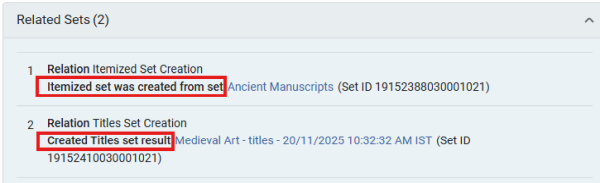 Itemized and Created Title Sets in Related Sets
- Set IDs are now displayed at the end of each set name.
- Updates/changes to sets (e.g., name change, adding members, etc.) that are part of a relation, no longer affect the display of the badges (for filter or combine operations) or the related set information in the Related Sets section.
- This change will not affect existing sets and existing sets relations and will take effect from this point onwards.
Additionally, the Manage Sets list now includes the Set ID information displayed in the first column of set information in the list, in addition to its current display in the right panel.

For more information, see Managing Search Queries and Sets.
Support for Plain Text Email
Idea Exchange URM-316414Alma now provides an option to include plain text on top of the HTML version. This provides patrons with plain-text email clients the ability to view emails from Alma.
This feature can be enabled by setting the include_plain_text_in_emails parameter to true (Configuration > General > Other Settings).
For more information, see Configuring Other Settings.
User-Controlled Default Collapse State for Success Fly-In Messages
The success fly-in messages checkbox was updated to enable users to set the default display state (collapsed or expanded) for success messages. Prior to this change, in pages with the new user interface, the default selection was for that specific message. Now, when selected, all similar message types on the same page follow the chosen default behavior. This change aligns the behavior with pages that do not have the new interface, and enables users to reduce visual clutter by collapsing success messages on the same page by default.

For more information, see Alma User Interface.
Search Users by Role and Scope
It is now possible to search for user records in the Advanced Search by role and scope, for example, to search for users with a circulation desk operator role in the scope of the Main Library. This new option enhances search options and enables the creation of user sets based on their roles and scopes.

For more information, see Searching in Alma.
Secondary Search for Titles/Holdings Search Results and PO Lines
When searching for titles, holdings or PO lines in Alma, it is now possible to perform a secondary search within the search results. This is also available when viewing logical set content, allowing for easy location of specific set members. This is especially useful for users who want to quickly or temporarily refine their search query, without having to update an advanced search with additional search criteria.

For pages with a Search Query, the secondary search is added to the search query.

After performing a secondary search, it is possible to save the refined results as a logical set.
The secondary search is also available when viewing the content of a logical set of any of these search types.
For more information, see Secondary Search.
New Encryption for User ID Encryption Field in Fulfillment Subject Area
The User ID Encryption field in the Fulfillment Subject Area in Analytics is used to obtain counts by user ID after the anonymization job is run, which deletes the Primary ID. This field is now calculated using a new encryption method.
Existing reports using a specific value as a filter may need to be reviewed and updated to ensure they continue to function as expected.
For more information, see Analytics Fulfillment Subject Area.
Flexible Definition of Local Parameters Being Sent to Analytics
Users can now decide which parts of a MARC field (indicators and subfields) are sent to Analytics through local parameters. This is possible for both bibliographic and holdings information. It provides more control over data granularity in reports, enabling a more accurate and focused analysis.
For more information, see Holding Details and Administrative Bibliographic Details.
Electronic Resource Network Data Accessible in a Single Location in Analytics
All electronic resource Network fields are now available in a single location within the Portfolio Details for Consortia Members folder in the E-Inventory Subject Area. Users can easily access all Network-related information in a single place, providing a clear and organized view.
For more information, see Analytics When Using a Network Zone and Portfolio Details for Consortia Members.
Electronic Collection Pending Deletion Reason and Alternative Collections CZ ID Fields Now Available in Analytics
Two new fields, Electronic Collection Pending Deletion Reason and Alternative Collections CZ ID, are now available in the E-Inventory Subject Area, specifically in the Electronic Collection and Portfolio Details for Consortia Members > Electronic Collection folders. Additional information about collections pending deletion in the Community is now available in analytics, making it accessible even after the Pending Deletion collection has been deleted in Alma.
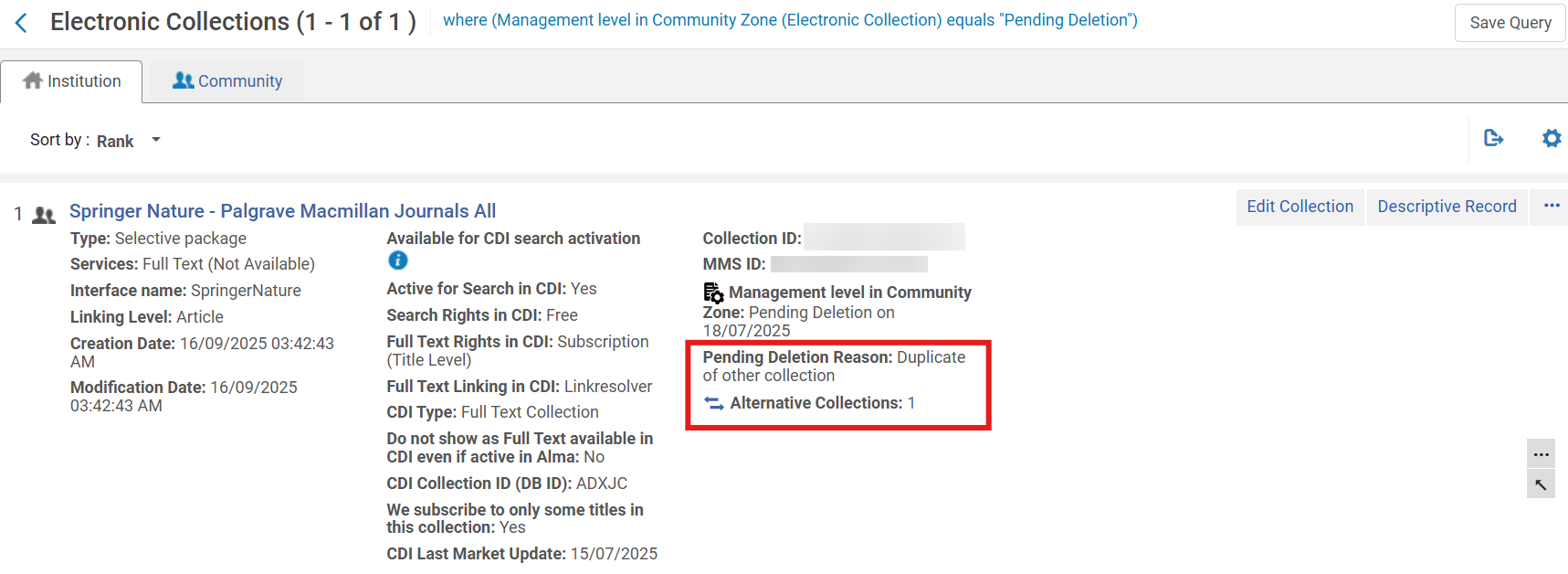
For more information, see Electronic Collection and Portfolio Details for Consortia Members (Electronic Collection).
Set "No List Expected" in Bulk Using Course Bulk Update Task
Idea Exchange URM-240421The Course Bulk Update job (Admin > Run a Job > Courses > Course Bulk Update) now supports the No list expected attribute. Staff can select the No list expected checkbox in the job and choose either Add No list expected or Remove No list expected for all courses in the selected set, which enables efficient large-scale updates.

A new No list expected facet is also available on the Fulfillment > Courses page. It enables staff to filter courses based on whether the No list expected attribute is selected (Yes) or not selected (No). This enhancement improves course management by enabling institutions to quickly identify and organize courses that are intentionally not expected to have lists.

Related Records from Recommendation Summaries
January 2026 Resource Management URM-316541
Rialto now displays a Related Records link in the Summary section when viewing a retention or deselection recommendation that has associated bibliographic records. The link indicates the number of related records in parentheses.

Selecting Related Records opens a sliding panel with a list of all bibliographic records associated with the recommendation’s MMS ID.
This enhancement makes it easy to find connected records when examining recommendations and helps users understand the broader bibliographic landscape of a title.
Expanded Details in Item-Level Compare To Sections
January 2026 Resource Management URM-253024
Item-level Compare To sections for both retention and deselection recommendations now include detailed data for other institutions' resources. Users can view this data by selecting the View full list and additional information link in the Compare To sections.

Selecting View full list and additional information opens a detailed sliding panel that displays various data related to all matching holdings in comparison institutions, such as:
- MMS IDs
- Titles
- Authors
- Publication date
- Publisher name
- ISBNs
- Other system numbers

The panel presents one row per matching MMS ID per institution. For example, if a single institution holds two matching MMS IDs, the panel lists two rows—one for each match. Additionally, if multiple identifiers exist, the sliding panel displays all of them in the same field.
Some data points are hidden by default; use the panel’s configuration button to add additional columns to the sliding panel.

This update increases transparency across comparison institutions and supports more confident decision-making when assessing items for retention and deselection.
Create Collection Development Projects from a File
January 2026 Resource Management URM-314774
Rialto now enables users to create retention and deselection projects by uploading a file that contains a predefined list of items. Users can upload a tab-delimited text file or an Excel file with item IDs to serve as the project’s data source from which Rialto can generate recommendations. The uploaded file must be smaller than 10 MB and include a column named Item ID in the header row.
This capability is ideal for libraries that manage curated title lists outside of Rialto—for example, lists exported from previous projects, inventory analyses, or collaborative collection studies.
When creating a new project, a new Upload Project From File option is available on the Add New Project window (Collection Development > Workflows > Retention or Deselection). When selected, the window updates to include a field for uploading a file.

This enhancement gives libraries greater flexibility when creating collection development projects. Direct file uploads also reduce manual setup time and improve accuracy when analyzing preselected title lists. For more information, see Creating a Deselection Project from a File and Creating a Retention Project from a File.
Create Collection Development Projects from an Alma Set
January 2026 Resource Management URM-306178
In addition to creating a project from a file, users can now also create new projects directly from existing Alma physical item sets. This enhancement applies to both retention and deselection projects.
When creating a new project, a Create Project from Set option is now available on the Add New Project window (Collection Development > Workflows > Deselection or Retention). Once selected, users can choose any Alma set containing physical items from the Select Physical Items Set dropdown. When generating recommendations for a project created this way, Rialto evaluates only the items included in the selected Alma set.

This enhancement streamlines project setup and strengthens the connection between Alma’s inventory management and Rialto’s collection development workflows. For more information, see Creating a Deselection Project from a Set and Creating a Retention Project from a Set.
Define Usage Scope in Retention Projects
January 2026 Resource Management URM-254904
Rialto now enables users to include usage criteria when defining the scope of retention projects. Previously, usage filters were available only for deselection projects.
A new Suggest when total usage per title is more than field has been added to the Scope section of the retention Criteria form. This field includes two dropdowns:
- A usage count dropdown (1–10) that specifies the minimum number of uses per title.
- A timeframe dropdown (1–10 years) that defines the period during which usage is calculated.
The field is optional and is blank by default.

This enhancement helps libraries preserve high-value materials by basing retention decisions on measurable usage patterns.
Include Digitization Requests in Usage Calculations
January 2026 Resource Management URM-306180
Rialto now enables institutions to account for digitization requests when calculating item usage in retention and deselection projects.
A new configuration option, DIGITIZATION_REQUESTS, is now available in the table found in Configuration > Collection Development > Workflows > Usage Calculation. When enabled, Rialto includes digitization requests in the total usage count used for generating project recommendations.

Digitization requests represent instances where users or staff request the creation of a digital copy of a physical item.
By incorporating digitization requests into the overall usage calculation, libraries gain a more accurate understanding of how their collections are accessed and valued. This helps institutions make better-informed decisions when identifying titles for retention or deselection.
Search Within Recommendations
January 2026 Resource Management URM-313438
Users can now search within the recommendations list in both retention and deselection projects. A new search bar has been added to the View Recommendations page, next to the existing sort control. You can search by several indexed fields, including:
- Keywords
- Creator
- Edition
- MMS ID
- Publisher
- Title
- Title Local Labels

Any selected facets remain applied when running a search. If no titles match the entered keywords, the page displays a message indicating that no results were found.
This improvement makes it easier to locate specific titles among large recommendation sets.
Additional Enhancements
-
May 2026 Fulfillment and Resource Sharing URM-175629
Institutions can now customize copyright status labels in Alma, which enables libraries to align terminology with local regulations and practices.You can configure these labels in Configuration > Fulfillment > Copyright Management > Citation Copyright by updating the text in the Description column.
 Citation Copyright table - Updated fair use label
Institutions cannot add/delete entries or modify the underlying code in the Citation Copyright table; only the display text (Description) can be edited.
After updating the Description column, the custom label appears in Fulfillment > Course Reserves > Citations for all items with the corresponding copyright status. Updated labels are also reflected in facets and are available when applying bulk changes using Change Copyright Status.
 Custom label for the fair use status
 - May 2026 Metadata & Linked Open Data URM-218454
To provide consistent Analytics reporting across MARC formats UNIMARC data was added to Analytics to align with the data already available for MARC21.For more information, see Bibliographic Details.
- May 2026 Metadata & Linked Open Data URM-252667
Updates to MARC21 Profile MARC21 bibliographic update No. 41 (December 2025), MARC21 holdings update No. 41 (December 2025), and MARC21 authorities update No. 41 (December 2025), including Bibliographic, Authorities, Classifications, and Community changes and updates to the MARC21 Holdings.For more information, see MARC21 Search Indexes.
- May 2026 Metadata & Linked Open Data URM-253419
LOD Editor — bf:hasInstance and bf:instanceOf are now consistent and reciprocal. To ensure a smooth workflow, incompatible links between BIBFRAME Works and Instances are no longer allowed. - May 2026 Metadata & Linked Open Data URM-319214
When performing a Wikidata lookup in a language other than the English default, the selected language tag is stored for that specific record field, ensuring future record updates do not revert to the default language.For more information, see Wikidata-Specific Features.
- May 2026 Metadata & Linked Open Data URM-318550
When creating a new BIBFRAME record (work or instance) from a template, the template name now appears at the beginning of the summary section to indicate to the cataloger which template was selected. The template name is visible until the record is saved to the database. "From template" Indication
 - May 2026 Metadata & Linked Open Data URM-253699
Updates have been made to the GND Profile. These updates are ongoing. - May 2026 Metadata & Linked Open Data URM-318309
In the new UX titles and holdings searches, a new display field, Short Title, was added that contains only the title proper (245 $$a). This field is hidden by default, but can be added to the table or record displays by configuring the views. It is especially useful for users who want to minimize the space the title takes in the table view, and can now choose to display a Short Title column instead of the Title column.This new field was also added when exporting all fields from the search results to Excel.
 Short Title Column
- March 2026 Fulfillment and Resource Sharing Idea Exchange URM-253833
Leganto now enables libraries to customize the labels of workflow tags, including those used for integrations with external systems such as Bolk and DCS.To customize a tag, navigate to Configuration > Fulfillment > Courses > Reading List Citation System Tags, select More actions, and then choose Customize. Libraries can then update the text shown in the Description column to better reflect local terminology or workflows.
 Reading List Citation System Tags
- January 2026 Fulfillment and Resource Sharing URM-315436
Alma now records which user uploaded a file to a citation. When a file is uploaded, the system stores either the uploader username or, if the file was added by a job, the job ID.In Alma, this information is visible in the File Upload component under the label Uploaded by. This information will be added to analytics in a future release
 Information on who uploaded a file