

E-Inventory
|
- Electronic Collection List - Drill down to Portfolio list in each electronic collection
- Number of portfolio per classification (Dewey, LC)
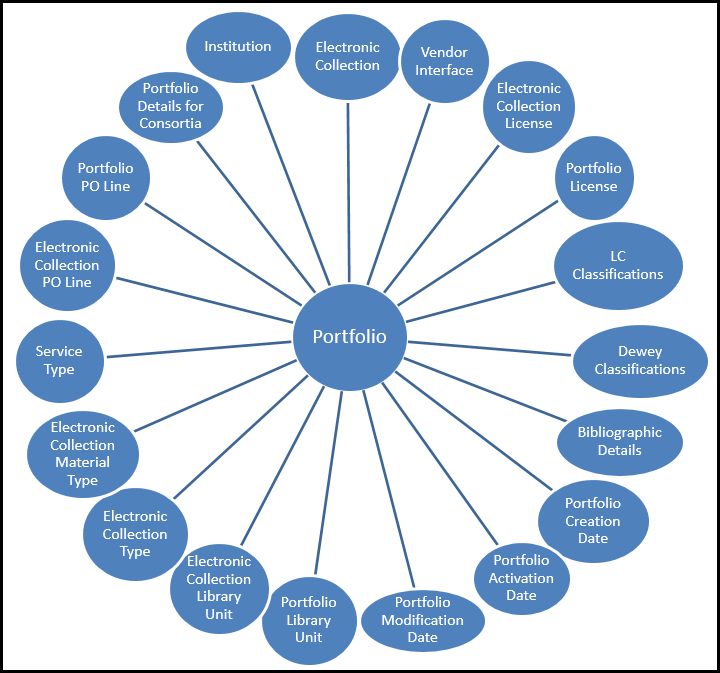
- For information on how to use Analytics to find duplicate titles with both physical and electronic inventory, see Overlap Analysis and Physical Item Usage for Weeding (Deselection) in Alma Analytics.
Field Descriptions

Portfolio
| Field | Description | Field Location in Alma | Additional Information | Data Type | Data Size |
|---|---|---|---|---|---|
| No. of Available Portfolios | Number of available portfolios | Portfolio editor > General Tab > Portfolio Availability radio button |
Lifecycle is not deleted. The availability is on the portfolio level. Availability for discovery depends on services availability. |
INT | |
| No. of Portfolios (Deleted + In Repository) | Number of all portfolios in the repository plus the number of deleted portfolios (available and not available) | INT | |||
| No. of Portfolios (Deleted) | The number of deleted portfolios in the repository | INT | |||
| No. of Portfolio (In Repository Contributed to CZ) | The number of portfolios in the repository contributed to the Community Zone | Portfolio search results, Community tab > management level > contributed | INT | ||
| No. of Portfolio (In Repository Linked to CZ) | The number of portfolios that are linked to portfolios in the Community | Portfolio search results > entries with the community icon. | Lifecycle is not deleted | INT | |
| No. of Portfolio (In Repository Not Linked to CZ) | The number of local portfolios (not linked to a portfolio in the Community) | Lifecycle is not deleted | INT | ||
| No. of Portfolios (In Repository) | The number of portfolios in the repository | Available and not available | INT | ||
| No. of Unavailable Portfolios | Number of portfolios that are not available for discovery | Portfolio editor > General tab > Portfolio availability radio button | Lifecycle is not deleted. The availability is on the portfolio level | INT | |
| No. of Unique Titles | The number of unique titles (mms ids) associated to a Portfolio | INT | |||
| Activation Date | The activation date of the portfolio | Portfolio editor – General tab - Activation date | For portfolios activated from the Community | DATE | |
| Active from date | Service active from date | Electronic Service Editor > Activation tab > Active from date field | Used together with Active until date and Service activation status | DATE | |
| Active to date | Service active to date | Electronic Service Editor > Activation tab > Active to date field | Used together with Active from date and Service activation status | DATE | |
| Availability | Indicates whether the portfolio is available or not available | Portfolio editor > General tab > Portfolio availability radio button | VARCHAR | 4000 | |
| Available For Group | The group codes for which portfolio is available | Portfolio editor > Group Settings tab | If there is no group assigned to the portfolio, the group availability is taken from the service. If no group is assigned to the service, the group availability is taken from the electronic collection | VARCHAR | 4000 |
|
Available For Group Members |
The members of the groups in the Available For Groups field. |
Configuration > Resources > Inventory Network Groups |
Multiple values are concatenated together with a semicolon (;) character. The format is displayed as follows:
|
CHAR | 4000 |
| Available For Resource Type | The resource type for which the "Available For" feature is configured. | Possible values are: Electronic Collection, Electronic Portfolio, and Service | VARCHAR | 30 | |
| Available From Date | Planned day of portfolio activation | Electronic portfolio editor > General tab > Available from date field | Used together with Available Until Date | DATE | |
| Available Until Date | Planned day of portfolio deactivation | Electronic portfolio editor > General tab > Available until date field | Used together with Available From Date | DATE | |
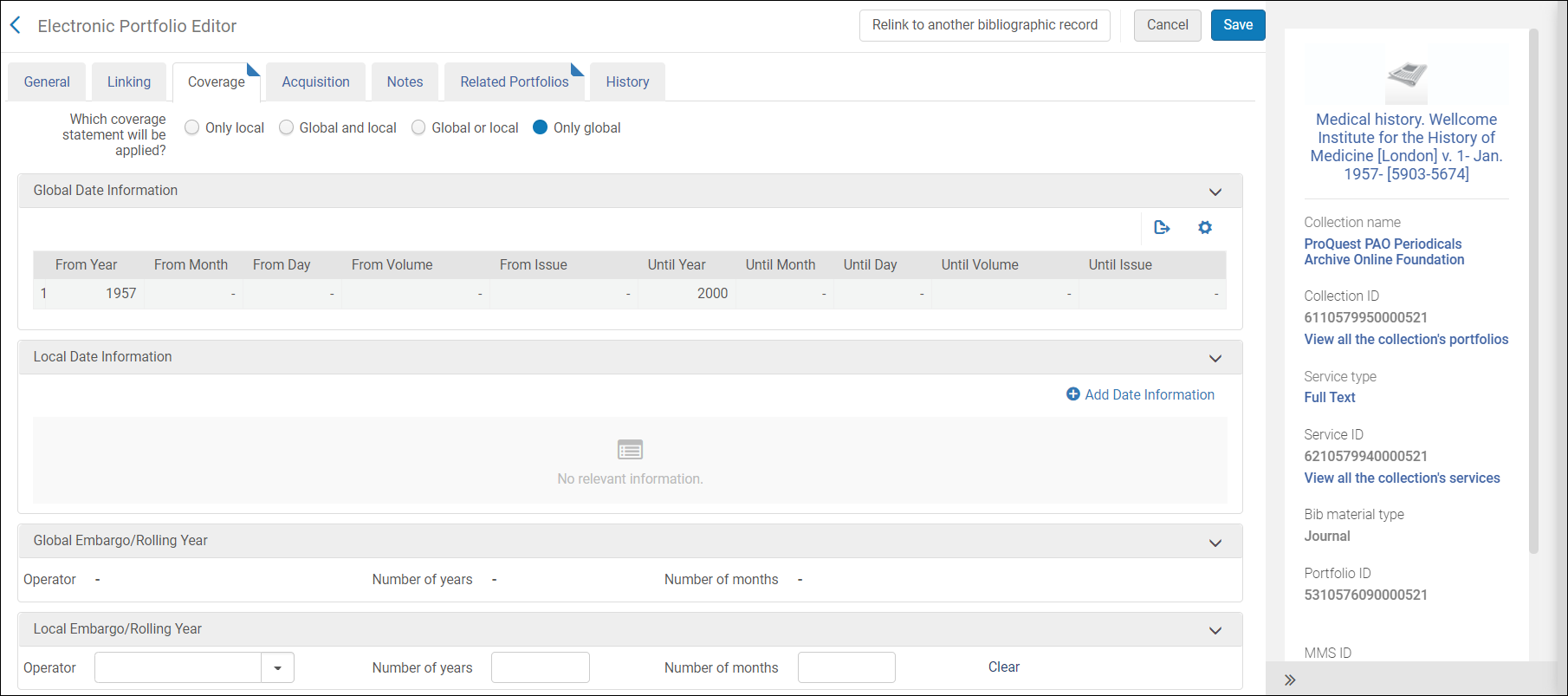
| Coverage Information Combined | The effective combined coverage information | Portfolio editor > Coverage tab | Multiple values are separated by a semicolon. | VARCHAR | 4000 |
| Coverage Statement | The coverage statement type. | Portfolio editor > Coverage tab | Possible values are:
For more information concerning the coverage statement, see Managing Electronic Resource Activation.
|
VARCHAR | 100 |
| Creator | The user or process that created the Portfolio | VARCHAR | 255 | ||
| Creation Date | The creation date of the portfolio | Electronic portfolio search results - Creations Date field | DATE | ||
| Dewey Number | The Dewey Number is a unique classification code assigned to a specific subject or topic category. | This information comes from the bibliographic record linked to the portfolio. The first 3 digits of the Dewey Classification. |
VARCHAR | 15 | |
| Embargo Months | Provides a moving wall of availability. States the number of embargo months | Portfolio editor > Coverage tab |
Depends on the coverage statement. |
VARCHAR | 4000 |
| Embargo Operator | The operator used for defining the embargo | Portfolio editor > Coverage tab |
Possible values:
|
VARCHAR | 4000 |
| Embargo Years | Provides a moving wall of availability. States the number of embargo years | Portfolio editor > Coverage tab | Depends on the coverage statement | VARCHAR | 4000 |
| Expected Activation Date | The expected date of the portfolio activation | Electronic portfolio editor > General tab > Expected activation date field | DATE | ||
| IEE | The intellectual entity number for electronic items. | Does not appear in the Ala UI | You can use this identifier to reconcile Analytics data, which has only MMS IDs, with the number from record IDs supplied to Primo from Alma. You can then pass the results to a reading list system in order to make relegation and capacity decisions. This number is essential for reports on Fulfillment activity where this number is the only common ID between the two systems. | VARCHAR | 255 |
| Interface Name | The interface name of the Collection the portfolio is a part of | For the Collection the portfolio is part of > Electronic Collection editor > General Tab > Interface Name field | VARCHAR | 4000 | |
| Is Free | Indicates whether the portfolio is supplied for free | Electronic service Editor - Linking tab - Service is free? field | Possible values - Yes, No | VARCHAR | 255 |
| LC Classification Code | A unique alphanumeric identifier assigned to a specific subject or topic category within the library's classification system. It is composed of letters and numbers that represent various facets of a work, such as its subject, genre, or format. For example, in the LC classification "PN1997.2.D56," the "PN" portion represents the general subject area (Performing Arts), and the "1997.2.D56" further refines the classification to a specific work or aspect within that category. |
This information comes from the bibliographic record linked to the portfolio | VARCHAR | 50 | |
| LC Classification Number | The numbers that follow the classification letters until the first period that is followed by a letter | This information comes from the bibliographic record linked to the portfolio | VATCHAR | 50 | |
| Lifecycle | Indicates whether the portfolio is deleted or not | Deleted resource appear only in Analytics (they do not appear in Alma) | Possible values: Deleted, In Repository, None | VARCHAR | 255 |
| Managed by Provider | Indicates if the electronic resource is managed by the provider | Historical possible values: Yes, No | varchar | 3 | |
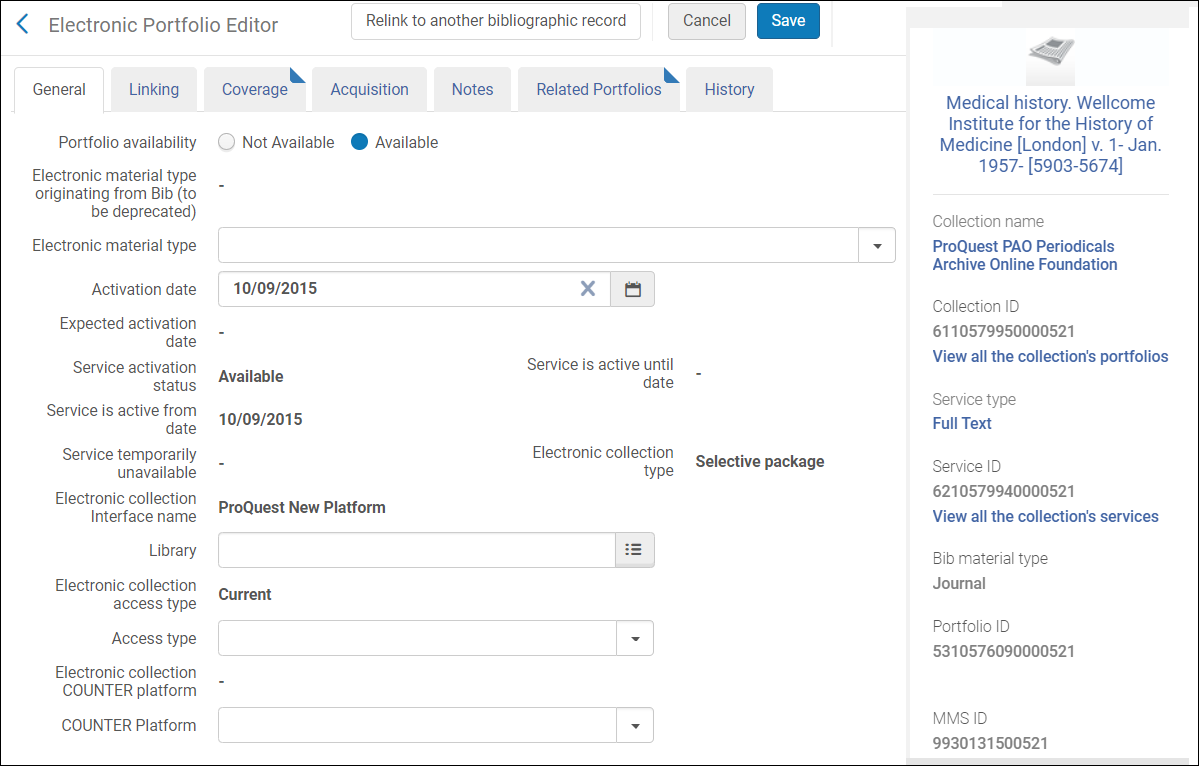
| Material Type | The material type of the portfolio. | See the field location in Alma in the figure Electronic Portfolio Editor – Portfolio Information Tab, below. | |||
| Modification Date | The date information was updated in the portfolio | Electronic portfolio search results > Modification Date field | DATETIME | ||
| Modified By | User name that modified the portfolio | Electronic portfolio editor, History tab > Operator column | Modifications done by an Alma process will show System in this column | VARCHAR | 255 |
| PDA Code | The code of the Patron Driven Acquisition assigned to the portfolio | Electronic portfolio editor > Acquisitions tab > PDA field | VARCHAR | 4000 | |
| PDA Name | The name of the Patron Driven Acquisition assigned to the portfolio | Electronic portfolio editor > Acquisition tab > PDA field | VARCHAR | 4000 | |
| Perpetual Coverage Information Combined | The summary of the perpetual coverage information for portfolios with Perpetual or Current and Perpetual access type | Electronic portfolio editor > Coverage tab > Perpetual Date Information section | Used together with Portfolio Access Type | VARCHAR | 4000 |
| Perpetual Embargo Months | Provides a moving wall of availability. States the number of perpetual embargo months | Electronic portfolio editor > Coverage tab > Perpetual Embargo/Rolling Year section | The following 4 fields are used together:
|
VATCHAR | 4000 |
| Perpetual Embargo Operator | The operator of the perpetual embargo | Electronic portfolio editor > Coverage tab > Perpetual Embargo/Rolling Year section | Possible values:
|
VARCHAR | 4000 |
| Perpetual Embargo Years | Provides a moving wall of availability. States the number of perpetual embargo years | Electronic portfolio editor > Coverage tab > Perpetual Embargo/Rolling Year section | The following 4 fields are used together:
|
VARCHAR | 4000 |
| Portfolio Access Type | The access type of the portfolio | Electronic portfolio editor - General tab > Access Type field | Electronic portfolio editor, Coverage tab – "Perpetual Embargo/Rolling Year" section | VARCHAR | 4000 |
| Portfolio Additional PO Lines | The additional PO Lines of the portfolio | Electronic portfolio editor > Acquisition tab > Additional PO Lines table | VARCHAR | 4000 | |
| Portfolio Authentication Note | The authentication note of the portfolio. | Electronic portfolio editor > Notes tab – Authentication Note field | VARCHAR | 4000 | |
| Portfolio Auto Active | Not in use | Use the fields - Service portfolio auto activate, Service portfolio auto delete - in the Service folder | varchar | 255 | |
| Portfolio Contributed to CZ | Indicates if the portfolio was contributed to the Community by my institution | VARCHAR | 3 | ||
| Portfolio COUNTER Platform | The platform by which usage data is tracked for a specific electronic collection | Electronic portfolio editor - General tab > COUNTER platform field | When this field is empty in Alma, Analytics will show the platform in the COUNTER Platform derived from interface field | VARCHAR | 400 |
| Portfolio General Note | The general notes of the portfolio | [Search for portfolio] > Edit Portfolio > Notes Tab > General Notes Section | If there are multiple notes, they are concatenated with the newest note first, separated by a semi-colon. Only the first 1330 characters of each note is displayed, with a maximum length of 4000 characters for the whole field.
The portfolio must be saved for the General Note to appear in Analytics. If the portfolio is not saved, the General Note appears in Alma, but not in Analytics. |
VARCHAR | 4000 |
| Portfolio Id | The Alma ID of the portfolio | Electronic portfolio editor > Header | This is the ID in the local institution (not Network or Community ID for linked portfolios) | VARCHAR | 255 |
| Portfolio Internal Description | The internal description of the portfolio. | Electronic portfolio editor > Notes Tab > Internal Description field | VARCHAR | 4000 | |
| Portfolio Licence ID | The ID of the license linked to the portfolio | Electronic portfolio editor > Acquisition tab > License field (the code of the license) | VARCHAR | 50 | |
| Portfolio Link Id | For portfolios activated from the Community - ID of the Portfolio in the Community. | Search in Community for Electronic Portfolio > Search results > Portfolio ID field for the linked portfolio in the Community | VARCHAR | 4000 | |
| Portfolio linked to CZ | Indicates if the portfolio is linked to the Community | Search in the Institution tab for Electronic Portfolio > Search results > Community icon is displayed next to the portfolio | VARCHAR | 3 | |
| Portfolio Material Type Code | The code of the material type of the portfolio. | Electronic portfolio editor > General tab > Electronic Material Type field (the code) | VARCHAR | 4000 | |
| Portfolio Material Type Description | The name of the material type of the portfolio. | Electronic portfolio editor > General tab > Electronic Material Type field | VARCHAR | 4000 | |
| Portfolio PO Line Reference | The reference number of the PO line of the portfolio | VARCHAR | 4000 | ||
| Portfolio Public Note | The public note of the portfolio. | Electronic portfolio editor > Notes Tab > Public Note field | VARCHAR | 4000 | |
| PPS Link Id | For portfolios activated from the Community - ID of the Service in the Community | Search in Community for Electronic Portfolio > Search results > Service ID field for the linked portfolio in the Community | VARCHAR | 765 | |
| Provider Name | The interface name of the Collection the portfolio is part of | For the Collection the portfolio is part of > Electronic Collection editor > General Tab > Interface Name field | VARCHAR | 255 | |
| Purchase Model | The portfolio purchase model, populated automatically by the autoholdings job. | Electronic portfolio editor > Acquisition tab > purchase model section | The purchase model only appears in portfolios belonging to ProQuest Ebook Central and JSTOR autoholdings collections. | VARCHAR | 4000 |
| Public Access Model | The patron facing access model, which is presented to the patron in the discovery system. | Electronic portfolio editor > Acquisition tab > Public Access Model field | For more information on Access Models in Alma, see Managing Access Models. | VARCHAR | 4000 |
| Service Type | The type of the service the portfolio belongs to | Electronic Service Editor > Service Description tab > Service Type field | Possible values :
|
VARCHAR | 4000 |
Portfolio Activation Date
- Calendar Fields – These are date fields as they display in the calendar.
- Fiscal Date Fields – These are date fields that match the institution's fiscal period.
| Field | Description | Additional Information | Data Type | Data Size |
|---|---|---|---|---|
| Portfolio Activation Date | The activation date of the Portfolio | The date in the format DD/MM/YYYY | DATE | |
| Portfolio Activation Start of Week | The date of the first business day of the week | The date in the format DD/MM/YYYY | DATE | |
| Portfolio Activation Week Number | The number of the week of the year | There are 52 weeks in a year | VARCHAR | 2 |
| Portfolio Activation Month Key | The month of the date in number format | e.g. February shows the number 2 in this column. This field is useful when you want to sort by month | INT | |
| Portfolio Activation Month | The month of the date in text format | The month e.g. February | VARCHAR | 20 |
| Portfolio Activation Full Month | The year and month that the purchase request was activated | The month in text format and the year e.g. Feb 25 (for February 2025) | VARCHAR | 20 |
| Portfolio Activation Quarter | The quarter in the year in which the purchase request was activated | The quarter of the date in a display format such as Q1 | VARCHAR | 20 |
| Portfolio Activation Year | The year in which the purchase request was activated | The year of the date in the format YYYY e.g. 2025 | VARCHAR | 20 |
| Portfolio Activation Fiscal Month Key | The fiscal month of the date in number format | e.g. If the fiscal year starts in June, this column shows the number 1 for June, the number 2 for July, and so on | INT | |
| Portfolio Activation Fiscal Year | The fiscal year of the date in string format | The year is presented according to the description in the mapping table Fund and Ledger Fiscal Period. For more information, see Configuring Fund and Ledger Fiscal Periods | VARCHAR | 50 |
|
Portfolio Activation Date Filter (under construction) |
Used to filter the portfolio activation date |
Possible :
|
VARCHAR |
100 |
| Portfolio Activation Year-Month | The year and the month in which the purchase request was modified | The year and the month in the format YYYY-MM | VARCHAR | 250 |
| Portfolio Activation Date | Stores the Hierarchy column that allows the user to drill down from the year to the month to the specific portfolio activation date. Using this column provides the user with the option to view the accumulative measures in each level of the hierarchy. | DATE |
Portfolio Creation Date
- Calendar Fields – These are date fields as they display in the calendar.
- Fiscal Date Fields – These are date fields that match the institution's fiscal period.
| Field | Description | Additional Information | Data Type | Data Size |
|---|---|---|---|---|
| Portfolio Creation Date | The current course end date of the purchase request | The date in the format DD/MM/YYYY | DATE | |
| Portfolio Creation Start of Week | The date of the first business day of the week | The date in the format DD/MM/YYYY | DATE | |
| Portfolio Creation Week Number | The number of the week of the year | There are 52 weeks in a year. | VARCHAR | 2 |
| Portfolio Creation Month Key | The month of the date in number format | For example - February will show the number 2 in this column. This field is useful when you want to sort by month. | INT | |
| Portfolio Creation Month | The month of the date in text format | The month, for example, "February" | VARCHAR | 20 |
| Portfolio Creation Full Month | The year and month that the purchase request was modified | The month in text format and the year. For example - Feb 25 (for February 2025) | VARCHAR | 20 |
| Portfolio Creation Quarter | The quarter in the year in which the purchase request was modified | The quarter of the date in a display format such as Q1 | VARCHAR | 20 |
| Portfolio Creation Year | The year in which the purchase request was modified | The year of the date in the format YYYY . For example - 2025 | VARCHAR | 20 |
| Portfolio Creation Year-Month | The year and the month in which the purchase request was modified | The year and the month in the format YYYY-MM | VARCHAR | 250 |
| Portfolio Creation Fiscal Month Key | The fiscal month of the date in number format | For example - If the fiscal year starts in June, this column will show the number 1 for June, the number 2 for July, and so on. | INT | |
| Portfolio Creation Fiscal Year | The fiscal year of the date in string format | The year is presented according to the description in the mapping table "Fund and Ledger Fiscal Period". For more information, see Configuring Fund and Ledger Fiscal Periods | VARCHAR | 50 |
| Portfolio Creation Date Filter | Used to filter report results by date | Possible values:
|
VARCHAR | 100 |
| Portfolio Creation Date | The date in a hierarchy format | Enables the user to drill down from the year to the month to the specific date. Using this column provides the user with the option to view the accumulative measures in each level of the hierarchy. |
Portfolio Modification Date
| Field | Description | Additional Information | Data Type | Data Size |
|---|---|---|---|---|
| Portfolio Modification Date | The current course end date of the purchase request | The date in the format DD/MM/YYYY | DATE | |
| Portfolio Modification Start of Week | The date of the first business day of the week | The date in the format DD/MM/YYYY | DATE | |
| Portfolio Modification Week Number | The number of the week of the year | There are 52 weeks in a year. | VARCHAR | 2 |
| Portfolio Modification Month Key | The month of the date in number format | For example - February will show the number 2 in this column. This field is useful when you want to sort by month. | INT | |
| Portfolio Modification Month | The month of the date in text format | The month, for example, "February" | VARCHAR | 20 |
| Portfolio Modification Full Month | The year and month that the purchase request was modified | The month in text format and the year. For example - Feb 25 (for February 2025) | VARCHAR | 20 |
| Portfolio Modification Quarter | The quarter in the year in which the purchase request was modified | The quarter of the date in a display format such as Q1 | VARCHAR | 20 |
| Portfolio Modification Year | The year in which the purchase request was modified | The year of the date in the format YYYY . For example - 2025 | VARCHAR | 20 |
| Portfolio Modification Year-Month | The year and the month in which the purchase request was modified | The year and the month in the format YYYY-MM | VARCHAR | 250 |
| Portfolio Modification Fiscal Month Key | The fiscal month of the date in number format | For example - If the fiscal year starts in June, this column will show the number 1 for June, the number 2 for July, and so on. | INT | |
| Portfolio Modification Fiscal Year | The fiscal year of the date in string format | The year is presented according to the description in the mapping table "Fund and Ledger Fiscal Period". For more information, see Configuring Fund and Ledger Fiscal Periods | VARCHAR | 50 |
| Portfolio Modification Date Filter | Used to filter report results by date | Possible values:
|
VARCHAR | 100 |
| Portfolio Modification Date | The date in a hierarchy format | Enables the user to drill down from the year to the month to the specific date. Using this column provides the user with the option to view the accumulative measures in each level of the hierarchy. |
Portfolio Library Unit
Portfolio License
| Field | Description | Field Location in Alma | Additional Information | Data Type | Data Size |
|---|---|---|---|---|---|
| License Creator Name | The first and last name of the user who created the license. | Acquisitions > Acquisitions Infrastructure > Licenses > [select a license] > Side information panel The label in Alma is Created by. | VARCHAR | 255 | |
| License Modification Date | The date the license was modified. | Acquisitions > Acquisitions Infrastructure > Licenses > [select a license] > Summary Tab > i icon The label in Alma is Last updated on. | DATE | ||
| License Modifier Name | The first and last name of the user who modified the license. | Acquisitions > Acquisitions Infrastructure > Licenses > [select a license] > Summary Tab > icon The label in Alma is Last updated by. | VARCHAR | 255 | |
| License Creation Date | The date the license was created. | Acquisitions > Acquisitions Infrastructure > Licenses > [select a license] >Side information panel. The label in Alma is Created on. | DATE | ||
| License Status | The status of the license. | Acquisitions > Acquisitions Infrastructure > Licenses > [select a license] > Summary Tab. | Possible values:
|
VARCHAR | 4000 |
| License ID | The ID of the license. | The License ID is not visible in Alma. The system ID of the license can only be seen in Analytics. | VARCHAR | 50 | |
| License Review Status | The status of the license review. | Acquisitions > Acquisitions Infrastructure > Licenses > [select a license] > Summary Tab. | The values for this field are configured under Configuration > Licenses > License Review Status. Out-of-the-box, the possible values are:
You can also configure additional license review statuses, as necessary. For more information, see Configuring License Review Statuses. These values are for informational purposes only. |
VARCHAR | 4000 |
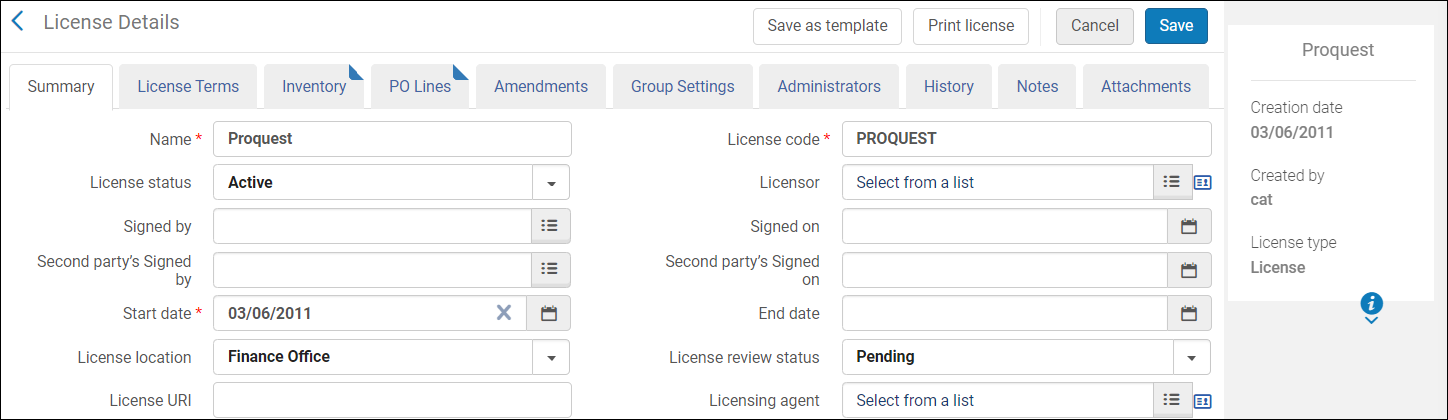
| License Code | The code of the license. | Acquisitions > Acquisitions Infrastructure > Licenses > [select a license] > Summary Tab. The label in Alma is License Code. | VARCHAR | 255 | |
| License Name | The name of the license. | Acquisitions > Acquisitions Infrastructure > Licenses > [select a license] > Summary Tab. The label in Alma is License Name. | VARCHAR | 255 | |
| License Begins | The date the license begins. | Acquisitions > Acquisitions Infrastructure > Licenses > [select a license] > Summary Tab. The label in Alma is End Date. | DATE | ||
| License Ends | The date the license ends. | Acquisitions > Acquisitions Infrastructure > Licenses > [select a license] > Summary Tab. The label in Alma is End Date. | DATE | ||
| License Note | The note of the license. | Acquisitions > Acquisitions Infrastructure > Licenses > Notes Tab. | VARCHAR | 4000 | |
| License Originating Licensor Key | The licensor key of the license in the legacy system from which the data was migrated. | Data is stored in the DB and not exposed in the Alma UI. | VARCHAR | 255 | |
| License Originating Parent Code | The parent code of the license in the legacy system from which the data was migrated. | Data is stored in the DB and not exposed in the Alma UI. | VARCHAR | 255 | |
| License Parent ID | The unique internal ID for the parent license. | Data is stored in the DB and not exposed in the Alma UI. | VARCHAR | 50 | |
| License Signed By | The user who approved the license. | Acquisitions > Acquisitions Infrastructure > Licenses > [select a license] > Summary Tab. The label in Alma is Signed by. | VARCHAR | 50 | |
| License Signed On | The date the license was approved. | Acquisitions > Acquisitions Infrastructure > Licenses > [select a license] > Summary Tab. The label in Alma is Signed on. | DATE | ||
| License Second Party Signed By | The user who is a secondary approver of the license. | Acquisitions > Acquisitions Infrastructure > Licenses > [select a license] > Summary Tab. The label in Alma is Second party's Signed by. | VARCHAR | 255 | |
| License Second Party Signed On | The date on which the license was approved by the secondary approver. | Acquisitions > Acquisitions Infrastructure > Licenses > [select a license] > Summary Tab. The label in Alma is Second Party's Signed on. | DATE | ||
| License Storage Location | The physical location of a printed license. | Acquisitions > Acquisitions Infrastructure > Licenses > [select a license] > Summary Tab. The label in Alma is License Location. | The values for this field are configured under Configuration > Licenses > License Storage Location. For information on configuring the license storage locations, see Configuring License Storage Locations. | VARCHAR | 4000 |
| License Type | The type of the license. | Acquisitions > Acquisitions Infrastructure > Licenses > [select a license] > Side information panel. | Possible Values:
|
VARCHAR | 4000 |
| License URI | The URI where an electronic license is available. | Acquisitions > Acquisitions Infrastructure > Licenses > [select a license] > Summary Tab | VARCHAR | 4000 | |
| Licensor ID | The unique internal ID of the vendor associated with the license. | Data is stored in the DB and not exposed in the Alma UI. | DOUBLE |
Portfolio PO Line
| Field | Description | Field Location in Alma | Additional Information | Data Type | Data Size |
|---|---|---|---|---|---|
| Access Model | The public access model for the electronic resource. | Acquisitions > All PO Lines > Activation Information section | Available only for electronic resources. The values are configured in the Access Model code table. | VARCHAR | 4000 |
| Acquisition Method | The code of the method by which the PO Line is acquired, with the default value set as PURCHASE. This value may change when the PO Line is sent. | See the Acquisition Method Code table. | VARCHAR | 255 | |
| Acquisition Method Description | The description (label) of the acquisition method. | Acquisitions > All PO Lines > PO Line Information section. The label in Alma is Acquisition method. | VARCHAR | 4000 | |
| Additional Order Reference | An additional identifier for the PO line | Acquisitions > All PO Lines > PO Line Information section. The label in Alma is Additional PO Line Reference Field. | VARCHAR | 255 | |
| Application | Used for identifying migrated PO lines | Data is stored in the DB, and it is not exposed in the Alma UI. | VARCHAR | 255 | |
| Assigned To | Stores the user that is assigned to the order | Acquisitions > All PO Lines > Left pane | VARCHAR | 255 | |
| Associated PO Line | The PO line associated with the current one. | Acquisitions > All PO Lines > PO Line Information section | VARCHAR | 255 | |
| Association Type | The type of association between PO lines. Defined by a user, process, or job. | Acquisitions > All PO Lines > Associated PO Lines link | Available when there is an associated PO line | VARCHAR | 255 |
| Cancellation Reason | Code for the reason that a PO line is canceled. Displayed only for canceled PO lines. | The cancellation reason label appears in the History link. To match the label from the PO line History page to the code in analytics, see the PO Line Cancellation Reasons Code table at Configuration > Purchase Orders > PO Line Cancellation Reasons. The cancellation reason is selected when cancelling a PO line. | VARCHAR | 255 | |
|
Cancellation Restriction
|
Indicates if the cancellation restriction note is displayed when cancelling a PO line that contains a warning about the cancellation.
|
Acquisitions > All PO Lines > PO Line Information section
|
Possible values:
|
VARCHAR
|
4000
|
| Cancellation Restriction Note | The warning to display when canceling a PO line with Cancellation Restriction selected in Alma. | Acquisitions > All PO Lines > PO Line Information section | Displayed when Cancellation Restriction is selected. | VARCHAR | 4000 |
| CKB ID | When selecting Order from an Electronic Collections search, a CKB ID (Central Knowledgebase ID) is stored as a reference to the electronic collection ID, rather than an MMS ID. | Acquisitions > All PO Lines > PO Line Information section. The label in Alma is CKB ID. | Not available when an MMS ID is present. | VARCHAR | 50 |
| Claiming Date | The date on which the PO line is sent to the claims task list. | Determined by adding the number of days in the claiming grace period to the expected receipt/activation date. Calculated from the Claiming grace period field (days) field on the Acquisitions > All PO Lines > Vendor Information section. For more information, see Criteria for Marking PO Lines as In Claim. | DATETIME | ||
| Claiming Date (Calendar) | Claiming Date without a timestamp. | DATE | |||
| Currency | The currency of the transaction. | Acquisitions > All PO Lines > Pricing and Funding section > next to the List Price field | VARCHAR | 3 | |
| Discount | The discount amount. | Acquisitions > All PO Lines > Pricing and Funding section. The label in Alma is Discount (amount). | DOUBLE | ||
| ERP Number | The Enterprise Resource Planning number of the purchase order. | Used by customers that want the purchase order to be approved by an ERP system before it is sent to the vendor. For more information, see Orders Export in the Developers Network. | VARCHAR | 255 | |
| Expected Activation Date | The expected date for the resource activation by the vendor for electronic PO lines. | Acquisitions > All PO Lines > Vendor Information section | Only for electronic PO lines. | DATE | |
| Expected Activation Interval | For electronic PO Lines, the number of days after ordering that you expect electronic orders to be activated. | Acquisitions > All PO Lines > Vendor Information section. The label in Alma is Activation due after ordering (days). | Only for electronic PO lines. | DOUBLE | |
| Expected Receipt after Ordering Interval | For physical PO Lines, the number of days after ordering that you expect to receive physical orders. | Acquisitions > All PO Lines > Vendor Information section. The label in Alma is Expected receipt after ordering (days). | Only for physical PO lines. | DOUBLE | |
| Expected Receiving Date | For physical PO lines, the expected date for physical items to be received from the vendor. | Acquisitions > All PO Lines > Vendor Information section. The label in Alma is Expected receipt (date). | Only for physical PO lines. | DATE | |
| Interest Users | Displays the interested users for the PO line. If more than one user is added to the PO line, values are concatenated. | Acquisitions > All PO Lines > Interested Users section | To search for a specific user, you should use the Contain filter to also find cases where more than one user was added to the PO. | VARCHAR | 4000 |
| Invoice Status | The status of the invoice. | Acquisitions > All PO Lines > PO Line Information section | VARCHAR | 400 | |
|
Is Claimed
|
Indicates if there is an open claim to the vendor. A PO line is claimed if the items were not received or if the receiving/activation date of the PO line has passed.
|
Acquisitions > All PO Lines > Left pane, when marked In Claim
|
Possible values:
|
VARCHAR
|
3
|
| Item Description | The description of the ordered physical item. | Acquisitions > All PO Lines > Ordered Items section | The description entered for the PO line. This field is not taken from the bibliographic details. It is useful when no item is related to the PO line. Only for physical one-time PO lines. | VARCHAR | 4000 |
| Latest Receiving Date | This field allows you to retrieve the latest receiving date for an item in a PO line. | Acquisitions > All PO Lines > Ordered Items section> Receiving date (the most recent receiving date) | For Physical Items only. | DATE | |
| Latest Receiving Date (Calendar) | This field allows you to retrieve the latest receiving date for an item in a PO line. | Acquisitions > All PO Lines > Ordered Items section> Receiving date (the most recent receiving date) | For Physical Items only. | ||
| License ID | The unique ID of the license of the PO line that is relevant for electronic PO lines. | Available only for electronic resources. Data is stored in the DB and it is not exposed in the Alma UI. | VARCHAR | 50 | |
| List Price | The list price for a single copy of the item. | Acquisitions > All PO Lines > Pricing and Funding section | DOUBLE | ||
| Manual Renewal | Indicates whether the PO line is renewed manually or automatically. | Acquisitions > All PO Lines > Renewal Information section | Yes for manual and No for automatic. Relevant for standing orders and subscriptions. | VARCHAR | 3 |
|
Material Supplier
|
The vendor supplying the ordered material.
|
Acquisitions > All PO Lines > Vendor Information section
|
This is a concatenation of:
|
VARCHAR
|
800
|
| Material Type | The material type of the PO line. | Acquisitions > All PO Lines > PO Line Information section | For example: Book. | VARCHAR | 4000 |
| Net Price | A calculation of the total price for the PO line based on the list price per copy, the discount, and the number of copies ordered. | Acquisitions > All PO Lines > Pricing and Funding section | DOUBLE | ||
| No Charge | Indicates if there is a charge for the PO line. | Acquisitions > All PO Lines > Pricing and Funding section | Yes / No | VARCHAR | 10 |
| Note To Vendor | Notes to the vendor. | Acquisitions > All PO Lines > Vendor Information section | VARCHAR | 2000 | |
| Order Line Type Code | The code for the Purchase Order line type. | See the PO Line Type Code table. | VARCHAR | 255 | |
| Order Line Type | The order line type as it appears in Alma. | Acquisitions > All PO Lines > PO Line Summary section does not have a label in the Alma UI. | See the PO Line Type Code table. | VARCHAR | 4000 |
| PDA Code | The patron-driven acquisition code. | Acquisitions > All PO Lines > (Electronic Resource) > Ordered Portfolios section> [Edit] >Acquisitions section> View PDA Details. The label in Alma is Code. | Only if the PO line was created by a PDA process. | VARCHAR | 4000 |
| PDA Name | The patron-driven acquisition name | Acquisitions > All PO Lines > (Electronic Resource) > Ordered Portfolios section> [Edit] > Acquisitions Tab. The label in Alma is PDA. | Only if the PO line was created by a PDA process. | VARCHAR | 4000 |
| PO Approval Date | The date the PO was approved (the sent date). |
Acquisitions > All PO Lines > Record View. The label in Alma is Sent Date. |
DATE | ||
| PO Approval Date and Time | The date and time that the PO was approved. | DATE; | |||
| PO Creation Date | The timestamp of the PO creation date. | Acquisitions > All PO Lines > PO Line Summary section> [PO link] > Information Icon The label in Alma is Created on. | TIMESTAMP | ||
| PO Creation Date (Calendar) | PO creation date without a timestamp. | DATE | |||
| PO Creator | The user who created the PO (user name). | Acquisitions > Review (PO) > Right Pane > Information Icon: The label in Alma is Created by. | VARCHAR | 255 | |
|
PO Line Binding During Receiving
|
Indicates if the PO line is marked for binding during receiving (for physical items).
|
Acquisitions > All PO Lines > Receiving Information section. The label in Alma is Binding during receiving.
|
Relevant only for physical items. Possible values:
|
VARCHAR
|
4000
|
| PO Line Creation Date | The timestamp of the PO line creation date. | Acquisitions > All PO Lines > History link > Info icon .The label in Alma is Created on. | TIMESTAMP | ||
| PO Line Creation Date (Calendar) | PO line creation date without a timestamp. | DATE | |||
| PO Line Creator | The user that created the PO line (user name). | Acquisitions > All PO Lines > History link > Info icon .The label in Alma is Created by. | VARCHAR | 255 | |
| PO Line Identifier | The identifier of the ordered title. (ISSN or ISBN) | Acquisitions > All PO Lines > PO Line Information section. The label in Alma is Identifier. | VARCHAR | 4000 | |
| PO Line Label | The labels assigned to the PO line | Acquisitions > All PO Lines >PO Line Summary section | This is a repeatable field in Alma, which is concatenated in analytics. It is a free-text field, configured by the user. For more information, see Managing Labels in the Details Pane. | VARCHAR | 4000 |
|
PO Line Manual Packaging
|
Indicates if the PO line was manually packaged into a PO.
|
Acquisitions > All PO Lines >PO Line Information section. The label in Alma is Manual packaging.
|
Possible values:
|
VARCHAR
|
4000
|
| PO Line Modification Date | The timestamp of the PO line modification date. | Acquisitions > All PO Lines > History link> Info icon .The label in Alma is Last updated on. | TIMESTAMP | ||
| PO Line Modification Date (Calendar) | PO line modification date without a timestamp. | DATE | |||
| PO Line Modified By | The user who modified the PO line (user name). | Acquisitions > All PO Lines > History link > Info icon .The label in Alma is Last updated by. | VARCHAR | 255 | |
| PO Line Owner Library Code | The code of the PO line owner library. | Configuration > General > Add a Library or Edit Library Information > Right Pane. The label in Alma is Code. | Library codes are configured in Configuration > General > Add a Library or Edit Library Information | VARCHAR | 4000 |
| PO Line Owner Library Name | The name of the PO line owner library | Acquisitions > All PO Lines > PO Line Summary section. The label in Alma is PO Line Owner. | VARCHAR | 4000 | |
| PO Line Reference | The business identifier of the PO line (PO Line number). | Acquisitions > All PO Lines > PO Line Summary section. The label in Alma is PO Line. | This is the PO line number in Alma. | VARCHAR | 255 |
| PO Line Routing During Receiving | Indicates if the PO line is marked for routing during receiving. | Acquisitions > All PO Lines > Receiving Information section. The label in Alma is Routing during receiving. | Relevant only for physical items.
Possible values:
|
VARCHAR | 4000 |
| PO Line Title | The title of the PO line | Acquisitions > All PO Lines > PO Line Summary section. There is no label in Alma. | VARCHAR | 4000 | |
| PO Line Vendor Title Number | A vendor-supplied number for the associated title on a PO line. | The MARC 035 field of the bibliographic record. | An identifier other than ISBN/ISSN for non-books inventory. | VARCHAR | 4000 |
| PO Line Title | The title of the PO line | Acquisitions > All PO Lines > PO Line Summary section. There is no label in Alma. | VARCHAR | 4000 | |
| PO Line Vendor Title Number | A vendor-supplied number for the associated title on a PO line. | The MARC 035 field of the bibliographic record. | An identifier other than ISBN/ISSN for non-books inventory. | VARCHAR | 4000 |
| PO Line Notes | The notes on the PO line. | Acquisitions > All PO Lines > Notes section | Multiple notes are separated by a semicolon (;). | VARCHAR | 4000 |
| PO Modification Date | The timestamp of the PO modification date. | Acquisitions > All PO Lines > Receiving Information section. The label in Alma is Last updated on. | TIMESTAMP | ||
| PO Modification Date (Calendar) | The PO modification date without the timestamp. | This date format is useful when filtering the report by date. | DATE | ||
| PO Modified By | The user who modified the PO (user name). | Acquisitions > All PO Lines > Receiving Information section. The label in Alma is Last updated by. | VARCHAR | 255 | |
| PO Number | The business identifier of the PO related to the PO line. | Acquisitions > All PO Lines > Left pane. The label in Alma is PO. | VARCHAR | 255 | |
| Quantity for Pricing | The number of items to be paid for. | Acquisitions > All PO Lines > Pricing and Funding section. | The quantity for pricing and the number of items to create may be different in the case of discounted pricing through a deal such as buy two items and get a third item at no additional charge. | DOUBLE | |
| Receiving Date (Latest in POL) | This field allows you to retrieve the latest receiving date for an item in a PO line. | This is useful, since a PO line can have several items, and each of the items may have a different receiving date | |||
| Receiving/Activation Note | Text with which the Purchasing Operator indicates to the Receiving Operator the intended location of serial order items, in which no inventory items are created. | Acquisitions > All PO Lines > Activation Information section | Activation information is only available for electronic resources. For physical resources, the section is Receiving Information. | VARCHAR | 4000 |
| Receiving Status | An indication (Yes/No) of whether or not all physical items were received in the receiving workbench. | VARCHAR | 10 | ||
| Reclaim Interval (Days) | The interval number of days that Alma will send reclaim letters after the initial claim letter is sent. | Acquisitions > All PO Lines > Vendor Information section | Relevant only for physical PO lines. | NUMERIC | |
| Renewal Cycle | The cycle for the autorenewal job for continuous orders For example, if it is set to one year, the PO line is renewed in one year. | Acquisitions > All PO Lines > Renewal Information section | Defined in the Renewal Cycle code table. Relevant only for continuous orders. | DOUBLE | |
| Renewal Date | The date of the PO line’s next renewal for continuous orders. | Acquisitions > All PO Lines > Renewal Information section | Relevant only for continuous orders. | DATE | |
| Renewal Note | The note of the PO line renewal for continuous orders. | Acquisitions > All PO Lines > Renewal Information section | Relevant only for continuous orders. | VARCHAR | 4000 |
| Renewal Reminder Period | Determines how many days before the renewal an email regarding it is sent. | Acquisitions > All PO Lines > Renewal Information section. The label in Alma is Renewal reminder period (days). | Relevant only for manually renewed continuous orders. | DOUBLE | |
| Reporting Code - 1-5 | Five fields that store the reporting codes. | As defined in the Reporting Codes code tables. | VARCHAR | 255 | |
| Reporting Code Description -1-5 | Five fields that store the description of the five reporting code fields. | Acquisitions > All PO Lines > Reporting Codes section | VARCHAR | 4000 | |
|
Rush
|
Indicates if the PO line is to be rushed.
|
Acquisitions > All PO Lines > Receiving Information section
|
Relevant only for Physical items. Possible values are:
1 indicates a rush.
|
VARCHAR
|
4000
|
| Sent Date | The date that the PO/ PO line is sent to the vendor. | Acquisitions > All PO Lines > PO Line Information section For PO line - in the history link. | DATE | ||
| Shipped To Address City | The city to which the physical item should be shipped. | From the shipping address configured for the relevant library. | VARCHAR | 176 | |
| Shipped To Address Country | The country to which to ship the physical item. | From the shipping address configured for the relevant library. | VARCHAR | 320 | |
| Shipped To Address Line 1-5 | The address to which to ship the physical item. | From the shipping address configured for the relevant library. | VARCHAR | 784 | |
| Ship to Address ID | Internal ID of the library shipping address. | Data is stored in the DB and not exposed in the Alma UI. | DOUBLE | ||
| Shipping Method | The code of the method for the vendor to ship the order. | Per the values in the Shipping Method code table defined in the acquisition configuration menu. | VARCHAR | 255 | |
| Source ID | The source file ID used for the EOD lines. | Data is stored in the DB and not exposed in the Alma UI. | VARCHAR | 255 | |
| Source Type | The source from which the PO line originated, for example, EOD, Manual, and Migration. | Acquisitions > All PO Lines > PO Line Information section | VARCHAR | 255 | |
| Status | The business status of the PO line is Active, Canceled, or Closed. There are a number of sub-statuses included in the business status "Active". See the Status (Active) field. | Acquisitions > All PO Lines > PO Line Summary section. There is no label in Alma. (If Active, the sub-status is displayed. See the Status (Active) field). | VARCHAR | 255 | |
| Status (Active) | Displays the sub-status of the Status field. For example: Waiting for Invoice, Waiting for Manual Renewal, Recurring Renewal, Under Evaluation, Sent, In Review, Ready to Be Sent, Waiting for Packaging, and Manual Packaging. | Acquisitions > All PO Lines > PO Line Summary section. There is no label in Alma. | When the status is active. | VARCHAR | 4000 |
| Subscription From Date | The date for the beginning of a subscription for continuous orders. | Acquisitions > All PO Lines > Renewal Information section | Relevant only for subscriptions. | DATE | |
| Subscription To Date | The date for the end of a subscription for continuous orders. | Acquisitions > All PO Lines > Renewal Information section | Relevant only for subscriptions. | DATE | |
| Vendor Access Provider | The vendor that provides access to electronic resources. | Acquisitions > All PO Lines > Vendor Information section. The label in Alma is Access provider. | VARCHAR | 255 | |
| Vendor Account Code | The vendor account code as defined in the Alma vendor account definitions. | Acquisitions > All PO Lines > Vendor Information section> > Material Supplier field - the fourth element | All the vendors on the order, not just the active vendor. | VARCHAR | 784 |
| Vendor Account Description | The vendor account description is defined in the Alma vendor account definitions. | Acquisitions > All PO Lines > Vendor Information section> Material Supplier field - the third element | All the vendors on the order, not just the active vendor. | VARCHAR | 255 |
| Vendor Code | The vendor code as defined in the Alma vendor details definitions. | Acquisitions > All PO Lines > Vendor Information section> Material Supplier field - the second element | All the vendors that have been on the order, not just the active vendor. | VARCHAR | 255 |
| Vendor Contact Person ID | The related vendor contact person ID. | It can be accessed by clicking on the Material Supplier in the Vendor Information section. | VARCHAR | 50 | |
| Vendor Name | The vendor name as defined in the Alma vendor details definitions. | Acquisitions > All PO Lines > Vendor Information section> Material Supplier field - the first element | All the vendors on the order, not just the active vendor. | VARCHAR | 255 |
| Vendor Reference Number | The reference number for the PO line in Alma, as provided by the vendor, serves as a matching point for identifying a PO line in Alma. | Acquisitions > All PO Lines > Vendor Information section | VARCHAR | 255 | |
| Vendor Reference Number Type | The type of the reference number. | Acquisitions > All PO Lines > Vendor Information section | VARCHAR | 255 |
- The PO line status is not currently mapped to analytics and will be added in a future release.
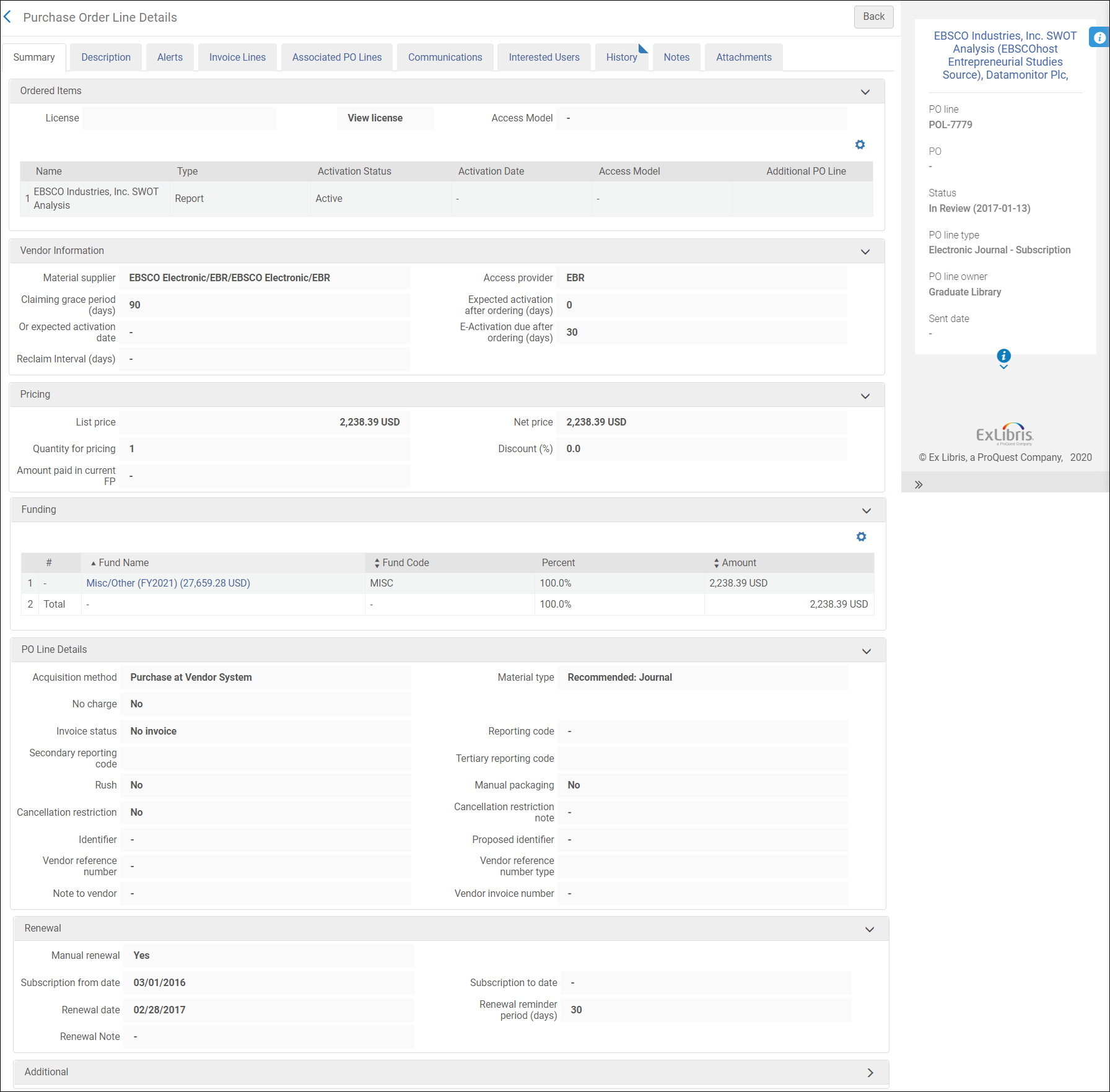
Portfolio PO Line Approver
| Field | Description | Field Location in Alma | Additional Information | Data Type | Data Size |
|---|---|---|---|---|---|
| Portfolio POL Approver Creation Date | The creation date of the record for the PO Line approver. |
Admin > Manage Users > Edit User > i icon (Right hand pane) The label in Alma is Created on. |
DATE | ||
| Portfolio POL Approver Creator | The user that created the PO Line approver's user record |
Admin > Manage Users > Edit User > i icon (Right hand pane) The label in Alma is Created by. |
VARCHAR | 255 | |
| Portfolio POL Approver Modification Date | The date of the last modification in the PO Line approver's user record. |
Admin > Manage Users > Edit User > i icon (Right hand pane) The Alma label is Last updated on. |
DATE | ||
| Portfolio POL Approver Modified By | The last person/system that modified the PO Line approver's user record. |
Admin > Manage Users > Edit User > i icon (Right hand pane) The label in Alma is Last updated by. |
VARCHAR | 255 | |
| Portfolio POL Approver Birth Date | The birth date in the PO Line approver's user record. |
Admin > Manage Users > Edit User > General Information Tab > User Information Section The label in Alma is Birth date. |
DATE | ||
| Portfolio POL Approver Campus Code | The campus code in the PO Line approver's user record. | Only the campus name is displayed in the Users UI. | The full list of campus codes and names can be found in Configuration > General > Libraries > Define Campuses. | VARCHAR | 50 |
| Portfolio POL Approver Cataloger Level | The cataloger level in the PO Line approver's user record. |
Admin > Manage Users > Edit User > General Information Tab > User Information Section The label in Alma is Cataloger level. |
For this to display in the UI, the Cataloger Permission Levels must be defined (in addition to the default level). See Cataloging Privileges for more information. | ||
| Portfolio POL Approver Disable All Login Restrictions | Indicates if the user has IP login restrictions disabled. This is recorded in the PO Line approver's user record. |
Admin > Manage Users > Edit User > General Information Tab > User Management Information Section The label in Alma is Disable all login restrictions. |
This is a checkbox. | VARCHAR | 3 |
| Portfolio POL Approver Expiry Date | The expiration date in the PO Line approver's user record. |
Admin > Manage Users > Edit User > General Information Tab > User Information Section The label in Alma is Expiration date. |
After expiration, the user cannot log in. | DATE | |
| Portfolio POL Approver External ID | The external ID in the PO line approver's user record (in the case where the record was created by an external system). | Not displayed in the UI. | For more information, see Managing User Identifiers. | VARCHAR | 255 |
| Portfolio POL Approver First Name | The first name in the PO Line approver's user record. |
Admin > Manage Users > Edit User > General Information Tab > User Information Section The label in Alma is First name. |
VARCHAR | 255 | |
| Portfolio POL Approver Full Name | The full name in the PO Line approver's user record. | Not displayed in the UI | Concatenation of the last name + first name. | VARCHAR | 511 |
| Portfolio POL Approver Gender (not in use) | |||||
| Portfolio POL Approver Has Role Other Than Patron | Indicates if the PO Line approver has a role in addition to Patron. | Does not display in the UI. |
The user roles can be viewed at Admin > Manage Users > Edit User > General Information Tab > User Roles section. This field checks whether any roles exist in addition to the Patron role added by default. |
VARCHAR | 3 |
| Portfolio POL Approver Has Role Other Than Patron and Instructor | Indicates if the PO Line approver has a role other than Patron and Instructor. | Does not display in the UI. |
The user roles can be viewed at Admin > Manage Users > Edit User > General Information Tab > User Roles section. This field checks whether there are any roles in addition to the Patron and Instructor role. |
VARCHAR | 3 |
| Portfolio POL Approver Identifier 1-2 | Two pre-configured user identifiers for the PO line approver. | Does not appear for users in the UI. | Choosing a specific identifier to be included in the user details is done in Alma (in an internal table that is not exposed to the users). Users who need assistance in defining this field do so by contacting Ex Libris Support. Note that only only one value per identifier is supported. | VARCHAR | 4000 |
| Portfolio POL Approver Is Blocked | Indicates if the PO Line approver is blocked. This is recorded in the PO Line approver's user record. | Does not display in the UI. |
For more information, see Configuring User Blocks. User blocks can be viewed in Admin > Manage Users > Edit User > Blocks Tab |
VARCHAR | 3 |
| Portfolio POL Approver Job Category | The job category in the PO Line approver's user record. |
Admin > Manage Users > Edit User > General Information Tab > User Information Section The label in Alma is Job Category. |
Can be configured in Configuration Menu > User Management > User Details > Job Categories. | VARCHAR | 255 |
| Portfolio POL Approver Job Description | The job description in the PO Line approver's user record. |
Admin > Manage Users > Edit User > General Information Tab > User Information Section The label in Alma is Job description. |
VARCHAR | 255 | |
| Portfolio POL Approver Last Activity Date | The last activity date in the PO Line approver's user record. This refers to the last date that the approver made a request or borrowed or returned an item. |
Admin > Manage Users > Edit User > General Information Tab > User Information Section The label in Alma is Last Patron Activity Date. |
This only displays if enabled at Configuration Menu > User Management > General > Record Last Patron Activity Date. For more information, see Configuring Last Patron Activity Date. |
DATE | |
| Portfolio POL Approver Last Name | The last name in the PO Line approver's user record. |
Admin > Manage Users > Edit User > General Information Tab > User Information Section The label in Alma is Last name. |
VARCHAR | 255 | |
| Portfolio POL Approver Linked From Institution Code | In a fulfillment network, this is the ID of the external institution from which the user was copied. |
Admin > Manage Users > Edit User > Right hand pane The label in Alma is Owner. |
Applies to linked user in a fulfillment network. For more information, see Managing Users > Not Local. |
VARCHAR | 255 |
| Portfolio POL Approver Linked From Institution Name | In a fulfillment network, this is the name of the external institution from which the user was copied. |
Admin > Manage Users > Edit User > General Information Tab. It displays in the Not local section. The label in Alma is Institution. |
Appears only in very specific cases. For more information, see Managing Users > Not Local. |
VARCHAR | 255 |
|
Portfolio POL Approver Linked From Other Institution
|
Indicates if the PO Line approver is linked from another institution.
|
Doesn't display in the UI
|
Applies to the linked user (the user in the secondary institution - copied from the user in the source institution). Populated only if the user created a link from their institution to another institution via a fulfillment network.
Possible values:
|
DOUBLE
|
|
|
Portfolio POL Approver Linked To Other Institution
|
Indicates if the user accessed Primo/Alma for services in another institution. Note that this does not necessarily indicate that the services were actually supplied or that a linked account was created.
|
Doesn't display in the UI.
|
Applies to the user in the source institution. Populated only if the user created a link from their institution to another institution via a fulfillment network. For more information, see Linking Users in Collaborative Networks.
Possible values:
|
VARCHAR
|
10
|
| Portfolio POL Approver Locked Out Date | |||||
|
Portfolio POL Approver Middle Name
|
The middle name in the PO Line approver's user record.
|
Admin > Manage Users > Edit User > General Information Tab > User Information Section
The label in Alma is Middle Name.
|
|
VARCHAR
|
255
|
|
Portfolio POL Approver Patron Letters Opt In
|
The letters for which the PO Line approver has opted in. This is recorded in the PO Line approver's user record.
|
Does not display in the UI.
|
The user can view the list of letters that are selected (opt-in) at Admin > Manage Users > Edit User > General Information Tab > User Information Section > Selected Patron Letters.
The label in Alma is Selected Patron Letters.
|
VARCHAR
|
2000
|
|
Portfolio POL Approver Patron Letters Opt Out
|
The letters for which the PO Line approver has opted out. This is recorded in the PO Line approver's user record.
|
Does not display in the UI.
|
The user can view the list of letters that are deselected (opt-out) at Admin > Manage Users > Edit User > General Information Tab > User Information Section > Selected Patron Letters. The label in Alma is Selected Patron Letters.
|
VARCHAR
|
2000
|
|
Portfolio POL Approver Preferred First Name
|
The preferred first name in the PO Line approver's user record.
|
Admin > Manage Users > Edit User > General Information Tab > User Information Section
The label in Alma is Preferred first name.
|
|
VARCHAR
|
255
|
|
Portfolio POL Approver Preferred Language
|
The preferred language in the PO Line approver's user record.
|
Admin > Manage Users > Edit User > General Information Tab > User Information Section
The label in Alma is Preferred language.
|
|
VARCHAR
|
4000
|
|
Portfolio POL Approver Preferred Last Name
|
The preferred last name in the PO Line approver's user record.
|
Admin > Manage Users > Edit User > General Information Tab > User Information Section
The label in Alma is Preferred last name.
|
|
VARCHAR
|
255
|
|
Portfolio POL Approver Preferred Middle Name
|
The preferred middle name in the PO Line approver's user record.
|
Admin > Manage Users > Edit User > General Information Tab > User Information Section
The label in Alma is Preferred middle name.
|
|
VARCHAR
|
255
|
|
Portfolio POL Approver Primary Identifier
|
The primary identifier in the PO Line approver's user record.
|
Admin > Manage Users > Edit User > General Information Tab > User Information Section
The label in Alma is Primary identifier.
|
|
VARCHAR
|
255
|
|
Portfolio POL Approver Purge Date
|
The purge date in the PO Line approver's user record. |
Admin > Manage Users > Edit User > General Information Tab > User Information Section The label in Alma is Purge date. |
For more information, see Purging Users.
|
DATE
|
|
| Portfolio POL Approver Resource Sharing Library Code | The code associated with the resource sharing library in the PO Line approver's user record. |
Library codes can be viewed in the library configuration screen. Configuration > General > Add or Edit Library Information > Edit a library > Right hand information window. The label in Alma is Code. |
VARCHAR | 4000 | |
|
Portfolio POL Approver Resource Sharing Library Name |
The resource sharing library name in the PO Line approver's user record. This is the name of the library associated with the PO Line approver. |
Admin > Manage Users > Edit User > General Information Tab > User Information Section > Resource Sharing Library The label in Alma is Resource Sharing Library. |
|
VARCHAR |
4000 |
| Portfolio POL Approver Statistical Category 01-10 | Statistical categories (1-10) that are recorded in the PO Line approver's user record. | Admin > Manage Users > Edit User > Statistics > Add Statistic | These fields allow you to map ten statistical categories. This allows you to filter reports based on advanced user information typically stored in the statistical category fields. For more information, see Configuring Statistical Categories for Analytics. | VARCHAR | 4000 |
| Portfolio POL Approver Status | The status in the PO Line approver's user record. |
Admin > Manage Users > Edit User > General Information Tab > User Information Section The label in Alma is Status. |
The possible values are:
For more information, see Find and Manage Users Page - Column Description table in Managing Users. |
VARCHAR | 8 |
| Portfolio POL Approver Status Date | This is the last date when the Status field of the PO Line approver's user record was modified. |
Admin > Manage Users > Edit User > General Information Tab > User Information Section The label in Alma is Status Date. |
DATE | ||
| Portfolio POL Approver User Group | The user group in the PO Line approver's user record. |
Admin > Manage Users > Edit User > General Information Tab > User Information Section The label in Alma is User group. |
User groups assigned to users can be configured by the institution. For more information, see Configuring User Groups. | ||
| Portfolio POL Approver User Group Code | The user group code associated with the user group name in the PO Line approver's user record. | For the full list of user groups codes and names see Configuration > Fulfillment > Patron Configuration > User Groups. | VARCHAR | 255 | |
| Portfolio POL Approver User Record Type | The user record type in the PO Line approver's user record. |
Admin > Manage Users > Edit User > Right hand pane The label in Alma is Record type.
|
The possible values are:
For more information, see Managing Users. |
VARCHAR | 4000 |
| Portfolio POL Approver User Title | The user title in the PO Line approver's user record. |
Admin > Manage Users > Edit User > General Information Tab > User Information Section The label in Alma is Title.
|
For more information see Configuring User Titles. | VARCHAR | 50 |
| Portfolio POL Approver User Type | The user type in the PO Line approver's user record. |
Admin > Manage Users > Edit User > Right hand pane The label in Alma is Account type. |
The possible values are:
For more information, see Managing Users. |
CHAR | 20 |
Portfolio PO Line Creation Date
| Field | Description | Additional Information | Data Type | Data Size |
|---|---|---|---|---|
| Portfolio PO Line Creation Date | The creation date of the purchase order line of the Portfolio | The date in the format DD/MM/YYYY | DATE | |
| Portfolio PO Line Creation Start Of Week | The date of the first business day of the week | The date in the format DD/MM/YYYY | DATE | |
| Portfolio PO Line Creation Week Number | The number of the week of the year | There are 52 weeks in a year | VARCHAR | 2 |
| Portfolio PO Line Creation Month Key | The month of the date in number format | e.g. February shows the number 2 in this column. This field is useful when you want to sort by month | INT | |
| Portfolio PO Line Creation Month | The month of the date in text format | The month e.g. February | VARCHAR | 20 |
| Portfolio PO Line Creation Full Month | The year and month that the purchase request was modified | The month in text format and the year e.g. Feb 25 (for February 2025) | VARCHAR | 20 |
| Portfolio PO Line Creation Quarter | The quarter in the year in which the purchase request was modified | The quarter of the date in a display format such as Q1 | VARCHAR | 20 |
| Portfolio PO Line Creation Year | The year in which the purchase request was modified | The year of the date in the format YYYY e.g. 2025 | VARCHAR | 20 |
| Portfolio PO Line Creation Fiscal Month Key | The fiscal month of the date in number format | e.g. If the fiscal year starts in June, this column shows the number 1 for June, the number 2 for July, and so on | INT | |
| Portfolio PO Line Creation Fiscal Year | The fiscal year of the date in string format | The year is presented according to the description in the mapping table Fund and Ledger Fiscal Period. For more information, see Configuring Fund and Ledger Fiscal Periods. | VARCHAR | 50 |
|
Portfolio PO Line Creation Date Filter |
Used to filter report results by date. |
Possible :
|
VARCHAR |
100 |
| Portfolio PO Line Creation Year-Month | The year and the month in which the purchase request was modified | The year and the month in the format YYYY-MM | VARCHAR | 250 |
Portfolio URL Information
| Field | Description | Additional Information |
|---|---|---|
| Portfolio Dynamic URL | A list of IF conditions that determine the service’s linking URL | |
| Portfolio Dynamic URL (override) | A URL that overrides the Portfolio Dynamic URL | |
| Portfolio Parser Parameters | The linking/access information for this portfolio | |
| Portfolio Parser Parameters (override) | The parser parameters to override the electronic collection parser parameters | |
| Portfolio Proxy Enabled | Whether a proxy is enabled | |
| Portfolio Proxy Selected | The proxy profile | |
| Portfolio Static URL | A URL that overrides the linking URL | |
| Portfolio Static URL (override) | A URL that overrides the Portfolio Static URL | |
| Portfolio URL | The URL for accessing the portfolio. | Only static URLs appears in this field, not those generated by a parser. |
| Portfolio URL Type | The type of URL that is used for this portfolio | Possible Values:
|
| Portfolio URL Type (override) | The URL type that overrides the Portfolio URL Type | Possible Values:
|
Portfolio Details for Consortia Members
- If you are working with a Network Zone and want to see information for your institution and your Network Zone, work only with the Portfolio Details for Consortia folder. If you want information for your institution only, you can work with the other measurements, but make sure to filter according to your institution. Otherwise, some measurements will be institution only-related and others will be related both to the Network Zone and to your individual institution.
- For more information on analytics when using a Network Zone, see Analytics When Using a Network Zone.
| Field | Description | Field Location in Alma | Additional Information | Data Type | Data Size |
|---|---|---|---|---|---|
| No. of Available Portfolios | Number of available portfolios | Portfolio editor > General Tab > Portfolio Availability radio button |
Lifecycle is not deleted. The availability is on the portfolio level. Availability for discovery depends on services availability. |
INT | |
| No. of Portfolios (Deleted + In Repository) | Number of all portfolios in the repository plus the number of deleted portfolios (available and not available) | INT | |||
| No. of Portfolios (Deleted) | The number of deleted portfolios in the repository | INT | |||
| No. of Portfolio (In Repository Contributed to CZ) | The number of portfolios in the repository contributed to the Community Zone | Portfolio search results, Community tab > management level > contributed | INT | ||
| No. of Portfolio (In Repository Linked to CZ) | The number of portfolios that are linked to portfolios in the Community | Portfolio search results > entries with the community icon. | Lifecycle is not deleted | INT | |
| No. of Portfolio (In Repository Not Linked to CZ) | The number of local portfolios (not linked to a portfolio in the Community) | Lifecycle is not deleted | INT | ||
| No. of Portfolios (In Repository) | The number of portfolios in the repository | Available and not available | INT | ||
| No. of Unavailable Portfolios | Number of portfolios that are not available for discovery | Portfolio editor > General tab > Portfolio availability radio button | Lifecycle is not deleted. The availability is on the portfolio level | INT | |
| No. of Unique Titles | The number of unique titles (mms ids) associated to a Portfolio | INT | |||
| Activation Date | The activation date of the portfolio | Portfolio editor – General tab - Activation date | For portfolios activated from the Community | DATE | |
| Active from date | Service active from date | Electronic Service Editor > Activation tab > Active from date field | Used together with Active until date and Service activation status | DATE | |
| Active to date | Service active to date | Electronic Service Editor > Activation tab > Active to date field | Used together with Active from date and Service activation status | DATE | |
| Availability | Indicates whether the portfolio is available or not available | Portfolio editor > General tab > Portfolio availability radio button | VARCHAR | 4000 | |
| Available For Group | The group codes for which portfolio is available | Portfolio editor > Group Settings tab | If there is no group assigned to the portfolio, the group availability is taken from the service. If no group is assigned to the service, the group availability is taken from the electronic collection | VARCHAR | 4000 |
|
Available For Group Members |
The members of the groups in the Available For Groups field. |
Configuration > Resources > Inventory Network Groups |
Multiple values are concatenated together with a semicolon (;) character. The format is displayed as follows:
|
CHAR | 4000 |
| Available for My Institution | Indicates if a portfolio is available for my institution. | Portfolio search > Available for field | VARCHAR | 3 | |
| Available For Resource Type | The resource type for which the "Available For" feature is configured. | Possible values are: Electronic Collection, Electronic Portfolio, and Service | VARCHAR | 30 | |
| Available From Date | Planned day of portfolio activation | Electronic portfolio editor > General tab > Available from date field | Used together with Available Until Date | DATE | |
| Available Until Date | Planned day of portfolio deactivation | Electronic portfolio editor > General tab > Available until date field | Used together with Available From Date | DATE | |
| Coverage Information Combined | The effective combined coverage information | Portfolio editor > Coverage tab | Multiple values are separated by a semicolon. | VARCHAR | 4000 |
| Coverage Statement | The coverage statement type. | Portfolio editor > Coverage tab | Possible values are:
For more information concerning the coverage statement, see Managing Electronic Resource Activation.
|
VARCHAR | 100 |
| Creation Date | The creation date of the portfolio | Electronic portfolio search results - Creations Date field | DATE | ||
| Creator | The user or process that created the Portfolio | VARCHAR | 255 | ||
| Dewey Number | The Dewey Number is a unique classification code assigned to a specific subject or topic category. | This information comes from the bibliographic record linked to the portfolio. The first 3 digits of the Dewey Classification. |
VARCHAR | 15 | |
| Embargo Months | Provides a moving wall of availability. States the number of embargo months | Portfolio editor > Coverage tab |
Depends on the coverage statement. |
VARCHAR | 4000 |
| Embargo Operator | The operator used for defining the embargo | Portfolio editor > Coverage tab |
Possible values:
|
VARCHAR | 4000 |
| Embargo Years | Provides a moving wall of availability. States the number of embargo years | Portfolio editor > Coverage tab | Depends on the coverage statement | VARCHAR | 4000 |
| Expected Activation Date | The expected date of the portfolio activation | Electronic portfolio editor > General tab > Expected activation date field | DATE | ||
| IEE | The intellectual entity number for electronic items. | Does not appear in the Ala UI | You can use this identifier to reconcile Analytics data, which has only MMS IDs, with the number from record IDs supplied to Primo from Alma. You can then pass the results to a reading list system in order to make relegation and capacity decisions. This number is essential for reports on Fulfillment activity where this number is the only common ID between the two systems. | VARCHAR | 255 |
| Interface Name | The interface name of the Collection the portfolio is a part of | For the Collection the portfolio is part of > Electronic Collection editor > General Tab > Interface Name field | VARCHAR | 4000 | |
| Is Free | Indicates whether the portfolio is supplied for free | Electronic service Editor - Linking tab - Service is free? field | Possible values - Yes, No | VARCHAR | 255 |
| LC Classification Code | A unique alphanumeric identifier assigned to a specific subject or topic category within the library's classification system. It is composed of letters and numbers that represent various facets of a work, such as its subject, genre, or format. For example, in the LC classification "PN1997.2.D56," the "PN" portion represents the general subject area (Performing Arts), and the "1997.2.D56" further refines the classification to a specific work or aspect within that category. |
This information comes from the bibliographic record linked to the portfolio | VARCHAR | 50 | |
| LC Classification Number | The numbers that follow the classification letters until the first period that is followed by a letter | This information comes from the bibliographic record linked to the portfolio | VATCHAR | 50 | |
| Lifecycle | Indicates whether the portfolio is deleted or not | Deleted resource appear only in Analytics (they do not appear in Alma) | Possible values: Deleted, In Repository, None | VARCHAR | 255 |
| Managed by Provider | Indicates if the electronic resource is managed by the provider | Historical possible values: Yes, No | varchar | 3 | |
| Material Type | The material type of the portfolio. | See the field location in Alma in the figure Electronic Portfolio Editor – Portfolio Information Tab, below. | |||
| Modification Date | The date information was updated in the portfolio | Electronic portfolio search results > Modification Date field | DATETIME | ||
| Modified By | User name that modified the portfolio | Electronic portfolio editor, History tab > Operator column | Modifications done by an Alma process will show System in this column | VARCHAR | 255 |
| PDA Code | The code of the Patron Driven Acquisition assigned to the portfolio | Electronic portfolio editor > Acquisitions tab > PDA field | VARCHAR | 4000 | |
| PDA Name | The name of the Patron Driven Acquisition assigned to the portfolio | Electronic portfolio editor > Acquisition tab > PDA field | VARCHAR | 4000 | |
| Perpetual Coverage Information Combined | The summary of the perpetual coverage information for portfolios with Perpetual or Current and Perpetual access type | Electronic portfolio editor > Coverage tab > Perpetual Date Information section | Used together with Portfolio Access Type | VARCHAR | 4000 |
| Perpetual Embargo Months | Provides a moving wall of availability. States the number of perpetual embargo months | Electronic portfolio editor > Coverage tab > Perpetual Embargo/Rolling Year section | The following 4 fields are used together:
|
VATCHAR | 4000 |
| Perpetual Embargo Operator | The operator of the perpetual embargo | Electronic portfolio editor > Coverage tab > Perpetual Embargo/Rolling Year section | Possible values:
|
VARCHAR | 4000 |
| Perpetual Embargo Years | Provides a moving wall of availability. States the number of perpetual embargo years | Electronic portfolio editor > Coverage tab > Perpetual Embargo/Rolling Year section | The following 4 fields are used together:
|
VARCHAR | 4000 |
| Portfolio Access Type | The access type of the portfolio | Electronic portfolio editor - General tab > Access Type field | Electronic portfolio editor, Coverage tab – "Perpetual Embargo/Rolling Year" section | VARCHAR | 4000 |
| Portfolio Additional PO Lines | The additional PO Lines of the portfolio | Electronic portfolio editor > Acquisition tab > Additional PO Lines table | VARCHAR | 4000 | |
| Portfolio Authentication Note | The authentication note of the portfolio. | Electronic portfolio editor > Notes tab – Authentication Note field | VARCHAR | 4000 | |
| Portfolio Auto Active | Not in use | Use the fields - Service portfolio auto activate, Service portfolio auto delete - in the Service folder | varchar | 255 | |
| Portfolio Contributed to CZ | Indicates if the portfolio was contributed to the Community by my institution | VARCHAR | 3 | ||
| Portfolio COUNTER Platform | The platform by which usage data is tracked for a specific electronic collection | Electronic portfolio editor - General tab > COUNTER platform field | When this field is empty in Alma, Analytics will show the platform in the COUNTER Platform derived from interface field | VARCHAR | 400 |
| Portfolio General Note | The general notes of the portfolio | [Search for portfolio] > Edit Portfolio > Notes Tab > General Notes Section | If there are multiple notes, they are concatenated with the newest note first, separated by a semi-colon. Only the first 1330 characters of each note is displayed, with a maximum length of 4000 characters for the whole field.
The portfolio must be saved for the General Note to appear in Analytics. If the portfolio is not saved, the General Note appears in Alma, but not in Analytics. |
VARCHAR | 4000 |
| Portfolio Id | The Alma ID of the portfolio | Electronic portfolio editor > Header | This is the ID in the local institution (not Network or Community ID for linked portfolios) | VARCHAR | 255 |
| Portfolio Internal Description | The internal description of the portfolio. | Electronic portfolio editor > Notes Tab > Internal Description field | VARCHAR | 4000 | |
| Portfolio Licence ID | The ID of the license linked to the portfolio | Electronic portfolio editor > Acquisition tab > License field (the code of the license) | VARCHAR | 50 | |
| Portfolio Link Id | For portfolios activated from the Community - ID of the Portfolio in the Community. | Search in Community for Electronic Portfolio > Search results > Portfolio ID field for the linked portfolio in the Community | VARCHAR | 4000 | |
| Portfolio linked to CZ | Indicates if the portfolio is linked to the Community | Search in the Institution tab for Electronic Portfolio > Search results > Community icon is displayed next to the portfolio | VARCHAR | 3 | |
| Portfolio Material Type Code | The code of the material type of the portfolio. | Electronic portfolio editor > General tab > Electronic Material Type field (the code) | VARCHAR | 4000 | |
| Portfolio Material Type Description | The name of the material type of the portfolio. | Electronic portfolio editor > General tab > Electronic Material Type field | VARCHAR | 4000 | |
| Portfolio PO Line Reference | The reference number of the PO line of the portfolio | VARCHAR | 4000 | ||
| Portfolio Public Note | The public note of the portfolio. | Electronic portfolio editor > Notes Tab > Public Note field | VARCHAR | 4000 | |
| PPS Link Id | For portfolios activated from the Community - ID of the Service in the Community | Search in Community for Electronic Portfolio > Search results > Service ID field for the linked portfolio in the Community | VARCHAR | 765 | |
| Provider Name | The interface name of the Collection the portfolio is part of | For the Collection the portfolio is part of > Electronic Collection editor > General Tab > Interface Name field | VARCHAR | 255 | |
| Purchase Model | The portfolio purchase model, populated automatically by the autoholdings job. | Electronic portfolio editor > Acquisition tab > purchase model section | The purchase model only appears in portfolios belonging to ProQuest Ebook Central and JSTOR autoholdings collections. | VARCHAR | 4000 |
| Public Access Model | The patron facing access model, which is presented to the patron in the discovery system. | Electronic portfolio editor > Acquisition tab > Public Access Model field | For more information on Access Models in Alma, see Managing Access Models. | VARCHAR | 4000 |
| Service Type | The type of the service the portfolio belongs to | Electronic Service Editor > Service Description tab > Service Type field | Possible values :
|
VARCHAR | 4000 |
| Field | Description | Additional Information |
|---|---|---|
| Portfolio Dynamic URL | A list of IF conditions that determine the service’s linking URL | |
| Portfolio Dynamic URL (override) | A URL that overrides the Portfolio Dynamic URL | |
| Portfolio Parser Parameters | The linking/access information for this portfolio | |
| Portfolio Parser Parameters (override) | The parser parameters to override the electronic collection parser parameters | |
| Portfolio Proxy Enabled | Whether a proxy is enabled | |
| Portfolio Proxy Selected | The proxy profile | |
| Portfolio Static URL | A URL that overrides the linking URL | |
| Portfolio Static URL (override) | A URL that overrides the Portfolio Static URL | |
| Portfolio URL | The URL for accessing the portfolio. | Only static URLs appear in this field, not those generated by a parser. |
| Portfolio URL Type | The type of URL that is used for this portfolio | Possible Values:
|
| Portfolio URL Type (override) | The URL type that overrides the Portfolio URL Type | Possible Values:
|
| Field | Note | Mapping from MARC21 | Mapping from UNIMARC | Mapping from Dublin Core | Data Type | Data Size |
|---|---|---|---|---|---|---|
| Author | The term Author refers to the individual or group of individuals responsible for creating or producing the work being documented. The author is the primary contributor to the work, and their name is typically listed prominently in the bibliographic record to identify the originator of the content. Depending on the type of work and the citation style, the author's name may be followed by additional information such as their credentials, institutional affiliation, and the date of publication. | 100, 110, 111 | 700, 701, 710, 711 | Currently empty, planned to come from dc:creator, dcterms:creators | VARCHAR | 4000 |
| ISBN Valid | A unique identifier for books and related materials. To be considered valid, an ISBN must adhere to the established ISBN standards and conventions. Field in analytics does not include cancelled and invalid ISBNs |
MARC 020 a | Not relevant for Dublin Core | VARCHAR | 255 | |
| ISBN Valid (Normalized) | ||||||
| ISSN Valid | A unique identifier for serial publications. To be considered valid for bibliographic records, an ISSN must adhere to the established standards and conventions for ISSN formatting and structure. Field in analytics does not include cancelled and invalid ISBNs. |
MARC 022 a | Not relevant for Dublin Core | VARCHAR | 255 | |
| ISSN Valid (Normalized) | ||||||
| MMS Id | The MMS ID of the inventory item (physical, electronic, or digital). | VARCHAR | 255 | |||
| Network Number | A Network Number typically refers to a unique identifier assigned to a bibliographic record within a library network or consortium. | 035 a z | 053 a z | dc:identifier, dcterms:identifier | VARCHAR | 4000 |
| Title | The Title refers to the name or title of a printed or published resource. The title is one of the most critical elements of bibliographic cataloging because it helps users identify and distinguish one resource from another. |
245 a,b 249 a,b,c,v |
200 a,c,d,e,h,i | dc:title | VARCHAR | 4000 |
| Title (Normalized) |
The normalized Title. This field is useful when you want to compare titles that may have been catalogued differently. This field is built in the following manner:
|
245 a,b,n,p 249 a,b,c,v |
200 a,c,d,e,h,i | dc:title | 4000 | |
| Title Author Combined and Normalized | 100 characters of the normalized title and the first four letters of the author in lowercase letters, with spaces removed. | See Author and Title Fields | See Author and Title Fields | See Author and Title Fields | VARCHAR | 110 |
| Field | Note | Mapping from MARC21 | Mapping from UNIMARC | Mapping from Dublin Core | Data Type | Data Size |
|---|---|---|---|---|---|---|
|
Action Note
|
A note that contains information about the retention and the retention reason of the bibliographic record.
|
583
|
Not relevant
|
Not relevant
|
VARCHAR
|
4000
|
|
Active Course Code
|
Active Course Code is the code of the course in the Alma course reserves. For more information see here.
|
|
|
|
VARCHAR
|
4000
|
|
Active Course Name
|
Active Course Name is the name of the course in the Alma course reserves. For more information see here.
|
|
|
|
VARCHAR
|
4000
|
|
Author
|
The term Author refers to the individual or group of individuals responsible for creating or producing the work being documented. The author is the primary contributor to the work, and their name is typically listed prominently in the bibliographic record to identify the originator of the content. Depending on the type of work and the citation style, the author's name may be followed by additional information such as their credentials, institutional affiliation, and the date of publication.
|
100,110,111
|
700,701,710,711
|
Currently empty, planned to come from dc:creator, dcterms:creators
|
VARCHAR
|
4000
|
|
Author (Contributor)
|
The Author (Contributor) role refers to the specific role or function played by an individual or group in the creation or production of a work. This role is important for cataloging and documenting the contributions of different individuals or entities to a particular resource. The Author (Contributor) role is a way to categorize and describe the responsibilities of contributors beyond just being the primary author.
|
711 a,c-e,i,j,n,q,u and its 880
700 a-e,j,q,u and its 880
710 a-e,i,n,u and its 880
|
700 a-d,f,p
701 a-d,f,p
710 a-h,p
711 a-h,p
720 a,f"
721 a,f
702 a-d,f,g
712 a-h,p
722 a,f
|
Currently empty, planned to come from dc:contributor, dcterms:contributor
|
VARCHAR
|
4000
|
|
Begin Publication Date
|
The Begin Publication Date refers to the earliest date associated with the publication or release of a particular work. It is a critical piece of information that helps users understand when the work was first made available to the public. The publication date can be essential for citing the work correctly, tracking its historical context, and assessing its relevance to specific time periods.
|
008 pos. 07-10
|
100.Date1
|
Not relevant for Dublin Core
|
VARCHAR
|
255
|
|
BIB 008 MARC
|
The contents of the MARC 008 bibliographic field. The BIB 008 field in a MARC bibliographic record is a fixed-length data element used to provide additional information about the bibliographic record itself. It contains various control information that helps catalogers and library systems manage and process the record.
|
008
|
|
Not relevant for Dublin Core
|
VARCHAR
|
50
|
|
BIB LDR MARC
|
The BIB LDR refers to the Leader field (LDR) within the bibliographic record. The Leader is a fixed-length data element that provides control information about the bibliographic record itself. It is a critical component of MARC records, and each position within the Leader serves a specific purpose. The Leader field is typically 24 characters in length. The Leader field is used to convey fundamental information about the structure, organization, and characteristics of the bibliographic record.
|
LDR
|
|
Not relevant for Dublin Core
|
VARCHAR
|
50
|
|
Bibliographic Acquisition Accession Number Note
|
The identification code assigned to materials acquired in a single and separate transfer of custody.
|
541 e
|
|
Not relevant for Dublin Core
|
VARCHAR
|
255
|
|
Bibliographic ID
|
A Bibliographic ID is a unique identifier assigned to a specific bibliographic entry or resource. It serves as a way to distinguish and locate a particular work within a library's catalog or database. The purpose of a bibliographic ID is to facilitate efficient retrieval and management of bibliographic records and to ensure that each record is distinct.
|
010 excluding numeric subfields
|
020 a
|
dcterms:identifier dcterms:ISBN, dcterms:identifier dcterms:ISSN
|
VARCHAR
|
255
|
|
Bibliographic Level
|
The Bibliographic Level is a classification that describes the scope and content of a bibliographic record. It helps users understand the nature of the resource being described in the record. The bibliographic level is often indicated using a one-letter code or abbreviation. Common bibliographic levels include: Monograph (m), Serial (s), Collection (c), Integration (i), Monographic Series (a), and so forth.
|
Position 7 of the LDR field of the bibliographic record
|
Position 7 of the LDR field of the bibliographic record
|
Not relevant for Dublin Core
|
VARCHAR
|
255
|
|
Bibliographic Rank
|
Alma assesses the comprehensiveness and depth of MARC 21 bibliographic entries, considering various elements such as identifiers, names, subjects, informative LDR and 008 fields, publication details, among others. This evaluation is reflected in the Bibliographic Rank, designed as a useful aid for libraries in pinpointing records requiring further scrutiny. For more information, see here.
|
|
|
|
INT
|
|
|
Bibliographic Source of Acquisition Note
|
The name of the people or organization that is the source of the material.
|
541 a
|
|
Not relevant for Dublin Core
|
VARCHAR
|
255
|
|
Brief Level
|
Brief Level refers to the level of detail provided in a bibliographic description. It indicates how much information is included in the bibliographic record, with brief descriptions containing less detailed information compared to full or comprehensive descriptions. In Alma, ten levels of brief records can be defined from 01 through 10, where 01 represents the most brief record and 10 represents a full record. For more information see here.
|
|
|
|
VARCHAR
|
2
|
|
Category of Material
|
The Category of Material is a classification or designation that describes the format or physical nature of the material being cataloged. It helps users and catalogers understand the medium in which a resource is presented.
|
Position 0 of the 007 field
|
200 b
|
Not relevant for Dublin Core
|
VARCHAR
|
255
|
|
Chinese Classification
|
The Chinese Classification of the bibliographic record. For more information, see here.
|
VARCHAR
|
50
|
|||
|
Collection ID
|
The ID of the collection or collections the bibliographic record is associated with as defined at Resources > Manage Inventory > Manage Collections.
Relevant only for bibliographic records that are part of a collection.
One MMS_ID can be attributed to multiple titles collections, therefore a delimited list of collections are defined for the MMS.
|
|
|
|
VARCHAR
|
4000
|
|
Collection Name
|
The Name of the collection or collections the bibliographic record is associated with as defined at Resources > Manage Inventory > Manage Collections.
Relevant only for bibliographic records that are part of a collection.
|
|
|
|
VARCHAR
|
4000
|
|
Create Date
|
The timestamp of the bibliographic record creation date.
|
|
|
|
DATETIME
|
|
|
Create Date (Calendar)
|
The creation date without a timestamp. This date format is useful when filtering the report by date.
|
|
|
|
DATE
|
|
|
Created with AI
|
Indicates that the bibliographic record of the resource was created by the AI Assistant.
|
|
|
|
VARCHAR
|
4
|
|
Creation Date (Calendar)
|
The creation date without a timestamp.
|
|
|
|
DATE
|
|
|
Creator
|
The name of the user that created the record
|
|
|
|
VARCHAR
|
255
|
|
DC Coverage
|
DC Coverage refers to an element used to provide information about the spatial or temporal topic of the resource, spatial applicability of the resource, or jurisdiction under which the resource is relevant.
|
Relevant only for Dublin Core
|
Relevant only for Dublin Core
|
dc:coverage
dcterms:coverage dcterms:spatial dcterms:temporal |
VARCHAR
|
|
|
DC Description
|
DC Description refers to Dublin Core (DC) metadata elements used to describe resources in a standardized way, particularly in digital libraries and online cataloging systems.
|
Relevant only for Dublin Core
|
Relevant only for Dublin Core
|
dc:description
dcterms:description dcterms:abstract |
VARCHAR
|
4000
|
|
DC Format
|
The file format, physical medium, or dimensions of the resource. The information in this field is entered as free text.
|
Relevant only for Dublin Core
|
Relevant only for Dublin Core
|
dc:format
dcterms:format |
VARCHAR
|
256
|
|
DC License
|
DC License is a Dublin Core element used to specify the terms and conditions associated with the use of a resource. It provides information about the licensing or copyright status of a digital or physical resource, allowing users to understand how they can legally use, share, or redistribute the resource. The DC License element is particularly important in digital libraries, repositories, and online cataloging systems where access to digital content is provided.
|
Relevant only for Dublin Core
|
Relevant only for Dublin Core
|
It will be populated by dcterms:license
|
VARCHAR
|
4000
|
|
DC Provenance
|
DC Provenance refers to an element used to provide a statement of any changes in ownership and custody of the resource since its creation that are significant for its authenticity, integrity, and interpretation
|
Relevant only for Dublin Core
|
Relevant only for Dublin Core
|
dcterms:provenance
|
VARCHAR
|
4000
|
|
DC Relation
|
DC Relation refers to an element used to provide information about a related resource to the described resource.
|
Relevant only for Dublin Core
|
Relevant only for Dublin Core
|
dc:relation
dcterms:relation dcterms:isVersionOf dcterms:hasVersion dcterms:isReplacedBy dcterms:replaces dcterms:isRequiredBy dcterms:requires dcterms:isPartOf dcterms:hasPart dcterms:isReferencedBy dcterms:references dcterms:isFormatOf dcterms:hasFormat dcterms:conformsTo |
VARCHAR
|
4000
|
|
DC Rights
|
DC Rights refers to an element used to provide information about the intellectual property rights or copyright status of a resource. This element helps users understand the legal rights and permissions associated with the resource and whether there are any restrictions on its use.
|
Relevant only for Dublin Core
|
Relevant only for Dublin Core
|
dc:rights and dcterms:rights
|
VARCHAR
|
4000
|
|
DC Source
|
DC Source refers to an element used to provide information about a related resource from which the described resource is derived.
|
Relevant only for Dublin Core
|
Relevant only for Dublin Core
|
dc:source
dcterms:source |
VARCHAR
|
4000
|
|
DC Type
|
DC Type refers to an element used to provide information about the nature or genre of the resource.
|
Relevant only for Dublin Core
|
Relevant only for Dublin Core
|
dc:type
dcterms:type |
VARCHAR
|
255
|
|
Dewey Classification
|
The Dewey classification of the record.
|
|
|
|
VARCHAR
|
255
|
|
Dewey Classification Top Line
|
The first 3 digits of the Dewey Classification
|
|
|
|
VARCHAR
|
15
|
|
Earliest Possible Publication Year
|
A normalized version of the publication date to the earliest possible value when the exact date is not known. It is taken from MARC21 008 pos. 07-10 or UNIMARC 100.Date1.
This field is normalized with all non-numeric characters converted to 0s. Values below 1500 and over 6000 will have the value 1.
|
|
|
|
VARCHAR
|
255
|
|
Edition
|
Edition refers to a specific version or variation of a publication. The edition information provides details about changes, updates, or variations that have occurred since the original publication. Including the edition helps users and researchers identify the specific version of a book or other resource they are looking for.
|
250 subfields a,b
|
205 a,b,f,g
|
dcterms:isVersionOf
|
VARCHAR
|
255
|
|
Edition Simplified (Combined)
|
The values of the Edition Simplified (Num) and Edition Simplified (Text) fields.
|
|
|
|
VARCHAR
|
255
|
|
Edition Simplified (Num)
|
The number of the edition found in the MARC 250 field, simplified.
|
|
|
|
VARCHAR
|
255
|
|
Edition Simplified (Text)
|
The text of the edition found in the MARC 250 field, simplified.
|
|
|
|
VARCHAR
|
255
|
|
Electronic location and access
|
The location and access URl for the electronic resource.
|
856 all subfields
|
|
Not relevant for Dublin Core
|
VARCHAR
|
4000
|
|
End Publication Date
|
The End Publication Date is the second date available in the 008 field, and it is used to indicate "Date 2." It is described as "A date specified by the code in 008/06 (Type of date/Publication status)."
|
008 pos. 11-14
|
100.Date2
|
Not relevant for Dublin Core
|
VARCHAR
|
255
|
|
Enriched with AI
|
Indicates that the bibliographic record of the resource was enriched by the AI Assistant.
|
|
|
|
VARCHAR
|
4
|
|
Export to National Libraries
|
This field appears only when the Customer Parameter national_catalog is defined. The field name is as defined in the parameter. Possible values:
|
|
|
|
VARCHAR
|
255
|
|
Export to WorldCat
|
Indicates that publication status is applied to a record.
Possible values:
|
|
|
|
VARCHAR
|
255
|
|
Form of Item
|
The Form of Item refers to a specific code or indicator that describes the physical format or medium of the resource being cataloged. This information helps library users understand the physical characteristics of the item and whether it is in a print or non-print format.
|
008 pos. 29 (Maps and Visual Material) or 23 (other material configurations)
|
|
Not relevant for Dublin Core
|
VARCHAR
|
1
|
|
General Note
|
A General Note is a field used to provide additional information or commentary about the resource being described. General notes can include various types of information that may not fit into specific structured fields within the bibliographic record. These notes are often used to convey contextual details, historical significance, or other relevant information about the resource.
|
500 a, 5
|
|
Not relevant for Dublin Core
|
VARCHAR
|
4000
|
|
Government Publication
|
A Government Publication is a term used to identify materials that are published or produced by government entities at various levels of government, including federal, state, local, and international governments.
For more information regarding the values of MARC 008 Pos. 28, see here.
|
008 pos. 28
According to MARC21 Format for Bibliographic Data, 008 pos. 28 is Government Publication for the following material types: Books, Computer Files, Continuing Resources, Maps, and Visual Materials.
For Music 008 pos. 28 is Accompanying matter. For Mixed material 008 pos. 28 is Undefined.
Consequently, when using this field, you may want to filter out records with Material Type = Music and Material Type = Mixed material.
|
|
Not relevant for Dublin Core
|
VARCHAR
|
1
|
|
Has Local Extensions
|
Indicates if the Community Zone-linked record has local extensions (Y/N).
|
|
|
|
VARCHAR
|
3
|
|
Has W1
|
Indicates that the 060 field of the bibliographic record has a value containing the W1 code. This indicates that the item is a journal. A second value in the 060 field is the subject classification code that appears for the NLM Classification Code analytics field.
|
|
|
|
|
|
|
Has Work
|
Indicates if the instance has related work.
|
|
Values are Yes, No and Null. After re-indexing, Null no loner appears.
|
|
|
|
|
Instance URI
|
The Uniform Resource Identifier (URI) that identifies the instance.
|
|
|
|
|
|
|
ISBN
|
ISBN is a unique identifier for books, and it is used to facilitate the identification and cataloging of books and related materials.
Field in analytics includes also cancelled and invalid ISBNs. |
020 a, z 776 z
|
010 a
|
dcterms:identifier dcterms:ISBN
|
VARCHAR
|
255
|
|
ISBN (Normalized)
|
An ISBN that has been formatted or standardized according to established rules or conventions.
|
|
|
|
VARCHAR
|
255
|
|
ISBN Valid
|
A unique identifier for books and related materials. To be considered valid, an ISBN must adhere to the established ISBN standards and conventions.
Field in analytics does not include cancelled and invalid ISBNs. |
020 a
|
|
Not relevant for Dublin Core
|
VARCHAR
|
255
|
|
ISSN
|
An ISSN (International Standard Serial Number) is a unique identifier for serial publications, which include periodicals, journals, magazines, and other recurring publications.
Field in analytics includes also cancelled and invalid ISSNs. |
022 l,a 776 x (for non-physical records)
|
011 a f
|
dcterms:identifier dcterms:ISSN
|
VARCHAR
|
255
|
|
ISSN (Normalized)
|
An ISSN that has been formatted or standardized according to established rules or conventions.
|
|
|
|
VARCHAR
|
255
|
|
ISSN Valid
|
A unique identifier for serial publications. To be considered valid for bibliographic records, an ISSN must adhere to the established standards and conventions for ISSN formatting and structure.
Field in analytics does not include cancelled and invalid ISBNs. |
022 a
|
|
Not relevant for Dublin Core
|
VARCHAR
|
255
|
|
Language Code
|
Language codes are used to indicate the language(s) in which a particular resource is written or presented. Language codes are typically standardized to ensure consistency in cataloging and bibliographic records.
|
008 pos. 35-37
|
101 a
|
Currently comes from dc:language. Planned to come from dc:language and dcterms:language
|
VARCHAR
|
255
|
|
Language Description
|
The language name of the title, based on the Language Code field on the record.
|
|
|
|
VARCHAR
|
255
|
|
LC Classification Top Line
|
The combined LC code and classification call numbers until the first period which is followed by a letter. If there are no periods then the entire string is taken until there is a space. The length is limited to 50 characters.
For example:
The LC Classification Top Line will contain one value. For MARC21, if the bibliographic record has:
Recent data may not be available if it has not yet been received from CONSER.
|
|
|
|
VARCHAR
|
50
|
|
Lifecycle
|
The Lifecycle of the bibliographic record. Possible values are Deleted and In Repository. This allows you to filter reports and to remove Deleted records.
|
|
|
|
VARCHAR
|
50
|
|
Link ID
|
The link ID, if the record is linked to the Community Zone or Network Zone. For more information concerning this field and the next two, see Understanding the fields Link ID Linked to CZ and Linked to NZ in the Bibliographic Details folder.
|
|
|
|
VARCHAR
|
50
|
|
Linked to CZ
|
Indicates if the record is linked to the Community Zone.
|
|
|
|
VARCHAR
|
3
|
|
Linked to NZ
|
Indicates if the record is linked to the Network Zone.
|
|
|
|
VARCHAR
|
3
|
|
Local Note
|
A Local Note is a type of note that provides specific information or instructions related to a library's unique policies, holdings, or services. Local notes are typically used to convey information that is specific to the individual library or cataloging institution and may not be relevant to libraries elsewhere. For Borrowing Requests, the Source is stored in this field.
|
590 a, 5
|
|
Not Relevant for Dublin Core
|
VARCHAR
|
4000
|
|
Managed by Provider
|
Indicates if the electronic resource is managed by the provider. Possible values are Yes or No.
Relevant only for electronic resources.
|
|
|
|
VARCHAR
|
3
|
|
Material Type
|
See the table, Fields that Identify the Bibliographic Material Type, in the Material Types in Search Results section for a description of material type.
|
MARC control LDR Material Type
|
|
Planned to be empty. Currently comes from dc:type
This field holds a fixed set of values designated for all record formats. For DC, the mapping is controlled from Configuration Resources > Cataloging > DCMI Material Type Mapping page. Any dc:type value not defined on this pages gets by default the value Computer File. For more information, see DCMI Material Type Mapping.
|
VARCHAR
|
4000
|
|
Material Type Code
|
Code of the material type described above (in Material Type).
|
MARC control LDR Material Type
|
|
Not relevant for Dublin Core
|
VARCHAR
|
255
|
|
MMS ID
|
The MMS ID of the inventory item (physical, electronic, or digital).
|
VARCHAR
|
255
|
|||
|
Modification Date
|
The latest (most recent) timestamp of the bibliographic record modification date.
|
DATETIME
|
|
|||
|
Modification Date (Calendar)
|
The latest (most recent) modification date without a timestamp. This date format is useful when filtering the report by date.
|
DATE
|
|
|||
|
Modified By
|
The name of the user that modified the record.
|
VARCHAR
|
255
|
|||
|
National Agricultural Library Call Number
|
The call number used by the American National Agricultural Library.
|
070 a
|
|
Not relevant for Dublin Core
|
|
|
|
Network ID
|
This field is used by institutions implementing a Network Zone. It is the same as the MMS ID of the bibliographic record in the Network Zone and can be used to create reports that show the MMS ID in the member institution (using the existing MMS ID), as well as the corresponding MMS ID in the Network Zone.
|
VARCHAR
|
50
|
|||
|
Network Number
|
A Network Number typically refers to a unique identifier assigned to a bibliographic record within a library network or consortium.
|
035 a z
|
053 a z
|
dc:identifier , dcterms:identifier
|
VARCHAR
|
4000
|
|
OCLC Control Number (019)
|
The OCLC Control Number (019 field) is used by OCLC to record and index OCLC control numbers of records that have been deleted or will be processed as duplicate records.
For more information on the OCLC Control Number 019 and its subfields, see here.
Leading zeros are not displayed.
|
019 a
When the subfield begins with one of the following prefixes:
|
|
Not relevant for Dublin Core
|
VARCHAR
|
4000
|
|
OCLC Control Number (035a)
|
Subfield "a" in the 035 field is used to record the main OCLC Control Numbers.
For more information on the OCLC Control Number 035 and its subfields, see here.
Leading zeros are not displayed.
|
035 a
When the subfield begins with one of the following prefixes:
|
035 a
|
Not relevant for Dublin Core
|
VARCHAR
|
4000
|
|
OCLC Control Number (035a+z)
|
The OCLC Control Number can include both the main OCLC Control Number in subfield "a" and any related or canceled OCLC Control Numbers in subfield "z." This practice is useful for indicating changes or updates to cataloging records and for maintaining a historical record of previous control numbers associated with the same resource.
For more information on the OCLC Control Number 035 and its subfields, see here.
Leading zeros are not displayed.
|
035a+z
When the subfield begins with one of the following prefixes:
|
035a+z
|
Not relevant for Dublin Core
|
VARCHAR
|
4000
|
|
OCLC Control Number (035z)
|
Subfield "z" in the 035 field is used to record related or canceled OCLC Control Numbers, providing a historical record of control numbers associated with a specific resource.
For more information on the OCLC Control Number 035 and its subfields, see here.
Leading zeros are not displayed.
|
035 z
When the subfield begins with one of the following prefixes:
|
035 z
|
Not relevant for Dublin Core
|
VARCHAR
|
4000
|
|
Open Access
|
Open Access (OA) refers to a publishing model that provides unrestricted and free access to scholarly and research publications on the Internet. It signifies that the full text or content of the publication is freely available to anyone, without requiring payment or subscription. Values are Yes and No.
|
Based on 506 f 506 2
|
|
Not relevant for Dublin Core
|
VARCHAR
|
4
|
|
Original Cataloging Agency
|
The MARC code or the name of the organization that created the original record.
|
040 a
|
081 b
|
Not relevant for Dublin Core
|
VARCHAR
|
255
|
|
Originating System
|
The system where the bibliographic record originated.
If Unknown is displayed in this field, see the following document: How to set up Alma so that the “Originating System” in Analytics will be properly populated.
|
|
|
|
VARCHAR
|
4000
|
|
Originating System ID
|
The ID of the record in the originating system where the bibliographic record originated.
|
VARCHAR
|
255
|
|||
|
Originating System Version
|
The Originating System Version is the metadata record field that enables uploading records in the correct sequence by preventing the update of an existing record with an older version of the same record. This prevents older bibliographic records from overlaying or merging with newer records. The Originating System Version field is created from the record’s 005 control field the first time the record is imported. For information regarding normalizing the Originating System Version field, see the Update originating system information process and the procedure To configure normalization for managing the Originating System and Originating System Version information.
|
VARCHAR
|
16
|
|||
|
Peer Reviewed
|
Indicates if the article was peer reviewed.
|
VARCHAR
|
4
|
|||
|
Place Code
|
The Place Code is a code that represents the place of publication for a printed or published resource.
|
008 pos. 15-17
|
102$$a
|
dcterms:spatial
|
VARCHAR
|
50
|
|
Place of Publication - City
|
The city where a printed or published resource was published or produced.
|
Derived from the place code in 008 pos. 15-17.
If the value of this field in the bibliographic record does not exist in the official list of place codes, the value for this field in Alma Analytics will be "No place, unknown, or undetermined".
|
Not relevant for UNIMARC
|
Not relevant for Dublin Core
|
VARCHAR
|
200
|
|
Place of Publication - Country
|
The country where a printed or published resource was published or produced.
|
Derived from the place code in 008 pos. 15-17.
For a list of country codes, see:
If the value of this field in the bibliographic record does not exist in the official list of place codes, the value for this field in Alma Analytics will be "No place, unknown, or undetermined".
|
Derived from the place code 102$$a.
For a list of country codes, see:
If the value of this field in the bibliographic record does not exist in the official list of place codes, the value for this field in Alma Analytics will be "No place, unknown, or undetermined". If there are multiple place codes in this field, only the first value is displayed.
|
Not relevant for Dublin Core. Value No place, unknown, or undetermined is displayed)
|
VARCHAR
|
200
|
|
Place of Publication - State
|
The state where a printed or published resource was published or produced.
|
Derived from the place code in 008 pos. 15-17.
If the value of this field in the bibliographic record does not exist in the official list of place codes, the value for this field in Alma Analytics will be "No place, unknown, or undetermined".
|
Not relevant for UNIMARC
|
Not relevant for Dublin Core
|
VARCHAR
|
200
|
|
Preservation Status
|
The preservation status of the title in Rosetta Plus/Pro.
Possible values:
|
|
|
|
VARCHAR
|
255
|
|
Provider Name
|
The name of the provider who manages the bibliographic record that is included in the CZ (Community Zone). Relevant only for electronic titles that are linked to the CZ and when an external provider manages the CZ record.
|
|
|
|
VARCHAR
|
255
|
|
Publication Date
|
The Publication Date refers to the date when a printed or published resource was officially issued, published, or made publicly available.
|
The publication date is determined as follows:
|
The publication date is determined as follows:
|
dc:date, dcterms:date, dcterms:created, dcterms:available, dctrems:issued, dcterms:dateAccepted
|
VARCHAR
|
255
|
|
Publication Place
|
The Publication Place refers to the city or location where a printed or published resource was officially published, issued, or produced.
|
260 a. When 260 a is empty, it is taken from 264 a
|
210 a 214 a
|
Not relevant for Dublin Core (use Place Code)
|
VARCHAR
|
255
|
|
Publisher
|
The Publisher refers to the entity or organization responsible for producing, printing, and distributing a printed or published resource.
|
260 b
264 b
|
210 c
214 c
|
dcterms:publisher, dc:publisher
|
VARCHAR
|
255
|
|
Record Format
|
The format of the bibliographic record. Examples:
|
|
|
|
VARCHAR
|
4000
|
|
Resource Type
|
Constructed based on existing bibliographic fields such as the LDR and 008. For more information, see The Resource Type Field.
|
|
|
Not relevant for Dublin Core
|
VARCHAR
|
4000
|
|
Series
|
A Series refers to a related group of publications or resources that share common characteristics, themes, or subjects and are published under a common title or series name.
|
800 t,v
810 t,v
811 t,v
830 a,n,p,v
|
410 a,h,i,o,t,x
|
dcterms:isPartOf
|
VARCHAR
|
4000
|
|
Series Statement
|
A Series Statement refers to the title or name of a series to which a printed or published resource belongs.
|
490 a,v x
|
|
Not relevant for Dublin Core
|
VARCHAR
|
4000
|
|
Source of Description Note
|
A note used by the Community Zone with details on AI enrichment.
|
588 $$a
|
Not relevant
|
Not relevant for Dublin Core
|
VARCHAR
|
1000
|
|
Subjects
|
Subjects refer to the specific topics, themes, or subjects covered by a printed or published resource.
|
6XX excluding 69X, 630, 689
|
600 a,b 602 603-8 610 616 617
|
dc:subject dcterms:LCSH,MESH,DDC,UDC,LCC
|
VARCHAR
|
4000
|
|
Subjects (Names)
|
Subjects (Names) refers to the specific individuals, organizations, or entities associated with a printed or published resource.
|
600 a,b,c,d,e,l,t.u
610 a,b,c,d,e,l,n,t,u
611 a,b,c,d,e,j,l,n,q,t,u
|
|
Not relevant for Dublin Core
|
VARCHAR
|
4000
|
|
Suppressed From Discovery
|
Indicates whether the record is suppressed from external discovery systems.
|
|
|
|
VARCHAR
|
3
|
|
Title
|
The Title refers to the name or title of a printed or published resource. The title is one of the most critical elements of bibliographic cataloging because it helps users identify and distinguish one resource from another.
|
245 a,b
249 a,b,c,v
|
200 a,c,d,e,h,i
|
dc:title
|
VARCHAR
|
4000
|
|
Title (Complete)
|
The information from MARC field 245, subfields $a, $n, $p, $h, $b, $c, $f, $g, $k, $s.
|
245 a,n,p,h,b,c,f,g,k,s
|
200 a-i
|
dc:title, dcterms:title, dc:alternative
|
VARCHAR
|
4000
|
|
Title (Filing)
|
The title with common words such as "The" and "An" removed to help with sorting the title alphabetically.
Any text between double arrows (<<>>) is removed.
For a video describing the use of this field, see Sort Analytics Reports by Filing Title - Ignoring "The", "A", and "An".
|
240 a,c,p
245 a,c,p
|
200 a,e
500
|
Not relevant for Dublin Core
|
VARCHAR
|
4000
|
|
Title (Normalized)
|
The normalized Title. This field is useful when you want to compare titles that may have been catalogued differently. This field is built in the following manner:
Alma does the following to the 245 field (except subfields c,h,6 and 8) in the following order:
|
245 a,b,n,p
249 a,b,c,v
|
200 a,c,d,e,h,i
|
dc:title
|
|
4000
|
|
Title Author Combined and Normalized
|
100 characters of the normalized title and the first four letters of the author in lowercase letters, with spaces removed.
|
See Author and Title Fields
|
See Author and Title Fields
|
See Author and Title Fields
|
VARCHAR
|
110
|
|
Title Committed to Retain
|
Title Committed to Retain refers to a commitment made by a library to retain and preserve a specific resource. This commitment is important for ensuring the long-term availability and accessibility of important scholarly or historical materials.
Indicates (Yes/No) if the bibliographic record is marked as Committed to Retain.
|
Configurable from Configuration > Resources > Collection Retention > Bibliographic Collection Retention Definition. For more information, see Bibliographic Record Retention.
|
|
Not relevant for Dublin Core
|
VARCHAR
|
4
|
|
Type of date
|
The Type of Date refers to the nature or purpose of a date included in the record. It specifies what the date represents or signifies within the bibliographic context. The type of date can provide important information to users and catalogers about the significance of the date included in the record.
|
008 pos. 6
For more information on the options available for Type of date in 008 pos. 6, see here.
|
100 pos 8
|
Not relevant for Dublin Core
|
VARCHAR
|
255
|
|
Uniform Resource Identifier
|
A Uniform Resource Identifier (URI) is a string of characters used to identify a resource on the internet or within a particular system. URIs are often used to provide direct links or references to online resources related to the bibliographic entry, such as a digital version of a book, an electronic journal article, or additional related materials.
|
856 u
|
856 u
|
dc:identifier (dcterms:URI) ,dcterms:identifier (dcterms:URI)
|
VARCHAR
|
4000
|
|
Uniform Resource Identifier Field Exists
|
Indicates whether a Uniform Resource Identifier (URI) Exists for the bibliographic record. Values are 0 or 1, where "0" means No and "1" means Yes.
Indicates if 856 subfield u contains data.
|
|
|
Not relevant for Dublin Core
|
INT
|
|
|
Uniform Title
|
A Uniform Title is a standardized title used to represent a specific work, especially when that work has been published under multiple titles or in various editions, languages, or formats.
|
240 130
|
500
The Uniform Title is only mapped if the first indicator = 1.
If the first indicator for UNIMARC 500 is empty or 0, the value is not mapped to Analytics.
|
Not relevant for Dublin Core
|
VARCHAR
|
4000
|
|
Work MMSID
|
The MMS ID for the work of the instance.
Mapping from BIBFRAME:
<bf:AdminMetadata>
<bf:identifiedBy>
<bf:Local>
<rdf:value>Work MMS
ID</rdf:value>
</bf:Local>
<bf:source>ALMA</bf:source>
|
|
|
|
|
|
|
Work URI
|
The Uniform Resource Identifier (URI) that identifies the work of the instance.
Mapping from BIBFRAME:
<bf:instanceOf rdf:resource=
|
|
|
|
|
|
| Field | Description | Field Location in Alma | Additional Information | Data Type | Data Size |
|---|---|---|---|---|---|
| No. of Electronic Collections (Deleted + In Repository) | The number of electronic collections, both deleted and in the repository | This is a measure. Does not appear in Alma | With and without portfolios associated to them | NUMERIC | |
| No. of Electronic Collections (Deleted) | The number of deleted electronic collections | This is a measure. Does not appear in Alma | With and without portfolios associated to them | NUMERIC | |
| No. of Electronic Collections (In Repository + In CDI) | Out of the collections in the repository, this is the number of collections that are also in CDI | This is a measure. Does not appear in Alma | NUMERIC | ||
| No. of Electronic Collections (In Repository + Not In CDI) | The number of collections in the repository, but not in CDI | This is a measure. Does not appear in Alma | NUMERIC | ||
| No. of Electronic Collections (In Repository Contributed to CZ) | The number of electronic collections in the repository that were contributed to the Community | This is a measure. Does not appear in Alma | With and without portfolios associated to them | NUMERIC | |
| No. of Electronic Collections (In Repository Linked to CZ) | The number of electronic collections (not deleted) that are linked to the Community | This is a measure. Does not appear in Alma | With and without portfolios associated to them | NUMERIC | |
| No. of Electronic Collections (In Repository Not Linked to CZ) | The number of electronic collections (not deleted) that are not linked to the Community (local) | This is a measure. Does not appear in Alma | With and without portfolios associated to them | NUMERIC | |
| No. of Electronic Collections (In Repository) | The number of electronic collections not deleted | This is a measure. Does not appear in Alma | With and without portfolios associated to them | NUMERIC | |
| No. of Electronic Collections Without Portfolios (In Repository) | The number of electronic collections without portfolios in the repository | This is a measure. Does not appear in Alma | NUMERIC | ||
| Alternative Collections CZ ID | For Electronic Collections with a Pending Deletion management level in CZ, this field may contain suggestions for alternative community collections to activate | Electronic Collection Search Results page > Electronic Collection Editor > General Tab | VARCHAR | 255 | |
| Electronic Collection Access Type | Indicates if the electronic collection access level license right is current or perpetual. | Electronic Collection Editor > General Information > Access type field | VARCHAR | 765 | |
| Electronic Collection Activation Date | The date the electronic collection was activated | Electronic Collection Editor > General Information > Activation date field | DATE | ||
| Electronic Collection Additional PO Lines | The additional PO Lines of the Electronic Collection | Electronic Collection Editor – General Information - Additional PO Lines section | VARCHAR | 4000 | |
| Electronic Collection Aggregator | The aggregator of the electronic collection based on the electronic collection's type | Electronic Collection Editor – General Information - type field | Possible values:
|
VARCHAR | 255 |
| Electronic Collection Aggregator (override) | Indicates if the customer overrode the CZ definitions | For collections linked to the Community Electronic Collection Editor > General Information > Type (override) field |
Possible values:
|
VARCHAR | 255 |
| Electronic Collection Authentication Note | The Authentication Note of the electronic collection | Electronic Collection Editor > Notes > Authentication Note field | VARCHAR | 4000 | |
| Electronic Collection Contributed To CZ | Indicates if electronic collections were contributed to the Community by the institution | Electronic Collection Editor > the button Update in Community appears | Possible values: Yes/No | VARCHAR | 3 |
| Electronic Collection COUNTER Platform | The COUNTER platform of the collection | Electronic Collection Editor > General Information > COUNTER platform field | VARCHAR | 400 | |
| Electronic Collection Creation Date | The date the electronic collection was created | Electronic Collection Editor > Header section > More information (i) > Created on | DATE | ||
| Electronic Collection Creator | The staff user or system process who created the electronic collection | Electronic Collection Editor > Header section > More information (i) > Created by | VARCHAR | 255 | |
| Electronic Collection Expected Activation Date | The date of the electronic collection is expected to be activated | Electronic Collection Editor > General Information > Expected activation date field | DATE | ||
| Electronic Collection General Note | The Electronic Collection General Notes | Electronic Collection Editor > Notes tab | If there are multiple notes, they are concatenated with the newest note first, separated by a semi-colon. Only the first 1330 characters of each note is displayed, with a maximum length of 4000 characters for the whole field.
The electronic collection must be saved for the General Note to appear in Analytics. If it is not saved, the General Note appears in Alma, but not in Analytics. |
VARCHAR | 4000 |
| Electronic Collection ID | Unique ID of the Electronic Collection in the institution | Electronic Collection Editor > Header section > Collection ID field | VARCHAR | 4000 | |
| Electronic Collection Interface Name | The interface name of the electronic collection | Electronic Collection Editor > General Information > Interface name field | In Community-linked collections, this field is updated in the Community | VARCHAR | 4000 |
| Electronic Collection Interface Name (override) | The override to the Electronic Collection Interface Name | Electronic Collection Editor > General Information > Interface name (override) field | Only for Community linked collections | VARCHAR | 255 |
| Electronic Collection Internal Description | The internal description of the electronic collection. | Electronic Collection Editor > Electronic Collection Description > Internal description field | VARCHAR | 4000 | |
| Electronic Collection License ID | The ID of the license attached to the electronic collection | Electronic Collection Editor > General > Acquisitions and License Information > License | VARCHAR | 50 | |
| Electronic Collection Lifecycle | Indicates whether the electronic collection is deleted or not | Deleted resource appear only in Analytics (they do not appear in Alma) |
Possible values:
|
VARCHAR | 255 |
| Electronic Collection Link ID | The electronic collection ID of the electronic collection in the Community | Electronic Collection search result > Community tab > Collection ID field | For electronic collections activated from the Community | VARCHAR | 255 |
| Electronic Collection Linked to CZ | Indicates if electronic collections are linked to the Community Zone | For electronic collections activated from the Community | VARCHAR | 3 | |
| Electronic Collection Management Level in CZ | The one that maintains the community-managed collection | Electronic Collection Editor > General Information > Management level in Community Zone field | Possible values:
For more information, see Managing Electronic Collections. |
VARCHAR | 255 |
| Electronic Collection MMS ID | The MMS ID of the bibliographic record associated with the electronic collection. | Electronic Collection Search >MMS ID. | VARCHAR | 255 | |
| Electronic Collection Modification Date | The date information in the electronic collection has been updated | DATE | |||
| Electronic Collection Modified By | The user name that updated electronic collection information | VARCHAR | 255 | ||
| Electronic Collection PO Line Reference | The main POL number of the electronic collection. | Electronic Collection Editor > General > Acquisitions and License Information > PO Line. | When the collection does not have a POL attached to it, the value of this field in analytics is >1 | VARCHAR | 4000 |
| Electronic Collection Pending Deletion Date | The date on which the electronic collection will be deleted | DATE | |||
| Electronic Collection Pending Deletion Reason | Reason for the pending deletion of the electronic collection. | Electronic Collection Search Results page > Electronic Collection Editor > General Tab | Relevant for collections with Management level in Community Zone = Pending deletion. | VARCHAR | 255 |
| Electronic Collection Public Name | The name to display in the discovery search results. | See the field location in Alma in the figure Electronic Collection Editor – General Information, below. | VARCHAR | 255 | |
| Electronic Collection Public Name Override | The name that you want to display (in the discovery search results) as an override to the name identified in Public name. | See the field location in Alma in the figure Electronic Collection Editor – General Information, below. | VARCHAR | 765 | |
| Electronic Collection Public Note | The public note of the electronic collection. | For future use. | VARCHAR | 4000 | |
| Electronic Collection Type Description | The type of the electronic collection (Aggregator package, Selective package, Database) | Electronic Collection Search > Type. |
Possible Values:
|
VARCHAR | 4000 |
| Has Corresponding SUSHI Account in CZ but not in Institution | Indicates if the electronic collection has a corresponding SUSHI account in the Community Zone, but is not configured in the institution. | Use to filter electronic collections by those with a corresponding SUSHI account | VARCHAR | 5 | |
| Has Electronic Portfolio | Indicates if the resource has an electronic portfolio | No specific field. This electronic collection will show portfolios associated with it. | VARCHAR | 3 | |
|
The Electronic Collection ID as supplied by the provider
|
Electronic Collection Editor> Header |
This may be different than the ID and name of the collection in Alma
|
VARCHAR
|
255
|
|
|
Provider Electronic Collection Name
|
The Electronic Collection name as supplied by the provider
|
Electronic Collection Editor > Header
Provider Collection Name field |
VARCHAR
|
255
|
|
| Public Access Model | The patron facing access model, which is presented to the patron in the discovery system. | Electronic Collection Editor > General Information > Electronic collection public access model field | For more information on Access Models in Alma, see Managing Access Models. | VARCHAR | 4000 |
| CDI - Active for Search In CDI | Indicates that the collection is active for search in CDI | Electronic Collection Editor > CDI > CDI Search activation status field | VARCHAR | 255 | |
| CDI - Available for CDI search activation | Indicates that the collection is in CDI | Electronic Collection Editor > CDI > Available for CDI search activation indication | VARCHAR | 10 | |
| CDI - Do not show as full text available even if active in Alma | Indicates that for CDI, do not show that full text is available even if the collection is active in Alma | Electronic Collection Editor > CDI > Do not show as Full Text available in CDI even if active in Alma field | VARCHAR | 255 | |
| CDI - Only full text activation | Indicates that the collection is active for fulltext in CDI | The field does not appear in Alma | VARCHAR | 255 | |
| CDI - Subscribe to only some titles in this collection | Indicates that for CDI, only some titles are configured in this collection | Electronic Collection Editor > CDI > We subscribe to only some titles in this collection field | VARCHAR | 10 | |
| CDI Activation Required | Indicates if CDI activation is required | The field does not appear in Alma | VARCHAR | 3 | |
| CDI Available for Groups | The CDI group codes available for the specific collection, service, or portfolio | Electronic Collection Editor > CDI > CDI Group Settings section | VARCHAR | 4000 | |
| CDI Available for Group Members | The CDI members of the groups in the Available For Groups field | Electronic Collection Editor > CDI > CDI Group Settings section | VARCHAR | 4000 | |
| CDI Coverage Calculation Date | The date the CDI coverage was calculated | The field does not appear in Alma | VARCHAR | 50 | |
| CDI Coverage Percentage | The percentage of titles from a collection that has coverage in CDI | Electronic Collection Editor > CDI > Coverage Percentage field |
|
DOUBLE | |
| CDI Full Text Linking | Indicates if CDI is configured for fulltext linking | Electronic Collection Editor > CDI > Full Text Linking in CDI field | VARCHAR | 255 | |
| CDI Full Text Rights | Indicates if CDI is configured for full text rights | Electronic Collection Editor > CDI > Full Text Rights in CDI field | VARCHAR | 255 | |
| CDI Local Note | The CDI local note | Electronic Collection Editor > CDI > Local Notes field | VARCHAR | 2000 | |
| CDI Newspapers | Indicates if there are CDI newspapers | Electronic Collection Editor > CDI > Newspapers field | VARCHAR | 255 | |
| CDI Number of Records | The number of CDI records | Electronic Collection Editor > CDI > Number of records field | VARCHAR | 255 | |
| CDI Provider Coverage | Indicates if there is CDI coverage | Electronic Collection Editor > CDI > Provider coverage field | VARCHAR | 3 | |
| CDI Provider Package Code | The CDI provider package code | Electronic Collection Editor > CDI > Header > Provider package code (DB ID) | VARCHAR | 255 | |
| CDI Resource Types | The CDI resource types | Electronic Collection Editor > CDI > Search Rights in CDI field | VARCHAR | 255 | |
| CDI Search Rights | The CDI search rights | Electronic Collection Editor > CDI > Resource Types field | VARCHAR | 255 | |
| CDI Type | The type of database in CDI | Electronic Collection Editor > CDI > CDI update frequency field | Possible values:
|
VARCHAR | 50 |
| CDI Update Frequency | The CDI update frequency | Electronic Collection Editor > CDI > CDI Type field | VARCHAR | 255 |
| Field | Description | Additional Information |
|---|---|---|
| Code | Code of the material type of the resource | |
| Description | Description of the material type of the resource, such as BOOK, JOURNAL, MAP. |
| Field | Description | Additional Information |
|---|---|---|
| Electronic Collection Level URL | The URL of the local electronic collection. | |
| Electronic Collection Level URL (override) | The URL to override the electronic collection level URL | |
| Electronic Collection Proxy Enabled | Whether a proxy is enabled
|
|
| Electronic Collection Proxy Selected | The proxy profile. |
| Field | Description | Field Location in Alma | Additional Information | Data Type | Data Size |
|---|---|---|---|---|---|
| Service Activation Status | Indicates if the service is available or not | Possible values : Available/Not Available | |||
| Service Authentication Note | The text of the service authentication note from the Notes tab of the service | ||||
| Service General Note | The Service General Notes | Electronic Service Editor > Notes tab | If there are multiple notes, they are concatenated with the newest note first, separated by a semi-colon. Only the first 1330 characters of each note is displayed, with a maximum length of 4000 characters for the whole field.
The electronic service must be saved for the General Note to appear in Analytics. If it is not saved, the General Note appears in Alma, but not in Analytics. |
VARCHAR | 4000 |
| Service ID | The ID of the service | A value of -1 means that the electronic collection is of Database type | |||
| Service Portfolio Auto Activate | Indicates if the feature to activate new portfolios associated with service automatically is configured | Possible values: Yes/No | |||
| Service Portfolio Auto Delete | Indicates the setting of the Automatically delete portfolios removed from service? field on the Electronic Service Editor for Community Zone linked services. | Electronic Service Editor > Activation tab > Automatically delete portfolios removed from service? field | Possible values: Yes/No/<empty> – for local collections not linked to the Community Zone | VARCHAR | 4000 |
|
Automatic deactivation setting on the service level of Community-linked services.
|
Electronic Service Editor > Activation tab > Automatically deactivate portfolios removed from service? field
|
Possible values:
Services where this field is not relevant (local services/services with auto-delete=yes) show Deactivate, as this is the default. Use this field with Service Portfolio Auto Delete field.
|
VARCHAR
|
4000
|
|
| Service Public Note | The text of the service public note from the Notes tab of the service | ||||
| Service Site Down Message | Indicates if a message to display when the service is unavailable is configured | Possible values: Yes/No |
| Field | Description | Additional Information |
|---|---|---|
| Code | Code of the service type of the resource | |
| Description | Description of the service type of the resource, such as Full Text, Selected Full Text | See the field location in Alma in the figure Electronic Collection Editor – General Information in E-Inventory. |
| Field | Description | Additional Information |
|---|---|---|
| Service Active From Date | The date when the service became active | |
| Service Active To Date | The date when the service ends | |
| Service Dynamic URL | A list of IF conditions to determine the service’s linking URL when the URL type is Dynamic URL. | |
| Service Dynamic URL (override) | The URL to override the Service Dynamic URL | |
| Service is Free | Indicates whether the service is supplied for free | Possible Values: Yes/No |
| Service is Free (Override) | The override of the Service is free indicator | Possible Values: Yes/No |
| Service Linking Level | Indicates the linking level of the service | |
| Service Linking Level (override) | Overrides the indicator of the linking level of the service | |
| Service Parser | The destination service specified for the electronic collection. | |
| Service Parser (override) | A parser to override the value in the Service Parser field. | |
| Service Parser Parameters | The linking/access information for the service. | |
| Service Parser Parameters (override) | An override to the Service Parser Parameters if an alternative one is specified by the service. | |
| Service Proxy Enabled | Whether the proxy is enabled. | |
| Service Proxy Selected | The service proxy profile. | |
| Service URL Type | The type of URL that is used for this service. | Possible values:
|
| Service URL Type (override) | The URL that overrides the Service URL Type | Possible values:
|
The Dewey Classification is displayed in Analytics in the Dewey Classifications shared dimension, available in several subject areas. Dewey classification information is derived from the bibliographic record in most subject areas, except for the Physical Items subject area, where it can be derived from either the holdings record or the bibliographic record.
- For MARC21
Taken from field 082$$a
https://www.loc.gov/marc/bibliographic/bd082.html - For UNIMARC
Taken from field 676$$
There are three levels of the Dewey Classification stored in Alma Analytics. Each level is referred to by a numbered group (Group1, Group2, and Group3).
The group fields display the names as follows:
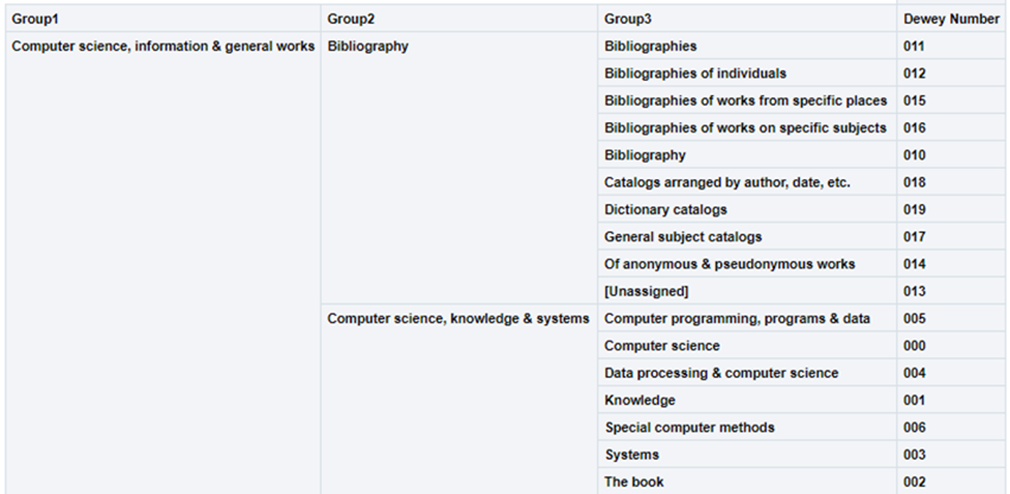
Using the hierarchy option in this dimension, the user can drill down from Group1 to Group3. In each level, the user can see measures accumulated to the relevant group.
For example:
-
000 Computer science, information & general works
o 010 Bibliography
o 000 Computer science, information & systems
-
005 Computer programming, programs & data
-
000 Computer science
-
004 Data processing & computer sciences
-
This is presented in Alma Analytics as follows:
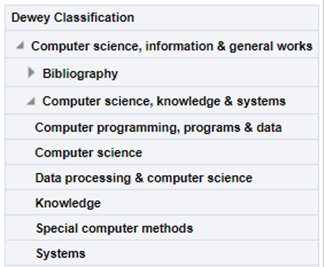
If there is more than one classification code, the last one appears.
| Field | Description | Data Type | Data Size |
|---|---|---|---|
| Group1 | The name (label) of the first Dewey classification level. | VARCHAR | 500 |
| Group2 | The name (label) of the second Dewey classification level. | VARCHAR | 500 |
| Group3 | The name (label) of the third Dewey classification level. | VARCHAR | 500 |
| Dewey Number |
The Dewey Number is a unique classification code assigned to a specific subject or topic category. The first 3 digits of the Dewey Classification. |
VARCHAR | 15 |
| Dewey Classifications | The hierarchy column that allows the user to drill down from the first level of the Dewey Classification to the third level. |
The Library of Congress Classification (LCC) is displayed in Analytics in the LC Classification shared dimension, available in several subject areas. LC classification information is derived from the bibliographic record in most subject areas, except for the Physical Items subject area, where it can be derived from either the holdings record or the bibliographic record.
- For MARC21
Taken from field 050$$a. If 050$a has no content, 090$a is used.
https://www.loc.gov/marc/bibliographic/bd050.html - For UNIMARC
Taken from field 680$$a
There are five levels of the LC Classification stored in Alma Analytics. Each level is referred to by a numbered group (Group1, Group2, Group3, Group4 and Group5).
Using the hierarchy option in this dimension, the user can drill down from Group1 to Group4. In each level, the user can see measures accumulated to the relevant group.
For example:
- SF1-1100 Animal culture
- SF87 Acclimatization
- ….
- SF191-275 Cattle
- SF250.5-275 Dairy processing. Dairy products
- SF221-250 Dairying
This is presented in Alma Analytics as follows:
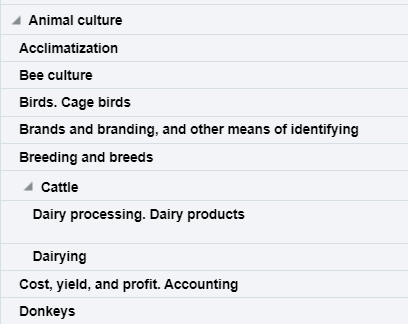
If there is more than one classification code, the last one appears.
Ex Libris works with content providers worldwide to enrich the metadata available in the Alma Community Zone. To enrich the journal/serial content in the CZ, we work directly with the Library of Congress CONSER feed for electronic serials, which we match against our knowledge base to enrich with all of the relevant metadata fields that they supply (for more details, see Community Zone Serial Records Enrichment). We receive weekly updates from CONSER and enrich the CZ records with all relevant metadata, including the 050 fields (when available).
In the case of book content, we work with multiple providers who are willing to share their metadata with the Alma community globally (for more details, see Community Zone Monograph Records Enrichment). If you have local access to these classifications, you may want to consider working with the local extension for these records whenever an update is not available. (For more details, see Working with Local Extension Fields for Community Zone-linked Records)
| Field | Description | Data Type | Data Size |
|---|---|---|---|
| Group1 | Group1 is the name given for the first level of the LC Classification and is the primary division used to organize and group related topics, subjects, or materials. | VARCHAR | 500 |
| Group2 | Group2 is the name given for the second level of classification. | VARCHAR | 500 |
| Group3 | Group3 is the name given for the third level of classification. | VARCHAR | 500 |
| Group4 | Group4 is the name given for the fourth level of classification. | VARCHAR | 500 |
| Group5 | Group5 is the name given for the fifth level of classification. | VARCHAR | 500 |
| Start Range | Start Range refers to the beginning point of a designated range within a classification system. The Start Range indicates the initial classification number or identifier within a specified range that encompasses a set of related subjects, topics, or materials.
For example, in PS501-689 (Collections of American literature), the start range is PS501. Possible start range values are hard coded to the beginning of LC Classification groups. |
VARCHAR | 50 |
| End Range | End Range refers to the concluding point of a designated range within a classification system. The End Range specifies the final classification number or identifier within a defined range that encompasses a set of related subjects, topics, or materials.
For example, in PS501-689 (Collections of American literature), the end range is PS689. Possible end range values are hard coded to the end of LC Classification groups. |
VARCHAR | 50 |
| Classification Code | Classification Code refers to a unique alphanumeric identifier assigned to a specific subject or topic category within the library's classification system. The Classification Code is composed of letters and numbers that represent various facets of a work, such as its subject, genre, or format.
For example, in the LC classification "PN1997.2.D56," the "PN" portion represents the general subject area (Performing Arts), and the "1997.2.D56" further refines the classification to a specific work or aspect within that category. |
VARCHAR | 50 |
| Start Range Number | The numbers that come after the letter(s) in the start range. | DOUBLE | |
| End Range Number | The numbers that come after the letter(s) in the end range. | DOUBLE | |
| Classifications | The Hierarchy column that enables the user to drill down from the first level of the classification to the fourth level. Using this column provides the user with the option to view the accumulative measures. Note that the fifth level is not included in this field. | Hierarchy |
| Field | Description | Additional Information |
|---|---|---|
| Cost | The price of the transaction of type expenditure for the invoice line of the PO line | |
| Usage - Total | The total usage . This is the sum total of all other measures in “Cost Usage” area. It includes both COUNTER R4 and COUNTER R5. | |
| Estimated Usage - Total | The estimated total usage of a journal or electronic collection | |
| Cost Per Use | The cost per use of a journal or electronic collection | Calculated by cost divided by use |
| Estimated Cost Per Use | The estimated cost per use of a journal or electronic collection | |
| Use Per Cost | The use per cost of a journal or electronic collection | Calculated by use divided by cost |
| Usage JR1 | The number of successful full text article requests by journal report | COUNTER Release 4 |
| Estimated Usage JR1 | The estimated number of Number of Successful Full-Text Article Requests from an Archive by Month and Journal | COUNTER Release 4 |
| Usage JR1a | The number of successful Full-Text Article Requests from an Archive by Month and Journal | COUNTER Release 4 |
| Estimated Usage JR1a | The estimated number of successful Full-Text Article Requests from an Archive by Month and Journal | COUNTER Release 4 |
| Usage JR1 GOA | The number of successful Gold Open Access Full-Text Article Requests by Month and Journal | COUNTER Release 4 |
| Estimated Usage JR1 GOA | The estimated number of successful Gold Open Access Full-Text Article Requests by Month and Journal | COUNTER Release 4 |
| Usage BR1 | The number of successful Title Requests by Month and Title. | COUNTER Release 4 |
| Estimated Usage BR1 | The estimated number of successful Title Requests by Month and Title. | COUNTER Release 4 |
| Usage BR2 | The number of successful Section Requests by Month and Title. | COUNTER Release 4 |
| Estimated Usage BR2 | The estimated number of successful Section Requests by Month and Title. | COUNTER Release 4 |
| Usage DB | The number of Total Searches, Result Clicks and Record Views by Month and Database | COUNTER Release 4 |
| Estimated Usage DB | The estimated number of Total Searches, Result Clicks and Record Views by Month and Database | COUNTER Release 4 |
| Usage TR_J1 | The number of successful Journal Requests (Excluding OA_Gold) The cost per use uses measure 'TR_J1 - Unique Item Requests' | COUNTER Release 5 |
| Estimated Usage TR_J1 | The estimated number of successful Journal Requests (Excluding OA_Gold) The cost per use uses measure 'TR_J1 - Unique Item Requests' | COUNTER Release 5 |
| Usage TR_B1 | The number of successful Book Requests (Excluding OA_Gold) The cost per use uses measure 'TR_B1 - Unique Title Requests' | COUNTER Release 5 |
| Estimated Usage TR_B1 | The estimated number of successful Book Requests (Excluding OA_Gold) The cost per use uses measure 'TR_B1 - Unique Title Requests' | COUNTER Release 5 |
| Usage DR | The number of successful Database Master Report The cost per use uses measure 'DR – Unique Title Requests' | COUNTER Release 5 |
| Estimated Usage DR | The estimated number of successful Database Master Report The cost per use uses measure 'DR – Unique Title Requests' | COUNTER Release 5 |
| Field | Description | Additional Information |
|---|---|---|
| No. of Portfolios (Deleted + In Repository) | The number of portfolios in the repository plus the number of deleted portfolios | |
| No. of Portfolios (In Repository) | The number of portfolios in the repository | |
| No. of Portfolios (Deleted) | The number of deleted portfolios | |
| No. of Portfolio (In Repository Linked to CZ) | The number of portfolios that are in the repository and linked to the Community Zone | |
| No. of Portfolio (In Repository Not Linked to CZ) | The number of portfolios that are in the repository and not linked to the Community Zone | |
| No. of Electronic Collections (Deleted + In Repository) | The number of electronic collections in the repository plus the number of deleted collections | |
| No. of Electronic Collections (In Repository) | The number of electronic collections in the repository | Includes also electronic collections without portfolios. |
| No. of Electronic Collections (Deleted) | The number of deleted electronic collections | |
| No. of Electronic Collections (In Repository Linked to CZ) | The number of electronic collections that are in the repository and linked to the Community Zone | |
| No. of Electronic Collections (In Repository Not Linked to CZ) | The number of electronic collections that are in the repository and not linked to the Community Zone | |
| No. of Electronic Collections Without Portfolios (In Repository) | The number of electronic collections without portfolios in the repository | This field was created for electronic databases. |
| No. of Electronic Collections (In Repository + In CDI) | The number of collections in both the repository and CDI | |
| No. of Electronic Collections (In Repository + Not In CDI) | The number of collections in the repository, but not in CDI |
| Field | Description | Additional Information |
|---|---|---|
| Data Updated as of (Cost Usage Details) | The date from as of which the data is updated | |
| Has Cost | Indicates if there is a cost | |
| Has Electronic Collection POL | Indicates if there is an electronic collection PO line | |
| Has Portfolio POL | Indicates if there is a portfolio PO line | |
| Has Usage | Indicates if there is usage | |
| Match By | Match by | |
| Multiple PO Lines | Indicates if there are multiple PO lines | These fields are highly technical in nature and are used in rare circumstances when a deep investigation of analytics processes is necessary. They are only to be used by experienced users |
| Num of MMS Match | The number of MMS matches | |
| Num of MMS Cost | The number of MMS cost | |
| Num of MMS Usage | The number of MMS usage | |
| Percent Portfolio | The percent portfolio | |
| Platform (from COUNTER report) | The vendor interface or content provider. An interface from an aggregator, host, publisher, or service that delivers the content to the user and that counts and provides the COUNTER usage reports. | |
| Normalized Platform (from COUNTER report) | The normalized name of the platform, taken from the COUNTER report | |
| COUNTER Platform (defined in E-Resource of UI Alma) | The platform for calculating cost usage, defined in the Alma e-resource. | If no platform is defined, the value of this field is taken from the “COUNTER Platform derived from interface” field on the Electronic Collection Editor” page. |
| Subscriber | The library or instance. An individual or organization that pays a vendor for access to a specified range of the vendors services and/or content and is subject to terms and conditions agreed to with the vendor. | |
| Total Expenditure | The total expenditure | |
| Usage Type | The usage type | |
| Field | Description | Additional information | Data Type | Data Size |
|---|---|---|---|---|
| Institution Code | The code of the institution. | Configured from: Configuration > General > Add a Library or Edit Library Information > Summary tab.
The label in Alma is Code located on the right pane. |
VARCHAR | 50 |
| Institution Name | The name of the institution. | Configured from: Configuration > General > Add a Library or Edit Library Information > Summary tab.
The label in Alma is Organization unit name. |
VARCHAR | 255 |
| Institution Address Line 1 | The first line of the address of the institution. It usually includes the building number and the street name. | Configured from: Configuration > General > Add a Library or Edit Library Information > Contact Information tab. This is taken from the address configured as the Preferred address.
The label in Alma is Address Line 1. |
VARCHAR | 1000 |
| Institution City | The city of the institution. | Configured from: Configuration > General > Add a Library or Edit Library Information > Contact Information tab. This is taken from the address configured as the Preferred address.
The label in Alma is City. |
VARCHAR | 255 |
| Institution State Province | The state or province of the institution. | Configured from: Configuration > General > Add a Library or Edit Library Information > Contact Information tab. This is taken from the address configured as the Preferred address.
The label in Alma is State/Province. |
VARCHAR | 320 |
| Institution Country | The country of the institution. | Configured from: Configuration > General > Add a Library or Edit Library Information > Contact Information tab. This is taken from the address configured as the Preferred address.
The label in Alma is Country. |
VARCHAR | 320 |
| Institution Postal Code | The postal code of the institution. | Configured from: Configuration > General > Add a Library or Edit Library Information > Contact Information tab. This is taken from the address configured as the Preferred address.
The label in Alma is Postal code. |
VARCHAR | 200 |
| Institution Timezone | The timezone of the institution. | The timezone is set during implementation. | VARCHAR | 255 |
| Data Available As Of | When the institution data became available in analytics. | Displayed at the bottom of the main Analytics menu. | VARCHAR | 255 |
| Data Updated As Of | When the institution data was taken from the Alma database. | Displayed at the bottom of the main Analytics menu. | VARCHAR | 255 |
Electronic Collection
| Field | Description | Field Location in Alma | Additional Information | Data Type | Data Size |
|---|---|---|---|---|---|
| No. of Electronic Collections (Deleted + In Repository) | The number of electronic collections, both deleted and in the repository | This is a measure. Does not appear in Alma | With and without portfolios associated to them | NUMERIC | |
| No. of Electronic Collections (Deleted) | The number of deleted electronic collections | This is a measure. Does not appear in Alma | With and without portfolios associated to them | NUMERIC | |
| No. of Electronic Collections (In Repository + In CDI) | Out of the collections in the repository, this is the number of collections that are also in CDI | This is a measure. Does not appear in Alma | NUMERIC | ||
| No. of Electronic Collections (In Repository + Not In CDI) | The number of collections in the repository, but not in CDI | This is a measure. Does not appear in Alma | NUMERIC | ||
| No. of Electronic Collections (In Repository Contributed to CZ) | The number of electronic collections in the repository that were contributed to the Community | This is a measure. Does not appear in Alma | With and without portfolios associated to them | NUMERIC | |
| No. of Electronic Collections (In Repository Linked to CZ) | The number of electronic collections (not deleted) that are linked to the Community | This is a measure. Does not appear in Alma | With and without portfolios associated to them | NUMERIC | |
| No. of Electronic Collections (In Repository Not Linked to CZ) | The number of electronic collections (not deleted) that are not linked to the Community (local) | This is a measure. Does not appear in Alma | With and without portfolios associated to them | NUMERIC | |
| No. of Electronic Collections (In Repository) | The number of electronic collections not deleted | This is a measure. Does not appear in Alma | With and without portfolios associated to them | NUMERIC | |
| No. of Electronic Collections Without Portfolios (In Repository) | The number of electronic collections without portfolios in the repository | This is a measure. Does not appear in Alma | NUMERIC | ||
| Alternative Collections CZ ID | For Electronic Collections with a Pending Deletion management level in CZ, this field may contain suggestions for alternative community collections to activate | Electronic Collection Search Results page > Electronic Collection Editor > General Tab | VARCHAR | 255 | |
| Electronic Collection Access Type | Indicates if the electronic collection access level license right is current or perpetual. | Electronic Collection Editor > General Information > Access type field | VARCHAR | 765 | |
| Electronic Collection Activation Date | The date the electronic collection was activated | Electronic Collection Editor > General Information > Activation date field | DATE | ||
| Electronic Collection Additional PO Lines | The additional PO Lines of the Electronic Collection | Electronic Collection Editor – General Information - Additional PO Lines section | VARCHAR | 4000 | |
| Electronic Collection Aggregator | The aggregator of the electronic collection based on the electronic collection's type | Electronic Collection Editor – General Information - type field | Possible values:
|
VARCHAR | 255 |
| Electronic Collection Aggregator (override) | Indicates if the customer overrode the CZ definitions | For collections linked to the Community Electronic Collection Editor > General Information > Type (override) field |
Possible values:
|
VARCHAR | 255 |
| Electronic Collection Authentication Note | The Authentication Note of the electronic collection | Electronic Collection Editor > Notes > Authentication Note field | VARCHAR | 4000 | |
| Electronic Collection Contributed To CZ | Indicates if electronic collections were contributed to the Community by the institution | Electronic Collection Editor > the button Update in Community appears | Possible values: Yes/No | VARCHAR | 3 |
| Electronic Collection COUNTER Platform | The COUNTER platform of the collection | Electronic Collection Editor > General Information > COUNTER platform field | VARCHAR | 400 | |
| Electronic Collection Creation Date | The date the electronic collection was created | Electronic Collection Editor > Header section > More information (i) > Created on | DATE | ||
| Electronic Collection Creator | The staff user or system process who created the electronic collection | Electronic Collection Editor > Header section > More information (i) > Created by | VARCHAR | 255 | |
| Electronic Collection Expected Activation Date | The date of the electronic collection is expected to be activated | Electronic Collection Editor > General Information > Expected activation date field | DATE | ||
| Electronic Collection General Note | The Electronic Collection General Notes | Electronic Collection Editor > Notes tab | If there are multiple notes, they are concatenated with the newest note first, separated by a semi-colon. Only the first 1330 characters of each note is displayed, with a maximum length of 4000 characters for the whole field.
The electronic collection must be saved for the General Note to appear in Analytics. If it is not saved, the General Note appears in Alma, but not in Analytics. |
VARCHAR | 4000 |
| Electronic Collection ID | Unique ID of the Electronic Collection in the institution | Electronic Collection Editor > Header section > Collection ID field | VARCHAR | 4000 | |
| Electronic Collection Interface Name | The interface name of the electronic collection | Electronic Collection Editor > General Information > Interface name field | In Community-linked collections, this field is updated in the Community | VARCHAR | 4000 |
| Electronic Collection Interface Name (override) | The override to the Electronic Collection Interface Name | Electronic Collection Editor > General Information > Interface name (override) field | Only for Community linked collections | VARCHAR | 255 |
| Electronic Collection Internal Description | The internal description of the electronic collection. | Electronic Collection Editor > Electronic Collection Description > Internal description field | VARCHAR | 4000 | |
| Electronic Collection License ID | The ID of the license attached to the electronic collection | Electronic Collection Editor > General > Acquisitions and License Information > License | VARCHAR | 50 | |
| Electronic Collection Lifecycle | Indicates whether the electronic collection is deleted or not | Deleted resource appear only in Analytics (they do not appear in Alma) |
Possible values:
|
VARCHAR | 255 |
| Electronic Collection Link ID | The electronic collection ID of the electronic collection in the Community | Electronic Collection search result > Community tab > Collection ID field | For electronic collections activated from the Community | VARCHAR | 255 |
| Electronic Collection Linked to CZ | Indicates if electronic collections are linked to the Community Zone | For electronic collections activated from the Community | VARCHAR | 3 | |
| Electronic Collection Management Level in CZ | The one that maintains the community-managed collection | Electronic Collection Editor > General Information > Management level in Community Zone field | Possible values:
For more information, see Managing Electronic Collections. |
VARCHAR | 255 |
| Electronic Collection MMS ID | The MMS ID of the bibliographic record associated with the electronic collection. | Electronic Collection Search >MMS ID. | VARCHAR | 255 | |
| Electronic Collection Modification Date | The date information in the electronic collection has been updated | DATE | |||
| Electronic Collection Modified By | The user name that updated electronic collection information | VARCHAR | 255 | ||
| Electronic Collection PO Line Reference | The main POL number of the electronic collection. | Electronic Collection Editor > General > Acquisitions and License Information > PO Line. | When the collection does not have a POL attached to it, the value of this field in analytics is >1 | VARCHAR | 4000 |
| Electronic Collection Pending Deletion Date | The date on which the electronic collection will be deleted | DATE | |||
| Electronic Collection Pending Deletion Reason | Reason for the pending deletion of the electronic collection. | Electronic Collection Search Results page > Electronic Collection Editor > General Tab | Relevant for collections with Management level in Community Zone = Pending deletion. | VARCHAR | 255 |
| Electronic Collection Public Name | The name to display in the discovery search results. | See the field location in Alma in the figure Electronic Collection Editor – General Information, below. | VARCHAR | 255 | |
| Electronic Collection Public Name Override | The name that you want to display (in the discovery search results) as an override to the name identified in Public name. | See the field location in Alma in the figure Electronic Collection Editor – General Information, below. | VARCHAR | 765 | |
| Electronic Collection Public Note | The public note of the electronic collection. | For future use. | VARCHAR | 4000 | |
| Electronic Collection Type Description | The type of the electronic collection (Aggregator package, Selective package, Database) | Electronic Collection Search > Type. |
Possible Values:
|
VARCHAR | 4000 |
| Has Corresponding SUSHI Account in CZ but not in Institution | Indicates if the electronic collection has a corresponding SUSHI account in the Community Zone, but is not configured in the institution. | Use to filter electronic collections by those with a corresponding SUSHI account | VARCHAR | 5 | |
| Has Electronic Portfolio | Indicates if the resource has an electronic portfolio | No specific field. This electronic collection will show portfolios associated with it. | VARCHAR | 3 | |
| Managed by Provider (To Be Deprecated) | Indicates if the electronic resource is managed by the provider | VARCHAR | 3 | ||
|
The Electronic Collection ID as supplied by the provider
|
Electronic Collection Editor> Header |
This may be different than the ID and name of the collection in Alma
|
VARCHAR
|
255
|
|
|
Provider Electronic Collection Name
|
The Electronic Collection name as supplied by the provider
|
Electronic Collection Editor > Header
Provider Collection Name field |
VARCHAR
|
255
|
|
| Provider Name (To Be Deprecated) | The interface name of the Collection the portfolio is part of | VARCHAR | 255 | ||
| Public Access Model | The patron facing access model, which is presented to the patron in the discovery system. | Electronic Collection Editor > General Information > Electronic collection public access model field | For more information on Access Models in Alma, see Managing Access Models. | VARCHAR | 4000 |
| CDI - Active for Search In CDI | Indicates that the collection is active for search in CDI | Electronic Collection Editor > CDI > CDI Search activation status field | VARCHAR | 255 | |
| CDI - Available for CDI search activation | Indicates that the collection is in CDI | Electronic Collection Editor > CDI > Available for CDI search activation indication | VARCHAR | 10 | |
| CDI - Do not show as full text available even if active in Alma | Indicates that for CDI, do not show that full text is available even if the collection is active in Alma | Electronic Collection Editor > CDI > Do not show as Full Text available in CDI even if active in Alma field | VARCHAR | 255 | |
| CDI - Only full text activation | Indicates that the collection is active for fulltext in CDI | The field does not appear in Alma | VARCHAR | 255 | |
| CDI - Subscribe to only some titles in this collection | Indicates that for CDI, only some titles are configured in this collection | Electronic Collection Editor > CDI > We subscribe to only some titles in this collection field | VARCHAR | 10 | |
| CDI Activation Required | Indicates if CDI activation is required | The field does not appear in Alma | VARCHAR | 3 | |
| CDI Available for Groups | The CDI group codes available for the specific collection, service, or portfolio | Electronic Collection Editor > CDI > CDI Group Settings section | VARCHAR | 4000 | |
| CDI Available for Group Members | The CDI members of the groups in the Available For Groups field | Electronic Collection Editor > CDI > CDI Group Settings section | VARCHAR | 4000 | |
| CDI Coverage Calculation Date | The date the CDI coverage was calculated | The field does not appear in Alma | VARCHAR | 50 | |
| CDI Coverage Percentage | The percentage of titles from a collection that has coverage in CDI | Electronic Collection Editor > CDI > Coverage Percentage field |
|
DOUBLE | |
| CDI Full Text Linking | Indicates if CDI is configured for fulltext linking | Electronic Collection Editor > CDI > Full Text Linking in CDI field | VARCHAR | 255 | |
| CDI Full Text Rights | Indicates if CDI is configured for full text rights | Electronic Collection Editor > CDI > Full Text Rights in CDI field | VARCHAR | 255 | |
| CDI Local Note | The CDI local note | Electronic Collection Editor > CDI > Local Notes field | VARCHAR | 2000 | |
| CDI Newspapers | Indicates if there are CDI newspapers | Electronic Collection Editor > CDI > Newspapers field | VARCHAR | 255 | |
| CDI Number of Records | The number of CDI records | Electronic Collection Editor > CDI > Number of records field | VARCHAR | 255 | |
| CDI Provider Coverage | Indicates if there is CDI coverage | Electronic Collection Editor > CDI > Provider coverage field | VARCHAR | 3 | |
| CDI Provider Package Code | The CDI provider package code | Electronic Collection Editor > CDI > Header > Provider package code (DB ID) | VARCHAR | 255 | |
| CDI Resource Types | The CDI resource types | Electronic Collection Editor > CDI > Search Rights in CDI field | VARCHAR | 255 | |
| CDI Search Rights | The CDI search rights | Electronic Collection Editor > CDI > Resource Types field | VARCHAR | 255 | |
| CDI Type | The type of database in CDI | Electronic Collection Editor > CDI > CDI update frequency field | Possible values:
|
VARCHAR | 50 |
| CDI Update Frequency | The CDI update frequency | Electronic Collection Editor > CDI > CDI Type field | VARCHAR | 255 |
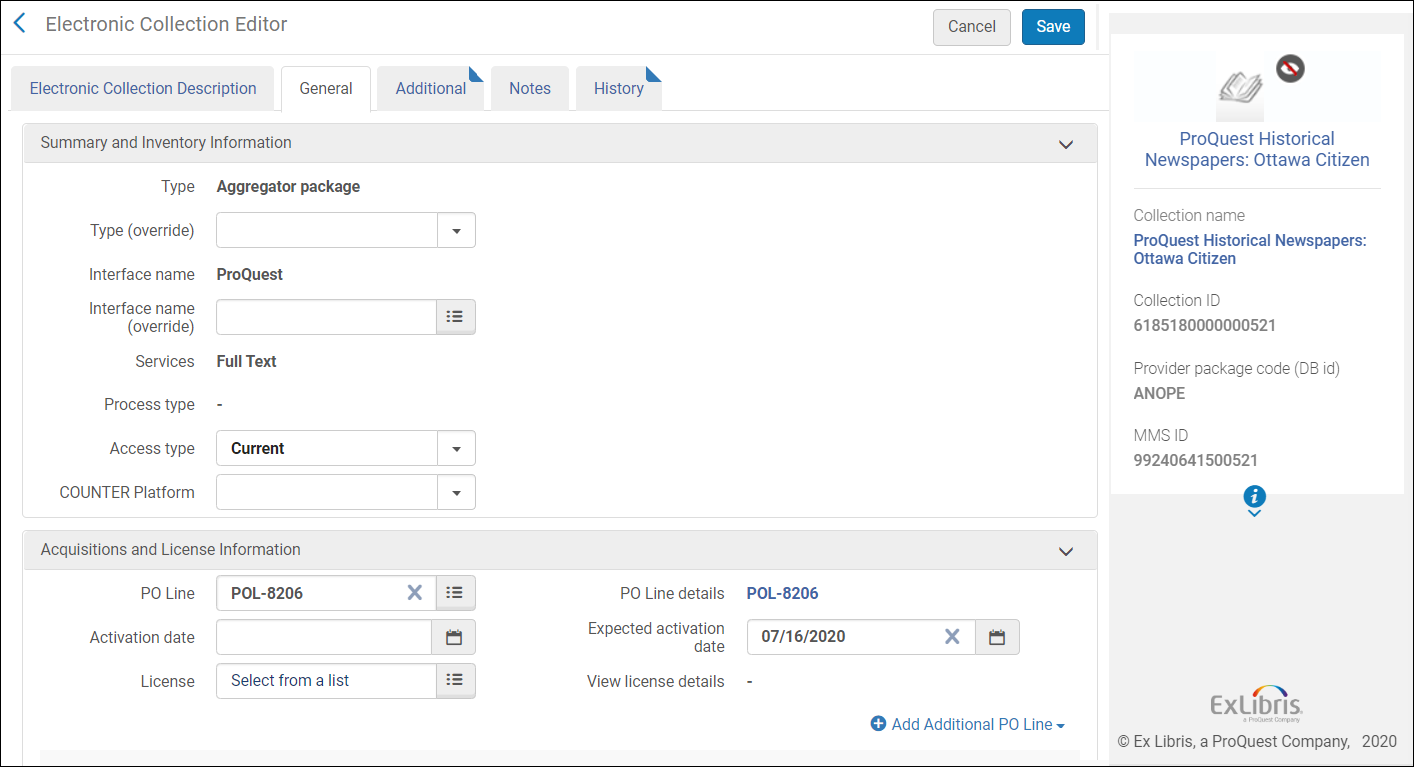
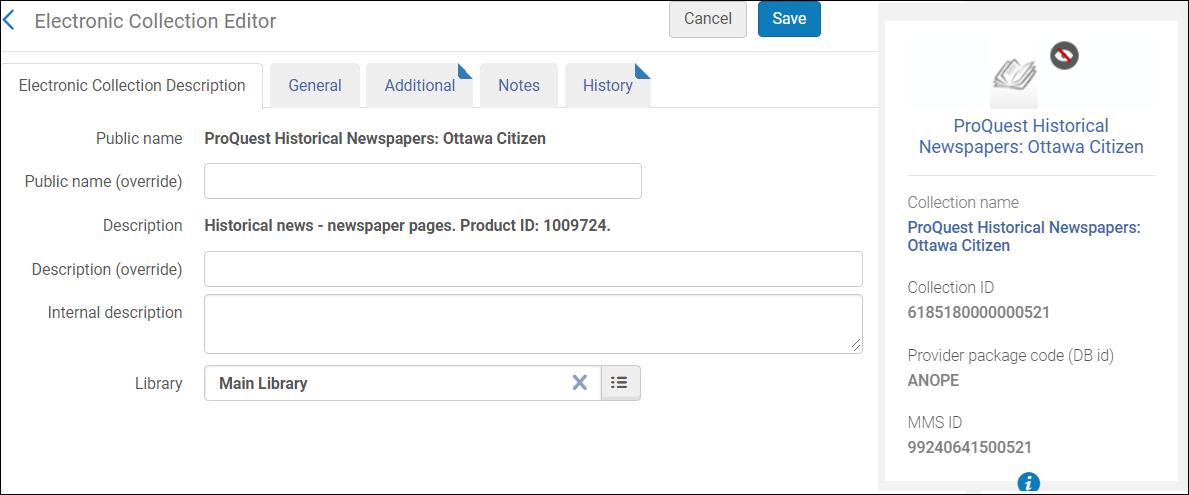
Electronic Collection Bibliographic Details
Electronic Collection Creation Date
- Calendar Fields – These are date fields as they display in the calendar.
- Fiscal Date Fields – These are date fields that match the institution's fiscal period.
| Field | Description | Additional Information | Data Type | Data Size |
|---|---|---|---|---|
| Electronic Collection Creation Date | The current course end date of the purchase request | The date in the format DD/MM/YYYY | DATE | |
| Electronic Collection Start of Week | The date of the first business day of the week | The date in the format DD/MM/YYYY | DATE | |
| Electronic Collection Week Number | The number of the week of the year | There are 52 weeks in a year. | VARCHAR | 2 |
| Electronic Collection Month Key | The month of the date in number format | For example - February will show the number 2 in this column. This field is useful when you want to sort by month. | INT | |
| Electronic Collection Month | The month of the date in text format | The month, for example, "February" | VARCHAR | 20 |
| Electronic Collection Full Month | The year and month that the purchase request was modified | The month in text format and the year. For example - Feb 25 (for February 2025) | VARCHAR | 20 |
| Electronic Collection Quarter | The quarter in the year in which the purchase request was modified | The quarter of the date in a display format such as Q1 | VARCHAR | 20 |
| Electronic Collection Year | The year in which the purchase request was modified | The year of the date in the format YYYY . For example - 2025 | VARCHAR | 20 |
| Electronic Collection Year-Month | The year and the month in which the purchase request was modified | The year and the month in the format YYYY-MM | VARCHAR | 250 |
| Electronic Collection Fiscal Month Key | The fiscal month of the date in number format | For example - If the fiscal year starts in June, this column will show the number 1 for June, the number 2 for July, and so on. | INT | |
| Electronic Collection Fiscal Year | The fiscal year of the date in string format | The year is presented according to the description in the mapping table "Fund and Ledger Fiscal Period". For more information, see Configuring Fund and Ledger Fiscal Periods | VARCHAR | 50 |
| Electronic Collection Creation Date Filter | Used to filter report results by date | Possible values:
|
VARCHAR | 100 |
| Electronic Collection Creation Date | The date in a hierarchy format | Enables the user to drill down from the year to the month to the specific date. Using this column provides the user with the option to view the accumulative measures in each level of the hierarchy. |
Electronic Collection PO Line Creation Date
| Field | Description | Additional Information | Data Type | Data Size |
|---|---|---|---|---|
| Electronic Collection PO Line Creation Date | ! The creation date of the purchase order line of the Electronic Collection | The date in the format DD/MM/YYYY | DATE | |
| Electronic Collection PO Line Creation Start Of Week | The date of the first business day of the week | ! The date in the format DD/MM/YYYY | ! DATE | |
| Electronic Collection PO Line Creation Week Number | The number of the week of the year | ! There are 52 weeks in a year | ! VARCHAR | ! 2 |
| Electronic Collection PO Line Creation Month Key | ! The month of the date in number format | ! e.g. February shows the number 2 in this column. This field is useful when you want to sort by month. | ! INT | |
| Electronic Collection PO Line Creation Month | ! The month of the date in text format | ! e.g. The month February | ! VARCHAR | ! 20 |
| Electronic Collection PO Line Creation Full Month | ! The year and month that the purchase request was modified | ! The month in text format and the year e.g. Feb 25 (for February 2025) | ! VARCHAR | ! 20 |
| Electronic Collection PO Line Creation Quarter | ! The quarter in the year in which the purchase request was modified | ! The quarter of the date in a display format such as Q1 | ! VARCHAR | ! 20 |
| Electronic Collection PO Line Creation Year | ! The year in which the purchase request was modified | ! The year of the date in the format YYYY e.g. 2025 | ! VARCHAR | ! 20 |
| Electronic Collection PO Line Creation Fiscal Month Key | The fiscal month of the date in number format | ! If the fiscal year starts in June, this column shows the number 1 for June, the number 2 for July, and so on | ! INT | |
| Electronic Collection PO Line Creation Fiscal Year | ! The fiscal year of the date in string format | ! The year is presented according to the description in the mapping table Fund and Ledger Fiscal Period. For more information, see Configuring Fund and Ledger Fiscal Periods | ! VARCHAR | ! 50 |
|
Electronic Collection PO Line Creation Date Filter
|
! Used to filter report results by date.
|
! Possible values:
|
! VARCHAR
|
! 100
|
| Electronic Collection PO Line Creation Year-Month | ! The year and the month in which the purchase request was modified | ! The year and the month in the format YYYY-MM | ! VARCHAR | ! 250 |
Electronic Collection Library Unit
Electronic Collection License
| Field | Description | Field Location in Alma | Additional Information | Date Type | Data Size |
|---|---|---|---|---|---|
| License Begins | The date the license begins. | Acquisitions > Acquisitions Infrastructure > Licenses > [select a license] > Summary Tab The label in Alma is Start date. | DATE | ||
| License Code | Code of the License. | Acquisitions > Acquisitions Infrastructure > Licenses > [select a license] > Summary Tab | VARCHAR | 255 | |
| License Creation Date | The date the License was created. | Acquisitions > Acquisitions Infrastructure > Licenses > [select a license] >Side information panel The label in Alma is Creation date. | DATE | ||
| License Creator | The first and last name of the user who created the license. | Acquisitions > Acquisitions Infrastructure > Licenses > [select a license] >Side information panel The label in Alma is Created by. |
VARCHAR | 255 | |
| License Ends | The date the license ends. | Acquisitions > Acquisitions Infrastructure > Licenses > [select a license] > Summary Tab The label in Alma is End Date. |
DATE | ||
| License ID | ID of the License. | The License ID is not visible in Alma from either the License Details page or the Electronic Portfolio Editor or collection. The system ID of the license can only be seen in Analytics. | VARCHAR | 50 | |
| License Modification Date | The date the license was modified. | Acquisitions > Acquisitions Infrastructure > Licenses > [select a license] > Summary Tab > i icon The label in Alma is Last updated on. |
DATE | ||
| License Modified By | The first and last name of the user who modified the license. | Acquisitions > Acquisitions Infrastructure > Licenses > [select a license] > Summary Tab > i icon The label in Alma is Last updated by. |
VARCHAR | 255 | |
| License Name | The name of the license. | Acquisitions > Acquisitions Infrastructure > Licenses > [select a license] > Summary Tab The label in Alma is Name. |
VARCHAR | 255 | |
| License Note | The note of the license. | Acquisitions > Acquisitions Infrastructure > Licenses > Notes Tab | VARCHAR | 4000 | |
| License Originating Licensor Key | The licensor key of the license in the legacy system from which the data was migrated. | Data is stored in the DB and not exposed in the Alma UI. | VARCHAR | 255 | |
| License Originating Parent Code | The parent code of the license in the legacy system from which the data was migrated. | Data is stored in the DB and not exposed in the Alma UI. | VARCHAR | 255 | |
| License Parent ID | The unique internal ID for the parent license. | Data is stored in the DB and not exposed in the Alma UI. | VARCHAR | 50 | |
| License Review Status | The status of the license review. | Acquisitions > Acquisitions Infrastructure > Licenses > [select a license] > Summary Tab | The values for this field are configured under Configuration > Licenses > License Review Status. Out-of-the-box, the possible values are:
You can also configure additional license review statuses, as necessary. For more information, see Configuring License Review Statuses. These values are for informational purposes only. |
VARCHAR | 4000 |
| License Second Party Signed By | The user who is a secondary approver of the license. | Acquisitions > Acquisitions Infrastructure > Licenses > [select a license] > Summary Tab The label in Alma is Second party's Signed by. |
VARCHAR | 255 | |
| License Second Party Signed On | The date on which the license was approved by the secondary approver. | Acquisitions > Acquisitions Infrastructure > Licenses > [select a license] > Summary Tab The label in Alma is Second Party's Signed on. |
DATE | ||
| License Signed By | The user who approved of the license. | Acquisitions > Acquisitions Infrastructure > Licenses > [select a license] > Summary Tab The label in Alma is Signed by. |
VARCHAR | 50 | |
| License Signed On | The date the license was approved. | Acquisitions > Acquisitions Infrastructure > Licenses > [select a license] > Summary Tab The label in Alma is Signed on. |
DATE | ||
| License Status | The status of the license. | Acquisitions > Acquisitions Infrastructure > Licenses > [select a license] > Summary Tab | Possible values:
|
VARCHAR | 4000 |
| License Storage Location | The physical location of the license | Acquisitions > Acquisitions Infrastructure > Licenses > [select a license] > Summary Tab The label in Alma is License Location. |
The values for this field are configured under Configuration > Licenses > License Storage Location. For information on configuring the license storage locations, see Configuring License Storage Locations. | VARCHAR | 4000 |
| License Type | The type of the license. | Acquisitions > Acquisitions Infrastructure > Licenses > [select a license] >Side information panel | Possible Values:
|
VARCHAR | 4000 |
| License URI | The URI where an electronic license is available. | Acquisitions > Acquisitions Infrastructure > Licenses > [select a license] > Summary Tab | VARCHAR | 255 | |
| Licensing Agent Name | An additional vendor, which is the organization (such as a subscription agent) or individual that facilitates a licensing transaction on behalf of one or more parties. | Acquisitions > Acquisitions Infrastructure > Licenses > [select a license] > Summary Tab The label in Alma is Licensing agent. |
Possible functions of the agent include acting as a negotiating intermediary (with or without a fee for services), a vendor accepting payment for the product, or the named licensee for a particular agreement. | VARCHAR | 255 |
| Licensor ID | The unique internal ID of the vendor associated with the license. | Data is stored in the DB and not exposed in the Alma UI. | DOUBLE | ||
| Licensor Name | The name of the vendor associated with the license. | Acquisitions > Acquisitions Infrastructure > Licenses > [select a license] > Summary Tab The name associated with the licensor code in the Licensor field. |
VARCHAR | 255 |
Electronic Collection Material Type
| Field | Description | Additional Information |
|---|---|---|
| Code | Code of the material type of the resource | |
| Description | Description of the material type of the resource, such as BOOK, JOURNAL, MAP. |
Electronic Collection Type
| Field | Description | Additional Information |
|---|---|---|
| Code | Code of the Electronic Collection Type | |
| Description | Description of the Electronic Collection Type, such as - Aggregator, Selective. |
Electronic Collection URL Information
| Field | Description | Additional Information |
|---|---|---|
| Electronic Collection Level URL | The URL of the local electronic collection. | |
| Electronic Collection Level URL (override) | The URL to override the electronic collection level URL | |
| Electronic Collection Proxy Enabled | Whether a proxy is enabled
|
|
| Electronic Collection Proxy Selected | The proxy profile. |
Electronic Collection PO Line
| Field | Description | Field Location in Alma | Additional Information | Data Type | Data Size |
|---|---|---|---|---|---|
| Acquisition Method | The code of the method by which the PO Line is acquired, with the default value set as PURCHASE. This value may change when the PO Line is sent. | See the Acquisition Method Code table. | VARCHAR | 255 | |
| Acquisition Method Description | The description (label) of the acquisition method. | Acquisitions > All PO Lines > PO Line Information section. The label in Alma is Acquisition method. | VARCHAR | 4000 | |
| Additional Order Reference | An additional identifier for the PO line | Acquisitions > All PO Lines > PO Line Information section. The label in Alma is Additional PO Line Reference Field. | VARCHAR | 255 | |
| Application | Used for identifying migrated PO lines | Data is stored in the DB, and it is not exposed in the Alma UI. | VARCHAR | 255 | |
| Assigned To | Stores the user that is assigned to the order | Acquisitions > All PO Lines > Left pane | VARCHAR | 255 | |
| Associated PO Line | The PO line associated with the current one. | Acquisitions > All PO Lines > PO Line Information section | VARCHAR | 255 | |
| Association Type | The type of association between PO lines. Defined by a user, process, or job. | Acquisitions > All PO Lines > Associated PO Lines link | Available when there is an associated PO line | VARCHAR | 255 |
| Cancellation Reason | Code for the reason that a PO line is canceled. Displayed only for canceled PO lines. | The cancellation reason label appears in the History link. To match the label from the PO line History page to the code in analytics, see the PO Line Cancellation Reasons Code table at Configuration > Purchase Orders > PO Line Cancellation Reasons. The cancellation reason is selected when cancelling a PO line. | VARCHAR | 255 | |
|
Cancellation Restriction
|
Indicates if the cancellation restriction note is displayed when cancelling a PO line that contains a warning about the cancellation.
|
Acquisitions > All PO Lines > PO Line Information section
|
Possible values:
|
VARCHAR
|
4000
|
| Cancellation Restriction Note | The warning to display when canceling a PO line with Cancellation Restriction selected in Alma. | Acquisitions > All PO Lines > PO Line Information section | Displayed when Cancellation Restriction is selected. | VARCHAR | 4000 |
| CKB ID | When selecting Order from an Electronic Collections search, a CKB ID (Central Knowledgebase ID) is stored as a reference to the electronic collection ID, rather than an MMS ID. | Acquisitions > All PO Lines > PO Line Information section. The label in Alma is CKB ID. | Not available when an MMS ID is present. | VARCHAR | 50 |
| Claiming Date | The date on which the PO line is sent to the claims task list. | Determined by adding the number of days in the claiming grace period to the expected receipt/activation date. Calculated from the Claiming grace period field (days) field on the Acquisitions > All PO Lines > Vendor Information section. For more information, see Criteria for Marking PO Lines as In Claim. | DATETIME | ||
| Currency | The currency of the transaction. | Acquisitions > All PO Lines > Pricing and Funding section > next to the List Price field | VARCHAR | 3 | |
| Discount | The discount amount. | Acquisitions > All PO Lines > Pricing and Funding section. The label in Alma is Discount (amount). | DOUBLE | ||
| ERP Number | The Enterprise Resource Planning number of the purchase order. | Used by customers that want the purchase order to be approved by an ERP system before it is sent to the vendor. For more information, see Orders Export in the Developers Network. | VARCHAR | 255 | |
| Expected Activation Date | The expected date for the resource activation by the vendor for electronic PO lines. | Acquisitions > All PO Lines > Vendor Information section | Only for electronic PO lines. | DATE | |
| Expected Activation Interval | For electronic PO Lines, the number of days after ordering that you expect electronic orders to be activated. | Acquisitions > All PO Lines > Vendor Information section. The label in Alma is Activation due after ordering (days). | Only for electronic PO lines. | DOUBLE | |
| Expected Receipt after Ordering Interval | For physical PO Lines, the number of days after ordering that you expect to receive physical orders. | Acquisitions > All PO Lines > Vendor Information section. The label in Alma is Expected receipt after ordering (days). | Only for physical PO lines. | DOUBLE | |
| Expected Receiving Date | For physical PO lines, the expected date for physical items to be received from the vendor. | Acquisitions > All PO Lines > Vendor Information section. The label in Alma is Expected receipt (date). | Only for physical PO lines. | DATE | |
| Interest Users | Displays the interested users for the PO line. If more than one user is added to the PO line, values are concatenated. | Acquisitions > All PO Lines > Interested Users section | To search for a specific user, you should use the Contain filter to also find cases where more than one user was added to the PO. | VARCHAR | 4000 |
| Invoice Status | The status of the invoice. | Acquisitions > All PO Lines > PO Line Information section | VARCHAR | 4000 | |
|
Is Claimed
|
Indicates if there is an open claim to the vendor. A PO line is claimed if the items were not received or if the receiving/activation date of the PO line has passed.
|
Acquisitions > All PO Lines > Left pane, when marked In Claim
|
Possible values:
|
VARCHAR
|
3
|
| Item Description | The description of the ordered physical item. | Acquisitions > All PO Lines > Ordered Items section | The description entered for the PO line. This field is not taken from the bibliographic details. It is useful when no item is related to the PO line. Only for physical one-time PO lines. | VARCHAR | 4000 |
| Latest Receiving Date | This field allows you to retrieve the latest receiving date for an item in a PO line. | Acquisitions > All PO Lines > Ordered Items section> Receiving date (the most recent receiving date) | For Physical Items only. | DATE | |
| Latest Receiving Date (Calendar) | This field allows you to retrieve the latest receiving date for an item in a PO line. | Acquisitions > All PO Lines > Ordered Items section> Receiving date (the most recent receiving date) | For Physical Items only. | ||
| License ID | The unique ID of the license of the PO line that is relevant for electronic PO lines. | Available only for electronic resources. Data is stored in the DB and it is not exposed in the Alma UI. | VARCHAR | 50 | |
| List Price | The list price for a single copy of the item. | Acquisitions > All PO Lines > Pricing and Funding section | DOUBLE | ||
| Manual Renewal | Indicates whether the PO line is renewed manually or automatically. | Acquisitions > All PO Lines > Renewal Information section | Yes for manual and No for automatic. Relevant for standing orders and subscriptions. | VARCHAR | 3 |
|
Material Supplier
|
The vendor supplying the ordered material.
|
Acquisitions > All PO Lines > Vendor Information section
|
This is a concatenation of:
|
VARCHAR
|
800
|
| Material Type | The material type of the PO line. | Acquisitions > All PO Lines > PO Line Information section | For example: Book. | VARCHAR | 4000 |
| Net Price | A calculation of the total price for the PO line based on the list price per copy, the discount, and the number of copies ordered. | Acquisitions > All PO Lines > Pricing and Funding section | DOUBLE | ||
| No Charge | Indicates if there is a charge for the PO line. | Acquisitions > All PO Lines > Pricing and Funding section | Yes / No | VARCHAR | 10 |
| Note To Vendor | Notes to the vendor. | Acquisitions > All PO Lines > Vendor Information section | VARCHAR | 2000 | |
| Order Line Type | The order line type as it appears in Alma. | Acquisitions > All PO Lines > PO Line Summary section does not have a label in the Alma UI. | See the PO Line Type Code table. | VARCHAR | 4000 |
| Order Line Type Code | The code for the Purchase Order line type. | See the PO Line Type Code table. | VARCHAR | 255 | |
| PO Approval Date | The date the PO was approved (the sent date). |
Acquisitions > All PO Lines > Record View. The label in Alma is Sent Date. |
DATE | ||
| PO Approval Date and Time | The date and time that the PO was approved. | DATE; | |||
| PO Creation Date | The timestamp of the PO creation date. | Acquisitions > All PO Lines > PO Line Summary section> [PO link] > Information Icon The label in Alma is Created on. | TIMESTAMP | ||
| PO Creation Date (Calendar) | PO creation date without a timestamp. | DATE | |||
| PO Creator | The user who created the PO (user name). | Acquisitions > Review (PO) > Right Pane > Information Icon: The label in Alma is Created by. | VARCHAR | 255 | |
|
PO Line Binding During Receiving
|
Indicates if the PO line is marked for binding during receiving (for physical items).
|
Acquisitions > All PO Lines > Receiving Information section. The label in Alma is Binding during receiving.
|
Relevant only for physical items. Possible values:
|
VARCHAR
|
4000
|
| PO Line Creation Date | The timestamp of the PO line creation date. | Acquisitions > All PO Lines > History link > Info icon .The label in Alma is Created on. | TIMESTAMP | ||
| PO Line Creation Date (Calendar) | PO line creation date without a timestamp. | DATE | |||
| PO Line Creator | The user that created the PO line (user name). | Acquisitions > All PO Lines > History link > Info icon .The label in Alma is Created by. | VARCHAR | 255 | |
| PO Line Identifier | The identifier of the ordered title. (ISSN or ISBN) | Acquisitions > All PO Lines > PO Line Information section. The label in Alma is Identifier. | VARCHAR | 4000 | |
| PO Line Label | The labels assigned to the PO line | Acquisitions > All PO Lines >PO Line Summary section | This is a repeatable field in Alma, which is concatenated in analytics. It is a free-text field, configured by the user. For more information, see Managing Labels in the Details Pane. | VARCHAR | 4000 |
|
PO Line Manual Packaging
|
Indicates if the PO line was manually packaged into a PO.
|
Acquisitions > All PO Lines >PO Line Information section. The label in Alma is Manual packaging.
|
Possible values:
|
VARCHAR
|
4000
|
| PO Line Modification Date | The timestamp of the PO line modification date. | Acquisitions > All PO Lines > History link> Info icon .The label in Alma is Last updated on. | TIMESTAMP | ||
| PO Line Modification Date (Calendar) | PO line modification date without a timestamp. | DATE | |||
| PO Line Modified By | The user who modified the PO line (user name). | Acquisitions > All PO Lines > History link > Info icon .The label in Alma is Last updated by. | VARCHAR | 255 | |
| PO Line Notes | The notes on the PO line. | Acquisitions > All PO Lines > Notes section | Multiple notes are separated by a semicolon (;). | VARCHAR | 4000 |
| PO Line Owner Library Code | The code of the PO line owner library. | Configuration > General > Add a Library or Edit Library Information > Right Pane. The label in Alma is Code. | Library codes are configured in Configuration > General > Add a Library or Edit Library Information | VARCHAR | 4000 |
| PO Line Owner Library Name | The name of the PO line owner library | Acquisitions > All PO Lines > PO Line Summary section. The label in Alma is PO Line Owner. | VARCHAR | 4000 | |
| PO Line Reference | The business identifier of the PO line (PO Line number). | Acquisitions > All PO Lines > PO Line Summary section. The label in Alma is PO Line. | This is the PO line number in Alma. | VARCHAR | 255 |
| PO Line Routing During Receiving | Indicates if the PO line is marked for routing during receiving. | Acquisitions > All PO Lines > Receiving Information section. The label in Alma is Routing during receiving. | Relevant only for physical items.
Possible values:
|
VARCHAR | 4000 |
| PO Line Title | The title of the PO line | Acquisitions > All PO Lines > PO Line Summary section. There is no label in Alma. | VARCHAR | 4000 | |
| PO Line Vendor Title Number | A vendor-supplied number for the associated title on a PO line. | The MARC 035 field of the bibliographic record. | An identifier other than ISBN/ISSN for non-books inventory. | VARCHAR | 4000 |
| PO Line Title | The title of the PO line | Acquisitions > All PO Lines > PO Line Summary section. There is no label in Alma. | VARCHAR | 4000 | |
| PO Line Vendor Title Number | A vendor-supplied number for the associated title on a PO line. | The MARC 035 field of the bibliographic record. | An identifier other than ISBN/ISSN for non-books inventory. | VARCHAR | 4000 |
| PO Modification Date | The timestamp of the PO modification date. | Acquisitions > All PO Lines > Receiving Information section. The label in Alma is Last updated on. | TIMESTAMP | ||
| PO Modification Date (Calendar) | The PO modification date without the timestamp. | This date format is useful when filtering the report by date. | DATE | ||
| PO Modified By | The user who modified the PO (user name). | Acquisitions > All PO Lines > Receiving Information section. The label in Alma is Last updated by. | VARCHAR | 255 | |
| PO Number | The business identifier of the PO related to the PO line. | Acquisitions > All PO Lines > Left pane. The label in Alma is PO. | VARCHAR | 255 | |
| Quantity for Pricing | The number of items to be paid for. | Acquisitions > All PO Lines > Pricing and Funding section. | The quantity for pricing and the number of items to create may be different in the case of discounted pricing through a deal such as buy two items and get a third item at no additional charge. | DOUBLE | |
| Receiving/Activation Note | Text with which the Purchasing Operator indicates to the Receiving Operator the intended location of serial order items, in which no inventory items are created. | Acquisitions > All PO Lines > Activation Information section | Activation information is only available for electronic resources. For physical resources, the section is Receiving Information. | VARCHAR | 4000 |
| Receiving Status | An indication (Yes/No) of whether or not all physical items were received in the receiving workbench. | VARCHAR | 10 | ||
| Reclaim Interval (Days) | The interval number of days that Alma will send reclaim letters after the initial claim letter is sent. | Acquisitions > All PO Lines > Vendor Information section | Relevant only for physical PO lines. | NUMERIC | |
| Renewal Cycle | The cycle for the autorenewal job for continuous orders For example, if it is set to one year, the PO line is renewed in one year. | Acquisitions > All PO Lines > Renewal Information section | Defined in the Renewal Cycle code table. Relevant only for continuous orders. | DOUBLE | |
| Renewal Date | The date of the PO line’s next renewal for continuous orders. | Acquisitions > All PO Lines > Renewal Information section | Relevant only for continuous orders. | DATE | |
| Renewal Note | The note of the PO line renewal for continuous orders. | Acquisitions > All PO Lines > Renewal Information section | Relevant only for continuous orders. | VARCHAR | 4000 |
| Renewal Reminder Period | Determines how many days before the renewal an email regarding it is sent. | Acquisitions > All PO Lines > Renewal Information section. The label in Alma is Renewal reminder period (days). | Relevant only for manually renewed continuous orders. | DOUBLE | |
| Reporting Code - 1-5 | Five fields that store the reporting codes. | As defined in the Reporting Codes code tables. | VARCHAR | 255 | |
| Reporting Code Description -1-5 | Five fields that store the description of the five reporting code fields. | Acquisitions > All PO Lines > Reporting Codes section | VARCHAR | 4000 | |
|
Rush
|
Indicates if the PO line is to be rushed.
|
Acquisitions > All PO Lines > Receiving Information section
|
Relevant only for Physical items. Possible values are:
1 indicates a rush.
|
VARCHAR
|
4000
|
| Sent Date | The date that the PO/ PO line is sent to the vendor. | Acquisitions > All PO Lines > PO Line Information section For PO line - in the history link. | DATE | ||
| Shipped To Address City | The city to which the physical item should be shipped. | From the shipping address configured for the relevant library. | VARCHAR | 176 | |
| Shipped To Address Country | The country to which to ship the physical item. | From the shipping address configured for the relevant library. | VARCHAR | 320 | |
| Shipped To Address Line 1-5 | The address to which to ship the physical item. | From the shipping address configured for the relevant library. | VARCHAR | 784 | |
| Ship to Address ID | Internal ID of the library shipping address. | Data is stored in the DB and not exposed in the Alma UI. | DOUBLE | ||
| Shipping Method | The code of the method for the vendor to ship the order. | Per the values in the Shipping Method code table defined in the acquisition configuration menu. | VARCHAR | 255 | |
| Source ID | The source file ID used for the EOD lines. | Data is stored in the DB and not exposed in the Alma UI. | VARCHAR | 255 | |
| Source Type | The source from which the PO line originated, for example, EOD, Manual, and Migration. | Acquisitions > All PO Lines > PO Line Information section | VARCHAR | 255 | |
| Status | The business status of the PO line is Active, Canceled, or Closed. There are a number of sub-statuses included in the business status "Active". See the Status (Active) field. | Acquisitions > All PO Lines > PO Line Summary section. There is no label in Alma. (If Active, the sub-status is displayed. See the Status (Active) field). | VARCHAR | 255 | |
| Status (Active) | Displays the sub-status of the Status field. For example: Waiting for Invoice, Waiting for Manual Renewal, Recurring Renewal, Under Evaluation, Sent, In Review, Ready to Be Sent, Waiting for Packaging, and Manual Packaging. | Acquisitions > All PO Lines > PO Line Summary section. There is no label in Alma. | When the status is active. | VARCHAR | 4000 |
| Subscription From Date | The date for the beginning of a subscription for continuous orders. | Acquisitions > All PO Lines > Renewal Information section | Relevant only for subscriptions. | DATE | |
| Subscription To Date | The date for the end of a subscription for continuous orders. | Acquisitions > All PO Lines > Renewal Information section | Relevant only for subscriptions. | DATE | |
| Vendor Account Code | The vendor account code as defined in the Alma vendor account definitions. | Acquisitions > All PO Lines > Vendor Information section> > Material Supplier field - the fourth element | All the vendors on the order, not just the active vendor. | VARCHAR | 784 |
| Vendor Account Description | The vendor account description is defined in the Alma vendor account definitions. | Acquisitions > All PO Lines > Vendor Information section> Material Supplier field - the third element | All the vendors on the order, not just the active vendor. | VARCHAR | 255 |
| Vendor Code | The vendor code as defined in the Alma vendor details definitions. | Acquisitions > All PO Lines > Vendor Information section> Material Supplier field - the second element | All the vendors that have been on the order, not just the active vendor. | VARCHAR | 255 |
| Vendor Contact Person ID | The related vendor contact person ID. | It can be accessed by clicking on the Material Supplier in the Vendor Information section. | VARCHAR | 50 | |
| Vendor Name | The vendor name as defined in the Alma vendor details definitions. | Acquisitions > All PO Lines > Vendor Information section> Material Supplier field - the first element | All the vendors on the order, not just the active vendor. | VARCHAR | 255 |
| Vendor Reference Number | The reference number for the PO line in Alma, as provided by the vendor, serves as a matching point for identifying a PO line in Alma. | Acquisitions > All PO Lines > Vendor Information section | VARCHAR | 255 | |
| Vendor Reference Number Type | The type of the reference number. | Acquisitions > All PO Lines > Vendor Information section | VARCHAR | 255 |
- The PO line status is not currently mapped to analytics and will be added in a future release.
Electronic Collection PO Line Approver
| Field | Description | Field Location in Alma | Additional Information | Data Type | Data Size |
|---|---|---|---|---|---|
| Electronic Collection POL Approver Creation Date | The creation date of the record for the PO Line approver. |
Admin > Manage Users > Edit User > i icon (Right hand pane) The label in Alma is Created on. |
DATE | ||
| Electronic Collection POL Approver Creator | The user that created the PO Line approver's user record |
Admin > Manage Users > Edit User > i icon (Right hand pane) The label in Alma is Created by. |
VARCHAR | 255 | |
| Electronic Collection POL Approver Modification Date | The date of the last modification in the PO Line approver's user record. |
Admin > Manage Users > Edit User > i icon (Right hand pane) The Alma label is Last updated on. |
DATE | ||
| Electronic Collection POL Approver Modified By | The last person/system that modified the PO Line approver's user record. |
Admin > Manage Users > Edit User > i icon (Right hand pane) The label in Alma is Last updated by. |
VARCHAR | 255 | |
| Electronic Collection POL Approver Birth Date | The birth date in the PO Line approver's user record. |
Admin > Manage Users > Edit User > General Information Tab > User Information Section The label in Alma is Birth date. |
DATE | ||
| Electronic Collection POL Approver Campus Code | The campus code in the PO Line approver's user record. | Only the campus name is displayed in the Users UI. | The full list of campus codes and names can be found in Configuration > General > Libraries > Define Campuses. | VARCHAR | 50 |
| Electronic Collection POL Approver Cataloger Level | The cataloger level in the PO Line approver's user record. |
Admin > Manage Users > Edit User > General Information Tab > User Information Section The label in Alma is Cataloger level. |
For this to display in the UI, the Cataloger Permission Levels must be defined (in addition to the default level). See Cataloging Privileges for more information. | ||
| Electronic Collection POL Approver Disable All Login Restrictions | Indicates if the user has IP login restrictions disabled. This is recorded in the PO Line approver's user record. |
Admin > Manage Users > Edit User > General Information Tab > User Management Information Section The label in Alma is Disable all login restrictions. |
This is a checkbox. | VARCHAR | 3 |
| Electronic Collection POL Approver Expiry Date | The expiration date in the PO Line approver's user record. |
Admin > Manage Users > Edit User > General Information Tab > User Information Section The label in Alma is Expiration date. |
After expiration, the user cannot log in. | DATE | |
| Electronic Collection POL Approver External ID | The external ID in the PO line approver's user record (in the case where the record was created by an external system). | Not displayed in the UI. | For more information, see Managing User Identifiers. | VARCHAR | 255 |
| Electronic Collection POL Approver First Name | The first name in the PO Line approver's user record. |
Admin > Manage Users > Edit User > General Information Tab > User Information Section The label in Alma is First name. |
VARCHAR | 255 | |
| Electronic Collection POL Approver Full Name | The full name in the PO Line approver's user record. | Not displayed in the UI | Concatenation of the last name + first name. | VARCHAR | 511 |
| Electronic Collection POL Approver Has Role Other Than Patron | Indicates if the PO Line approver has a role in addition to Patron. | Does not display in the UI. |
The user roles can be viewed at Admin > Manage Users > Edit User > General Information Tab > User Roles section. This field checks whether any roles exist in addition to the Patron role added by default. |
VARCHAR | 3 |
| Electronic Collection POL Approver Has Role Other Than Patron and Instructor | Indicates if the PO Line approver has a role other than Patron and Instructor. | Does not display in the UI. |
The user roles can be viewed at Admin > Manage Users > Edit User > General Information Tab > User Roles section. This field checks whether there are any roles in addition to the Patron and Instructor role. |
VARCHAR | 3 |
| Electronic Collection POL Approver Identifier 1-2 | Two pre-configured user identifiers for the PO line approver. | Does not appear for users in the UI. | Choosing a specific identifier to be included in the user details is done in Alma (in an internal table that is not exposed to the users). Users who need assistance in defining this field do so by contacting Ex Libris Support. Note that only only one value per identifier is supported. | VARCHAR | 4000 |
| Electronic Collection POL Approver Is Blocked | Indicates if the PO Line approver is blocked. This is recorded in the PO Line approver's user record. | Does not display in the UI. |
For more information, see Configuring User Blocks. User blocks can be viewed in Admin > Manage Users > Edit User > Blocks Tab |
VARCHAR | 3 |
| Electronic Collection POL Approver Job Category | The job category in the PO Line approver's user record. |
Admin > Manage Users > Edit User > General Information Tab > User Information Section The label in Alma is Job Category. |
Can be configured in Configuration Menu > User Management > User Details > Job Categories. | VARCHAR | 255 |
| Electronic Collection POL Approver Job Description | The job description in the PO Line approver's user record. |
Admin > Manage Users > Edit User > General Information Tab > User Information Section The label in Alma is Job description. |
VARCHAR | 255 | |
| Electronic Collection POL Approver Last Activity Date | The last activity date in the PO Line approver's user record. This refers to the last date that the approver made a request or borrowed or returned an item. |
Admin > Manage Users > Edit User > General Information Tab > User Information Section The label in Alma is Last Patron Activity Date. |
This only displays if enabled at Configuration Menu > User Management > General > Record Last Patron Activity Date. For more information, see Configuring Last Patron Activity Date. |
DATE | |
| Electronic Collection POL Approver Last Name | The last name in the PO Line approver's user record. |
Admin > Manage Users > Edit User > General Information Tab > User Information Section The label in Alma is Last name. |
VARCHAR | 255 | |
| Electronic Collection POL Approver Linked From Institution Code | In a fulfillment network, this is the ID of the external institution from which the user was copied. |
Admin > Manage Users > Edit User > Right hand pane The label in Alma is Owner. |
Applies to linked user in a fulfillment network. For more information, see Managing Users > Not Local. |
VARCHAR | 255 |
| Electronic Collection POL Approver Linked From Institution Name | In a fulfillment network, this is the name of the external institution from which the user was copied. |
Admin > Manage Users > Edit User > General Information Tab. It displays in the Not local section. The label in Alma is Institution. |
Appears only in very specific cases. For more information, see Managing Users > Not Local. |
VARCHAR | 255 |
|
Electronic Collection POL Approver Linked From Other Institution
|
Indicates if the PO Line approver is linked from another institution.
|
Doesn't display in the UI
|
Applies to the linked user (the user in the secondary institution - copied from the user in the source institution). Populated only if the user created a link from their institution to another institution via a fulfillment network.
Possible values:
|
DOUBLE
|
|
|
Electronic Collection POL Approver Linked To Other Institution
|
Indicates if the user accessed Primo/Alma for services in another institution. Note that this does not necessarily indicate that the services were actually supplied or that a linked account was created.
|
Doesn't display in the UI.
|
Applies to the user in the source institution. Populated only if the user created a link from their institution to another institution via a fulfillment network. For more information, see Linking Users in Collaborative Networks.
Possible values:
|
VARCHAR
|
10
|
| Electronic Collection POL Approver Locked Out Date | |||||
|
Electronic Collection POL Approver Middle Name
|
The middle name in the PO Line approver's user record.
|
Admin > Manage Users > Edit User > General Information Tab > User Information Section
The label in Alma is Middle Name.
|
|
VARCHAR
|
255
|
|
Electronic Collection POL Approver Patron Letters Opt In
|
The letters for which the PO Line approver has opted in. This is recorded in the PO Line approver's user record.
|
Does not display in the UI.
|
The user can view the list of letters that are selected (opt-in) at Admin > Manage Users > Edit User > General Information Tab > User Information Section > Selected Patron Letters.
The label in Alma is Selected Patron Letters.
|
VARCHAR
|
2000
|
|
Electronic Collection POL Approver Patron Letters Opt Out
|
The letters for which the PO Line approver has opted out. This is recorded in the PO Line approver's user record.
|
Does not display in the UI.
|
The user can view the list of letters that are deselected (opt-out) at Admin > Manage Users > Edit User > General Information Tab > User Information Section > Selected Patron Letters. The label in Alma is Selected Patron Letters.
|
VARCHAR
|
2000
|
|
Electronic Collection POL Approver Preferred First Name
|
The preferred first name in the PO Line approver's user record.
|
Admin > Manage Users > Edit User > General Information Tab > User Information Section
The label in Alma is Preferred first name.
|
|
VARCHAR
|
255
|
|
Electronic Collection POL Approver Preferred Language
|
The preferred language in the PO Line approver's user record.
|
Admin > Manage Users > Edit User > General Information Tab > User Information Section
The label in Alma is Preferred language.
|
|
VARCHAR
|
4000
|
|
Electronic Collection POL Approver Preferred Last Name
|
The preferred last name in the PO Line approver's user record.
|
Admin > Manage Users > Edit User > General Information Tab > User Information Section
The label in Alma is Preferred last name.
|
|
VARCHAR
|
255
|
|
Electronic Collection POL Approver Preferred Middle Name
|
The preferred middle name in the PO Line approver's user record.
|
Admin > Manage Users > Edit User > General Information Tab > User Information Section
The label in Alma is Preferred middle name.
|
|
VARCHAR
|
255
|
|
Electronic Collection POL Approver Primary Identifier
|
The primary identifier in the PO Line approver's user record.
|
Admin > Manage Users > Edit User > General Information Tab > User Information Section
The label in Alma is Primary identifier.
|
|
VARCHAR
|
255
|
|
Electronic Collection POL Approver Purge Date
|
The purge date in the PO Line approver's user record. |
Admin > Manage Users > Edit User > General Information Tab > User Information Section The label in Alma is Purge date. |
For more information, see Purging Users.
|
DATE
|
|
| Electronic Collection POL Approver Resource Sharing Library Code | The code associated with the resource sharing library in the PO Line approver's user record. |
Library codes can be viewed in the library configuration screen. Configuration > General > Add or Edit Library Information > Edit a library > Right hand information window. The label in Alma is Code. |
VARCHAR | 4000 | |
|
Electronic Collection POL Approver Resource Sharing Library Name |
The resource sharing library name in the PO Line approver's user record. This is the name of the library associated with the PO Line approver. |
Admin > Manage Users > Edit User > General Information Tab > User Information Section > Resource Sharing Library The label in Alma is Resource Sharing Library. |
|
VARCHAR |
4000 |
| Electronic Collection POL Approver Statistical Category 01-10 | Statistical categories (1-10) that are recorded in the PO Line approver's user record. | Admin > Manage Users > Edit User > Statistics > Add Statistic | These fields allow you to map ten statistical categories. This allows you to filter reports based on advanced user information typically stored in the statistical category fields. For more information, see Configuring Statistical Categories for Analytics. | VARCHAR | 4000 |
| Electronic Collection POL Approver Status | The status in the PO Line approver's user record. |
Admin > Manage Users > Edit User > General Information Tab > User Information Section The label in Alma is Status. |
The possible values are:
For more information, see Find and Manage Users Page - Column Description table in Managing Users. |
VARCHAR | 8 |
| Electronic Collection POL Approver Status Date | This is the last date when the Status field of the PO Line approver's user record was modified. |
Admin > Manage Users > Edit User > General Information Tab > User Information Section The label in Alma is Status Date. |
DATE | ||
| Electronic Collection POL Approver Type | |||||
| Electronic Collection POL Approver User Group | The user group in the PO Line approver's user record. |
Admin > Manage Users > Edit User > General Information Tab > User Information Section The label in Alma is User group. |
User groups assigned to users can be configured by the institution. For more information, see Configuring User Groups. | ||
| Electronic Collection POL Approver User Group Code | The user group code associated with the user group name in the PO Line approver's user record. | For the full list of user groups codes and names see Configuration > Fulfillment > Patron Configuration > User Groups. | VARCHAR | 255 | |
| Electronic Collection POL Approver User ID | The Alma internal user ID in the PO Line approver's user record. | Not displayed in the UI. | VARCHAR | 50 | |
| Electronic Collection POL Approver User Record Type | The user record type in the PO Line approver's user record. |
Admin > Manage Users > Edit User > Right hand pane The label in Alma is Record type.
|
The possible values are:
For more information, see Managing Users. |
VARCHAR | 4000 |
| Electronic Collection POL Approver User Title | The user title in the PO Line approver's user record. |
Admin > Manage Users > Edit User > General Information Tab > User Information Section The label in Alma is Title.
|
For more information see Configuring User Titles. | VARCHAR | 50 |
| Electronic Collection POL Approver User Type | The user type in the PO Line approver's user record. |
Admin > Manage Users > Edit User > Right hand pane The label in Alma is Account type. |
The possible values are:
For more information, see Managing Users. |
CHAR | 20 |
Service Details
| Field | Description | Field Location in Alma | Additional Information | Data Type | Data Size |
|---|---|---|---|---|---|
| Service Activation Status | Indicates if the service is available or not | Possible values : Available/Not Available | |||
| Service Authentication Note | The text of the service authentication note from the Notes tab of the service | ||||
| Service General Note | The Service General Notes | Electronic Service Editor > Notes tab | If there are multiple notes, they are concatenated with the newest note first, separated by a semi-colon. Only the first 1330 characters of each note is displayed, with a maximum length of 4000 characters for the whole field.
The electronic service must be saved for the General Note to appear in Analytics. If it is not saved, the General Note appears in Alma, but not in Analytics. |
VARCHAR | 4000 |
| Service ID | The ID of the service | A value of -1 means that the electronic collection is of Database type | |||
| Service Portfolio Auto Activate | Indicates if the feature to activate new portfolios associated with service automatically is configured | Possible values: Yes/No | |||
| Service Portfolio Auto Delete | Indicates the setting of the Automatically delete portfolios removed from service? field on the Electronic Service Editor for Community Zone linked services. | Electronic Service Editor > Activation tab > Automatically delete portfolios removed from service? field | Possible values: Yes/No/<empty> – for local collections not linked to the Community Zone | VARCHAR | 4000 |
|
Automatic deactivation setting on the service level of Community-linked services.
|
Electronic Service Editor > Activation tab > Automatically deactivate portfolios removed from service? field
|
Possible values:
Services where this field is not relevant (local services/services with auto-delete=yes) show Deactivate, as this is the default. Use this field with Service Portfolio Auto Delete field.
|
VARCHAR
|
4000
|
|
| Service Public Note | The text of the service public note from the Notes tab of the service | ||||
| Service Site Down Message | Indicates if a message to display when the service is unavailable is configured | Possible values: Yes/No |
Service Type
| Field | Description | Additional Information |
|---|---|---|
| Code | Code of the service type of the resource | |
| Description | Description of the service type of the resource, such as Full Text, Selected Full Text | See the field location in Alma in the figure Electronic Collection Editor – General Information in E-Inventory. |
Service URL Information
| Field | Description | Additional Information |
|---|---|---|
| Service Active From Date | The date when the service became active | |
| Service Active To Date | The date when the service ends | |
| Service Dynamic URL | A list of IF conditions to determine the service’s linking URL when the URL type is Dynamic URL | |
| Service Dynamic URL (override) | The URL to override the Service Dynamic URL | |
| Service is Free | Indicates whether the service is supplied for free | Possible Values: Yes/No |
| Service is Free (Override) | The override of the Service is free indicator | Possible Values: Yes/No |
| Service Linking Level | Indicates the linking level of the service | |
| Service Linking Level (override) | Overrides the indicator of the linking level of the service | |
| Service Parser | The destination service specified for the electronic collection. | |
| Service Parser (override) | A parser to override the value in the Service Parser field. | |
| Service Parser Parameters | The linking/access information for the service. | |
| Service Parser Parameters (override) | An override to the Service Parser Parameters if an alternative one is specified by the service. | |
| Service Proxy Enabled | Whether the proxy is enabled. | |
| Service Proxy Selected | The service proxy profile. | |
| Service URL Type | The type of URL that is used for this service. | Possible values:
|
| Service URL Type (override) | The URL that overrides the Service URL Type | Possible values:
|
Bibliographic Details
Dewey Classifications
The Dewey Classification is displayed in Analytics in the Dewey Classifications shared dimension, available in several subject areas. Dewey classification information is derived from the bibliographic record in most subject areas, except for the Physical Items subject area, where it can be derived from either the holdings record or the bibliographic record.
- For MARC21
Taken from field 082$$a
https://www.loc.gov/marc/bibliographic/bd082.html - For UNIMARC
Taken from field 676$$
There are three levels of the Dewey Classification stored in Alma Analytics. Each level is referred to by a numbered group (Group1, Group2, and Group3).
The group fields display the names as follows:
Using the hierarchy option in this dimension, the user can drill down from Group1 to Group3. In each level, the user can see measures accumulated to the relevant group.
For example:
-
000 Computer science, information & general works
o 010 Bibliography
o 000 Computer science, information & systems
-
005 Computer programming, programs & data
-
000 Computer science
-
004 Data processing & computer sciences
-
This is presented in Alma Analytics as follows:
If there is more than one classification code, the last one appears.
| Field | Description | Data Type | Data Size |
|---|---|---|---|
| Group1 | The name (label) of the first Dewey classification level. | VARCHAR | 500 |
| Group2 | The name (label) of the second Dewey classification level. | VARCHAR | 500 |
| Group3 | The name (label) of the third Dewey classification level. | VARCHAR | 500 |
| Dewey Number |
The Dewey Number is a unique classification code assigned to a specific subject or topic category. The first 3 digits of the Dewey Classification. |
VARCHAR | 15 |
| Dewey Classifications | The hierarchy column that allows the user to drill down from the first level of the Dewey Classification to the third level. |
LC Classifications
The Library of Congress Classification (LCC) is displayed in Analytics in the LC Classification shared dimension, available in several subject areas. LC classification information is derived from the bibliographic record in most subject areas, except for the Physical Items subject area, where it can be derived from either the holdings record or the bibliographic record.
- For MARC21
Taken from field 050$$a. If 050$a has no content, 090$a is used.
https://www.loc.gov/marc/bibliographic/bd050.html - For UNIMARC
Taken from field 680$$a
There are five levels of the LC Classification stored in Alma Analytics. Each level is referred to by a numbered group (Group1, Group2, Group3, Group4 and Group5).
Using the hierarchy option in this dimension, the user can drill down from Group1 to Group4. In each level, the user can see measures accumulated to the relevant group.
For example:
- SF1-1100 Animal culture
- SF87 Acclimatization
- ….
- SF191-275 Cattle
- SF250.5-275 Dairy processing. Dairy products
- SF221-250 Dairying
This is presented in Alma Analytics as follows:
If there is more than one classification code, the last one appears.
Ex Libris works with content providers worldwide to enrich the metadata available in the Alma Community Zone. To enrich the journal/serial content in the CZ, we work directly with the Library of Congress CONSER feed for electronic serials, which we match against our knowledge base to enrich with all of the relevant metadata fields that they supply (for more details, see Community Zone Serial Records Enrichment). We receive weekly updates from CONSER and enrich the CZ records with all relevant metadata, including the 050 fields (when available).
In the case of book content, we work with multiple providers who are willing to share their metadata with the Alma community globally (for more details, see Community Zone Monograph Records Enrichment). If you have local access to these classifications, you may want to consider working with the local extension for these records whenever an update is not available. (For more details, see Working with Local Extension Fields for Community Zone-linked Records)
| Field | Description | Data Type | Data Size |
|---|---|---|---|
| Group1 | Group1 is the name given for the first level of the LC Classification and is the primary division used to organize and group related topics, subjects, or materials. | VARCHAR | 500 |
| Group2 | Group2 is the name given for the second level of classification. | VARCHAR | 500 |
| Group3 | Group3 is the name given for the third level of classification. | VARCHAR | 500 |
| Group4 | Group4 is the name given for the fourth level of classification. | VARCHAR | 500 |
| Group5 | Group5 is the name given for the fifth level of classification. | VARCHAR | 500 |
| Start Range | Start Range refers to the beginning point of a designated range within a classification system. The Start Range indicates the initial classification number or identifier within a specified range that encompasses a set of related subjects, topics, or materials.
For example, in PS501-689 (Collections of American literature), the start range is PS501. Possible start range values are hard coded to the beginning of LC Classification groups. |
VARCHAR | 50 |
| End Range | End Range refers to the concluding point of a designated range within a classification system. The End Range specifies the final classification number or identifier within a defined range that encompasses a set of related subjects, topics, or materials.
For example, in PS501-689 (Collections of American literature), the end range is PS689. Possible end range values are hard coded to the end of LC Classification groups. |
VARCHAR | 50 |
| Classification Code | Classification Code refers to a unique alphanumeric identifier assigned to a specific subject or topic category within the library's classification system. The Classification Code is composed of letters and numbers that represent various facets of a work, such as its subject, genre, or format.
For example, in the LC classification "PN1997.2.D56," the "PN" portion represents the general subject area (Performing Arts), and the "1997.2.D56" further refines the classification to a specific work or aspect within that category. |
VARCHAR | 50 |
| Start Range Number | The numbers that come after the letter(s) in the start range. | DOUBLE | |
| End Range Number | The numbers that come after the letter(s) in the end range. | DOUBLE | |
| Classifications | The Hierarchy column that enables the user to drill down from the first level of the classification to the fourth level. Using this column provides the user with the option to view the accumulative measures. Note that the fifth level is not included in this field. | Hierarchy |
Other Classifications
Vendor Interface
| Field | Description | Additional Information |
|---|---|---|
| Available | The availability of usage statistics for the resource. | Possible values are: Yes, No. |
| Creation date | The date the interface was created | See the field location in Alma in the figure Vendor Interface Details, below. |
| Creator | The user who created the interface | See the field location in Alma in the figure Vendor Interface Details, below. |
| Delivery address | Usage statistics delivery addressee - The contact name within the library. | |
| Delivery method | The manner in which statistics are made available | |
| Description | Holds information about the interface | See the field location in Alma in the figure Vendor Interface Details, below. |
| Format | The formats in which statistics are made available, such as HTML, Excel, ASCII, Other | |
| Frequency | The frequency with which statistics are made available. | Possible values are: Annual, Bi-annual, Monthly, Quarterly, User-selectable |
| Incident log | A log of downtime and problem reports, as well as their resolution. | |
| Interface name | Name of the Interface | See the field location in Alma in the figure Vendor Interface Details, below. |
| Interface note | Additional information related to the Interface. | See the field location in Alma in the figure Vendor Interface Details, below. |
| Interface status | Defines the status of the Interface. | Possible values - Active, Inactive
See the field location in Alma in the figure Vendor Interface Details, below.
|
| Linking note | Information about external linking, such as implementation details or other notes (Administrative) | |
| Locally stored | Usage statistics locally stored - Information about and/or links to locally stored data | |
| Modification date | The date information in the Interface has been updated | See the field location in Alma in the figure Vendor Interface Details, below. |
| Modified by | The user name that updated Interface information | See the field location in Alma in the figure Vendor Interface Details, below. |
| Online location | The online location where statistics can be accessed, such as a URL or file path. | |
| OpenURL compliant | Indicates whether the electronic product and its content are compliant with OpenURL. | Possible values are: Yes, No. |
| Statistics note | Information about external linking, such as implementation details or other notes (Statistics) | |
| Vendor code | Vendor code | All the vendors that have been on the order, not just the active vendor.
See the field location in Alma in the figure Vendor Interface Details, below.
|
| Vendor name | Vendor Name | See the field location in Alma in the figure Vendor Interface Details, below. |
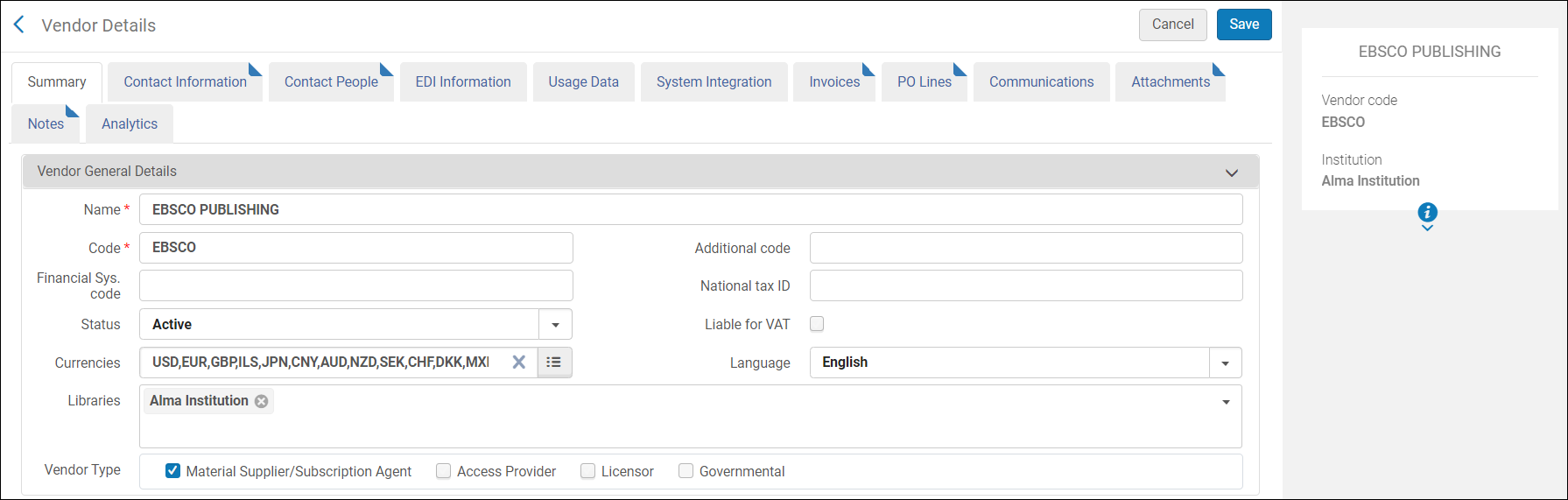
Cost Usage
- Attributes (gray fields) from all folders can be used with measures (yellow fields) and attributes from the Cost Usage folder. Measures from the Portfolio folder and the Electronic Collection folder should not be use together with measures or attributes from the Cost Usage folder or you may receive incorrect results.
- There is no cost usage information for deleted electronic collections.
- For information on how to use these fields in your reports, see the Developer Network.
- Cost Usage information is updated in Analytics once a month.
- This dimension is only for expenditure type transactions.
- Regular usage fields display usage to date as uploaded from the COUNTER reports. The estimated usage fields project the usage for the full year based on the usage to date so that institutions can estimate the cost usage for the entire year.
- The COUNTER measures listed in the table below are the only measures that can be used for cost usage calculations. If none of these have data for a given title, no usage is included in the analytics report.
| Field | Description | Additional Information |
|---|---|---|
| Cost | The price of the transaction of type expenditure for the invoice line of the POL | |
| Usage - Total | The total usage . This is the sum total of all other measures in “Cost Usage” area. It includes both COUNTER R4 and COUNTER R5. | |
| Estimated Usage - Total | The estimated total usage of a journal or electronic collection | |
| Cost Per Use | The cost per use of a journal or electronic collection | Calculated by cost divided by use |
| Estimated Cost Per Use | The estimated cost per use of a journal or electronic collection | |
| Use Per Cost | The use per cost of a journal or electronic collection | Calculated by use divided by cost |
| Usage JR1 | The number of successful full text article requests by journal report | COUNTER Release 4 |
| Estimated Usage JR1 | The estimated number of Number of Successful Full-Text Article Requests from an Archive by Month and Journal | COUNTER Release 4 |
| Usage JR1a | The number of successful Full-Text Article Requests from an Archive by Month and Journal | COUNTER Release 4 |
| Estimated Usage JR1a | The estimated number of successful Full-Text Article Requests from an Archive by Month and Journal | COUNTER Release 4 |
| Usage JR1 GOA | The number of successful Gold Open Access Full-Text Article Requests by Month and Journal | COUNTER Release 4 |
| Estimated Usage JR1 GOA | The estimated number of successful Gold Open Access Full-Text Article Requests by Month and Journal | COUNTER Release 4 |
| Usage BR1 | The number of successful Title Requests by Month and Title. | COUNTER Release 4 |
| Estimated Usage BR1 | The estimated number of successful Title Requests by Month and Title. | COUNTER Release 4 |
| Usage BR2 | The number of successful Section Requests by Month and Title. | COUNTER Release 4 |
| Estimated Usage BR2 | The estimated number of successful Section Requests by Month and Title. | COUNTER Release 4 |
| Usage DB | The number of Total Searches, Result Clicks and Record Views by Month and Database | COUNTER Release 4 |
| Estimated Usage DB | The estimated number of Total Searches, Result Clicks and Record Views by Month and Database | COUNTER Release 4 |
| Usage TR_J1 | The number of successful Journal Requests (Excluding OA_Gold) The cost per use uses measure 'TR_J1 - Unique Item Requests' | COUNTER Release 5 |
| Estimated Usage TR_J1 | The estimated number of successful Journal Requests (Excluding OA_Gold) The cost per use uses measure 'TR_J1 - Unique Item Requests' | COUNTER Release 5 |
| Usage TR_B1 | The number of successful Book Requests (Excluding OA_Gold) The cost per use uses measure 'TR_B1 - Unique Title Requests' | COUNTER Release 5 |
| Estimated Usage TR_B1 | The estimated number of successful Book Requests (Excluding OA_Gold) The cost per use uses measure 'TR_B1 - Unique Title Requests' | COUNTER Release 5 |
| Usage DR | The number of successful Database Master Report The cost per use uses measure 'DR – Unique Title Requests' | COUNTER Release 5 |
| Estimated Usage DR | The estimated number of successful Database Master Report The cost per use uses measure 'DR – Unique Title Requests' | COUNTER Release 5 |
| Field | Description | Additional Information |
|---|---|---|
| No. of Portfolios (Deleted + In Repository) | The number of portfolios in the repository plus the number of deleted portfolios | |
| No. of Portfolios (In Repository) | The number of portfolios in the repository | |
| No. of Portfolios (Deleted) | The number of deleted portfolios | |
| No. of Portfolio (In Repository Linked to CZ) | The number of portfolios that are in the repository and linked to the Community Zone | |
| No. of Portfolio (In Repository Not Linked to CZ) | The number of portfolios that are in the repository and not linked to the Community Zone | |
| No. of Electronic Collections (Deleted + In Repository) | The number of electronic collections in the repository plus the number of deleted collections | |
| No. of Electronic Collections (In Repository) | The number of electronic collections in the repository | Includes also electronic collections without portfolios. |
| No. of Electronic Collections (Deleted) | The number of deleted electronic collections | |
| No. of Electronic Collections (In Repository Linked to CZ) | The number of electronic collections that are in the repository and linked to the Community Zone | |
| No. of Electronic Collections (In Repository Not Linked to CZ) | The number of electronic collections that are in the repository and not linked to the Community Zone | |
| No. of Electronic Collections Without Portfolios (In Repository) | The number of electronic collections without portfolios in the repository | This field was created for electronic databases. |
| No. of Electronic Collections (In Repository + In CDI) | The number of collections in both the repository and CDI | |
| No. of Electronic Collections (In Repository + Not In CDI) | The number of collections in the repository, but not in CDI |
| Field | Description | Additional Information |
|---|---|---|
| Data Updated as of (Cost Usage Details) | The date from as of which the data is updated | |
| Has Cost | Indicates if there is a cost | |
| Has Electronic Collection POL | Indicates if there is an electronic collection POL | |
| Has Portfolio POL | Indicates if there is a portfolio POL | |
| Has Usage | Indicates if there is usage | |
| Match By | Match by | |
| Multiple POLs | Indicates if there are multiple POLs | These fields are highly technical in nature and are used in rare circumstances when a deep investigation of analytics processes is necessary. They are only to be used by experienced users |
| Num of MMS Match | The number of MMS matches | |
| Num of MMS Cost | The number of MMS cost | |
| Num of MMS Usage | The number of MMS usage | |
| Percent Portfolio | The percent portfolio | |
| Platform (from COUNTER report) | The vendor interface or content provider. An interface from an aggregator, host, publisher, or service that delivers the content to the user and that counts and provides the COUNTER usage reports. | |
| Normalized Platform (from COUNTER report) | The normalized name of the platform, taken from the COUNTER report | |
| COUNTER Platform (defined in E-Resource of UI Alma) | The platform for calculating cost usage, defined in the Alma e-resource. | If no platform is defined, the value of this field is taken from the “COUNTER Platform derived from interface” field on the Electronic Collection Editor” page. |
| Subscriber | The library or instance. An individual or organization that pays a vendor for access to a specified range of the vendors services and/or content and is subject to terms and conditions agreed to with the vendor. | |
| Total Expenditure | The total expenditure | |
| Usage Type | The usage type |
| Field | Description | Additional Information |
|---|---|---|
| Fund Currency | Stores the fund's currency | |
| Fund Area Code | Stores values defined in the Fund Types table and attributed to funds, for example: Endowed, Gift, General, Grant, Income, and Resource Sharing. For more information, see Configuring Fund Types. | This field is named Fund type in Alma and is created via a mapping table. |
| Fund Area Description | Stores the fund area description | |
| Fund Description | The contents of the Description field of the Summary tab of the fund | |
| Fund External ID | The fund ID used by an external system. | |
| Fund Code | Stores the fund code unique to each institution and fiscal period | This code is not unique, since each year another entry is made for the same code |
| Fund ID | Stores the unique ID of the fund | |
| Fund Name | Stores the fund name | |
| Fund Owner Code | The owner code of the fund | |
| Fund Owner Name | The owner name of the fund | |
| Fund Status | Indicates if the fund is active or inactive | |
| Fund Note | Stores the note of the fund | |
| Fund Type | Stores one of the following fund types:
|
|
|
Parent Fund Code |
Stores the parent fund code | |
| Parent Fund ID | Stores the unique ID of the fund's parent | |
| Parent Fund Name | Stores the parent fund name |
| Field | Description | Additional Information |
|---|---|---|
| Fiscal Period Description | Stores the description of the fiscal period as stored in the FundLedgerFiscalPeriodTable mapping table or stores the fiscal year if the description is empty | |
| Fiscal Period Start Date | Stores the start date of the fiscal period of the institution | |
| Fiscal Period End Date | Stores the end date of the fiscal period of the institution | |
| Fiscal Period Start End | Stores the start and end dates of the fiscal period of the institution | |
| Fiscal Period Status | Stores the status of the fiscal period such as Active, Inactive, Draft, or Close | |
| Fiscal Period Filter | The filter on the fiscal period | Possible values:
|
| Field | Description | Additional Information |
|---|---|---|
| Material Type | The material type if the POL | |
| Publication Date | The publication date | |
| Approved By | The user who approved the POL | |
| Creator | The creator of the POL | |
| Identifier | The identifier | |
| Is Delayed | Indicates if the POL is delayed | |
| Is Valid | Indicates if the POL is valid | |
| POL Title | The title of the POL | |
| Publication Place | The place of publication of the POL | |
| Publisher | The publisher of the POL | |
| Review Status | The review status of the POL | |
| Vendor Title Number | The number of the vendor title | |
| PO Number | Stores the business identifier of the PO related to the POL. | |
| POL Notes | The notes on the POL | Multiple notes are separated by a semicolon |
| PO ERP Number | The ERP number of the purchase order | Used by customers that want the purchase order to be approved by an ERP system before it is sent to the vendor |
| POL Reference | Stores the business identifier of the POL | This is the POL number in Alma. |
| Item Description | Description of the item | The description entered for the POL. Note that this field is not taken from the bibliographic details. It is useful when no item is related to the POL |
| Status | Stores the business status of the POL as Active, Canceled, or Closed
There are a number of sub-statuses included in the business status Active. See the Status (Active) field.
|
|
| Status (Active) | Indicates the sub-status of the Status field. For example: Waiting for Invoice, Waiting for Manual Renewal, Waiting for Renewal, Under Evaluation, Sent, In Review, Ready to Be Sent, Waiting for Packaging, and Manual Packaging | |
| Order Line Type | The order line type as it appears in the order in Alma | |
| Order Line Type Code | A short code for the Order line type | |
| Sent Date | Stores the date that the PO/ POL is sent to the vendor | |
| Currency | The currency of the transaction. | |
| List Price | The list price for a single copy of the item | |
| Net Price | A calculation of the total price for the POL based on the list price per copy, the discount, and the number of copies ordered | |
| Quantity For Pricing | The number of items to be paid for. | The quantity for pricing and the number of items to create may be different in a case of discounted pricing through a deal such as "buy two items and get a third item at no additional charge." |
| Discount | The discount amount. | |
| Vendor Name | The vendor name as defined in the Alma vendor details definitions. | |
| Vendor Code | The vendor code as defined in the Alma vendor details definitions. | |
| Vendor Account Description | The vendor description as defined in the Alma vendor account definitions. | |
| Vendor Account Code | The vendor description as defined in the Alma vendor account definitions | |
| Vendor Contact Person ID | Stores the related vendor contact person ID | |
| Vendor Reference Number Type | Stores the type of the reference number | |
| Vendor Reference Number | Store the reference number for the POL in Alma, as provided by the vendor. Serves as a matching point for identifying a POL in Alma | |
| Material Supplier | The vendor supplying the material being ordered | |
| Note To Vendor | Notes to the vendor. | |
| Acquisition Method | Stores the method by which the POL is acquired with the default value set as Purchase. This value may affect when the POL is sent. | |
| Rush | Indicates whether the POL is to be rushed. | |
| Cancellation Restriction | Indicates if a cancellation restriction note, containing a warning upon the cancellation of a POL, is configured to be displayed. | |
| Cancellation Restriction Note | The warning to be displayed when canceling a POL. | |
| Cancellation Reason | Stores the reason that a POL is canceled and displays only on canceled lines. Values are in the code table POLineCancellationReasons | |
| Is Claimed | Flags the POL if there is an open claim to the vendor. A POL is claimed if the items were not received. | |
| Shipping Method | Stores the method for the vendor to ship the order | Per the values in Shipping Method code table defined in the acquisition configuration menu |
| Ship to Address ID | Stores the library shipping address that should be used by the vendor | |
| Shipped To Address Line 1-5 | The shipped to address lines. | |
| Shipped To Address City | The shipped to city. | |
| Shipped To Address Country | The shipped to country. | |
| POL Creation Date | Stores the timestamp of the POL creation date. | |
| POL Modification Date | Stores the timestamp of the POL modification date | |
| PO Approval Date | The date the PO was approved (the sent date). | |
| PO Approval Date and Time | The date and time that the PO was approved. | |
| PO Creation Date | Stores the timestamp of the PO creation date | |
| PO Modification Date | Stores the timestamp of the PO modification date | |
| Expected Activation Date | Stores the expected date for the resource activation by vendor for electronic POLs | |
| Expected Activation Interval | For electronic POLs, the number of days after ordering that you expect electronic orders to be activated | |
| Claiming Date | The number of days from the expected receipt/activation date to the date on which the POL is sent to the claims task list | The default value is taken from the Claiming grace period field on the Vendor Account Details |
| Subscription From Date | Stores the date for the beginning of a subscription for continuous orders | |
| Subscription To Date | Stores the date for the end of a subscription for continuous orders | |
| Expected Receiving Date | Stores the expected date for physical items to be received from the vendor for physical POLs | |
| Expected Receiving Interval | For physical POLs, the number of days after ordering that you expect physical orders to be received | |
| Receiving/Activation Note | Text enabling the Purchasing Operator to indicate to the Receiving Operator the intended location of serial order items in which no inventory items are created. | |
| Receiving Status | Stores an indication of whether or not all physical items were received | |
| Renewal Date | Stores the date of the POL's next renewal for continuous orders | |
| Renewal Reminder Period | Determines how many days before renewal is mail regarding that renewal sent | |
| Renewal Cycle | Stores the cycle for the autorenewal job for continuous orders. For example, if it is set to one year, the POL is renewed in one year. | Defined in RenewalCycle code table. |
| Manual Renewal | Stores an indication that the POL is renewed manually or automatically | |
| PO Creator | Stores the user name that created the PO | |
| POL Creator | Stores the user name that created the POL | |
| POL Label | The labels assigned to the POL | This is a repeatable field in Alma, which is concatenated in analytics. It is free-text field, configured by the user. For more information, see Managing Labels in the Details Pane. |
| PO Modified By | Stores the user name that modified the PO | |
| POL Modified By | Stores the user name that modified the POL | |
| Interested Users | Displays the interested users for the POL. in case more than one user is added to the POL, values are concatenated | List of interested user in Alma is displayed in the interested users tab of the POL. Note that in order to search for a specific user, you should use the contain filter in order to find also cases that more than 1 user was added to the PO. |
| Assigned To | Stores the user that is assigned to the order | |
| Application | Used for identifying migrated lines | |
| CKB ID | Stores a reference to the electronic collection PID for electronic POLs | |
| License ID | Stores the ID of the license of the POL that is relevant for electronic POLs | |
| Source Type | Stores the source from which the POL originated. Values for example: EOD, Manual, Migration, and so forth | |
| Source ID | Stores the source file ID used for the EOD lines | |
| Associated POL | The target POL | |
| Association Type | The type of association between POLs, such as defined by user or by a process or job.ctronic Collection Management Le | |
| Reporting Code - 1-5 | Five fields that store the reporting codes. | Taken from the POL |
| Reporting Code Description -1-5 | Five fields that store the description of the 5 reporting code fields | |
| Invoice Status | The status of the invoice | |
| Additional Order Reference | An additional identifier for the POL |
| Field | Description | Field Location in Alma | Additional Information | Data Type | Data Size |
|---|---|---|---|---|---|
| New for July! Cost Usage POL Approver Creation Date | The creation date of the record for the POL approver. |
Admin > Manage Users > Edit User > i icon (Right hand pane) The label in Alma is Created on. |
DATE | ||
| Cost Usage POL Approver Creator | The user that created the POL approver's user record |
Admin > Manage Users > Edit User > i icon (Right hand pane) The label in Alma is Created by. |
VARCHAR | 255 | |
| Cost Usage POL Approver Modification Date | The date of the last modification in the POL approver's user record. |
Admin > Manage Users > Edit User > i icon (Right hand pane) The Alma label is Last updated on. |
DATE | ||
| Cost Usage POL Approver Modified By | The last person/system that modified the POL approver's user record. |
Admin > Manage Users > Edit User > i icon (Right hand pane) The label in Alma is Last updated by. |
VARCHAR | 255 | |
| Cost Usage POL Approver Birth Date | The birth date in the POL approver's user record. |
Admin > Manage Users > Edit User > General Information Tab > User Information Section The label in Alma is Birth date. |
DATE | ||
| Cost Usage POL Approver Campus Code | The campus code in the POL approver's user record. | Only the campus name is displayed in the Users UI. | The full list of campus codes and names can be found in Configuration > General > Libraries > Define Campuses. | VARCHAR | 50 |
| Cost Usage POL Approver Cataloger Level | The cataloger level in the POL approver's user record. |
Admin > Manage Users > Edit User > General Information Tab > User Information Section The label in Alma is Cataloger level. |
For this to display in the UI, the Cataloger Permission Levels must be defined (in addition to the default level). See Cataloging Privileges for more information. | ||
| Cost Usage POL Approver Disable All Login Restrictions | Indicates if the user has IP login restrictions disabled. This is recorded in the POL approver's user record. |
Admin > Manage Users > Edit User > General Information Tab > User Management Information Section The label in Alma is Disable all login restrictions. |
This is a checkbox. | VARCHAR | 3 |
| Cost Usage POL Approver Expiry Date | The expiration date in the POL approver's user record. |
Admin > Manage Users > Edit User > General Information Tab > User Information Section The label in Alma is Expiration date. |
After expiration, the user cannot log in. | DATE | |
| Cost Usage POL Approver External ID | The external ID in the POL approver's user record (in the case where the record was created by an external system). | Not displayed in the UI. | For more information, see Managing User Identifiers. | VARCHAR | 255 |
| Cost Usage POL Approver First Name | The first name in the POL approver's user record. |
Admin > Manage Users > Edit User > General Information Tab > User Information Section The label in Alma is First name. |
VARCHAR | 255 | |
| Cost Usage POL Approver Full Name | The full name in the POL approver's user record. | Not displayed in the UI | Concatenation of the last name + first name. | VARCHAR | 511 |
| Cost Usage POL Approver Gender (Not in Use) |
|||||
| Cost Usage POL Approver Has Role Other Than Patron | Indicates if the POL approver has a role in addition to Patron. | Does not display in the UI. |
The user roles can be viewed at Admin > Manage Users > Edit User > General Information Tab > User Roles section. This field checks whether any roles exist in addition to the Patron role added by default. |
VARCHAR | 3 |
| Cost Usage POL Approver Has Role Other Than Patron and Instructor | Indicates if the POL approver has a role other than Patron and Instructor. | Does not display in the UI. |
The user roles can be viewed at Admin > Manage Users > Edit User > General Information Tab > User Roles section. This field checks whether there are any roles in addition to the Patron and Instructor role. |
VARCHAR | 3 |
| Cost Usage POL Approver Identifier 1-2 | Two pre-configured user identifiers for the POL approver. | Does not appear for users in the UI. | Choosing a specific identifier to be included in the user details is done in Alma (in an internal table that is not exposed to the users). Users who need assistance in defining this field do so by contacting Ex Libris Support. Note that only only one value per identifier is supported. | VARCHAR | 4000 |
| Cost Usage POL Approver Is Blocked | Indicates if the POL approver is blocked. This is recorded in the POL approver's user record. | Does not display in the UI. |
For more information, see Configuring User Blocks. User blocks can be viewed in Admin > Manage Users > Edit User > Blocks Tab |
VARCHAR | 3 |
| Cost Usage POL Approver Job Category | The job category in the POL approver's user record. |
Admin > Manage Users > Edit User > General Information Tab > User Information Section The label in Alma is Job Category. |
Can be configured in Configuration Menu > User Management > User Details > Job Categories. | VARCHAR | 255 |
| Cost Usage POL Approver Job Description | The job description in the POL approver's user record. |
Admin > Manage Users > Edit User > General Information Tab > User Information Section The label in Alma is Job description. |
VARCHAR | 255 | |
| Cost Usage POL Approver Last Activity Date | The last activity date in the POL approver's user record. This refers to the last date that the approver made a request or borrowed or returned an item. |
Admin > Manage Users > Edit User > General Information Tab > User Information Section The label in Alma is Last Patron Activity Date. |
This only displays if enabled at Configuration Menu > User Management > General > Record Last Patron Activity Date. For more information, see Configuring Last Patron Activity Date. |
DATE | |
| Cost Usage POL Approver Last Name | The last name in the POL approver's user record. |
Admin > Manage Users > Edit User > General Information Tab > User Information Section The label in Alma is Last name. |
VARCHAR | 255 | |
| Cost Usage POL Approver Linked From Institution Code | In a fulfillment network, this is the ID of the external institution from which the user was copied. |
Admin > Manage Users > Edit User > Right hand pane The label in Alma is Owner. |
Applies to linked user in a fulfillment network. For more information, see Managing Users > Not Local. |
VARCHAR | 255 |
| Cost Usage POL Approver Linked From Institution Name | In a fulfillment network, this is the name of the external institution from which the user was copied. |
Admin > Manage Users > Edit User > General Information Tab. It displays in the Not local section. The label in Alma is Institution. |
Appears only in very specific cases. For more information, see Managing Users > Not Local. |
VARCHAR | 255 |
|
Cost Usage POL Approver Linked From Other Institution
|
Indicates if the POL approver is linked from another institution.
|
Doesn't display in the UI
|
Applies to the linked user (the user in the secondary institution - copied from the user in the source institution). Populated only if the user created a link from their institution to another institution via a fulfillment network.
Possible values:
|
DOUBLE
|
|
|
Cost Usage POL Approver Linked To Other Institution
|
Indicates if the user accessed Primo/Alma for services in another institution. Note that this does not necessarily indicate that the services were actually supplied or that a linked account was created.
|
Doesn't display in the UI.
|
Applies to the user in the source institution. Populated only if the user created a link from their institution to another institution via a fulfillment network. For more information, see Linking Users in Collaborative Networks.
Possible values:
|
VARCHAR
|
10
|
| Cost Usage POL Approver Locked Out Date | |||||
|
Cost Usage POL Approver Middle Name
|
The middle name in the POL approver's user record.
|
Admin > Manage Users > Edit User > General Information Tab > User Information Section
The label in Alma is Middle Name.
|
|
VARCHAR
|
255
|
|
Cost Usage POL Approver Patron Letters Opt In
|
The letters for which the POL approver has opted in. This is recorded in the POL approver's user record.
|
Does not display in the UI.
|
The user can view the list of letters that are selected (opt-in) at Admin > Manage Users > Edit User > General Information Tab > User Information Section > Selected Patron Letters.
The label in Alma is Selected Patron Letters.
|
VARCHAR
|
2000
|
|
Cost Usage POL Approver Patron Letters Opt Out
|
The letters for which the POL approver has opted out. This is recorded in the POL approver's user record.
|
Does not display in the UI.
|
The user can view the list of letters that are deselected (opt-out) at Admin > Manage Users > Edit User > General Information Tab > User Information Section > Selected Patron Letters. The label in Alma is Selected Patron Letters.
|
VARCHAR
|
2000
|
|
Cost Usage POL Approver Preferred First Name
|
The preferred first name in the POL approver's user record.
|
Admin > Manage Users > Edit User > General Information Tab > User Information Section
The label in Alma is Preferred first name.
|
|
VARCHAR
|
255
|
|
Cost Usage POL Approver Preferred Language
|
The preferred language in the POL approver's user record.
|
Admin > Manage Users > Edit User > General Information Tab > User Information Section
The label in Alma is Preferred language.
|
|
VARCHAR
|
4000
|
|
Cost Usage POL Approver Preferred Last Name
|
The preferred last name in the POL approver's user record.
|
Admin > Manage Users > Edit User > General Information Tab > User Information Section
The label in Alma is Preferred last name.
|
|
VARCHAR
|
255
|
|
Cost Usage POL Approver Preferred Middle Name
|
The preferred middle name in the POL approver's user record.
|
Admin > Manage Users > Edit User > General Information Tab > User Information Section
The label in Alma is Preferred middle name.
|
|
VARCHAR
|
255
|
|
Cost Usage POL Approver Primary Identifier
|
The primary identifier in the POL approver's user record.
|
Admin > Manage Users > Edit User > General Information Tab > User Information Section
The label in Alma is Primary identifier.
|
|
VARCHAR
|
255
|
|
Cost Usage POL Approver Purge Date
|
The purge date in the POL approver's user record. |
Admin > Manage Users > Edit User > General Information Tab > User Information Section The label in Alma is Purge date. |
For more information, see Purging Users.
|
DATE
|
|
| Cost Usage POL Approver Resource Sharing Library Code | The code associated with the resource sharing library in the POL approver's user record. |
Library codes can be viewed in the library configuration screen. Configuration > General > Add or Edit Library Information > Edit a library > Right hand information window. The label in Alma is Code. |
VARCHAR | 4000 | |
|
Cost Usage POL Approver Resource Sharing Library Name |
The resource sharing library name in the POL approver's user record. This is the name of the library associated with the POL approver. |
Admin > Manage Users > Edit User > General Information Tab > User Information Section > Resource Sharing Library The label in Alma is Resource Sharing Library. |
|
VARCHAR |
4000 |
| Cost Usage POL Approver Statistical Category 01-10 | Statistical categories (1-10) that are recorded in the POL approver's user record. | Admin > Manage Users > Edit User > Statistics > Add Statistic | These fields allow you to map ten statistical categories. This allows you to filter reports based on advanced user information typically stored in the statistical category fields. For more information, see Configuring Statistical Categories for Analytics. | VARCHAR | 4000 |
| Cost Usage POL Approver Status | The status in the POL approver's user record. |
Admin > Manage Users > Edit User > General Information Tab > User Information Section The label in Alma is Status. |
The possible values are:
For more information, see Find and Manage Users Page - Column Description table in Managing Users. |
VARCHAR | 8 |
| Cost Usage POL Approver Status Date | This is the last date when the Status field of the POL approver's user record was modified. |
Admin > Manage Users > Edit User > General Information Tab > User Information Section The label in Alma is Status Date. |
DATE | ||
|
Cost Usage POL Approver User Email
|
The preferred email for correspondence in the POL approver's user record.
|
Admin > Manage Users > Edit User > General Information Tab > Contact Information Tab > Email Addresses section > Edit an email The label in Alma is Email Address. |
Note that even if there are multiple emails for the user, only the preferred email will appear in analytics.
|
VARCHAR
|
255
|
| Cost Usage POL Approver User Group | The user group in the POL approver's user record. |
Admin > Manage Users > Edit User > General Information Tab > User Information Section The label in Alma is User group. |
User groups assigned to users can be configured by the institution. For more information, see Configuring User Groups. | ||
| Cost Usage POL Approver User Group Code | The user group code associated with the user group name in the POL approver's user record. | For the full list of user groups codes and names see Configuration > Fulfillment > Patron Configuration > User Groups. | VARCHAR | 255 | |
| Cost Usage POL Approver User ID | The Alma internal user ID in the POL approver's user record. | Not displayed in the UI. | VARCHAR | 50 | |
| Cost Usage POL Approver User Record Type | The user record type in the POL approver's user record. |
Admin > Manage Users > Edit User > Right hand pane The label in Alma is Record type.
|
The possible values are:
For more information, see Managing Users. |
VARCHAR | 4000 |
| Cost Usage POL Approver User Title | The user title in the POL approver's user record. |
Admin > Manage Users > Edit User > General Information Tab > User Information Section The label in Alma is Title.
|
For more information see Configuring User Titles. | VARCHAR | 50 |
| Cost Usage POL Approver User Type | The user type in the POL approver's user record. |
Admin > Manage Users > Edit User > Right hand pane The label in Alma is Account type. |
The possible values are:
For more information, see Managing Users. |
CHAR | 20 |
| Field | Description | Additional Information | Data Type | Data Size |
|---|---|---|---|---|
| Cost Usage POL Creation Date | The creation date of the purchase order line of the Cost Usage. | The date in the format DD/MM/YYYY | DATE | |
| Cost Usage POL Creation Start Of Week | The date of the first business day of the week. | The date in the format DD/MM/YYYY | DATE | |
| Cost Usage POL Creation Week Number | The number of the week of the year. | There are 52 weeks in a year. | VARCHAR | 2 |
| Cost Usage POL Creation Month Key | The month of the date in number format. | E.g. February will show the number 2 in this column. This field is useful when you want to sort by month. | INT | |
| Cost Usage POL Creation Month | The month of the date in text format. | The month, e.g. February. | VARCHAR | 20 |
| Cost Usage POL Creation Full Month | The year and month that the purchase request was modified. | The month in text format and the year. E.g. Feb 25 (for February 2025) | VARCHAR | 20 |
| Cost Usage POL Creation Quarter | The quarter in the year in which the purchase request was modified. | The quarter of the date in a display format such as Q1 | VARCHAR | 20 |
| Cost Usage POL Creation Year | The year in which the purchase request was modified. | The year of the date in the format YYYY . E.g.2025 | VARCHAR | 20 |
| Cost Usage POL Creation Fiscal Month Key | The fiscal month of the date in number format. | E.g. if the fiscal year starts in June, this column shows the number 1 for June, the number 2 for July, and so on. | INT | |
| Cost Usage POL Creation Fiscal Year | The fiscal year of the date in string format. | The year is presented according to the description in the mapping table Fund and Ledger Fiscal Period. For more information, see Configuring Fund and Ledger Fiscal Periods. | VARCHAR | 50 |
| Cost Usage POL Creation Date Filter | Used to filter report results by date. |
Possible values:
|
VARCHAR | 100 |
| Cost Usage POL Creation Year-Month | The year and the month in a format such as 2023-1 | The year and the month in the format YYYY-MM | VARCHAR | 250 |
|
Field
|
Description
|
Field Location in Alma
|
Additional Information
|
Data Type
|
Data Size
|
|---|---|---|---|---|---|
| Acquisition Material Type | The acquisition material type code. | For the list of physical material types, see Configuring Physical Item Material Type Descriptions. |
VARCHAR
|
255
|
|
|
Acquisition Material Type Description
|
The description of the acquisition material type
|
Configuration > Acquisitions > Purchase Orders > POL Types
The label in Alma is Acquisition Material Type. |
|
VARCHAR
|
255
|
| Continuity | If the POL is one-time, continuous, or a standing order. | Configuration > Acquisitions > Purchase Orders > POLTypes | See the field location in Alma in the figure POL Types below. |
VARCHAR
|
255
|
| Format | Stores the inventory format that can be Electronic, Physical, or Generic. | Configuration > Acquisitions > Purchase Orders > POL Types The label in Alma is Inventory Format. |
Possible values are P, E, and G. This value comes from the Inventory Format column of the POL Type mapping table (Acquisitions > Purchase Orders > POL Types). See the field location in Alma in the figure POL Types below. |
VARCHAR
|
255
|
| POL Type Name | The name of the POL Type | Configuration > Acquisitions > Purchase Orders > POL Types. The label in Alma is Description. | For the list of POL types, see Enabling/Disabling POL Types. See the field location in Alma in the figure POL Types, below. | VARCHAR | 255 |
| Field | Description | Additional Information |
|---|---|---|
| Cost Usage Institution Code | The institution code of the of the network member | |
| Cost Usage Institution Name | The institution name of the network member | |
| Institution Address Line 1 | The first line of the address of the institution. It usually includes the building number and the street name. | Configured from Configuration > General > Add a Library or Edit Library Information > Contact Information tab. This is taken from the address configured as the Preferred address.
The label in Alma is Address Line 1. |
| Institution City | The city of the institution. | Configured from Configuration > General > Add a Library or Edit Library Information > Contact Information tab. This is taken from the address configured as the Preferred address.
The label in Alma is City. |
| Institution State Province | The state or province of the institution. | Configured from Configuration > General > Add a Library or Edit Library Information > Contact Information tab. This is taken from the address configured as the Preferred address.
The label in Alma is State/Province. |
| Institution Country | The country of the institution. | Configured from Configuration > General > Add a Library or Edit Library Information > Contact Information tab. This is taken from the address configured as the Preferred address.
The label in Alma is Country. |
| Institution Postal Code | The postal code of the institution. | Configured from Configuration > General > Add a Library or Edit Library Information > Contact Information tab. This is taken from the address configured as the Preferred address.
The label in Alma is Postal code. |
| Field | Description | Field Location in Rialto | Additional Information | Data Type | Data Size |
|---|---|---|---|---|---|
|
Fulfilled by Rialto |
Orders that were placed with Rialto and were received/activated. |
Market > Order History > Order History | VARCHAR | 10 | |
|
Rialto Cart Origin |
The last touch point of an order before it was placed. This can indicate if it was found through search, selection plan, sent to a list, etc. |
Market > Persistent Search toolbar > Cart icon |
This can be helpful if end users wants to get a feel for how their staff are finding titles. However, since it is the last touch point, it is a limited scope. |
VARCHAR | 2000 |
|
Rialto EBA ID |
A unique identifier for an EBA plan managed in Rialto. |
Market > Automatic Selection > Evidence Based Acquisition |
This allows end users to focus on a specific EBA plan. |
DOUBLE | |
|
Rialto Fail Code |
The code of a failed purchase. | Configuration menu > Market > Rialto Vendor Codes | VARCHAR | 255 | |
|
Rialto License |
The license selected by the user for an electronic purchase. | Market > Market > Market Search...On the Offers page, to the right of each upgradeable item | Possible values:
|
VARCHAR | 255 |
|
Rialto List ID |
A unique identifier for user created offer lists within Rialto. |
Market > My Lists > My Lists | DOUBLE | ||
|
Rialto Order Status |
The most recent order status sent from the Rialto order processing system. |
Market > Order History > Order History | Possible values:
For more information on order statuses, see Rialto Order Statuses. |
VARCHAR | 4000 |
|
Rialto Origin ID |
The ID of the order origin if it is a list, feed, or selection plan. | Market > Order History > Order History...search for an order by Origin ID | DOUBLE | ||
|
Rialto Request Cancellation By |
The user who requested to cancel an order. |
Market > Order History > Order History...selecting "Request cancellation" | DOUBLE | ||
|
Rialto SP ID |
A unique identifier for selection plans in Rialto. |
Market > Automatic Selection > Selection Plans | This allows end users to focus on a specific selection plan. | DOUBLE | |
|
Rialto Template ID |
A unique identifier for cart templates that were created in Rialto. |
Market > Orders > Cart Templates | DOUBLE | ||
|
Rialto Transaction Type |
The transaction type. | Market > Order History > Order History...Facets on the Order History Page | Possible values:
|
VARCHAR | 2000 |