

2025 RN 05 Main
|
Upcoming UX Enhancements in the May 2025 Release
Alma introduces major UX improvements in the May 2025 Alma Release, bringing enhanced workflows, improved readability, and a smoother transition to the new UI experiences.
Manage Patron Services and Return Items New UX
The new, next-generation Alma UX design is available for the Manage Patron Services and Return Items pages. In this release, the new UX is automatically set as the default for all users, with no option to opt-out.
For a general overview of the new Manage Patron Services and Return Items pages, see Managing Patron Services at a Circulation Desk - New Layout.
Title Searches New UX – Enhancements & August Sunset
The classic title search UX will be sunset as part of the August 2025 - we encourage you to work with the new search and become accustomed to it.
The May release introduces several improvements to the new Title Searches UX, addressing feedback and fixing known issues:
View Work Action for BIBFRAME Instances in All Titles Search
A new action in the All Titles search for BIBFRAME instance records enables users to navigate to the details page of the linked work within a sliding panel, improving navigation and display of the BIBFRAME work.
For more information, see Performing Record Actions on the Repository Search Results Page.

Enhanced Saved Facets in Title and Holdings Searches
You can now save multiple facet combinations and quickly apply them to your searches, similar to the functionality on the Manage Sets page. Saved facets appear in the Saved drop-down list, where you can also set a default that is automatically applied to searches.
Users who previously saved facets in title searches before this update will find them in the drop-down list, labeled Pre-saved.
For more information, see Saving Multiple Combinations of Facets.
Adding Cataloger Notes in the Titles and Holdings Searches
In title and holdings searches, catalogers can now view, add, edit, and delete notes directly without opening the Metadata Editor. Notes are only accessible for viewing or editing when available to the user in the Metadata Editor: if the cataloger has permission in the Metadata Editor and the record is not locked. Additionally, notes can only be managed within the search scope where the record is maintained (institution, network, or community). This enhancement enables catalogers to quickly add notes to bibliographic or holdings records.
For more information, see Searching in Alma > Notes Section.
Navigation Links Added to the Title Searches Export
The new title search UX includes single-click links to additional related entities, such as Related Records, Courses, Licenses, and Reminders, along with a link to the new Notes section for catalogers. These fields are now included in search exports to Excel, just like existing navigation links for Orders and Requests. This enhancement enables users to quickly identify records with related entities in their exported files at a glance.
For more information, see Export to Excel.
AI Indication for Community Zone Enriched Records
In the new title searches UX, the AI indication ( ) is now displayed for Community Zone records enriched by the Community Zone AI generator.
For more information, see:

Enhanced Electronic Portfolio Availability Information in Title Searches
The expanded electronic tab and the electronic portfolio section now include a calculated availability indication, taking into account both the portfolio and service status and reflecting the availability of the portfolio to patrons.
This availability, as well as the availability set in the portfolio, are also added to the Excel created when exporting the electronic portfolio section.
For more information, see Searching in Alma > Electronic Portfolios.


New Title Search Experience Features Now Available When Adding Titles to Collections
The features of the New Title Search Experience are now available when adding titles to collections (Resources > Manage Collections > Edit a Collection > Titles List > Add Title):

Among other characteristics of the next-generation interface, it displays as a sliding panel, with a multi-select facets pane and title details pane.
For an overview of the next-generation interface, see Introduction to the New Title Search Experience.
Enhanced Search Query Design with Improved UI and Accessibility
 Idea Exchange URM-242034
We have introduced a new search query design with an updated UI to ensure a more consistent and efficient search process, improving the visibility and usability of search options across different workflows. The new design includes a refreshed search query display and a magnifying glass icon for quick access to update the query via the Advanced Search.
The redesigned search query and new icon make it easier for users to understand the search query and locate and utilize Advanced Search functionalities. The enhanced UI elements and structured design improve navigation, benefiting all users, including those using assistive technologies.

For more information, see Searching in Alma.
Enhanced Text Appearance for Improved Readability
The text appearance in the record view and sections of the new UI across Alma was updated. Labels now have bold font, and values appear as regular text rather than bold. This change enhances various pages, including Purchase Order Lines, Resource Sharing, Manage Patron Services and Title Searches, to create a clearer and more intuitive interface.
This update improves readability by making it easier to distinguish between labels and their corresponding values. It was driven by user feedback, discussed, and approved by the UX focus group. It enhances the overall user experience, ensuring a more user-friendly, readable, and visually appealing system.

Closed Library Management TOU for Resource Sharing Request
Idea Exchange URM -118982It is now possible to configure system behavior for managing a lending request's due date if the calculated date falls on a closed date. This enables the library to ensure that the lending requests' due date is not calculated to fall on dates when the library is closed.
For more information, see Managing Lending Requests.
Supporting Linked Open Data and VIAF for Local Authorities
Institutions that use local authorities (in Institution Zone or Network Zone) or copy Community Zone authorities to work with them locally can define global ID's to be extracted from the authority records and mapped to VIAF (Virtual International Authority File). Institutions with local name authorities that are part of VIAF are able to view info cards, contributor pages and use the URI enrichment configuration.
For more information, see Configuring Linked Open Data for Local Authorities.
Alma AI Metadata Assistant Developments
Request AI Metadata Assistant for Specific Metadata in Alma Mobile 2 App
AI Metadata Assistant: Request Specific Metadata
Administrator Control: Manage Requested Metadata from AI Assistant
Searching for Titles with AI Generated Metadata
Two new search indexes have been added to title searches:
-
Processed with Alma AI tools – Searches for records created or enriched using Alma's AI Metadata Assistant.
-
Enriched with AI metadata by CZ – Searches for Community Zone records that have been enriched with AI-generated metadata.
These indexes help libraries quickly identify records cataloged with AI-generated metadata.
The new indexes require re-indexing and will be fully operational for new, updated, and re-indexed records only. Full functionality will be available after the semi-annual indexing process is completed. In sandbox environments, they will become fully operational after the next refresh or re-indexing.
For more information, see Search Index to MARC 21 Bibliographic Tag Mapping.


Upload Resource Descriptions in PDF and Word Document Formats in AI Metadata Assistant
Catalogers can now upload a PDF or Word document (up to 4 pages) containing a resource description, in addition to JPEG and PNG images. For larger files, only the first 4 pages will be used to generate metadata.
This feature is particularly useful for libraries that receive descriptive files and metadata from vendors, allowing them to generate or enrich records more efficiently.
For more information, see Working with the AI Metadata Assistant > Creating a New Record.

Delete Portfolios Directly from the Metadata Editor
Idea Exchange URM-237697
It is now possible to delete portfolios directly from the Metadata Editor inventory section.
For more information, see Navigating the Metadata Editor page > View Inventory.
For more information on network-specific configurations for record deletion, see Restrict Deletion of Network Zone Bibliographic Records with Related Records and/or Local Extensions.

Enhanced Title Navigation in the Physical Holdings Search
In the physical holdings search, viewing title information now opens the full title details instead of just the bibliographic record. This enables users to access the bibliographic record, its inventory, and related entities, as well as perform actions on the title and inventory based on their privileges. The Record View page remains accessible from the title details via the "View Record" action. This enhancement is especially useful for users who need to navigate seamlessly between holdings and titles while performing actions on both.
For more information, see Performing Record Actions on the Repository Search Results Page.
Physical Holdings Search Labels Management for Physical Inventory Operators
Since the repository search is available to all system users, managing repository search labels is restricted by a privilege, which is granted by default to administrators and managers. Previously, a single privilege controlled label management for both the physical holdings search and the new title searches. Now, separate privileges exist for bibliographic and physical holdings search labels, and physical inventory operators are able to manage physical holdings search labels by default, without affecting title search labels.
This update is particularly beneficial for physical inventory operators, who primarily use the physical holdings search and need to efficiently manage physical inventory. Libraries that wish to modify which roles can add and manage labels for title searches or the physical holdings search can contact Ex Libris support for assistance.
For more information, see Repository Search Labels.
XSL Normalization Process for Metadata Records
XSL normalization of metadata records is now supported, enabling both manual and batch processing. Institutions can use XSL to manipulate metadata across all MARC-supported formats, enabling advanced data normalization through complex logic.
Key updates:
-
The new enable_xsl_normalization_rules parameter is set to false by default for all customers, except for DC/MODS customers who have already defined XSL normalization rules, for whom it is set to true.
-
A new privilege, Normalization Rules Enabled, has been added to all cataloger roles, allowing them to create normalization rules (DROOLS or XSL). Institutions can disable this privilege for selected roles if needed, by contacting Ex Libris support.
Customers who enable XSL normalization rules acknowledge that XSL is a programming language used to manipulate data and accept the associated risks.
For more information, see:
- Privileges for Roles in Alma
- Configuring Other Settings (Resource Management)
- Blog post: Alma XSL Normalization Rule Examples
Persistent Sorting Routine for Physical Items List
Idea ExchangeURM-158995
When users select a sort method different from the default, their choice will now be saved. The selected sorting will persist the next time they view a physical items list, providing a more consistent experience.
For more information, see Configuring Physical Item Sort Routines.

Flexibility in the Definition of Community Zone Updates Behaviour for New and Deleted Portfolios
Idea ExchangeURM-233539
Alma now enables a more precise configuration of how updates from the Community Zone affect collections. For collections activated from the Community Zone, two distinct settings are now available to manage new and deleted portfolios:
- Activate new portfolios associated with the service automatically: Before the current release, this setting controlled both the automatic activation of new portfolios and the automatic removal of portfolios deleted from the Community Zone. Now, this setting controls only whether new portfolios added to the Community Zone are automatically activated.
- Automatically delete portfolios removed from the service: This new setting determines how to handle portfolios deleted from the Community Zone. If set to "Yes," the portfolio will be deleted from the Institution Zone, as well as the Community Zone; if set to "No," the portfolio will be unlinked and deactivated.
For existing activated services, the newly added auto-delete setting will automatically inherit the value of the auto-active setting, ensuring that current behavior remains unchanged. (i.e. an existing service that had 'Activate new portfolios associated with the service automatically' set to 'Yes' will now have 'Automatically delete portfolios removed from the service' set to 'Yes' as well, and vice versa. Each of the settings can be modified at any time using the Service Editor, the Change E-Collection Information job, the API, or the E-Collection Quick Update application.
As always, all Community Zone updates are recorded in the Community Zone Updates Task List.
For more information, see:
- Working with the Community Zone Updates Task List
- Activating an Electronic Collection Using the Activation Wizard
Adding Titles from Network Zone to Institution Zone Collections
 Idea Exchange URM-241494 URM-227315
You can now add titles from the Network Zone to Collections in your Institution Zone. There are two ways that you can do this:
- When adding a title from the Network Zone from the Collection Resource Editor (Resources > Manage Collections > Edit a Collection > Title List > Add Title). Select the titles you want to add and select Select.
 Collection Search in Network Zone
 - From the search results list when searching for titles in the Network Zone. A new Add to Collection option is now available:
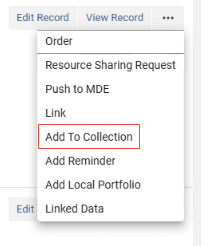 Add to Collection
Select this option and then select a collection to which you want to add the title.
With either method, the Network Zone title is linked to the Institution Zone in order to be added to the collection.
Improved Performance of ERP Export Invoices Job
An infrastructure change was made to improve the performance of this job. Instead of running the invoices one by one, multiple invoices are now processed in parallel, allowing the job to finish in a shorter time.
The name of the job was changed from “ERP export using profile {profile name}” to “ERP export using profile {profile name} PA”, where PA stands for Process Automation. The Job ID was changed from 70 to 327. The job report contains the number of processed invoices. The general information of "processed records" refers to the processed groups, which is a technical division about the job's parallel handling.
Note that you do not need to do anything; the existing scheduling is handled automatically using the new job from the May 2025 release onwards.
Improvements to Ordering from Network Zone
 URM -XXXXXX
Improvements were implemented to the process for ordering titles from the Network Zone (NZ):
-
When ordering in Primo from the Network Zone (NZ), the purchase requests created in the Institution Zone (IZ) are now linked to the bibliographic record in the Network. Alma first checks for a local MMS ID linked to the bibliographic record in the Network. If such a record exists, Alma uses it for the purchase request. If it doesn't exist, Alma creates one and uses it.
-
When importing with profiles of type New Order that are defined as Use Network Zone, it is now possible to match against the NZ records and create a linked record in the IZ, for which the order will be linked. To implement this, the Use NZ Record option should be used for "Upon match" in the Match Actions section:
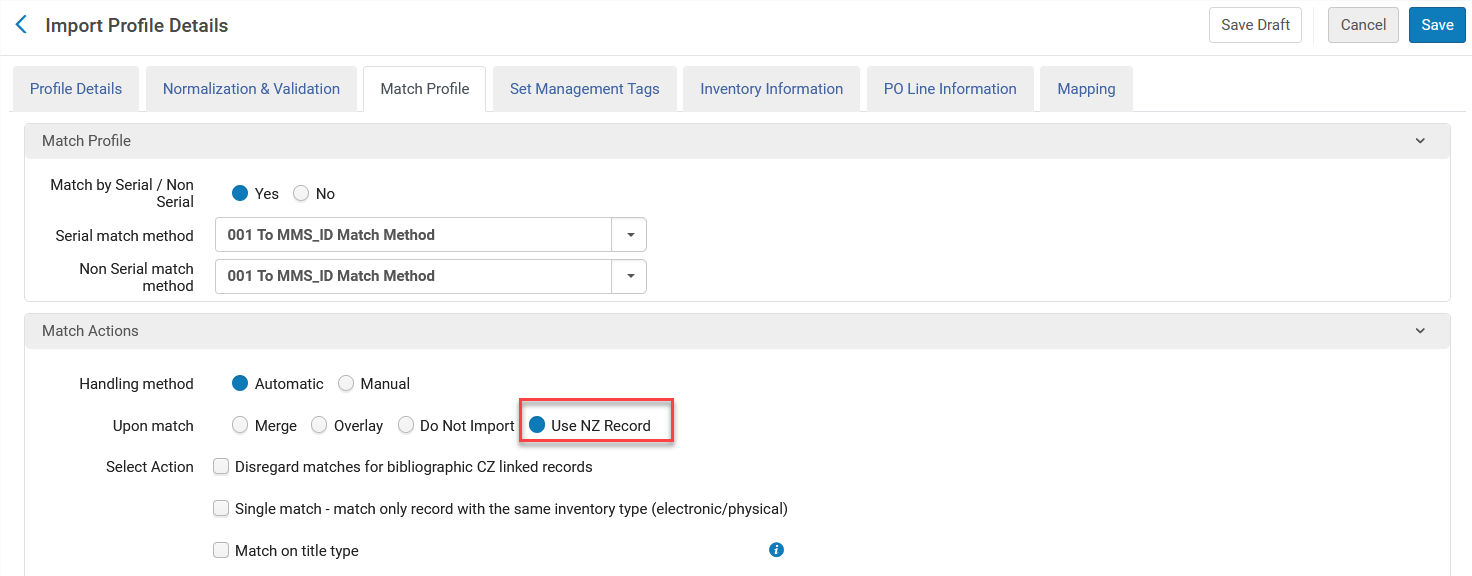
Existing profiles with the following definitions need to be edited so that the correct Upon match option will be saved:
-
Use Network Zone = Yes
-
In the Match Profile tab, Use Existing Record is selected as a value for the Upon Match field.
For more information, see Managing Import Profiles and Working with Purchase Requests.
General Electronic Services in the Consortia Central Configuration Dashboard
It is now possible for the Network Zone operator from the Central Configuration Dashboard to manage General Electronic Services configurations at the institution level.
This feature improves cooperation by enabling centralized management of General Electronic Services configurations (General Electronic Services, General Electronic Services Order, General Electronic Services Bib Fields Enrichment) at the Network Zone level.

This new feature is only relevant to Consortia with a Network Zone setup.
For more information, see Discovery Interface Display Logic in Dashboard Sections and Configurations.
Network Zone Distribution Notifications to Institution Zone Administrators
URM-230882
Configuration updates distributed from the Consortia Central Configuration Dashboard at the Network level now trigger an email to the relevant administrator at the Member level.
This feature improves communication and enhances collaboration across the network.
This is only relevant to Consortia institutions with a Network Zone setup.
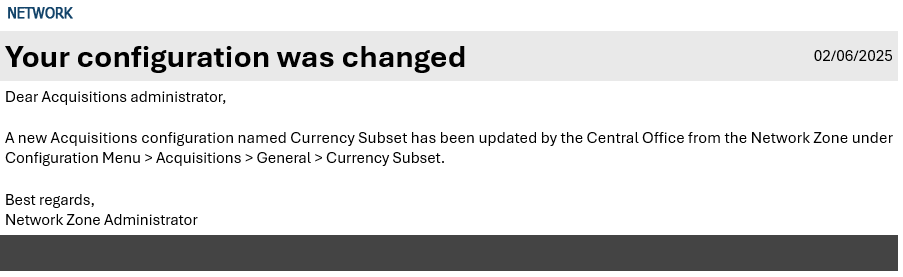
For more information, see Consortia Central Configuration Dashboard.
Redirect Old Menu Links to New Central Configuration Dashboard
URM-239635
Network Zone operators can now access the New Central Configuration Dashboard directly from the Alma Configuration search when no results are found. A link appears, enabling quick access to the Dashboard to find the configuration.
This enhancement improves access to configurations at the Network Zone level.
This feature is only applicable to consortia with a Network Zone setup.
For more information, see Accessing the Consortia Central Configuration Dashboard.

Request Release of a Configuration Managed by the Network
URM-235375
Institution Zone administrators (at the Member level) can now request to release configurations managed by their Collaborative Network’s Central Office, allowing them to customize these configurations locally. This enhancement increases flexibility by allowing Institution Zone administrators to regain control over customizing configurations initially managed by the Central Office.
This feature applies only to consortia with a Network Zone setup.
For more information, see Request Release of a Configuration Managed by the Network.

Removal of Gender Information
As part of our GDPR compliance efforts and in order to improve the protection of private information on the Alma database, all gender information will be removed from the user records in Alma in the upcoming August release. Since gender is not essential for product functionality, retaining it poses unnecessary compliance risks according to GDPR requirements that personal data be collected and processed only when there is a clear legal basis and business need.
The deletion will not be reversible. From that point on, it will no longer be possible to input or retrieve gender information to the user record using any of the standard interfaces that concurrently update this record.
Digital Adoption Policy Update
As announced in the November 2023 release, Ex Libris began deploying Pendo, a new digital adoption tool, across Alma and other Library Open Platform back-office suite components.
Pendo is a digital adoption tool that allows customers to benefit from functionalities such as online guides and "what's new” notifications. It is also used by SAAS (Software as a Service) software companies to identify usage trends and behavioural analytics to help improve the user experience.
After further review and due to the extensive measures we are taking to anonymize the usage data and ensure full compliance with our privacy polices, in which no personal data is collected (see Privacy center | Clarivate), we will gradually (during May) activate Digital Adoption for institutions subject to GDPR, that were inactive up until now.
There will be no other changes for all other institutions. We will continue to comply with their country and institutional policies.
For more information, visit Configuring Digital Adoption.
Relative Date Searches Support for Users
Idea ExchangeURM-17795Date-related search indexes in the Users advanced search, such as Purge Date, Last Activity Date, Expiration Date, etc., now include the following options to search within a moving range of days:
-
Is Within the Last (days)
-
Is Older Than (days)
-
Is Within the Next (days)

This enables customers to create dynamic "moving-window" sets (for example a logical set of users that expired in the last 30 days).

For more information, see Searching in Alma.
Security Improvements for Multi-Factor Authentication (MFA)
It was already possible to configure Alma to recommend (or enforce) an additional identification method (MFA). In addition to the regular username and password screen, users receive an email with a link that they need to select in order to log in.
The MFA security has now been enhanced as follows:
-
The email link's expiry is now 10 minutes (previously it was 60 minutes).
-
The link is usable only in the same browser where the login flow started from.
Configurable Session Timeout
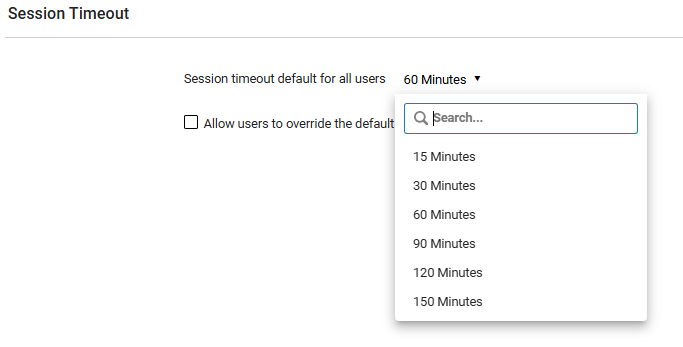
Idea Exchange URM-219169All Ex Libris platform products now include a configurable session timeout feature in response to community feedback from the Idea Exchange. Institutions can now set a default session timeout duration ranging from 15 to 150 minutes (default remains 60 minutes) from the new "Session Timeout" configuration page (Configuration > General > General Configuration > Session Timeout). This page is accessible to General System Administrators.
.png?revision=1)
In addition, institutions can choose whether to allow individual users to override this default setting by selecting the Allow users to override the default session timeout checkbox. The user-level options also range from 15 to 150 minutes.

This functionality enhances flexibility while maintaining compatibility with security standards and infrastructure capabilities.
For more information, see Session Timeout Configuration.
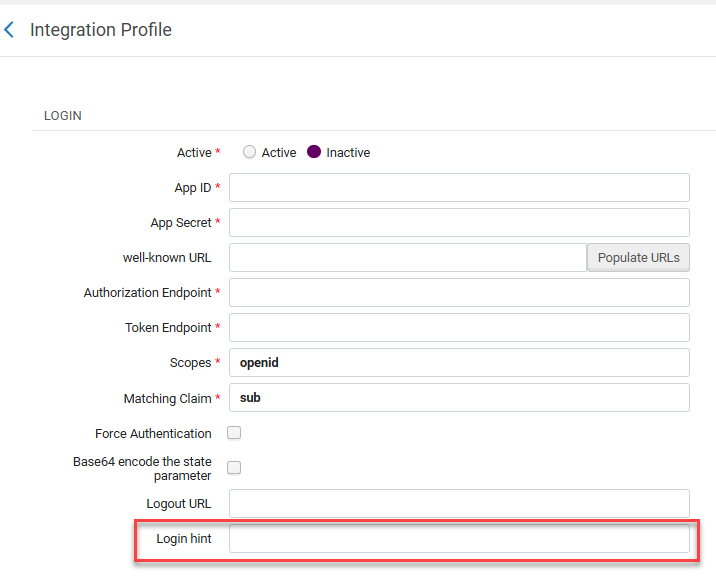
Login Hint for OpenID Connect
Institutions using OpenID Connect can now configure a login hint for single sign-on. This streamlines the user login experience by reducing the number of steps required for authentication. This option is disabled by default, and can be configured at Configuration > General > Integration Profiles > Add profile > Integration Type = OpenID Connect.
For more information, see OpenID Connect.
Apply Login Restrictions to All Users
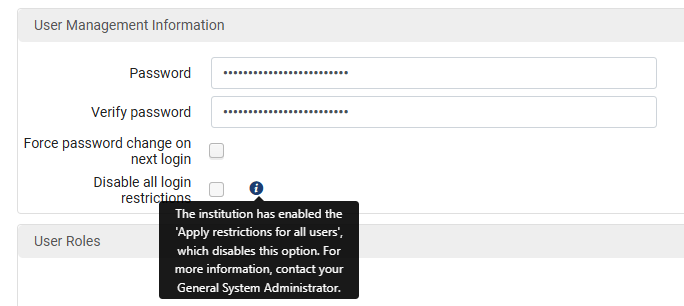
Alma users' login can be restricted by IP Range. To override these restrictions for a particular user, it is possible to select Disable all login restrictions when editing the user. Until now, users with the General System Administrator role were not restricted by the IP Range restriction.
Now, clicking on the new Apply restrictions for all users checkbox in the Login Restriction Configuration page (Alma Configuration > General > Security > Login Restriction Configuration) limits users with the General System Administrator role. This provides enhanced security through more precise user access management.

In addition, selecting the Apply restrictions for all users checkbox cancels the user-level override.
The previous configuration is not removed and will return once the checkbox is unchecked.
For more information, see Security.
Upgrade Alma Cloud App SDK for Node and Angular
Cloud App developers can now upgrade the Alma Cloud App SDK to support the latest versions of Node and Angular. This enhances the security of the Cloud App.
This upgrade is not mandatory. You may continue maintaining Cloud Apps developed before 2025 without upgrading.
For more information, including instructions for upgrading your Cloud Apps, see Upgrade of the SDK to v2.0.
Support Basic Authentication in NCIP P2P
Alma now supports basic authentication when NCIP P2P messages are received. This improves security by enabling the user to protect the NCIP communication with an authentication header.

For more information, see Resource Sharing Partners.
New Bibliographic Records Distribution by LC and Dewey Classifications Canvas
The New Bibliographic Records Distribution by LC and Dewey Classifications canvas is now available. It was combined with the existing Bibliographic Records Distribution by Language and Publication Year canvas under the new Bibliographic Records Distribution workbook. The new canvas shows the most prominent Library of Congress (LC) and Dewey classifications in the catalog, highlighting the distribution of different areas of knowledge across the collection. You can filter and analyze the data to evaluate how well your holdings support various fields of study and research interests to aid in strategic planning for a well-balanced and impactful collection.

Additional Holdings Local Parameters Now Available
You can now define up to 30 Holdings Local Parameter fields (Physical Items > Holdings Details), an increase from the previous limit of 10.
For more information, see Holdings Details.