

Configuring Other Settings (Resource Management)
- Catalog Administrator
- Repository Administrator
- General System Administrator
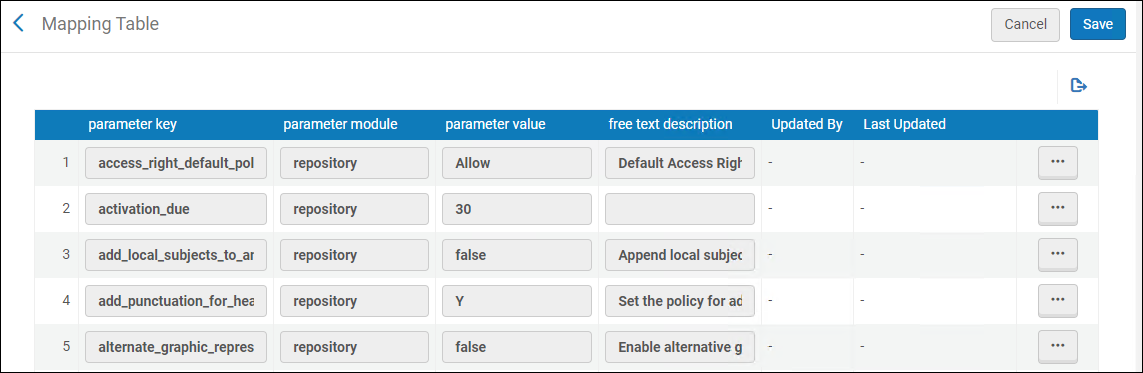
| Parameter Key | Description | ||||||||||||||
|---|---|---|---|---|---|---|---|---|---|---|---|---|---|---|---|
| access_right_default_policy | The access rights that are applied to all digital inventory that are not attached to access rights (see Configuring Access Rights). Possible values are:
|
||||||||||||||
| activation_due | The number of days to add to the current date to calculate the default e-activation task due date. The value is added to all e-activation tasks. When the due date passes, a notification is sent to the user that is assigned the e-resource activation task and an alert is displayed in the user’s list of tasks. For more information, see Managing Electronic Resource Activation and Manually Creating a PO Line. | ||||||||||||||
|
Use this customer parameter to control how punctuation is handled when a bibliographic record is updated by headings information. The following options can be configured:
Enter Y to add or correct punctuation when bibliographic records are updated by authority records.
If the bibliographic record originally had punctuation in a subfield, but the authority record does not have punctuation in that same subfield, when the authority record updates the bibliographic record during the Preferred Term Correction run, the authority record updates the bibliographic record with the latest headings information and runs a script according to the table in Implemented Punctuation Rules for Updated Bibliographic Records section to add or correct punctuation in the heading, before it is added to the bibliographic record. This is the default setting.
Enter N not to add or correct punctuation when bibliographic record are updated by authority records.
If the bibliographic record originally had punctuation in a subfield, but the authority record does not have punctuation in that same subfield, when the authority record updates the bibliographic record during the Preferred Term Correction run, it will update the bibliographic record with the latest headings information and will remove the punctuation from that subfield in the bibliographic record.
Enter 'LDR' when you want the system to determine how to handle the punctuation based on the content of position 18 in the LDR. When position 18 contains c or n (see the MARC 21 standard), punctuation is not added to the bibliographic record. For anything else specified in position 18, punctuation is added or corrected in the bibliographic record.
These punctuation settings apply when:
|
|||||||||||||||
| allow_link_resolver_usage_indications | Use this customer parameter to turn OFF "Link Resolver Usage" information in search results and the Overlap Analysis tool. When set to false, data about "link resolver usage" in search results and in Overlap Analysis tool will not be available. For more information, see Link Resolver Usage. | ||||||||||||||
| alternate_graphic_representation_editing | Set the value for this parameter to true to enable the Alternate Graphic Representation option in the Edit menu of the MD Editor. The Alternate Graphic Representation function replaces the Add Alternate Graphic Representation function in the Edit menu and can be expanded to provide the following options:
If the value for this parameter is blank or set to false, the Add Alternate Graphic Representation function is the option presented in the Edit menu of the MD Editor.
This capability is provided for institutions that mainly work with non-Latin scripts.
See Working with Linked 880 Fields in Bibliographic Records for more information.
|
||||||||||||||
| asrs_socket_timeout | Not functional (for future use). | ||||||||||||||
| aut_see_also_link | By default, this parameter is set to true, and if an authority vocabulary does not use authority IDs, selecting the "See also" link generates a search for the term in the 5XX field. The search operator is changed from “contains keywords” to “equals”.
Institutions that prefer the previous keyword-based “See also” search behavior can select to opt out of the enhanced system by setting the customer parameter to false. |
||||||||||||||
| authority_control_link_available | When this parameter is set to true, the headings that are successfully linked are reported and available in the Authority Control Task List under the All tab. The default setting for this parameter is false. For more information, see Using the Authority Control Task List. | ||||||||||||||
| authority_ptc_ignore_suffix | Enables libraries to configure Alma to correct bibliographic headings based on authority cross-references, updating them to the preferred term and changing the field tag in the bibliographic record accordingly (such as, from 610 to 630). This ensures bibliographic data stays aligned with authority records' preferred terms.
To enable this functionality in your institution, input the vocabulary codes in upper case for the relevant authority vocabularies into the customer parameter, separated by commas, for example, LCNAMES, LCSH, LCGFT, MESH. |
||||||||||||||
| avoid_fuzzy_search_resolving | When set to true, enables the institution to indicate to Alma to avoid "Fuzzy matches" ("title only" matches) attempts if other information (like identifiers or author) exists in the URL. By default, the new customer parameter is set to false. For more information, see Control Ability to Ignore Title Based Link Resolving. |
||||||||||||||
| brief_level | Set the value that identifies the brief level threshold for records. Records with the same/equal value or less are considered brief records. You may use the values 00 through 09 to identify the brief level threshold. The default value for this parameter is 01.
By specifying 00 for the brief_level parameter, all records will be evaluated as not brief since the minimum brief level value that can be saved in a bibliographic record is 01. For institutions that choose not to use brief level criteria for evaluating records and want to avoid the brief level warnings that occur when creating PO lines, for example, the brief_level parameter should be set to 00.
The brief_level parameter is used as a threshold to evaluate the brief level of records. It does not change the brief level value assigned to individual records.
For more information, see Working with Brief Record Levels.
|
||||||||||||||
|
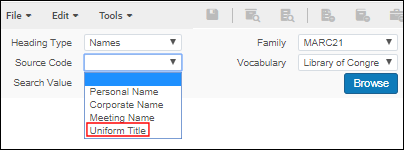
Use this parameter to control the option for Uniform Title when doing a Names browse in Browse Bibliographic Headings (Resources > Cataloging > Browse Bibliographic Headings). The Uniform Title option appears in the Source Code drop-down list when the Heading Type of Names is selected and the browse_headings_use_uniform_title_in_names customer parameter is set to true. This is the default parameter setting.
Uniform Title Source Code Option
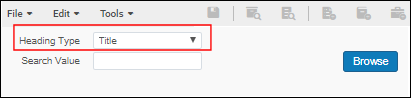
When browse_headings_use_uniform_title_in_names is set to false, Uniform Title does not appear as an option in the Source Code drop-down list for a Names browse. Regardless of the browse_headings_use_uniform_title_in_names configuration setting, uniform titles (fields 130, 630, and 730) are indexed under the headings type of Title and may be browsed using this option in Browse Bibliographic Headings. Browsing of UNIMARC Uniform Titles includes field 500 all subfields and 501 $a data.
Title Heading Type
|
|||||||||||||||
|
If the call number type of a given holdings record has not been specified (MARC 852 first indicator) and no default call number type has been configured for the location of the holdings record, the value selected here is used by default. The following values for the call number type are supported: The call number sorting is done on a normalized value. Normalization differs by call number type. In general, there is a default generic call number normalization, which removes leading and trailing spaces, packs spaces, converts everything to lowercase, and adds a left pad with zeros up to 12. This is done for cases that aren’t specifically defined to have their own normalization.
|
|||||||||||||||
| cataloging_level_user_preferences | Customize the behavior of the Cataloger Permission Level drop-down list in the MD Editor. When true, the cataloging level that appears in the Cataloger Permission Level drop-down list while working with a record becomes the default cataloging level. This default remains in place as subsequent records are edited, even when you log out and log back in. The default stays the same until another cataloging level from the Cataloger Permission Level drop-down list is selected; and then this new selection becomes the default.
Stickiness of a new cataloger level is maintained only after a record is saved with the new cataloger level. The options are:
This parameter controls the default cataloging level for bibliographic records, local authority records, and externally managed authority records. Note that it is overruled by the use_record_cataloging_level_by_default parameter (detailed below).
See Cataloging Privileges for more information.
|
||||||||||||||
| cdi_consortia_inheritance |
Determine whether collections activated in the network zone for search in CDI will be inherited by the institution. When set to Y (which is the default for institutions connected to a Network Zone):
When set to N, no inheritance will occur for CDI search activations and full text activations of database type of collections from the network zone. All member institutions that are part of the consortium inherit full text activations for collections with portfolios from the Network Zone. It is not possible to not inherit Network Zone activations for these types of collections. The value of this parameter corresponds to the Inherit Consortium Central office resources check box in the Primo Central Institutional profile, for institutions set up with a Central Office. See Consortium Activation in Primo Central. |
||||||||||||||
|
Where records are managed in a Network Zone. To be configured in member institutions. For more information, see Network-Managed Records in a Collaborative Network. Options are:
Note that when DEFAULT_NETWORK is selected, the validation of bibliographic records is executed in the Network Zone. As a result, the Institution Zone validation profiles/configurations are not used. |
|||||||||||||||
| controlled_vocabulary_remove_punctuation | Metadata Editor: When comparing the value in the record to a controlled vocabulary, the Controlled Vocabulary validation mechanism behaves as follows:
|
||||||||||||||
| course_restricted_bib_data_will_be_deleted |
Select true to delete a bibliographic record that is created as course restricted when the course is deactivated. If the value of this field is false, the record is suppressed from publication. Also see Adding Citations to a Reading List. The bib records are not deleted if the bib record has any of the following:
|
||||||||||||||
| course_restricted_field |
This parameter key is relevant only for Primo. It does not work with Primo VE. The field in the bibliographic MARC record that indicates whether a bibliographic record is restricted for use by a course. Note that it is possible in Alma to use defined subfield separators, such as dollar dollar $$ or double dagger ‡. The type that is defined as the subfield separator must also be stipulated in this field. Also see Adding Citations to a Reading List. |
||||||||||||||
|
db_categories_field |
For Primo and Primo VE, this field indicates which MARC field holds the database categories for Database Search. For more details, see Database Search for Primo or Configuring Database Search for Primo VE. | ||||||||||||||
| delete_nz_bib_without_inventory |
Set to true to enable automatic deletion of the Network Zone bibliographic record when its last inventory is deleted in the NZ member. The delete_nz_bib_without_inventory parameter does not delete NZ electronic inventory (bib and portfolios) linked to CZ. Set to false to leave the bibliographic record in the Network Zone when its last inventory is deleted in the NZ member. In this case the staff user will have to delete the bibliographic record in the NZ manually. Define this parameter in the Network Zone. |
||||||||||||||
| deposit_activity_report_last_run | The last run time of the Deposit Activity Report job. | ||||||||||||||
|
disable_preferred_term_correction_job |
When the job Authorities - Preferred Term Correction runs, it:
By default, this parameter is set to true. For more information on this parameter and the Authorities - Preferred Term Correction job, see Working with Authority Records. |
||||||||||||||
|
For MARC 21, set this parameter to true to display in repository search results only the specific items identified in $g for related records cataloged with the 773 field. For UNIMARC, set this parameter to true to display in repository search results only the specific items identified in $v for related records cataloged with the 461 or 463 field. In order for this to work properly, you must catalog $g (MARC 21) or $v (UNIMARC) using yr: and no:. For example: $g yr: 2014 $g no: 1 See $g and $v item identification labels on the Configuring Related Records for Physical Inventory page for more information. |
|||||||||||||||
| distribute_resource_management_changes_last_run | For future use. | ||||||||||||||
| enable_bib_heading_adjustments_for_cz | |||||||||||||||
|
This parameter controls the ability for users with cataloging extended privileges to delete records without inventory for their institution, the Network Zone, and other member institutions. Note that linked (cached) Network Zone records with inventory cannot be deleted by the Network Zone or Network Zone members. Also note that this customer parameter affects only linked Network Zone records. That is, a Network Zone record that is not linked to any member institution can be deleted regardless of this parameter’s value, either by a member institution or by the Network Zone. This parameter should be set in the Network Zone. The true/false setting for this parameter in the Network Zone affects the delete functionality for all the Network Zone members.
For more information regarding linking/unlinking, see To copy Network Zone records to local records (without linking the records), or to unlink local and Network Zone records. |
|||||||||||||||
|
enable_directional_characters |
Set this parameter to true to enable right-to-left and left-to-right directional editing in the Metadata Editor. When you set this parameter to false, the right-to-left and left-to-right directional editing feature is disabled (does not appear) in the Metadata Editor. The default setting for this parameter is true. |
||||||||||||||
| enable_exact_start_with_compare_condition (Not applicable) |
Not applicable. | ||||||||||||||
|
Set this parameter to true in order to enable the capability to include matches to non-preferred terms in any associated authority records for Keywords, Creator, Uniform Title, Names, Subject, and Subject (LC) repository searches. See Non-Preferred Terms in Repository Search for more information. |
|||||||||||||||
|
Set this parameter to true to avoid having the Publish your Local Holdings Records (LHRs) to OCLC publishing job mistakenly take a bibliographic record 035 field value and add it to the holdings record 004 field when there is already a 004 field, thus creating a second 004 field. |
|||||||||||||||
|
Set this customer parameter to true to have the system update or create the LDR, 005, or 008 fields of the imported record that is stored in Alma. For these fields, the system handles the import in the following manner:
The default setting for this parameter is false. When this parameter is set to true, it applies to all imported records/types such as repository, authority, and so forth. |
|||||||||||||||
|
enable_nz_record_assignment This parameter is available only for the Network Zone, since the network sets this policy for all its member. Stand-alone institutions and NZ members do not have access to this parameter. |
Set this customer parameter to true to allow users to assign Bibliographic and Authority Network Zone records to a cataloger from another institution within the network, using the Assign Record to Another Cataloger action in the Metadata Editor. This functionality is available only in the new Metadata Editor. |
||||||||||||||
|
Set this customer parameter to true to be able to view more than 25 entries in View It. See View It for more information. This functionality is supported in Primo VE environments only. If you have an Alma-Primo environment, set this parameter to false to prevent unexpected results. |
|||||||||||||||
| enable_xsl_normalization_rules | Set by default to false. When set to true, enables users the option to create/edit XSL normalization rules. This gives users control over the new XSL normalization rules capabilities.
For more information, see Alma XSL Normalization Rule Examples. |
||||||||||||||
|
Set this parameter to true when running the export electronic portfolio job with KBART files, and the file name contains diacritics. When this parameter is set to true, the file name will contain an ID and not a package name (with diacritics). Using this option circumvents the issues that occur with file names that contain diacritics. When you leave this parameter set to the default, false, the system uses the package name in the file name when running the export electronic portfolio job with KBART files. See Export Electronic Portfolios for more information. |
|||||||||||||||
| external_central_SFX_API_base_url | Not generally functional. | ||||||||||||||
| generate_unique_barcode_max_retries | Set the maximum number of times for Alma to attempt to create a new unique barcode when a non-unique barcode is identified during validation. The default setting is 3.
When a non-unique barcode is found, Alma attempts to generate a unique barcode up to the maximum number of times specified. If a unique barcode is not generated within the number of retries, an error message appears.
See Configuring Barcode Validation for more information.
|
||||||||||||||
| gnd_token | Enter the token provided by GND for the parameter value. This token is used by GND for authentication when you contribute records to GND.
For consortia, the Network Zone and the member institutions use and specify the same token in the parameter value for gnd_token.
|
||||||||||||||
| han_proxy_multi_license | Enables users of the HAN proxy who are utilizing HAN’s multi-license functionality to manage various licenses in Alma to accommodate the scenario where an electronic resource can have a distinct service per license, in the View It section. For example, this feature is intended to address situations where different levels of access to the E-Resource are required depending on the type of patron, such as researchers or external users. | ||||||||||||||
| holdings_accession_number_generation_extended | Set this parameter to true in order to configure and use institution-level and library-level accession number sequencing. See Configuring Accession Numbers for more information. | ||||||||||||||
| ignore_cz_records | Various processes in Alma, such as the following, use record matching before adding records to the institution's catalog:
To fine tune the matching process, Alma allows you to indicate at the institution level whether to consider matching records that are linked to the Community Zone.
The valid values for ignore_cz_records are true and false.
If this parameter is set to true, Alma matches incoming records with any record that exists in the catalog and ignores bibliographic records that are linked to the Community Zone.
If this parameter is set to false (the default setting), Alma presents the following options in the Match Actions section of the import profile for Repository, Update Inventory, or New Order import profiles:
See Community Zone linked records handling for more information.
|
||||||||||||||
| item_call_numbers_generate_enable | Set this parameter to true to use the Generate button on the Physical Item Editor page to create alternative and/or temporary item-level call numbers from sequences defined in the Accession Number configuration.
See Configuring Accession Numbers to configure your call numbers sequences and Updating Item-Level Information for information regarding how to use this capability.
|
||||||||||||||
| item_editor_inventory_price_regex |
In the parameter value, configure a regular expression (regex) that will determine which characters may be used when manually entering an inventory price in the item editor. When an item with an invalid value in the inventory price is edited and saved, the operator is alerted that the inventory price does not match the institution's configuration, so they can check and correct the data if needed. This will help libraries make sure no mistakes are made when manually entering an inventory price. Libraries that populate an inventory price automatically from the PO Line should verify they configure a regex that supports the values in their PO Lines to prevent frequent alerts from being displayed to operators. |
||||||||||||||
| lod_uri_enrichment_for_partial_match | Set this parameter to false to prevent URI enrichment for partially linked authority records and add URIs only for full matches.
The authority control process in Alma sometimes generates partial matches between subject headings and authority records without the subdivisions. In such cases, the Linked Data enrichment process for bibliographic records that are linked to authorities generates a URI that only partially corresponds with the full subject. Libraries can prevent partial linking and add URIs only for full matches by setting this parameter to false. |
||||||||||||||
| marc_holding_in_use | Whether to display holdings records in MARC format (true or false). | ||||||||||||||
| merge_method | The normalization rules (Drools) define the merge profile logic used in the metadata editor when copy cataloging a record from an external source or merging imported records via an import profile. | ||||||||||||||
| network_description_templates_rules_precedence | Use this parameter (from a member institution) to identify if the Network's or the member's item description rules should run first. Configure this parameter as follows:
See Configuring Description Templates for more information regarding item description rules.
|
||||||||||||||
| network_label | The value of the Network label for the Placement of new record field on the Quick Cataloging (Resource Management > Create Inventory > Add Physical Item) and New Portfolio (Resource Management > Create Inventory > Add Local Portfolio) pages. See Network-Managed Records in a Collaborative Network. | ||||||||||||||
| network_label_template_rules_precedence | In a Network Zone, set this to true to use the Network Zone's label generation rules instead of the locally defined rules (if any). See Managing Label Generation Rules Using a Network Zone. | ||||||||||||||
| networkSearchInstitution | The code of the Network Zone. | ||||||||||||||
| networkSearchInstitutionId | The ID of the Network Zone. | ||||||||||||||
| networkSearchPassword | The password of the Network Zone. | ||||||||||||||
| networkSearchServer | The name of the server of the Network Zone.
Only Ex Libris customer support personnel should make changes to this parameter.
|
||||||||||||||
| non_serial_match_profile | The default match profile for non-serial items in the MD Editor and Search External Resources (the match profiles for import profiles are defined elsewhere). Enter one of the following:
For detailed information on all of the below methods, see Match Methods – Explanations and Examples.
In member institutions implementing a Network Zone, the setting is taken from the Network Zone, even if this parameter is set and the Manage in Network flag is not enabled (see Centrally Managing Configuration Tables at the Row Level).
|
||||||||||||||
| nz_multi_campus_members | When set to true, in the Network Zone institution, Inventory network groups in the network zone can include libraries and campuses from within member institutions, see Configuring Distributed Access to Electronic Resources from the Network Zone. | ||||||||||||||
| search_limit | Not in use. | ||||||||||||||
| serial_match_profile | The default match profile for serial items in the MD Editor and Search External Resources (the match profiles for import profiles are defined elsewhere). Enter one of the following:
For detailed information on all of the below methods, see Match Methods – Explanations and Examples.
In member institutions implementing a Network Zone, the setting is taken from the Network Zone, even if this parameter is set and the Manage in Network flag is not enabled (see Centrally Managing Configuration Tables at the Row Level).
|
||||||||||||||
| share_item_usage_across_network |
When set to True in the Network Zone, then upon network search results, item usage data is shared for all network's members in the Physical Usage tab. When set to False, the Physical Usage tab does not appear. |
||||||||||||||
| show_all_relevant_work_orders_type_for_bind_items | This parameter is for use by Ex Libris. The default setting for this parameter is false. | ||||||||||||||
| show_item_description_confirmation_message | When set to true, if the operator edits a serial item and updates a field that may be relevant to the item description, a confirmation message is shown if the description field was not updated as well. When false, there is no confirmation message regarding the item description when editing item information, regardless of the type of item or the fields changed. | ||||||||||||||
| sort_library_by_relevance |
Controls the order by which holdings records are displayed in the following locations: The sorting selected in the holdings section in the right pane will be applied in both the holdings section and the holdings drawer in the list results.
The privilege PHYSICAL_INVENTORY_MANAGE is part of the below roles:
|
||||||||||||||
| split_values_in_display_license |
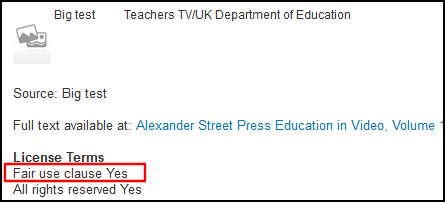
This parameter indicates whether the license field is split from its contents in the HTML for View It. This allows you to specify separate formatting for the field and its contents. When set to true, the license field and its contents appear in separate rows and the colon delimiter is removed from the HTML for View It: <b>License Terms</b> <br> <c>Fair use clause</c> <c>Yes</c>
Display License in View It - Split Line in HTML
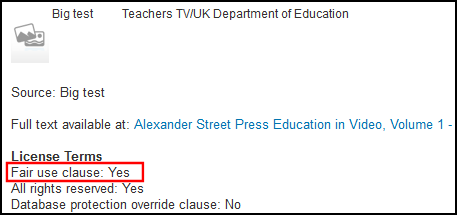
When set to false, the license field and its contents are delimited by a colon and appear on the same line in the HTML for View It: <b>License Terms</b> <br> <c>Fair use clause: Yes</c>
Display License in View It - Same Line in HTML
|
||||||||||||||
| statistics_note_controlled | Set this parameter to true in order to implement fixed drop-down lists for Statistics note 1, Statistics note 2, and Statistics note 3 in the Physical Item Editor. (By default, it is set to false and free text can be used in the notes fields of the Physical Item Editor.)
When this parameter is set to true, the Statistics note 1, Statistics note 2, and Statistics note 3 configuration options become available for you to configure in the General section of Resource Management Configuration.
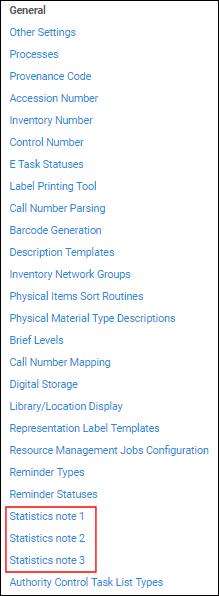 Statistics Notes Configuration Options
See Configuring Statistics Notes for more information.
|
||||||||||||||
| suppressBibWithDeletedHol | Use this parameter to suppress a bibliographic record from publishing when all its holdings records are deleted (true or false).
When true, if the last physical item of a holdings record is deleted and the operator chooses to delete the last holdings record of the bib, the bib record is suppressed. This parameter is used only for deletion workflows where the operator cannot choose whether to suppress the bib record and the system determines the behavior. |
||||||||||||||
| suppressBibWithSuppressedHol | Use this parameter to suppress a bibliographic record from publishing when all its holdings records are suppressed (true or false).
When set to true, the bib record is suppressed if an operator suppresses all of its holdings records. Note that this does not mark the bibliographic records as suppressed in Alma.
Publishing to Primo from Network Zone:
When set to true, local extensions of records without inventory at the Institution Zone are not processed and published as part of the Network Zone record.
|
||||||||||||||
| system_date_format | Set the system date format using dd (for day), MM, MMM, or MMMM (for month), and yyyy (for year). Place these in the preferred order separated by a slash, hyphen, or space. For example: dd/MM/yyyy or MM/dd/yyyy, dd-MMM-yyyy (such as 30-Jan-2017), or dd MMMM yyyy (such as 30 January 2017). | ||||||||||||||
|
temp_enable_holdings_field_852_subfields_reordering |
This parameter is for use by Ex Libris. The default setting for this parameter is true. |
||||||||||||||
| temp_enable_identifier_combined_search | This parameter is for use by Ex Libris. The default setting for this parameter is true.
The functionality to combine the EISSN and ISSN searches is controlled by the parameter: temp_enable_identifier_combined_search which is set to true by default. This functionality opens URLs generated for items that have EISSN and ISSN and matches them on EISSN. |
||||||||||||||
| unimarc_uniform_title_headings_split | UNIMARC F3 enables finding authority and Bib headings for field 500 and links to the headings. The default setting for this parameter is true.
|
||||||||||||||
| update_call_number_type_upon_item_move | When set to true, if the location of an item is changed, this updates the call number type of the new holding according to it.
Default = false (no update to call number type). |
||||||||||||||
| upload_single_record_from_file | The Repository type import profile to use when importing a single bibliographic record. The value must be the profile's name (case-sensitive). For more information, see Importing Records Using an Import Profile. For more about the profile name, see Creating/Editing an Import Profile: General Profile Information. | ||||||||||||||
| use_holdings_form | Whether to use the Form format to display the holdings record in the MD Editor. With this parameter set to true, some of the MD Editor options are unavailable; and you can only edit the following for a holdings record:
|
||||||||||||||
| Set to true when you want to use the default template for holdings records outside the MD Editor such as when placing orders in Acquisitions or doing a repository import of holdings records. See Working with Record Templates and Additional Holdings Record Information for more information. | |||||||||||||||
| use_record_cataloging_level_by_default | Set this parameter to true when you want the cataloging level already stored in the record to be used as the default when editing records. The default setting for this parameter is false. See Using Cataloging Permission Levels in the MD Editor for more information.
This parameter overrules the cataloging_level_user_preferences parameter listed above.
|
||||||||||||||
|
Set this parameter to true to have the system recognize the 852 with a first indicator of a space, blank, or # (when entered in the MD Editor) as a valid value that should not be overridden by a different default call number type that is specified in the call_number_type customer parameter. The default setting for this parameter is false. When this parameter is set to false, a default call number type is specified based on the call_number_type customer parameter setting. See Browsing the Shelf Listing for more information. |
|||||||||||||||
| working_copy_lock_timeout | Specify the number of hours after exiting the MD Editor that you want a bibliographic record that is being edited to be locked from being edited by another user. The amount you specify can be up to 9999 and excludes 0. The default is 1 hour.
See Edit Record in the Performing Actions on the Repository Search Results Page section for additional information.
|
||||||||||||||
- On the Customer Parameters Mapping Table page, change the Table Description as required.
- Under Mapping Table Rows, locate the setting that you want to edit, and select Customize.
- Modify the parameter value as required.
- Select Save. The modified customer parameters are saved in the Alma system.