

Primo VE 2026 Release Notes
 Release:
Information provided in the Release Notes is subject to change. Occasionally, features or fixes described here may be postponed or adjusted based on production schedules or quality considerations as part of our commitment to maintaining product quality and stability.
Additional Information:
-
Specto-Related Enhancements, below
-
CDI-Related Updates, below
Announcement
Issue Identified with Item-Level Request Indicator in the NDE
We would like to update you that we identified an issue with the indication shown in the Request section for item-level requests (as shown in the image).
NDE currently displays a message indicating that item-level requests may be available and directs users to the Locations section for more details.

During our investigation, we discovered issues with the calculation behind this indication when handling long item lists. As a result, this calculation will be rolled back in the August release to ensure accurate behavior.
We are currently working on an optimized solution and plan to reintroduce this functionality in a future release. We apologize for any inconvenience and will keep you updated on our progress.
Coming in September
Offset-Limit Handling
Following the pagination limitation introduced in June, an improved solution is coming to minimize the impact on users browsing through the UI while preventing misuse of the offset parameter.
When pagination has an offset greater than 500, the system will handle it as follows:
- Signed-in users: Full browsing experience.
- Guest users if CAPTCHA is enabled: Can continue beyond offset 500 after successful verification.
- Guest users without CAPTCHA: Sign-in required after offset 500 and results restart from page 1.

More details will be shared in September. For a preview, check the updates in the Primo mailing list.
Mixpanel Data Center Selection and Migration
Support for selecting and managing the Mixpanel data center is planned for September 2026. This enhancement will allow institutions to:
- Select their preferred data center (for example, US or EU) when configuring Mixpanel.
- Change the data center for an existing implementation. This process requires creating a new Mixpanel project in the target region.
- Migrate historical data from one data center to another. Data migration is performed by exporting data from the source region and importing it into the target region using the Mixpanel APIs.
November Sneak Preview
-
Research Assistant will include local records
-
View-level parameter distribution
-
Indexing MARC21 subfields $0 and $1 for search
-
Custom normalization-rules for key Search and Facet fields
-
Collection discovery – hierarchical tree-view display
Announcements
Important Update for Customers Implementing Headers and Footers in the NDE UI Regarding HTTP Content Security Policy (CSP) Headers
Added 14 January 2026
The HTTP Content Security Policy (CSP) header is important for security purposes. Until the January release, the NDE UI did not check the CSP Header Configuration settings (Configuration Menu > General > Security > CSP Header Configuration), and no CSP directives were applied. This issue has now been fixed.
If CSP Header Configuration is enabled and your NDE customization uses images, CSS, or JavaScript from URLs that are not included in the Allowed List, you must add the relevant domains to the Allowed-List Additions column.
For more information about CSP configuration, see Security.
Thumbnail Display for Collections – Change Beginning January 2026
To ensure optimal display, define collection thumbnails explicitly using the Manage Collections tool in Alma (see Managing Collections in the Alma documentation).
These thumbnails appear as background images in the Collections discovery page, as in the following illustration.

Until now, if no specific thumbnail was defined, the following occurred:
- If the collection had sub-collections that had thumbnails, Primo VE displayed an image taken from the thumbnails of a sub-collection in the first level below the collection.
- Otherwise, a default thumbnail image was displayed, as in the illustration below.
Starting January, 2026, collections without a defined thumbnail always appear with the default thumbnail image, as in the illustration below.
We strongly recommend defining thumbnails for every collection.

Features
Improved Offset-Limit Handling
September 2026 URM-331013
The improved solution for the pagination limitation has been implemented. This solution minimizes the impact on legitimate users browsing through the UI but also prevents misuse of the offset parameter by automated attacks. When pagination has an offset greater than 500 results, the system handles it as follows:
- Signed-in users always enjoy a full browsing experience, with no limitations on the number of results that can be viewed.
- Guest users:
- If reCaptcha is enabled by the institution, after successful verification, guest users can continue browsing from where they left off.
- If reCaptcha is not enabled by the institution, guest users must sign-in when they reach offset 500. When they do so, the results restart from page 1. If they do not sign in, the last page of results remains open.
Recommended Action: To provide the best experience for guest users, especially at institutions with high guest-user traffic, we recommend enabling reCaptcha. This allows users to continue browsing large result sets without interruption after verification.
For additional information, see Search Limitations; Configuring reCaptcha for Primo VE.
NDE UI - Booking Request Form – Opening Hours Incorporated in Availability Calendar
September 2026 URM-319649
The booking request form now supports incorporating library opening hours into the availability calculation. This option is controlled by the new include_library_hours_booking_request customer setting (Configuration Menu > Discovery > Other > Customer Settings). When this setting is set to true (default: false), the calendar in the booking request form reflects not only the item's booking availability but also the opening hours of the selected pickup library - only days and time slots when the library is open are available for the user to select.

For additional information, see Discovery Customer Settings.
NDE UI - Resource Recommender Now Supported in Journal, Database, and Newspaper Searches
September 2026 URM-328343
The Resource Recommender, which enables you to recommend resources based on searchable tags (a word or a phrase), is now supported for Journal, Database, and Newspaper searches.

For additional information about the Resource Recommender, see Resource Recommender for Primo VE.
Option to Include Electronic and Digital Resources in the Library Facet
August 2026  Idea ExchangeURM-317216
The Library facet has been enhanced to optionally include electronic and digital resources in addition to physical items. For this purpose, a new configuration option, Include electronic and digital resources, has been added in the in the Edit Facet Slots window of the Library facet (Discovery > Display Settings > View Configuration > [Edit a view]: in the Brief Results tab, in the Facets section, in the Library row, select Edit). When this option is selected, the Library facet includes all inventory types — physical, electronic, and digital.

This feature is also relevant for consortia, in which it is configured in the View Configuration page (Discovery > Display Configuration > View Configuration > [Edit a view]) in the General tab, under Discovery network settings. The Include member institution physical inventory in facets setting there controls whether the resources of other institutions in the consortium are included in the Library Facet. By default, only physical inventory from other institutions is included in the Library facet. However, if a member institution has selected Include electronic and digital resources for its own resources (in the Edit Facet Slots window, as described above), its electronic and digital resources are also included in the Library facets of the other member institutions, along with the physical inventory, in accordance with the setting each of these institutions has selected for Include member institution physical inventory in facets.
This option is supported in both the original and NDE UIs.
This feature requires re-indexing.
For additional information, see Configuring Discovery Views for Primo VE; for consortia, see also Display Functionality.
Support for Wildcards in Phrase Searches
August 2026  CERV Enhancement (ID #28298) URM-317694
Updated 4 August 2026
Wildcard characters (* and ?) are now supported within phrase searches (that is, searches enclosed in quotation marks). This applies to both Basic Search and Advanced Search and is available out of the box for all customers, in both the original Primo VE UI and the NDE UI. CDI searches also support this enhancement.
A wildcards can be used as a prefix, suffix, or in the middle of a word within a phrase. For example:
-
"authori?ed access control" – to match both authorized and authorised
-
"behavior modifi*" – to match behavior modifying, behavior modification, behavior modifiers, etc.
-
"synchronized swim*" – to match synchronized swimming, synchronized swimmers, etc.
This enhancement applies to the default phrase-search behavior and to the equals exact phrase operator in Advanced Search. It does not apply to the starts with or contains (exact) search operators.
Important considerations:
-
Performance: A wildcard within a phrase is conceptually expanded to all possible matching terms. Response times can increase significantly when a large number of terms match the wildcards. For example, "catastrophic failure*" matches only a few variations and should perform well, whereas "cat* f*" matches millions of terms and may take significantly longer. In cases where full expansion is too computationally expensive, partial results may be returned.
-
Ranking: Wildcard searches apply different ranking factors compared to standard searches. For example, CDI's ranking algorithm assigns greater weight to less frequent words, but wildcard searches do not take term frequency into account. As a result, adding a wildcard to a search may alter the ranking of results.
For additional information, see Using Wildcards in Phrase Searches in Primo VE.
Until the CDI release on 5 August 2026, this feature only returns local resources. Following the August CDI release, CDI records will also be included in the search results.
Configurable Authority Display Fields
August 2026 URM-328843
The display of data in the Authority Details page can now be configured. This can be done in the Manage Customized Fields page (Discovery > Display Configuration > Manage Customized Fields), in the new Authority Search tab, by modifying the normalization rules that are applied to the fields.
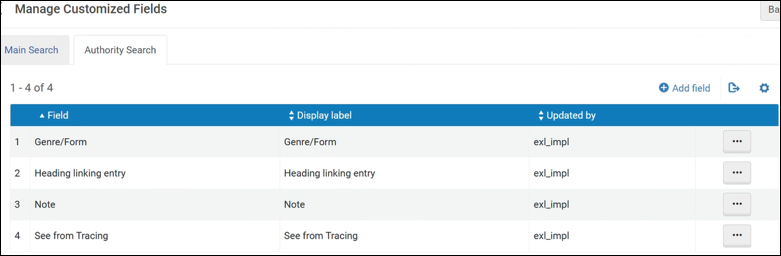
For additional information, see Configuring Authority Search for Primo VE.
Linked Data Support for External Records Based on Authority Identifier
August 2026 URM-318400
Linked Data enrichment in Primo VE has been extended to support external records. Previously, Linked Data entities (such as author, contributor, and subject information) could only be displayed for local Alma records that were linked to Community Zone (CZ) authorities. With this enhancement, records from external data sources can now be matched to authorities using standard authority identifiers (such as GND IDs), enabling Linked Data enrichment for a broader range of records.
To use this feature, institutions must configure a local field to store the authority identifiers for their external records. This is done by setting the new local_field_external_lod parameter in the Customer Settings mapping table (Configuration Menu > Discovery > Other > Customer Settings) to the number of the local field that will contain the identifiers (for example, 3 for local field 3). The local field must be populated to the source record and must follow a specific format that includes the entity type (Author, Contributor, or Subject) and one or more authority identifiers.
During PNX creation, Primo reads the configured local field, parses the type and identifiers, and maps them to the corresponding PNX authority ID fields (originatingSystemIDAuthor, originatingSystemIDContributor, originatingSystemIDSubject). These IDs are then used for Linked Data matching and enrichment, in the same way as for local records.
This feature requires re-indexing.
For additional information, see Configuring Linked Data for External Records.
NDE UI - Allow Authentication for Customized List of Institutions - Consortia Only
August 2026 URM-248152
Authentication for a customized list of institutions in a consortium is now supported in the NDE UI. This enhancement enables an institution within a consortium to allow users to access a main view and then authenticate and get services from another institution in the network. Previously, access to services was restricted to your own institution. When enabled, users are prompted to authenticate with an institution that is affiliated with your institution. Depending on your configuration, users are redirected either to the other institution's view or to the same page (such as a record's full view) within the other institution if the following information matches in the other institution:
-
Search term
-
search scope and tab
-
filters, facets
-
doc id (when coming from full view)
-
lang
-
mode
-
Collection id (when coming from collection discovery)
-
journals (in journal search)
-
databases (in database search)
Configuration Options
This functionality is disabled by default. Refer to the following table for information to enable this feature and to set other configuration options.
| Element | Description |
|---|---|
|
General tab on View Configuration Page (Configuration > Discovery > Display Configuration > Configure Views) |
Select the Allow direct login to other institutions option to enable the configuration of the affiliated institutions. This parameter displays only for institutions (IZs) that are affiliated with a Network Zone (NZ). To create the list of institutions that appear in the Login Menu:
For additional information, see Configuring Discovery Views for Primo VE. |
|
Discovery Customer Settings mapping table (Configuration > Discovery > Other > Customer Settings) |
Set the direct_login_transfer_all_parameters parameter to true if you want to redirect to the other institution and retain context and page settings (such as search terms and filters/facets) from the original page. The default setting is false, which redirects to the other institution without transferring page settings from the original page. For more information, see Discovery Customer Settings. |
|
Direct Login Labels code table (Configuration > Discovery > Display Configuration > Labels) |
Defines the labels used on the Direct Login Menu. This information is automatically populated with the values configured in the Institution name label field from the view's configuration for this functionality. |
NDE UI - Adding Labels to Saved Records in Bulk
August 2026 URM-234980 URM-329639
Signed-in users can now attach labels to their Saved Records in bulk. This can be done in one of two ways:
- From the Saved Records page – When selecting records in bulk in the Saved Records page, selecting the Add new label option enables the user to attach labels.
- From the Brief Results page – When saving selected records in bulk from the Brief Results to their Saved Records, selecting the Add to Saved Records option opens a menu in which the user can choose whether to attach labels to the records when saving them, or just save them. Selecting Add label and save to saved records enables the user to attach labels.
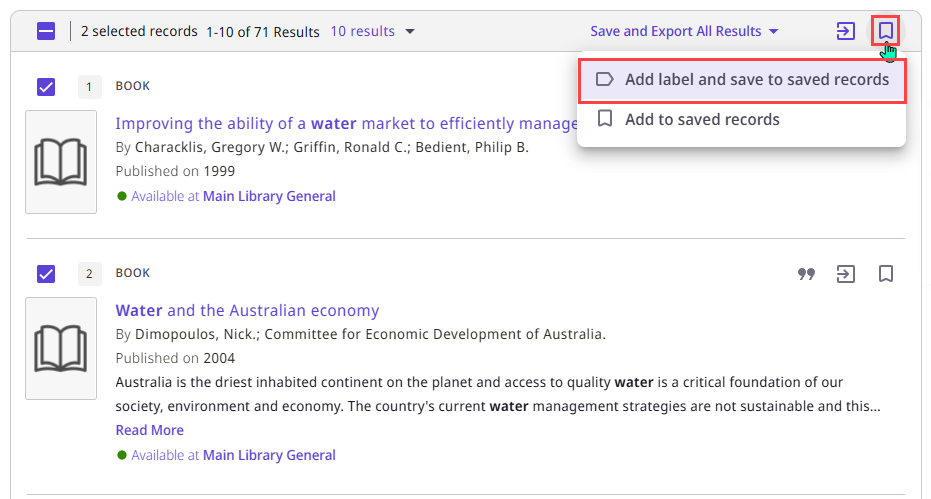
Selecting one of these options opens a label-configuration dialog box in which the user can select existing labels and/or add a new label to attach to the saved records.
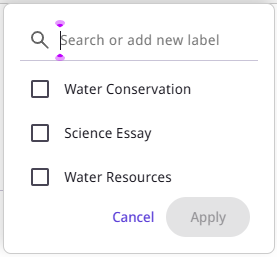
This development makes it easier to organize and categorize large quantities of saved records.
The following configurable labels were added to Primo VE for this development:
| Code | Description |
|---|---|
| nde.brief.bulk.addToFavoritesWithLabels | Add label and save to saved records |
| nde.brief.bulk.addToFavorites | Add to saved records |
| nde.aria.favoritesAddLabelBulk | Add new label for multiple records |
For additional information, see Using the Enhanced User Area, Saving Records in the NDE UI.
NDE UI - Removing Saved Queries in Bulk
August 2026 URM-234188
Queries that are saved in either the Saved Searches or the Search History can now be deleted in bulk. To do so, select the checkboxes of the queries you want to delete, and then, above the list, select Remove Items ( ).
).
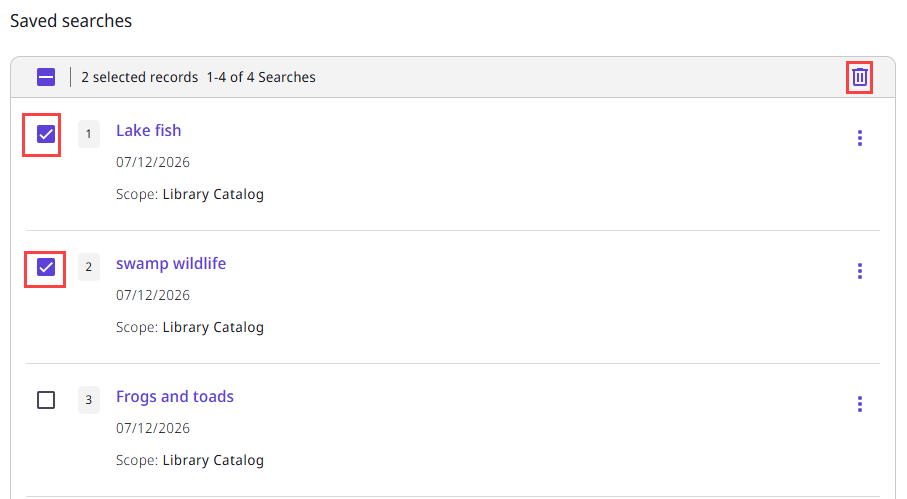
For additional information, see Search History and Saved Searches in the NDE UI.
Improved Classification of Related Holdings in Primo VE
August 2026 Idea Exchange URM-322643
A refined classification of record relationships introduced in Alma can now be reflected in the Primo VE Get It section. When the New Logic mode is enabled in Alma, Primo VE provides more accurate holdings' information for multi-volume works and series records.
When New Logic is enabled in Alma (Configuration Menu > Resources > General > Contains Related Records Logic), the "Contains" relationship is redefined to only include records with the following MARC fields:
- 773 with 2nd indicator ≠ 8
- 774
In this case, Primo VE only displays these records as related holdings.
The default behavior, now called Default Logic, remains unchanged: the "Contains" relationship includes all records linked by the 773, 774, 800, 810, 811, 830 fields, and all of these records appear in Primo VE as related holdings.
Institutions wishing to adopt the New Logic should change the setting in Alma. Doing so means that end users searching in Primo VE will see more accurate holdings and availability information for multi-volume and series records, reducing confusion caused by holdings from unrelated series appearing under a parent record.
For additional information about this setting, see Configuring Related Records for Physical Inventory in the Alma documentation.
NDE UI - Consortia Library Card – Fines and Fees Per Institution under All Institutions
August 2026 URM-314834
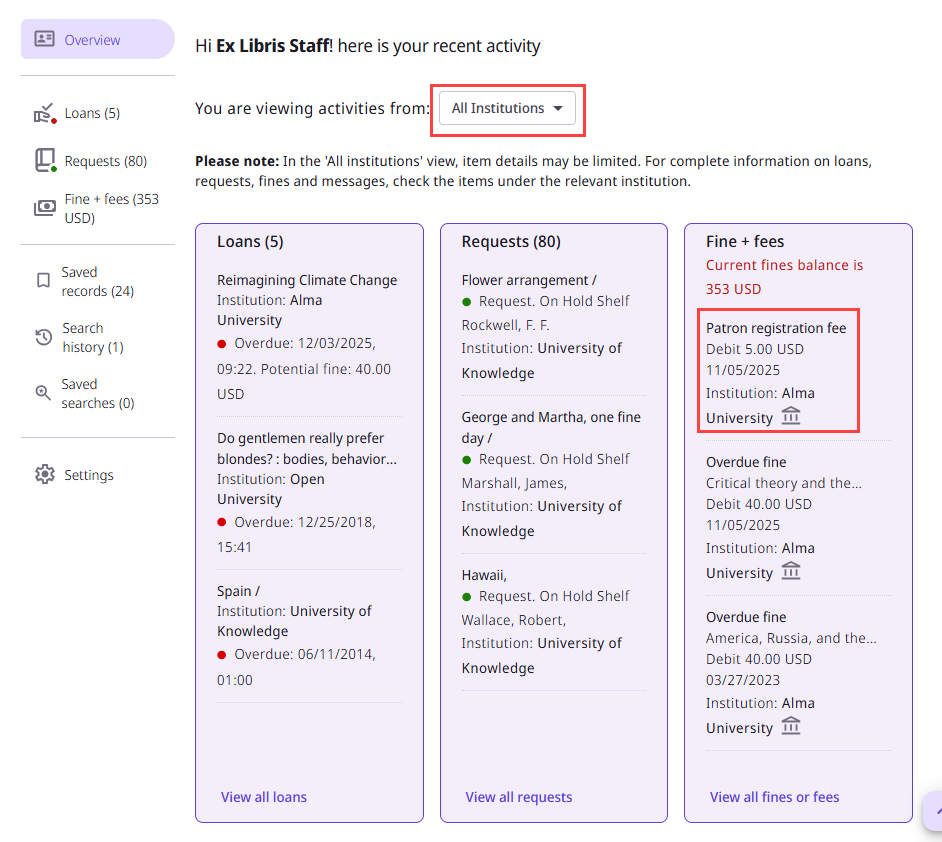
The consortia library card now displays detailed fines and fees information in the All Institutions view, both in the Overview tab and in the Fines + Fees tab. Previously, only the total balance was shown under All Institutions. Users can now see all active fines and fees from all institutions, with a clear indication of the institution with which each one is connected.

NDE UI - Featured Results Bar in Brief Results
August 2026 URM-235723
The NDE UI now supports the Featured Results Bar, allowing institutions to highlight additional relevant records from a different search scope or to promote records of a specific resource type within the brief results page. When configured, the Featured Results Bar appears after the third record on the first page of results, displaying up to ten records in a thumbnail view ranked by relevance.

Users can select any thumbnail to view the record's full display, or select Display all results to open the search results as an advanced search in the configured scope. The bar appears only on the first page of basic-search results and does not display after applying facets, navigating to other pages, or when the original query returns no results. A minimum of three results is required for the bar to appear.
Configuration: The Featured Results Bar is configured in Discovery > Display Configuration > Configure Views > [Edit the relevant view], in the Edit Search Profile Slot tab, under Define Featured Results, using the same configuration as in the original Primo VE UI. For additional information, see Configuring Search Profile Slots.
NDE UI - Add a Showcase Carousel to the Landing Page
August 2026 URM-226327
A showcase carousel displaying the results of a selected saved search can now be added to the bottom of the Primo VE landing page through simple configuration, eliminating the need for the external widget used in the original UI. This can be used, for example, to highlight the works of a particular author or the latest additions to the library.
When configured, the showcases appear at the bottom of both landing page flavors (customization-based and configuration-based), displaying up to 50 items using the existing showcase component (similar to virtual browse).
You can optionally add a title to the carousel. If you do so, selecting the carousel title will open the Brief Results page for the search query defined for the carousel.

This feature is enabled per view in the view configuration (Discovery > Display Configuration > Configure Views), in the General tab, by selecting Display Showcase in Landing page.
For additional information, see Adding a Showcase Carousel to the Landing Page (NDE UI).
NDE UI - Barcode Search
August 2026 URM-199798
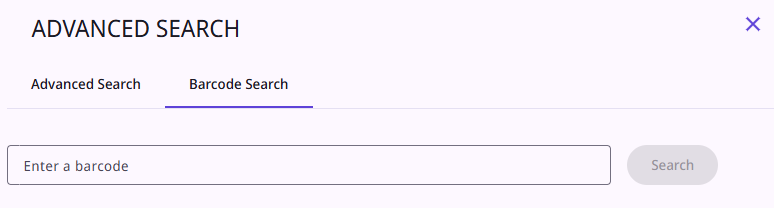
The NDE UI now supports barcode search, allowing users to locate specific physical items by scanning or entering a barcode. The barcode search is available as a dedicated tab within the Advanced Search page. When a barcode is found, the Full Display of the records opens directly. The feature can be turned on or off in the View Configuration page using the existing barcode-search configuration setting, Enable Barcode Search (Discovery > Display Configuration > View Configuration > [Edit the view] > General tab).
For additional information, see Configuring Discovery Views for Primo VE; Performing Advanced Searches in the NDE UI.
NDE UI - Blocks and Messages in the User Area
August 2026 URM-206598
The NDE now supports the Blocks and Messages section within the library card, allowing patrons to view important notifications and account blocks directly in the NDE interface. When messages exist, the Overview page also displays a prompt directing users to view their messages.
To enable this feature:
-
In the User Area Links page (Configuration Menu > Discovery > Library Card Configurations > User Area Links), turn on the Active toggle for Blocks and Messages (disabled by default).
-
In the User Dashboard Configuration page (Configuration Menu > Discovery > Library Card Configurations > User Dashboard Configuration), turn on the Enable toggle for Blocks and Messages (disabled by default). If you want the Blocks and Messages information to appear in the Overview tab of the User Area, also select Display in Overview.
For additional information, see Configuring the User Area Menu; Configuring the User Area Dashboard.
NDE UI - More From the Same Course/Collection
August 2026 URM-206626
The NDE UI now supports the More From the Same feature in the Full Display. When a record belongs to a course or a collection, a new section displays related items in an interactive carousel, helping users discover additional resources.
- More From the Same Course – Displays items from the same course. For courses linked to a Leganto reading list, the course name links to the reading list in a new tab. Otherwise, the course name is shown as plain text.
- More From the Same Collection – Displays items from the same collection. The collection name links to the Collection Discovery page.

Each section appears only when at least one related item exists. When a record belongs to both a course and a collection, both sections are displayed. Items show the title and, on hover, the creator. A View more button for expanding the display appears when a record is associated with more than three courses or collections.
This feature is configured in View Configuration page (Discovery > Display Configuration > View Configuration > [Edit the view] > Full Record Services tab), using the existing checkboxes for Collections and Courses. The NDE Expand by default option is also supported.
For additional information, see Configuring the More From the Same Service in Primo VE.
Support for Korean A-Z Browsing
June 2026 URM-250242
The A-Z browsing option for database and journal searches has been expanded to support Korean (Hangul). When this option is activated, users can browse for journals and databases by selecting the first character of the name of the journal or database. Korean letter headings for the 14 basic consonants can now be activated in the A-Z DB and Journal Search Configuration page (Configuration > Discovery > Other > AZ DB and Journal Search Configuration). Note that this implementation requires re-indexing after the activation.
For additional information, see Configuring the AZ List for Database and Journal Searches
Limitations on the Number of Search Results
June 2026 URM-324579
Updated 8 June 2026
Unfortunately, it is necessary to protect the system from automated attacks that manipulate the search-result navigation by changing the offset parameter to a very large number. Such attacks create excessive and unnecessary system load, causing stability issues. In order to protect the system from attacks of this sort while still allowing legitimate users to continue browsing search results, the following limitations have been established:
- Guest users can only access the first 250 results in the results list.
- Validated users can only access the first 2000 results in the results list.
These limitations come into effect in the following cases:
- The user navigates through result pages and reaches an offset ≥ 250.
- The user manually changes the offset value in the URL to a value ≥ 250.
- The user selects a deep link with an offset ≥ 250.
- The server receives a request with an offset ≥ 250. (This type of event is generally only initiated by a bot.)
In all such cases, the user is prompted to sign in.

If they sign in, the page is displayed. If they do not, a message indicating there are no records that match their query is displayed.

Similarly, if a signed-in user attempts to access more than 2000 results, this message is shown.
For additional information, see Paging through Search Results in the NDE UI; Paging through Search Results in Primo VE (Original UI).
We are aware of customer concerns regarding the search limitations introduced by this authentication requirement and are actively exploring alternative approaches to address them while maintaining system stability and performance. Further updates will be shared as the direction is clarified.
NDE UI - Collapsible Embedded Viewer
June 2026 URM-323067
The Primo VE Viewer, which is automatically embedded in the Full Display page for digital resource of supported formats, can now be manually collapsed and expanded in the Full Display page.
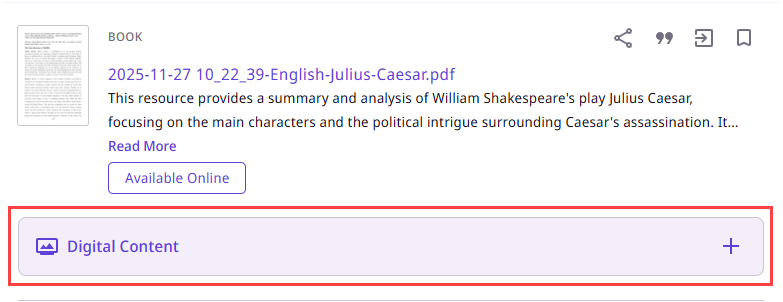
In addition, the Alma Discovery Interface Display Logic rules (Configuration Menu > Fulfillment > Discovery Interface Display Logic > Display Logic Rules) can now be used to configure when the viewer should initially be expanded or collapsed: if Representation Quick Access is configured to be hidden for the digital resource, the viewer is initially collapsed. Otherwise, it is initially expanded.
For additional information, see Primo NDE Viewer.
NDE UI - Hiding the Digital Versions Section
June 2026 URM-323067
The Digital Versions section of the Full Display for digital resources can now be hidden from the page. This option is configured via the Alma Discovery Interface Display Logic rules (Configuration Menu > Fulfillment > Discovery Interface Display Logic > Display Logic Rules): if Representation Delivery Service is configured to be hidden for the digital resource, the section is hidden. Otherwise, it is included in the page.
For additional information, see Primo NDE Viewer.
Prioritizing Online Services in Discovery Based on Current Year Access
May 2026 Alma Resource Management CERV Enhancement (ID#36385) URM-318110
The Additional Settings section on the Online Services Order configuration page (Configuration Menu > Fulfillment > Discovery Interface Display Logic > Online Services Order) now includes a new configuration option: Prefer services with current year access. This enables institutions to prioritize services with coverage dates within the current calendar year. By default this setting is turned off. When enabled, Alma pushes the current year access resources (according to the portfolio's coverage and embargo definitions in the current year) to the top of the list. This takes priority over all the other criteria.

 For Consortia, Network Zone services with current access are prioritized together with Institution Zone services with current access.
For more information, see ViewIt.
NDE UI - Landing Page Configurations
May 2026URM-317720 CERV Enhancement (ID#28360)
The Primo NDE UI now offers an easy way to configure the NDE landing page. Institutions can either use the current customization package option or they can select Enable configuration (Discovery > Display Configuration > Configure Views > [select a view to edit] > Landing Page tab) to change their landing page. Customization for all other pages is still controlled by the customization package.

- Configuration-based approach: easy, dynamic, no HTML code required, handling, multi-language support
- This feature can be used dynamically. For example, institutions can choose to enable the “Announcement” section during their semester break, announce holidays with a specific message, and then disable it when it's no longer relevant.
- HTML customization: use the existing customization package to maintain full control, including complete layout replacement
Webinar follow-up questions:
The NDE landing page configuration makes it easy to create and update landing page content without code.
In parallel, the customization package should still be used for broader branding and structural elements, such as the header, footer, library logo, and more.
Additionally, even when using the landing page configuration, you can customize icons for quick links using the customization package (e.g., in the assets/icons folder).
For more advanced requirements, customers can combine both approaches:
- Use the landing page configuration for layout and content
- Extend functionality via the advanced customization package by developing custom components and connecting them to elements on the landing page
Overall, there are multiple flexible options, and these approaches can work together to support both simple configurations and more advanced customization scenarios.
For more information, see Configuration Changes for the Landing Page.
NDE UI - Voice Search Assistant
When configured (Configuration > Discovery > Configure Views > General > Use Voice Search), the NDE UI now supports Search by voice.

Additionally, the Search by voice functionality is now available in the ASK ANYTHING NDE UI.

For more information, see Configuring the Voice Search Assistant.
NDE UI - Topic Overview
When configured (Configuration > Discovery > Configure Views > General > Highlight reference entry on top), the NDE UI now supports Topic Overview.

NDE UI - Export All Action
The NDE UI now supports the Export All action for signed-in users.
The Export Actions (Discovery > Display Configuration > Configure Views > Brief Record Display > Record Actions/NDE Record Actions) must be Active for the Export All Results option to be displayed.

If the export_all_for_user_email_only (Configuration > Discovery > Other > Customer Settings) parameter is set to true, the Send To field is auto-populated with the signed-in user's email address and is not editable. For more information, see the Discovery Customer Settings.
The following codes were added to support customization and translation of the labels in this area:
| Code Table | Description | ||||||||||||||||||
|---|---|---|---|---|---|---|---|---|---|---|---|---|---|---|---|---|---|---|---|
|
Aria labels (Configuration > Discovery > Display Configuration > Labels) |
|
||||||||||||||||||
|
Results Tile Labels (Configuration > Discovery > Display Configuration > Labels) |
|
For more information, see Using the Export All Results Option.
NDE UI - Patron Default Sort
May 2026URM-233337 CERV Enhancement (ID#8810)
Previously, the default sort for advanced and simple searches was Relevance. With this enhancement, when the parameter enable_patrons_default_sort (Configuration > Discovery > Other > Customer Settings) is set to true (default), and the patron is signed in, the patron's default search Sort by is set to their last selected sort type. For signed-in users, this setting is retained between sessions.

This functionality is not applicable to other search types (such as Browse Search and Journal Search).
For more information, see Discovery Customer Settings.
NDE UI - Authority Search
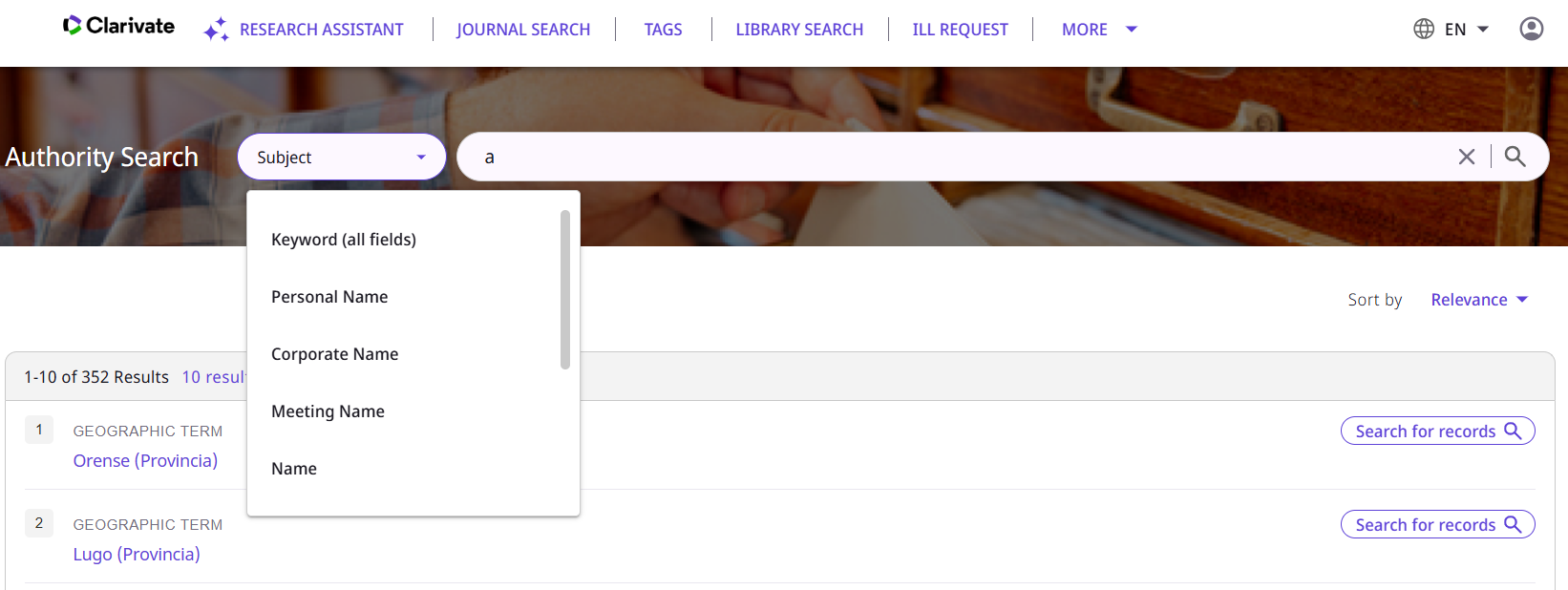
May 2026URM-213717
The NDE UI now supports Authority Searches.
NDE UI - Controlled Vocabulary
May 2026 URM-228778
The Controlled Vocabulary service is now supported in the NDE UI. This service expands user searches with words and phrases that constitute variations of the search term with the same meaning, thereby increasing the accuracy of the users' searches. For example, if the user enters adhd in the query, Primo also returns results that include attention deficit hyperactivity disorder. If the user is interested only in results that include adhd, they can select the just search link to the right of the recommendation to remove the results of the expansion.

NDE UI - Search Inside Journal
May 2026 URM-241030
The Search Inside option for journals is now supported in the NDE UI. This option enables users to search for articles within a journal, and is available in the Full Display of a journal record. The search is performed on the journal's CDI record, and covers the full text of articles, so that the results locate relevant articles based on their titles and keywords. The search results open in a new window/tab.
In the Original UI, this feature was included in the list of available services in the Full Display of the journal record. In the NDE UI, the feature appears beside the list of services for the journal.

In the NDE UI, the Search Inside feature is enabled by default. It can be disabled by setting the enable_search_inside_journal customer setting to false (Configuration Menu > Discovery > Other > Customer Settings).
For additional information, see Configuring Discovery Views for Primo VE; Configuring Journal Search for the NDE UI.
NDE UI - Expand Results Options
May 2026 URM-319340
A new menu has been created for the Brief Results page: the Expand Results Options menu. The menu contains the following options: Search in Full Text and Expand My Results, and is located above the list of results. These options were previously included in the side filter panel. Moving them to a separate menu makes them more visible to users.

- The mobile UI was not modified.
- In small screens, such as tablets, the menu appears as a button without a label.
These options are also available in the Search Results page when no records are found for the search query.

For additional information, see Configuring Search Profiles for Primo VE, Performing Basic Searches in the NDE UI.
NDE UI - Links to Specto Exhibitions
May 2026 URM-242756
Primo VE customers who also subscribe to Specto can include links to Specto exhibitions in the configurations of collections in Alma. When these links exist, Primo VE adds links to these exhibitions to the Collections Lobby page, the Collection page, and in the Full Display of records that are associated with collections that have an exhibition link:
A link to a Specto exhibition can be added to a collection in the collection's configuration (Resources > Manage Inventory > Manage Collections > [Edit the collection]), in the Discovery tab, under Specto Exhibition.

The link appears in the Collections Lobby page as a Go to Exhibition icon ( ), and in the Collection and Full Display pages as a Go to Exhibition button. Selecting the link opens the exhibition in a new window/tab.


At present, this functionality is supported for collections but not for sub-collections. In the future, support for sub-collections will be added.
For additional information, see Configuring Collection Discovery for the NDE UI. For information about creating exhibitions in Specto, see Exhibition Builder Workflow.
NDE UI - Links to Leganto
May 2026 URM-223254
For Primo VE customers who also subscribe to Leganto, links from the Course Information section of the Full Details page to the user's Leganto reading list are now supported in the NDE UI.

The configuration of this feature in NDE is the same as it is in the Original UI. For additional information, see Configuring Course Reserves for Primo VE.
Selective Proxy Settings on the Collection Level for CDI Linking
April 2026 CDI-25824
Added 14 April 2026
A new option enabling the use of selective proxy settings on the collection level for CDI linking – including Link in Record links, Quicklinks, and Document Insights links – has been added.
Before this release, Primo CDI institutions could use the configuration in the Discovery > Central Index and Proxy section to turn the proxy on or off for all CDI Link in Record links. It was not possible to define proxy settings per collection for collections that used Link in Record linking.
This was different for CDI collections that linked to full text via the Alma linkresolver. For these collections, it was possible to define the use of the proxy at the collection level, by setting the resolver proxy to Selective in the Alma integration profile. This option allowed libraries to apply authentication (e.g., EZproxy, OpenAthens) only to specific electronic resources that required it, while bypassing the proxy for open-access resources.
From the April release, selective proxy settings on the collection level can now be used for CDI Link in Record linking. The configuration for CDI proxy settings has been changed in the Discovery > Central Index and Proxy section to allow for selective proxy settings per collection:
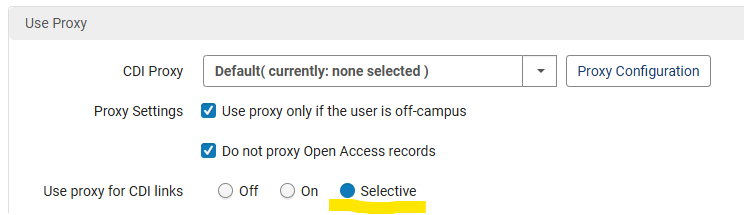
This configuration takes the Alma collection-level proxy configuration into account:

Before you activate the Selective option, ensure that the proxy settings for each active collection correctly specify whether the proxy should or should not be used for it. This is defined in the Electronic Collection Editor, in the Additional tab. (To open the editor, in the row actions of the collection, select Edit Collection.)
For each active collection in Alma, the proxy settings from Alma are part of the CDI publishing. They are stored as part of the CDI availability information and returned in the PNX for each CDI link.
When the proxy settings in the Discovery > Central Index and Proxy section are set to Selective, Primo VE checks the link from CDI and the proxy link according to the collection-level proxy settings in Alma.
In a nutshell, how does this work?
- Configuration in Alma per collection (proxy enabled/disabled) is passed to CDI as part of the CDI publishing.
- For all links returned by CDI, CDI provides information in the PNX link on whether the customer wants to use the proxy for the link.
- When the CDI Proxy is set to Selective in the Discovery > Central Index and proxy configuration, Primo VE uses this PNX information to proxy or not proxy the link, as required.
Important:
- In Alma there is still more granularity: selective settings can be defined not just on the collection level, but also on the service and portfolio levels. It is also possible to use different proxies per campus or library. This functionality is not available for CDI links. CDI only supports collection-level proxy settings from Alma and only one proxy setting per collection and per CDI holdings file/PCkey.
- If you make changes to the proxy settings for a collection, the changes will take effect only with the next CDI-rights update (as with newly activated collections).
PNX changes:
A new parameter, $$P, was added to all CDI links (linktorsrc, linktorsrcadditional, linktohtml, linktopdf, linkunpaywall, docinsights, backlink). Possible values are:
- omit_proxy_false – The Alma Collection proxy setting should be checked.
- omit_proxy_true – The Alma Collection proxy setting should not be checked.
Example:
<links>
<linktorsrc>$$Uhttps://data.europeana.eu/item/352/_filmportal_de_node_1740105$$EView_record_in_Europeana$$FView_record_in_$$GEuropeana$$Hfree_for_read$$Pomit_proxy_false</linktorsrc>
<linktohtml>$$Uhttps://data.europeana.eu/item/352/_filmportal_de_node_1740105$$EHTML$$P50$$Geuropeana$$Hfree_for_read$$Pomit_proxy_false</linktohtml>
</links>
Additional Information:
- Information about CDI proxy configuration in Alma: Configuring Central Index and Proxy Settings for Primo VE
- Information about CDI publishing: Publishing to Central Discovery Index
- Alma documentation about Proxy settings: Managing Electronic Resources; Access to Services
NDE UI - Enhanced Map Display
April 2026 URM-321892, URM-322534
The Places Map widget has been enhanced: The look and feel has been refined, and a new option to open an enlarged version of the map in a pop-up window has been added. To open the enlarged map, select the  button.

For additional information, see Overview of the NDE Interface and Configuration.
NDE UI - Register Option for Other Institutions in the Network
April 2026 - Collaborative Networks URM-213898
When a patron locates a resource at another institution in the network, the patron must be registered with the other institution in order to request the resource. You can now configure what happens in the NDE UI if they are not yet registered:
- You can choose whether to automatically register patrons from other institutions in the network, or to add a Register option in the Get It from other institutions section of the Full Display, enabling them to register manually. To do so, set the value of the uresolver_remote_register customer setting (Configuration Menu > Fulfillment > Other Settings) of the institution holding the resource to one of the following: Auto to set up automatic registration, or Manual to add the Register option to the Full Display.
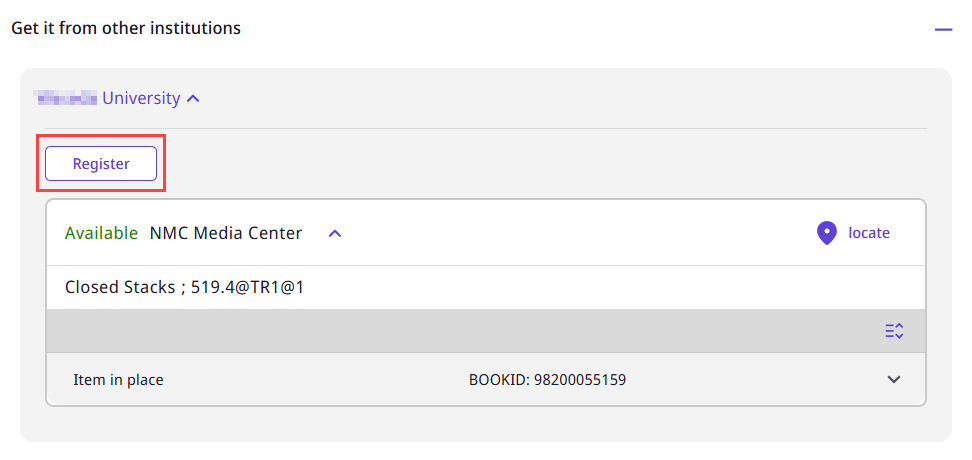
- When you choose to require manual registration, you can also choose to hide the Register option from users who cannot register at your institution. To do this, you must create a list of Restricted patrons – user groups whose members cannot register at your institution – in the Unexposed User Groups table (Configuration Menu > User Management > Collaborative Networks > Restricted Users). Then, you must set the value of the display_register_button_by_restricted_user_groups customer setting (Configuration Menu > Discovery > Other > Customer Settings) to true.
For additional information, see Display Functionality.
Expanded Options for Selecting the Preferred FRBR Record
March 2026 URM-244101
Primo FRBR now supports defining up to three levels of priority for the selection of the preferred record based on availability:
- Availability - Digital – Precedence is given to a record that is available in digital form (ALMA-D) if it is among the highest ranked records in the FRBR group.
- Availability - Electronic – Precedence is given to a record that is available in electronic form (ALMA-E) if it is among the highest ranked records in the FRBR group.
- Availability - Physical – Precedence is given to a record that is available in physical form (ALMA-P) if it is among the highest ranked records in the FRBR group.
This means the selection of the preferred FRBR record can now be based on five criteria:
- Date - Newest
- Resource Type
- Availability - Digital
- Availability - Electronic
- Availability - Physical
For additional information, see Configuring Discovery Views for Primo VE.
Normalization-Test Records Stored in Primo VE
March 2026 URM-319149
CERV Enhancement (ID #28330)
Added 18 February, 2026
Test files containing sample records for use when testing normalization rules are now retained by Primo VE after they are uploaded. They remain in the system until they are manually deleted, enabling you to quickly test normalization rules without having to provide sample records each time you want to do so.
A different sample file can be saved in the system for each supported format – DC, Generic XML, Marc21 XML, Marc21 Binary, or Unimarc – and can contain up to 20 sample records. The uploaded records are available for use as test input by all the Primo VE admins in the institution, and the files can be downloaded as well, making it easy for other admins to access them. In order to upload a different file for a particular format, you must first delete the one that is currently loaded.
The testing process is managed in the Testing Normalization of non-Alma Primo VE Records page (Configuration Menu > Discovery > Loading Records from External Data Sources > Test Normalization Rules).
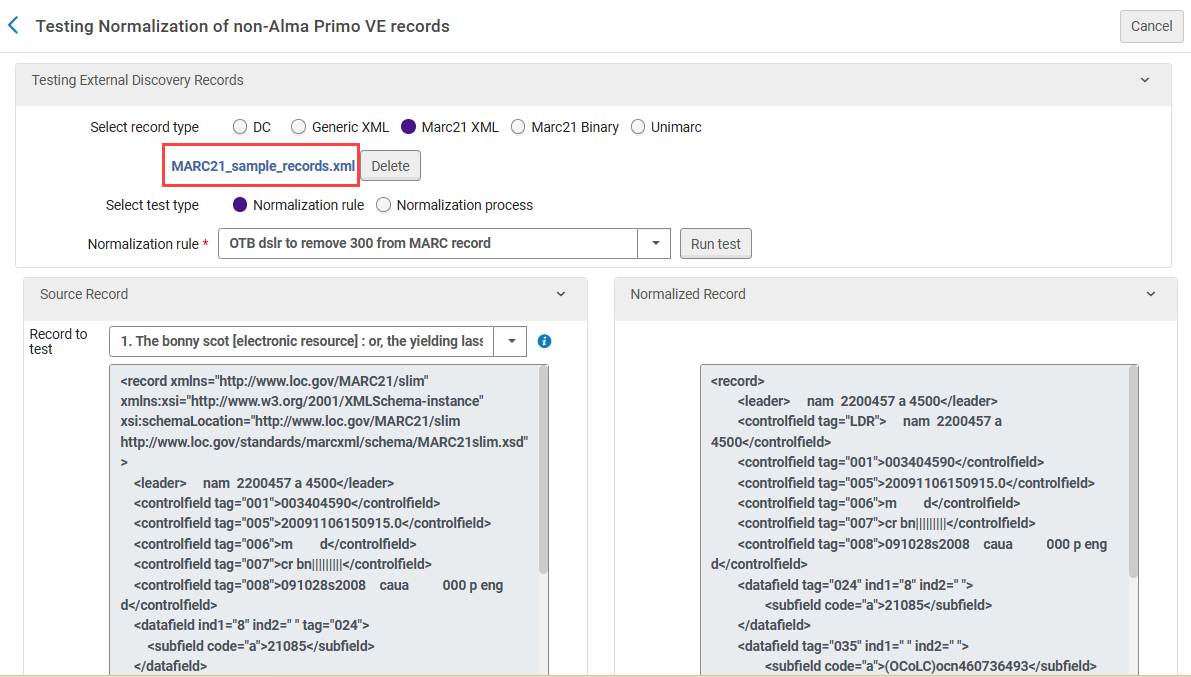
For additional information, see Testing Normalization Rules for External Data Sources.
Expanded Addata Fields for Dublin Core
March 2026 URM-132237
The PNX of Dublin Core records now includes many more Addata fields. For additional information, see Mapping to the Display, Facets, and Search Sections in the Primo VE Record.
NDE UI - Enhanced Maps
March 2026 URM-242751
The map in the Full Display has been enhanced. In addition to showing the location of the record itself (when coordinates exist in its metadata), it now also displays the locations of related entities, based on coordinates retrieved from the entities’ information.

The following markers are used on maps:
- Locations given as two coordinates –
- Record location –

- Related-location entity –

- Related-organization entity –

- Record location –
- Locations given as four coordinates –

Placing the mouse cursor on a marker opens a tooltip indicating which entity the marker represents.

For additional information, see Overview of the NDE Interface and Configuration.
NDE UI - Configuration of the Facets Panel's Initial State
March 2026 URM-XXXXX
For each view in your Primo VE system, you can now choose whether the Facets panel of the Brief Results page should be open or closed at the beginning of each user session. By default, the panel is closed. To set it to be open, in the view settings (Discovery > Display Configuration > Configure Views > Edit (a view)) in the Brief Results tab, under Facets, select Show Filters Panel By Default.

This setting has no effect on the mobile UI.
For additional information, see Configuring Discovery Views for Primo VE.
NDE UI - Support for "May Also Be Held By"
February 2026 - Collaborative Networks URM-237333
The NDE UI now supports the "May Also Be Held By" feature for collaborative networks. When this feature is activated, the Full Display of resources contains a "May also be held by" section whenever the resource's metadata includes links to other institutions, campuses, and libraries that may also provide services for the resource. The section lists the relevant locations, with links to those locations. You can use the customization package to add icons for each of the locations.

For additional information, see Configuring the "May Also Be Held By" Service in Primo VE; NDE UI Customization - Best Practices.
NDE UI - Option to Customize Background Images in Login and Dedicated Search Pages
February 2026 URM-253268
You can now use the customization package to customize the background images that surround the search box in dedicated search pages, such as the Journal Search or the Database Search, and the image that appears in the Login page.
To customize the background image of a dedicated search page, in the customization package, in the images/header folder, add a PNG image file for the type of search, with the file name <resource type>-search-header-img.png. For example, for the Database search page, add a file called database-search-header-img.png. Currently, the background images of the following types of search pages can be customized in this way: Journal search, Browse search, Database search, and Newspaper search.

When the Login is a full page, you can add a custom image to the page. To do so, in the images/loginPage folder, add a JPG image file with the file name loginPageImage.jpg.

NDE UI - Similar Image Browse for Digital Images
February 2026 URM-242755, URM-321296
For customers who have purchased Alma Specto, a new section has been added to the Full Display of digital images: Similar Image Browse. When enabled, this section presents a selection of images in the institution/network holdings that are deemed similar to the current image. This feature employs the Alma Specto API to find similar images. The images found are displayed in a carousel, in order of the degree of similarity between them and the current image. Selecting one of the images in the carousel opens the Full Display of that image.

In order for this section to appear in the Full Display of an image, the Enable Similar Image Browse option must be enabled in the view settings (Discovery > Display Configuration > Configure Views > [Edit a view] > General tab) of the view. For additional information, see Overview of the NDE Interface and Configuration, Configuring Discovery Views for Primo VE.
NDE UI - Central Package for Consortia
February 2026 - Collaborative Networks URM-233647
The NDE UI now supports central distribution and deployment of customization packages in consortia. This enables consortia to share common UI assets, such as headers and images, so that the members' UIs can have a similar look and feel.
As in the original UI, configuration of the Central Package in the NDE UI is performed in the Network Zone, in the Manage Customization Package page (Configuration Menu > Discovery > Display Configuration > Manage Customization Package). Configuration for NDE UI Central Packages is similar to that of the original UI, but it is configured separately, so that views based on the original UI are not affected by the configuration of the NDE UI, and vice versa.
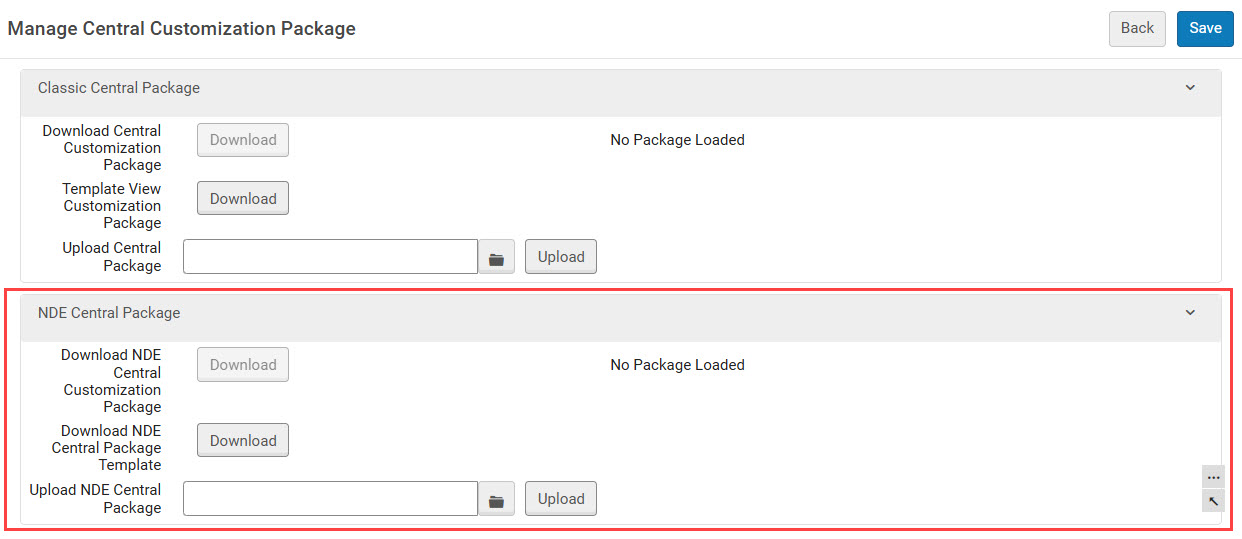
Once the NDE Central Package has been uploaded to the Network Zone, it becomes available to member institutions. Each institution can then choose to implement the Central Package in any of their NDE views. They have two options for how to do this:
- Use the Central Package as a template for further customizations – Download the central package, modify it as required, and then upload it to the view. In the institution's UI, modifications made by the institution override the settings of the Central Package.
- Adopt the Central Package completely, without modifying it at all – Select the Inherit from Central Package option. When this option is selected, any updates that are implemented in the Network Zone in the future are also automatically implemented in the view.
If Duplicate for NDE is used to create an NDE view from an existing non-NDE view, the Inherit from Central Package setting is not copied, and is not selected. If you want to use this option in the NDE view, you must select it again in its settings.

For additional information, see Central Management in Collaborative Networks.
Improvements to Natural Language Search
January 2026 URM-317408, URM-254501, URM-253493
In the Natural Language Search, we have improved the transformation of the original query into a structured format. Highlights of the improvements include:
- The identification of author names in search queries has been refined to better differentiate authors from subjects. This makes it possible to use them as author filters in query processing, which improves the accuracy of the search results.
Identification of author names in queries relies on the Large Language Model (LLM). While author detection is generally very accurate, detection may not always be successful.
- We added a new mechanism to ensure that terms that are used as filters are not duplicated in the actual Boolean query.
- We enhanced the handling of non-English queries. When a query is identified as being in a language other than English, the resulting Boolean query is generated with three permutations in the (non-English) query language and three permutations in English (because the CDI index is very rich in English content).
- Searches for photos now automatically include the more general resource-type images.
For additional information about Natural Language Search in Primo VE, see Natural Language Search in the NDE UI.
NDE UI - Linked Open Data - Discovery of Organization and Location Entities
January 2026 URM-253782
The NDE UI now supports the linked-data organization and location entities. This feature utilizes Linked Open Data (LOD) to enable users to discover additional information regarding an entity and to relate it to materials provided by your library. Currently supported entity types are person, organization, and location. The information about each entity is obtained from the Library of Congress and Wikidata.
The UI includes the following elements to enable discovery of entities:
- Autocomplete Entity – Suggestions of entities related to terms the user enters into a search query. When the user begins to enter a search term, the system identifies possible matches for the term among entities of each type for which LOD information is available, and ranks the suggestions for each type of entity. The top-ranked suggestions appear at the bottom of the autocomplete list; up to two suggestions may appear. When available, the first suggestion is a person, and the second suggestion is an organization. Locations only appear if neither persons nor organizations are found.

- Info Cards – Brief information about entities related to a record that is open in the Full Display. Info Cards appear on the Full Display page in the Related Entities section of the Recommendations panel. A card showing the same brief description that would appear in an autocomplete suggestion is displayed for each entity that is associated with the record. Selecting the entity's name in a card opens the Entity Page (see below) of that entity.
Up to three entities can appear in the Related Entities section. If more than three entities are associated with the record, a More related entities option appears below the Info Cards. Selecting this option opens the full list of related entities in a sliding panel. Up to 40 entities can be included in the list in the sliding panel. Persons are prioritized for the first suggestion, organizations are prioritized for the second suggestion, and locations are prioritized for the third suggestion.

- Entity Page – More detailed information about an entity presented in a dedicated page. Entity pages open when an entity is selected in either an autocomplete list or an Info Card.

For additional information, see Linked Open Data in the NDE UI.
NDE UI - Related Links
January 2026 (Updated 19 May 2026)URM-216833
Contextual relationships – links to CDI records of resources related to a book – are now included in the Full Display of book records in the NDE UI. Unlike the original UI, the NDE UI includes sections in the Full Display page of a book record for each type of related links available for the book. The following types of related links are supported:
- Chapters of this book (for book records)
- Other chapters of this book (for book-chapter records)
- Reviews of this book (for both book records and book-chapter records)
Links in the general information section of the Full Display indicate how many related links exist. Selecting a link takes the user to the relevant section.

Initially, the first five available related items in the category are listed in the section. Selecting the Show more items link below the list adds the next five available related items, and so on, until all of the items are shown.
From the related-links section, users can select an item to view it. The Full Display of the related item then opens in a new tab.

For additional information, see Configuring Contextual Relationships for Primo VE.
Additional Enhancements
- September 2026 URM-331032
NDE UI - More from the Same – The layout of the Part of collections / Part of courses information displayed in the More from the same Collection / More from the same Course sections has been adjusted. It is now shown below the records and multiple items are separated by pipe characters (|).
For additional information about the More from... sections, see Configuring the More From the Same Service in Primo VE.
- September 2026 URM-328476
NDE UI - Generic FRBR in Brief Results – When the Generic FRBR display option is selected for an NDE View (Define FRBR display for local records in Discovery > Display Configuration > Configure Views > [Edit a View] > Brief Results tab), the resource type shown in the Brief Results for multi-version records has been changed to Multiple Versions, and the default icon for the resource type has been changed to reflect this.
For additional information, see Configuring Discovery Views for Primo VE.
- August 2026 URM-323053
Improved Handling of Italian Names – The handling of Italian names with the prefixes Bell and Sant, followed by apostrophes (e.g., Bell’Antonio), has been improved. Primo VE now identifies these names correctly. - August 2026 URM-331246
Login Pop-up when Offset Limit Is Reached – For collection discovery, when a guest patron reaches the offset limit, a message now appears informing them that they must log in in order to see more results. (Messages to this effect were already implemented for other types of search results, and have now been implemented for collections.) This improvement has been implemented in both the original UI and the NDE UI.In the September release, the handling of the offset limit will be improved in order to minimize the impact on users' browsing while ensuring there is no misuse of the offset parameter (especially via deep links). - August 2026 URM-324677
Maximum Number of Holdings to Include in the Full Display – The maximum number of holdings to display in the Full Display of a record (under GetIt in the original UI or under Locations in the NDE UI) has been increased from 100 to 300. This means that you can configure the number to be between 1 and 300. The number is configured in the max_holding_per_record parameter (Configuration Menu > Discovery > Other > Customer Settings). For additional information about this parameter, see Discovery Customer Settings. - August 2026 Idea ExchangeURM-321191
NDE UI – Option to Hide the Update Login Credentials Link – The existing primo_patron_info_updatable parameter (Configuration Menu > General > General Configuration > Other Settings) is now supported in the NDE UI. When this parameter is set to N, users cannot update their personal information from Primo VE, and the Update Login Credentials link in the User Settings is hidden for all users.
When the primo_patron_info_updatable parameter is set to Y, users can update their personal information from Primo VE, and the new hide_update_login_credentials_external_users customer setting controls when this link appears. When hide_update_login_credentials_external_users is set to true, the Update Login Credentials option in the User Settings area is hidden for external users (users who did not authenticate via Alma). By default, this setting is set to false, and the Update Login Credentials option appears for all users. Note that this setting has no effect if the primo_patron_info_updatable parameter is set to N (because the option is hidden for everyone).
- August 2026 URM-323648
Autofill of Not needed after / Pickup Date Field – When a patron creates a hold or digitization request for a resource, if the terms of use of the resource defined in Alma include a Date Needed By Period, the Not needed after (original UI) / Pickup Date (NDE UI) field in the Primo VE request form is automatically filled in with the default date. The field can still be edited by the patron if they wish. For additional information about the Date Needed By Period fulfillment policy, see Configuring Physical Fulfillment in the Alma documentation. See also Configuring Request Forms for Primo VE.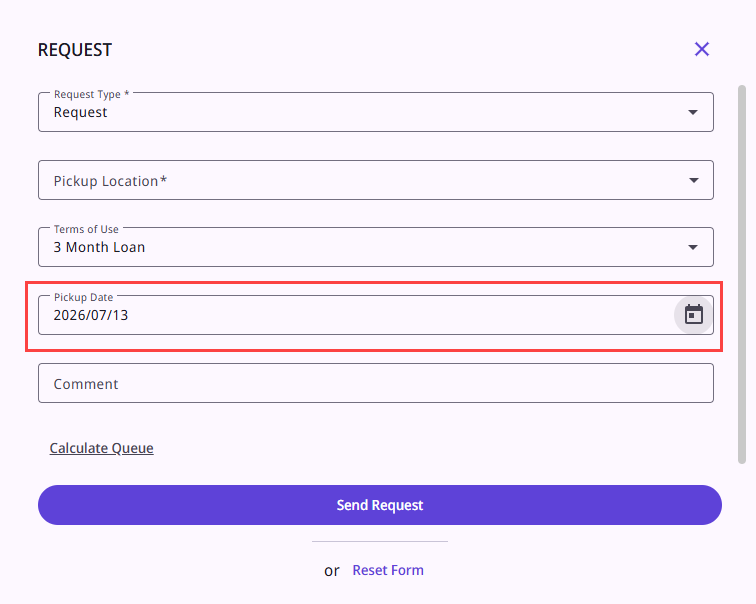
- August 2026 URM-330927
NDE UI - New Control for Collapsing the Embedded Viewer – The control for collapsing the embedded viewer for digital representations has been changed. The viewer can now be collapsed by selecting Hide Digital Content.
- August 2026 URM-326493 URM-326332
NDE UI - Usability Improvements to the Locations Section of the Full Display – This release introduces several usability improvements to the Locations section of the Full Display:- The expand/collapse controls now include text labels — Expand All/Collapse All — in addition to the icons, at both the location and item levels.
- The Filter by bar has been repositioned so that the button is on the left side of the same line instead of appearing on a separate line.
- A new View Items button (label nde.getit.holding.viewItems) replaces the previous Expand control on the holding level. It was moved to the right together with the availability information.
- Holding-level request options (e.g., Request Other, Digitize Other) are now displayed inline within the holding row (not shown in the illustration below).

As part of this development, a new customer setting (Configuration Menu > Discovery > Other > Customer Settings), open_locations_filterBy_by_default, was added to Primo VE. When set to false (default), the Filter option is initially collapsed. In this case, selecting the Filter icon expands the control to enable users to apply filters to the list of locations and their items. (The option is expanded in the illustration above.) When set to true, the Filter option is initially expanded, making it easier for users to see which filters are available.
Additional changes are planned for future releases:
- The item.brief.4 field will be restored to the item's brief display.
- Item-level request options will be presented as a single button when only one option exists, or as a dropdown (with the first option visible upfront) when multiple options are available.
The following configurable labels were added to Primo VE for these enhancements:
Code Description nde.getit.expandAll Expand All nde.getit.collapseAll Collapse All nde.getit.itemView View item details nde.getit.itemHide Hide item details nde.getit.holding.viewItems View Items The changes described above may impact on existing customizations. - August 2026 URM-325769
NDE-UI Additional Metadata Fields in Purchasing Requests – The metadata fields configured for the Purchase Request form are now displayed in the UI. These fields were included in the form in the original UI, but they were not initially included in the NDE UI. They have now been added to the form in the NDE UI. For information about configuring the purchase-request form, see Configuring Request Forms for Primo VE. - August 2026 URM-314754
Advanced Search – Enhanced Date Filtering – The Date field in the Primo NDE Advanced Search has been redesigned to offer simplified, preset date range options alongside custom date entry:- The Date dropdown now includes the following options: All Dates, Last 12 Months, Last 5 Years, Last 10 Years, Custom Years (YYYY range), and Custom Dates (specific date range, as before).
- Custom Year lets users enter a From and To year in YYYY format.
- All date options are enabled by default. Each option can be independently enabled/disabled, sorted, and scoped by administrators per view via a new Date Range Options configuration section (Discovery > Display Configuration > Configure Views > [Edit a view] > Advanced Search Configuration).
- New translatable labels have been added to the Search Tile Labels code table (Discovery > Display Configuration > Labels).
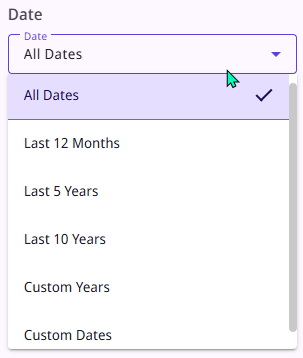 Date-Range Options in the Advanced Search Dialog Box
For additional information, see Configuring Discovery Views for Primo VE, Performing Advanced Searches in the NDE UI.
- August 2026 URM-321581
NDE UI - Handling of Small Images in the Resource Recommender – The display of small images in the Resource Recommender has been improved. Note, nonetheless, that only images with a 3:4 aspect ratio are supported. Images with different ratios may be cropped or displayed incorrectly. For additional information about the Resource Recommender, see Resource Recommender for Primo VE. - August 2026 URM-319339
NDE UI - Improved Layout of Main Menu Items – Based on customers feedback, the styling and layout of the main menu have been updated to improve visual consistency and responsiveness across screen sizes. As part of this change, the main menu banner was expanded to span the full width of the page by removing side margins. Please note that this may affect existing customizations.
- August 2026 URM-324286
NDE UI - Bulk Actions for Mobile Apps – Bulk actions are now supported in the mobile apps for both the Brief Results page and the User Area. - August 2026 URM-324206
NDE UI - Support for Esploro Related Assets – Display of Esploro Related Assets is now supported in the NDE UI. They appear in the Full Display, in the Full details section, under Related titles.
- August 2026 URM-318351
NDE UI - Tooltips for Quick Filters Buttons – Tooltips have been added to the Quick Filters Buttons in the Brief Results page, one for inactive filters and the other for active filters.
The tooltip labels can be configured in the Results Tile Labels code table (Discovery > Display Configuration > Labels). For each Quick Filter button, the following labels are used as tooltips when the filter is active (nde.facets.quickFilterActive.tooltip) and when it is not active (nde.facets.quickFilterInactive.tooltip).
Code Description nde.facets.quickFilterActive.tooltip Showing only resources <quickfilter_value>. Click to remove filter nde.facets.quickFilterInactive.tooltip Show only resources <quickfilter_value>
- July 2026 URM-327652
Snippets from Alma Digital Records – Snippets from Alma Digital records are now included in the Brief Results in the original UI. This enhancement requires re-indexing.Snippets from Alma Digital records are not currently included in the Brief Results in the NDE UI. Beginning with the August 2026 release, they will be displayed in NDE as well. - July 2026 URM-254015
NDE UI - Start of Week in Calendars – You can now choose the day of the week that should appear first in calendar widgets. To do so, in the Customer Settings (Configuration Menu > Other > Customer Settings), configure the calendar_week_start parameter by specifying the number of the day, as follows: 1 for Monday, 2 for Tuesday,... 7 for Sunday. The default value for the parameter is 7. Calendar Widgets with Start Day Sunday and with Start Day Monday
For additional information about Customer Settings, see Discovery Customer Settings.
- July 2026 URM-314060
NDE UI - Bulk Removal of Saved Records – Saved records can now be removed from the user's list of Saved Records in bulk. When this option is used, all selected records on the current page are removed. To do this, select the records on the page that you want to remove from the list, and then, at the top of the list, select (Remove from saved records). For additional information, see Using the Enhanced User Area.
 - July 2026 URM-315659
NDE UI - Sorting of Requests by Date Added – In the User Area, in the Requests tab, when the Request date- newest sort option is selected for the list of requests, it is now applied for all request types.(Previously, only hold requests were actually sorted – all other request types were shown after the sorted holds, and the sort option was not applied to them.) For additional information about managing requests in the User Area, see Using the Enhanced User Area. - July 2026 URM-316853
NDE UI - New Default Thumbnail for Collections – The thumbnail displayed in the Collections Lobby for collections that do not have a thumbnail image configured has been updated. New Default Collections Thumbnail (Outlined in Red)
 - July 2026 URM-329670
NDE UI - Configurable Alt Text for Library Logo – The Alt text for the library logo can now be configured. To do so, configure the nui.header.LogoAlt label (Discovery > Display Configuration > Labels). For additional information about configuring labels, see Configuring Display Labels for Primo VE.
- June 2026 URM-323786
Ongoing accessibility improvements in the NDE UI – View It links have been redesigned to use anchor (<a>) elements rather than buttons, ensuring they are keyboard accessible and comply with web accessibility standards for external links. - June 2026 URM-322517
New Search Operators for Authority Searches – The Authority Search can now be configured to enable users to choose the search operator they want to apply in their Authority search. Previously, only one operator was available – Contains – and it was applied automatically, without explicitly indicating to the user that it was being applied. By default, this is still the case, but support for two optional operators has been added to the UI: Equals and Starts with. When more than one of the three operators is activated in the Authority Search link settings of a view (Discovery > Display Configuration > Configure Views > [Edit a view] > Links Menu tab > Edit Authority Search > Search Operators section), a dropdown list of operators is added to the Authority Search page, so that users can select the operator they want to apply when they initiate a search. Search Operators Section of the Authority Search Configuration
 Operators Dropdown List in the Authority Search Page (NDE UI)For additional information, see Configuring Discovery Views for Primo VE; Configuring Authority Search for Primo VE.
This feature relies on Alma's search functionality, which includes non-preferred and see also fields in its indexing. Thus, search results may include records in which the only incidence of the search term is in one of these fields.
- June 2026 URM-229761, URM-229762
Hebrew Synonyms Added – The following synonyms were added to the Hebrew synonyms list:- ירמיה=ירמיהו
- ירמיהו=ירמיה
- ישעיה=ישעיהו
- ישעיהו=ישעיה
- June 2026 URM-254618
Customer Setting to Hide Implicit Relations from Related Titles – You can now choose to exclude implicit 773 "Units" relations from the Related titles list in the record's Full Display. To do so, set the new customer setting, primo_ve_hide_implicit_constituent_relations (Configuration Menu > Discovery > Other > Customer Settings), to true. For additional information, see Discovery Customer Settings. - June 2026 URM-321182
NDE UI - Selected Category in Database Brief Results – In the Database Search page, when categories are enabled, the name of the currently selected category is now displayed at the top of the list of results. Selected Category in Database Search
 - June 2026 URM-320853
NDE UI - Longer Scope Dropdown – The Scope dropdown lists in Search pages now display up to five options at a time – a scrollbar is now added only if more than five options exist. Search-Scope Dropdown with Four Options Displayed
 - June 2026 URM-326480
NDE UI - Thumbnails of Digital Content – Thumbnails of digital content are now displayed in the Full Display page even when the content is also displayed in the page in the embedded viewer. For additional information about the display of digital content in the embedded viewer, see Primo NDE Viewer. - June 2026 URM-322916
NDE UI - Digital Representation Icons – The icons of digital representations that have no descriptions are now placed beside the file properties instead of above them. For additional information about the display of digital content in the embedded viewer, see Primo NDE Viewer. Representations with Icons Beside their Properties
 - June 2026 URM-306013
NDE UI - Deep Links to Natural Language Search – A Natural Language Search can now be initiated from outside of Primo VE using a deep link. The deep link must contain the following parameters:- Host URL + /nde/ – For example, https://myhost.alma.exlibrisgroup.com/nde/
- nlsSearch?
- original_query
- vid – The view ID, in the form Code:Name – for example MYINSTITUTION:NDE
In addition, the deep link should contain all the relevant optional parameters, like lang, query, scope, and tab. (Default values are used for these parameters if they are not defined.)
The following is an example of a deep link to the Natural Language Search:
https://myhost.alma.exlibrisgroup.com/nde/nlsSearch?tab=Everything&search_scope=MyInst_and_CI&vid= MYINSTITUTION:NDE&lang=en&original_query=Find me books about different types of homes for different species
For additional information about Natural Language Search, see Natural Language Search in the NDE UI.
- May 2026 URM-325688
Filtering Logic of Dedup Key Generation for c5 Field – Filtering logic was added to the dedup key generation for the c5 field: the c5 key is not created if the field value is shorter than 5 characters or does not contain any digits. For additional information, see Understanding the Dedup and FRBR Processes (Primo VE). - May 2026 Updated 20 May, 2026
This development has been temporarily rolled back, due to a problem in the display of some facets. For additional information, see the June announcement.
Indexing of MARC21 Subfields $0 and $1 – MARC21 subfield $0 is now indexed for search and display for controlled fields. This enables linking by GND ID. Re-indexing is required for this enhancement to be implemented. - May 2026 URM-123601
Improved French Linguistic Support – Query parsing in French now includes French inflections and pluralization. - May 2026 URM-313934
Removal of Non-filing Characters – Non-filing characters are now removed from MARC fields 880 and 245. Re-indexing is required for this enhancement to be implemented. - May 2026 URM-321767
NDE UI - Scroll Bar for Book Chapters and Reviews – In the Full Display, the entire lists of book chapters and book reviews are now included from the outset, with a scrollbar enabling the user to navigate within the lists. In addition, the total number of items in the lists is displayed at the tops of the lists. Previously, only the first few items in each list were initially displayed, and users had to select a Show more button to view additional items. For additional information, see Configuring Contextual Relationships for Primo VE.
- May 2026 URM-313751
CSL Style Update – The Citation Style Language (CSL) styles were refreshed from the central repository. The May release includes a snapshot from February 2026. - May 2026 URM-316231
NDE UI - Ongoing Accessibility Improvements – Continued resolution of issues following the second audit by Deque, which was conducted in November.- More than 50 issues were resolved in the May release. Some of these improvements have been shared via the Known Issues.
- Among the fixes that were implemented:
- Keyboard Focus – The placement of the keyboard focus during user interaction, content refresh or update, and in certain other cases, was improved.
- Next phase:
- An additional audit is planned for the end of H1 2026, to validate fixes and post-November updates.
- April 2026 URM-313724
NDE UI - Upgraded Resource Recommender – The Resource Recommender has been upgraded, as follows:- The Recommendations section can now be collapsed or expanded. (Previously, it could be closed by selecting the X at the top of the section, but then it could not be reopened. The X has been replaced by a collapse/expand arrow.)
- When the recommendation description is longer than 155 characters, a Read more link appears after the first 155 characters. Selecting the link opens the full description in a pop-up window.
- The formatting of the contents displayed in each tile has been improved.

For additional information, see Resource Recommender for Primo VE.
- April 2026 URM-233861
Bulk Actions for Loans and Requests – In the User Area, bulk actions are now supported for the Loans and Requests lists. Bulk actions enable the user to select the checkboxes of multiple records that appear in the list, and then select an action to implement on all of the selected records. The available bulk actions are Export and
  Add to Saved Records.
 Bulk Actions' Controls in the Requests Tab of the User Area
For additional information, see Using the Enhanced User Area.
- April 2026 URM-317003, URM-324598
NDE UI - Support for Esploro Services – The NDE UI now supports online services from Esploro, enabling patrons to access Esploro record services. - April 2026 URM-322676
Autocomplete Entity Suggestions Based Only on Ranking – The two autocomplete entity-suggestions shown for the Search field are now selected exclusively based on the rankings calculated for them by the API. (Previously, the two suggestions displayed were the highest-ranked suggestions available for their entity types. Persons were prioritized for the first suggestion, and organizations were prioritized for the second suggestion. Locations only appeared if neither persons nor organizations were found.) For additional information, see Linked Open Data in the NDE UI. - April 2026 URM-323392
NDE UI - Accessibility Improvements – As part of our ongoing accessibility improvements for the NDE UI, the following improvements were implemented:- Brief Record – Screen Reader Reading Order
The HTML DOM structure of the brief record was refactored to ensure that assistive technologies present content in a logical reading sequence that matches the visual layout. As part of this improvement, the Peer reviewed label now appears in the correct position in the screen-reader reading order, supporting compliance with WCAG 2.1 Success Criterion 1.3.2 (Meaningful Sequence).
Note: Libraries that implemented customizations to the brief record should review those customizations following this change. - Advanced Search – Visible and Persistent Field Labels
Improvements were implemented to ensure that form fields include visible and persistent labels in accordance with WCAG 2.1 Success Criterion 3.3.2 (Labels or Instructions). The Enter a search term field no longer relies solely on placeholder text that disappears once users begin typing. In addition, visible labels have been added or clarified for elements associated with the Search Field, Match Type, and Operator controls to improve clarity for assistive technology users.
Additional improvements will be implemented in the upcoming May release.
- Brief Record – Screen Reader Reading Order
- April 2026 URM-326201
NDE UI - Support for HTML Tags in Normalization Rules – Support for HTML tags in normalization rules has been expanded. The following tags are now supported:- a
- b
- br
- div
- em
- i
- img
- li
- ol
- p
- s
- span
- strong
- sub
- sup
- table
- tbody
- td
- th
- tr
- u
- ul
For additional information, see Configuring Normalization Rules for Display and Local Fields.
- March 2026 URM-254142
NDE UI - Non-English Search Terms in Natural Language Searches – The handling of non-English search queries in the Natural Language Search ("Ask Anything") feature has been enhanced. Users can request search results in a particular non-English language in one of two ways:- By specifying the language as part of the initial search term – for example, Find me history journals in French that are available online. In this case, all six of the permutations generated by Primo VE are generated in the specified language:
(histoire) OR (journaux historiques) OR (revues d'histoire) OR (études historiques) OR (chroniques historiques) OR (archives historiques)
- By entering the search term in the required language – for example, Trouvez-moi des revues d'histoire disponibles en ligne. In this case, three of the permutations generated by Primo VE are in the language of the initial search, and three are in English:
(histoire) OR (historique) OR (chronique) OR (history) OR (historical) OR (chronicle)
English terms are included in the generated search term in this case because a substantial portion of the CDI index consists of English content. Adding English keywords increases the likelihood of retrieving relevant results.
For additional information, see Natural Language Search in the NDE UI.
- By specifying the language as part of the initial search term – for example, Find me history journals in French that are available online. In this case, all six of the permutations generated by Primo VE are generated in the specified language:
- March 2026 URM-320076
NDE UI - New Display in Viewer Button – In the Full Display of image resources, under Digital Images, the Display in Viewer link has been replaced with a button. The new button appears beside the file name for each representation that can be opened in the built-in viewer.The button's tooltip changes depending on whether the representation is currently selected (and therefore displayed in the viewer). When it is selected, the tooltip is Current item; when it is not selected, it is Display item. The tooltips can be customized in the ViewIt Labels code table (Discovery > Display Configuration > Labels). Their codes are nde.digital.currentItem.tooltip and nde.digital.displayItem.tooltip. For additional information about viewing images in the viewer, see Primo NDE Viewer.
- March 2026 URM-320134
NDE UI - Improved Handling of Unpaywall PDF Links – The improvement that was implemented in the February 2026 release for the original UI has been implemented in the March release for the NDE UI: The source of Unpaywall PDF links that appear in the Brief or Full Display of a record has been changed. The Get PDF service now accesses Unpaywall links directly from CDI instead of using the Ex Libris/Proquest API. This allows for more timely updates from the Ex Libris Content Team and a better alignment between the Unpaywall collection links and the Unpaywall PDF links. No changes to customers' configuration of this feature are required. For additional information about this feature, see Integrating Unpaywall for Discovery.
- March 2026 URM-245916
NDE UI - Integration with campusM – Work has been completed to support the campusM tile for the NDE view. Ongoing testing continues in preparation for the upcoming release, and customers are welcome to engage with us regarding this integration. - March 2026 URM-319962
NDE UI - Support for Leganto – The NDE UI now supports sending the Requests section to Leganto (in addition to the Locations section, which was already available), enabling users to place requests directly from Leganto.
The labels of these sections can be customized in the Full Display Labels code table (Discovery > Display Configuration > Labels):- Requests – nde.fulldisplay.leganto.requests
- Locations – nde.fulldisplay.leganto.locations
For additional information, see Leganto 2026 Release Notes.
- March 2026 URM-247967
NDE UI - Error Message for Unavailable Views – When the user attempts to use an NDE-format URL to open an NDE view that does not exist, an error message is displayed.
- March 2026 URM-255032
NDE UI - Notification of Item-Level Request Options – The conditions under which a notification appears in the Full Description, informing users that item-level request options are available under the physical locations, have changed.
The notification now appears under the following conditions:
- Alma confirms that there are item-level request options available for the resource.
And - The user is signed in.
- Alma confirms that there are item-level request options available for the resource.
- March 2026 CDI-32104, CDI-32734
Research Assistant - Filter UX Improvements – In the UX of the Research Assistant, the filter display has been improved. The filter icon is more visible, and the filters themselves are now displayed all the time instead of being in a drawer that was closed by default.
- February 2026 URM-191247
Upgraded Version of Melingo – As soon as the semi-annual indexing is completed, Primo VE will use the latest version of Melingo (v. 5.2.1-5.24). Melingo is a plugin that enhances Hebrew and Arabic search accuracy by performing morphological analysis on the search term. This enables Primo VE to better identify different forms of the same word so that it can produce more complete and relevant search results. - February 2026 URM-254105
Analytics - New Provider Field – A new field, Provider, has been added to the Action Usage fact table. This search-attribute field contains the provider name for the following types of links when they are selected by the user:- Link to source
- Additional link to source
- Link to PDF full text using CDI Quicklink
- Link to HTML full text using CDI Quicklink
- AI Insights
For additional information, see Analytics Subject Areas for Primo VE. - February 2026
CSL Style Update – The Citation Style Language (CSL) styles were refreshed from the central repository. The February release includes a snapshot from November 2025. - February 2026 URM-314184 URM-314186
NDE UI - Expanded Support for Browse Search – Browse Search is now supported on mobile platforms and in Mixpanel analytics. For additional information about Mixpanel support, see Mixpanel - Events and Properties for the NDE UI. Browse Search on a Mobile Device
 - February 2026 URM-316850
NDE UI - HTML in Labels – Support for HTML coding has been added to a number of additional labels. For additional information, see Configuring Display Labels for Primo VE. - February 2026 URM-254487
Improved Handling of Unpaywall PDF Links – The source of Unpaywall PDF links that appear in the Brief or Full Display of a record has been changed. The Get PDF service now accesses Unpaywall links directly from CDI instead of using the ExLibris/Proquest API. This allows for more timely updates from the ExLibris Content Team and a better alignment between the Unpaywall collection links and the Unpaywall PDF links. No changes to customers' configuration of this feature are required. For additional information about this feature, see Integrating Unpaywall for Discovery.

- January 2026 URM-249297 Idea Exchange
Indexing of 773 $x field – The 773 $x field is now included in the ISSN index. This ensures that ISSNs specified in the 773 $x fields of MARC21 article records can be found via the basic and advanced searches, a change that supports searching within locally cataloged articles. Including this field in the ISSN index requires re-indexing. Since re-indexing is being performed for all customers as part of the January release, it should not be necessary for individual customers to request re-indexing in order for this change to be implemented in their systems if the change is made before the re-indexing. - January 2026 URM-314844
Change in the activation process of the title_equals_exact_phrase_one_subfield CP – We have implemented a change to the activation process for the title_equals_exact_phrase_one_subfield option. This option is an enhancement of the Advanced Search for Titles under the operator equals exact phrase that enables end-users to find local titles if they match either MARC 245 $a$b or 245 $a. From now on, the value of the title_equals_exact_phrase_one_subfield Customer Parameter should first be set to true, and then the database should be re-indexed. For additional information about this option, see Configuring Discovery Views for Primo VE. - January 2026 - Collaborative Networks URM-229768
Hiding digital resources from local scopes – Member institutions in a consortium can now configure their IZ settings so that the search results of searches in local scopes do not include digital or external resources that are not held locally by the institution. To enable this option, set the exclude_other_shared_digital_in_my_institution_scopes parameter to true (Configuration Menu > Discovery > Other > Customer Settings). For additional information, see Searching in Collaborative Networks. - January 2026 URM-313543
New Provider IDs – Provider IDs for the following providers are now supported: Casalini, WISO, Pubmed Central. For additional information, see OpenURL linking via metadata, DOI and specific provider IDs. - January 2026
Added 14 Jan 2026
CSL Style Update – The Citation Style Language (CSL) styles were refreshed from the central repository. The January release includes a snapshot from October 2025. - January 2026 URM-315040 CERV Enhancement (ID #6729)
NDE UI - Automatic expansion of search results when no results were found – The option to automatically expand a search when no results are found within the library holdings is now supported in the NDE UI. This means that Primo VE automatically turns on the Expand My Results option under Refine your results, which expands the search results to include CDI records that are not available locally. This functionality is only triggered for searches within scopes that include the complete range of the institution's holdings as well as CDI. To activate this option, in the Customer Settings (Configuration Menu > Discovery > Other > Customer Settings), set the expand_my_results_when_no_results parameter to true. For additional information, see Configuring Discovery Views for Primo VE. - January 2026 URM-245698
NDE UI - Select multiple Views for an Add-on – In the configuration of an add-on (Configuration Menu > Discovery > Other > Add-on Configuration), you can now select multiple Views in which to activate the Add-on. For additional information, see Managing Add-Ons for the NDE UI. - January 2026 URM-317018
NDE-UI Additional metadata fields in resource-sharing requests – We added additional metadata fields to the resource-sharing request form. These fields were included in the form in the original UI, but they were not initially included in the NDE UI. They have now been added to the form in the NDE UI. For information about configuring the resource-sharing request form, see Configuring Request Forms for Primo VE. - January 2026 URM-252476
NDE UI - Sitemap creation – We added support for NDE views to the Publishing Profiles job that publishes sitemap information to Google. URLs for new NDE views are now generated correctly for NDE. - January 2026 URM-241621
NDE UI - Enhanced Digital Versions section – We have enhanced the Digital Versions section of the Full Display page. Under the Digital Version(s) Availability section, additional information about representations is shown, as follows:- Representations that can be opened in the embedded viewer have a Display in Viewer link (unless they are currently displayed in the embedded viewer). Select the link (or the file name) to open the representation in the embedded viewer.
- Representations in formats that are not supported by the embedded viewer are identified by an arrow icon (
 ). Select the file name to open the representation in an external viewer.
 - If you are not logged into Primo VE, representations that can only be opened by logged-in users are identified by a lock icon (
 ) and the label, You do not have permission to view this object.
For additional information about viewing digital resources in the embedded viewer, see Primo NDE Viewer. - January 2026
Updated 11 January 2026
NDE UI - Customize the loading animation – It is now possible to customize the animation that appears while the NDE UI is loading. This can be done using the customization package. To do so, add the animation you want to use under /assets/images/loadingAnimations/. The animation must be in Lottie (JSON) format, and must be called LoadingAnimationJson.json. For additional information, see Using the Customization Package Manager and Loading Animation on the NDE UI Customization - Best Practices Knowledge Center page.
Resolved Issues
Specto-Related Enhancements
- August 2026
Metadata Pane in the NDE Embedded Viewer – A new Metadata pane is now available in the NDE embedded viewer, enabling users to view descriptive metadata directly within the viewer while examining a digital resource. The metadata pane is accessed from the Information (i) icon in the viewer's left sidebar and is closed by default. Metadata displayed in the pane uses the same normalized and formatted metadata presented in Primo, ensuring a consistent experience across discovery and viewing workflows. This enhancement is available for end users in the Primo NDE interface and for staff users working in Alma.Impact: View descriptive metadata without leaving the viewer or scrolling to another part of the page.

- August 2026
NDE Digital Viewer Configuration in Viewer Services – The new embedded NDE Digital Viewer has been added to the Viewer Services page, enabling Digital Managers to configure how the Mirador-based viewer displays and behaves when presenting digital content in NDE.
Available configuration options include:- Default display layout (Single Page, Book, Thumbnail, or Scroll)
- PDF zoom default behavior
- Paging direction based on content language
- Display of the original image download link
In addition, staff can create rules that set the default layout for content that matches defined criteria, such as a specific material type. For example, Material Type = Book, would display by default in the two-page Book Layout. The configuration is managed from a dedicated NDE Digital Viewer section within the existing Viewer Services page.
Impact:
- Tailor the digital viewing experience to different types of content without requiring development changes.
- Automatically present content in the most appropriate layout, such as opening books in Book View.
- August 2026
PDF viewer upgrade for Primo VE – The Alma Digital Viewer for Primo VE has been updated to use a newer PDF rendering engine, improving PDF viewing compatibility and resolving several reported display issues.Impact: Users continue to view PDFs in the same viewer with no workflow changes or configuration required.
CDI-Related Updates
This section lists the fixes and enhancements associated with CDI by their release date to ensure that Primo/VE customers are aware of the availability of these updates during and between releases of Primo/VE. When available, CDI updates are released on the first Wednesday of the month.
Unless otherwise specified, these updates apply to both Primo and Primo VE environments.
2026 Updates
July 1, 2026
- Phrase Search with Wildcards – CDI-32395 CERV Enhancement (ID #28298)
Primo VE phrase search with wildcards has been enabled for testing in July by adding the following parameter to the URL: &searchCDI=wildcard_phrase.
For example, to search for "hel* wo?ld", the URL would be
https://your_server/discovery/search?query=any,contains,%22hel*%20wo%3Fld%22&tab=CentralIndex&search_scope=CentralIndex&vid=01WRLC_AMU:01WRLC_AMU&offset=0&searchInFulltext=false&searchCDI=wildcard_phrase
This option is supported in both the original and NDE UIs. Wildcard phrase-searching will be enabled in the Primo production environment in the August 2026 release.
- CDI-25768 Refined Criteria for the Peer-Review Flag – Idea Exchange
Updated 27 July 2026
Following consultation with the Content Product Working Group, we refined the criteria used to apply the Peer-Review flag to certain CDI records. As a result, articles with the content type Book Review are no longer automatically assigned the Peer-Review flag solely because they appear in journals designated as Peer-Review or Refereed in Ulrichsweb.Please note the following considerations:
- This change does not affect Book Review records that are explicitly identified as peer-reviewed by the source provider.
- If a Book Review record is merged with a Journal Article record that carries the Peer-Review flag, Primo may continue to display the merged record as peer reviewed.
- Because this logic is applied during source-package ingestion, affected source packages must be re-ingested into CDI before the change takes effect. As a result, the update will be implemented gradually across CDI.
- Identification of Book Reviews –The identification of Book Review records has been expanded by including more variants for titles containing ISBN.
June 3, 2026
- CDI-32746 SF: 08222424
Previously, all journal titles were processed using the same capitalization rule, according to which the first letter of every word was capitalized. As a result, acronyms in journal titles were incorrectly formatted. The handling of journal-title capitalization has been updated to correctly preserve known acronyms (for example, “BMC”) while keeping the existing capitalization behavior for journal titles without acronyms. This change improves acronym handling but does not fully resolve the broader inconsistency between displayed journal titles and journal-facet names. - CDI-32975 SF: 08012728
The handling of journal-title facets in the Primo search results has been imporved by deduplicating similar journal titles and returning only the most relevant value to Primo. - CDI-32747 SF: 08311541
An issue arose when the results of a search for collections included a facet that, when selected, yielded no results. Investigation showed that the problem occurred because multiple electronic collections were configured with the same value in the Public name (override) field, which led to mismatched results and empty result sets. To ensure correct facet behavior, every electronic collection for which a Public name (override) is defined must have a unique value in this field. Otherwise, facet filtering may cause incorrect or missing results. - CDI-32870 SF: 08271037 08288969
When records were exported to PNX format, the sequence in which the editors' names were supposed to appear was not taken into account. This was fixed. - CDI-32731 SF: 08055164
When a Web of Science icon appeared in a record, no alt tag was defined for it, as is required for accessibility. This was fixed. - CDI-33346 SF: 08414835
Primo NDE bookmark instructions have been added to the Rights Analysis Tool Help Page.
May 6, 2026
- CDI-32800 SF: 07880921 08273316 08330993
The handling of records whose metadata comes from Unpaywall was improved. - CDI-32254 SF: 08160162
The English synonym file has been updated with the synonyms "U.S.A." and "USA," and "U.S." and "US." Note that the queries "U.S.A." and "USA" may not return the same number of results, because "U.S.A." and "USA" can appear in non-English records. - CDI-32868 SF: 08314007
The handling of English stop words in Chinese, Japanese, and Korean text analyzers has been updated to improve the search results for phrase queries containing English stop words.
March 4, 2026
- CDI-32542 SF: 08254631
The ftext search field was not mapped to CDI. This was fixed. - An unrelated search result was retrieved when searching in the UI. This was fixed.
- CDI-32889 SF: 08286958
The record for the streaming-audio version of the novel Flight behavior was not ranked high enough in the search results of a Simple search to be discoverable in Primo VE. It could only be found when the search was refined by the resource type "Streaming Audio." This issue is related to the ranking algorithm used by CDI. To fix the issue, the query was added to CDI's common-query modification list, which boosts its ranking in the list of search results based on its ISBN. - The phrase "2024 may" was incorrectly handled as "2024." This was because "may" was not identified as the name of a month. The handling of the word "may" has been modified to prevent this from happening in the future.